
Mapping the marketing and sales process for effective automation
The best way to start effective automation is by mapping the customer journey and identifying the places where automations remove manual work. First, list the tasks that take up the most time: manual sends, segmentation, follow-ups and report preparation. Then map out the process in the sequence “entry → lead → purchase → retention” and mark the points where a lack of response or delays reduce conversion. The process map should show not “what can be automated”, but where automation genuinely removes bottlenecks.
The most useful mapping ends with a list of specific triggers and handovers between systems that can be implemented straight away. In practice, these will be email sequences after sign-up, cart reminders and the automatic transfer of a lead to the CRM when an intent signal appears. It is worth specifying exactly what should happen at each step and who is responsible for the next actions on the sales or customer service side. The more precisely you describe the “entry” points into the automation and the exit conditions, the fewer accidental messages you will send and the better the consistency of your actions.
- Identify the most time-consuming activities: manual sends, segmentation, follow-ups, reports.
- Map the customer journey: entry → lead → purchase → retention.
- Mark the points where automation removes manual work (e.g. welcome after sign-up, cart, lead transfer to CRM).
- Describe the triggers and rules: when the flow starts, when it ends and what triggers the next stage.
- 01Identify time-consuming tasksManual sends, segmentation, reports
- 02Map out the customer journeyEntry → Lead → Purchase → Retention
- 03Mark pain pointsNo response, delays, lost conversion
- 04Define specific triggersEmail sequences, reminders, CRM handovers
The process map should show where automation genuinely removes bottlenecks, not just what can be automated.
Prioritising automation actions by impact and difficulty
You will see sales growth fastest when you place automations in a matrix of “impact on revenue” versus “implementation difficulty”. Assess each idea in terms of revenue potential (e.g. abandoned cart) and the cost and complexity of delivery (e.g. recommendation personalisation may be more difficult). At the start, choose 2–3 automations with high impact and low cost, because that is the quickest route to a measurable result. This order reduces the risk of long implementations with no outcome and makes it easier to draw conclusions about what actually works in your funnel.
Prioritisation only makes sense when it stems from the process map and responds to concrete time or conversion losses. If most of the effort is swallowed up by manual follow-ups or segmentation, choose first the automations that remove those responsibilities from the team. Treat more complex initiatives as the next stage only after delivering the “basic” use cases that generate results consistently. That way, marketing automation becomes an operational tool rather than a wish list with no impact on sales.
Setting goals and revenue-related KPIs
It is worth defining marketing automation goals so that they can be directly linked to revenue, rather than only to the number of sends. Instead of measuring actions solely by opens and clicks, set metrics that show whether a flow is genuinely moving users through the funnel. For this, you need consistent definitions of stages and metrics across the whole journey (from acquisition to retention). The most important thing is that the KPIs answer the question: “how much sales does a given automation generate and at what cost?”
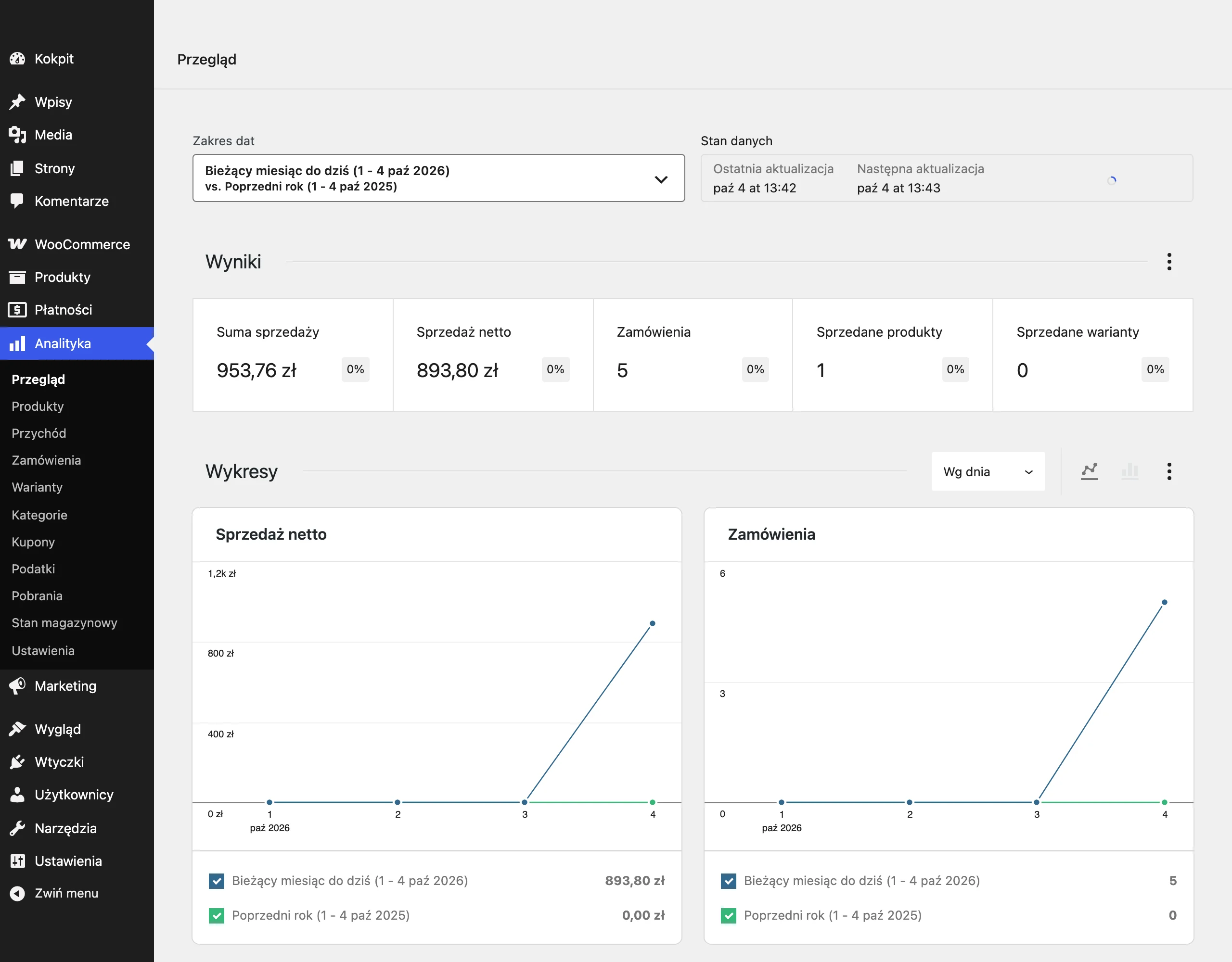
The most practical set of KPIs includes: revenue attributed to the flow, funnel stage conversion, CAC, LTV and MQL→SQL transitions. If you operate with a sales team, response time to the lead is also important, measured as an SLA, e.g. contact within 15 minutes. This set makes it possible to distinguish automations that merely “delivered traffic” from those that genuinely improve conversion and lead quality. Implement SLA and MQL→SQL as operational metrics, because they show whether automation ends with sales action rather than just a message.
- 01Revenue from automationNot just opens
- 02Progress in the funnelConsistent definitions
- 03Key KPIConversion, CAC, LTV, MQL→SQL
- 04Sales team (option)SLA and response time
The key is to connect the metrics with generated revenue and the efficiency of the customer journey, not just with simple send metrics.
Communication and frequency rules in marketing automation
Communication and frequency rules in marketing automation need to be set in advance so that automations do not start causing harm through an overload and chaos of messages. The basis is a communication schedule and frequency capping limits, e.g. max 3 emails/week per person and max 1 SMS/week. Equally important are rules for silencing after purchase, so you do not bombard customers at the moment when their need has already been satisfied. The simplest protection against “overheating” your database is hard limits and clear rules for when a contact should not enter subsequent flows.
Campaign priorities should organise the sending order and resolve conflicts between automations. In practice, this means setting a hierarchy: transactional > behavioural > newsletter, so that key information (e.g. purchase-related) always takes precedence. This way, automation strengthens the customer experience instead of competing with itself for attention. By setting priorities and capping, you reduce audience fatigue and the risk that important messages will get lost in the “noise”.
It is easier to maintain consistency in communication when you define the tone of voice and personalisation rules before launching further channels and scenarios. This is supported by a library of text modules (phrases, CTA, microcopy) and rules defining when personal data may be used (e.g. using a first name only after it has been confirmed). This approach reduces the impression of “random templates” and lowers the risk of errors in automations. At the same time, communication is easier to scale because subsequent flows are based on the same proven elements.
Choosing a marketing automation platform according to the business model
A marketing automation platform is chosen primarily according to the business model, because e-commerce has different requirements from B2B. In e-commerce, Klaviyo, Bloomreach or SalesManago often work well, while in B2B it is HubSpot, Marketo or ActiveCampaign. The key selection criteria are workflow capabilities, segmentation, integrations and revenue reporting, so that automations can not only be launched but also assessed against results. If the tool does not support your integrations and revenue reporting from flows, automation will quickly turn into a set of “nice sends” with no control over the outcome.
It is worth designing the MarTech stack so that data and events flow between systems without manual “stitching” in spreadsheets. When ready-made integrations are lacking, you can use Zapier or Make for simple flows (e.g. form → list → CRM), and for real-time events implement webhooks that trigger sequences immediately after a user action. Where there are many data sources, a CDP (e.g. Segment, mParticle, Tealium) collects events and passes them to MA/CRM/Ads, which reduces errors caused by data mismatches. Before buying, compare the pricing model too (contacts vs. sends vs. events) and limit events to those needed in automations, because limits can be a key cost.
- 01Fit with the business modelDifferent requirements for e-commerce and B2B (e.g. Klaviyo vs. HubSpot)
- 02Key selection criteriaWorkflow, segmentation, integrations, revenue reporting
- 03Smooth tech stack & dataAutomatic data flow without manual merging
The key is to match the tool to the business model and analytical capabilities so that automation delivers measurable results.
Integrations with CRM and automated lead handoff
CRM integrations are needed so that a lead does not “get lost” between the form and the salesperson, but immediately enters the sales process. Integrate the MA platform with CRM (HubSpot CRM, Salesforce, Pipedrive) and configure automatic record and task creation, e.g. “call back in 15 min”. For high-intent leads, add Slack/Teams notifications to shorten the team’s response time. The most practical handoff is one in which the CRM receives not only the contact, but also a task and an immediate signal to act.
To make lead handoff end in real action, connect automations also with task management and SLA enforcement. You can tie the process to Asana/Jira/ClickUp or rely on tasks in the CRM and set rules such as: hot lead → task + reminder after 2 hours. This approach reduces situations where automation is “working” but sales does not make contact, which over time lowers the performance of the entire funnel. In this way, marketing automation supports sales operationally instead of merely adding more records to the database.
Abandoned cart recovery and conversion uplift strategies
Abandoned cart recovery works best when it is based on a short, planned sequence that reminds the customer about the purchase and addresses typical objections. In practice, you build a scenario (flow) that starts after cart or checkout abandonment and guides the user from a simple reminder to a clearer prompt. It is also crucial to close the exclusion logic technically, so that someone who has already purchased does not keep receiving follow-ups. This is often one of the highest-converting flows in e-commerce, because it reaches users with high intent.
- After 1 hour: a short reminder about the cart.
- After 24 hours: benefits + FAQ to reduce objections.
- After 48–72 hours: a time-limited incentive (if it fits your offer strategy).
- Permanent rule: exclude people after purchase so you do not duplicate communication.
Conversion in this scenario is also improved by matching the content to the decision stage, because an abandoned cart requires different arguments than mere interest in a product. When the user is close to buying, concrete answers (e.g. in the form of an FAQ) and a clear CTA usually work better than general messages. The key is to maintain a coherent logic: reminder → addressing doubts → limited incentive, rather than random messages. This means automation supports completing the transaction, rather than just increasing the number of sends.
Funnel analysis and identifying bottlenecks in the sales process
Funnel analysis quickly shows what is really worth improving, because it identifies the stage of the sales process where conversion is genuinely dropping. Instead of optimising “everything at once”, you can check where users drop off: sign-up→open, click→add to cart, cart→purchase. This breakdown structures the discussion in the team and immediately narrows down the list of hypotheses that are worth testing. The biggest impact often comes from refining the checkout page or the offer itself, rather than adding another email.
In practice, bottleneck analysis comes down to comparing the stages and spotting the point where the drop is disproportionately large against the rest of the journey. If the problem appears between click and add to cart, it usually means the message is doing its job, but the page or offer is failing to meet expectations. If the drop happens at the cart→purchase stage, the priority is to establish what is blocking transaction completion before you increase communication pressure. With this approach, marketing automation becomes a tool for removing obstacles from the process, rather than merely a sending mechanism.
FAQ
Frequently asked questions
How do you start marketing automation so that it delivers sales results?
First, you need to map the customer journey and identify where leads or customers are currently lost. Only then is it worth choosing automations for specific bottlenecks.
Which activities are worth automating first?
To start, it is best to choose the most manual tasks, such as manual sends, segmentation, follow-ups and reports. It is also worth starting with automations that have a high impact and are easy to implement.
How do you prioritise marketing automation?
The “impact on revenue” vs “implementation difficulty” matrix helps. First implement 2–3 solutions with high impact and low cost, instead of launching everything at once.
Which KPIs measure the effectiveness of marketing automation?
The most practical ones are: revenue attributed to a flow, funnel stage conversion, CAC, LTV and MQL→SQL transitions. In a model with a sales team, it is also worth measuring lead response time, i.e. SLA.
Can marketing automation harm communication with the customer?
Yes, if rules for sending frequency and priorities are not set. The article points to limits such as max 3 emails per week and the rule that transactional messages take priority over behavioural messages and the newsletter.
How do you recover abandoned baskets in marketing automation?
A short flow works best: after 1 hour a reminder, after 24 hours benefits and FAQ, and after 48–72 hours a time-limited incentive. You also need to exclude people after purchase so they do not receive further prompts.