
Automation without a big budget is a game of quick wins. It is about streamlining repetitive tasks using tools the company already has or can add at low cost. The point is not to build a huge system, but to sensibly connect a form, CRM, spreadsheet, e-mail, calendar or messaging app. In practice, the biggest returns come from small scenarios: the ones that cut out manual data copying and shorten response times. The best implementations start with one process that repeats often and has a clear start and outcome. This makes it easy to calculate whether automation is genuinely saving time and bringing order to the work. This approach is particularly useful for small businesses that want to improve operations without taking on large IT projects.
What the automation service without a big budget involves
It is not magic. An automation service without a big budget involves designing and launching simple scenarios that remove repetitive tasks from the team. The starting point is not technology itself, but a specific event: a form being submitted, a new lead appearing, a customer payment coming in or a status changing in the CRM. On this basis, a rule is built: if A happens, the system should do B, and sometimes also C and D. The question is whether this sequence of actions can be described clearly and without exceptions.
This is most often done with off-the-shelf integrations and trigger-action-condition logic rather than building your own development infrastructure. That means a form can automatically create a contact in the CRM, send a confirmation e-mail, assign a task to a salesperson and add an entry to a spreadsheet. It sounds simple because it is meant to be simple. The practical value does not come from the number of tools, but from removing unnecessary manual steps.
Such a service usually includes process analysis, tool selection, setting up connections between systems, configuring conditions, testing and handling exceptions. Documentation is also provided so the team knows what happens automatically and when human intervention is needed. And here is the catch: in small implementations, this is often more important than the technical configuration itself. Without documentation, even a good scenario can turn into a black box.
The result should be clear. A well-configured scenario organises the flow of information between tools: data goes where it should, the right person receives a notification, and the customer gets a message at the right moment. But be careful, this is not a race to rack up automation counts. Good automation should be predictable, easy to check and easy to adjust when the process changes. Otherwise, instead of order, you get another layer of chaos.
The current practical context of automation in small businesses
Today, this level is simply within reach. Automation in small businesses is available mainly thanks to no-code and low-code tools that connect popular systems without high implementation costs. That is why even a small team can set up a simple flow for leads, payments, bookings or notifications. The facts are that you often do not need to start with an advanced platform if the process can be described with simple logic. Instead of investing in scale, it is better to nail the basics and only then add the next building blocks.
Processes that are repetitive work best for automation. They have a clear start, a few predictable steps and a measurable finish, so they can be described without guesswork. That is why scenarios based on forms, status changes, sending messages, assigning tasks or saving data in one place work well. If a process is chaotic and the input data is incomplete, automation usually only moves the problem along faster.
In small businesses, the biggest bottleneck is rarely the tool itself. More often we trip over messy data and rules: inconsistent statuses, duplicate contacts, different names for the same fields, and on top of that no decision on who is actually responsible for the process. The problem is that even a simple scenario starts to fall apart when every user “does it their own way”. And then automation does not organise the work, it multiplies it.
Cost and complexity rise when automation has to connect many systems at once. The more integrations, exceptions and data formats there are, the less room there is for shortcuts and the more there is for testing, fixes and maintenance. Then there is security, marketing consents, access to accounts and managing the connections between tools themselves, which is usually the thing people think about last. In real-world conditions, the best model is usually partial automation with a clear moment when a person takes control of an exception or a critical decision.
How the implementation of automation scenarios works in practice
The implementation looks simple. One specific event triggers a series of predefined actions in connected tools. Such an event might be a form submission, a new payment, a booking or a status change in the CRM. From that moment, the system launches the previously defined steps: it saves data, sends a message, creates a task, updates a status or notifies the team. The biggest benefit appears when the same manual process is carried out many times a day or week.
In practice, everything starts with an audit of how the process works today. You look for places where minutes and hours are being lost: someone retypes data between systems, misses the next step, responds late or quickly adds something to the wrong field. Only then is a decision made about which tool should be the source of the data, where the record should go and who should receive the information. The key point is that automation does not operate in a vacuum, but on real fields, statuses and users, with their habits and shortcuts.
The next element is the scenario logic. The question is: what triggers the process, what should happen and under what conditions. If a lead comes from a form, it can be added straight to the CRM, assigned a source, sent a confirmation e-mail and turned into a task for a salesperson. But be careful, because if a required field is missing or the contact already exists, that same set of actions can backfire, and rather expensively at that. Good automation does not just perform actions, it also recognises situations in which it should stop or flag an exception.
Most of the work lies in the data. Not in the tool itself, but in how you name fields, set date formats, save phone numbers, detect duplicates and map information between the form, CRM, spreadsheet and mailing. When the input data is inconsistent, automation will only speed up the chaos instead of reducing it.
After configuration comes the real test. Operational tests are run across different input variants and you check whether the trigger fires as it should, whether the record lands where it should, whether the notifications come through, and what happens with missing data or duplicates. And the question is: how will the process behave in edge cases. In the end the scenario goes live in production, and the team gets a short guide on where to look for errors, when to step in manually and how not to bypass the process. In low-budget implementations, the mixed model works best: automation handles repetitive steps, and a person takes over exceptions and critical decisions.
Stages of creating and implementing simple automation scenarios
The process has its own sequence. Creating and implementing a simple scenario goes from choosing the process, through mapping the logic and testing, to going live and making fixes, and it is this order that keeps everything in check. The key thing is that most problems do not come from the integration itself, but from skipping one of the earlier steps. If you first “set up automation” and only then start tidying up data and statuses, errors, duplicates and ambiguities will appear faster than you can describe them in tickets.
- Process identification. At the start, you choose a task performed manually and check how often it comes back, who is involved and where the bottleneck appears. The best processes to start with are frequent, repetitive and easy to measure.
- Choosing the starter scenario. Priority goes to one simple flow, not several connected processes at once. A good candidate is handling a contact form, passing a lead to CRM or sending an automatic notification after payment.
- Mapping the logic. Here you define the trigger, the next actions, if/else conditions, required data and the expected end result. This makes it clear what exactly is meant to happen, in what order and when the process should be stopped.
- Tool analysis. You check whether the current systems have ready integrations, webhooks, API or the option to connect through an integration tool. This is the stage that quickly shows whether the scenario will be simple or will start requiring additional workarounds.
- Data design. Mandatory fields, data formats, naming conventions, record owners and deduplication rules are defined. This step cuts out a large share of later errors in CRM, mailings and reports.
- Building the scenario. Only at this stage are connections, filters, time delays, task assignments, tags and messages configured. Simply “clicking automation” is usually shorter than preparing the rules by which it is meant to operate.
- Testing and handling exceptions. The scenario needs to be run through with correct data and with the “wonky” stuff, not just the textbook example. It is best to add alerts straight away, a separate list of faulty records or manual approval for more difficult cases.
- Production rollout and optimisation. After launch, you look at where the process most often gets stuck, which conditions are set too broadly and what data regularly comes in incorrectly. Simple automations are usually fine-tuned after the first few days or weeks of working with real data.
In practice, a well-designed scenario should deliver something concrete, not just “get the integration running”. That could be a lead created in CRM, an email confirmation sent, a task assigned, a customer status changed or a record written to a reporting spreadsheet. That kind of outcome can be quickly verified, and then you can assess without illusions whether the process really works.
In the end, what should remain is not only active rules, but also clear documentation for users. Briefly and in plain language. The team must know what triggers the scenario, which fields are required, where to check errors and when to step into the process manually. The problem is that without this simplicity, automation will not become part of day-to-day work; it will just turn into another add-on that everyone avoids and nobody wants to maintain.
What to implement and what to watch out for in process automation
It is worth implementing first and foremost processes that are simple, frequent and measurable. In other words, ones that have a clear start, a predictable course and a specific finish. The best starting point is handling a contact form, passing a lead to CRM, sending a notification after payment or creating a task after a booking. These are scenarios where, without any overcomplication, you can check whether automation is genuinely saving time and reducing errors. The best first scenario is not the most ambitious one, but the one you most often carry out manually.
Before implementation, you need to sort out the data, otherwise automation will only move the mess between systems faster. This means standardising field names, statuses, record owners and the basic rules for working with a lead or customer. If the same stage in CRM has several different names or the form collects data in different formats, the scenario will start to lose its way or produce duplicates. Automation is worth switching on only when you know which data are mandatory and who is responsible for their accuracy.
You also need to choose a process that can be described with simple logic: event, condition, action, outcome. The fewer exceptions, manual additions and discretionary decisions along the way, the cheaper and more stable the implementation will be. It works well to split the flow into stages: first data retrieval, then validation, then carrying out the action, and finally error reporting. This makes the scenario easier to test, and even easier to improve when real life adds its own “but”.
At the decision stage, you check not only the technology. Just as important are organisational issues: admin access to the tools, the ability to create integrations, properly collected marketing consents and someone who will oversee the process after launch. Even a simple automation without an owner quickly stops working in practice, because nobody reacts to errors, field changes and new exceptions.
You also need to agree straight away on what should remain after implementation. The minimum is a process description, trigger and action logic, the configured scenario, exception handling rules and a short user guide. The problem is that without documentation the team loses the boundary: when the process runs automatically and when manual intervention is needed. That is when improvisation starts. As a result, people bypass the system and go back to old habits.
The most common pitfalls and limitations of low-budget automation
The pitfalls of low-budget automation are surprisingly repetitive. Data duplicates, incorrect field mapping, looping rules and a lack of exception handling appear especially when one system updates another, and that then triggers the first scenario again. The result. Duplicated records, incorrect statuses or a series of completely unnecessary notifications. If a scenario has no filters, conditions or safeguards against being triggered again, sooner or later it will start producing errors.
The second limitation rarely lies in the tool. It lies in the process. When input data is incomplete, statuses are inconsistent and the team works to different rules, automation will not remain stable. Cheap no-code tools handle repetitive patterns well, but they lose out when faced with organisational chaos. Let’s look at it differently: instead of automating the mess — simplify it first, and only then move it into scenarios.
Complexity rises sharply when one scenario has to connect multiple systems and take on a lot of exceptions. Simply sending data from a form to a CRM is straightforward, but data validation, deduplication, routing to the right person, time delays and error reporting are already several separate layers of logic. And that is where the costs begin: not of integration, but of maintenance. At this stage, a low-budget implementation is still possible, but it requires a more precise design and more testing. The biggest problems do not come from the integration itself, but from the exceptions that only emerge on real data.
There is also security and compliance. And that is not a cliché. Integrations operate on user accounts, access tokens and customer data, so you need to tightly control who has access to connections and what data is passed on. This applies especially to forms, CRMs, mailing systems and messengers. The question is: is automation meant to be a “technical add-on”, or a process with monitored consents, permissions and data retention rules. The mistake is treating automation as a technical add-on without checking consents, permissions and data retention rules.
Low-budget automation is rarely fully autonomous. Most often, a hybrid model works best: the system handles repetitive steps, and a person steps in where a decision, data correction or simple customer contact is needed. And that is good. It is not a flaw, but a sensible safeguard that reduces the risk of costly mistakes. Good automation does not remove people from the process, but takes routine work away from them and leaves control where it makes sense.
How to monitor and optimise implemented scenarios
Monitoring scenarios is not the ritual of “ticked off, it works”. It is the regular checking of whether automation starts at the right moment, completes the full set of actions and does not distort data along the way. What matters is something else: whether, at the end of the process, you get the correct business outcome, not just a green light in the logs. Well-set automation should be predictable, almost boring: a lead lands in the CRM, the customer receives the right message, the team sees a task, and the status changes without manual correction. The most important thing is to monitor the end result, not just the technical start of the scenario.
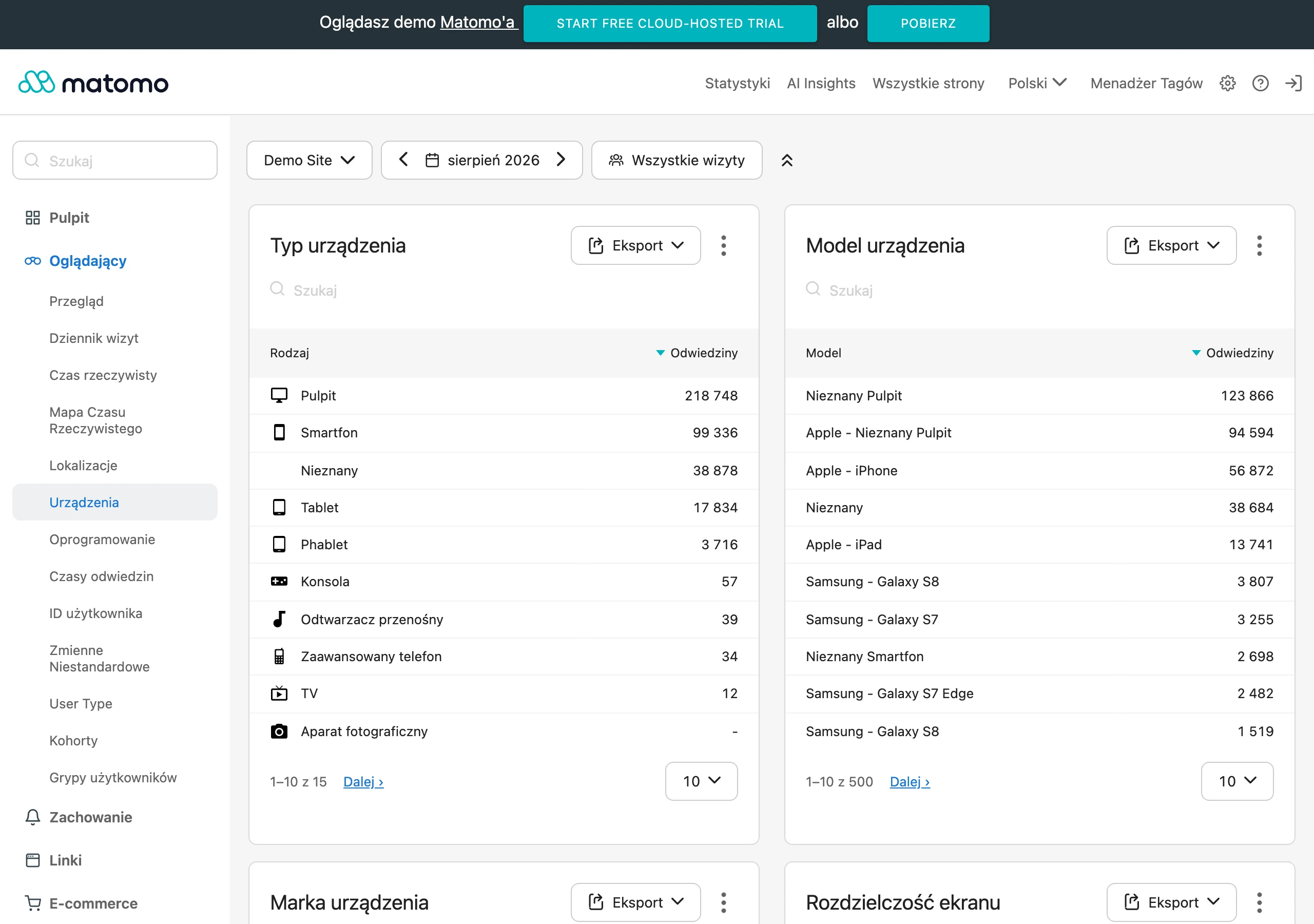
To start, a few simple checkpoints are enough. And you need to return to them constantly instead of waiting for the first fire. Most often these are: the number of scenario runs, the error rate, completeness of required fields, the number of duplicates, response time and the number of cases requiring manual intervention. When the process concerns leads, you mainly look at whether the record appeared in the CRM with the correct source, owner and status. And when payments or bookings are involved, you verify whether the customer status changed, whether the message went out and whether a follow-up task was created.
The best monitoring starts with a simple error log and a list of exceptions. If a scenario cannot perform an action, it should record the problem in a separate place or send an alert to a specific person. Why wander through systems when you can immediately see which record got stuck, at which step and for what reason. This is especially important with missing fields, incorrect data formats, duplicates and expired connections between tools.
Optimisation rarely means adding more actions. Instead, simplifying the logic and making the conditions more precise usually wins. If a scenario often stops, first check whether the trigger is too broad, whether the conditions are unambiguous and whether the input data can be considered organised. A lot of problems come from a very mundane thing: different people enter data differently, use different statuses or bypass the process manually. If users are working around the automation, it is usually a sign that the process is poorly matched to the team’s work, not that the team “does not want to cooperate”.
In practice, break the scenario down into layers. Separately: data retrieval, validation, action execution and reporting, because this division shows within minutes where the real problem lies. When the data does not arrive from the form, fixing actions in the CRM is the wrong direction. And if the record is created correctly but the email does not go out, you are no longer looking at the CRM, but at the sending condition, marketing consent or address field mapping.
- check whether the trigger runs for all the right events and only for them,
- control whether required fields are always completed and saved in the correct format,
- catch record duplicates and looping rules,
- compare the number of real events with the number of actions performed in the automation,
- monitor whether messages to the team are not too frequent and whether they are therefore losing value.
A good practice is to review scenarios after the first few days, then after a few weeks, and later on a cyclical basis, for example once a month. This is discipline, not decoration. The first review catches implementation errors, the second shows how the process behaves on a larger volume of data, and the subsequent ones reveal changes resulting from team work or changes in the tools. Automation that nobody reviews after deployment sooner or later starts working alongside the process instead of supporting it.
If you want to improve results, change one thing at a time. Not revolution, but iteration. Changing several conditions, tags and notifications at once makes it harder to assess what actually helped and what harmed, because the signal gets mixed with the noise. In low-budget implementations, a small loop works best: one fix, a short test, error control and only then the next step. This keeps things organised and stops you turning a simple scenario into a system that nobody wants to maintain.
Finally, keep an eye on changes in the tools themselves. The problem is that even a small detail can break a properly working workflow: a form update, a change to fields in the CRM, a new sales status or replacing an email account. That is why a scenario should have an owner who knows where to check the logs, when to react and who makes the decision about changes. Without this, even good automation stops being cheap, because it starts generating hidden cost in the form of errors, delays and manual fixes.
FAQ
Frequently asked questions
Which processes are best suited to automation on a small budget?
The best fit is for processes that are frequent, repetitive and easy to measure. Good starting points are contact forms, lead handover to CRM, payment notifications and tasks after a booking is made.
Can a small business implement automation without a complex IT system?
Yes, because today this can mostly be done with no-code and low-code tools. In many cases, it is enough to connect a form, CRM, spreadsheet, email or messenger.
Why does automation sometimes speed up chaos instead of helping?
This happens when the data is inconsistent, duplicates appear, or the team works to different rules. Then automation simply moves the problem between systems faster.
What does implementing a simple automation scenario step by step look like?
It starts with choosing one process, then mapping the logic, selecting the tools, testing the scenario and launching it in production. At the end, documentation and instructions for handling exceptions are also important.
What needs to be organised before launching automation?
You need to standardise field names, statuses, data formats and the rules for working with a lead or customer. It is also important to specify who is responsible for data accuracy.
What are the most common pitfalls of low-budget automation?
The most common issues are duplicates, incorrect field mapping, looping rules and a lack of exception handling. The risk increases when one system updates another without filters and safeguards against re-triggering.