HTTPS is short for the English name hypertext transfer protocol secure and is an encrypted version of HTTP. It is used for secure communication on the Internet or within a network. The communication protocol is encrypted using Transport Layer Security (TLS – transfer layer security), and formerly by Secure Sockets Layer (SSL – secure sockets layer).
In the beginning, SEO specialists and developers used the HTTP protocol to provide users with website experiences. The web was simple, and website migrations involved moving between domains or servers.
There was no need to worry so much about ordinary redirects or whether a site migration caused any issues. Then HTTPS appeared. New technologies always create new problems that need to be solved in order to achieve the same or a better result than before.
HTTP and HTTPS and their significance for websites
HTTP, or “hypertext transfer protocol”, is the absolute foundation of the global internet. It is the protocol used to process, render and deliver pages from the server to the client’s browser. HTTP is the means by which the vast majority of the web is displayed.
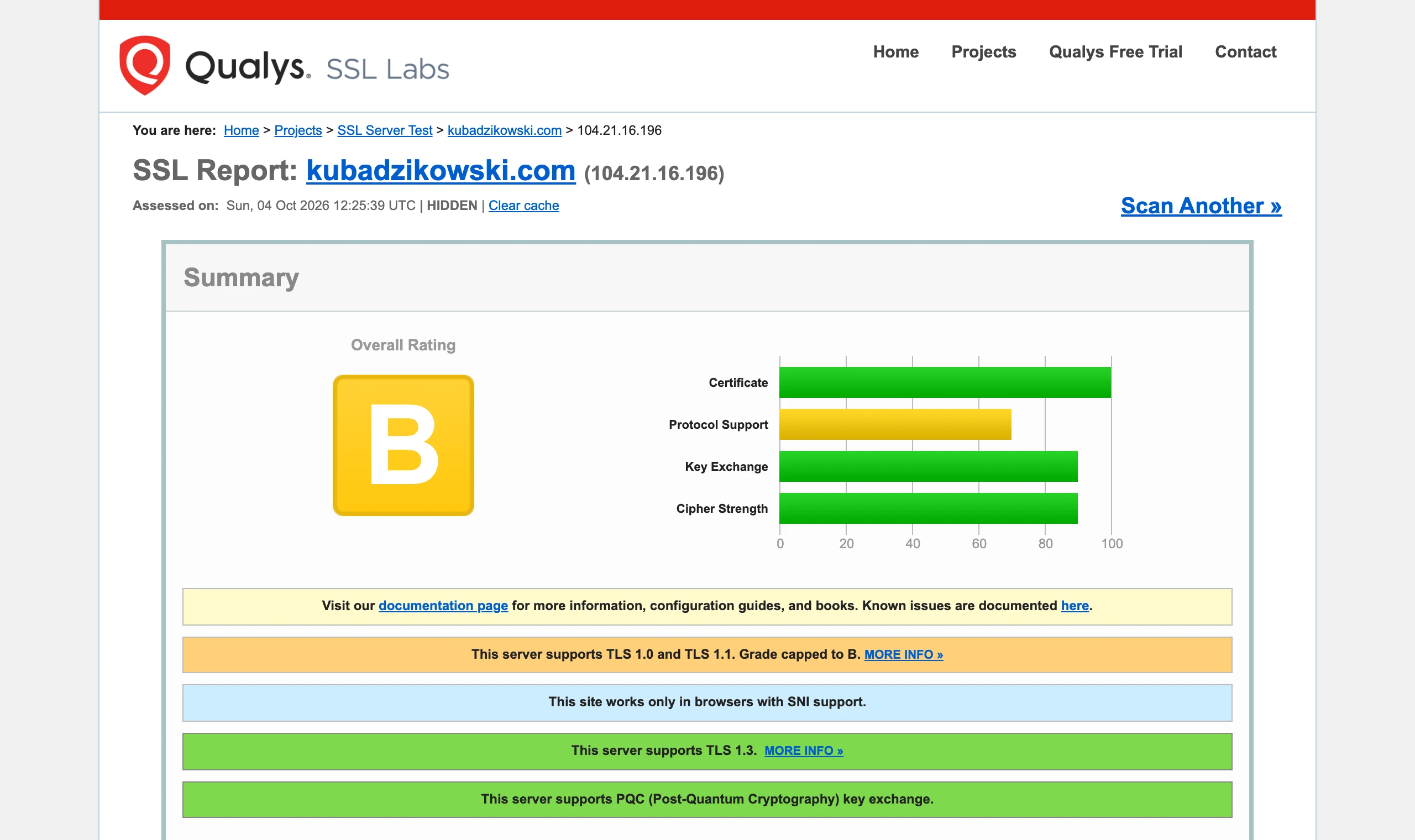
ExampleThe SSL Labs test grades HTTPS configuration with a letter and breaks it down into certificate, protocols and ciphers — any weak element is immediately visible in the bars. Result for kubadzikowski.com, own screenshot
HTTP and HTTPS operate on the basis of so-called requests. Such requests are created by the user’s browser when they try to interact with a website. This is a critical element of page rendering and without it there would be no way to use the web in its current state.
How does it work? Let’s assume someone is searching for the keyword “jak dokonać migracji strony internetowej”. The request is sent to the server, which then sends another request to the search results. These results are displayed in the SERP (search results page) once the search has been completed. The duration of this process is measured in milliseconds. That is generally how the HTTP protocol works.
Internet & webHTTP and HTTPS and their significance for websites
01HTTP: Basic protocolFoundation of the global web
02Request systemThe browser sends queries
03Rendering and deliveryThe server delivers pages
The key mechanism behind how the web works and content is displayed.
What is HTTP?
HTTP is the main method of transferring web pages on the web. Pages are stored on servers and then appear on clients’ computers when a user accesses them. The resulting network of connections creates the Internet as we know it today.
There is one serious problem with the HTTP connection – data transmitted using HTTP is not encrypted, so there is a risk of information being stolen by outsiders. Any information transmitted across the web using HTTP is not private, so any kind of credit card details and other sensitive data should not be sent if you are on an HTTP site.
What is HTTPS?
HTTPS is short for the English name “hypertext transfer protocol secure” or “secure hypertext transfer protocol”. In this case, we are therefore dealing with a secured protocol.
Network architectureWhat is HTTPS?
01Protocol (HTTP)Data transfer, hypertext
02Secured (S)Encryption, Protection
03Secure communicationConfidentiality, Trust
HTTPS: Ensures the confidentiality and security of transmitted data
How does HTTPS work?
Unlike HTTP, HTTPS uses a security certificate from a third-party vendor to secure the connection and verify that the site is legitimate. This security certificate is known as an SSL Certificate (or “cert”).
SSL is short for the English name “secure sockets layer”. This solution provides a secure, encrypted connection between the browser and the server, which protects the communication layer between them. This certificate encrypts the connection while maintaining the level of protection set at the time of purchase of the SSL certificate.
An SSL certificate provides an additional layer of protection for sensitive data that must not fall into outsiders’ hands. Such extra protection can be particularly important for online stores.
Here are a few examples:
securing the transfer of credit card data or other sensitive data (such as address and personal details),
running a lead generation site that relies on real data belonging to other people. In this case, it is necessary to use HTTPS to protect users’ data from attacks.
There are many benefits associated with having HTTPS that are worth the small cost. It is worth remembering that if the certificate is absent, outsiders can easily scan the connection for sensitive data.
What is TLS and how is it used in HTTPS?
TLS stands for transport layer security. This solution helps encrypt HTTPS and can be used to secure email or other protocols. It uses cryptographic techniques here, which ensure that the data has not been tampered with since it was sent, and that communication takes place with the correct person from whom it came. In addition, this solution protects against the interception of personal data.
As part of TLS encryption, authentication and session key creation take place. New session keys are created when two devices communicate with each other, based on two keys working together. The result is deeper, more encrypted communication.
SecurityHTTP vs HTTPS – HTTPS builds trust among your users
01User trustBuilds trust.
02Payment protectionSecure transactions.
03Data encryptionEncrypted passwords and data.
04Browser credibilityNo warnings.
05Competitive advantageCompetitive site.
Thanks to HTTPS, the site is secure, credible and competitive.
An important step for HTTPS – web server authentication
The most important element of a secure HTTPS connection is making sure that the web server is what it claims to be. That is why the SSL certificate is the most important part of such a configuration. It ensures that the owner of the web server is the one indicated by the certificate. It works very much like a driving licence – it confirms the identity of the server owner. A protective layer against various types of attacks appears when HTTPS is implemented. This is very important for a website.
HTTP vs HTTPS – HTTPS builds trust among your users
One of the more hidden benefits of having HTTPS is that it builds trust among users. In the case of running an online store accepting card payments, the sight of the padlock in the browser reassures the user that the site handles card payments without data leakage.
This means that users will trust such a site much more than a site without protection. In addition, modern browsers notify users if a site is not “secure”.
Thanks to HTTPS, credit card data, passwords, users’ private data and personal details are encrypted to the industry-standard security layer. With such protection, the site will remain competitive against other sites in the niche.
In addition to protecting user data from disclosure, https:// helps protect reputation. In the event of regular security breaches on the site and user data being exposed, people will not want to use such a site. This has a negative impact on online reputation and is disadvantageous in the long term.
Values associated with HTTP
There are currently not many such values, but there are still some benefits for those who have not fully switched to https://. For example, if you do not serve users who regularly submit sensitive data in e-commerce or for other reasons, increased security will probably not be necessary.
In an ideal world, https:// should significantly affect a site’s position in search results. However, it turns out that it is still possible to achieve high positions even with http://. HTTPS is, after all, a rather weak ranking factor.
Migration issues related to SEO: moving from HTTP to HTTPS
There are many benefits associated with moving from HTTP to HTTPS, especially when it comes to SEO. However, if you do not know the process well, you may do more harm than good. First and foremost, Google should be informed of the change. You need to choose the certificate that is best suited to the situation, configure Google Search Console and Google Analytics, update internal links and any associated URLs.
Informing Google about the move and mistakes to avoid
This stage involves creating another Google Search Console property. You should not deactivate the unsecured GSC property. Instead, all properties should remain active. A new property should be set up for the HTTPS version of the site and it should be ensured that it continues collecting data.
In addition, in Google Analytics, make sure the property has been set as secure. Otherwise, you will not be tracking the correct data. Do not forget to update the data collection settings in Google Tag Manager, where applicable. Additionally, if you use Bing Webmaster Tools, updating from http:// to https:// during the migration will also be necessary.
When moving from http:// to https://, many errors may occur due to a lack of overall visibility of the initial transition process and a lack of updates to critical data-tracking properties. Such errors can lead to under-reporting or over-reporting of data, and this adversely affects SEO strategy decisions.
Choosing the right security certificate: SSL and Wildcard certificates
SSL certificates are used for many different purposes, such as single domains, multiple domains, etc. In addition, you should not forget about Wildcard certificates. For smaller sites, a full Wildcard certificate is not necessary. However, it can make life much easier when working on URL syntax control on your sites.
An SSL certificate for a single domain is issued for one subdomain or for the main domain. In turn, an SSL certificate for multiple domains allows you to secure the main domain and up to 99 SANs or alternative subject names.
Wildcard allows you to secure the initial URL of a website and all related subdomains, without limit. This means that if domena.domenaglowna.com is set up and a Wildcard certificate is created, it is automatically secured. There is therefore no need to take any further action to ensure that it falls within the site’s security coverage.
It is clear that a Wildcard certificate is excellent. However, such a solid certificate with many different features is quite expensive, so you will need to factor in the additional business costs and compare them with the features you gain.
Make sure all URLs across the site are updated correctly
There are people who recommend using only related URLs for specific resources. Assuming you are adept at managing your website’s ongoing needs, you will not need this stage. However, you must make sure that all content on the site is updated with the correct protocol. Do not forget the XML sitemap as well.
In many cases, this stage is neglected, which adversely affects ensuring that the content is secure. It does not matter whether you use related or full URLs, if they are properly updated on the site. You can switch to related URLs, but if the site relies on full URLs, then you should use the “find and replace” option in the database, if the website allows it. This will eliminate all existing instances of mixed content.
Do not prevent Google from crawling your new HTTPS site
You need to make sure, using the robots.txt file, that all elements can be crawled. If there is no specific case, such as a folder that really should not be indexed, then it makes sense to allow Google to crawl everything on the site, including CSS and JS files. If the site does not allow CSS and JS files to be rendered, problems may arise.
For example, if you do not allow a critical CSS or JS element on the site to be rendered, you may prevent Google from understanding the full context of the site, which is important for achieving a high position in search results. Also, in around 99% of cases, there is no reason to exclude CSS or JSS files in this way.
Check everything carefully before migration
Regular, ongoing monitoring of the website is important for achieving a successful migration of the website to https://. You should check Google Search Console, Google Analytics and carefully review any other reporting programmes you use. If http:// has not been updated to https://, this should be done as soon as possible. This way, you will not run into further problems that could negatively affect your SEO efforts.
HTTP:// vs HTTPS:// – which option is actually better?
If you are not well versed in SEO, discovering the key issues involved in choosing a secure or insecure protocol can be a very difficult task.
Do you run an online store that stores sensitive credit card data and personal data? In that case, securing your website with HTTPS is the best option. It allows you to show goodwill and win the trust of online customers, and it will help ensure that you do not make the mistake of having a site open to network attacks. Your online reputation will have a positive impact on your SEO.
There are also sites that are not online stores, but they collect data submitted by people (e.g. lead generation sites). In such a case, you should use HTTPS. People expect the security of the web protecting them and the protection of their personal data. This choice translates into greater trust and more significance for your company.
Is it worth using the free option, “Let’s Encrypt”? It depends on many things. For a start-up company without a large budget, this is a good option. However, if the company earns hundreds of thousands of zlotys, using a more expensive option such as GeoTrust or Comodo will be better. Both solutions do the same thing when the implementation is carried out correctly, but in marketing perception is very important.
It’s up to you whether you want to stay with http:// or move over to https://. When it comes to creating a safer web, the switch to https:// is an excellent option, so it’s worth taking advantage of it.
FAQ
Frequently asked questions
01How does HTTPS work compared to HTTP?
HTTPS works like HTTP, but additionally encrypts the connection between the browser and the server. This means that data transmitted during communication is protected from outside parties.
02Does HTTPS protect credit card data and other sensitive information?
Yes, HTTPS encrypts credit card data, passwords and other personal data. The article emphasises that without such protection, sensitive information should not be sent on an HTTP site.
03Why is an SSL certificate needed for HTTPS?
An SSL certificate is used to secure the connection and confirm that the site is legitimate. It is responsible for encrypting communication between the browser and the server.
04When is it worth moving from HTTP to HTTPS?
It is especially worth doing when the site handles payments, stores user data or collects information, for example in lead forms. HTTPS then helps protect data and build trust.
05Does HTTPS help with SEO and rankings in Google?
The article indicates that HTTPS may matter for SEO, but it is rather a weak ranking factor. Even so, migrating to HTTPS can bring benefits if carried out correctly.
06What mistakes should you watch out for when migrating from HTTP to HTTPS?
You need to inform Google about the change, update Google Search Console, Google Analytics, internal links and URL addresses. It is also important not to disable the old HTTP profile and not to block Google’s access to CSS and JS resources.