
Customers most often want to quickly make sure that someone has seen their message, understands the problem and has a specific action plan. Without consistent rules, it is easy for information about returns, complaints or warranties to diverge, which weakens trust in the store. Without omnichannel and linking the contact history, the customer has to provide the same details in several places. In this article, we show practical standards for language, transparency and ownership of the case, as well as how to organise e-mail, chat, phone and social media. We focus on process solutions and tools that shorten response times and reduce the number of unnecessary enquiries.
Communication standards and customer experience in an online store
Communication standards in e-commerce should give the customer a clear, specific answer without “corporate” jargon and without shifting responsibility. Define the tone of voice: simple sentences, concrete steps and a summary of “what we have done, what happens next and when we will get back to you”, and for a premium brand you can use a more formal tone while keeping the same clarity. It is also important to maintain consistency of terms, because when different people understand “return”, “complaint” and “warranty” differently, the customer quickly loses trust. That is why it is worth defining these terms in an internal knowledge base and using them consistently in responses.
The first response should above all confirm that the case has been received, and include an action plan and the deadline for the next contact. In the first contact, the customer often asks directly: “is anyone even reading this?”, so even a short message should indicate the next step (e.g. a request for missing details, such as a photo of the defect) and the time frame for a reply (e.g. by the end of the working day). Response templates really do shorten response times, but they must not feel copy-pasted. The minimum personalisation is the name and a detail from the order (number, product or date), and in tools such as Zendesk or Freshdesk, macros with dynamic fields from integrations are helpful.
- Empathy and de-escalation: name the emotions and acknowledge that the situation is frustrating, without admitting fault before the facts have been verified; use the pattern problem acknowledgement → questions → proposed solution → confirmation of choice.
- Transparency of costs and timelines: instead of promising “tomorrow”, provide ranges and conditions (e.g. refund within 14 days of receiving the statement, with the possibility of holding it until the goods or proof of return are received).
- One owner policy: one person handles the enquiry from start to finish, and a change of owner requires a note and informing the customer.
- Proactive communication when problems arise: warn about delays and shortages before the customer has a chance to ask, indicating possible options (exchange of variant, partial shipment, cancellation and immediate refund).
- Availability of contact: provide at least one text channel (e-mail/chat), the option of a phone conversation and a clear form with automatic confirmation of submission.
- 01Simple languageSpecific, clear communication, without jargon.
- 02Consistent termsDefinitions of terms (return, complaint) in the knowledge base.
- 03Action planConfirmation, steps, deadline and next contact.
The key to building trust and a positive customer experience through transparency and predictability.
Optimisation of contact channels and omnichannel support
Optimising contact channels comes down to assigning each of them the right role and connecting them into a coherent customer history. E-mail is the natural choice for matters requiring documents, such as an invoice, photos of a defect or payment confirmation, so it is worth clearly communicating acceptance of attachments up to 10–20 MB and secure file storage. In e-mail correspondence, the structure “what we already have, what is missing, what the next step is” works well, because it reduces the number of follow-up questions. In omnichannel, the key is linking threads by e-mail address, phone number and order ID, so that the customer does not have to tell the same story again.
The chat on the website should have a clearly defined response time standard, because customers expect an answer within a few dozen seconds, and otherwise often leave the site. A sensible target during working hours is 30–60 seconds, and tools such as LiveChat, Intercom or Tidio can route conversations based on where the user is on the site (e.g. basket/checkout) and make it easier for the consultant to provide quick prompts. Phone is particularly important for urgent matters (e.g. changing the address before dispatch), but no queue and no callback option can be a source of frustration. Solutions such as Aircall, RingCentral or Twilio support IVR, call recording, callback and abandoned call reports.
Social media (Facebook/Instagram/TikTok) is better treated as a supporting channel rather than a full helpdesk, and it is best to decide in advance which topics you handle in DMs (e.g. parcel status), and which you move to a more secure channel (e.g. complaints involving sensitive data). In messengers such as Messenger/WhatsApp, customers expect quick confirmation, so an autoresponder with service hours and a request for the order number comes in handy, and the WhatsApp Business API (e.g. via Twilio) supports transactional templates and reminders. The contact form should reduce mistakes: topic selection and dynamic fields (e.g. order number only for delivery/return), and after submission the case number and estimated response time will reduce the number of duplicates. SMS works well as a notification channel, not for discussion, so instead of a long exchange it is better to send a short message and a link to the order status page.
The order status page reduces the most common question, “where is my parcel”, because part of the support is moved to self-service. It works best if it shows the next stages (received, picking, shipped) together with tracking, and integrations with courier companies (InPost, DPD, DHL) as well as an OMS (e.g. Baselinker) provide updates almost in real time. This setup relieves the team because the customer checks progress themselves without opening another ticket. In addition, a consistent customer history in the system allows the consultant to view previous contacts, notes and orders, and then move straight to a resolution, regardless of whether the customer writes on chat, by e-mail or in DM.
Choosing and integrating helpdesk/CRM tools for e-commerce
When choosing helpdesk/CRM tools for e-commerce, it is worth starting with the question of how quickly the consultant will see the order context and which automations will genuinely support service. Zendesk is strong in automations and its ecosystem, Freshdesk is often more affordable, and Help Scout is a good fit for smaller teams. In practice, the level of service is determined not only by features, but also by whether the tool makes multichannel work easier and provides SLA reports. The most important selection criteria are integrations with the store platform, SLA reporting and the ability to handle multiple channels in one view.
Integrating the helpdesk with the store platform (Shopify, WooCommerce, Magento, PrestaShop, Shoper, IdoSell) solves the problem of a “ticket without context”, because order data is pulled into the ticket. The minimum set of information that should appear with a case includes payment status, delivery method, basket items and change history. As a result, replies are specific and do not require the customer to send screenshots again or provide their details once more. In the Shopify ecosystem and similar ones, Gorgias can additionally make “without switching tabs” actions easier, which shortens resolution time.
Integrations with OMS/ERP (Baselinker, Subiekt, enova365) help avoid discrepancies in information about stock availability and shipping, because support can see reservations, picking and parcel numbers. CRM (HubSpot, Pipedrive) supports customer segmentation (e.g. VIP, B2B, frequent returns) and makes it possible to set SLA priorities or automatically assign cases to the sales account manager. The knowledge base (Confluence, Notion, Zendesk Guide) should have an internal and a public layer, and articles are worth versioning and linking in replies using macros. When ready-made connections are lacking, no-code integrations (Zapier, Make, n8n) allow systems to be connected quickly, provided error logging and a “fallback” are implemented so automations do not lose tickets during API outages.
Monitoring and a status page (UptimeRobot, Statuspage) make it possible to spot payment or tracking panel outages faster and reduce the wave of tickets. For deeper analysis, it is worth combining support data with sales and returns, because helpdesk reports alone often do not give the full picture. Exporting to Looker Studio or Power BI makes it easier to analyse support cost and recurring problem patterns by category. Such a toolset supports both the day-to-day work of consultants and operational decisions on the e-commerce side.
- 01Integration with the store platformConnects order data with tickets (Shopify, Shoper, etc.).
- 02Instant customer contextEnables quick access to order history.
- 03Automation and SLA reportingGenuinely supports service and monitors quality.
- 04Multichannel support in one placeMakes it easier to manage all channels from one view.
In practice, the level of service is determined not only by features, but also by integrations, automation and the convenience of working in one view.
Customer service processes: mapping and ticket management
Customer service processes work most efficiently when you map case types and turn them into repeatable paths from ticket to resolution. The most common categories are delivery, payment, return, complaint and product questions, so it is better to base them on a decision tree rather than working ad hoc. For each category, define the required starting data (e.g. order number, and in the case of a defect also photos) as well as the possible outcomes. Such mapping shortens diagnosis time and standardises the way consultants communicate.
SLA and triage organise the queue, because the customer immediately knows when to expect a reply and within what timeframe the case will be closed. Set clear P1/P2/P3 priorities and response and resolution times depending on the channel and case type to avoid “ping-pong” and frustration. For example, P1 may cover an address change before dispatch or a duplicate card charge, while P3 may be a product dimension question without a deadline. It is also worth measuring time to resolution, e.g. around 2 days for status enquiries and 7–14 days for complaints dependent on a service process.
Escalations to the warehouse, payments and IT require one clear way of passing on the case together with a full set of data and an indication of the owner on the other side. In practice, it helps to establish the escalation channel (Jira/Asana/Teams), the list of required information and the response time (e.g. warehouse up to 4h, IT up to 8h on working days), so that the customer is not bounced between teams. Internal notes also affect the quality of service, so it is worth keeping a fixed format: what the customer reported, what was checked, what evidence was collected, next steps and deadline. In the helpdesk, separate the internal note from the message to the customer so that communication is clear and consistent.
Managing tickets also includes preventing duplicates and setting clear rules for handling outside working hours. Automatic acknowledgements with a case number and a link to the history, as well as detecting duplicates by order number and subject and merging tickets, help maintain a single communication thread. Outside working hours, the minimum is an autoresponder with service hours and the expected response time, and optionally a chatbot or an on-call rota for critical cases. At the end of each case, add a short summary: what has been done, what happens next and what to do if the issue returns, and send a CSAT survey with one click, but no more often than once every 30 days per customer.
After-sales support: returns, complaints and warranties
After-sales support in an online store should guide the customer through a return, a complaint or a warranty claim along a clearly defined step-by-step path, with realistic deadlines and a list of required details. For a return (withdrawal from the contract), the standard in distance selling is 14 days to withdraw without giving a reason. In practice, the buyer wants to know how to submit a return (form or e-mail), how to send the parcel back and when the funds will return to their account. In your communication, it is worth clarifying straight away that the refund is generally made within 14 days and is often processed after receiving the goods or proof of dispatch.
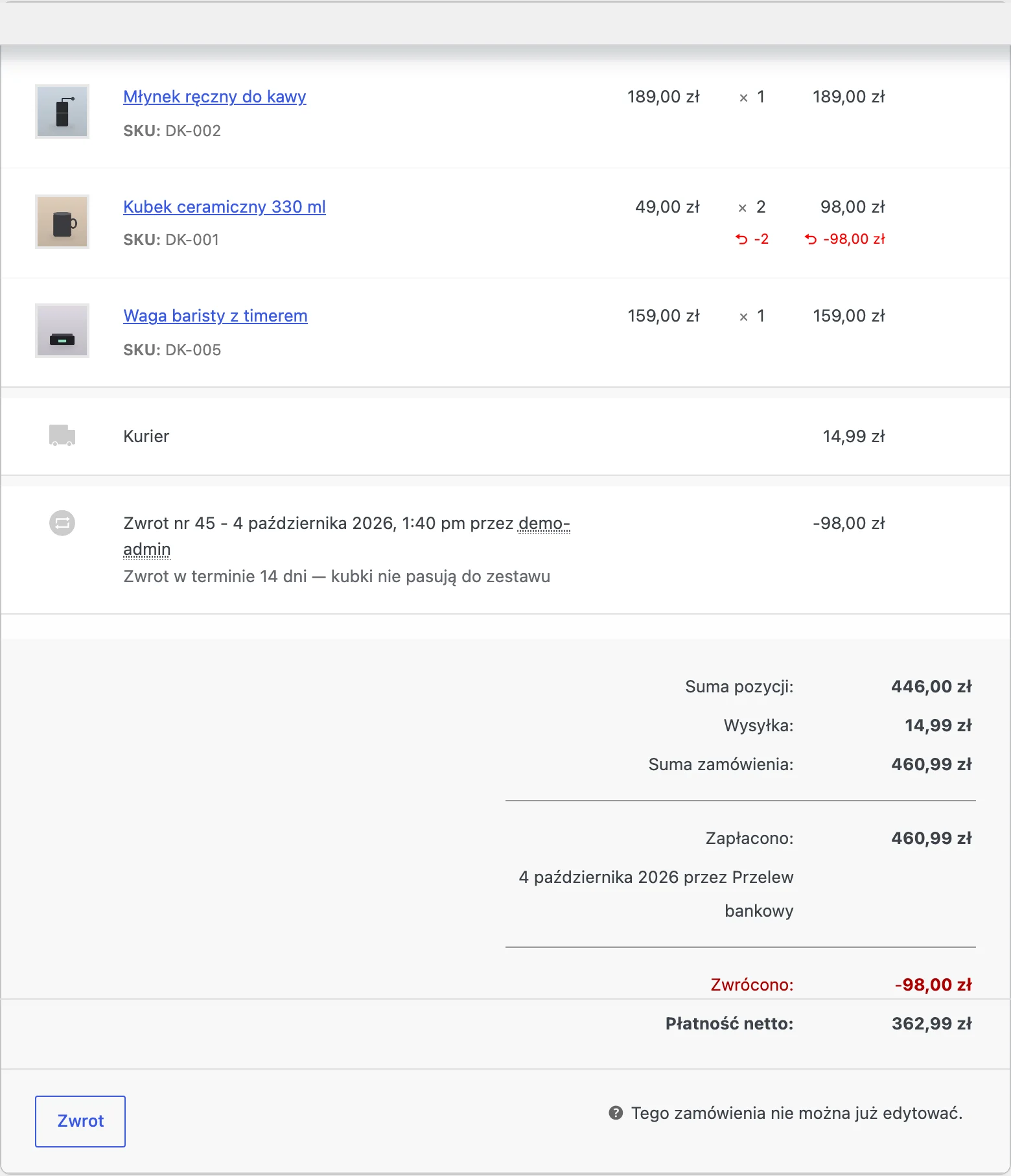
A complaint with the seller should immediately collect all the information: a description of the defect, photos and the date it was noticed, and the customer must receive an acknowledgement of receipt and an RMA number. Customers often ask whether they have to report the issue “to the manufacturer”, so in your reply make it clear that they can complain to the seller, and then explain whether you need the goods sent back and who covers the shipping cost. A fixed message template works well: acknowledgement of receipt, case/RMA number and information about the next logistical steps. This structure reduces follow-up questions and shortens the time needed to close the case.
The difference between a manufacturer’s warranty and a complaint to the seller should be explained plainly, because customers often confuse these routes and ask which one will be quicker. A warranty is a voluntary commitment by the manufacturer under specified conditions (time and scope), whereas a complaint to the seller arises from consumer law relating to goods not being as described in the contract. Depending on the product, you can point out the practical consequence of the choice, e.g. in electronics, the manufacturer’s service may be faster for a replacement, but the customer still has the right to choose the store-based procedure. The key is for the customer to receive a clear recommendation on “what to choose” along with the conditions and required documents.
Reverse logistics and settlements should limit the risk of the parcel going missing and misunderstandings about refunds. The RMA number should be required and clearly visible in the e-mail and on the label, because without it the warehouse will not match the parcel to the correct case. For transit damage, provide the procedure: photos of the packaging, label and contents and, if possible, a damage report when collecting the parcel from the courier, and then explain whether you send a replacement immediately or wait for the carrier’s decision. For refunds, explain that the time depends on the payment method and the bank (e.g. card 1–7 days, instant transfer usually 1–2 days), and for disputes such as chargebacks, collect evidence (proof of dispatch, tracking, correspondence, terms and conditions, proof of refund) and stick to the agreed responsibility and document preparation deadlines.
- 01Returns (14 days)Form/e-mail. Refunds within 14 days.
- 02Complaints & warrantiesDescription of the defect, photos. RMA number and acknowledgement.
- 03Clear processStep by step. Realistic deadlines.
What matters most is transparent communication that guides the customer through every stage of the process, building trust.
Automation and AI in customer service
Automation and AI in customer service should primarily take over repetitive enquiries and make consultants’ work more efficient, without giving up control over facts or data. Chatbots and conversational forms (Tidio, Intercom, ManyChat) can answer questions such as order status, delivery costs or returns before the customer even creates a ticket. A well-designed bot collects information (e.g. order number and e-mail), and when needed, passes the conversation to a human together with full context. At the same time, a customer knowledge base (articles, FAQ, video tutorials) relieves the team when it guides the user through “how to do it” in concrete steps and is linked in key places, e.g. in checkout.
AI in an “agent assist” model should prepare a draft reply based on the knowledge base and the case history, and the consultant is obliged to verify the facts before sending. Automatic tagging and ticket classification based on keywords or AI models shortens the time needed to route issues to the right queue, especially when the customer describes the problem imprecisely. In practice, messages such as “payment not working” can receive the payments tag and priority P1, and “size change” can be directed to returns/exchanges. In addition, automatic conversation summaries can create a note covering: the problem, agreed points, next steps and deadlines, which makes handover and quality control easier.
- Self-service: chatbot + knowledge base for repetitive questions (status, delivery, returns), with handover to an adviser together with context.
- Operational automations: workflows with reminders and escalation before an SLA breach, plus follow-ups when a case has “stalled”.
- Transactional notifications: automated email/SMS messages about order confirmation, dispatch, delay, receipt of the return and refund initiation, visible in the contact history.
Workflows and business rules are key where the customer least tolerates informational silence, namely during delays and escalations. Automations can trigger reminders and escalations before an SLA breach occurs, as well as send the customer an update that the matter is in progress when you are waiting for another department. Automating transactional notifications reduces the number of contacts of the “telling you what you already know in the system” kind, because the customer receives information about dispatch, delay, receipt of the return or refund initiation without having to ask again. The condition for effectiveness is that the helpdesk has visibility of the history of these messages and can refer to it in the conversation.
Automation in e-commerce should also take account of the risk of abuse and the rules of privacy and data security. The system can flag accounts with an unusual number of returns (e.g. >5 in 60 days) or frequent “didn’t arrive” claims, but instead of an automatic refusal it is better to trigger additional verification (address confirmation, proof of delivery signature, payment verification). If you use AI, keep an eye on what data reaches the model by applying masking to personal data, card numbers and addresses. Choose solutions with an option for processing in the EU or with data processing agreements, and keep logs of when and by whom the data was used, so that you can answer customers’ questions about security in a reliable way.
KPIs and monitoring customer service quality
KPIs in customer service are worth setting up so they quickly show whether the store is responding to customers’ needs and where the process is “bottlenecking”. The most useful indicators are those measured per channel and per case type, because an “average good” result can mask problems, for example in complaints. If you monitor KPIs regularly, you can move from firefighting to systematically removing the reasons for contact. In practice, this means not only collecting numbers, but also assigning owners for corrective actions on the side of customer service and other departments.
CSAT is most conveniently measured with a short post-contact survey, because customers are more willing to answer 1 rating question (e.g. 1–5) and leave an optional comment. To make the result comparable, analyse CSAT separately for channels and case categories, because high satisfaction in chat does not mean complaints are working equally well. NPS complements the picture with loyalty after contact with customer service and it is usually worth collecting it less often than CSAT, for example once a quarter or after larger interactions. If NPS falls, the comments provide clues — delays and a lack of proactive information are often the source of the problem, rather than the conversation style itself.
FCR (First Contact Resolution) directly shows whether the customer resolves the matter in one contact or comes back with further messages. To improve FCR, you need a checklist of input data (e.g. for complaints) and integrations that allow the adviser to see the order without asking the customer for additional information. AHT (Average Handle Time) is worth treating as a balancing metric, because too low a time can be a sign of fobbing off, while too high a time indicates gaps in tools or knowledge. Set AHT targets separately for channels (chat vs email) and read them together with CSAT so you do not optimise solely for speed.
Backlog and queue management need to be supervised so that customers do not notice mounting response delays. It is essential to monitor the number of cases older than the SLA and set alarm thresholds, for example when there are >20 overdue tickets, you bring in an extra shift. Operationally, a daily review of the oldest tickets also works well before they “get lost” among current topics. If you are waiting for a customer reply, automatic reminders help close the thread and avoid leaving it in the queue indefinitely.
Quality assurance (QA) should check whether the team follows standards and provides complete information, rather than focusing only on response speed. In practice, sampling works well, for example 5–10% of interactions per person per week, and tools such as Klaus or MaestroQA make it easier to verify compliance with the procedure and to coach afterwards. Root cause analysis (RCA) helps remove recurring reasons for contact. If a large share of tickets concerns the same issue (e.g. a lack of information about delivery time), that is a signal to improve the process or the content in the store, rather than just CS work. This is complemented by A/B testing of messages (e.g. emails about a delay or return), where you measure a drop in the number of follow-up questions and an increase in CSAT, plus a playbook for training and onboarding so new advisers have ready-made scenarios, macros and escalation rules at hand.
FAQ
Frequently asked questions
What communication standards should apply in customer service for an online store?
Communication should be simple, specific and free of jargon, with a clear description of what has been done and what will happen next. Consistency of terms such as return, complaint and warranty is also important.
Should the first contact with a customer in an online store include an action plan straight away?
Yes, the first response should confirm receipt of the issue and indicate the next step. It is also worth providing the time for the next contact or the expected response window.
Why does omnichannel need to combine the customer’s contact history?
So the customer does not have to provide the same details several times and repeat the same story across different channels. This way, the consultant can see the context of the case more quickly and move straight to a solution.
When does live chat on an online store work best?
Chat is most useful when the customer expects a very quick answer, usually within a few dozen seconds. During working hours, a sensible target is a 30–60 second response time.
What information should the helpdesk have after being integrated with an online store?
When a ticket is logged, items such as payment status, delivery method, basket items and change history should be visible. This reduces the need to ask the customer to send screenshots or provide their details again.
What does proper handling of returns and complaints look like in an online store?
For a return, the customer should receive a clear process for submitting the request, sending back the parcel and information on when the funds will be refunded, usually within 14 days. For a complaint, you need to collect a description of the defect, photos, the date it was discovered and issue an RMA number.