

Fundamentals of GA4 for SEO: how to implement correctly and maintain data hygiene
Correct GA4 implementation for SEO means, above all, controlling what is measured and how, so that organic traffic reports are not distorted. Start with configuring the data stream and enabling “Enhanced measurement”, but immediately verify whether event types such as scroll or outbound_click are actually needed in your context. For a blog, scroll may be useful, while for product pages, events tied to intent are often more important (e.g. add_to_cart or generate_lead). The less “noise” there is in events, the easier it is to assess the real quality of traffic from SEO.
Data hygiene in GA4 requires filtering out traffic that should not affect SEO metrics. Add an IP filter for the team (office, VPN) and mark it as “Internal traffic” so that organic sessions and conversions are not inflated. In addition, compare spikes in traffic with the list of bots in server logs or in tools such as Cloudflare/WAF, because GA4 does not always catch automated activity. Such simple steps reduce the risk that “SEO growth” turns out to be nothing more than non-human traffic.
Reporting consistency also depends on organisational and technical settings that are easy to overlook. Set the correct time zone, because day-to-day comparisons after changes have been implemented (e.g. navigation changes, new CTAs) can become “misaligned” if reports do not match the business cycle. If you analyse e-commerce revenue, set the correct currency so that Revenue/ROAS for organic is not calculated incorrectly. Also ensure URL consistency (http/https, www, slash and parameters), because otherwise the same page will split into several rows in reports; in that case, consider reports based on “Page path” if you have many full URL variants.
Maintaining data quality also includes regression tests after changes and quickly spotting anomalies. After SEO changes have been implemented, check in DebugView whether key events still fire for organic visits, because a form rebuild often cuts off generate_lead and creates the impression of a drop in conversions. It is also worth keeping the names of micro-conversions consistent (e.g. click_phone, download_pdf) and parameters (e.g. content_type, author), so that you can later compare the quality of traffic between content types reliably. Finally, prepare a simple threshold checklist (e.g. a drop in organic sessions >30% day on day, an increase in “(not set)” or “Unassigned”), so that you can quickly distinguish an SEO problem from a measurement problem.
- Enable “Enhanced measurement”, but switch off events that generate noise in SEO analysis.
- Filter “Internal traffic” and verify traffic spikes for bots (server logs / Cloudflare/WAF).
- Set the correct time zone and currency so that comparisons and organic revenue are reliable.
- Standardise URLs (slash/protocol/parameters) and consider analysing by “Page path” if reports split apart.
- After changes have been implemented, test in DebugView and monitor anomalies (e.g. “(not set)”, “Unassigned”).
- 01Stream configuration and verificationCheck the validity of events (scroll vs intent)
- 02Measuring user intentFocus on events key for SEO (e.g. add_to_cart)
- 03Traffic filtering and data hygieneFilter out internal traffic (office IP)
Clean data is the foundation of reliable analysis of traffic from Google.
Identifying and optimising organic traffic sources in GA4
You analyse organic traffic in GA4 correctly when search engine visits land in the “Organic Search” channel in the Traffic acquisition report (Reports > Acquisition > Traffic acquisition). If you see a lot of visits as “(direct) / (none)” or “Unassigned”, fix attribution first before drawing conclusions about SEO performance. Typical causes include 301 redirects, campaign parameters and incorrect tagging. In practice, you organise the sources first, and only then assess the effects of SEO activities.
Attribution optimisation is particularly important when a user moves between domains or subdomains (e.g. blog → shop → payment gateway). Without proper cross-domain configuration, organic sessions will be split artificially, and some visits will “flow” into referral. Check the list of domains to be measured in Tag Manager and GA4, and exclude payment domains from “Unwanted referrals” so that sources are not overwritten during the purchase journey. This directly affects whether organic will be visible as a real acquisition channel, rather than a “cut-up” fragment of the funnel.
Privacy and user consent also affect the interpretation of traffic sources. With Consent Mode implemented, some users will not have full measurement, which understates the number of sessions and conversions attributed to organic. That is why you should compare trends as percentages and use GA4 modelling, and verify important decisions (e.g. assessing the effect of migration) additionally in Search Console and server logs. This approach reduces the risk that an “SEO drop” is in fact the result of measurement limitations.
Configuring SEO conversions: how to measure the real impact on sales
Assess the real impact of SEO on sales in GA4 through conversions, revenue and the conversion rate for “Organic Search”, not through sessions alone. At the outset, define the KPIs that answer the question “is SEO delivering sales, or just traffic?”, and only then tailor your reporting to them. In practice, treat sessions as a supporting metric and base the effectiveness of your activities on business outcomes. This approach reduces the risk that a rise in visibility is wrongly taken for a rise in sales.
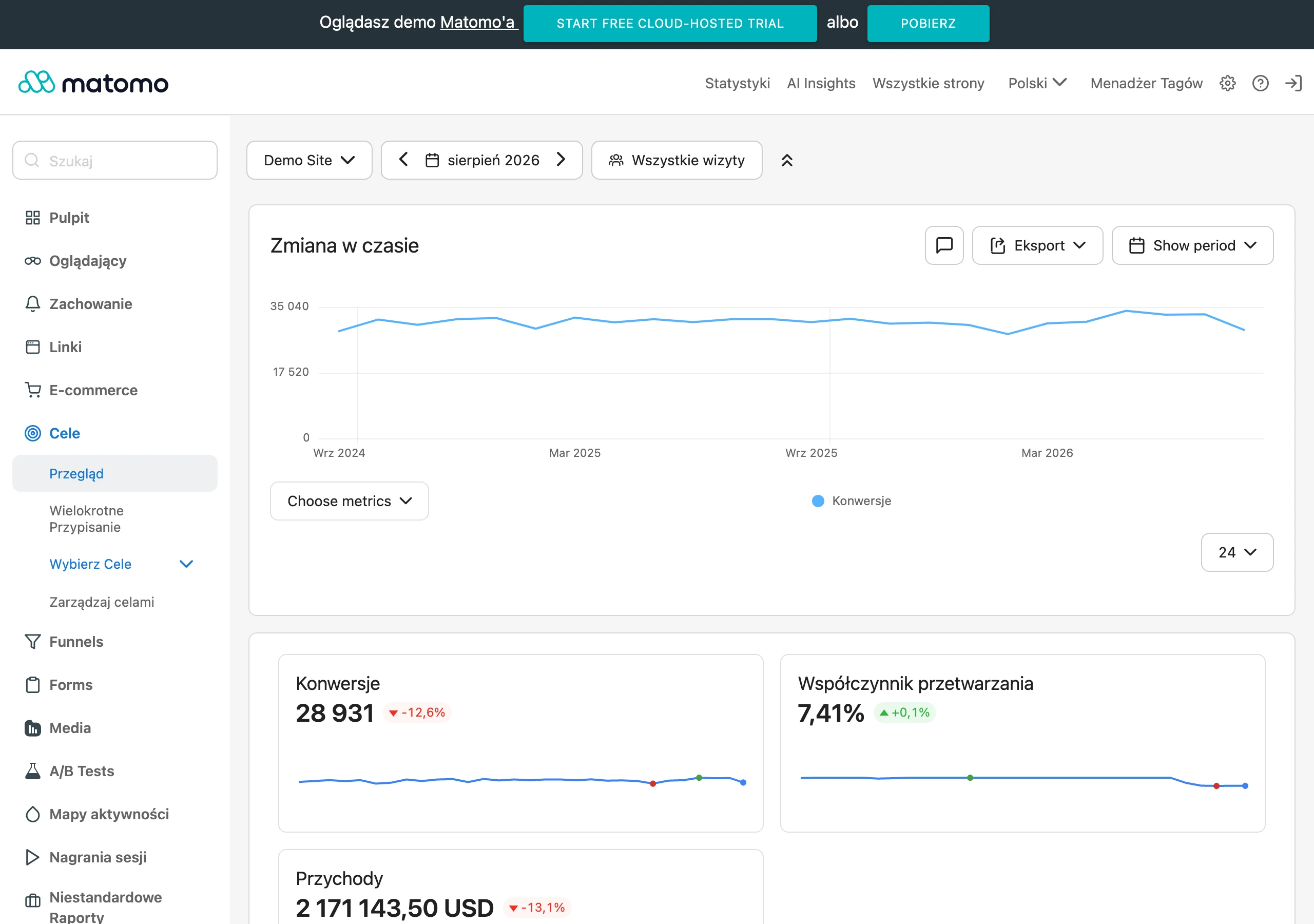
You configure SEO conversions correctly when you mark only genuinely valuable events as “Conversions” (e.g. purchase, generate_lead, sign_up). If you set events that merely “look good” in reports (e.g. scroll) as conversions, the metrics will be artificially inflated and will stop reflecting SEO’s impact on sales. It is worth defining micro-conversions especially for TOFU/MOFU content, where the purchase is not direct (e.g. going to a category, clicking “pricing”, subscribing to the newsletter, downloading a checklist). The most important rule is this: conversions should reflect value, and micro-conversions should explain the role of content on the path to the offer.
Assess SEO attribution in GA4 beyond last-click as well, comparing models (e.g. last-click vs data-driven) in the Advertising > Attribution area and analysing the “Conversion paths” reports. This way you can check whether Organic Search more often closes the sale or more often supports the path (assists) when the user returns later via direct or paid. For a long decision cycle (e.g. expensive B2B services), analyse and set longer conversion windows, because an organic visit may precede the lead by 7–30 days. If discrepancies appear between GA4 and CRM (e.g. 120 leads vs 80), verify deduplication and the lead definition, and consider sending offline conversions to GA4 (e.g. via Measurement Protocol or import from BigQuery) so you can assess the quality of leads from SEO.
- 01Define business KPIsIs SEO delivering sales?
- 02Key metrics in GA4Conversions, revenue, rate
- 03Mark valuable eventsAvoid vanity metrics (e.g. scroll)
Base SEO effectiveness on real conversions and the impact on revenue, and treat sessions only as a supporting metric to avoid drawing false conclusions.
Landing page analysis: which content generates valuable traffic from Google?
You can identify valuable traffic from Google in GA4 by analysing the “Landing page” report with the session channel filter set to “Organic Search”. This is the simplest way to answer the question of which pages are actually bringing in SEO visits and what the consequences are. This means you work with entry pages rather than relying on general charts for the whole channel. In practice, this view becomes the starting point for prioritising content and landing page optimisation.
Assess the quality of SEO content primarily through engagement rate and average engagement time for organic entry pages. If a landing page has a lot of visits, but the average engagement time is only 10–15 seconds, it usually points to a mismatch with user intent or a UX/loading issue. Also be cautious when analysing by the “Page title” dimension, because non-unique titles can merge different URLs into one row and make content decisions harder. The most useful interpretation is relative comparisons between landing pages and periods, not judging a single metric in isolation from the page context.
You will find the biggest optimisation “levers” when you combine landing pages with post-entry behaviour analysis and a well-structured content hierarchy. In “Path exploration”, set the start from an organic landing page and check whether users move on to the offer (e.g. /uslugi/ or /kategoria/) or whether the path ends on content with no further steps. Because GA4 does not group content automatically, it is worth adding a content_type parameter (e.g. article, category, product, landing page) so you can compare quality and conversions between page types within organic. Operationally, also catch visits to 404 pages (e.g. based on patterns like “/404”, “not-found”) and, after refreshing content, compare periods for a specific landing page (organic sessions, engagement, micro-conversions), while for seasonal topics analyse year on year (YoY); you can export the list of top landing pages to CSV and combine it with data from SEO tools (Ahrefs, Semrush, Senuto) to quickly identify pages with high traffic and low conversion.
GA4 and Google Search Console integration: how to analyse queries and CTR
Integrating GA4 with Google Search Console allows you to analyse queries, pages and countries in one place based on GSC data (clicks, impressions, CTR, position). This helps you answer more quickly which keywords are actually delivering visibility and traffic, and then assess the quality of that traffic with GA4 metrics (e.g. engagement and conversions). In practice, this combination is particularly useful when you want to move from “what is visible in the SERP” to “what the user did on the page”. Treat GSC reports in GA4 as a source of query and snippet data, and GA4 as a layer of behaviour and business outcomes.
Discrepancies between GSC and GA4 are normal, because clicks in Search Console do not have to match sessions in Analytics. The most common causes include cookie/consent blocking, different definitions of sessions, loss of the page_view hit, redirects, and situations where a click does not result in the page loading fully. That is why, when assessing changes (e.g. after a migration or a major rollout), you should compare positions/CTR in GSC over time with engagement/conversions in GA4, so that you can separate a “ranking” issue from an “UX/tracking” issue. If you need more operational work with data, the built-in reports may turn out too simplified, and in that case it makes sense to combine data in Looker Studio directly with GSC or export it to BigQuery.
A good way to start analysing CTR is by quickly identifying “low CTR, high position” queries, meaning those at positions 1–5, but with CTR for example <2–3%. This usually results from weak title/meta or from a mismatch between the snippet promise and the intent, so refining snippets can increase traffic without adding new content. It is also worth reviewing pages with a large number of impressions and a small number of clicks, and then checking in GA4 whether users who do click through show high engagement — if so, the problem lies mainly with CTR, not the content. To reliably separate brand/non-brand, filter queries in GSC by brand name (including misspellings), and only then assess whether non-brand really drives new users and micro-conversions.
- 01GSC source (SERP)Analysis of queries, clicks, CTR and position.
- 02GA4 analysis (site)Traffic quality, engagement and conversions.
- 03Business impactConnecting visibility with results.
Key takeaway: Use GSC to analyse search visibility, and GA4 to assess actual on-site behaviour and conversions, despite possible discrepancies in the data.
Segmenting organic users: how to create effective explorations
Effective explorations for SEO in GA4 are usually best started with a session-based segment, i.e. “Session default channel group = Organic Search”. This segment lets you view SEO as the channel works (at visit level), without mixing organic entrances with later direct/paid visits from the same user. A user segment can be misleading, because it is easy to “stitch together” different sources of subsequent visits in one view and reach inaccurate conclusions. If a report is meant to answer a question about the impact of SEO, segment sessions first and users second.
In “Free form” explorations, you will reach specific SEO answers fastest if you set rows as Landing page, columns as Device category, and metrics as Sessions, Conversions and Engagement rate. This setup immediately shows whether a given organic landing page behaves differently on mobile than on desktop and where to prioritise fixes. To avoid drawing conclusions that go too far, go one level deeper than a channel chart: analyse by landing page, device, country or content type (if you have content_type). This approach is particularly important when “Organic Search” as an aggregate looks stable, but the problem affects only a slice of the site.
To analyse paths after a Google visit, use “Path exploration”, setting the starting point as the organic landing page and tracking the next steps (page_view or key events). When you want to establish at which stage SEO “loses” users, build a “Funnel exploration” with micro-to-macro logic (organic landing page → view_item/service_page → begin_checkout/lead_form_start → purchase/lead_submit). For evergreen content, cohort/retention analyses are also useful, because they answer the question of whether SEO brings users back (e.g. after 7 and 28 days), and comparisons of new vs returning users help assess whether content delivers recurring traffic. After a known core update, compare the organic segment before/after in explorations (landings, engagement, conversions), because a drop in traffic alongside an increase in conversions may mean weaker queries have disappeared and more transactional ones remain.
Maintaining traffic quality: user engagement and improving UX
You will maintain the quality of traffic from SEO when, in GA4, you analyse engagement and conversions on key landings and quickly identify UX issues that stop the user before the next step. In GA4, an “engaged session” means, among other things, a session lasting more than 10 seconds, ending in a conversion or including at least two pageviews, which is why it can be a more useful benchmark than the classic “bounce”. If organic traffic has a low engagement rate on the most important entry pages, it is usually down to mismatched intent, too slow a load time, or what the user sees on the first screen (headline, hero, CTA). Draw conclusions at the level of specific landing pages, because the aggregate “Organic Search” can mask real UX issues.
Improving UX for SEO is supported by device analysis and by comparing behaviour with site performance. Compare organic sessions and conversion rate on mobile vs desktop for the same landing pages, because discrepancies often show where mobile UX is the real “bottleneck” (forms, readability, speed). GA4 is not a Core Web Vitals tool, but you can link drops in engagement to periods of worse performance, and verify the hard data in PageSpeed Insights and CrUX. After implementing fixes, monitor in GA4 whether engagement and conversions from organic are rising, rather than making decisions based on a single metric.
The most practical improvements come from measuring actions that signal intent, and from identifying the stages where users “drop off”. For leads, measure form steps (start, error, submit) via GTM, so you can separate a drop in leads caused by lower traffic from a drop caused by a validation error or a non-working button. For e-commerce, assess organic performance across the whole funnel (view_item → add_to_cart → begin_checkout → purchase), and for local businesses include contact events (click_phone, click_email, clicks on “How to get there”). Treat scroll as a supporting signal and combine it with engagement time and CTA clicks, because scrolling on its own does not have to mean genuine content consumption.
Reporting and automation in Looker Studio: how to combine GA4 data with GSC
You can automate SEO reporting most conveniently in Looker Studio by combining GA4 with Google Search Console in a single dashboard. This view lets you compare behaviour and outcome metrics (GA4) with visibility and snippet metrics (GSC: clicks, impressions, CTR, position) in one place. In practice, this makes it easier to answer whether the problem lies with “rankings” (drops in GSC), or with the quality of traffic and the on-site path (drops in GA4). When you need deeper work with the data, GSC reports in GA4 are often simplified, so operationally it makes sense to connect Looker Studio directly to GSC or export to BigQuery.
Automation works best when the dashboard is supplemented with a change log and anomaly monitoring. Since GA4 does not have full annotations like UA, keep a change log in an external tool (Notion, Jira, Google Sheets) and link it in the dashboard so that spikes/drops in organic traffic can be quickly tied to a deployment, migration, template change or CMP update. For early failure detection, set up alerts for a day-on-day drop in organic sessions (e.g. by >25%) — you can use Custom Insights in Analytics, schedules in Looker Studio or automations on the BigQuery side. If you also have crawl data or logs (e.g. Screaming Frog, Sitebulb), combining them with landing pages and conversions from GA4 helps prioritise technical fixes by SEO impact.
- One SEO dashboard: organic sessions, engagement, conversions/revenue and top landing pages, alongside clicks, CTR and position from GSC.
- A change log (release notes) outside GA4 and a link in the report, so you do not confuse SEO fluctuations with the effects of deployments.
- Alerts for sudden drops in organic traffic (e.g. >25% day on day) via Custom Insights, Looker Studio schedules or BigQuery automations.
- Standardisation of the definition of “SEO traffic” across the team: in reports, stick to “Session default channel group = Organic Search” to avoid discrepancies between views.
- Separation of dashboards and permissions: a separate management view (KPIs and trends) and an operational view (landings, queries, issues), with limited editing of data sources.
BigQuery makes sense in SEO when you want to combine GA4 with cost data or CRM data, or build your own segmentation on raw events. It is also a practical solution to the problem of “split” landing pages caused by parameters such as ?utm_, ?fbclid or ?gclid — in BigQuery you can normalise URLs and report on cleaned paths. For large sites, reports per directory/section (e.g. /blog/, /kategoria/, /produkt/) are also useful, because they show faster which part of the site is really driving leads to the offer and conversions. Based on combined GA4 + GSC data, you can also create automated task lists: pages with traffic and low CVR, queries with high position and low CTR, and pages with high traffic and low engagement.
FAQ
Frequently asked questions
How can GA4 be implemented correctly so SEO data are reliable?
You need to keep data hygiene under control: enable and verify Enhanced measurement, filter out internal traffic, set the time zone and currency, and ensure URL consistency. After changes, it is worth testing events in DebugView and monitoring anomalies.
Does traffic from Google always end up in GA4 under Organic Search?
Not always, because sometimes visits land as (direct) / (none) or Unassigned. First you need to fix attribution, and only then assess SEO performance.
Why can SEO conversions drop in GA4 after changes are implemented?
This often does not mean worse SEO, only a measurement error after changes on the site. Rebuilding a form or other elements may cut off key events, e.g. generate_lead.
How can you analyse which SEO landing pages are the best in GA4?
It is best to use the Landing page report with an Organic Search filter and compare sessions, engagement rate and average engagement time. This makes it possible to assess which pages really attract valuable traffic.
Is it worth measuring SEO only through organic sessions?
No, because sessions are only a supporting metric. More important are conversions, revenue and conversion rate for Organic Search.
How do you connect GA4 with Google Search Console in SEO analysis?
GSC shows queries, clicks, impressions, CTR and position, while GA4 shows user behaviour and business outcomes. This makes it easier to separate a visibility problem from a UX or tracking problem.