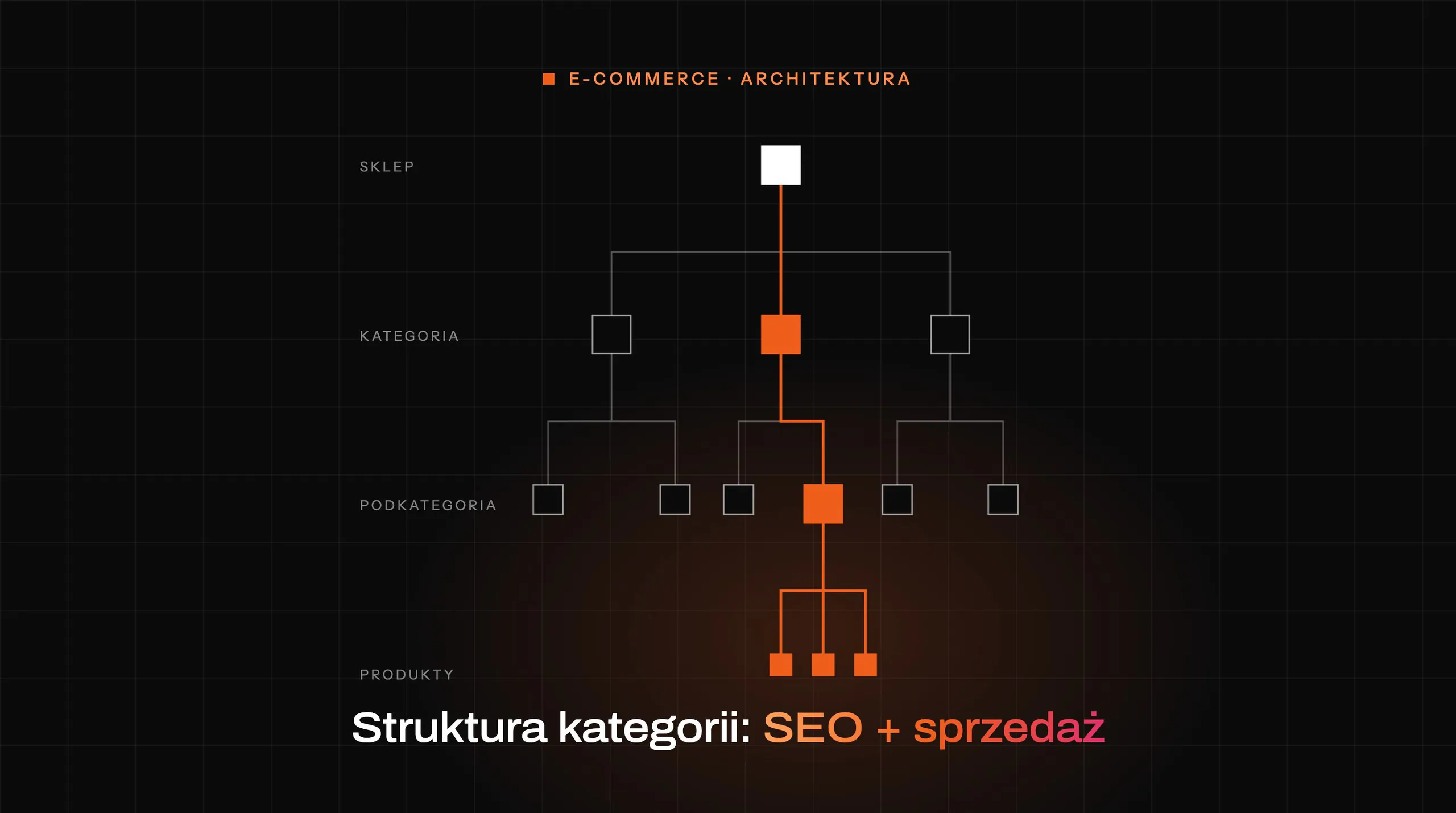

The category structure determines at the same time what Google will see and how quickly the customer reaches the right product. A well-designed store tree does not start with the menu or naming in the ERP, but with real demand. A category only makes sense when it responds to specific user queries and guides them efficiently towards purchase. If this foundation is wrong, later tweaks to content, internal linking and filters usually only mask the problem.
The role of categories in e-commerce and their impact on SEO and sales
A category in an online store serves three roles at once: an entry page from Google, a navigation node and a place that supports the purchasing decision. That is precisely why its structure cannot be treated solely as organising the assortment. If a category is unclear or badly named, it loses both visibility and sales value. In practice, one bad decision in the structure affects traffic, UX and conversion at the same time.
- 01Entry page from GoogleCaptures broad and medium-specific queries: the product type name, not a specific model.
- 02Navigation nodeShows whether the user is in the right place, what options they have and how to narrow the offer.
- 03Support for the purchasing decisionThe listing makes product comparison easier. Assessing the offer should take a few seconds.
One bad decision in the structure affects traffic, UX and conversion at the same time.
From an SEO perspective, a category most often targets broad and medium-specific queries. The user enters the name of a product type, not a specific model, so they need a collection page with a clear scope. Such a page must tell the search engine exactly what it is about while also showing products without unnecessary obstacles. If that scope is blurred, there is a risk of keyword cannibalisation between categories, subcategories or other landing pages.

From a sales perspective, a category should make selection easier, not just present a product list. The user should quickly understand whether they are in the right place, what options they have and how to narrow the offer. That is why a good category combines clear naming, logical navigation and a listing that supports product comparison. If the customer cannot assess the offer in a few seconds, the category is not fulfilling its sales purpose.
Demand and user intent analysis as the foundation of category structure
Demand and intent analysis should directly determine the category split, their names and the level of detail. The store structure should reflect how customers search for products, not how the company stores or buys them. This distinction is crucial, because the warehouse operates on internal logic, while the search engine and the user operate on the logic of language and needs. When a store mixes these two orders, it creates names that are incomprehensible to people and weak for SEO.
- Real demand + unique product rangeSeparate category
- The difference between products is cosmeticFilter or attribute
- The name comes from the supplier, collection or buying departmentName it in the customer’s language
- A few products, but nobody searches for them as a separate groupNo new subpage
In practice, the analysis begins with mapping keywords to query groups and stages of the buying journey. You need to check how users name the category, what they expect after arriving on the page and how precise a choice they want to make. A person looking for a broad group of products needs a different page from someone comparing a specific type or brand. These differences are what decide whether it is worth creating a separate category, subcategory, filtered page or leaving the topic at product page level.
A good decision to create a category requires two conditions: real demand and a unique product range. The mere presence of a few products does not justify a new subpage if users are not searching for it as a separate entity. On the other hand, a category that is too broad may mix different intents and make it harder to find the right offer. The most common mistake is creating sections aligned with the supplier, collection or buying department instead of the customer’s language.
At this stage, it is worth answering a few simple questions before the menu and URL are created. Does a given name appear in real queries, or is it only an internal term? Does the user expect a specific group of products under that name, or rather a guide or a brand page? Will the new category conflict with an existing category, subcategory or blog content?
The effect of a well-executed analysis is quickly visible across the whole shop architecture. Category names become natural, topic ranges are separated, and later decisions about linking and indexing are simpler. It also reduces keyword cannibalisation, because each important page gets its own role and its own set of keywords. Without this foundation, the shop usually grows chaotically, and every further subcategory deepens the problem instead of solving it.
How to build an effective information architecture for an online store
An effective information architecture is built through a logical, as flat as possible category tree, in which each page has a clearly defined scope. The user should understand without hesitation where to click, and the search engine should see clear relationships between the levels of the structure. In practice, this means a division based on product types and buying intent, rather than the warehouse layout. The more natural the logic of the tree, the easier it is to scale the store without chaos.
- Too deepIt lengthens the route to important categories and weakens their importance on the site.
- ReasonableYou can get to key areas quickly, without losing precision.
- Too flatIt mixes different product groups on one level and blurs the differences between topics.
A good tree can be neither too deep nor artificially flattened. A too-deep structure lengthens the route to important categories and weakens their importance on the site. A too-flat one often mixes different product groups on a single level and blurs the differences between topics. A sensible structure lets you reach key areas quickly, but without losing precision.
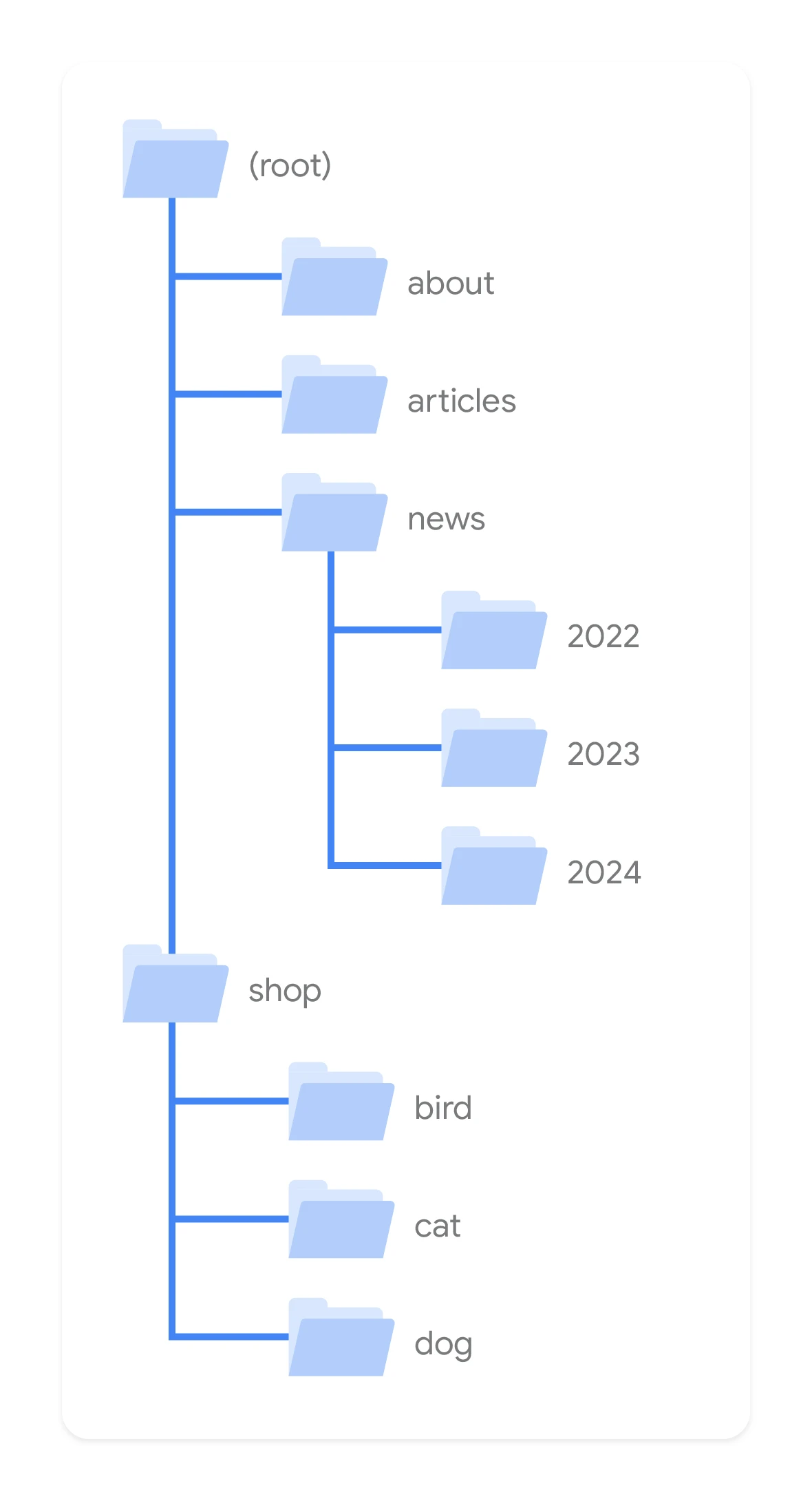
Each category should correspond to a separate set of queries and have its own non-overlapping product scope. It is this condition that limits keyword cannibalisation between the main category, subcategory and other shop pages. If two URLs describe practically the same thing, Google gets a conflicting signal, and the user lands on similar views. Then even good content and linking do not fix the problem at its source.
When creating a new category, it is worth checking not only demand, but also the real distinctiveness of the offer. A separate subpage makes sense when the user expects a separate view, filtering and product comparison. If the difference is cosmetic, it is better to use a filter or attribute than to multiply entities in the structure. This way the shop remains clear and does not produce empty or almost empty sections.
The importance of internal linking architecture for navigation and SEO
The architecture of internal linking decides whether important categories are easily accessible to the user and to search engine crawlers. Key pages should be reachable quickly from the menu, navigation sections and breadcrumbs. This is not a technical detail, but a mechanism that affects visibility and the ease of moving around the shop. If an important category is hidden too deeply, it usually loses traffic and importance.
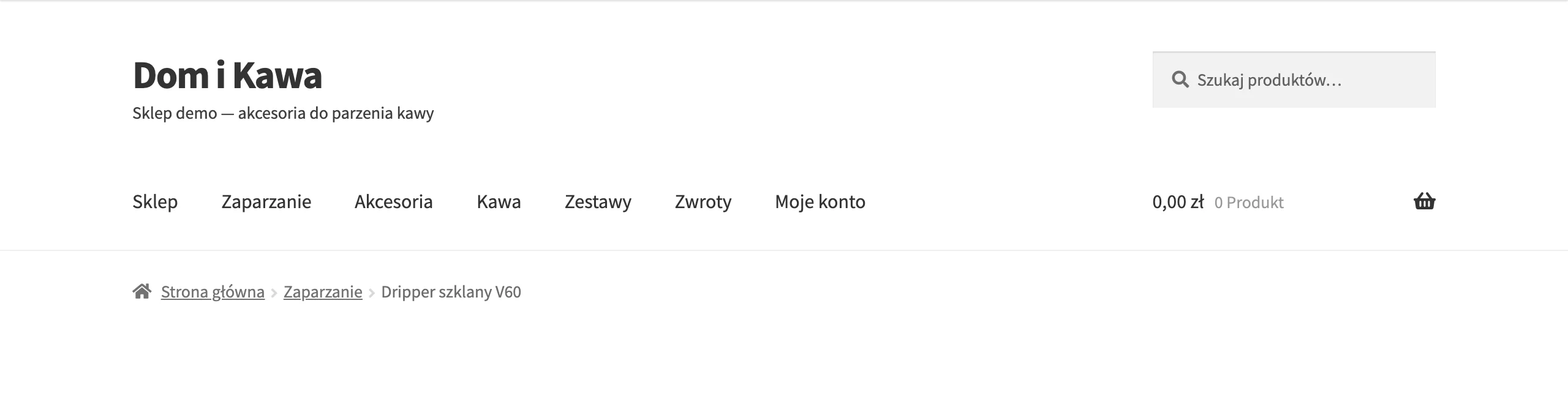
In practice, internal linking distributes the site’s authority to the pages that are meant to gain visibility for broad keywords. That is why the most important categories should not be accessible only through a filter, an internal search engine or several more clicks. They need permanent exposure in the menu and additional links from high-value places. A consistent breadcrumbs layout also works well, because it strengthens the hierarchy context and helps users return to broader product groups.
Effective linking does not end with the menu. Thematically related guides, rankings and inspirational content should lead to the relevant categories, not just to product pages. Such a structure builds stronger semantic connections between the user’s problem and the shop’s offer. This is important both for classic SEO and for AI systems, which understand better pages embedded in a clear context.
The most common mistake is that the store links heavily to products, while neglecting category pages. As a result, addresses that should be collecting traffic for broad keywords get too little internal support. If a category is to be a strong SEO landing page, it must be regularly linked to from the main and thematically related places across the site. It is also worth monitoring click depth, because it quickly shows which sections are only theoretically important for the store.
Optimising URL structure and breadcrumbs for better visibility and navigation
URL structure and breadcrumbs need to be set up so that they show the place of a category in the store tree and make it easier to return to broader groups. A category URL should be short, clear and consistent with the store’s real hierarchy. This helps the user understand the page context more quickly, and gives the search engine a coherent semantic signal. Good URLs support orientation, but they will not make up for a badly designed structure.
- Menu
- Parent categorySubcategory
- URL
- /parent-category/subcategory/
- Breadcrumbs
- HomeParent categorySubcategory
If breadcrumbs show a different hierarchy than the URL and menu, the store sends conflicting signals.
It is best when the URL reflects a logical division, for example a parent category and a specific subcategory, without unnecessary identifiers or chaotic parameters. Such a structure is easier to read in search results and when sharing links. Names in URLs should match what users actually call the products. If the store uses internal abbreviations or technical codes, it loses clarity and context.
Breadcrumbs should follow the same logic as the menu and URL structure. They are not just a navigation add-on, because they strengthen the relationships between the site’s levels. This is especially important in larger stores, where the customer often wants to go back one step rather than start from the home page. If breadcrumbs show a different hierarchy than the URL and menu, the store sends conflicting signals to users and search engines.
Indexing and canonicalisation management strategies to avoid content duplication
Indexing and canonicalisation need to be managed selectively so that only pages with real SEO value end up in the results. In a store, not every category, subcategory and filter combination deserves a separate indexable entity. The more technical duplicates there are, the greater the risk of signal dilution and wasted crawler resources. That is why the starting point is a list of addresses the store wants to promote organically.
- canonical
- ConsolidatesBrings similar versions of a page together around one main address.
- meta robots
- Limits the indexDecides whether a given view enters the index at all.
- robots.txt
- Controls accessCloses selected technical areas of the site off to crawlers.
They cannot be used interchangeably.
As a rule, only those filtered views that meet several conditions at once are worth allowing into the index:
- they answer real user queries,
- they have a distinct product scope or a clear intent,
- they do not duplicate an important category or subcategory,
- they can function as a stable landing page.
For example, a separate view such as category plus brand may make sense if users search that way and the offer is broad enough. By contrast, sorting combinations, broad price ranges or random sets of several filters should usually not be indexed. In such cases, you need to point to a canonical version or exclude indexing with the appropriate directive. The worst solution is to leave the decision to the store system without a manual strategy.
Canonical, meta robots and robots.txt fulfil different roles, so they cannot be used interchangeably. Canonical helps consolidate similar versions of a page around one main address, meta robots limits entry into the index, and robots.txt controls access to selected technical areas. Problems begin when the store canonicalises everything to the first category page or blocks important views without analysis. In practice, you need to regularly compare the intended state with the addresses that are actually indexed, especially with filters and pagination.
A good indicator of a problem is a situation where the number of indexed URLs with parameters grows faster than the number of canonical addresses. This means that crawlers are entering many technical variants that should not be competing in the results. Such a state usually lowers the effectiveness of the entire category structure, even if the main pages themselves are well optimised. That is why indexing control is not an add-on to the store architecture, but part of its operational layer.
Audit and monitoring as key elements of store structure optimisation
Audit and monitoring are needed to check whether the designed store structure works in practice as intended. A correct category concept on its own is not enough if crawlers enter different URLs, users get lost in listings, or important pages lose visibility. In a store, problems rarely result from one mistake; more often they come from a series of small mismatches between structure, internal linking and indexing. That is why the architecture needs to be checked regularly, rather than treated as a closed project.
- 01Site crawlClick depth, orphaned categories, faulty redirects, inconsistent internal linking.
- 02Server logsWhether bots visit the key categories or waste resources on parameter-based variants.
- 03Search Console and analyticsWhich categories gain visibility and which have traffic without sales.
First, it is worth bringing together data from a site crawl, server logs and analytics tools. A crawl will show click depth, orphaned categories, faulty redirects and inconsistent internal linking. Logs will reveal whether bots actually visit the key categories or waste resources on parameter-based variants. Meanwhile, data from Google Search Console and analytics will help assess which categories gain visibility and which have traffic without sales or do not fulfil their landing role.
In practice, several areas need to be checked regularly, because each of them affects the store’s performance differently:
- whether the key categories are accessible within 2-3 clicks from the homepage,
- whether the number of indexed URLs matches the plan,
- whether URLs with filters are growing faster than canonical URLs,
- whether keyword cannibalisation appears between categories, subcategories and advisory content,
- whether category pages take part in conversion paths rather than only generating page views,
- whether the number of 404 errors increased after changes to the structure.
The most valuable monitoring does not stop at SEO, but combines indexation data with user behaviour. If a category has good visibility but a low share of sales, the problem may be the listing, filtering or an ill-fitting product range. If it sells well but grows poorly organically, you usually need to go back to the naming, linking or content. Only such data connection allows you to make sensible decisions about expanding, merging or removing categories.
FAQ
Frequently asked questions
How should you choose category names in a store to support SEO and sales?
The names should come from real user queries, not from the store’s internal terminology or ERP. If the name feels natural and unambiguous to customers, it is easier to build visibility and help them find the product quickly.
Should every product group have its own category in a store?
No, a separate page only makes sense when there is real demand and a distinct product scope. The mere presence of a few products is not enough if users do not search for that group as a separate entity.
Why does an overly deep category structure harm an online store?
Because it lengthens the path to important categories and weakens their importance across the site. As a result, it becomes harder for users and search engine robots to reach key pages.
What internal linking best supports category pages?
The most important categories should be accessible from the menu, navigation sections and breadcrumbs, not only via filters or the internal search. It is also worth linking to them from guides, rankings and other thematic content.
Is it worth indexing all filters and category variants in a store?
No, only views that answer real queries, have a distinct scope and do not duplicate important pages should be indexed. Sorting combinations, random filter sets and broad variants usually should not be indexed.
How can you check whether the store structure is working well after implementation?
You need to combine crawl audits, server logs and data from Google Search Console and analytics. This shows whether the categories are accessible, indexed as planned and actually contributing to sales.