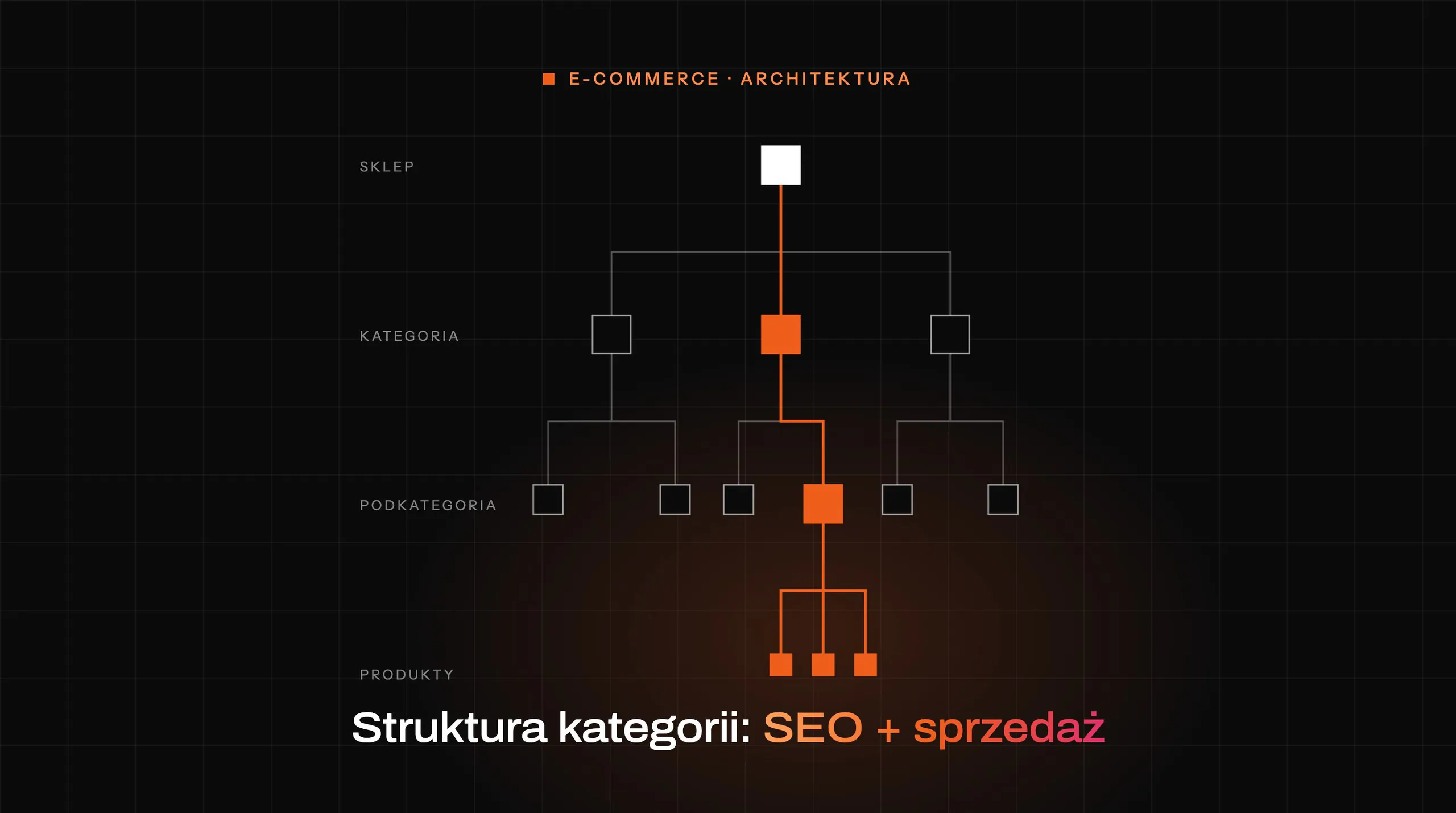

Shop visibility does not have to grow thanks to publishing dozens or hundreds of weak pages. In practice, better results come from organising what the shop already has: categories, subcategories, product pages, brand pages, filters and supporting content, rather than adding more “filler”. The point is for every important user intent to have the right landing page, rather than a separate text written “for the keyword”. The biggest problem for many shops is not a lack of content, but the fact that the wrong pages are being indexed while the right pages are not strong enough. That is why you look at information architecture, template quality, internal linking and indexation control at the same time, not at one element in isolation from the rest. Only at the end do you decide which new content really makes sense and which merely pretends to be strategy.
What is increasing shop visibility without adding weak content?
Increasing shop visibility without adding weak content means making better use of existing pages and limiting the publication of pages that do not add real value. It is quality of fit that counts, not the publication counter. In this model, it is not the number of texts that wins, but whether a specific category, product or brand page matches a given query and delivers what the user came for. Instead of producing thin descriptions and duplicated landing pages, you organise the shop structure and strengthen the pages that can genuinely rank, rather than just “exist”.
This approach is based on assigning intent to the right URL types. A transactional keyword should usually lead to a category, subcategory or product page, not to a general blog post that circles around the topic. Good visibility in e-commerce more often comes from the page matching the intent well than from the sheer volume of content. Not more words, but a better landing page.
In practice, this means working on category architecture, indexation rules, internal linking, the quality of product data and the page template. There are no shortcuts here. It is especially important to get filters, sorting, parameters and variants under control, because these are what most often generate a large number of weak or duplicated URLs. If a shop has many URLs and little control over what gets into the index, visibility disperses instead of growing, and the topical signal becomes blurry.
The result should not be “more pages in Google”, but a better visibility map. It sounds more modest, but it works more powerfully. That means less keyword cannibalisation, stronger priority pages and a clearer topical signal for the search engine, instead of a random crowd of URLs. If a shop already has hundreds or thousands of addresses, you first need to decide which of them are allowed to rank and which should support navigation but not the index.
Why is landing page quality key to e-commerce visibility?
Landing page quality is key because that page has to answer the user’s query and prove that this exact URL deserves visibility. In a shop, it is not enough to “be about the topic”, because the user is not looking for declarations, only for specifics. The page must clearly show what it offers, who it is for and how it helps with the choice, rather than hiding the meaning among random headings. If a user lands on a category with a random heading, a thin structure and a chaotic product list, that page will usually lose to better-designed competition. This is not a matter of cosmetics, but of usability, which translates into results.
A good category page organises the choice. Instead of leaving the user in a maze of products, it guides them with a clear H1, a sensible title, logical subcategories, helpful filters and a short introduction that explains the differences in the offer. The user must understand within a few seconds what they will find here and how to narrow the choice down to the right product.
The product page cannot pretend that “that is enough”. Quality is complete, consistent data: attributes, variants, compatibility, availability, images, technical specifications, delivery information and, when items are out of stock, sensible substitutes too. These are the elements that build the context needed by both people and algorithms. If a product page ends with just the name, price and a short manufacturer description, it usually gives neither the search engine nor the user any foothold for making a decision.
Technology is part of the assessment too. Inconsistency between the page, the feed and structured data, rendering errors in JS elements or poorly set canonicals can weaken even a very well-developed content layer. In e-commerce, landing page quality is not only about content, but also about data correctness, template usability and technical readability for search systems. And there are no shortcuts here.
That is why visibility is most often built from the foundations, not from a blog publishing plan. The biggest return comes from refining categories and products with real demand, and only afterwards boosting them with internal linking and selective supporting content. If the landing page does not solve the user’s task, additional articles rarely fix the problem.
What are the stages of optimising information architecture in an online store?
Information architecture in an online store is meant to work like a map, not like a collection of random paths. The aim is to organise page types, assign the right intents to them and build clear relationships between categories, products and supporting pages so that the user and the search engine crawler “read” the shop in a similar way. The first stage is an inventory of all URLs: categories, subcategories, product pages, brands, filters, search results, guide pages and supporting pages. At the same time, you check which pages genuinely generate traffic, sales and visits from commercial keywords. Without such a map, it is difficult to honestly identify the places where the shop is losing potential.
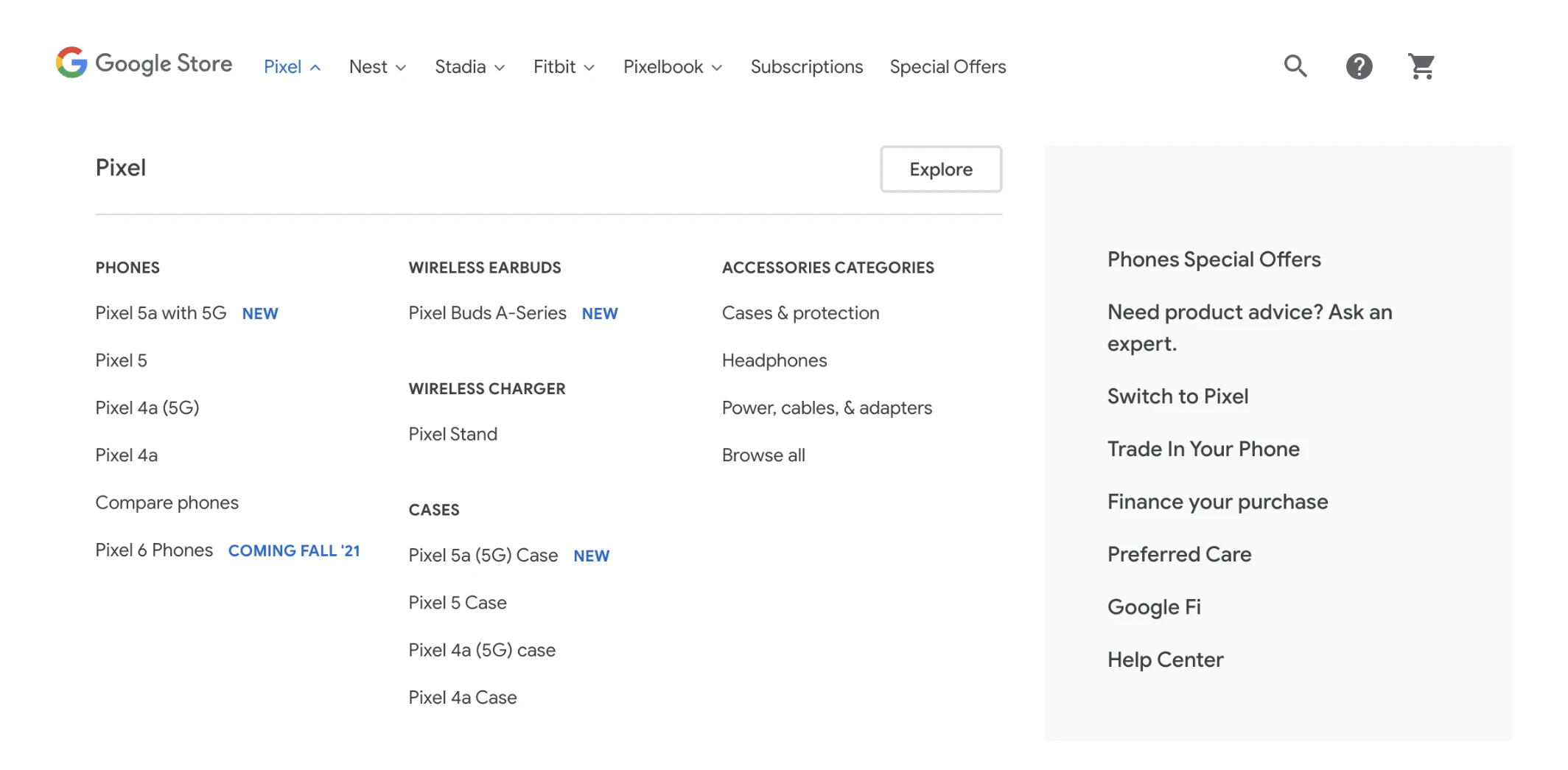
The second stage is analysing demand and user intent. Queries are grouped not by individual keywords, but by what the user wants to do: buy, compare, match a product, check specifications or find a brand. The key is to assign a cluster of queries to one sensible landing page, rather than creating a separate subpage for every phrase. The question is whether the store organises these needs or multiplies them. This is exactly where keyword cannibalisation and too-similar categories become apparent.
The next stage is designing the store’s target structure. In practice, this comes down to deciding which categories should take centre stage, which subcategories are truly needed, where filters are enough, and where a better brand page or buying guide is required. Good architecture shortens the path from entry to product and at the same time strengthens topical signals for the search engine. If several pages respond to the same intent, usually none of them will be strong enough.
Then comes the time to optimise page templates, not just the content itself. And this is where the difficulties begin. A category should immediately tell the user what they will find here, how the offer differs, how to choose a product and where to go next, instead of pretending to be a “landing page” for everything. A product page, in turn, should show the full set of attributes, variants, compatibility, availability information and sensible alternatives. This often delivers a bigger effect than adding long descriptions that nobody reads.
A separate stage is internal linking and navigation. Simplicity matters. Menus, breadcrumbs, links to subcategories, “related” sections, popular filters and product modules should guide users and bots to priority pages, not wander around the margins. In large stores, this is not done manually URL by URL, but through rules assigned to page types and templates. Good internal linking often determines whether an important category will start gaining visibility at all.
The final stage is implementing priorities and ongoing monitoring. Without this, the whole structure falls apart. First you improve the areas with real demand and revenue, then the places with duplication, incorrect hierarchy or weak templates, instead of polishing details that add nothing. After implementation, you need to monitor indexation, query coverage, CTR and user behaviour on landing pages. Information architecture is not a one-off project, because assortment, seasonality and offer development change it.
What indexation decisions affect SEO performance in e-commerce?
The decision that most strongly affects SEO performance in e-commerce is which URL types should be indexed, which merged, and which excluded from the index. The question is: should the index contain what has value, or what can simply be generated. In practice, the aim is for the search engine to see primarily pages that have real value for the user and cover specific purchase intents. These are usually the main categories, selected subcategories, important brand pages and product pages with demand. The problem is that the index also ends up containing sort orders, parameters, internal search and hundreds of almost identical filter combinations.
The most important indexation decisions usually come down to a few fixed rules:
- keep – leaving in the index pages that have a unique function and demand,
- merge – combining too-similar pages into one stronger page,
- canonical – indicating the main version in cases of duplication or variants,
- noindex – excluding auxiliary pages that should not rank from the index,
- generation blocking – limiting the creation of addresses that from the outset have no SEO value.
Most mistakes revolve around filters and faceted navigation. Simple rule. Not every combination of colour + size + manufacturer + sorting deserves its own indexed URL, because often there is neither demand behind it nor a sensible set of results. Only filter pages that have stable demand, a sensible number of products and genuinely solve a specific user need are worth indexing. The rest should be canonicalised, excluded from the index or, preferably, should not be created as a separate URL at all.
The second minefield is pagination, sort orders, internal search results and product variants. These are details that can eat up visibility. If all such addresses are available for indexing, signals spread across similar pages and bots waste time on assets of marginal value. As a result, the load on the crawl budget increases, and reaching the right categories and product pages becomes simply more difficult. The worst-case scenario is a store where the system indexes everything by default.
Products that are out of stock or removed are a separate category. And here there is no automatic answer. A temporarily unavailable product should usually keep its page, information and links to alternatives, because it may still match a user’s intent. A permanently discontinued product requires a decision: a redirect to the nearest equivalent, to the parent category, or a controlled expiry if there is no sensible alternative. The question is: what matches the actual state of the offer, rather than what can be redirected “somewhere”.
Consistency between the page content, product feed and structured data is important too. Without it, things get messy. If the page shows a different price, availability or name than the feed and schema, the search engine receives conflicting signals, and that undermines data reliability. This not only weakens trust, but can also harm the quality of product listings. The page, feed and schema should describe the same product in the same way.
In practice, the best results come from setting out indexing rules for each URL class and implementing them systemically. This is work done once, with a long-term benefit. For categories, products, brands, filters, pagination and variants, you need to decide in advance what should be indexed and under what conditions, instead of relying on “default settings”. This approach is scalable and makes it easy to spot deviations in the crawler, Search Console or server logs. Without these rules, a store usually grows in the number of addresses faster than in real visibility.
How do you implement internal linking correctly in an online store?
Internal linking in an online store is about directing strength and user attention. The goal is simple. It is about sending traffic to pages that answer the most important purchase intents, rather than adding links “for the sake of it”. In practice, you first identify priority pages: main categories, selected subcategories, the strongest brand pages and products with real demand. If a page is to rank, it must be regularly supported by links from places that are actually visited and rendered.
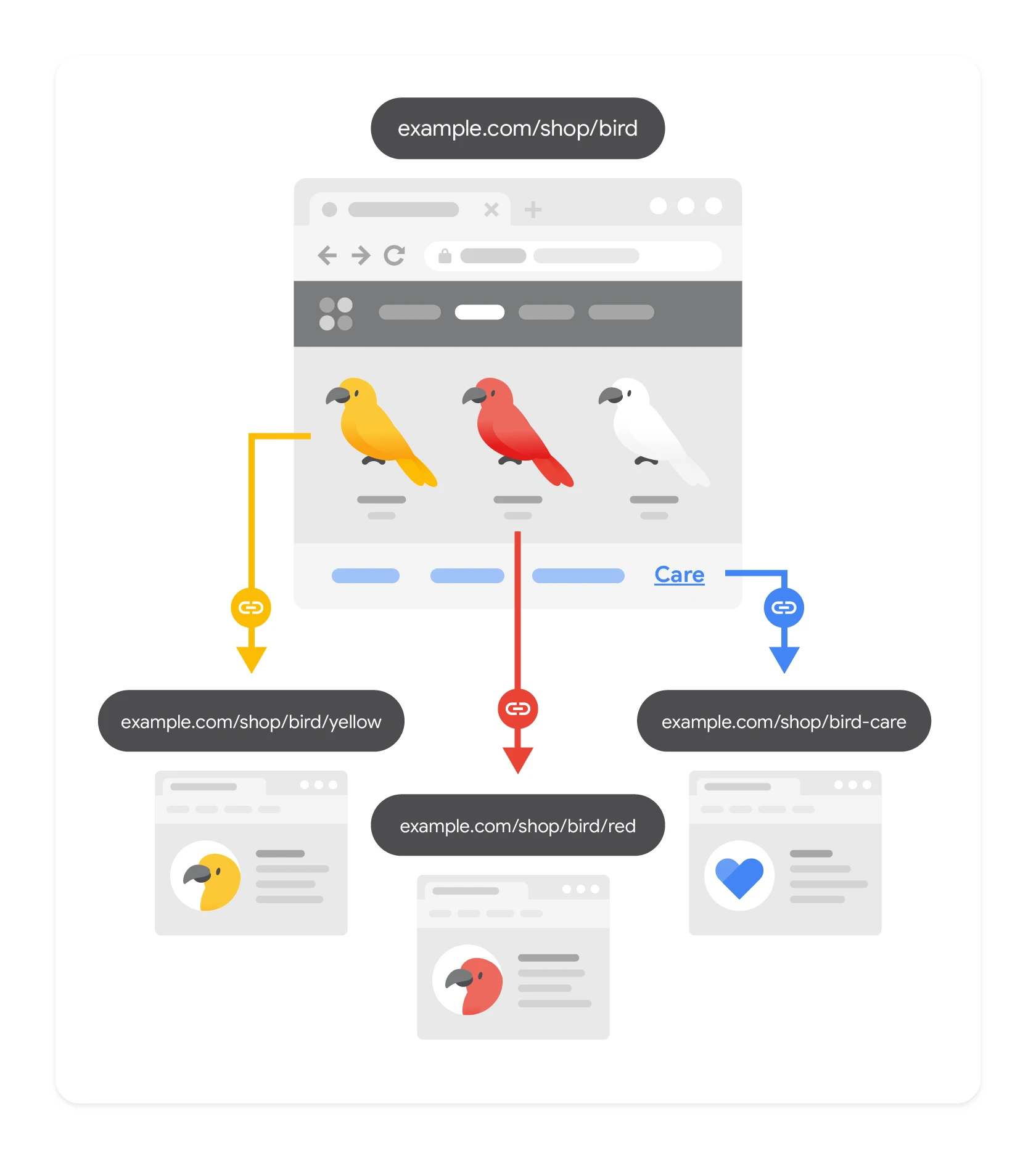
The sources of links are well known. The difference lies in how they are used. Most often, menu, breadcrumbs, category listings, related products modules, popular picks sections and selected guide pages do the work here, but each of these places has a different role. The menu organises the hierarchy, breadcrumbs reinforce relationships between catalogue levels, and recommendation modules push the user further on to the point where the next purchase intent begins. A well-designed link layout shortens the discovery path and reduces the number of situations in which an important subpage is left waiting behind several clicks.
Linking should follow the logic of the range. Not random “see also” boxes. In practice, this means connecting pages by product type, use case, compatibility, price range or brand, provided such a division genuinely makes selection easier. The best internal links do not just support SEO, but also answer the user’s natural question: what is worth seeing next?
Large stores should not piece together linking manually, URL by URL. It does not scale. Instead, template rules are implemented, defining separate standards for categories, product pages, brand pages and guides, so the whole structure is consistent and resilient to change. This is particularly important with a large number of SKUs, frequent stock rotations and extensive filtering.
The quality of anchors matters too. And every day. There is no need to force keywords into them, but the link text should clearly say where it leads and what the page is, because otherwise the user and the crawler get noise rather than a signal. Anchor chaos, hidden links in JS elements and a lack of links to priority pages are a more common problem than too few links.
The effectiveness of linking is visible in results, not diagrams. You look at whether important pages get indexed faster, cover queries better and whether users actually move further along the buying journey. That is why it makes sense to combine data from the crawler, Search Console and analytics, because only this set shows where links are doing work and where they are just decoration. If a page has potential but does not receive internal signals from parent categories, the menu or related products, it is usually difficult for it to grow steadily.
What are the most common mistakes in managing store visibility?
The most common mistakes in managing store visibility are banal in cause and costly in effect. The issue is spreading potential across too many weak URLs and failing to make a firm decision about which pages really should rank. Many stores publish hundreds of texts or generate thousands of filter combinations, but they do not strengthen the categories and products that could capture commercial queries. The outcome is often predictable: keyword cannibalisation, poor indexing and wasted crawl budget.
A very common problem is indexing pages that should not be visible in search results. This especially applies to internal search results, sorting, pagination, parameters, variants and almost identical filter pages. And that is where the roulette starts, because the algorithm is under no obligation to guess the store owner’s intent. If the store does not control which URL classes are to be indexed, the search engine chooses the target pages itself — and often chooses badly.
The second mistake hurts more, because it masquerades as strategy. It is building content without assigning it to a specific intent and a specific target page. The store creates separate subpages for similar keywords instead of strengthening one category, refining the template and adding a few sections that are genuinely helpful in the decision-making process. The reader gets lost, and the crawler receives chaos rather than a signal. The same applies to copying manufacturer descriptions that do not explain the differences between products or answer purchase objections.
Consistency of data also often fails. It is not a minor detail, but a foundation. Product name, price, availability, attributes and identifiers should match across the page, feed and structured data. When these elements drift apart, the store loses listing quality, finds it harder to build trust and complicates how search systems interpret the offer. Instead of a clear offer — information noise.
A separate group of errors is neglecting the product lifecycle. Unavailable products disappear without sensible information, deleted addresses end up as errors, and old pages do not lead to substitutes or parent categories. And why hand over traffic that has already been won once. A properly handled out-of-stock item can still retain SEO value and help the user, while a poorly handled one quickly loses it.
The problem can also be a lack of prioritisation in implementation. The team improves minor details in metadata, but does not tidy up category templates, strengthen internal linking, or eliminate duplication in filters. This is a classic example of optimisation “on the surface”, instead of striking at the structure of the whole site. In practice, the biggest impact usually comes from changes to architecture, indexing, product data and templates, and only later from additional editorial content.
Many stores also overestimate the platform’s capabilities and ignore its limitations. It sounds harmless, but ends up costing dearly. If the CMS does not allow you to control canonicals, noindex, schema, breadcrumbs or template content, the strategy has to take that into account from the start. Not “someday”, but immediately, because otherwise all that is left is firefighting. The worst SEO plan is one that cannot be maintained operationally after implementation.
The safest approach is to work with rules, not exceptions. Rather than patching individual cases, it is better to set the rules once and enforce them consistently. You need to define a standard for categories, products, brands, filters and support pages, and then make sure it is followed as the offer grows. That way, visibility grows on a well-ordered structure, not on random actions carried out under pressure from the next keywords.
What are the key metrics for monitoring optimisation effectiveness?
Key metrics are fairly straightforward, you just must not blur them. What matters is the indexing of the right pages, coverage of queries by the right URLs, CTR, organic traffic on priority pages and the business results of those pages. In e-commerce, it is not enough to stare at the overall number of SEO visits, because that can grow thanks to addresses that do not deliver value. What matters most is whether visibility and clicks are being won by the pages that really need to sell or support the purchase decision. The question is whether traffic is growing where you want it, not where you happen to “manage” to catch it. That is why monitoring makes sense at the level of categories, subcategories, products, brands and selected support pages, and not just the domain as a whole.
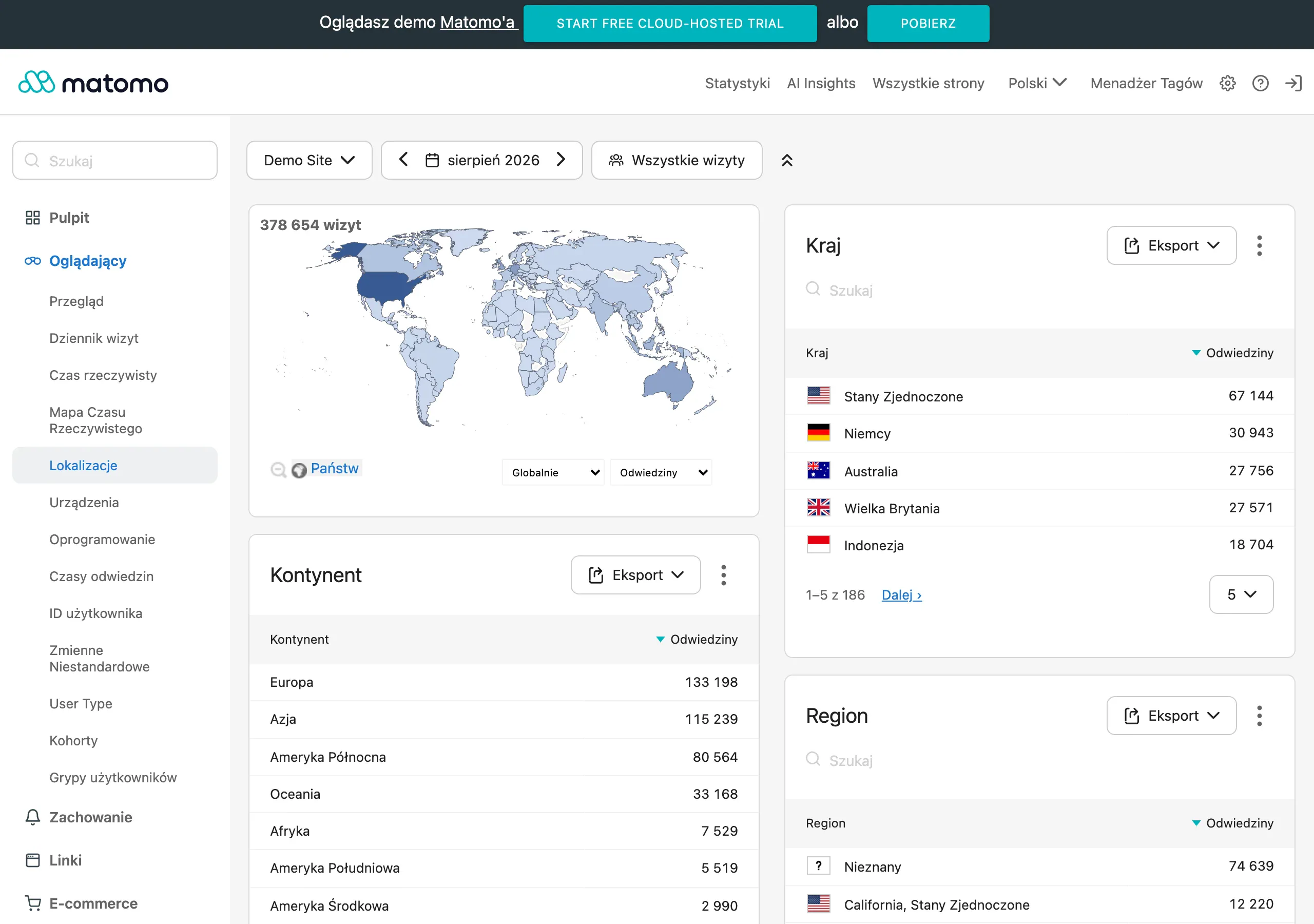
The first group of metrics concerns indexing and URL control. You need to regularly check how many pages are actually indexed, how many should be indexed, and which types of URL are getting into the index even though they should not, for example filters, sorting or the internal search engine. The problem is that the index can “bloat” not because of quality, but because of junk. If the share of low-value addresses in the index is growing, it is usually a sign that the canonical, noindex or URL generation rules are not set up as they should be.
In practice, it is worth tracking the number of excluded, duplicated, alternate canonical and discovered but not indexed pages. A good signal is not “more pages in Google”, but a larger share of the right pages in the index. In larger stores, there is also hard control: crawler data and server logs. They show, without mercy, whether the bot is burning crawl budget on addresses that do not matter for visibility.
The second group of metrics concerns query coverage and landing page quality. It is best to monitor impressions, clicks, CTR and average position for specific query clusters and the landing pages assigned to them. The key is for the intent to land on the right landing page, rather than spreading across the site. If one category is meant to build visibility around a given topic, then it should capture most of the traffic from those keywords, not random products or filter pages.
Do not judge effectiveness only by average position. What matters more is whether the right URL is gaining impressions for the right intents, whether CTR is growing after changes to the title and headings, and whether keyword cannibalisation is not appearing between similar pages. Let us look at it another way: the position may “hold”, and yet sales still stand still because the user does not click. If impressions rise after optimisation but clicks stay flat, the problem is usually the snippet, category naming or a mismatch between the page and the intent.
The third group consists of business metrics tied to organic traffic. It is worth measuring organic sessions on priority pages, visits to product pages from search results, add-to-basket actions, the click-through rate from listings to a product, and revenue generated by traffic on those pages. The data is clear: growth in visibility alone is not yet a win. Growth in visibility without an improvement in traffic quality and movement into the offer often means the store is attracting the wrong queries, the ones that do not really support sales. Instead of fetishising charts, it is better to check whether organic is actually pushing the user towards the offer.
It is worth separating sales pages from supporting ones. A buying guide or FAQ will not always close a sale in the same session, but they can clearly improve the move to categories and product pages. And that is the point. That is why it makes sense to measure assisted paths: whether the user, after landing on a support page, moves on to the offer and whether they return to the store more often.
The fourth group of indicators concerns data quality and the health of templates. The key thing is to keep prices, availability, variants and names consistent between the page, the feed and structured data, because discrepancies weaken listings and make it harder for systems to understand the offer. The data says it clearly: a minor error in one place can throw the whole thing out in another. On top of that comes monitoring render errors, JavaScript issues, missing schema elements and the state of category and product templates after deployments.
If, after technical changes, the number of correctly rendered elements falls or the number of structured data errors rises, SEO results can go backwards despite better content and architecture. In e-commerce, product life cycle control is just as important. How much traffic goes to out-of-stock products, whether pages for discontinued products have sensible redirects and whether substitutes take over their visibility.
The best monitoring therefore combines data from Search Console, analytics, the crawler, the feed and the store system. Without this puzzle, the report is often just a pretty table. The question is: are the right pages being indexed, are the right queries being captured, do users click and move on, and does the traffic translate into business activity at all. This model shortens the distance between observation and decision. And it lets you decide faster whether the next step is improving indexation, internal linking, the category template, product data or only then creating selective content.
FAQ
Frequently asked questions
How can I increase store visibility without adding hundreds of new pieces of content?
First, you need to organise what the store already has: categories, subcategories, product pages, brand pages, filters and supporting content. It is better to strengthen pages that can rank than to produce more weak subpages.
In e-commerce, is it better to create more subpages or better match the page to user intent?
Better results come from matching the right page to a specific intent, rather than multiplying similar URLs. A purchase keyword should usually lead to a category, subcategory or product page, not to a generic blog post.
Why is landing page quality more important than the sheer amount of content in a store?
Because the landing page is what has to answer the query and show that it deserves visibility. If it is thin, chaotic or poorly designed, extra articles will usually not fix the problem.
What elements should a good category page have in an online store?
It should clearly show the offer, the differences between products and help with selection. Important elements are a clear H1, a sensible title, logical subcategories, helpful filters and a short introduction.
Which indexation decisions have the biggest impact on store SEO?
The most important thing is deciding which URLs should be indexed, which should be consolidated and which should be excluded from the index. In particular, you need to control filters, sorting, parameters, pagination and internal search results.
How do you set up internal linking correctly in a large online store?
You need to direct links to priority pages, such as main categories, selected subcategories, brand pages and products with demand. The best approach is to do this with template rules, not manually for every URL.