

An online store is truly ready for growth in sales from organic traffic only when visits from Google land on the right pages and guide the user to purchase without technical hiccups. So it is not just about higher rankings, but about whether categories, products and filters respond to real purchase intent. This model brings together technical SEO, information architecture, content, purchase-focused UX, analytics and efficient implementation. The most important thing is that traffic growth only makes sense when the store can turn that traffic into revenue. That is why you assess not individual elements, but the whole chain: indexing, structure, page-to-query alignment, offer quality and business outcome measurement. And that is the crux: this approach sets priorities faster and cuts out activities that multiply the number of URLs without moving sales.
What is the model for preparing an online store for growth in sales from organic traffic?
This is not “some audit”. The model for preparing an online store for growth in sales from organic traffic means organising the store so that the search engine can index it correctly and the user can find and buy a product without effort. It is neither reduced to optimising meta tags alone, nor to content writing alone. The key is aligning the whole store with purchase intent at different decision stages: from generic queries, through comparative ones, to transactional ones. The question is whether your pages respond to these stages, or whether they just “look nice” in the structure.
In practice, this model combines several areas that in many companies live separately: SEO, e-commerce, content and development. First, you check whether the store has technical barriers and whether the search engine robot actually reaches the pages that are meant to sell. Then comes analysis of the category structure, filter logic, product cards and content supporting the decision. If a store has poor architecture or indexes useless pages, even growing visibility rarely delivers a proportional increase in sales. You can see this especially when “traffic” grows but the basket remains empty.
The relationship is simple. First indexing and crawl budget, then information architecture, then page-to-intent alignment, and finally optimisation of the shopping experience and measurement of the result. The problem is that many stores start with content, even though the real brake is filters generating thousands of URL addresses or categories cannibalising each other. Instead of organising the foundations, they add more layers. Then the work goes in the wrong direction from the start and costs more than it should.
Store readiness means that the key elements are under control. Categories must make business and search sense, products should be properly described, data needs to be consistent, and implementations must be possible without manual workarounds and “quick fixes”. The store should also allow editing of meta data, headings, breadcrumbs, canonicals, structured data and indexing rules. This is not a one-off “SEO audit”, but an operational working model with priorities, a backlog and quality control after deployments. Because what is the point of something being “implemented” if nobody checks whether indexing or the purchase path has broken along the way.
What are the key elements of a technical audit for an online store?
The key elements of a technical audit for an online store are the areas that decide whether the most important subpages are accessible, understandable and worthwhile for the search engine to index. That sounds technical. However, the audit should identify not only “code errors”, but also blockers that cut sales from SEO at category, filter and product level. In e-commerce, mass errors are usually the most dangerous, because one faulty mechanism can distort thousands of URLs.
- indexing and HTTP status codes of business-critical pages,
- robots.txt, meta robots, canonicals and XML sitemaps,
- handling filters, sorting, pagination and product variants,
- redirects, 404 errors and URL duplication,
- JavaScript rendering and content availability for the robot,
- internal linking, breadcrumbs and click depth,
- site speed, Core Web Vitals and mobile experience,
- structured data and compliance of the page’s semantic elements.
The first area is indexing control. The problem is that Google can index what it can “catch”, not necessarily what makes business sense, so you need to separate pages with sales potential from those that only create noise: empty filters, duplicate variants or parameterised URLs with no value for the user. Not every page that is technically accessible should be indexed. In a store, this is a heavy-duty decision, because it affects visibility, crawl budget and traffic quality at the same time.
The second area is the logic of URLs and relationships between pages. This is not about a “nice structure”, but about whether categories, subcategories, products and filters fit into a coherent map, do not compete for the same queries and whether the crawler reaches them through sensible internal linking. The question is: are the important places in the store really close to the user and the crawler. A common scenario is rather mundane. A key category supposedly exists, but sits deep in the structure or loses signals through incorrect canonicals.
The third area is the frontend layer and performance. First the detail, then the consequences: if the content or product list is only loaded after scripts, you need to verify whether the crawler actually sees the content and links, rather than an empty shell. It gets more interesting from there, because the mobile version, load time, layout stability and interface response speed all come into play, i.e. elements that are mixed together in one pot: indexing and user behaviour. An online store may be correct “on paper”, but if it performs slowly on a phone, it loses part of its sales potential.
The final element is data and markup quality control. Consistency matters here: product and category pages should include coherent headings, titles, descriptions, breadcrumbs and structured data that match the actual page content, not what “came out of the template”. And that is not a cliché. When a store runs on automated templates, a small mistake rarely stays small, because it is replicated at scale and disappears in the crowd. Without a crawl and validation after deployment, things like this can go unnoticed.
How to optimise the information architecture in an online store?
Information architecture does not like accidents. You optimise it so that categories, subcategories, filters and brand pages form one coherent map, where every important purchasing intent gets one correct landing page. In practice: a simple hierarchy, clear menu and breadcrumbs that do not lead into the weeds. The user should understand in a second where they are and how to reach the right product. The search engine crawler should see the same logic, without unnecessary branches and without duplicates.
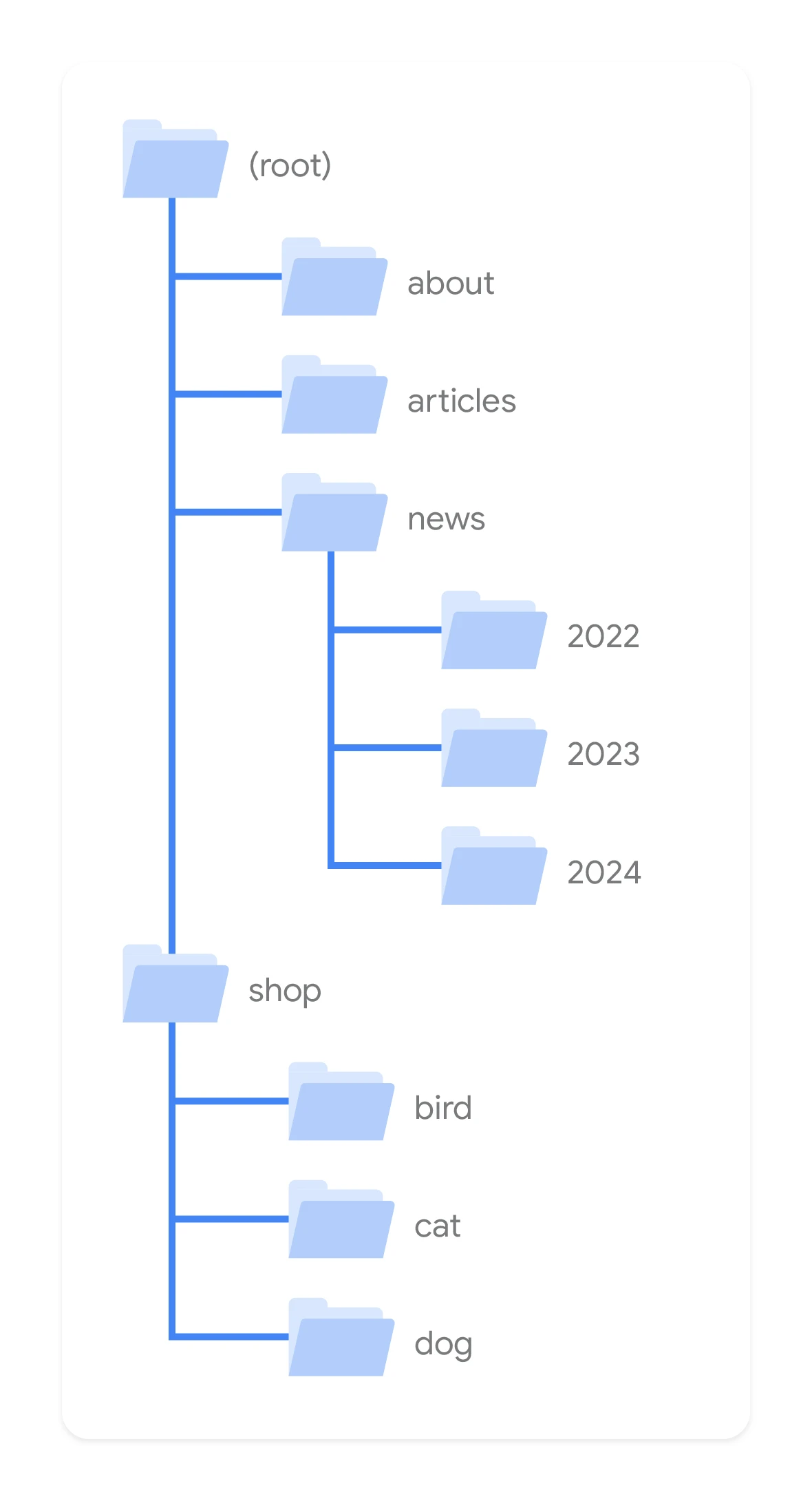
The most common mistake is banal in its cause. The problem is that the structure is built around the internal catalogue or supplier naming, instead of how people actually search for products. A category should correspond to a real shopping group, not an arbitrary technical division. When a user searches for a product type, they should land on a category. When they narrow the choice by feature, brand or use, only then do subcategories, brand pages or selected SEO filters make sense.
Not every combination of filters should be indexed. This is not a minor detail, but a safety brake. You should only index pages that have demand, shopping intent and a sufficiently broad offer, not those created “incidentally” through clicking. The rest needs trimming: canonical, noindex or the system logic itself, so you do not produce thousands of URLs without business value. In stores with a large assortment, this is one of the points that makes the difference between order and chaos.
The second critical area is cannibalisation between page types. A store should not fight itself for the same keyword when it is simultaneously suggesting a category, a brand page, a filter and a guide. The question is who should be the “owner” of the query. For one query cluster, choose one main page and align internal linking and content with it. Not more, but better: that way you build a stronger signal and do not spread traffic across several competing URLs.
In a good structure, category–product relationships also matter. This is the foundation. Products must be assigned to the right groups, and product listing pages must lead to the next purchase steps without wandering through a maze. Linking works from categories to subcategories, brands and the most important offer segments, and from products to alternatives, variants and related products. Architecture does not end with the menu — it also covers how the store pushes the user towards the next sensible decision, instead of leaving them at a dead end.
It is best to start where it hurts the most. That is, with the areas that have the biggest impact on sales: main categories, subcategories with demand, bestsellers and seasonal pages. It is on these pages that you can see fastest whether the structure supports purchases or merely produces extra URLs. Only when that backbone is simple is it worth scaling the tidy-up to the broader long tail.
What importance do structured data and semantics have for store SEO?
Structured data and semantics are like a map for the search engine. They help it understand what the page is, which product or category is actually on it and which information takes priority. They will not replace good architecture or sensible content, but they organise the signals you are already sending. In e-commerce, this is especially visible when dozens of subpages look almost identical and differ only in a small detail of the offer. Well-implemented schema will not fix a weak page, but it can make it easier to interpret it correctly and display it in search results.
On product pages, Product and Offer types usually win out. On top of that, depending on the content, AggregateRating and BreadcrumbList come into play too, because ratings and breadcrumbs are clear, “hard” signals. On FAQ pages, you can use FAQPage, but note: only when the FAQ section is genuinely on the page and answers visible content, rather than being added “for schema”. The most important rule is disarmingly practical: the markup has to match what the user sees. If the schema communicates availability, price, brand or rating, that data must be up to date and consistent with the shop interface, with no mismatch between the code and the front end.
Semantics do not end with schema. It is also about consistency between the title, heading, content, product attributes and the site structure itself, because the algorithm does not like it when one thing promises and another delivers. If the title announces a specific product type but the page shows a mix of different offers, the signal starts to blur and loses its sharpness. The same applies to brand names, models, variants and technical parameters, where a single typo can spoil the whole puzzle. In online stores, a great deal depends on the quality of product data, because it is what builds a clear relationship between the query, the page and the offer.
In practice, it is best to start with the most important things. Implement structured data first on the key templates, namely products, categories and breadcrumbs, because that is where the gains from getting things in order are fastest. Then you need to check them after implementation, instead of assuming that because “it is in the code” it must be working correctly. The problem is that errors like to hide in the details: incorrect variant mapping, missing price and availability updates, marking up content that is not on the page, or duplicating the same information across multiple URLs. Schema should be part of quality control, not a one-off add-on implemented without any further verification.
The business benefit appears when the search engine can read the offer without effort. And the user, already at the results stage, sees a clearer message about the page and understands more quickly what they are clicking on. This can support CTR and reduce accidental visits to poorly matched subpages, but the fact is this: the effect is the result of the quality of the whole shop. Structured data works best when it is part of a broader order, not a plaster over chaos. We are talking about good architecture, consistent content, clear attributes and correct indexing.
What are the most common system limitations in e-commerce?
The most common system limitations in e-commerce are straightforward. A closed CMS, limited control over indexing, poor filter handling, a heavy front end and a sluggish implementation process all take their toll. Such a shop may look fine to the user, but fail to provide real control over SEO. The problem is that it is not about “which system it is”, but whether it allows critical elements to be implemented without manual workarounds and without constant developer involvement. If you cannot freely manage URLs, canonicals, noindex, breadcrumbs and structured data, the scale of organic activity quickly comes to an end.
A very common barrier is the way the platform handles categories, variants and filters. The system can automatically generate thousands of URLs for combinations of size, colour, brand and sorting, but it does not provide tools to control their indexing. The result is predictable: the crawler burns resources on pages with no value, while important categories start competing with filters or their copies. And then the data says it clearly: the scale of the index grows, while the traffic that sells fails to keep up. This is one of the main reasons why shops have lots of indexed pages and little traffic that converts.
The second limitation sits in the editing layer. In many shops, it is difficult to change titles, headings, category descriptions, internal linking or implement logical meta data templates, so every adjustment turns into a small project. This slows the work down and forces the team into manual tasks that are expensive and hard to scale. The key point is simple: editing has to be mass, not artisanal. A shop ready for organic growth must allow SEO elements to be edited at template level and in bulk, not only one by one.
A major limitation can also be the front end. Heavy scripts, content rendered only in the browser, delayed loading of product list elements and mobile issues make indexing harder and worsen the shopping experience. The question is: does the user see the offer straight away, or only after fighting through a loading screen. It is not just about the technical score in a tool, but about whether the user will quickly see the offer, filter, price, availability and CTA. When a shop is slow or unstable, not only does SEO effectiveness fall, but so does conversion from the traffic already acquired.
A separate category of limitations is the organisation of implementations. Even a good audit is of little use if changes end up in the backlog with no owner, priorities or publication date. In shops, responsibility is often spread across marketing, IT, the agency and the e-commerce team, so simple fixes can wait for weeks. Instead of action, there is ping-pong; instead of decisions — “who owns this?”. The best results come from projects where it is clear from the start who approves, who implements and who checks quality after publication.
It is also worth assessing the quality of product data, because what looks like a system limitation often turns out, in practice, to be a business limitation. If the product feed has inconsistent names, missing parameters and variants described in a chaotic way, it is hard to build good product pages and sensible filter pages. In that situation, simply “doing SEO” is not enough, and that is not a cliché. First you need to tidy up the data that the system shows to the user and the search engine, because without that the rest is just cosmetic.
What are the most common SEO mistakes made by online stores?
Online stores most often run into SEO mistakes when they develop the site according to the logic of the catalogue or the CMS, rather than according to buying intent and hard sales data. That creates a mass of subpages. The thing is, only part of them responds to real demand and real queries. The rest disperses visibility, complicates the structure and, from the user’s perspective, is simply noise. The biggest mistake is turning the number of pages into the goal, instead of building pages that have a chance to attract the right traffic and turn it into sales.
Very often, content is created without mapping intent. The store publishes category descriptions, guides or landing pages, but does not assign them a specific role in the purchase journey. The effect is predictable. Several subpages try to rank for the same keyword, and the search engine does not get a clear signal as to which page should be the most important one. This is classic keyword cannibalisation between categories, filters, brand pages and informational content, which, instead of strengthening the domain, pits it against itself internally.
The second recurring mistake is indexing pages that exist technically but are empty from a business point of view. This applies especially to filters with no demand, empty categories, pages with products temporarily unavailable and variants differing only by a minor parameter. Such URLs add noise to the index. And, as a side effect, they weaken the store’s internal structure and blur priorities. Not every page that the system can generate should be an SEO page.
Many stores still copy manufacturer descriptions or create seemingly unique texts that do not help the purchasing decision. The problem is not the lack of a long description itself. The problem is the lack of useful information: who the product is for, how the variants differ, how to choose the size, when it is better to choose an alternative. At category level, a similar sin is inserting “SEO” text without real support for product selection. Such content may exist, but it does not strengthen either visibility or sales.
Internal linking is also often neglected. Categories do not lead to subcategories and brands in a logical way, products do not have sections for alternatives and related products, and guides do not link to transactional pages. The effect can be painful. The bot understands the hierarchy less well, and the user has a longer path to purchase and more places to change their mind along the way. In an online store, internal linking is not decoration, but an element of navigation, semantics and traffic distribution.
A strategic mistake is also assessing effectiveness solely by rankings. Visibility alone does not tell you whether the store is capturing traffic for the right queries, whether visits land on the right pages and whether they end in sales at all. That is why you need to look simultaneously at clicks, landing page quality, cart additions, revenue and the share of categories and products in organic sales. If a store is growing in rankings but not in revenue from organic traffic, the problem is usually a mismatch between pages and intent or an issue with the purchase UX.
Finally, there is one more implementation mistake: doing everything at once. Mass editing of thousands of titles, descriptions and filters without established priorities rarely ends well. Instead, it is better to start with indexing barriers, main categories, bestsellers and areas with the highest margin or seasonality. Such a sequence of work shows the effect faster and limits the cost of poor decisions.
How to measure the effectiveness of SEO activities in an online store?
The effectiveness of SEO in an online store is measured primarily by revenue and the quality of organic traffic at page-type level, not by visibility alone. Rankings and the number of keywords are only supporting indicators, because they do not say whether the store is attracting users who are truly ready to buy. What matters most is whether traffic from Google lands on the right categories, products and pages that support the decision, and then moves on to the basket and order. If visibility is growing but sales are stagnant, the issue is usually that intent has drifted away from content, the offer from expectations, or UX from real user behaviour.
In practice, you need to see several layers of data at once. First, Search Console: clicks, impressions, CTR and changes on landing pages, because that shows where traffic is coming from and what it is landing on. Then e-commerce analytics: organic sessions, conversion rate, number of transactions, revenue, basket value and paths to purchase, i.e. what happens next. A proper SEO assessment starts when you combine visibility data with sales data. Without this, it is easy to fall into the trap of rising charts that do not translate into results.
Segmentation is fundamental. Analyse categories, subcategories, product pages, brand pages and informational content separately, because each page type plays a different role in the funnel. A category can deliver sales directly, a product closes the transaction, and a guide more often only warms up the user at an earlier stage of the decision. If you measure all organic traffic as one whole, you quickly lose the information about which elements of the store are actually working for the result. So the question is not “how many visits do we have?”, but “which visits make business sense?”
In an online store, it also makes sense to measure the quality of visits to specific landing pages. If a category page has a lot of clicks but a low conversion rate, check the match between queries and the offer, the completeness of filters, prices, product availability and the clarity of the listing. If the product page has traffic but does not sell, the culprit is often a weak description, missing attributes, unclear availability, a low level of trust or an overly convoluted purchase journey. Traffic without conversion is not automatically a failure, but it always requires an explanation of at which stage the user drops off. And only that answer tells you what to improve.
Accurate measurement requires properly implemented analytics. The store should record at least product list views, product clicks, add to basket, checkout start and purchase, and it should also make it possible to filter out organic traffic and analyse by landing page. In addition, data on stock levels, margin and seasonality is useful, because a drop in sales does not always result from SEO. Sometimes a page has traffic and demand, but the products are unavailable or simply losing on price. In that case, even the best visibility will not save the result.
Assess results only after implementation. And do it at sensible, logical intervals, comparing not only month on month, but also the same period year on year if the business is seasonal. In analytics, mark the moment changes are published so you do not have to guess which implementation really moved the result. Do you really want to draw conclusions without that “point in time”. The most common mistake is assessing SEO solely by rankings, without checking revenue, traffic quality and changes at the level of specific categories and products.
In practice, a simple reporting model wins. First indexing and technical health, then visibility and clicks, then user behaviour, and only at the end sales. This structure makes it easy to quickly spot whether the problem is a lack of exposure, a weak CTR, a mismatched page or simply poor purchase effectiveness. And that is not just a cliché. Thanks to this, SEO stops being a table of keywords and becomes a tool for making concrete business decisions.
FAQ
Frequently asked questions
How do you check whether an ecommerce store is ready for sales growth from organic traffic?
You need to assess the whole chain: indexing, store structure, page-to-intent matching, offer quality and measurement of business impact. Traffic growth alone is not enough if it does not translate into revenue.
Is an SEO audit alone enough to make a store ready for sales growth?
No, because it is not just a matter of meta tags or content. Technical clean-up, information architecture, shopping UX, analytics and efficient implementation are all needed.
What technical elements should be checked in an ecommerce store before scaling SEO?
The most important are indexing, robots.txt, meta robots, canonicals, XML sitemaps, redirects, 404s, JavaScript rendering, internal linking, site speed and structured data. The audit should also identify blockers in categories, filters and products.
How do you optimise information architecture in an ecommerce store?
Categories, subcategories, filters and brand pages should form a coherent map in which every important buying intent has one proper landing page. You also need to reduce duplicates and avoid indexing every filter combination.
Why can filters and duplicate URLs hold back sales from SEO?
Because they can generate thousands of low-value URLs and waste crawl budget that should be spent on the pages that actually need to sell. As a result, bots and users land on noise instead of key categories and products.
What is the importance of structured data in an ecommerce store?
It helps the search engine understand what the page is and which information on it matters most. It works best on products, categories and breadcrumbs, but it must match what the user actually sees.