Let us imagine a situation in which someone asks us to analyse the entire Internet and create a list of all the pages contained within it in a single day. Everyone would surely agree that this is impossible for a human to do.
Fortunately, search engines understand this problem and therefore send special robots to carry out such tasks. Bots analyse a site together with billions of other websites in order to gather information about them.
What is crawling in SEO?
Put as simply as possible, we are dealing with crawling when search engines send a robot to a website or post to read it. It is a process of sending robots out to find new or updated content.
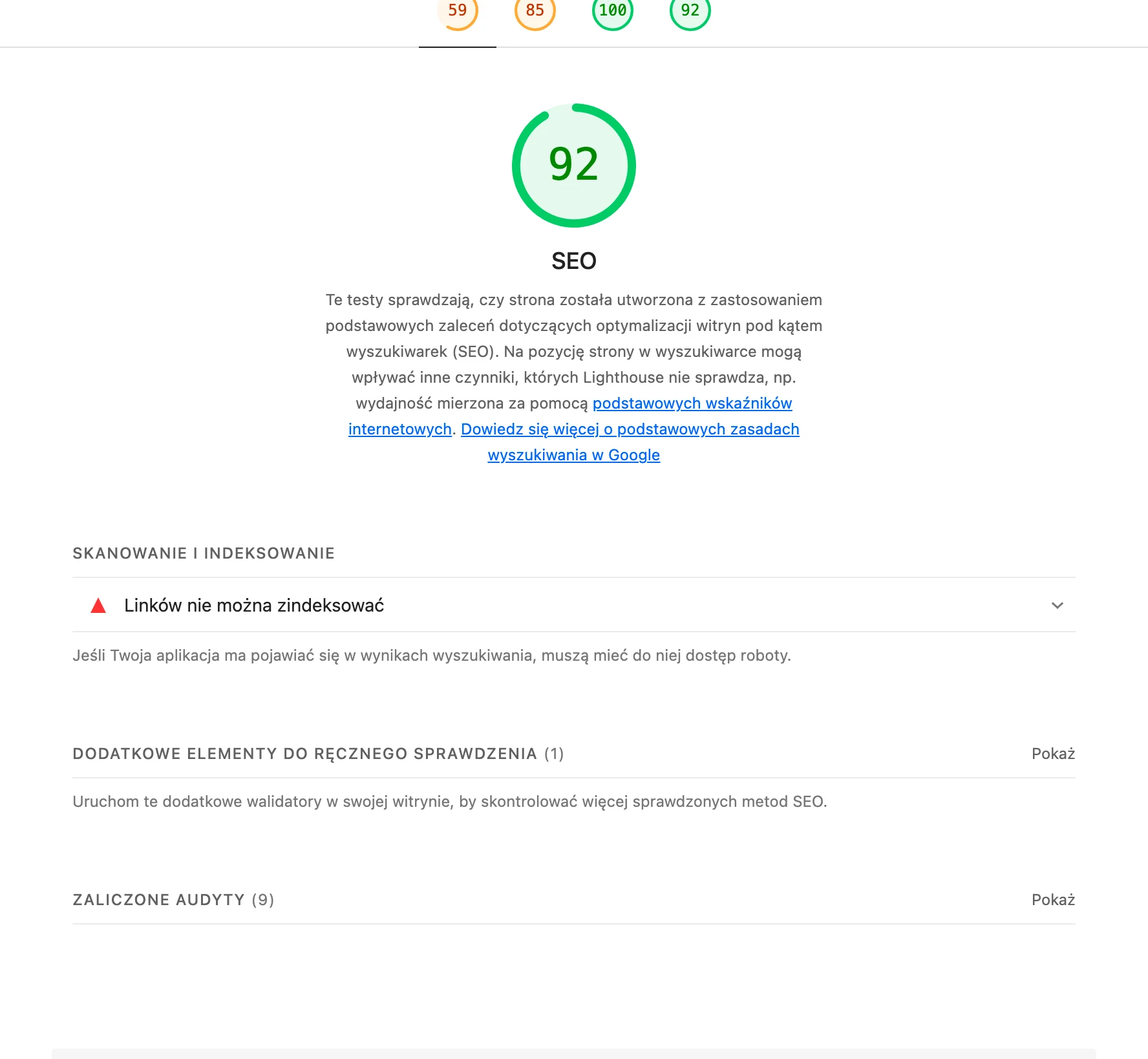
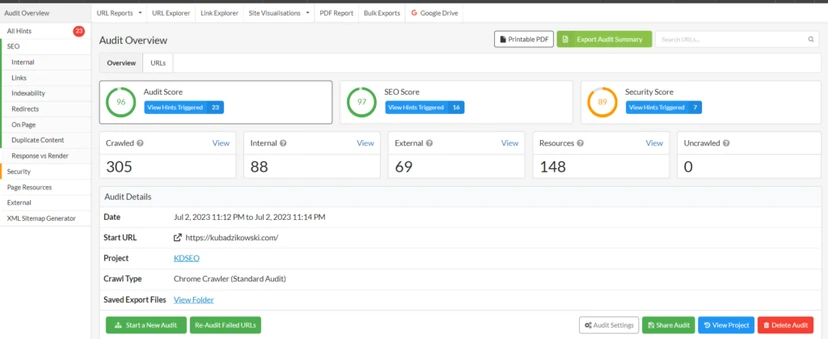
ExampleThe SEO test in Lighthouse checks only the technical basics (indexability, links, meta) — it is a starting point, not a full audit. Report for kubadzikowski.com, original screenshot
Crawling, or so-called crawling the web, involves opening successive links and familiarising ourselves with their content. The aim of search engines is to crawl the Internet quickly and effectively. However, it must be remembered that this is a major challenge because of the huge number of pages on the web.
In 2008, Google analysed 1 trillion pages. In 2013, this had already risen to 30 trillion pages, and in 2017 it reached 130 trillion. So we can appreciate that Google discovering a specific page is quite an achievement.
That is why understanding how search engines analyse pages is the only way to make sure they notice a given page.
Crawling is one of the basic functions of search engines. The other two are indexing and ranking.
Indexing is the storage and organisation of content detected during crawling. Once a page has been indexed, it will be displayed as a search result for relevant queries.
Ranking provides content that best answers users’ queries. The most relevant results will appear at the top of the list, and the least relevant at the bottom.
SEO & GoogleWhat is crawling in SEO?
01The search engine sends a robotTo read the page
02Crawling linksOpening successive subpages
03Discovering contentFinding new information
04The huge scale of the InternetThe challenge of analysing trillions of pages
Crawling is a key process by which search engines discover and index pages.
Different types of search engine robots
Search engine robots are computer programs that visit websites and read their pages in order to make entries in the search engine index.
Below are some of the most popular robots:
GoogleBot,
BingBot,
Sogou Spider,
Facebook external Hit,
SlurpBot,
DuckDuckBot,
AppleBot.
Crawling and indexing
Many people wonder how Google, or any other search engine, decides which page should be analysed.
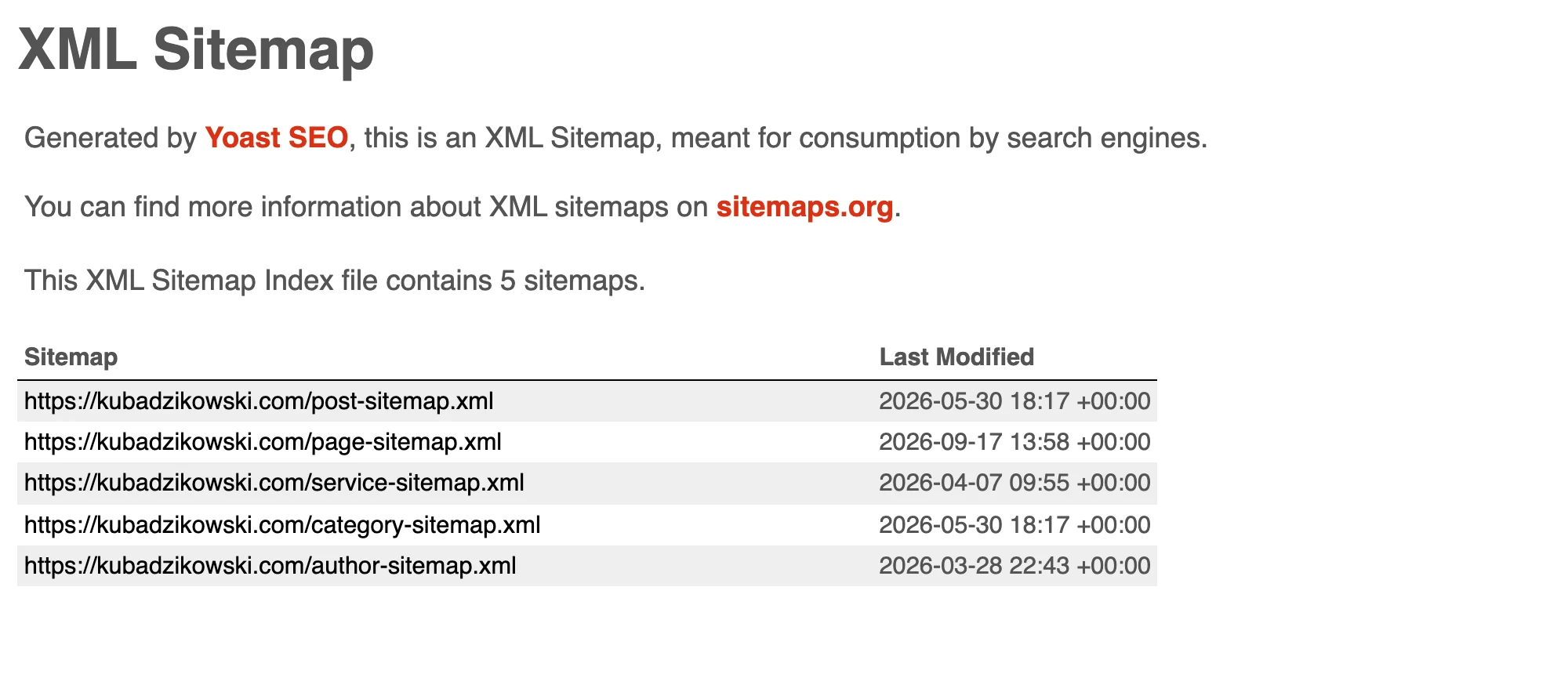
ExampleThe index splits URLs into separate sitemaps by content type, and the modification date next to each one tells robots what has changed. sitemap_index.xml from kubadzikowski.com, original screenshot
The answer is simple: there are computer programs that determine which pages to analyse and how many pages to pull from a website, as well as how often robots should analyse the site.
The robot begins its work from a list of web addresses and uses the links on those pages to discover other pages. It pays particular attention to:
new pages,
changes made to existing pages,
broken links.
Indexing begins after crawling. This is the moment when the ranking process starts after the robot has analysed the page. Indexing is nothing more than adding website content to the search engine so that it can be taken into account in the ranking.
Nothing needs to be done for a page to be indexed. Google bots take care of that. They analyse the page and save a copy of the information on the index server. When a user uses the relevant query, the search engine will show them the page.
As a result, without crawling, the page will not be indexed. Consequently, it will not appear in search results.
SEO basicCrawling and indexing
01Discovering pagesBots follow links
02Analysis of key elementsSelective content assessment
03Indexing and addingContent goes into the database
04Ranking processAutomatic inclusion in results
Understanding the path from a bot discovering a page to it appearing in search results.
Crawl budget – what is it?
Imagine that you are a search engine bot and are responsible for analysing all the pages on the Internet. How would you carry out crawling? (Choose one of the options below)
option A: you will analyse every component page of a website before crawling the next page, but you will not be able to analyse every page on the Internet,
option B: you will allocate a set amount of time to crawling a website before moving on to the next one, thereby enabling yourself to analyse all pages, but you will not be able to analyse every page completely.
It can be seen that option B looks better.
Google carries out crawling in the same way. It has the so-called crawl budget, so it carries out its actions while staying within that budget.
Simply put, the amount of time and resources Google uses while analysing a page is generally referred to as the crawl budget (Crawl budget).
This means that once the crawl budget has been exhausted, the bot will stop visiting the page and move on to the next one.
A page’s crawl budget depends on the following factors:
popularity of the page on the Internet,
server capacity,
freshness of content,
page size affects the crawl budget (the larger it is, the larger the budget).
What is rendering?
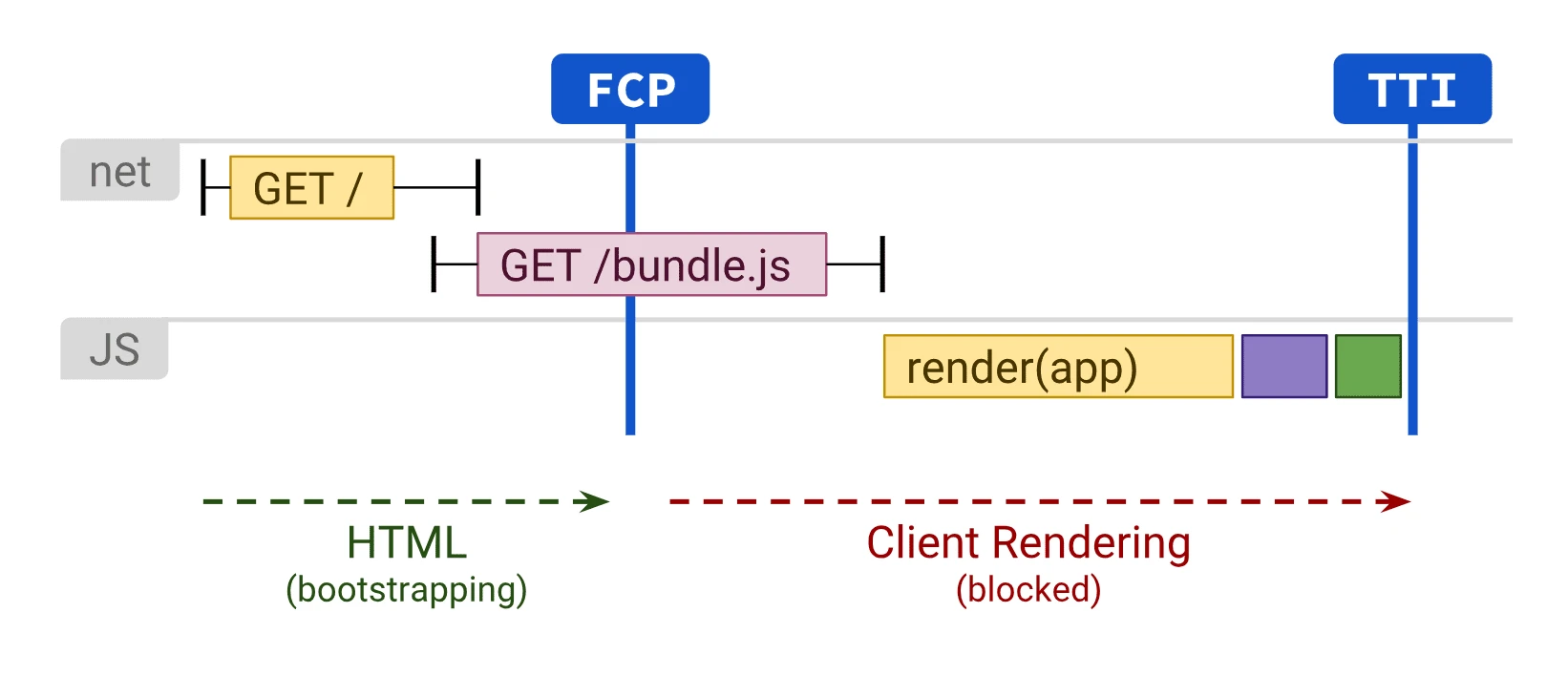
Rendering is the interpretation of HTML, CSS and JavaScript on a page in order to create a visual image of what is visible in the browser. The browser renders the code on the website.
DiagramIn client-side rendering, both first content and interactivity wait for the JavaScript bundle to be fetched and executed.Source: web.dev (Google), CC BY 4.0
Rendering HTML code uses the computer’s processing power. If pages are based on JavaScript rendering the page content, the processing is enormous.
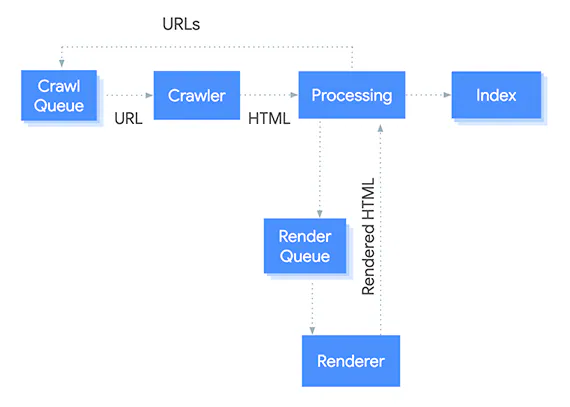
Google can analyse and render JavaScript pages. JS rendering is placed in a queue according to priorities. Depending on the importance of the page, it may take some time to reach it. In the case of having a very large page requiring content to be rendered by JavaScript, indexing new or updated pages may take some time. It is therefore recommended to provide content and links in HTML, where possible, rather than in JavaScript.
How Google reads and renders JavaScriptTech blogWhat is rendering?
01Code interpretationHTML, CSS, JS into an image.
02Power usageJS rendering = = heavy load.
03JS queuingGoogle prioritises JS.
04Indexing delayHTML recommended for content.
The process of converting code into an image, which affects performance and indexing.
Page segmentation
Page segmentation or block-level analysis allows the search engine to understand the different elements of a page: navigation, ads, content, footer, etc. The algorithm can identify which part of the page contains the most important information or the main content. This enables the search engine to understand what a given page is about and avoid being misled by other elements.
Google uses this reasoning to downgrade low-quality experiences, such as too many ads on a page or too little content above the fold.
A research paper published by Microsoft explains how different sections of a page can be understood by the algorithm.Page segmentation is also useful for link analysis.
Traditionally, different links on a page are treated identically. The basic assumption of link analysis is that if there is a link between two pages, then there is some overall connection between them. However, in most cases, a link from page A to page B only indicates that there may be a connection between a specific part of page A and a specific part of page B.
This type of analysis allows contextual links located within larger content blocks to gain more power (value) than links appearing in the navigation menu, footer or sidebar. The importance of a link can be assessed based on what is around it and where it was found on the page.
Google also uses page segmentation patents, paying attention to visible gaps or white space on the rendered page.
Can search engines be told how to analyse a page?
Yes, you can definitively tell search engines how they should analyse a page. This makes it possible to better control what gets indexed. You can steer Googlebot away from certain pages that should not be indexed.
This mainly concerns URLs with duplicate content, thin content, test pages or pages with special promotional codes.
To prevent Googlebot from analysing specific pages, use the robots.txt file.
What can search engines not see?
Difficult navigation
Many websites have navigation that is not accessible to search engines. This, in turn, worsens their ability to appear in the index and in search results.
if menu items are not in HTML, the search engine may have trouble reading them,
this may be caused by having two types of navigation for different devices, such as desktop computers and mobile devices,
a lack of links to the main page from the navigation may also make it harder for the search engine to find it.
Protected pages
If on certain pages users have to log in, answer questions in surveys or complete forms, then robots will not see these protected pages.
Content hidden in elements that are not text
You should avoid using non-text forms to display text that is meant to be indexed. Search engines may not be able to read such content. It is best to write the text in a tag on the page.
How do you tell robots what to analyse?
There are many ways to inform robots what they should analyse. Some methods are presented below.
Using a sitemap
A sitemap informs Google which pages are important. It can also guide robots in terms of how often to recrawl. Of course, Google can find pages without them being included in a sitemap, but it is worth making it easier for them.
To check whether a page is in the sitemap, go to Search Console and use the URL inspection tool. You can also do the same by going to the URL of your sitemap (twojadomena.com/sitemap.xml) and looking for the page.
Robots.txt file
These files are located in the root directory of the website.
This directory (https://twojadomena.com/robots.txt) is where you can find the robots.txt file. You can then suggest in this file the pages of your site that are to be analysed.
The robot will check the robots.txt file and crawl the site, taking the suggestions into account.
Finding “orphan pages”
Orphan pages are pages that do not have internal links leading to them from other pages. Google analyses and discovers new content, but robots are not able to discover such pages. To check whether a site contains orphan pages, you can use Ahref’s Site Audit tool.
Internal links with the nofollow tag
Google does not analyse “nofollow” links, so make sure that the internal links of pages intended for indexing do not contain the “nofollow” tag.
Knowledge graph
Google used its vast database of information to create the knowledge graph. It uses the data it has found to map out entities (objects) or things. Facts are linked to things, and relationships are created between things. For example, a film has characters linked to a book written by an author whose family has other connections, etc.
In 2012, Google announced that it takes into account more than 500 million things and more than 3.5 billion facts about relationships between things and entities. The facts collected and displayed for each entity are driven by the types of searches Google sees for different things.
The knowledge graph can also explain possible misunderstandings and ambiguities between things with the same name. For example, the query “Taj Mahal” may refer to searching for information about the architectural wonder of the world, or it may be associated with the latest Taj Mahal casino or with a local Indian restaurant.
Conversational search
In the past, when Google launched, the search engine returned results that always contained the search terms. Search results were simply aimed at matching the searched keywords to the same keywords found in documents on the Internet.
The meaning of the query was not understood, so Google had trouble with question-based searches. Over the years, however, this changed.
In 2012, Google introduced “conversational search” powered by the knowledge graph. In 2013, the Hummingbird algorithm was launched, which was the major improvement enabling Google to process the semantics or meaning of each word in every query.
The importance of crawling and indexing for a website
SEO starts with these actions. If Google is unable to analyse your website, it will not be included in any search results. You should also check the robots.txt file. A technical SEO audit of the site should reveal any other issues with search engine robots’ accessibility.
If a website is overloaded, contains errors or low-quality pages, Google may get the impression that the site consists mostly of useless pages. Coding errors, CMS settings or sites attacked by hackers inform Googlebot about low-quality pages. If there are more low-quality pages than high-quality ones, the site’s position in the search rankings will suffer.
How do you check crawling and indexing issues?
Google search
You can check how Google indexes a site using the “site:” command. Enter it in the Google search field to see all pages of a given site that have been indexed. Google operators are extremely useful, but they should not be taken as a 100% oracle, because they do not work perfectly.
site:twojadomena.com
You can check all pages sharing the same directory (or path) within a site if this is included in the query.
site:twojadomena.com/blog/
You can use “site:” together with “inurl:” and the minus sign to exclude matches and get more detailed results.
You should check whether titles and descriptions have been indexed in a way that provides the best experience. It is worth making sure that no unexpected and odd, or other unnecessary pages, have been indexed.
Google Search Console
If you have a website, you should verify it in Google Search Console. The data in this tool is invaluable.
Google provides performance reports in terms of search rankings: impressions and clicks by pages, countries or device types for up to 16 months back. In the Index Coverage reports, you can find all kinds of errors found by Google. There are also other useful reports related to structured data, page speed and the way Google indexes the site.
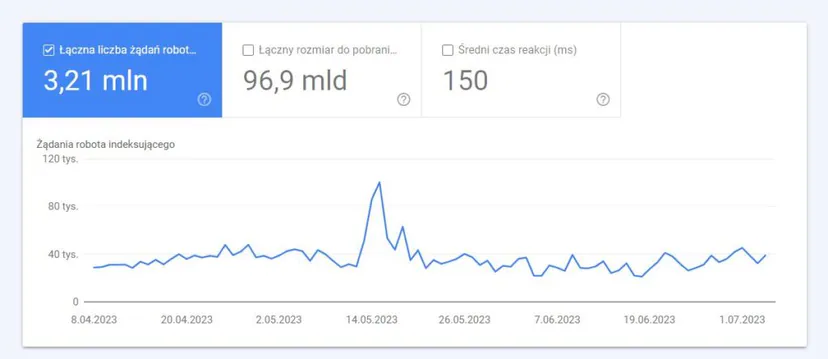
You can find the Crawl Stats report in Legacy Reports (for now). This allows you to check how Google analysed the site (quickly or slowly, many or fewer pages, etc.).
Preview of the indexing report in Google Search Console, which may be useful for interpreting website crawling
Using a search engine robot
It is worth trying to use a search engine robot to find out better how the search engine analyses the site. There are many options available for free. One of the most popular is Screaming Frog, which has an excellent interface, plenty of features and allows crawling up to 500 pages for free.
Example view of the Sitebulb website crawling tool
Sitebulb is another excellent option when it comes to a crawler with many features and better visual presentation of data. Xenu’s Ling Sleuth is an older crawler, but it is completely free. It does not have many features that allow you to identify SEO issues, but it can quickly analyse large websites and check status codes and which pages are linked to each other.
Server log analysis
When it comes to understanding how Google analyses a website, there is nothing better than server logs. A web server can be configured to write log files containing every request or user action. These files include people visiting pages through their browsers and any bots, such as Googlebot.
You will not get information about search engine bots’ experiences with a given page from Web Analytics applications, such as Google Analytics. This is because search engine bots do not use JavaScript analytics tags, or they are filtered out.
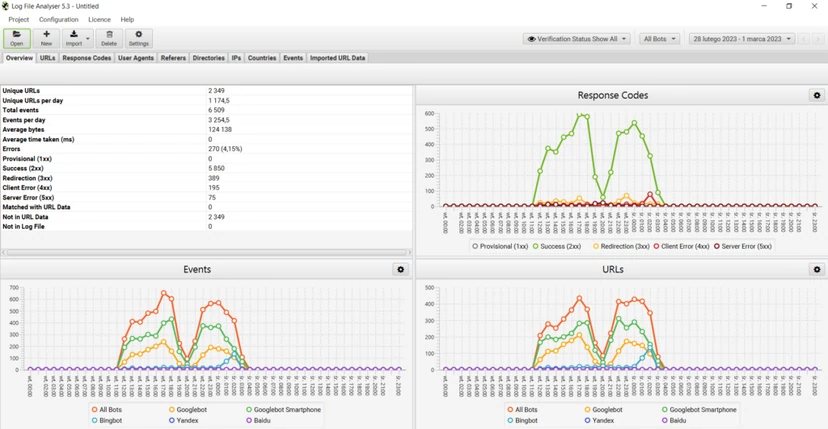
Analysing which pages Google crawls is very useful. This allows you to understand whether bots are crawling the most important pages. It is helpful to group pages by type to check how much of the crawl budget is allocated to a given page type. You can also group blog pages, “about us” pages, topical pages, author pages and search pages. If you notice large changes in the types of pages being crawled or a high crawl rate for a single page type (to the detriment of others), this may indicate a crawling issue that needs to be investigated.
Example log analysis based on Screaming Frog Log Analyser
The ability to crawl the entire Internet and quickly discover updates is an incredible engineering feat. The way Google understands page content, the connections (links) between pages and the meaning of words may seem magical, but it is all based on natural language processing and computational linguistics. We may not fully understand these advanced solutions, but we are able to familiarise ourselves with their capabilities. Through crawling and indexing the Internet, Google can recognise meaning and quality based on measurements and context.
FAQ
Frequently asked questions
01How do search engines crawl a website?
They send robots to it that open successive links and read the page content. This is how search engines discover new or updated content.
02Can a site appear in Google without crawling?
No, because without crawling the site will not be indexed. As a result, it will not appear in search results.
03Why is crawl budget important for SEO?
Because Google has limited time and resources to analyse a site. When the budget runs out, the robot moves on to the next page.
04How does Google decide which pages to analyse more often?
It looks at factors including a site’s popularity, server capacity, content freshness and its size. The larger the site, the larger the crawling budget may be.
05Can you tell robots what they should not analyse?
Yes, this can be done through the robots.txt file. This makes it possible to steer Googlebot away from duplicate pages, pages with little content, test pages or pages with promo codes.
06How can you check whether Google has indexed a site?
You can use the site: command in Google search to see the indexed pages of a given website. The article also points to Search Console and the URL inspection tool.