

Crawling is the stage in which Google discovers URLs, fetches their content and assesses whether, and when, to return to them. For a site owner, this is not a technical curiosity, but a factor that genuinely affects the visibility of key subpages. When Google does not come across a page, does not read it properly or spends budget on irrelevant URLs, SEO results will be limited. The mere presence of a site on the internet does not yet mean that Google crawls and indexes it efficiently. In practice, the source of problems is most often technical errors, weak internal linking and messy URLs. It is worth taking an operational approach, because many improvements can be implemented quickly, without rebuilding the entire site.
What is crawling and how does it work in practice?
Crawling involves Google finding URLs, visiting them, reading the content and deciding what to do with them next. The bot reaches pages primarily via internal links, XML sitemaps, previous visits and external signals. If an important subpage has no sensible internal linking, it may be discovered very slowly or not at all. A sitemap helps, but it does not replace a good internal linking architecture.
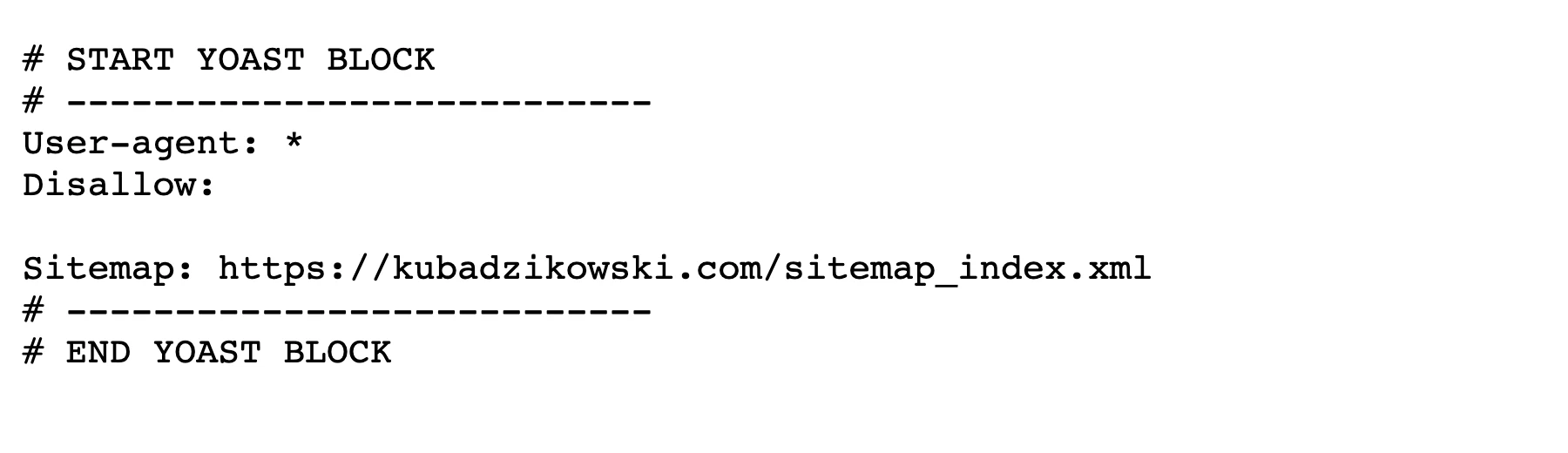
After detecting a URL, Google checks whether it can fetch it and how the server responds. At this stage, robots.txt, meta robots, HTTP status code, redirects, response time and access to CSS and JavaScript files all matter. When a page returns 5xx errors, gets caught in redirect loops or looks like a soft 404, the bot wastes resources and finds it harder to move on effectively.
Google then analyses technical signals and tries to determine which version of the URL is the correct one. It takes into account the canonical, the consistency of HTTP and HTTPS versions, the www and non-www variants, as well as whether the signals contradict each other. One page should not suggest indexing and block it with another signal at the same time.
If content or links are generated by JavaScript, Google may additionally render the page. This matters because some sites show key content only after scripts have run or after user interaction. In practice, this means that a heavy front-end can delay link discovery and content indexing, even if the page “works” from a human perspective.
At the end, Google decides whether to add a given URL to the index, which canonical address to associate it with and when to revisit it. Not every fetched page ends up in the index, because uniqueness, quality and usefulness also matter. That is why crawling should be treated as the beginning of the process, not its end.
- 01Discovering URLsLinks, XML sitemaps, signals
- 02Verification & accessRobots.txt, HTTP status codes, resources
- 03Reading & decisionContent analysis, indexing
Key: Good link architecture and accessibility speed up crawling.
What factors affect the effectiveness of Google indexing?
The effectiveness of indexing is determined above all by whether Google can easily reach the key subpages, fetch them without obstacles and receive consistent technical signals. The biggest role is played by internal linking, the quality of server responses, tidy URLs and the value of the content itself. When these areas are struggling, even a correctly prepared XML sitemap will not remove the cause of the problem.
Much also depends on whether the site is not burning through its crawling budget on unnecessary subpages. The most common sources of waste are filters, sorting, URL parameters, search results within the site, duplicates and uncontrolled pagination. The more technical or duplicate URLs the bot visits, the less attention it can devote to pages that are genuinely important for the business. This is particularly important in e-commerce, portals and large sites where content often changes.
The technical condition of the website is also not insignificant. Repeated 5xx errors, timeouts, redirect chains, incorrectly set canonicals and conflicts between noindex and linking weaken the effectiveness of crawling and indexing. In such a situation, Google considers the site less predictable and harder to process.
The way content is delivered also makes a big difference. Google can render JavaScript, but this does not always happen immediately and not every piece of content loaded client-side will be equally easy to discover. If key text and links are available straight away in HTML, Google will usually read them faster and understand the structure of the site better.
Indexation is also affected by the quality of an individual subpage. Google does not automatically index everything it manages to fetch, because it takes into account uniqueness, usefulness and consistency with the rest of the site. Thin-content pages, almost identical pages or pages created solely for filter variants are often crawled, but do not add any real value to the index.
For diagnostics, it is best to rely on data rather than assumptions. Search Console signals indexation issues and some technical signals, but only server logs show which URLs Google actually visits and how often. If you want to improve crawling, start with log analysis, internal linking and the quality of the XML sitemap.
How to manage technical signals correctly for better crawling?
Correct management of technical signals means making sure Google receives one consistent message: which URLs it can fetch, which it can index and which version of the page is the right one. Most problems stem not from a single fault, but from discrepancies between robots.txt, meta robots, canonical, redirects and the URL structure. When these signals say different things, Google wastes time interpreting them instead of efficiently crawling important pages.
Start by sorting out URL accessibility. A page that is meant to be visible should return a 200 status code, must not be blocked in robots.txt and should not have a noindex meta robots tag. If an important URL redirects, make sure the redirect leads directly to the destination version, without a chain of several intermediate steps.
The canonical should point to the variant you actually want to promote as the main one. This is particularly important with filters, parameters, slash and non-slash versions, HTTP and HTTPS, and www and non-www. A canonical will not tidy up a mess in the URL architecture, but when used sensibly it reduces duplication and makes it easier for Google to choose the right page.
It is better to treat robots.txt as a tool for controlling access rather than a way to sort out all indexation issues. Blocking a URL in robots.txt may prevent Google from reading the content, but it does not always mean that such an address disappears from the results. If you want a page not to end up in the index, you usually need a URL accessible to the bot with noindex or a correct redirect to the destination version.
On JavaScript-based sites, make sure that key content and links are accessible without heavy client-side rendering. Google can render JS, but it does not always happen immediately and not every implementation works flawlessly. When the menu, text or links to important subpages appear only after user interaction, discovery of those URLs will be slower or incomplete.
Also pay attention to the consistency of supporting signals. The XML sitemap should contain only canonical, indexable URLs with a 200 status code, not redirects, errors or noindex pages. This does not replace internal linking, but it organises the guidance for Google and reduces the number of unnecessary visits.
- 01Consistent messageUnified signals for Google.
- 02URL accessibility200 status code, no blocks, indexable.
- 03Direct redirectsNo chains, straight to the target.
- 04Correct canonicalPoints to the main version of the page.
Organised technical signals speed up efficient crawling and Google’s interpretation of important pages, avoiding unnecessary delays.
What practices help to optimise crawl budget?
Crawl budget optimisation is about getting Google to visit business-critical pages more often and unnecessary, duplicate or purely technical URLs less often. This makes the most sense on large sites, stores, portals and websites with filters and parameters. In smaller sites, the effect can also be noticeable, but usually the basics remain more important: accessibility, linking and content quality.
The first step is to verify what Google is actually visiting. It is best to use server logs and crawl stats reports in Google Search Console, because only there can you see whether the bot is spending time on products, categories and articles, or rather on sort orders, internal search results and parameterised URLs. Without data, it is easy to tackle the wrong problem.
The biggest share of the budget is usually consumed by duplicates and URL variants. This applies to filters, sorting, uncontrolled pagination, tracking parameters, test versions and mass-generated pages without real value. In practice, you need to reduce the number of such URLs through better architecture, correct canonicals, sensible linking and by not exposing unnecessary variants for indexing.
The second area is technical faults that slow down or even interrupt crawl. Frequent 5xx errors, timeouts, redirect loops, long redirect chains and soft 404s reduce fetch efficiency because Google has to make additional requests or runs into dead ends. The more stable the server response and the shorter the path to the content, the more efficiently Google returns to important pages.
Internal linking is also very important. Subpages that are important for traffic and sales should have links from places with high visibility, and their click depth should be as low as possible. If a key subpage exists only in the sitemap or is hidden several levels down, Google will usually consider it less important.
It is worth regularly reviewing page templates rather than focusing exclusively on individual URLs. One faulty pattern for filtering, pagination or parameter generation can produce thousands of unnecessary addresses. The best results come from removing the cause in the template or site logic, rather than manually tidying up individual subpages.
What tools are essential for analysing and optimising the crawling process?
For analysing and optimising the crawling process, you need above all Google Search Console, server logs, a desktop or cloud crawler, XML sitemap verification and rendering tests. Each of these sources covers a different piece of the puzzle: URL discovery, Googlebot’s actual visits, technical errors and what the bot actually sees after the page has been rendered. The most common mistake is basing the diagnosis solely on Search Console, without looking at logs and the internal linking structure.
Google Search Console provides the quickest starting point. The indexing report, crawl stats, URL inspection and sitemap report show whether Google knows a given address, when it visits it, what status it returns and whether there are issues with fetching or choosing the canonical version. However, the tool does not give the full picture, because it does not replace server data.
Server logs are essential when you want to check what Google is doing in practice, rather than what it should theoretically be doing. Thanks to them, you can verify which sections the bot visits most often, how much time it wastes on parameters, filters and incorrect addresses, and whether important pages are fetched regularly. If important URLs do not appear in the logs or are visited less often than low-value pages, the problem concerns crawl priorities or URL discovery.
Your own crawler lets you go through the site as a bot would, but from the perspective of a technical audit. In practice, it helps to detect orphan pages, faulty redirects, canonical conflicts, noindex tags, loops, excessive click depth and internal linking issues. This is precisely where it is easiest to identify the places where the site architecture makes it harder to discover key pages.
It is better to treat the XML sitemap as a checklist rather than confirmation that everything is fine. A well-structured sitemap should contain only canonical, indexable URLs returning a 200 status code. When redirects, errors, duplicates or pages with noindex appear in the sitemap, you send Google an inconsistent signal and weaken the efficiency of the entire process.
Rendering tests are essential when the site relies heavily on JavaScript. It is worth making sure that the main content, links to subpages and navigation elements are available in HTML or appear without additional user actions. If links only become visible after a click, expanding a filter or loading data with a delay, Google may reach them later or not at all.
In practice, the best approach is a simple sequence: first analyse Search Console, then confirm the picture in the logs, next run the site through a crawler, and finally verify the rendering of key templates. Such a sequence helps separate indexing problems from issues with discovering, fetching and interpreting the page. There is no single universal crawling tool; accurate decisions only emerge after combining several data sources.
- 01Google Search ConsoleIndexing status and stats
- 02Server logsReal Googlebot visits
- 03Crawlers (Desktop/Cloud)URL discovery, technical errors
- 04Rendering tests and XML sitemapsVisibility for the bot and structure
Combining these sources provides a full picture of the crawling and indexing process.
What are the most common errors and limitations in crawling, and how can you avoid them?
The most common errors and limitations in crawling include difficulties in discovering important URLs, technical blocks, wasting budget on duplicates, and problems with rendering content and links. As a result, Google either does not reach key pages, reaches them too late, or spends resources on addresses that add no value to the index. Usually, this is not one spectacular error, but the sum of small technical decisions that together reduce effectiveness.
One of the most common problems is orphan pages and weak internal linking. If an important subpage appears only in the sitemap or is reached through a long click path, Google treats it as less important and may visit it less often. It helps to shorten access paths, add links from strong sections of the site and make sure that key pages are available from the standard navigation.
The second major category of problems is duplicate URLs. Parameters, sorting, filtering, different versions of the same category, uncontrolled pagination and mixing address variants cause the bot to visit numerous very similar pages instead of focusing on the right ones. The more technical variants of the same content there are, the greater the risk that Google will crawl what is not business-critical.
Another frequent limitation is incorrect server responses and faulty handling of redirects. 5xx codes, timeouts, loops, long redirect chains and soft 404s slow down fetching and make it harder to assess the quality of the page. In such a situation, it is worth simplifying redirect paths, fixing unstable templates and ensuring that every landing page returns a clear, correct HTTP status.
A separate challenge is conflicting indexing signals. It happens that a page is internally indicated as important, while at the same time it has noindex, a wrongly set canonical, or is blocked from fetching resources needed for rendering. For Google, this is not a minor discrepancy, but a clear sign that it is not known which version should be considered correct.
On JavaScript-based sites, the architecture of the interface itself can be a barrier. If content only appears after scripts are executed, and links are hidden in components that require interaction, discovering URLs takes longer and becomes less predictable. If key text and links are not available immediately in the HTML code, it is worth simplifying rendering or providing a version that Google can read without additional steps.
To limit these errors, you should regularly compare four elements: what is in the sitemap, what follows from internal linking, what Google visits in the logs, and what ultimately makes it into the index. When these four views diverge, the source of the problem can usually be identified quickly. The most effective crawling optimisation does not consist in “speeding up Google”, but in removing obstacles that cause the bot to waste time.
FAQ
Frequently asked questions
How does Google discover and crawl websites in practice?
Google finds URL addresses mainly through internal links, XML sitemaps, previous visits and external signals. Then it visits the page, reads the content and decides whether, and when, to return to that address.
Is an XML sitemap enough for Google to index a site properly?
No, a sitemap helps, but it does not replace a good internal linking architecture. If an important subpage is weakly linked, it may be discovered slowly or not at all.
Why might Google not index a fetched page?
Google does not automatically index everything it fetches, because it takes into account uniqueness, usefulness and consistency with the site. Pages with thin content, almost identical pages or pages created for filters often do not make it into the index.
Which technical signals help Google most with crawling?
The most important are consistent robots.txt, meta robots, canonicals, redirects and correct HTTP status codes. It is also important that the HTTP and HTTPS versions, as well as www and non-www, do not send conflicting messages.
What burns through crawl budget most on a large site?
These are usually duplicates, filters, sorting options, URL parameters, internal search results and uncontrolled pagination. The more such addresses the bot visits, the less time is left for important subpages.
How can you check whether Google really visits important subpages?
The best way is to analyse server logs and the crawl stats reports in Google Search Console. Only this shows which URLs the bot visits most often and whether it is not wasting time on less important addresses.