
The canonical tag helps the search engine recognise which URL should be treated as the primary version of a page when there are several near-identical variants. This is particularly important in online stores, sites with filters, blogs and anywhere a CMS can generate numerous variants of one URL. As a result, canonical organises SEO signals and reduces cases where different URLs compete with one another for indexing. The key point is that canonical does not remove duplication at the technical layer, but indicates the preferred version for indexing. For this reason, it works best when it matches the site’s logic, including internal linking, the sitemap, redirects and server responses. When these signals conflict with one another, the search engine may ignore such a hint.
What is the canonical tag and how does it work in practice?
The canonical tag is the link rel=”canonical” element, most often placed in the head section, which indicates the preferred URL for a given piece of content. It is implemented when the same or very similar content appears under several addresses. It most often concerns URL parameters, sorting, filtering, campaign tags, http/https versions or www/non-www.
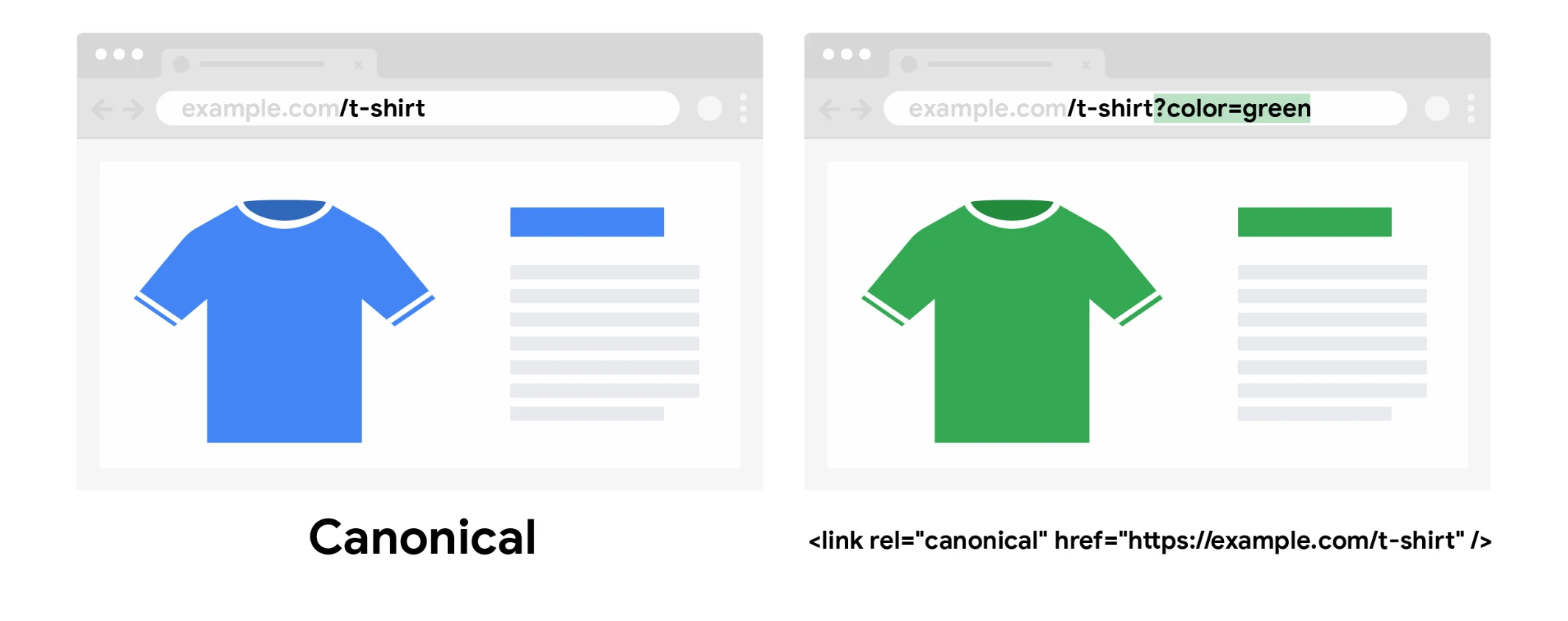
In practice, canonical is a strong hint to the search engine, not an irrevocable command. This means that Google and other search engines can take it into account, but the final decision rests with the algorithms that assess which address to treat as canonical. With consistent signals within the site, the likelihood of the correct choice increases. However, if the signals are inconsistent, the search engine may indicate a different URL than the one declared in the tag.
The simplest scheme looks as follows: first you identify a group of similar URLs, then you choose one parent URL, and then you set the canonical from the remaining variants to that version. The main page itself in such a cluster usually has a self-referencing canonical, meaning it refers to itself. This way, signals related to indexing, links and relevance accumulate on one address instead of being spread across numerous variants.
Canonical is not a substitute for 301 redirects and does not restrict user access to the page. If a given URL variant is needed by no one, 301 is usually the better choice. If, however, the variant should remain accessible, for example for filters, sorting or campaign tracking, but should not compete in the index, then canonical may be the right solution.
- 01Preferred URL designationIndicates the main address for the content
- 02A solution for duplicatesFor sorting, filters, parameters
- 03A hint for the search engineA strong suggestion, not a command
Canonical is a strong suggestion for Google, helping indicate the correct address in cases of duplicates, but the final decision is made by the algorithm.
What are the current challenges associated with canonical tags?
The current challenges associated with canonical tags stem mainly from the fact that search engines analyse them in the broader context of the entire site. The tag alone is not enough when other signals suggest a different version. This is especially visible in large stores, complex CMSs and sites with faceted navigation, where the number of URL variants can grow very quickly.
Today, the most common problem is technical inconsistency. The canonical points to one address, internal linking leads to another, the sitemap contains yet another, and some variants return a redirect or an error. The canonical URL should be indexable, return a 200 status code and must not be blocked in robots.txt or marked noindex.
- several canonical tags on one page,
- a canonical pointing to an address with a redirect, a 4xx/5xx error or a soft 404,
- pointing to a URL with noindex or blocked in robots.txt,
- canonical loops, where subpages refer to one another in a contradictory way,
- setting canonical on pages that in fact differ in intent or scope of content.
Language and regional versions are a separate issue. Canonical helps to organise duplicates within the same language version, but does not replace relationships between languages. If a site has Polish, English and German versions, their relationships are handled through hreflang, not by reducing everything to a single canonical.
In practice, the biggest problems usually come to light after a template change, domain migration, rolling out a new CMS or expanding filters in an online store. That is when some rules work automatically, but not always in line with SEO assumptions. That is why after every major change it is worth checking whether the site is creating unnecessary duplicate clusters and whether the canonical is consistent with the actually preferred URL version.
How to implement the canonical tag correctly on a website?
The canonical tag is implemented correctly when each group of similar URLs points to one consistently chosen URL as the main version. First you need to establish which variants are genuinely duplicates: URLs with parameters, filters, sorting, UTM tags, technical versions or differences such as www and non-www. Only then do you choose the address that is to be indexed, used in internal linking and included in the sitemap.
The tag itself is usually placed in the head section as link rel=”canonical” with the full, absolute URL. The safest rule is: one main content page, one canonical, one target URL. The canonical page should most often have a canonical pointing to itself, i.e. the so-called self-referencing canonical.
From a technical point of view, consistency of signals is key. The URL indicated as canonical should return status code 200, must not be blocked in robots.txt, marked noindex or lead through a redirect. If the canonical points to a non-indexable or incorrect address, the search engine will often choose a different URL than the one you intended.
In practice, the implementation needs to be verified not only in the code, but also in how the site works. Internal linking, menu, breadcrumbs, sitemap and addresses used in campaigns should support the same variant. Canonical works best when it remains in line with the rest of the site.
If the user does not need a specific URL variant, a 301 redirect will usually be the more sensible option. It is worth implementing a canonical when different versions are meant to remain available, but should not compete separately for rankings in the index. This is a common scenario with sorting, campaign parameters and some filters in e-commerce.
- 01Identify duplicatesParameters, filters, sorting, www.
- 02Choose the main URLFor indexing, linking, the sitemap.
- 03Place the tag in the headFull, absolute URL.
- 04Implement self-referencingThe main page points to itself.
Consistency is key: one main content page, one target URL and one consistent canonical tag.
What are the best practices for using the canonical tag?
Good practice with the canonical tag comes down to indicating only the URL version that is actually meant to collect SEO signals and serve as the content’s representative in the index. A canonical is not a tool for “sticking together” any subpages that are only partially similar. If two pages answer different search intents, each should have its own indexing strategy.
The most common slips result from automatic settings in the CMS or e-commerce platform. Filters, pagination, product variants and parameterised URLs can generate hundreds of URLs for the same offer. A better approach is to set one canonical rule for the product, category and article, instead of manually “putting out fires” for individual exceptions.
It is also worth keeping the relationship between canonical and other methods under control. Do not combine canonical with noindex unless there is a clear need, because it often sends conflicting signals. Do not point canonical to a page with an error, to a soft 404, to a URL after a redirect or to a URL that the site itself hardly links to anywhere.
- Use only one canonical per page.
- Point the canonical to an absolute, indexable URL returning 200.
- Strengthen the same URL in internal linking and in the sitemap.
- Set the canonical to the base version for UTM tags, sorting and some filter parameters if those variants add no value in Google.
- Do not indicate as the main page one that is itself a secondary navigation step, e.g. a random pagination page.
On multilingual sites, the canonical should organise duplicates within the same language version, not replace relationships between languages. To connect the Polish, English or German version, hreflang is used. Canonical and hreflang solve different problems, so they should work in parallel rather than as substitutes.
After implementation, the effects should be checked regularly in webmaster tools, as well as after every major technical change. Domain migrations, template changes, a new CMS, filter rebuilds and URL modifications are particularly important. The most common mistake in practice does not come from bad theory, but from the fact that correct settings stop applying after the site is updated.
How can you avoid typical mistakes when using the canonical tag?
Typical mistakes when using the canonical tag can be avoided by sticking to one consistent target URL version and tying all technical signals to it. Most often the problem is not the tag itself, but the fact that the site gives the search engine conflicting instructions. The page specifies one canonical, while the sitemap, internal linking or redirects promote a different address. When the signals diverge, the search engine may ignore the indicated canonical version.
It is incorrect to point the canonical at an address that should not serve as the main version. This applies to pages with noindex, addresses with redirects, 4xx and 5xx errors, and URLs blocked in robots.txt. In practice, the canonical should lead to a page that is accessible, indexable and returns a 200 response.
The problem also arises when the canonical links pages that are not actually duplicates. If two pages address different user intents, have different filters, different offer variants or genuinely differ in content, they should not be tied together with a single tag. The canonical helps organise duplication, but it is not a tool for “switching off” pages that should function independently in search results.
In e-commerce, filters, sorting and pagination require particular attention. Campaign tracking parameters and sorting should usually point to the base URL, while some filters can create separate subpages that are valuable from an SEO perspective. By contrast, pagination pages should not be canonicalised automatically to page one if the subsequent pages form a separate part of the listing and serve their own role for the user.
It is also worth keeping an eye on implementation errors resulting from the CMS or template. These include two different canonicals on one page, loops between addresses, a missing canonical on the main version, or specifying a relative address instead of the full one. The safest setup is one canonical per page and a self-referencing canonical on the URL that is meant to be the main version.
- 01Consistent URL versionAll signals point to one target
- 02Avoid discrepanciesSitemap, links and redirects aligned
- 03Incorrect targetsAvoid noindex, errors and blocks
- 04Accessible and indexableThe target must be valid and open
Key: Make sure all technical signals consistently promote one accessible canonical URL version to avoid search engine confusion.
How should you monitor and verify the effectiveness of the canonical tag?
The effectiveness of the canonical tag is worth assessing by checking whether the search engine actually chooses the indicated address as canonical and whether it is not indexing unnecessary variants. Adding the tag alone does not mean the issue is closed. What matters is the effect visible in indexing, crawl budget and the consistency of the addresses appearing in search results.
The key is to compare two elements: the canonical address declared by the page and the canonical address selected by the search engine. If these versions are not identical, the cause usually lies in other signals, such as internal linking, sitemap, redirects or the level of content similarity between variants. It is precisely the gap between “user-declared canonical” and “selected canonical” that most often shows the implementation is only partially correct.
In practice, it is a good idea to analyse not only individual URLs, but also entire sets of subpages operating according to a similar pattern. This is particularly relevant for categories with filters, product pages with variants, addresses with campaign parameters and technical versions after a migration. After a template change, a new CMS implementation or a navigation rebuild, it is worth returning to the checks, because canonical issues often reappear precisely after such implementations.
- Check in the URL inspection tool what canonical the page declares and which address the search engine selects.
- Make sure the canonical address returns 200, has no noindex, is not blocked in robots.txt and does not go through a redirect.
- Compare the canonical with internal linking, the sitemap and the URL variant used in the site navigation.
- Crawl the site with a crawler to catch missing canonicals, multiple tags on one page, loops and faulty patterns in templates.
- Monitor indexing reports and check whether parameters, filters and other variants that were supposed to remain secondary are starting to appear in the index.
Solid verification is not limited to a one-off test of a few subpages. You need to check whether, over time, the number of unnecessary variants in the index is falling and whether the site is consistently pointing to one URL for one piece of content. If the index still selects different addresses than the planned ones, the problem most often lies in the architecture of signals, not in the canonical tag itself.