The canonical tag is also known as a canonical link or “rel canonical”. It is a tag found in the page source code that tells search engines that there is a primary copy of a given page. Canonical tags are used in SEO to help search engines index the correct URLs and avoid content duplication.
What is a canonical tag?
A canonical tag (rel=“canonical”) is a snippet of HTML that specifies the main version of duplicate, near-duplicate and similar pages. In other words, if the same or similar content is available under several different URLs, you can use canonical tags to determine which one is the primary version intended for indexing.
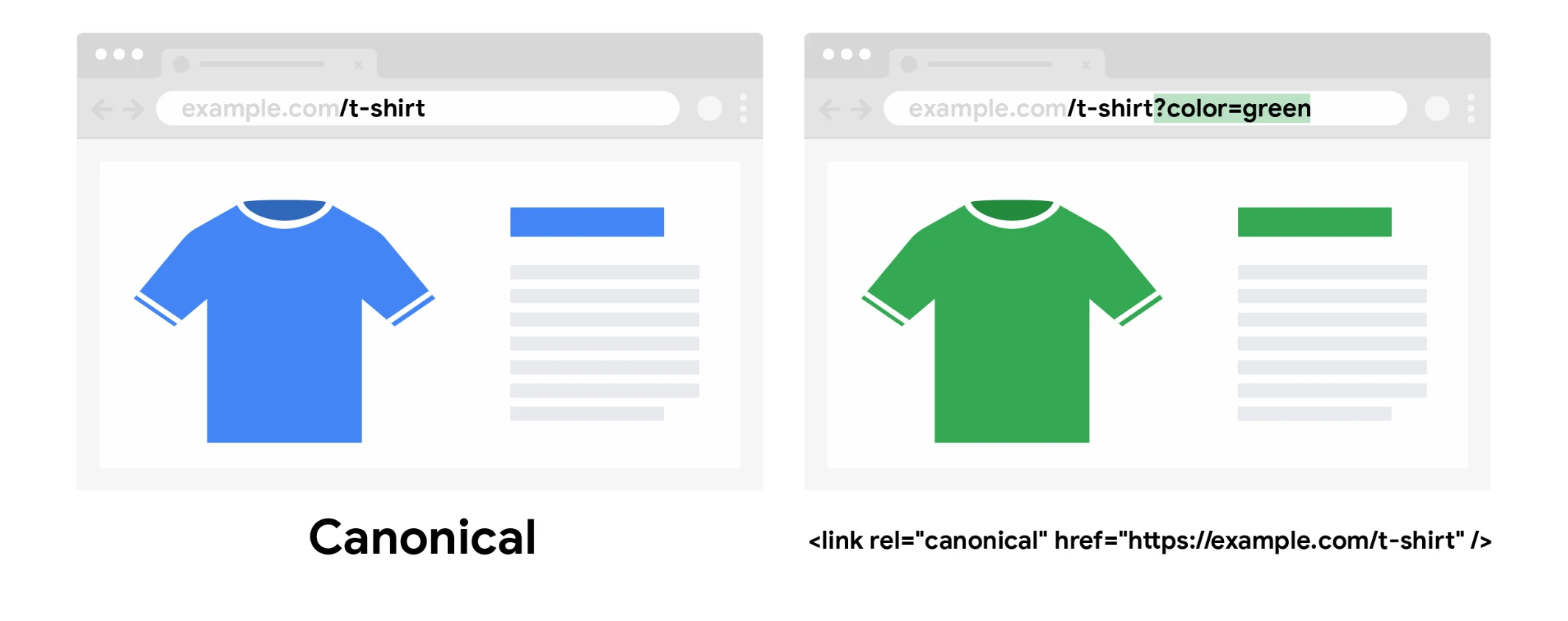
DiagramThe colour variant has its own URL with a parameter, but the canonical link points to the main product page — signals from both URLs are consolidated on one URL.Source: Google Search Central, CC BY 4.0
Canonical tagWhat is a canonical tag?
01Content duplicatesIdentical or similar pages
02Canonical tagIndication of the main version
03IndexingCorrect indexing for Google
It defines the main page for Google, avoiding problems with duplicates.
Why are canonical tags important for SEO?
Google does not like duplicate content. It makes it harder for the search engine to decide:
Which version of the page to index (only one is indexed!)
Which version of the page to rank for specific queries.
Whether to use the “link equity” on the page or split it between multiple versions of it.
An excessive amount of duplicate content can also affect the “crawl budget”. This means that Google may waste time crawling many versions of the same page instead of discovering its other important content.
Where should rel=canonical be added?
The canonical tag should be placed in the HEAD section as a relative address, that is, the full form of the URL address.
Canonical tags solve duplication issues and direct SEO equity.
The truth about crawl budget
Forcing Google to waste time crawling duplicate content is something that should be avoided where possible. However, Google says that for most sites this is not a problem.
If new pages are to be analysed on the same day they are published, then crawl budget is not something webmasters need to focus on. Similarly, if a site has fewer than a few thousand URLs, it will be analysed efficiently.
Canonical tags solve all these problems. They make it possible to tell Google which version of the page the search engine should index and rank, and where to use “link equity”, that is, link juice.
Failing to specify a canonical URL will mean that Google will act at its own discretion.
Relying on Google is not a good idea. The search engine may choose a version of the page that should not actually be canonical.
Important: Google says it usually takes the set canonical URLs into account, but not always. This is because canonical tags are hints, not directives. If they are followed, then any signals, such as links, will work in favour of the canonical URL.
Using best practices related to canonical tags helps reduce the risk of Google noticing an undesirable version of the page and treating it as canonical.
Common errors related to canonical tags
Canonical tags are an interesting solution. However, if they are used incorrectly, websites or their specific subpages may be completely ignored by Google.
Before implementing a canonical tag pointing to another page, the webmaster should first decide whether the content is truly the same and should familiarise themselves with common errors related to canonical tags.
Common errors are as follows:
The canonical URL returns a 404 status code. Canonical URLs must always be accessible, because a 404 error is confusing for the search engine robot.
Combining “noindex”, “disallow” or “nofollow” tags with a canonical URL is not recommended.
The canonical link element is located in the main part of the document and should not be reused in metadata.
The canonical tag should not point from HTTPS to HTTP. In January 2017, Google announced that using a secure HTTPS connection would become an important ranking factor for websites. From that moment, Google has preferred HTTPS pages as canonical URLs.
Technical SEOHow to implement canonical tags?
01HTML tag (rel=canonical)Code in the head section
02HTTP headerServer configuration
There are two main canonical signals that help Google understand preferred URLs.
How to implement canonical tags?
There are five known ways to specify canonical URLs. They are known as canonical signals:
HTML tag (rel=canonical),
HTTP header.
How to check canonical tags?
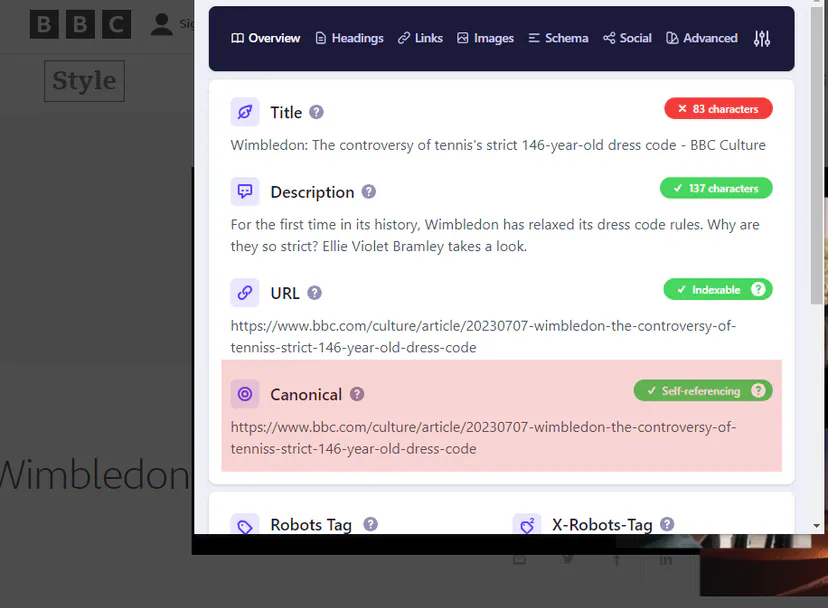
To avoid checking the source code of every subpage, it is best to crawl the site using Screaming Frog to check canonical tags across the entire site in one go, or you can use the free Detailed SEO Extension plugin.
Example of specifying a canonical tag using the Chrome plugin – Detailed SEO Extension
1. Establishing canonical elements using HTML tags rel=”cannonical”
Using the rel=canonical tag is the simplest and most obvious way to specify a canonical URL.
Simply add the following code to the <head> section (header) of any duplicate page:
Take as an example an ecommerce website for a t-shirt shop. The https://twojsklep.com/tshirts/black-tshirts/ page should be set as the canonical URL, even if the page content is available via other URLs (e.g. https://yourstore.com/offers/black-tshirts/)
Simply add the following canonical tag to any duplicate pages:
When using a CMS, you do not need to modify the website code.
Establishing canonical tags in WordPress:
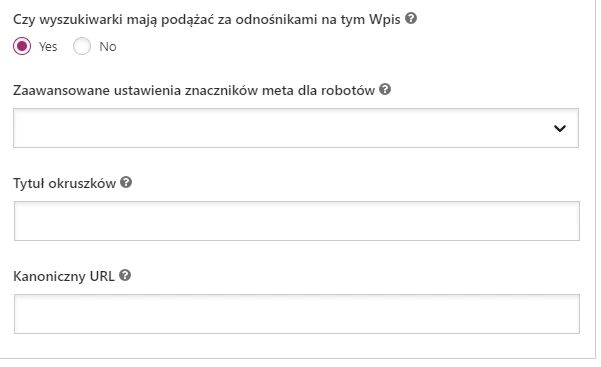
After installing Yoast SEO, self-referencing canonical tags will be added automatically. To set custom canonical tags, choose the “Advanced” section in each post or on each page.
How to add a canonical tag using the Yoast SEO plugin
Establishing canonical tags in Shopify:
Shopify adds self-referencing canonical URLs by default for products and blog posts. To set custom canonical URLs, you need to edit the theme files directly (.liquid).
2. Establishing canonical tags in HTTP headers
In documents such as PDF files, it is not possible to place canonical tags in the page header, because there is no <head> section on the page. In such cases, you need to use HTTP headers to establish canonical elements. Canonical elements can also be used in HTTP headers on standard websites.
Example
As an example, take creating a PDF version of a blog post and placing it in a blog subfolder (strona.com/blog/*).
The HTTP header in this case may look as follows for such a file:
HTTP/1.1 200 OK Content-Type: application/pdf Link: <https://strona.com/blog/canonical-tags/>; rel=”canonical”
3. Internal links
How subpages are connected to each other within a given site is a canonical signal.
Maintaining as much consistency as possible with all these signals makes it easier for search engines to determine the preferred canonical URL. It is worth remembering that Google also prefers HTTPS URLs over HTTP.
FAQ
Frequently asked questions
01How does the rel=canonical tag work on a website?
It tells search engines the main version among pages with the same or similar content. This allows Google to choose the correct URL for indexing and SEO.
02Why are canonical tags important for SEO?
They help avoid duplicate content issues and make it easier for search engines to decide which version of a page to index. They also affect how “link equity” is assigned to the chosen URL.
03Where should rel=canonical be placed in the page code?
The canonical tag is placed in the HEAD section of the page. The article also said that it should be a full URL.
04Does Google always respect the canonical URL set?
Not always, because the canonical tag is a hint to Google, not a command. The search engine usually takes it into account, but it may choose a different version of the page.
05What are the most common canonical tag mistakes?
A mistake is pointing the canonical URL to one that returns 404, as well as combining the canonical tag with noindex, disallow or nofollow. You should also not point from HTTPS to HTTP.
06How can you check canonical tags across the whole site?
The easiest way is to crawl the site in Screaming Frog to check them in bulk. The article also mentioned the free Detailed SEO Extension plugin.