Content needs links before it achieves the right positions in search rankings. Google finds posts and pages best when links to them lead from somewhere on the web. Internal links also connect content and inform Google about the structure of a website. They make it possible to establish a hierarchy on the site, allowing you to create more important pages and posts with higher link value compared with other, less valuable pages. Using the right internal linking strategy has a positive impact on SEO. Below you can find more information about the importance of internal linking and the approach to this process.
What are internal links?
An internal link is any link leading from one page to another internal page within the overall website. Both users and search engines use links to find content on a site. Users use links to navigate the site and find the content they are looking for. Search engines also use links to navigate the site. They will not find a page to which no links lead.
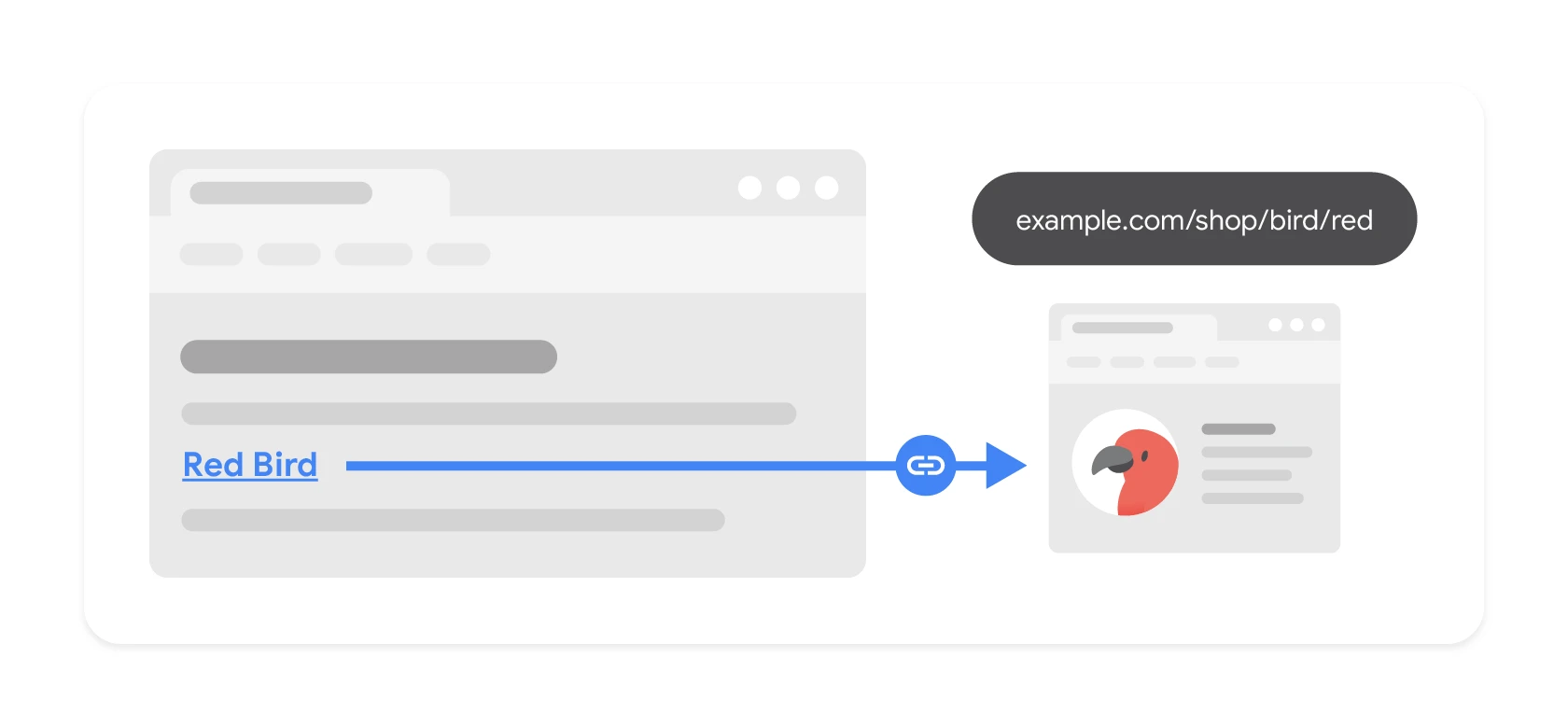
DiagramThe link text (“Red Bird”) tells the user and the search engine what to expect after clicking — which is why “click here” is a wasted opportunity.Source: Google Search Central, CC BY 4.0
There are many types of internal links. In addition to links on the homepage, in the menu and other elements, it is possible to place links in the main content. These are referred to as contextual links. Contextual links direct users to interesting related content. They also allow search engines to discover what the content on the page is related to and establish its value. The more links that lead to an important page, the more important it will be for search engines. As a result, good internal links are crucial for SEO activities.
SEO strategyWhat are internal links?
01Link definitionConnection within a site
02Navigation & discoveryFor users and search engines
A key element of navigation and SEO, making content discovery easier for people and bots.
Internal and external links
Every website (including online stores) consists of internal and external links. Internal links connect pages and posts within a website, while external links connect pages with other pages on the web. It is worth learning a bit more about internal links and their importance for SEO.
Why are links important for Google?
Internal linking is an important factor for Google and the other search engines.
Google uses links to discover content on pages and to rank it in search results. If a post or page has a lot of links, this signals to Google that it is dealing with an important article of high value. This applies to both internal and external links.
Internal linking is something you can control as a website owner. With the right internal links, you direct visitors and Google to the most important pages.
Internal linksUnderstanding different types of internal links
01Navigation linksMain menu structure
02Footer and sidebarAvailable on all pages
03Contextual linksIn article content
04Help usersMake content easier to find
Crucial for user navigation and a consistent site-wide structure.
Internal links establish connections between content
Google analyses pages using internal and external links, opening them with a robot known as Googlebot.
This robot visits, among other pages, the homepage, loads it and then moves through many subpages of the information architecture. By using links, Google can discover connections between different pages, posts and other types of content. In this way, Google finds out which pages cover similar topics.
For example, above a post there may be tags “SEO content”, “internal linking” and “site structure”. In this way, by adding such internal links, you can make sure that Google understands that the content on those pages is related to the content of the given post.
Internal links make it easier for search engines to find content
Websites are now growing in size and becoming more complex. As a result, in many cases “orphan content” becomes a problem. This term refers to pages that have no internal links pointing to them. This is a major issue because without any internal links directing Googlebot to such pages, search engines have no way of finding and indexing them.
Although websites now have sitemaps with a list of URL addresses for the (majority of) pages that make up a given site, it takes search engines quite a long time to reach those pages. This is particularly evident in the case of large sites that use a lot of resources for crawling or new sites that are not visited often by Google. By adding internal links to newly published pages, you provide search engines with additional opportunities to reach the content.
Understanding different types of internal links
There are several different types of internal links: navigation links, footer links, contextual links and sidebar links.
Below you can find more information about them and how they appear on the site.
Navigation links
Navigation links are the most important internal links because they are permanently placed in the main menu. They create the basic navigational structure of the site.
Navigation links are often found in the top menu or in the sidebar and include product categories, services or the most important topics covered in the content.
They are usually implemented so that they are available across the whole site and on all subpages. Their main purpose is to help users find what they need.
Navigation links using a news portal as an example
Footer links
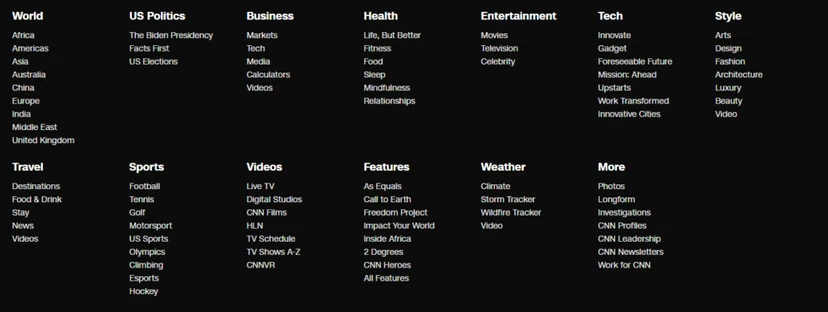
Footer links are one type of navigation link. They appear on every page within the site, but at the bottom.
Such links should point to other pages within the site that may be of interest to the user.
Popular footer links include links to pages such as “Contact”, “About us”, “FAQ”, etc.
Example of CNN footer links
Sidebar links
Sidebar links are other types of navigation links used on certain pages to direct users to related content.
Many news or recipe sites have this type of links. They encourage visitors to move on to related pages within the same site.
Contextual links
Contextual links (or links in the text) are usually placed in the main content on the page.
Instead of directing users to larger pages, these types of links direct them to other related content.
Such links are usually placed within descriptive anchor text.
Blog posts often contain contextual links pointing readers to related, relevant content. They also help Google understand how your pages are connected to each other.
Establishing an internal linking strategy
For SEO optimisation of a website, regular review and improvement of the internal linking strategy is important. This is one way to improve a website. By adding the right internal links, you can make sure that Google understands:
the relevance of pages,
the relationships between pages,
the value of pages.
To establish an internal linking strategy, you need to take many things into account. The exact approach depends on the website and your goals, but carrying out the following actions is good practice.
Defining the ideal site structure
It is useful to imagine a website as a pyramid. At its top is the homepage, followed by certain sections or categories, and at the bottom are individual posts and pages (with possible subcategories in between). Proper optimisation allows this structure to be reflected in the website menu.
Deciding which content is most important
Next, you need to determine which content is the most important. This is the best and most comprehensive content. It should concern the main essence of a given business. This is the content that people want to find when searching for topics or products you specialise in.
Anyone who wants to let Google know that this is the most important content should add many links to it. There are various places from which you can link to your cornerstone content. Below are the most common options.
Adding contextual links
After writing different articles on a specific topic, you should connect them with one another. This will show Google and site users that such articles are topically related. You can create links leading directly from sentences in the content or add links at the end of the post.
In addition, you need to show Google which articles are key. This means the most comprehensive article on a given topic. You should add a link to it in all articles related to that topic. Do not forget to create reciprocal links from the main article to individual posts.
Contextual linking – example
An example could be a blog with the main article “Comprehensive guidelines for keyword research”. Such a post will rank in Google search results for all related queries about keyword research.
An important point was adding links from other relevant articles, such as “7 search mistakes to avoid”, “What is keyword research?” or “Focusing on long-tail keywords”. Then reciprocal links leading to these articles were added from the main article.
Thanks to this, Google will understand that the comprehensive guidelines contain the most information about keyword research. As a result, Google will rank the comprehensive guidelines above other, shorter posts about keyword research.
Linking hierarchical pages
If you have hierarchical pages on the site, you should connect parent pages with child pages and vice versa. You should also not forget to link sibling pages to one another. Such pages should be linked together in a well-organised site.
Adding a related posts section
There are many plugins and modules that add complete related posts sections to specific posts. This way, you can effectively show your posts to more visitors. When using such solutions, it is recommended to check whether the posts used are actually related. If there is any doubt about this, then manual linking to posts is probably the best solution.
Adding navigational links
In addition to linking from topically related posts and pages, it is possible to give even more authority to the main content by adding links to it from the homepage or the top navigation menu. You should do this for posts and pages that are the most important for your business. This will give posts or pages a high link value and make them gain strength in Google’s eyes.
Adding taxonomy links
Taxonomies, like categories and tags, help organise the site and help users and Google understand what the content is about. If you have a blog, it will be beneficial to add internal links to the taxonomies to which the blog post belongs. Adding links to categories and tags helps Google understand the structure of the blog and helps visitors move to related posts more easily.
Adding links to the latest posts
Good practice after publishing a post or page is to link to such a newly published post from other content on the site. Of course, posts or pages that link to the recently published post must have similar topics. You should not link to this new post only from a random post or page.
Such a task may seem daunting, especially when you publish content regularly. It is worth making the effort, however, to avoid the problem of orphaned content, which needs fixing. In addition, adding internal links to the latest posts means that search engine bots can crawl and index them when they land on other pages within the site.
FAQ
Frequently asked questions
01How does internal linking affect a website’s SEO?
It helps Google discover content, understand how it is connected and assess its importance. As a result, well-planned internal links support SEO.
02Can Google find a page without internal links?
This can be difficult, because search engines use links to navigate the site. A page with no internal links can become orphaned and may not be easily found or indexed.
03Why are contextual links important in article content?
They direct users to related content and show Google what a given page is topically related to. They also help establish a page’s value and importance within the site.
04What are the most important types of internal links?
The article mentions navigation links, footer links, sidebar links and contextual links. Each plays a different role in organising and discovering content.
05When is it worth adding a link to a newly published post?
Ideally after publication, from other content on a similar topic. This helps Google reach the new page faster and index it more easily.
06What should you do to signal the most important content on the site to Google?
You need to link to it from other related posts, from the homepage or from the menu. The article also highlights the importance of relationships between parent, child and sibling pages.