Websites all over the world are visited by Googlebot, which is responsible for analysing them in order to determine the correct ranking in search results. It gathers information that makes it possible to build a searchable web index. It is worth remembering that Google has robots tailored to desktop sites, mobile devices, as well as separate robots focused on news, images and video content.
What is Googlebot?
Googlebot is a virtual robot developed by engineers in the Mountain View offices. This solution is designed to visit pages quickly before their subpages are indexed. It is a computer program that simply searches for and reads the content of websites and modifies their index in line with the updates it finds. The index, where search results are stored, is a kind of “brain” of Google. It is here that all knowledge is stored.
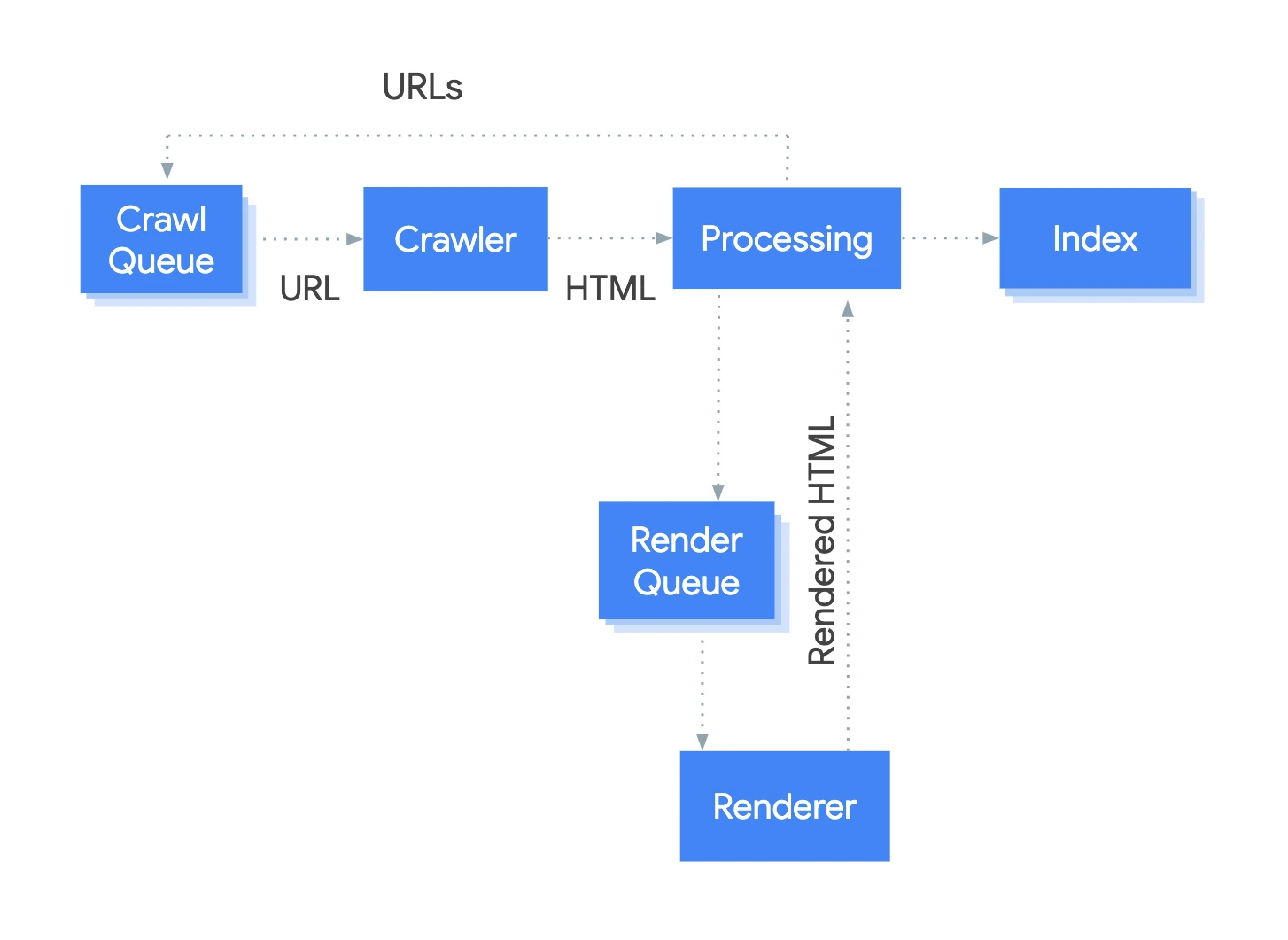
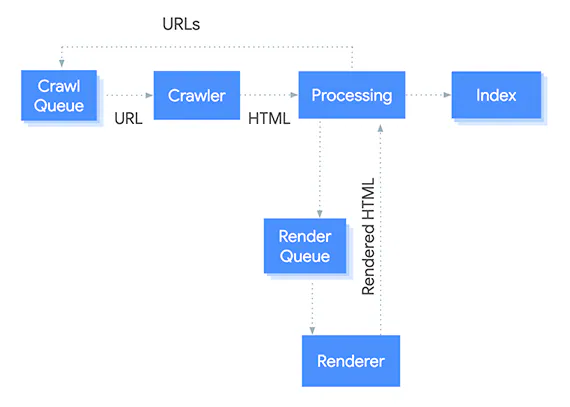
DiagramPages with JavaScript also go to the render queue — content visible only after scripts are executed may be indexed later than HTML from the server.Source: Google Search Central, CC BY 4.0
Google uses thousands of “small computers” in order to send its robots to every corner of the web. This allows it to find websites and check what is in them.
There are many different robots, each with its own clearly defined purpose. For example, AdSense and AdsBot robots are responsible for checking the compliance of paid ads, while Android Mobile Apps checks Android applications. There are also robots responsible for images, news, etc.
Googlebot: what is it?What is Googlebot?
01Virtual robotCrawls websites.
02Index updateModifies Google’s 'brain’.
03Web explorationDiscovers the corners of the internet.
Googlebot is the key to up-to-date knowledge in search, ensuring that the search results index is always current.
How does Googlebot work and what does it look for?
This robot uses sitemaps and links found during crawling processes. Googlebot decides for itself how often to visit websites. It assigns each page a “budget”, that is some kind of visit limit.
As a result, it is normal that hundreds or even thousands of websites have not been fully crawled or indexed. To make Googlebot’s job easier and make sure the site is properly indexed, it is worth checking whether some factor is not blocking the robot or slowing it down (for example, an incorrect directive in robots.txt).
The diagram shows the steps Googlebot takes to analyse and render a page’s content. The process is iterative. Each time Googlebot finds a new URL, it adds it to the crawling queue.
robots.txt commands
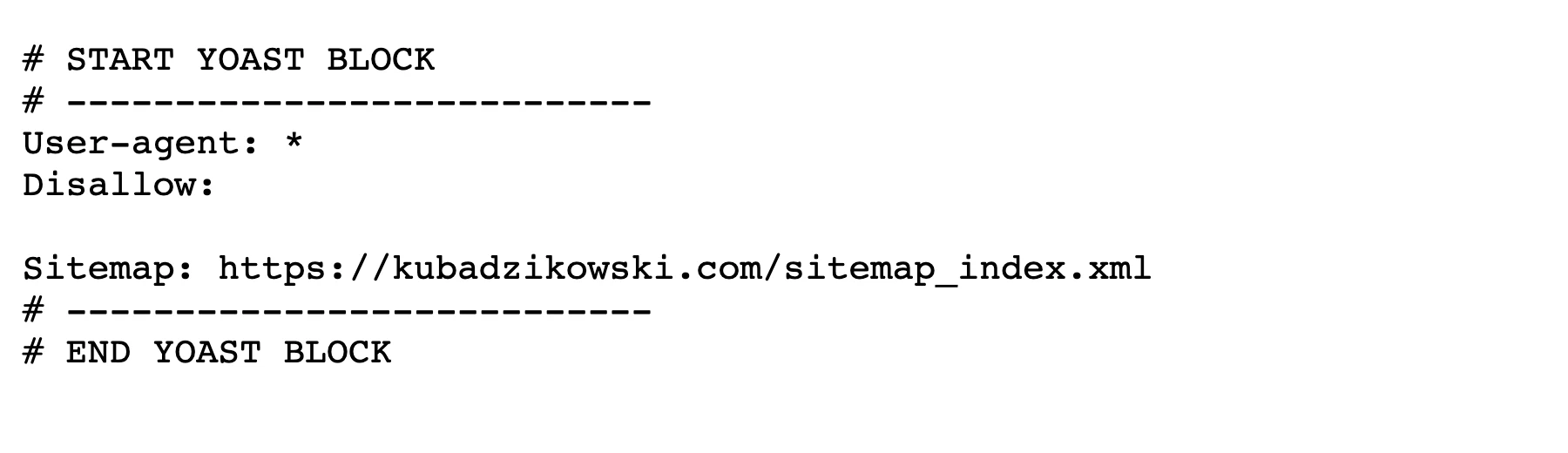
Robots.txt is a kind of map for Googlebot. It is the first element it visits, so the robot can act in line with the guidance. In the robots.txt file, you can restrict Googlebot’s access to specific resources on a website. This system is usually used to optimise the strategy of the aforementioned crawl budget (visit limit). Access to the robots.txt file for any website can be obtained by adding robots.txt to the end of the URL.
ExampleThe simplest valid robots.txt: it blocks nothing (empty Disallow) and points robots to the sitemap address. File from kubadzikowski.com, own screenshot
This solution can, for example, block the crawling of websites with shopping baskets, customer accounts or various configuration subpages.
robots.txt commandsRobots.txt: a roadmap for Googlebot
01First point of contactStart for Googlebot.
02Action guidelinesDirects the bot’s traffic.
03Access restrictionBlocks selected resources.
04Budget optimisationSaves crawling resources.
05Examples of blocksBaskets, accounts, configurations.
Robots.txt effectively manages indexing, protecting key resources and improving performance.
CSS files
CSS is short for the English name Cascading Style Sheets. This file determines how HTML elements should be displayed on the screen. It saves a lot of time because style sheets are used across the entire website. Such a file can even control the layout of many websites at the same time. Googlebot now not only reads written content, but also fetches CSS files to better understand the overall content of a website.
Thanks to CSS, Googlebot is able to detect possible attempts at manipulation on websites designed to mislead robots and achieve better SEO (the most common attempts include cloaking and placing white text on a white background). In addition, this file allows the bot to fetch certain images (logo, pictograms, etc.), and to read guidelines for responsive design, which are important to demonstrate that a given website is suitable for browsing on mobile devices.
Images
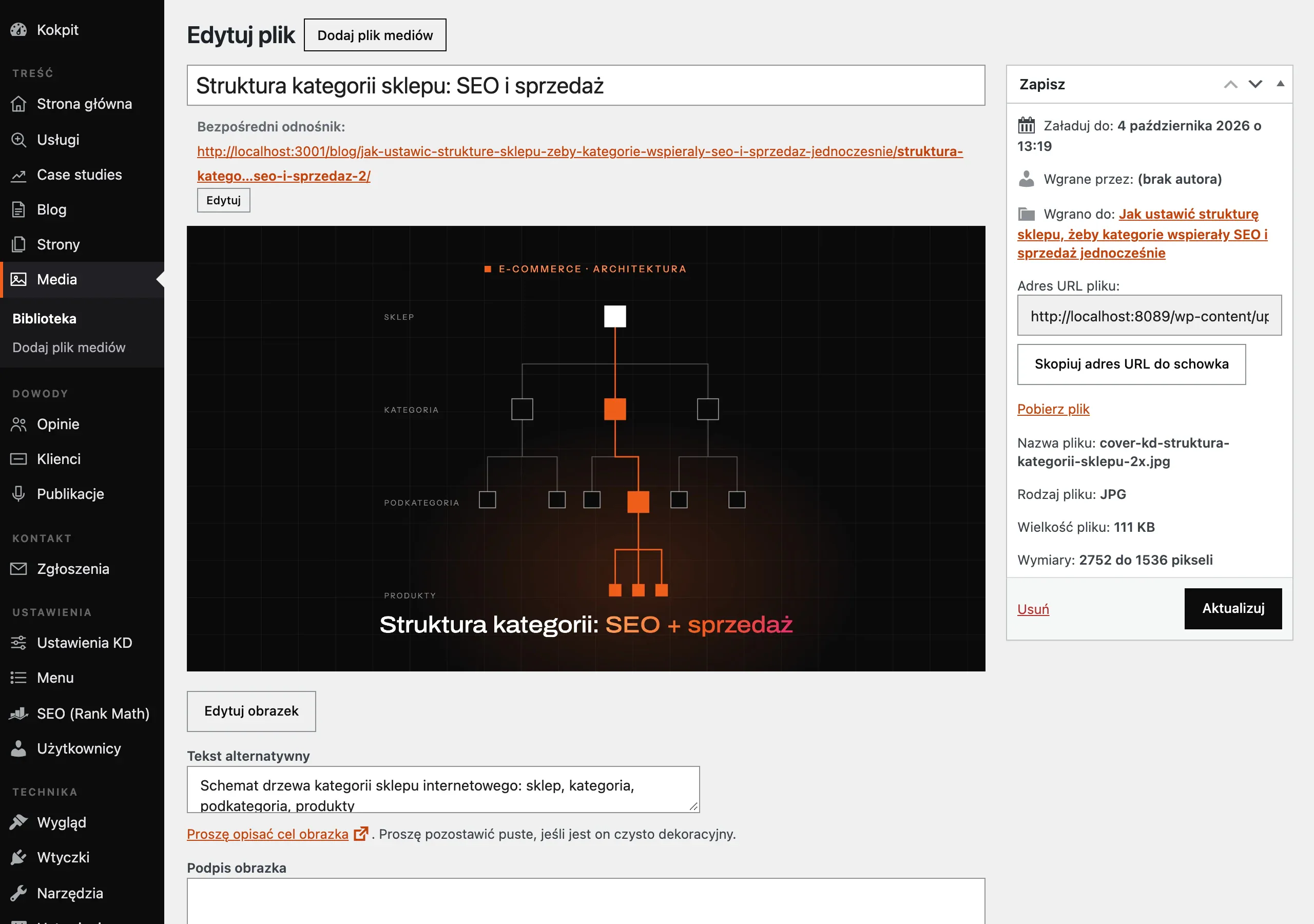
Googlebot fetches images from websites to feed the Google Images engine. Of course, the robot does not “see” the image itself, but it can understand it thanks to the alt attributes and the overall context of the page. Therefore, images should not be underestimated, as they are a significant source of traffic.
ExampleAlternative text is entered once for the file in the media library; alongside it you can also see the image dimensions and file size, which affect page speed. WordPress (local CMS), own screenshotSEO & imagesHow Google understands your graphics
01Fetching by GooglebotThe robot collects graphics from pages.
02Understanding contextIt uses ALT attributes and text.
03Source of trafficGraphics generate valuable visits.
"Proper image optimisation helps robots understand them and attract users from Google Images."
How to analyse Googlebot visits on a website?
Google’s robot is rather discreet and, at first glance, unnoticeable. For beginners, it is an abstract concept. In reality, such a robot exists and leaves traces behind.
These are visible in website logs. One way to understand how Googlebot visits a website is to analyse the logs. The log file also makes it possible to observe the exact day and time of the bot’s visit, the target file or requested page, the server response, etc.
Google Search Console
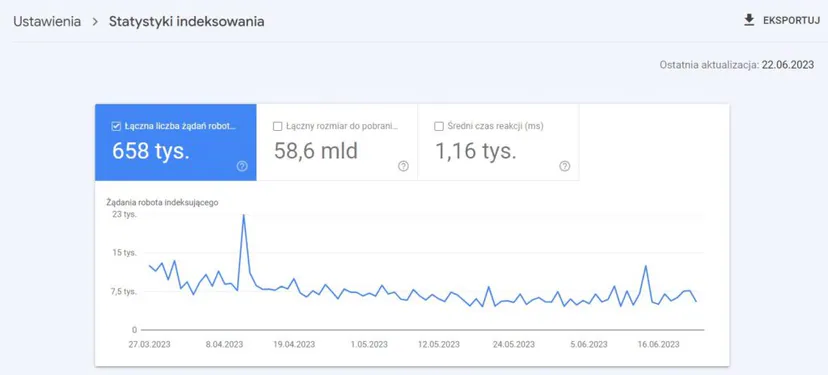
Search Console, formerly known as Webmaster Tools, is one of the most important free tools for checking website usability. Through indexing and crawling charts, you can check the ratio of crawled and indexed pages compared with the total number of subpages that make up a given website. In addition, it is possible to obtain a list of errors that can be fixed to help Googlebot navigate the website more effectively.
“Indexing statistics” in Google Search Console. This report contains a lot of information about how Google indexes your site.
Paid log analysis tools
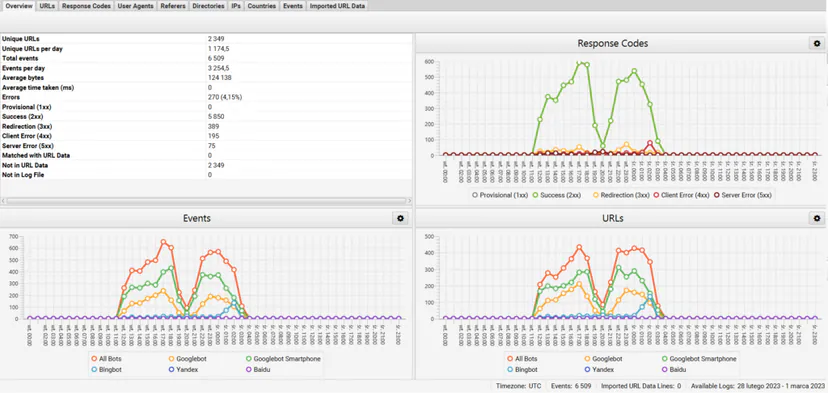
To find out how often Googlebot visits a website and what it does on it, you can also use paid server log analysis tools, which are much more advanced than Search Console. Well-known tools include Oncrawl, Kibana, Botify and Screaming Frog Log Analyser. These solutions are more suited to websites made up of many subpages, which need to be broken down into sections to make analysis easier.
Indeed, unlike Search Console, which provides an overall view of visits, some of these tools make it possible to refine the analysis by determining the crawl range for each type of page (category pages, product pages, etc.). This kind of breakdown is important in order to identify problematic pages and consider implementing the necessary fixes on them.
Example of server log presentation based on Screaming Frog Log File Analyser and the Overview tab
How to optimise a website to meet Googlebot’s requirements?
Helping Googlebot crawl subpages on a website can be a complex process. It involves overcoming technical barriers that prevent the bot from browsing the site in an optimised way. This is one of the three pillars of SEO: on-page optimisation.
Regularly updating content on a website
Content is by far the most important criterion for Google, as well as for other search engines. Websites that regularly update their content are likely to be crawled more often, as Google is constantly looking for new things.
When running a company website (where it is difficult to add content regularly), you can create a company blog directly linked to the website. This will encourage the bot to visit the site more often and enrich the website’s semantics. On average, it is recommended to add new content at least three times a week to increase crawl and indexing frequency.
Improving server response time and page load time
Page load time is a determining factor. Indeed, if loading and browsing the site takes Googlebot too long, it will crawl fewer subpages. Therefore, the site should be hosted on a reliable server offering good performance.
Creating sitemaps
Adding a sitemap is one of the first things you can do to help bots crawl a given site faster and more easily. They will not crawl all the pages on the sitemap, but they will have paths prepared, which is particularly important for subpages that are incorrectly linked within the site.
Avoiding duplicate content
Duplicate content (duplicate content) significantly reduces crawl range, because the Google robot assumes that its resources are being used to crawl the same thing. In other words, it is wasting effort. That is why, both for Google and Panda, duplicate content should be avoided as much as possible.
Blocking access to unwanted pages via Robots.txt
To preserve crawl budget (time spent on indexing), there is no need to allow search engine bots to crawl the wrong pages. These include informational subpages, account management options, etc. A simple modification of the robots.txt file will block Googlebot from crawling these subpages.
Taking care of internal linking
Internal linking is crucial for optimising crawl budget. It not only makes it possible to provide the appropriate SEO value to each subpage, but also guides bots better towards further subpages. More specifically, if you have a blog, after adding an article, where possible you should place a link leading to an older subpage. It will be properly supported and will continue to be of interest to Googlebot.
Internal linking does not directly help to increase crawl range, but it helps bots to effectively crawl further and deeper subpages, which are often overlooked.
Image optimisation
Bots are intelligent, but they are not yet able to visualise an image. They therefore need textual guidance. If the site contains images, the alt attributes should be completed to provide a clear description that search engines will understand and index. Images may appear in search results if they are properly optimised. Image optimisation is extremely important!
FAQ
Frequently asked questions
01How does Googlebot work when visiting a website?
Googlebot analyses the page using sitemaps and links found while browsing. It also assigns each page a crawl budget, so not all subpages have to be fully crawled.
02Does Googlebot index all pages on a website?
Not always, because it has a limited crawl budget. For this reason, hundreds or even thousands of pages may not be fully crawled or indexed.
03Why is the robots.txt file important for Googlebot?
robots.txt works like a map and helps show the bot which resources it can access. It can also be used to block crawling of selected subpages, for example the basket, customer account or configuration pages.
04How does Googlebot understand images on a website?
The bot fetches images and interprets them thanks to alt attributes and the page context. It does not “see” images like a human, but it can understand them and use them in Google Images.
05How can you check Googlebot visits to a site?
The simplest way is to analyse server logs, where you can see, among other things, the date and time of the visit, the target file and the server response. Google Search Console data is also useful, as it shows indexing and errors.
06How can you optimise a site so Googlebot crawls it better?
It is worth regularly updating content, speeding up page loading, adding a sitemap and making sure internal linking is in place. You also need to avoid duplicate content, block unnecessary subpages in robots.txt and describe images with alt attributes.