

Log analysis is a precise way of analysing how search engines read our pages. Every day, SEO specialists and analysts use tools that present diagrams of traffic, user behaviour and conversions. What is more, specialists usually try to understand how Google analyses their pages using Google Search Console. It is worth paying attention to the basics related to server log tools. With these, you check whether the search engine is handling the site correctly – for example through response status codes (404, 503, 302), and so on!
What are log files?
A log file is a file in which the web server records a line for every individual website resource that is requested by bots or users. Each line contains data about the request, which may include IP, date, requested resource (page, .css, .js, …), user-agent, response-time, …
The fragment may look as follows, for example:
66.249.**.** – – [13/Apr/2021:00:07:31 +0200] “GET /***/x_*** HTTP/1.1” 200 40960 “-” “Mozilla/5.0 (compatible; Googlebot/2.1; +http://www.google.com/bot.html)” “www.***.it” “-“
Server logs are created and updated by the server, which records the actions performed. A popular server log file is the access file, which contains a history of HTTP requests sent to the server (both by users and bots).
When requesting logs from a developer, the first question they will ask is which logs you mean. Therefore, you always need to specify your request precisely. When looking for logs for crawling analysis, you should ask for access logs.
Access log files contain a lot of information about each request sent to the server, such as for example:
- IP addresses,
- user agents,
- URL,
- Timestamps (when the bot/search engine sent the request),
- request type (GET or POST),
- HTTP status codes.
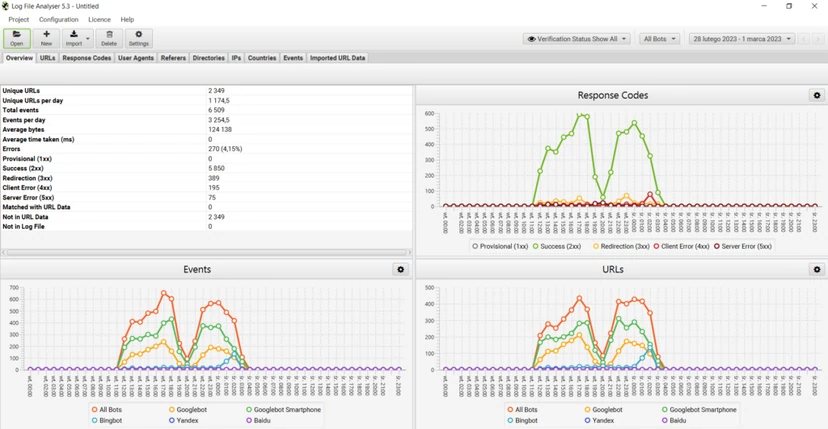
What servers place in access logs varies depending on the type of server, and sometimes on how developers have configured the server in terms of the elements stored in the log files. Popular log file formats include, among others, the following types:
- Apache format – it is used by Nginx and Apache servers.
- W3C format – it is used by Microsoft IIS servers.
- ELB format – it is used by Amazon Elastic Load Balancing.
- Custom formats – many servers support sending custom log formats.
There are also other formats, but the ones presented above are those you are most likely to come across.
- 01The server records requestsAn activity log for each page resource (bots/users).
- 02Detailed record dataContains IP, date, resource, user-agent, response-time and other data.
- 03Creation and updatingThe server automatically creates and updates the HTTP request history.
A key tool for monitoring and analysing the history of server requests.
The ability to analyse and update
Every page has three basic SEO statuses:
- crawlable,
- indexable,
- rankable.
From the perspective of log analysis, you can learn that for a page to be indexed, it must be read by a bot. Similarly, content that has already been indexed by the search engine must be analysed again in order to be updated in the search engine’s indexes.
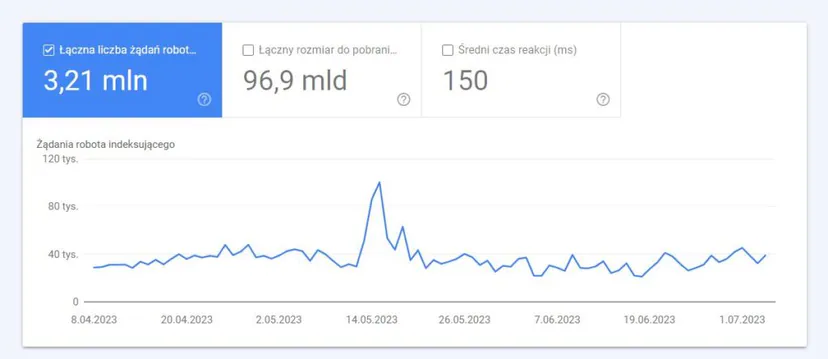
Unfortunately, Google Search Console does not offer this level of detail. You can check how many times Googlebot read a subpage of a given site in the last three months. It is also possible to check how quickly the web server responded.
However, you can check whether the bot read the page. This is possible thanks to using log files in a log analyser.
Why do SEO specialists have to analyse log files?
Analysing log files allows SEO specialists (and system administrators) to understand:
- what exactly the bot reads,
- how often the bot reads it,
- what the time spent crawling is (ms).
A log analysis tool enables you to analyse them by grouping information by “path”, file type or response time. A proper log analysis tool allows you to combine information gathered from log files with information from other data sources, such as Google Search Console (clicks, impressions, average positions) or Google Analytics.
- 01What the bot readsExact scope of indexing
- 02FrequencyHow often the bot returns
- 03Crawling time (ms)Performance and speed
Log analysis reveals bot behaviour, optimising indexing and site performance.
What should you look for in log files?
The first stage in understanding why a page has not been indexed or updated to the latest version is checking whether the bot (e.g. Googlebot) crawled it.
Then, if the site is updated frequently, it may be important to check how often the bot reads the site or its section.
The next step is to check which subpages are read most often by bots. By tracking them, you can check whether such pages:
- deserve such frequent reading,
- are scanned so often because something on the site is causing constant changes beyond your control.
For example, there was a problem with a page that recorded a high scanning frequency by bots under a strange URL address. The bot showed that this page came from a URL created by JavaScript and that it had certain debugging values assigned to it, which changed with every page load. Based on such information, a good SEO specialist will certainly find the right solution to such a hole in the crawl budget.
Crawl Budget
Every site has a metaphorical crawl budget linked to search engines and their bots. It is not recorded anywhere, but it can be estimated in two ways:
- checking the report with crawling statistics in Google Search Console,
- checking log files, and filtering them for a user containing “Googlebot” in the name (The best results can be achieved by making sure that such users are matched to the correct Google IP numbers…).
Crawl Budget increases when the site is updated and interesting content lands on it, as well as when its content is regularly updated or when the site acquires good backlinks.
The way crawl budget is used on a site can be managed through:
- internal links (including follow / nofollow),
- noindex / canonical,
- robots.txt (note: this causes a user-agent block).
“Zombie” pages
By “zombie” pages, one can mean all pages that have not recorded any organic traffic or bot visits for a significant period of time, but which have internal links pointing to them.
This type of page may use too much crawl budget and may receive unnecessary Page Rank because of internal links. Such a situation can be solved in the following way:
- If these subpages are useful for users visiting the site, you can set them to noindex and mark the internal links leading to them as nofollow (or use disallow robots.txt, but caution is needed in this case…),
- If these pages are not useful for users visiting the site, then you can remove them (and set a 410 return status code or redirect with 301, as well as remove all internal links.
FAQ
Frequently asked questions
What information can be read from server log files for SEO?
Logs show, among other things, the IP address, date, URL, user-agent, request type and HTTP status codes. They let you check exactly what the bot read and how quickly the server responded.
Does server log analysis help check whether Googlebot crawled a page?
Yes, because logs let you read whether the bot crawled the page and how often it did so. Google Search Console does not offer that level of detail.
Why do SEO specialists analyse server logs?
To understand what the bot reads, how often it does so and how much time it spends crawling. Logs can also be combined with data from Google Search Console and Google Analytics.
Which log files are best to request for crawling analysis?
You should ask for access logs, because they contain a history of HTTP requests from users and bots. It is worth specifying precisely which logs you mean.
When is it worth checking server logs for crawl budget?
When a page has not been indexed or has not been updated to the latest version. It also helps with frequently updated pages, to assess how often the bot visits them.
What should you do with “zombie” pages that have no traffic but have internal links?
If they are useful, you can set them to noindex and change the links leading to them to nofollow. If they are not needed, you can remove them, return a 410 code or redirect them with 301, and remove the internal links.