

Robots.txt is a file responsible for passing information to search engines about which URL addresses on a given site robots have access to. It is most often used to avoid overloading the website with requests. However, this solution cannot be used to hide a page in Google. In such a case, you simply need to block indexing using the noindex tag or protect the page with a password.
What is the robots.txt file?
Behind the name Robots.txt lies a text file created by webmasters to instruct robots (most often search engine robots) on how they should crawl a website. The robots.txt file is part of the Robots Exclusion Protocol (REP), a group of web standards regulating how robots crawl the web, as well as access and index content and pass it on to users.
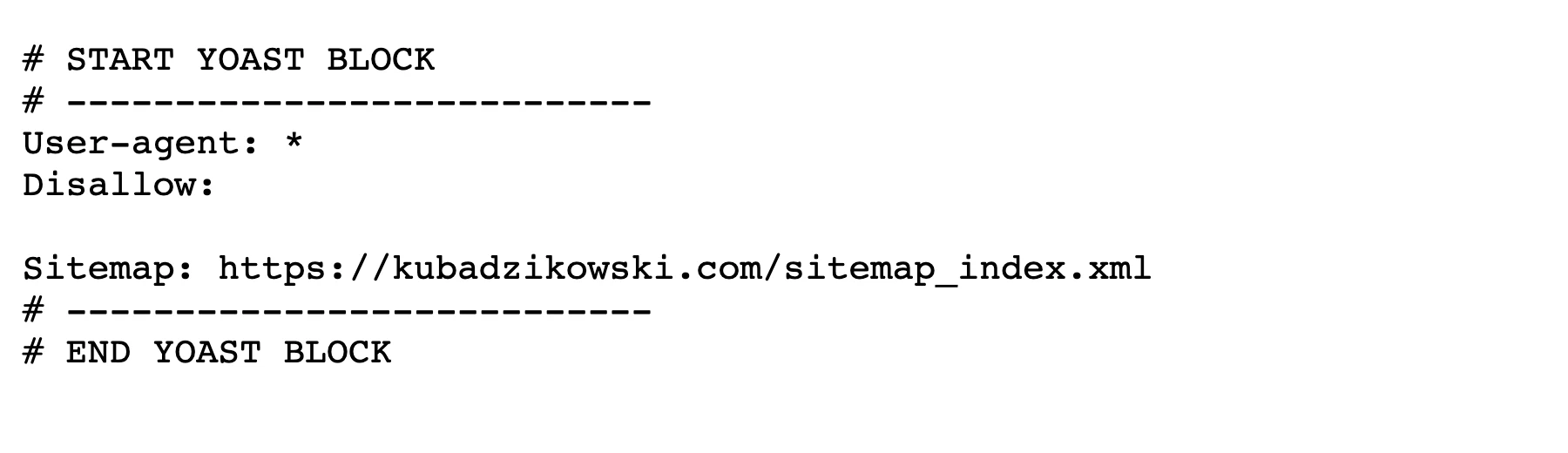
REP also includes guidelines such as meta robots and instructions for pages, categories or websites on how search engines should treat links (e.g. follow or nofollow).
In practice, robots.txt files indicate whether specific bots may or may not analyse particular parts of a site. Such crawling instructions are referred to as “disallowing” or “allowing” specific (or all) users to perform specific actions.
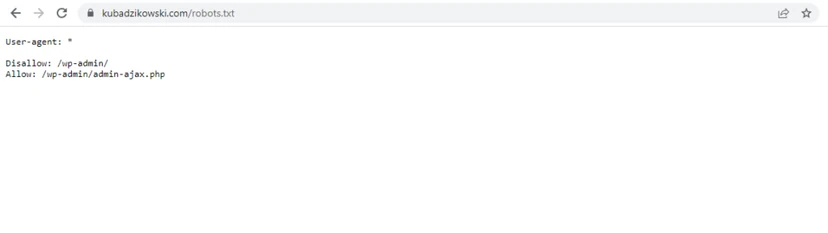
Basic format:
User-agent: [username] Disallow: [URL address will not be analysed]
Together, these two lines are considered a complete robots.txt file. However, one robots file can contain many users and directives (e.g. disallow, allow, crawling delays, etc.).
In a robots.txt file, each set of user directives appears in a separate set separated by a blank line. In a robots.txt file with directives for multiple users, each disallow or allow rule applies only to the bots specified in that particular separate set.
- 01Instructs robotsRegulates site crawling.
- 02Part of the REP protocolA group of web standards.
- 03Manages accessDisallows or allows analysis.
The robots.txt file is a simple but crucial instruction for search engine robots, defining which parts of the site they can index and which they should avoid.
robots.txt example
Below are a few examples of a robots.txt file used for the www.example.com site:
Robots.txt file URL: www.example.com/robots.txt
Blocking search engine robots from the entire content
User-agent: * Disallow: /
Using this syntax in a robots.txt file, you can tell search engine robots not to analyse any subpages on www.example.com, including the homepage.
Allowing all search engine robots access to all content
User-agent: * Disallow:
Using this syntax in a robots.txt file, you can tell search engine robots to analyse all pages on www.example.com, including the homepage.
Blocking a specific search engine robot in a specific directory
User-agent: Googlebot Disallow: /przykładowy-katalog/
This syntax says that only the Google robot (user-agent Googlebot) may not analyse any pages containing the URL www.example.com/przykładowy-folder/.
Blocking a specific robot on a specific page
User-agent: Bingbot Disallow: /example-subfolder/blocked-page.html
This syntax says that only the Bing robot (user-agent Bing) may not analyse the specific page located at www.example.com/example-subfolder/blocked-page.html.
How does robots.txt work?
Search engines perform two basic tasks:
- crawling the web for content;
- indexing content, so that it is shown to searchers looking for information.
To crawl pages, search engines use links to move between pages, and this ultimately leads to the crawling of billions of links and pages. This behaviour is sometimes referred to as “spidering”.
When arriving on a site, before crawling it, a search engine bot checks the robots.txt file. If it finds such a file, it will read it first before taking any further action on the site. The robots.txt file contains information about how the search engine should crawl the site, so the information found in it will instruct the bot on what to do next on the given site.
If the robots.txt file does not contain any directives that prohibit specific user actions (or if the site does not have a robots.txt file), the bot will start crawling other information on the site.
- 01SpideringMoving between links
- 02robots.txt fileChecking before crawling
- 03InstructionsGuidelines for the bot
- 04IndexingProcessing page content
The robots.txt file is the first step in the indexing process, telling search engines what they can crawl on the site.
Other important things about robots.txt that you should know
- To be found, the robots.txt file must be located in the top-level directory of the website (the site root).
- Capitalisation matters in the case of the Robots.txt file: the file must be named “robots.txt” (not Robots.txt, robots.TXT or anything else).
- Some users (bots) may ignore the robots.txt file. This is especially common with many malicious bots, such as malware bots or address stealing bots.
- The /robots.txt file is publicly accessible: simply add /robots.txt to the end of any main domain to check the guidelines for that site (if that site has a robots.txt file!). This means that anyone can see which pages a given owner wants or does not want to crawl. For this reason, such files must not be used to hide users’ personal data.
The syntax of a technical robots.txt file
The syntax of the robots.txt file can be regarded as the “language” of robots.txt files. There are five basic terms that can be found in a robots file. Here they are:
- User-agent (user) – A specific bot to which crawling instructions are given (usually a search engine).
- Disallow – This command is used to tell the user that it may not crawl a specific URL. Only one “Disallow:” line is permitted for each URL.
- Allow (applies to Googlebot only) – This command tells Googlebot that it has access to a specific page or subfolder, even if the homepage or folder may be disallowed.
- Crawl-delay (crawling delay) – Indicates how many seconds the bot should wait before loading and crawling the page content. It is worth remembering that Googlebot does not take this command into account, but the crawl rate can be set in Google Search Console
- Sitemap – Used to indicate the location of any XML sitemaps associated with a given URL. This command is supported only by Google, Ask, Bing and Yahoo.
- 01User-agentIdentifies the crawler bot
- 02DisallowBlocks access to a path
- 03AllowAllows access to a path
- 04SitemapPoints to the sitemap
- 05Pattern matchingUses * and $ for flexibility
robots.txt files use a specific language and regular expressions to manage bots’ access.
Pattern matching
When it comes to actually blocking or allowing access to URLs, robots.txt files can become very complex, because they allow pattern matching that covers many possible URL options. Google and Bing recognise two basic expressions that can be used to identify pages or folders that are to be excluded. These are the asterisk (*) and the dollar sign ($).
When it comes to the actual URLs to block or allow, robots.txt files can get fairly complex as they allow the use of pattern-matching to cover a range of possible URL options. Google and Bing both honour two regular expressions that can be used to identify pages or subfolders that an SEO wants excluded. These two characters are the asterisk (*) and the dollar sign ($).
- * is a character representing any sequence of characters
- $ indicates the end of a URL
Why is the robots.txt file needed?
robots.txt files control robots’ access to specific areas of a given website. However, it can be dangerous to accidentally prevent Googlebot from crawling the entire site. There are, however, certain situations in which the robots.txt file can be very useful.
Typical use cases are as follows:
- preventing duplicate content from appearing in SERPs (meta robots is a better choice here),
- maintaining the privacy of entire sections of a website,
- protecting internal search results pages from being shown on the public SERP,
- specifying the location of the sitemap,
- preventing search engines from indexing specific website files (images, PDF files, etc.),
- setting a crawling delay to protect servers from overload when robots load many content elements at once.
If you do not have areas of the site where user access control is required, the robots.txt file is practically unnecessary.
Limitations of the robots.txt file
Finally, remember that before creating or modifying a robots.txt file, you should familiarise yourself with the limitations when it comes to blocking URLs. Depending on the circumstances and the goal, you may want to consider using other mechanisms. This will help ensure that the given URLs are not found on the web.
- Some search engines cannot handle certain robots.txt rules.
The directives contained in robots.txt files will not dictate the behaviour of certain robots that crawl a site, and it is up to the robot whether it follows the instructions. For example, Googlebot and other popular robots will comply with the instructions placed in the robots.txt file, but there are also some robots that will ignore this file. Therefore, hiding data from such robots should be done using other methods, such as protecting private files with a password. Additionally, remember that even with information in robots.txt, a given resource can still be indexed. Google may receive signals in the form of external linking or the given resource may have been indexed earlier – before the relevant entry was added to robots.txt.
- Each robot interprets the syntax differently.
Popular crawlers follow the rules in the robots.txt file, but each of them may understand them differently. Passing instructions to different robots requires using the appropriate syntax, because some robots simply do not recognise certain commands.
- A page blocked in robots.txt may still be indexed if there are links to it from other websites.
Google will not index content blocked by robots.txt, but it is still possible for a blocked URL to be indexed if links to it are found elsewhere on the Internet. Such a URL (and other disclosed information, for example the anchor text) may be displayed in Google search results. Completely excluding a URL from such results is possible by protecting files on the server with a password or by using the noindex meta tag or response header. Another solution is to remove the page entirely.
FAQ
Frequently asked questions
How does the robots.txt file work in SEO?
A search engine robot reads robots.txt first and only then decides which parts of the site it can analyse. If there are no blocks in it, the bot moves on and crawls the site.
Does robots.txt hide a site from Google?
No, the robots.txt file alone does not hide a site in Google. To block indexing, you need to use the noindex tag, an HTTP response header, password protection or remove the page.
When is it worth using robots.txt?
The file is useful for controlling robot access to selected sections of a site. It can be used, among other things, to limit crawling, point to the sitemap and protect the server from overload.
What can be blocked in robots.txt?
You can block whole sections of a site, specific directories, individual pages or selected files, e.g. images and PDFs. You can also indicate which bots have access to particular URL addresses.
Do robots have to follow robots.txt?
Not always, because some robots may ignore this file. This applies especially to malicious bots, which is why robots.txt is not a method of protecting personal data.
Why can a site blocked in robots.txt still appear in search results?
Because the URL may have been indexed earlier or may have been discovered through links from other sites. In such a case, the ban in robots.txt alone is not enough to exclude it completely from the results.