A sitemap is, simply put, a plan of your website that helps search engines find, crawl and index all the content on your website. In other words, it gives search engines detailed information about all the subpages, their relationships and content. A sitemap is also a great tool for technical website optimisation. Want to learn more? Check out this article!
What is an XML sitemap?
An XML sitemap is a file located in the root directory of a website. It presents a list of subpages using the sitemaps.org protocol. This protocol, readable by robots, was developed to provide webmasters with a standardised way of presenting pages that should be indexed by search engines. It usually contains additional data about each subpage.
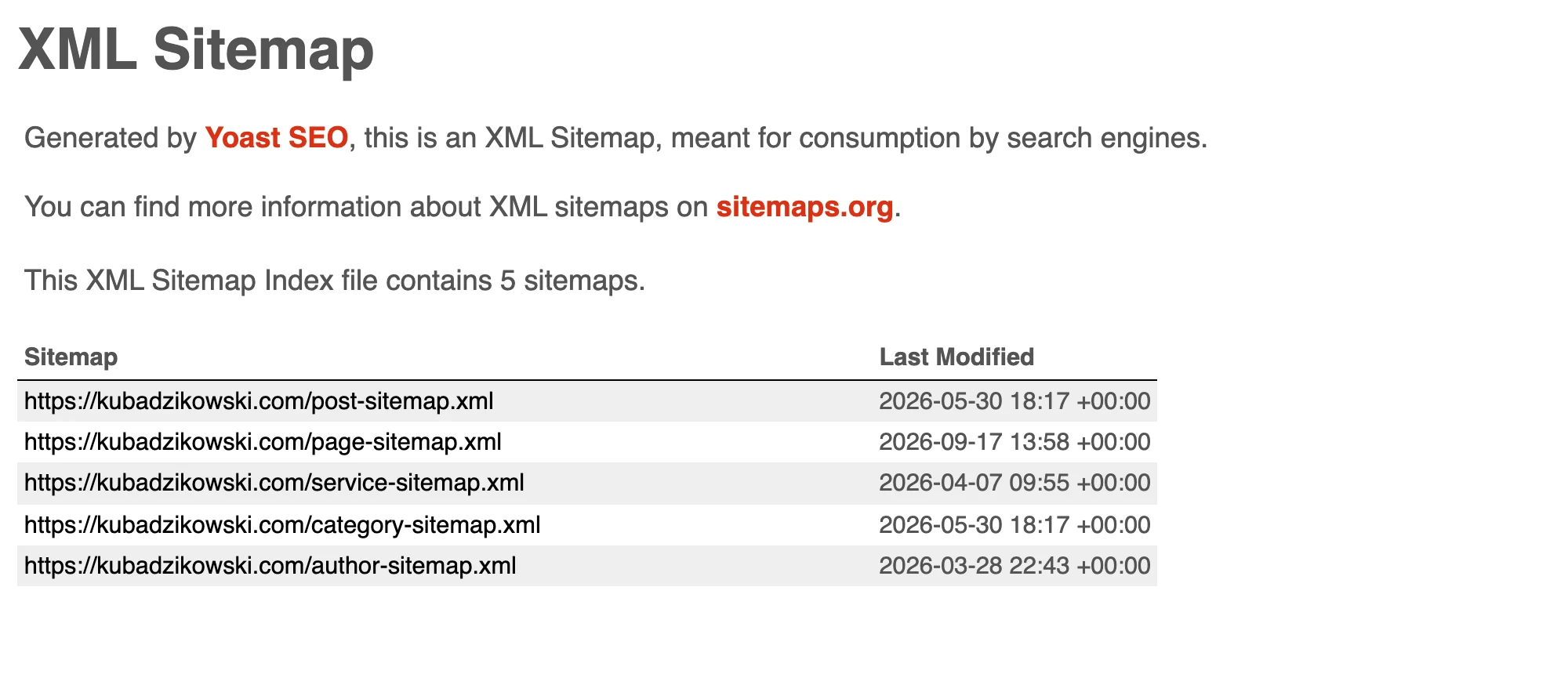
ExampleThe index splits URLs into separate sitemaps by content type, and the modification date next to each one tells robots what has changed. sitemap_index.xml from kubadzikowski.com, own screenshot
Such additional data make an XML sitemap useful in many situations. Sitemaps include many tools related to a broad range of SEO issues connected with analysing and indexing pages.
<url> – represents a single URL (page) on a website
<loc> – contains the page URL, pointing to a specific page or resource on the website
<lastmod> – specifies the date of the page’s last modification, helping search engines understand when the page was last updated
There is also:
<changefreq> – information about how frequently the page changes
<priority> – the priority of the URL on the site, determined on a scale of 0.0 – 1.0
There was quite a lot of discussion in the industry about lastmod, changefreq and priority. Especially as John Muller said in 2015 on a video hangout on Google+ that changefreq and priority no longer play such a big role in sitemaps. I’ll leave the issue of lastmod open and worth testing. 🙂
An XML sitemap is a key file that helps search engines understand and index the structure of your website, supporting SEO efforts.
How can I check whether a website has an XML sitemap?
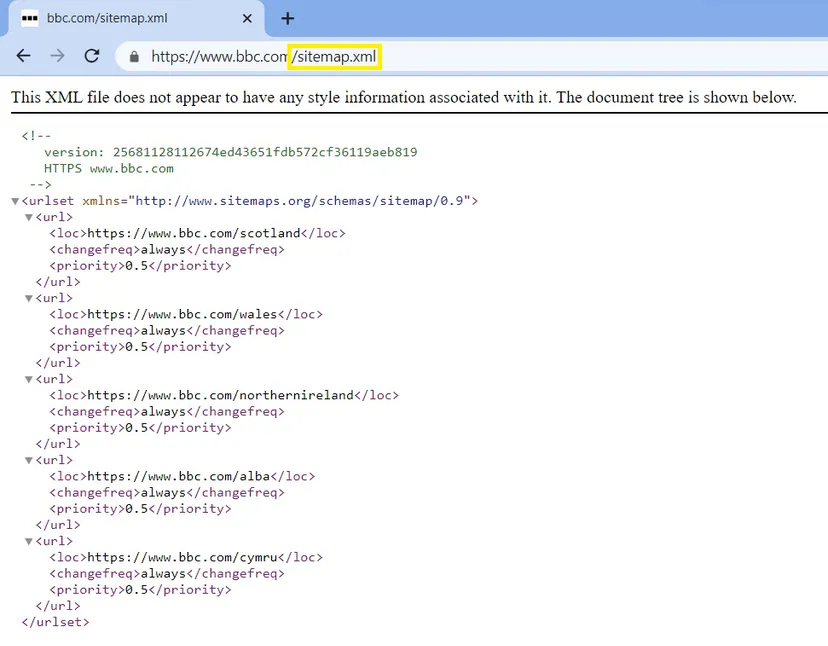
In most cases, you can find out whether a website has a sitemap by adding sitemap.xml to the URL. So it would be example.com/sitemap.xml.
If the site has Yoast SEO installed, you’ll notice a trace in the form of example.com/sitemap_index.xml. Sitemap_index.xml is the main sitemap that gathers all the individual sitemaps on your website in one place.
Example of the BBC News sitemap. Just enter the /sitemap.xml suffix after the slug to see the sitemap structure.
How can I update an XML sitemap?
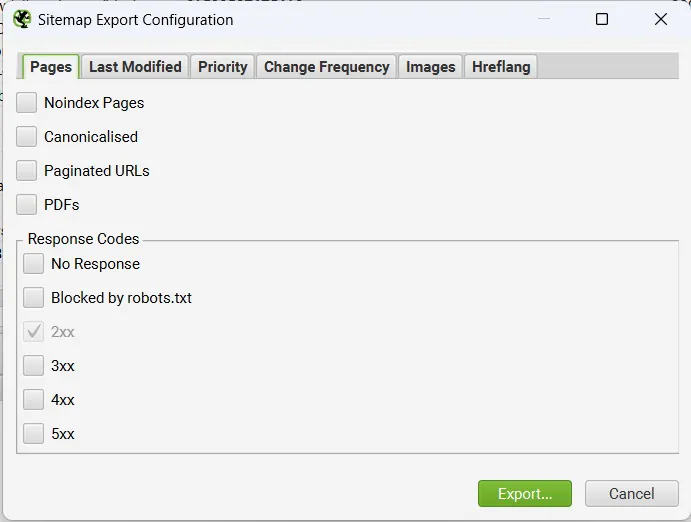
There are ways to create and update a sitemap manually. There are also static generators that will help you create a sitemap at any time – for example using Screaming Frog or Sitebulb.
But again, this process would have to be repeated every time you add or update content. That is why there are plugins on the market that handle this, for example Yoast SEO. It is worth considering. With this plugin, it is worth checking that the right URLs we want to index are added. It is worth reviewing the sitemap manually.
Preparing a sitemap using Screaming Frog as an exampleIn Screaming Frog, there are many interesting options for sitemap optimisation. It is worth remembering that this is a fairly static solution.Information architectureMitigating the effects of a deep information architecture path
01Deep architectureRequires many clicks
02Lower PageRankHarder to index
03Solution: SitemapDirect links for bots
Sitemaps allow bots to reach deeply nested subpages quickly, improving their indexing and visibility.
Submitting new URLs to Google
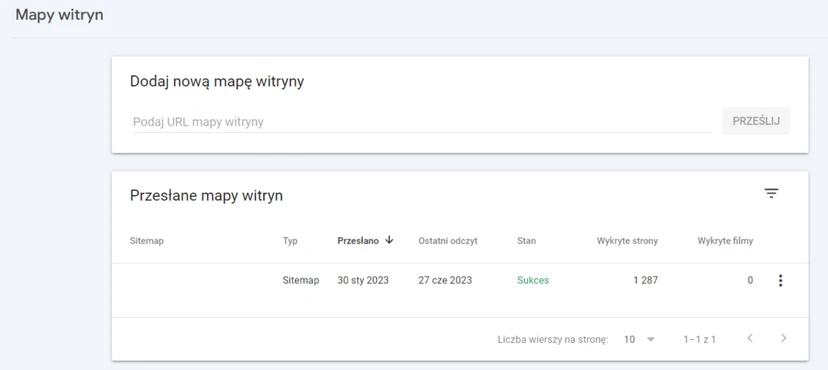
One of the basic and most obvious uses of a sitemap is submitting URLs to search engines. Google also allows you to submit a new sitemap after new URLs have been added to your website.
Indeed, submitting new URLs in a sitemap has become the recommended method of informing Google about the presence of new subpages. This alerts Google to changes on the site faster, compared with Google’s standard schedule.
However, it is important to remember that despite placing new subpages in a new sitemap, Google is under no obligation to analyse or index them immediately.
One of the steps for submitting a sitemap is Google Search Console and the sitemap option.
Mitigating the effects of a deep information architecture path
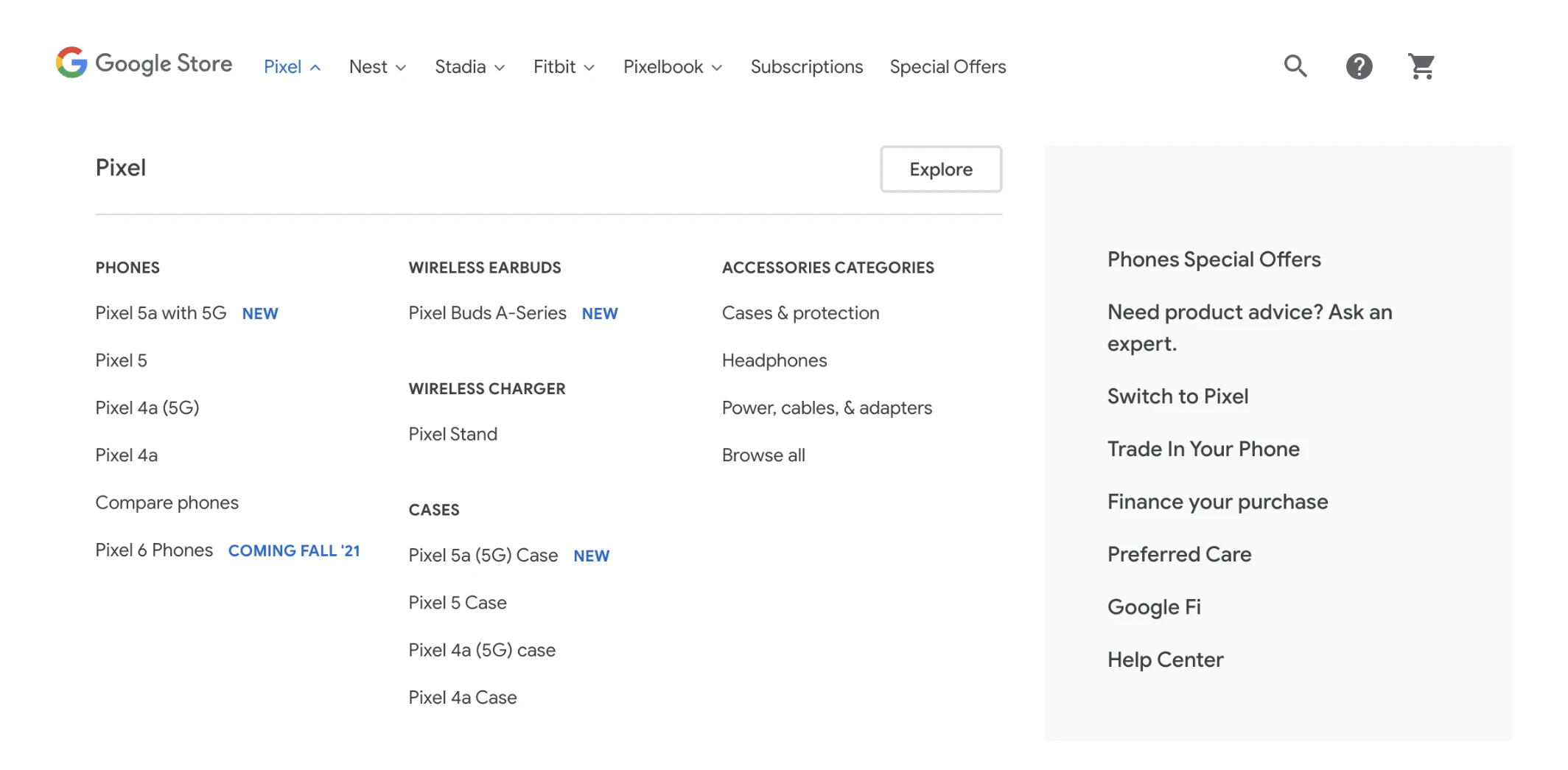
Analysis and indexing are based on links between subpages. As a result the site architecture is important both for bots and for users browsing the site in search of information.
DiagramStore menu with categories and subcategories — navigation is a signal to Google about which pages are the most important on the site.Source: Google Search Central, CC BY 4.0
When on the home page, you sometimes need to click many times to get to further pages. In this case, we are dealing with subpages that are embedded deep within the overall architecture. It is known that this can have many consequences:
depth affects rankings through a lower assessment by the PageRank algorithm,
depth affects the time needed to analyse pages,
depth may prevent users from visiting subpages or reduce the frequency of their visits. As a result, search engine bots may behave similarly.
In this case, sitemaps can be used to present bots with URLs of subpages that are deep within the site structure. This ensures that Googlebot is able to find, analyse and index URLs with a large depth path.
SEO & indexingUsing a sitemap to find indexing issues
015000 subpages (You want to index)Approximate range in the sitemap
022000 indexed (Reality)Visible in Google Search Console
03Indexing issue (The difference suggests an error)Significant disparity in pages
05Crawl budget exceeded (Bot resource limit)No time to process
Key takeaway: comparing the number of pages in the sitemap with the number actually indexed makes it possible to quickly identify technical issues such as duplicates or crawl budget limitations.
Speeding up the deindexing of multiple URLs from Google
Usually, the fastest way to remove a single page from Google’s index is to use the URL removal tool. However, this process can be tedious when there are a large number of URLs to process.
Sitemaps are an excellent way of keeping URL status in Google up to date. They can also be used to indicate which URLs should be removed from the index.
Pages that are to be removed from Google’s index should appear in the XML sitemap:
As “noindex”. This indicates a change in indexing status that Google should take into account.
With the < lastmod > tag indicating the date of the change.
Using a sitemap to find indexing issues
One of the better things about using a sitemap is that it provides an approximate range:
How many pages the user WANTS to index
How many pages HAVE been indexed
For example, let’s assume that a given site links to 5,000 subpages. However, in Google Search Console it turns out that only 2,000 subpages have been indexed.
This means that something is wrong. It’s possible that those 5,000 subpages contain a lot of duplicate content.
In other words, Google is not indexing them all. It’s also possible that this number of pages exceeds the crawl budget (budget for crawling).
Looking for orphan pages
Orphan pages are subpages that have not been connected by internal links to the site’s main structure. For this reason, their impact on SEO and site traffic may be limited. Such subpages should be removed or have links leading to them from subpages that form part of the site structure.
The key to managing orphan pages is finding them. One of the best ways to look for orphan subpages is to compare the URLs in the sitemap with the URLs that can be found during a site crawl. Comparing crawling with the sitemap is possible in Oncrawl. Screaming Frog also provides a similar option. All information on orphan pages is included in the standard analysis results.
Managing duplicate content
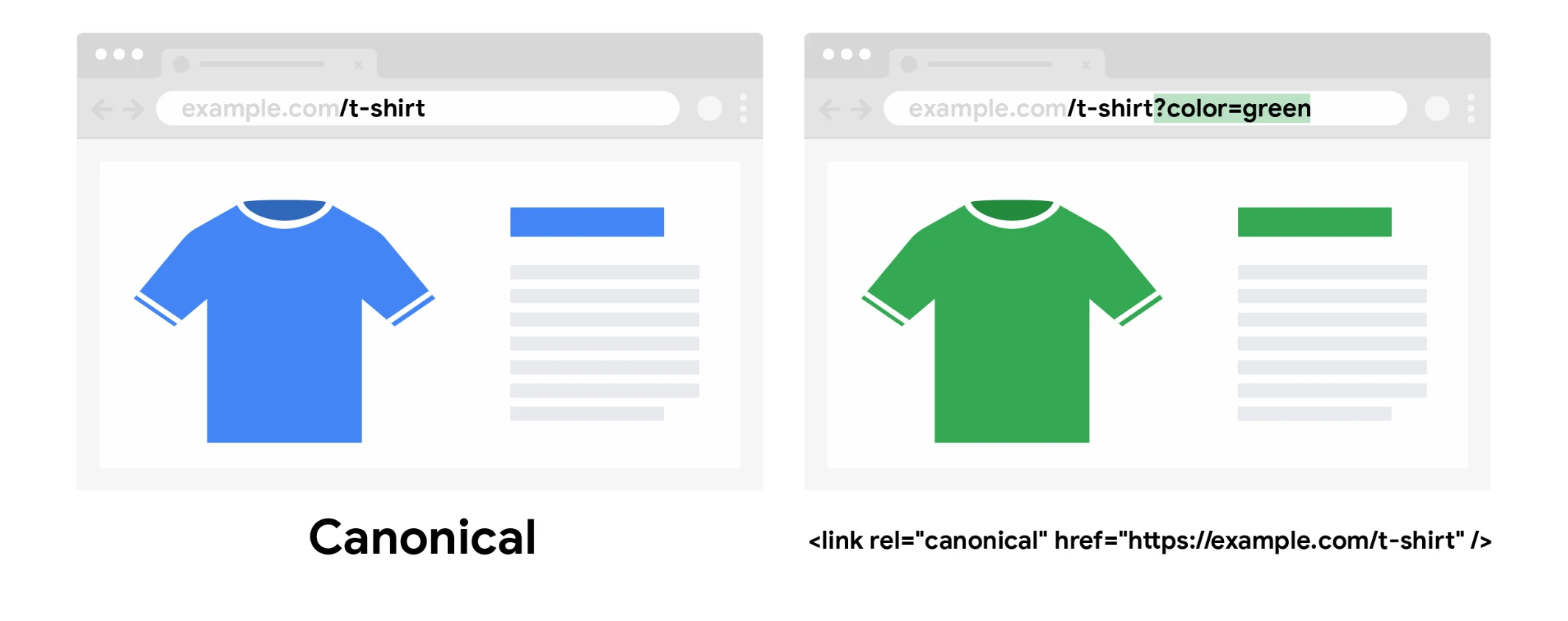
Once duplicate content has been identified, the best way to solve the problem is to differentiate the content or use rel=canonical (canonical declarations) to indicate to search engines which of the duplicate pieces of content should be indexed.
DiagramThe colour variant has its own URL with a parameter, but the canonical link points to the main product page — signals from both URLs are consolidated on one URL.Source: Google Search Central, CC BY 4.0
URLs that are to be used as canonical URLs can be included in XML sitemaps. Including non-canonical URLs is, in turn, not a good idea. Google also discourages this practice.
Creating content for multilingual sites
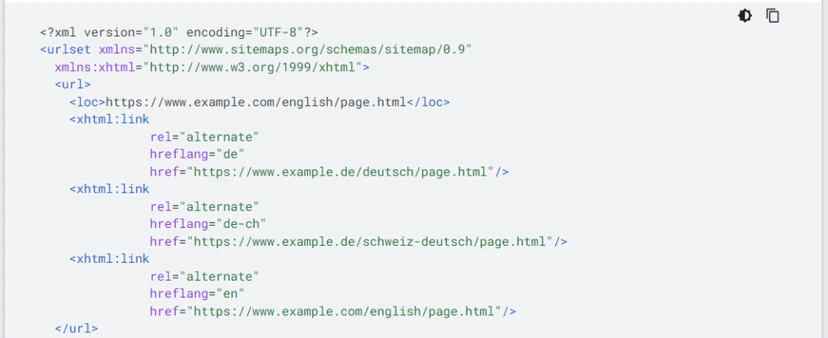
XML sitemaps support hreflang declarations. There are many reasons why a user may prefer declaring hreflang in sitemaps rather than on individual subpages. Even if only because of limited development-side capabilities. In its documentation, Google presents this solution as one of the alternatives.
Presenting content to Google in the form of images, videos and news
Content that is to be fetched by Google Images, Google Videos or Google News can be indicated in sitemaps. Admittedly, this does not improve a site’s ranking positions, but it can ensure faster discovery of content.
Google also recommends using the corresponding schema.org structured data markup (ImageObject, VideoObject or NewsArticle) on the page, together with images, videos and news articles added in XML sitemaps.
FAQ
Frequently asked questions
01How do you check whether a site has an XML sitemap?
Most often, you just need to add /sitemap.xml to the site address, for example example.com/sitemap.xml. If the site uses Yoast SEO, the sitemap is often available at /sitemap_index.xml.
02How do you update an XML sitemap after adding new content?
You can create and refresh it manually or use generators such as Screaming Frog or Sitebulb. In practice, plugins such as Yoast SEO are also a convenient solution, as they update the sitemap automatically.
03Do you need to submit an XML sitemap to Google?
Yes, one of the basic uses of a sitemap is submitting new URLs to search engines. You can do this in Google Search Console in the sitemap section.
04Why is it worth using an XML sitemap on a deep site architecture?
It helps point robots to URLs that take many clicks from the homepage to reach. This makes it easier for Googlebot to find, analyse and index them.
05When can you use an XML sitemap to remove URLs from the index?
When many URLs are to be deindexed, a sitemap can be used to indicate status changes. Such pages should be marked as noindex, and the lastmod tag with the change date is also helpful.
06How can you use an XML sitemap to find indexing problems?
It is worth comparing the number of URLs in the sitemap with the number of pages indexed in Google Search Console. A large difference may suggest content duplication or exceeding the crawl budget.