The impact of JavaScript on SEO is the subject of fierce debate in the SEO industry. Whether you use this language on your own website or plan to audit a client site using JavaScript, you need to take several important factors into account.
What is JavaScript?
JavaScript is a programming language used to make websites interactive and dynamic. JavaScript runs on the visitor’s computer, so it does not require the website to be continually downloaded.
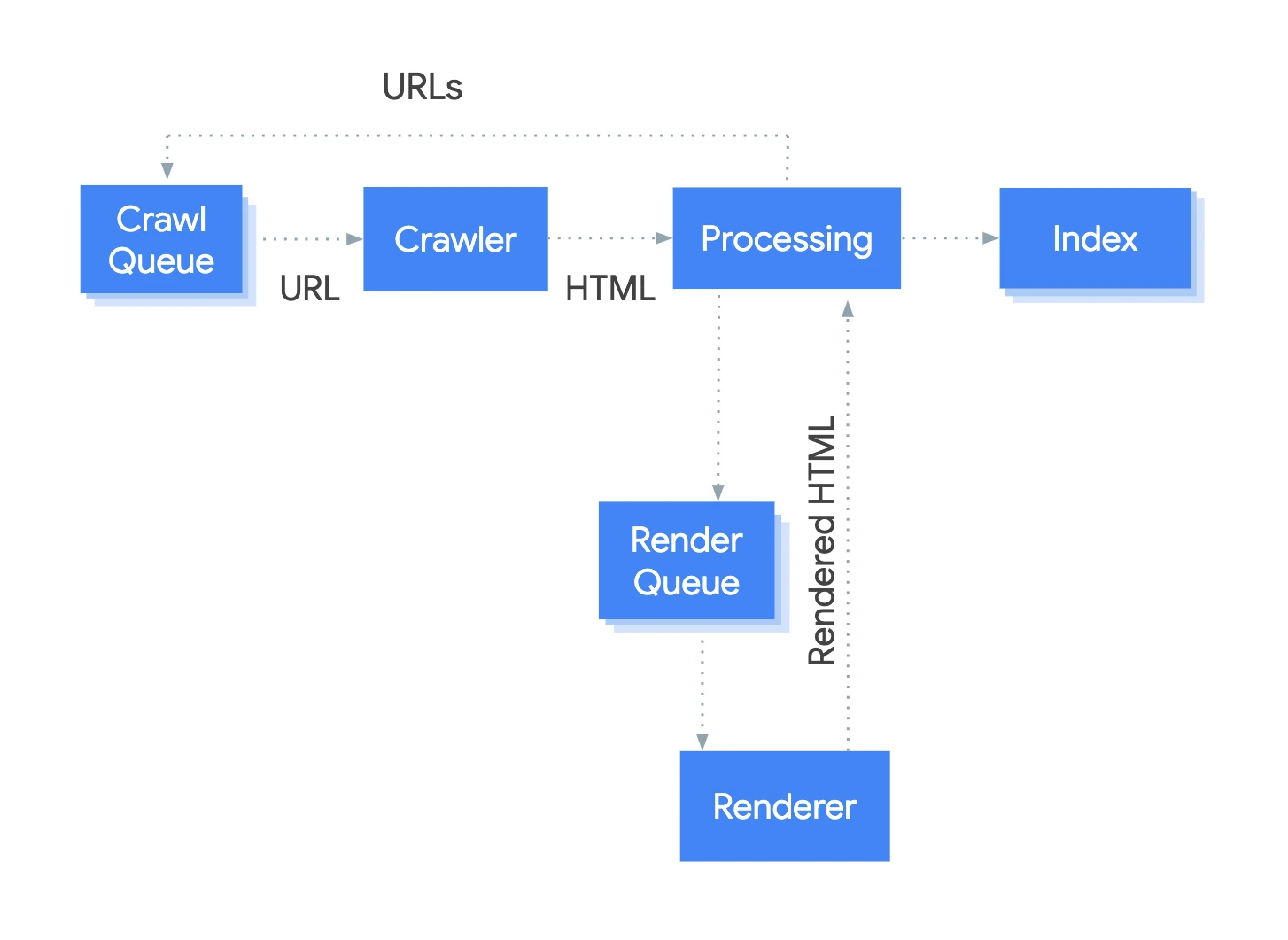
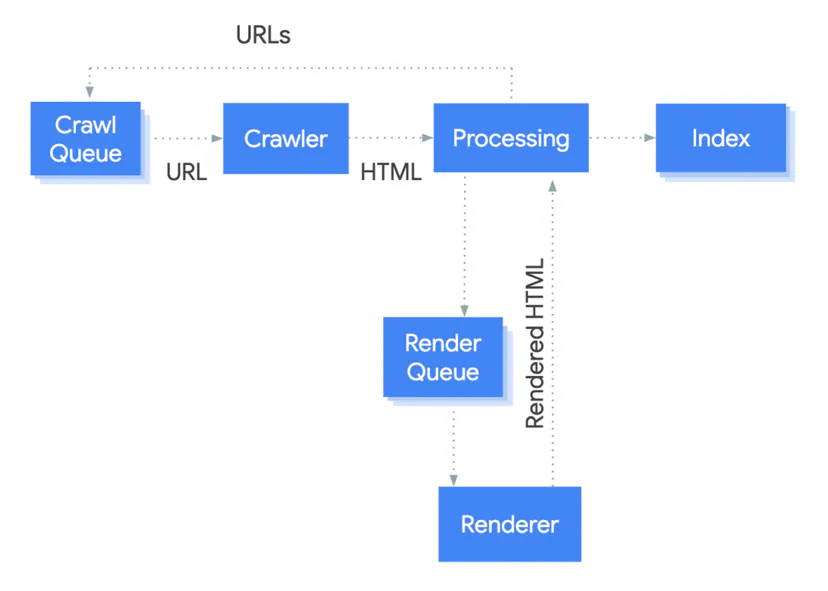
DiagramPages with JavaScript also go into the render queue — content visible only after scripts are executed may be indexed later than HTML from the server.Source: Google Search Central, CC BY 4.0
It is important to remember that JavaScript is an interpreted language. It does not require any special software needed to create production code. A basic text editor is enough to write JS.
It is also the only scripting language supported by all search engines that handle client-side scripts.
John Muller on the presence of JavaScript in the website spaceProgrammingWhat is JavaScript?
01Interactive websitesDynamic and responsive
02Client-sideRuns on the device
03Interpreted languageA text editor is enough
04Universal supportSupported by browsers
JavaScript is a key scripting language running directly in the browser, making it easier to create dynamic content without complex tools.
Does Google analyse JavaScript?
Previously, search engine robots were not able to analyse and index dynamic content using JavaScript. They were only able to check what is in the static HTML source code.
Google, however, changed the guidelines of its old AJAX crawling scheme in relation to the omitted fragment #! in URLs and HTML snapshots in October 2015. Now they are more often able to use and understand websites. The use of JavaScript has increased in recent years, due to adaptation of Google’s own JavaScript MVW pattern AngularJS and the development of progressive web applications and other solutions such as React.
When it comes to analysing JavaScript-based websites, the ability to read the DOM loaded after the page is created by JS is essential.
Old SEO robots analysing links and website content are only able to analyse the static HTML code returned by the server. Google can now analyse both types of code thanks to JS robots, and Oncrawl or Screaming Frog give us the ability to analyse the JS implementation on our site and check its possible correctness.
The system handling the rendering process in Google is called the Web Rendering Service (WRS). Google has provided a simplified diagram showing how this process works
Key issues related to JavaScript crawling
For sites using JavaScript, the important thing is to obtain a thorough view of their structure and the data needed for a more complete SEO analysis. Therefore, before going any further into unrestricted JavaScript analysis, there are several technical issues you need to know about:
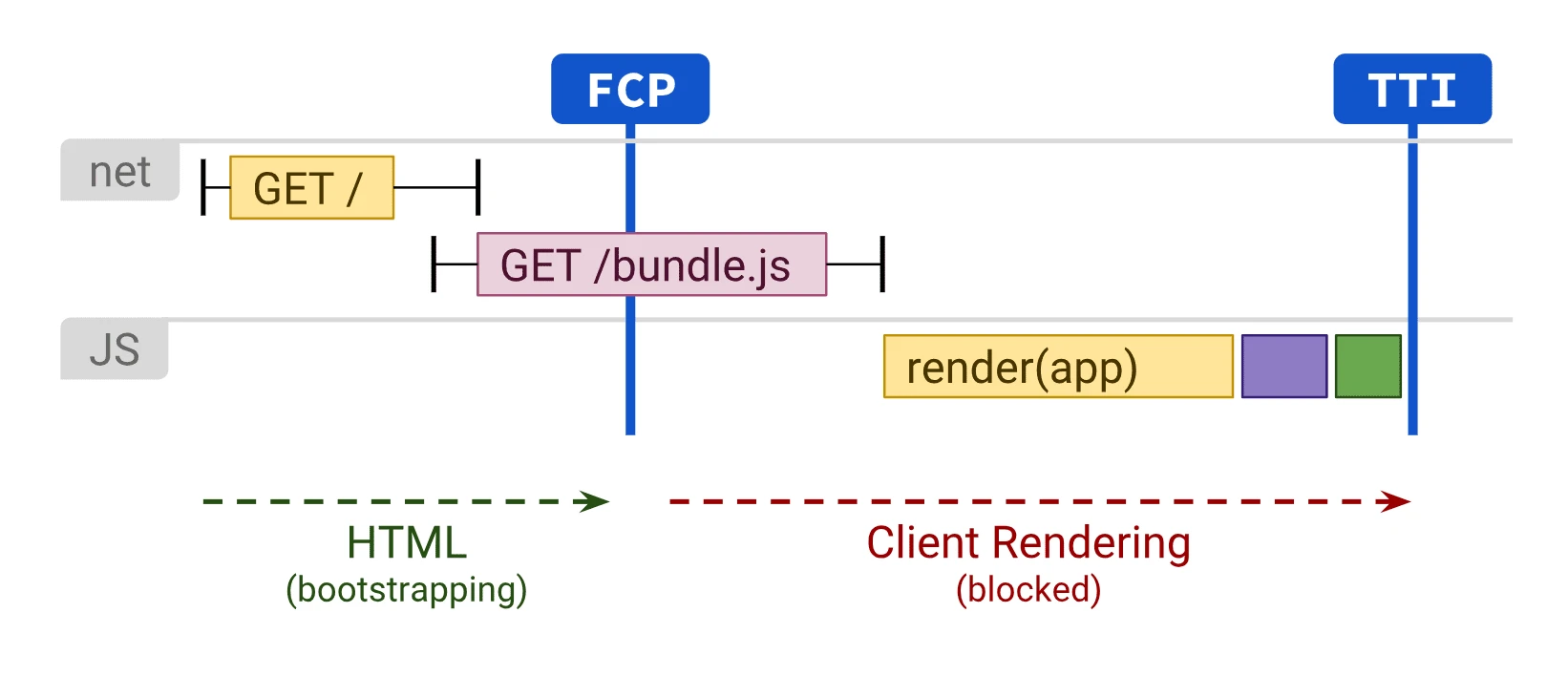
DiagramIn client-side rendering, both the first content and interactivity wait for the JavaScript bundle to be downloaded and executed.Source: web.dev (Google), CC BY 4.0
JavaScript analysis is longer and more resource-intensive for the server, especially in the case of large websites. This is due to the need to download all resources.
There are different JavaScript patterns, as well as the associated SEO implications. You should start by analysing how the site in question was built.
Many sites still operate on the old AJAX crawling scheme and on a unique configuration. In such a case, you cannot rely solely on JavaScript for crawling, indexing and assessment.
Links or click areas must have the “ng-href” attribute (not “ng-click”) when using the Angular.js pattern.
The “href” attribute will only be understood by robots if it contains a link and anchor.
In addition, Google still has certain limitations when it comes to JS crawling:
Google needs unique and clean URLs with links located in the HTML.
The page snapshot used lasts 5 seconds, so the content must load within that time. Otherwise, it will not be indexed for each website.
All site resources (JS, CSS) must be available for analysis, use and indexing.
According to Google, starting from scratch, a good approach is to create the site structure and navigation using HTML only. Then, once the subpages, links and content are in place, you can enhance the site’s appearance and interface using AJAX.
SEO and JavaScript analysisKey issues related to JavaScript crawling
01SEO structureThe basis for data analysis
02Google limitationsIncomplete JS indexing
03HTML firstBuilding the site foundations
04Resource intensityLonger, heavier analysis
Conclusion: A solid HTML structure is crucial for effective analysis and indexing of JavaScript sites.
Why is JavaScript crawling important?
Linking and content are among the most important ranking factors to analyse. Search engines can detect and index content that uses JS. It is therefore important to know how they see it and how it affects SEO processes.
Link discovery – checking the full range of outgoing links from the site, including those based on JavaScript;
Text content discovery – obtaining an accurate analysis of content quality, including content such as product reviews or user-generated comments, which are often rendered in JS.
If search engines can find and index this, it is important to include such elements in your SEO analysis.
View-source vs Inspect
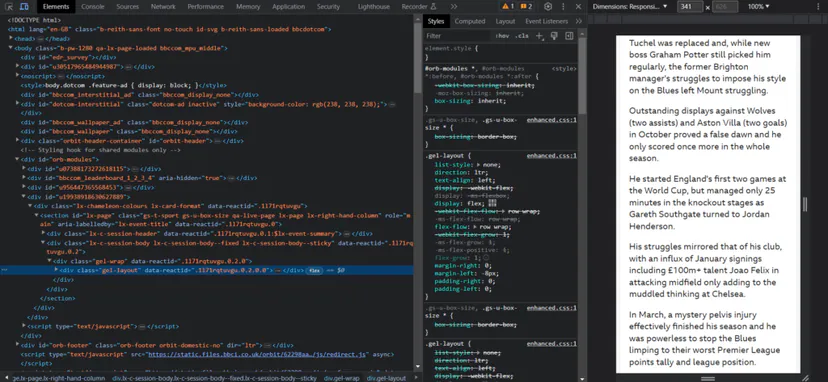
After right-clicking in the browser window, several options will appear for viewing the page source code and inspecting it. View-source will show the same as the GET request.
This is the raw HTML code of the page. Inspect shows the processed DOM after changes have been made and is more content-related compared with what Google sees. It is the updated and latest version of the page. You should use Inspect, not view-source, when working with JavaScript.
You should create a user agent in Chrome DevTools in order to troubleshoot pages that are pre-rendered based on specific user agents.
Example of the Chrome DevTools tool
Google Cache
Google Cache is not a reliable way of checking what Googlebot sees. It is usually the initial HTML code, but sometimes it is rendered HTML or an older version. The system was created to check content when the site is not working. It is therefore not a particularly useful tool for fixing errors.
Google Testing Tools
Google testing tools, such as URL Inspector, found in Google Search Console, as well as Mobile Friendly Tester and Rich Results Tester, are useful for fixing errors. However, even in this case these tools differ slightly from what Google sees.
These tools differ not only in terms of the previously mentioned 5 seconds, but also in terms of how they fetch resources in real time and do not use the cache version. Screenshots from such tools also show pages with pixelated elements that Google cannot see.
These tools are useful for checking whether the content has been loaded into the DOM. The HTML code shown in these tools is the rendered DOM. You can search for a text fragment to check whether it has been loaded by default.
These tools also show resources that may be blocked and console error messages that are useful for fixing errors.
Example of the Google Search Console URL Inspector tool in action
Searching for text in Google
Many JavaScript-based websites may not show all content to Google. A quick check is to search for a fragment of your content in Google.
You should search for “certain phrases from your content” and check whether the page appears in the results. If it does, the content is probably visible. It is worth remembering that hidden-by-default content may not appear with a given fragment in the SERP.
FAQ
Frequently asked questions
01How does Google analyse JavaScript pages?
Google can now analyse both static HTML and code rendered after JavaScript has run. It uses the Web Rendering Service (WRS) for this.
02Does Google index content generated by JavaScript?
Yes, but only if the content and resources have time to load and are available for analysis. The article notes that the page snapshot takes 5 seconds.
03Why is JavaScript crawling important for SEO?
Because links and content are among the most important ranking factors. If they are generated by JS, you need to know whether the search engine can see them and index them.
04What technical issues can arise with JavaScript-based websites?
Crawling JS is more time-consuming and puts more load on the server, especially on large websites. Other issues include unique URLs, the availability of all resources, and a correct link structure in HTML.
05What should you check in Chrome DevTools when a website runs on JavaScript?
You should use Inspect, not View Source, because Inspect shows the processed DOM. The article also mentions setting the user agent in Chrome DevTools.
06How can you quickly check whether JavaScript content is visible in Google?
You can search Google for specific content fragments and see whether the given page appears. If it does, the content is probably visible, although elements hidden by default may not appear in the SERP.