

Ajax in itself does not harm SEO, but it can make it difficult for Google to access what should be seen and indexed. In practice, the problem is often not the technology as such, but the availability of content, links and page states for the crawler. This is particularly important for online stores, offer sites and SPA-type applications, where many elements are loaded dynamically. If important content appears only after a click, scroll or filter change, Google may not consider it easily accessible. That is why an SEO assessment for Ajax should start with a simple question: what is actually in the HTML and what can be seen after rendering, without user intervention. In practice, it is this level that determines whether a dynamic page will support visibility or limit it.
What is Ajax in the context of SEO?
Ajax in the context of SEO means a way of loading or replacing content without a full page reload. It matters only when it affects what Google is able to crawl, render and index. The technology itself is not a problem. The issues begin when key content appears only after JavaScript is triggered or after a specific user action.
In practice, Ajax works by having the browser fetch data from an API and update a section of the page on the client side. For the user, this is a convenient solution because the interface remains fluid. From an SEO perspective, however, what matters is not the dynamic loading itself, but whether Google can see the final state of the page without guessing what is supposed to happen after a click.
The greatest risks concern elements such as product lists, filtering, pagination, tabs, comments or offer cards. If these sections are important for organic traffic, they should be available in a predictable way and openable under a specific address. Every important view should have its own stable URL, rather than exist only as a temporary state of the application.
That is why, in an SEO assessment, it is not the word “Ajax” itself that matters, but whether specific content can be reached. The raw HTML, the rendering result and whether important states are accessible via ordinary links rather than only JavaScript handlers are analysed. Only on that basis can it be reliably determined whether the solution is safe from an indexing perspective.
- 01Dynamic content loadingWithout a full page reload.
- 02Interaction vs. visibility to GoogleProblematic when content requires JS.
- 03Final page stateGoogle must see the full content.
What matters is Google’s ability to render and index the content, not the technology of dynamic loading itself.
Current technical challenges related to Ajax and Google
Current technical challenges related to Ajax and Google arise from the fact that Google can render JavaScript, but it does not always do so immediately and not always without complications. As a result, a page may be assessed first on the basis of the raw HTML and only later on the basis of the rendered DOM. The more critical content depends on JavaScript, the greater the risk of delays, omissions or misinterpretation.
That is why implementations are more reliable when key elements are available from the first HTML render or delivered via SSR, SSG or prerendering. This applies not only to the main content, but also to the page title, meta description, headings and structured data. When these components appear only on the client side, Google may encounter an empty or incomplete view.
The second commonly encountered obstacle is the resources needed to assemble the page. When JS, CSS, API endpoints or images are blocked, the crawler may not reproduce the view in the same way as the user does. Even correct application code will not help if Google cannot access the resources needed for rendering.
URLs and the way application states are handled also matter. Google no longer requires old hashbang-style schemes, but it does need ordinary URLs that can be opened independently of a previous session, click or filter setting. If filtering, pagination or tab switching does not update the URL in a sensible way, specific views may be crawled less effectively and assessed less favourably.
A separate group of errors consists of mismatches between what the server returns and what the application ultimately shows on the client side. Hydration errors, delayed API responses and differences between HTML and DOM can result in empty content, incorrect tags or omitted sections of content. In practice, this is one of the reasons why dynamic pages should be tested not only visually, but also from the perspective of crawler rendering.
How does Google handle JavaScript rendering?
Google can render JavaScript, but that does not mean that every piece of dynamically loaded content will be indexed quickly and correctly. First, the crawler fetches the raw HTML, and only later can it perform rendering and reconstruct the view built by scripts. This is an important distinction, because when the page is almost empty at the first step, some SEO signals may be assessed with a delay or only partially.
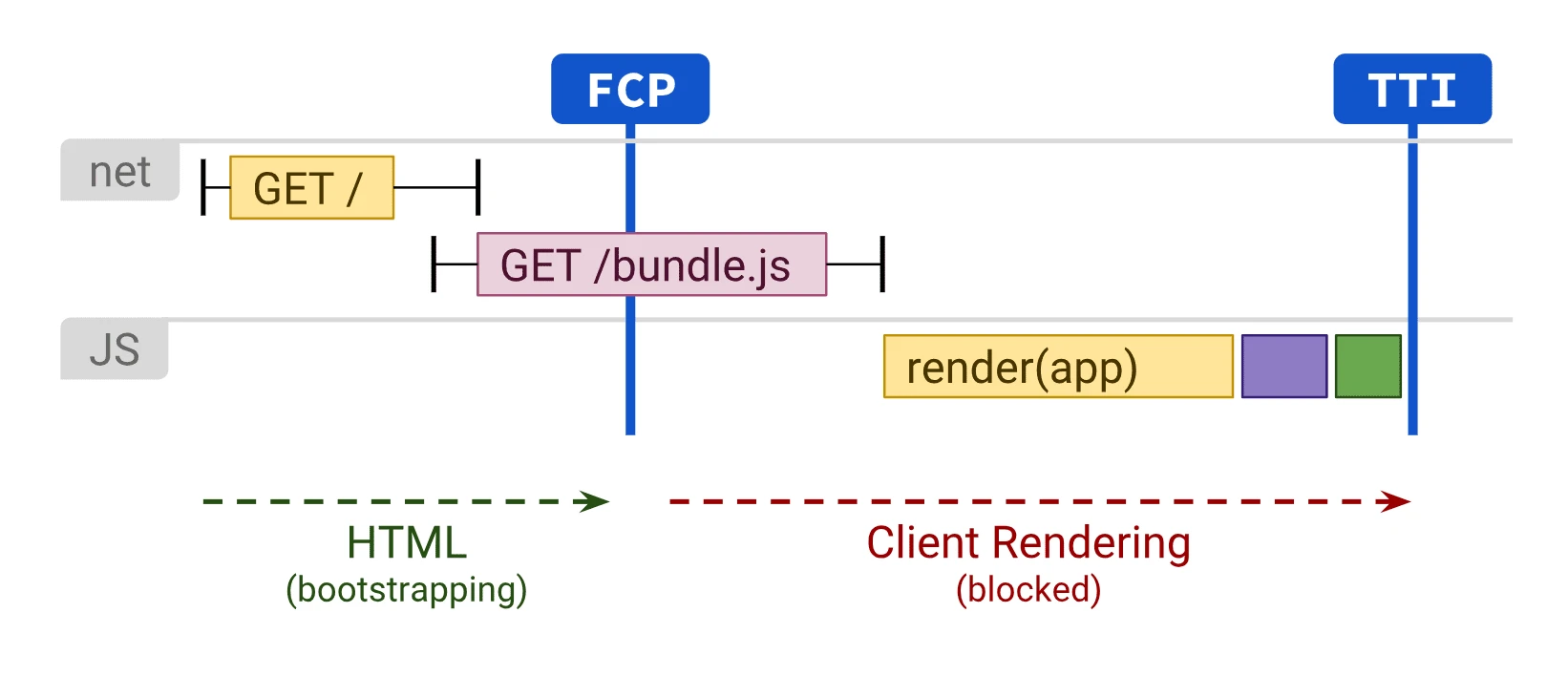
In practice, the safest implementations are those where the most important content, headings and meta data are visible immediately in the HTML or delivered via SSR, SSG or prerendering. If key content appears only after JavaScript execution, you increase the risk that Google will see it later than the user or not at all. This is especially relevant for category descriptions, product listings, offer content, pagination and internal links.
Google no longer needs outdated hashbang-style solutions. What matters are ordinary, stable URLs that can be opened without prior interaction and that return a specific page state. If a filter, tab or the next batch of results works only in the application memory, without a separate URL, such a view is clearly harder to index.
A common obstacle is blocking resources needed for rendering. If robots.txt blocks JS files, CSS, images or API endpoints, the robot may not assemble the page into the form the user sees. Even correct HTML will not be enough if the final content depends on resources that Google cannot fetch.
It is also worth keeping consistency between what the server returns, what is produced after rendering and what the user sees after visiting a specific URL. A mismatch between the HTML and the client-side DOM often ends in empty content, an incorrect title or a canonical pointing to the wrong state. This is usually caused by hydration errors, API timeouts and incorrectly handled transitions in a SPA.
From an SEO perspective, the key question is therefore not whether Google “supports JavaScript”, but whether it is able to reconstruct the most important page state without disruption. The fewer critical elements depend on a click, scroll or delayed loading, the lower the technical risk. That is why dynamic interfaces can be developed, but the content responsible for visibility should be delivered as simply and stably as possible.
- 01HTML fetchA quick first step.
- 02JS renderingDelayed script execution.
- 03Delay riskContent visible later.
- 04Safe solutionSSR, SSG, Prerendering.
The most important content should be visible immediately in the HTML to avoid indexing issues.
Key stages of SEO assessment and implementation for Ajax sites
The key stages of SEO assessment and implementation for SEO for sites Ajax include identifying what works dynamically, what is available to the crawler, and which page states should actually be indexed. Such an analysis does not start with technology, but with the content and views that are meant to generate search traffic. Only then do you choose the rendering method and indexing rules.
- Inventory of dynamic views: establishing which sections are loaded via Ajax and whether they contain content important for SEO.
- Comparison of raw HTML with the DOM after rendering: identifying elements that Google may not see immediately.
- Analysis of states and URLs: checking whether filters, pagination, tabs and variants have stable, openable addresses.
- Linking assessment: confirming that transitions to important views happen via trackable links, not solely through JS handlers.
- Control of rendering resources: ensuring that Google can fetch the JS, CSS, images and API responses needed to build the content.
- Decision on the rendering method: choosing between SSR, SSG, prerendering and client-side rendering.
- Setting SEO signals: matching title, meta description, canonicals, structured data and indexing rules to the final URL state.
- Post-launch validation: rendering tests, log analysis and checking what actually gets indexed.
At the outset, it is a good idea to separate business-critical elements from supporting extras. If a category description, offer listing or advice content loads dynamically, such a module should usually be available already at the first render. When Ajax is only responsible for minor interface components, for example visual sorting or secondary widgets, the SEO risk is clearly lower.
The next stage is assessing individual page states. Not every filter or every parameter combination should be indexed, because it is easy to generate duplicates or low-quality subpages in this way. A good implementation is not about indexing everything, but about assigning URLs to those states that have real search value.
Next comes the technical decision. For key content, SSR, SSG or prerendering usually work best, because they reduce dependence on JavaScript execution on the crawler side. Client-side rendering is best left for areas where it has no impact on indexing, linking or reading the most important elements of the page.
In the end, practical validation is needed. You verify not only whether the page “works”, but also whether Google reads the correct title, content, canonical, links and state after entering a specific URL. Problems with Ajax usually only appear at the level of a specific template, filter or component, so a test after deployment is mandatory.
In practice, it is this stage that determines whether a dynamic page genuinely supports SEO or merely gives the impression of being modern. If important content is accessible, linkable and assigned to stable URLs, Ajax is not an obstacle for Google. If not, the source of the problems will not be the script itself, but the architecture of the whole view.
Best practices for implementing Ajax for SEO
Best practices come down to making the dynamic page accessible to Google in the same way as a classic HTML page, with content, links and a stable URL. If a given view is meant to attract search traffic, it should be openable without prior clicking, scrolling and building state only in the browser. The most important subpages and states are worth serving in HTML from the outset or via SSR, SSG or prerendering.
Every important application state should have its own clear address. This applies to categories, pagination, product cards, important filters and variants that genuinely correspond to different search intents. Such an address must be copyable, openable in a new tab and reproducible without an active user session.
Navigation to key views should be based on links, not solely on click handling in JavaScript. In practice, this means that moving to a category, the next page of a listing or an offer detail page cannot depend only on client-side code, without a standard link. If the crawler has no clear path to reach the page state, indexing will be weaker or random.
Metadata must match the final URL state, not just the app’s starting screen. The same applies to the canonical, headings and structured data. A common mistake is that after a view change the content updates, but the title and canonical remain from the previous state.
It is worth making sure that all resources needed to build the view are available. If JS, CSS, images or API responses are blocked, the bot may end up on an empty or only partially assembled screen. Do not judge the implementation by how it looks in the developer’s browser, but by what can actually be rendered and indexed from outside.
In dynamic listings, it is a good idea to separate states worth indexing from those that are purely functional. A filter that genuinely creates a separate offer or category can have its own URL and its own set of SEO signals. Dozens of combinations without unique value are better trimmed with canonical, noindex or by abandoning active internal linking.
- 01HTML accessibility (SSR/Prerendering)Content and links from the outset in the source code.
- 02Stable URLsEach important application state under its own unique address.
- 03Direct navigationKey views available without clicking and building state.
- 04Shareable statesAbility to copy and open in a new tab without a session.
Key: A dynamic page must be just as accessible, stable and linkable to Google as classic HTML.
Typical Ajax-related mistakes and how to avoid them
The most common problems with Ajax appear when key content exists only after user interaction or does not have its own reproducible address. In such a situation, Google may not see the full content, even though everything works perfectly from the user’s perspective. Usually it is not about the technology itself, but about the way it was used.
A very typical mistake is hiding important content behind a tab, accordion, filter or “show more” button without an alternative URL. This is particularly risky in the case of category descriptions, product lists, reviews and advisory content that only loads after a click. If a given section is to be indexed, it should not depend solely on a user event.
The second trap is application states that change the view but do not update the address or store it in a form that is useless for indexing. When a filter, sorting or pagination exists only in browser memory, it cannot be sensibly linked to or reopened. As a result, the bot usually indexes only the initial state, and the remaining view variants stay out of reach.
Infinite scroll without pagination available under URLs is also common. For the user, this is a convenient solution, but from an SEO perspective it makes it harder to reach further items in the list. If there is no alternative in the form of subsequent pages or other linkable states, deeper content has a lower chance of being fully discovered.
A separate set of mistakes comes from a mismatch between HTML, render and client-side state. A page may look correct after a few seconds, while earlier it returns an empty container, a generic title or an outdated canonical. Hydration errors, API timeouts and delayed loading can make the bot see a different page than the user.
Blocking resources needed for rendering can also be risky. When robots.txt cuts off JS files, CSS or data endpoints, Google will not recreate the final view. Such a problem often only comes to light after deployment, so it is worth analysing server logs, the indexed page preview and specific templates rather than relying solely on the homepage.
At the end, there is one more strategic error: indexing everything the application generates dynamically. Not every combination of filters, parameters and views should make it into the index. Usually, better results come from specifying a few valuable states for indexing than from letting in hundreds of technical duplicates.
Monitoring and optimising dynamic pages after deployment
Monitoring and optimising pages dynamic pages after deployment comes down to checking whether Google really sees, renders and indexes the same page state that the user sees. After publishing, it is not enough just to confirm that JavaScript “works”. You need to make sure that the key content appears in the HTML or after rendering without errors, and that important URLs actually make it into the index. In practice, Ajax problems most often only show up at the level of specific templates, filters or components, rather than the whole site.
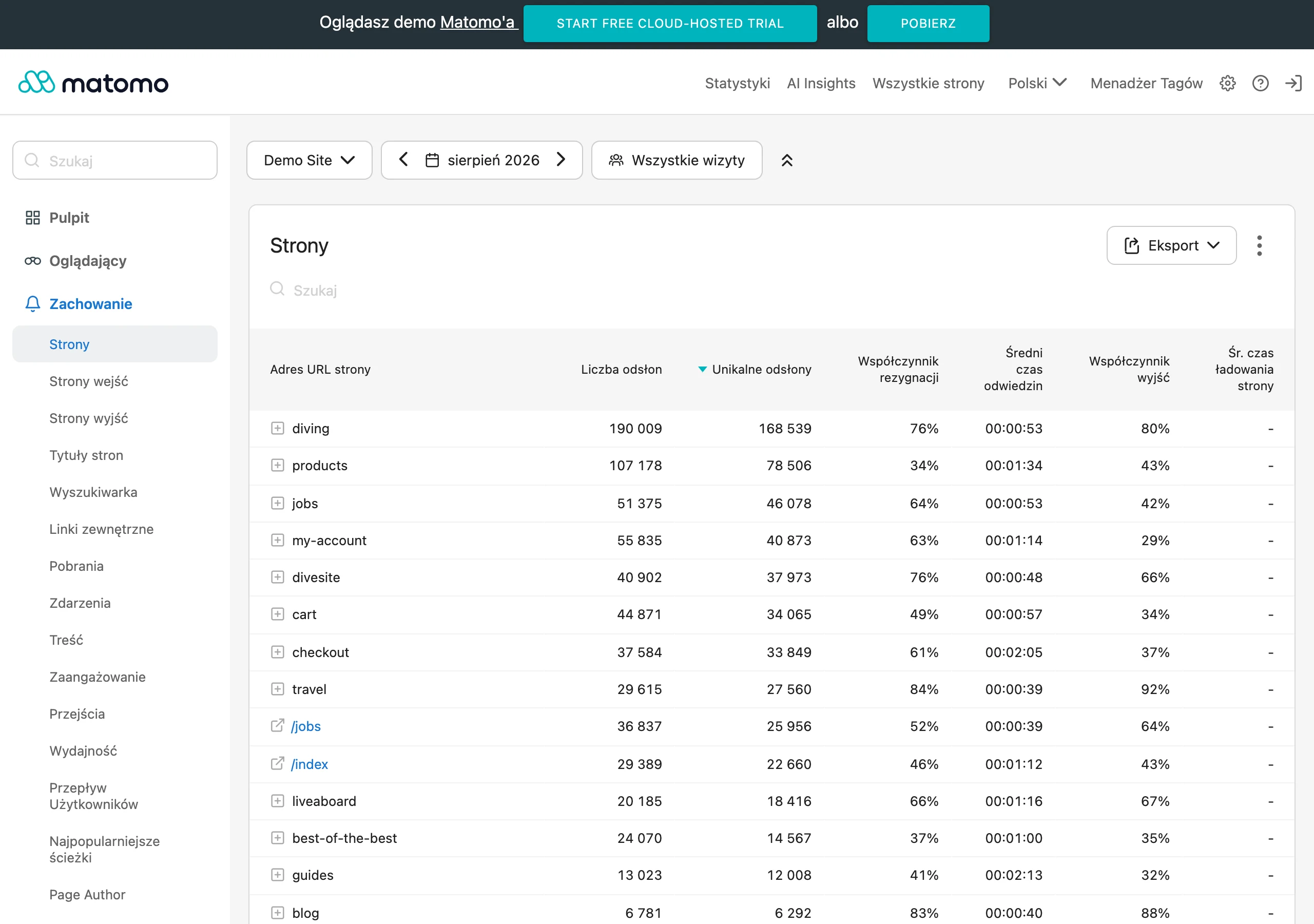
The first area to check covers indexing and rendering of individual page types. It is worth regularly verifying in Google Search Console which URLs are indexed, which are discovered but not indexed, and which have crawl or duplication issues. For dynamic pages, it is particularly important to compare what the server returns with what appears after JavaScript rendering.
The second area is consistency between the content and the SEO tags and the final URL state. When the application replaces content on the client side, it is easy to end up with the title, canonical, H1 heading or structured data left over from the initial version. If the metadata do not update together with the content, Google may index a different document from the one you want to rank.
Server logs and responses from the resources used for rendering are also very important. Logs show whether Googlebot visits the right URLs, how often it returns to key sections and whether it encounters 4xx, 5xx or timeout errors. With Ajax, it is worth looking not only at the HTML document, but also at JS and CSS files and API endpoints, without which the view can be incomplete or empty.
The next point is controlling the states generated by filters, pagination and interactive components. After deployment, it often turns out that some parameter combinations start being internally linked and end up in the index, even though they add no unique value. This is the moment to decide which states should be indexed and which should be restricted with canonical, noindex or changes to internal linking.
When optimising dynamic pages, it is also worth tracking hydration errors and delayed content loading. A page may look fine to a user with a fast browser, but the bot may see an empty container, a fallback or an incomplete module if the API responds too slowly. This kind of problem will not always show up in a standard manual test, which is why it is a good idea to compare the raw HTML, the rendered DOM and the actually indexed version of the page.
A good solution is to track changes at the template level, not just across the whole domain. When the problem affects product pages, category pages with filters or asynchronously loaded listings, it is worth treating these sets separately. In SEO for applications dynamic applications, working on repeatable patterns of errors brings the most value, because a single component fault can break hundreds or thousands of URLs.
Optimisation after deployment should end with a concrete technical decision, not just a diagnosis. If the key content is still appearing too late, it usually needs to be moved to SSR, SSG or prerendering. If the problem lies in navigation, you need to add linkable URLs and semantic links, rather than relying solely on JavaScript events for transitions.
The best results come from a steady cycle of actions: rendering checks, indexing checks, architecture fixes and revalidation. In dynamic services, even a small frontend change can affect organic visibility, although the product team will not notice it straight away. That is why after every major deployment it is worth checking not only whether the feature works, but also whether Google still sees a full, consistent and indexable version of the page.
FAQ
Frequently asked questions
How does Ajax affect the SEO of dynamic pages?
It only affects it when it makes it harder for Google to fetch, render or index the content. The problem is not the technology itself, but the lack of access to important elements of the page.
Can Google render Ajax pages with JavaScript?
Yes, but that does not mean immediate and trouble-free indexing of every piece of content. Google first fetches the raw HTML and only later may execute JavaScript rendering.
Why can content loaded only after a click be a problem for Google?
Because Google may not consider it easily accessible if it appears only after a user action. This applies especially to content important for organic traffic, such as product lists or category descriptions.
When do dynamic pages require SSR, SSG or prerendering?
When the most important content, headings, meta data or structured data depend on JavaScript. Such solutions are safer because they deliver the key elements already in the first render in HTML.
What should have its own URL on a page with Ajax?
Every important page state that has value for SEO should have a stable, openable URL. This includes categories, pagination, filters, tabs and offer variants.
Can Ajax filtering and pagination harm indexing?
Yes, if they work only in application memory and do not sensibly update the address. Then Google has a harder time tracking specific views, and some content may remain outside the reach of indexing.