

JavaScript-based pages can achieve good visibility in Google, provided that the crawler really has access to the content, links and indexing signals. In practice, the site simply working correctly in the user’s browser is not enough. It is worth checking what Google receives in the raw HTML, what appears only after rendering, and what ultimately lands in the index. The most important question is not “does Google support JavaScript”, but “can it see the most important SEO elements on your site without any problems”. This is particularly important with SPAs, client-side rendering, filters, infinite scroll and browser-side routing. In this article I translate the topic into concrete risks, tests and implementation decisions.
How does JavaScript SEO work in practice?
In practice, JavaScript SEO comes down to checking whether Google can fetch the page, execute its scripts and see the key content and links in a predictable, stable form. Three layers matter: the raw HTML code returned by the server, the DOM after JavaScript rendering, and what actually makes it into the index. When there are clear discrepancies between these layers, the risk of losing SEO signals increases.
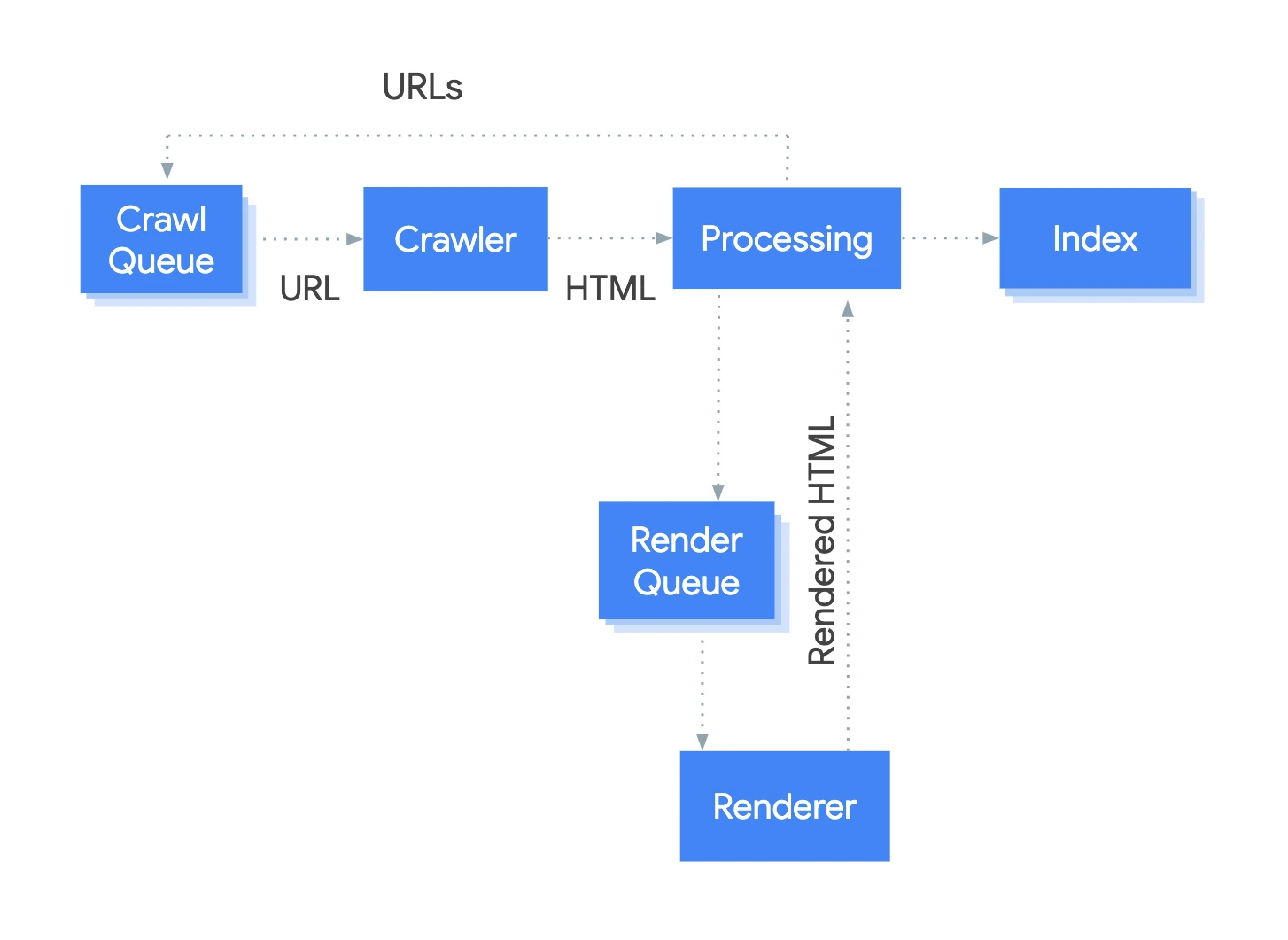
At the outset, you assess what the page makes available as soon as the crawler lands on a given URL. This applies not only to text, but also to internal links, canonical, title, meta robots and structured data. The more important elements are present already in the initial HTML, the lower the likelihood of indexing issues.
Next, the effect of JavaScript rendering is compared with what was available at the start. You verify whether headings, description, product listing, breadcrumbs, pagination and links to subpages appear correctly and without the need for extra actions. This is particularly important for SPA applications, hydration, lazy loading, filters and client-side routing.
The analysis does not end with the page view itself. You also need to check whether the crawler has access to JS and CSS assets, whether the API returns data without a user session, and whether addresses can be discovered through standard href links. If content discovery depends on onclick, scrolling or state saved in the browser, Google may not reach important subpages or may see an empty view.
As part of a practical audit, you also assess which rendering model will make sense for a given type of site. For key templates such as categories, products, articles or landing pages, SSR, SSG or stable prerendering often work better than pure CSR. The aim is not to “convert everything”, but to remove reliance on JS wherever it really affects indexing and discoverability.
Why does Google have difficulties indexing JS pages?
Google can struggle to index JS-based pages when key SEO elements appear only after scripts have run or depend on user interaction. The crawler first fetches the HTML, and only afterwards may it render JavaScript, which means part of the signals is not available straight away. Such a delay can be small, but on complex sites or with unstable rendering it can turn into a real problem.
A common scenario is that the initial HTML contains only an empty application container, while the actual content is pulled in from an API. If the endpoint requires cookies, a token, localStorage or returns an error, the crawler will not see the correct content. As a result, from Google’s perspective the page may resemble an empty app shell, even though it works perfectly for the user.
Problems can also stem from technical issues on the frontend side. JS or CSS files blocked in robots.txt, console errors, timeouts, hydration mismatch or overly aggressive lazy loading can interrupt rendering or hide important elements. Google will not fill in missing content if the script does not provide it in a form accessible to the crawler.
A major source of SEO losses is navigation based solely on JavaScript events. When subpages open through onclick, hash routing or dynamic modules without real href links, the crawler has difficulty discovering them and moving on. The same applies to infinite scroll without pagination and filters that change the view but do not create sensible, crawlable URLs.
Another issue is indexing signals being replaced too late. Title, meta description, canonical or structured data can be generated by JS, but if this happens unstably or with a clear delay, Google will not always read them the way you expect. In practice, this shows up in empty snippets, an incorrect canonical, statuses like “discovered, currently not indexed” or a large discrepancy between source HTML and what appears after rendering.
It is also worth separating performance from visibility. Core Web Vitals are important, but they will not by themselves fix a situation where the crawler does not get the content or links needed for indexing. First you need to make sure that Google can see the page, and only then refine how quickly it is rendered.
What are the key elements to analyse in JavaScript SEO?
In JavaScript SEO, the key is to check whether Google gets the full content, links and indexing signals in the HTML as well as after rendering. In practice, it is worth comparing three layers: the raw response code, the rendered DOM and what can ultimately be confirmed in Google’s tools. Most problems show up in differences between the source HTML and what the user only sees after JavaScript runs.
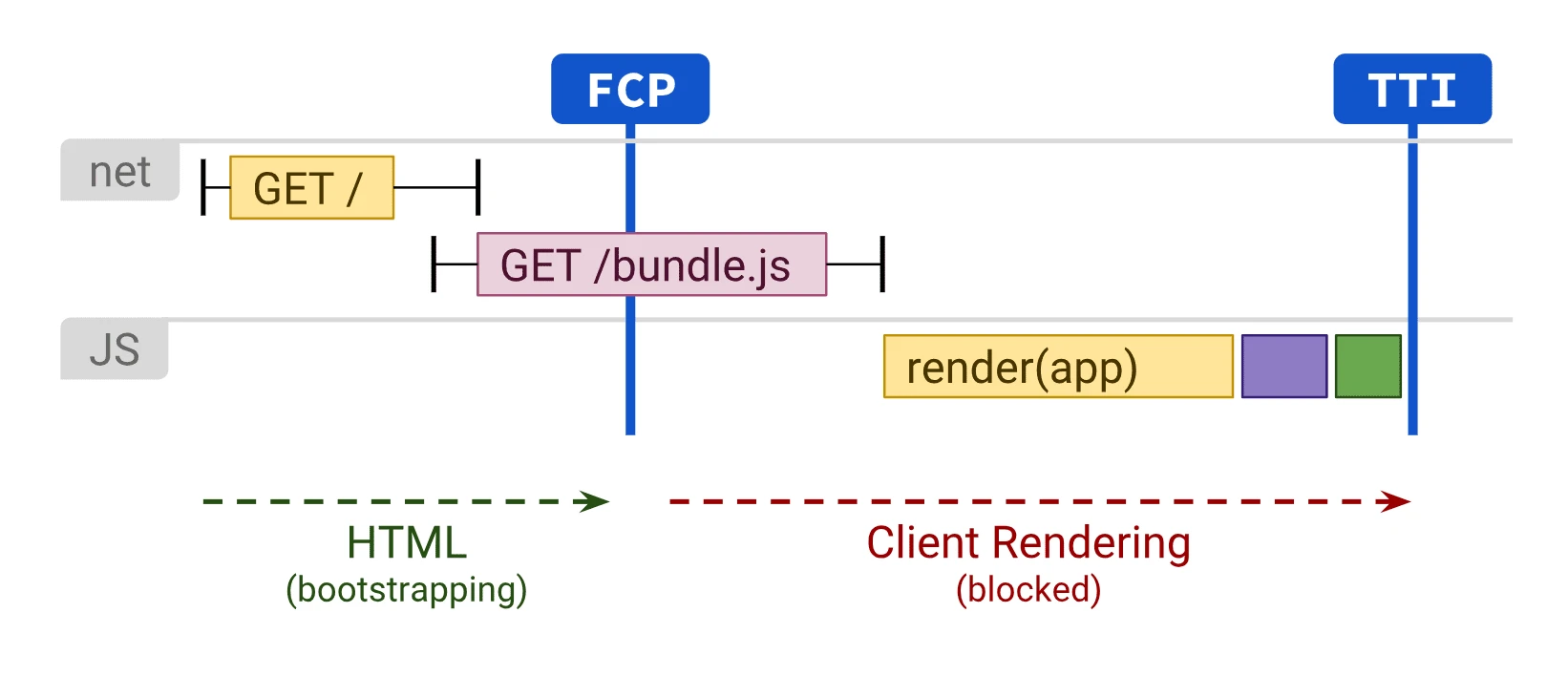
The first control area covers elements that are critical for indexing. In practice, this means the page heading, main content, internal linking, canonical, meta robots, title, meta description and structured data. If these components only appear after a while or only after an additional API call, the risk increases that Google will see an incomplete version of the page.
The second area is technical accessibility. It is worth checking the HTTP status, robots.txt, any blocking of JS and CSS resources, the sitemap, hreflang and whether data endpoints are publicly accessible without a user session. When content is pulled from an API that requires cookies, a token or state from localStorage, the robot may receive an empty template instead of the actual content.
- whether key content is immediately visible in the HTML or appears consistently after rendering,
- whether links have standard href attributes rather than being handled only via onclick,
- whether pagination, filters and listings have addressable URLs that can be visited without additional interaction,
- whether lazy loading does not hide text, images or links that are important for SEO,
- whether client-side routing does not cut the robot off from part of the subpages.
It is also important to analyse the behaviour of templates, not just individual URLs. Very often the problem does not concern the whole site, but only one class of pages, for example categories, products or articles with a specific module. That is why it makes more sense to analyse per page type so as to distinguish a system error from an isolated incident.
It is also worth assessing render stability separately. JavaScript errors, hydration mismatch, an empty app shell, delayed replacement of the title and meta tags or overly aggressive infinite scroll can all reduce visibility, even though the page works correctly for the user. If important subpages can only be discovered by scrolling, clicking or expanding modules, from an SEO perspective you should assume discoverability is poor until there are alternative links and URLs.
At the end, you need to compare the observations with the actual indexing effect. URL Inspection, a crawl with JS rendering and server log analysis help with this, because they show whether Googlebot visits the indicated addresses and fetches the required resources. Only by bringing these data together can you determine whether the problem lies in rendering, URL discovery or Google’s actual indexing decision.
Which rendering strategies are most effective for SEO?
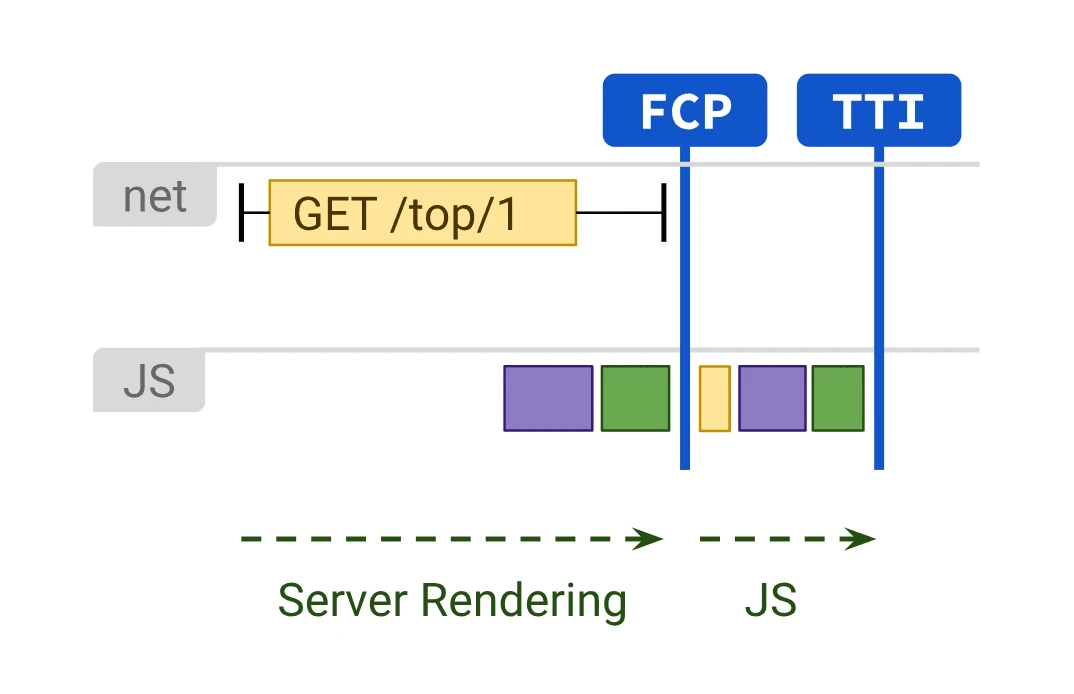
Usually SSR, SSG and stable prerender work best, because they provide Google with key content and signals without waiting for JavaScript to execute. This makes crawling easier, reduces the risk of an empty HTML response and decreases dependence on later rendering. Pure CSR can also be indexed, but it more often requires additional testing, workarounds and protection layers.
SSR performs best where content is dynamic and should reach the user immediately in the server response. This includes categories, products, offers, locations and other subpages that change frequently or have particular significance for organic traffic. For key business templates, SSR is often the safest option, especially when the current CSR makes it harder to present content and links in the HTML.
SSG works particularly well where content is predictable and does not need to be generated on the fly for every visit. It is a good choice for articles, guides, landing pages and many informational pages. Its strength is the straightforward delivery of complete HTML, while maintaining good performance and reducing the number of potential points of failure.
Prerender can be a sensible compromise when full SSR is costly or difficult to implement in the current architecture. In practice, however, you need to make sure the prerender is stable, up to date and consistent with what the user sees. If the snapshot is outdated or does not cover all URL variants, the problem only disappears on paper.
- choose SSR when data freshness and a large number of important subpages are crucial,
- choose SSG when content updates less frequently and can be generated at build time,
- use prerender when you want to speed up indexing without rebuilding the entire front end,
- leave CSR for areas that are less important from an SEO perspective or highly interactive areas that do not need to acquire traffic from Google.
The rendering model alone will not solve the issue if critical elements still appear too late. Regardless of the approach, title, canonical, meta robots, structured data, main content and links to subsequent subpages must be delivered reliably. The best rendering strategy is one that removes SEO’s dependence on user interaction and on late browser-side requests.
Dynamic rendering should be treated as a supporting solution in more difficult cases, rather than as the target architecture. It can help with complex applications, but it increases maintenance costs because you have to manage two render versions. Usually a better direction is to organise the HTML on the server side or at build time, instead of adding yet another workaround layer.
What are the most common mistakes in JavaScript SEO?
The most common mistakes in JavaScript SEO are situations in which Google receives too little content, links or indexing signals in the initial HTML or during rendering. In practice, the biggest problems involve sites that look correct to the user, but return an empty app shell, incomplete DOM or unstable metadata to the bot. Such a mismatch usually does not result from JavaScript itself, but from the way it has been implemented. The most risky are hidden errors, because the site works visually and yet still loses discoverability and indexing.
One of the most common problems is loading key content only after additional JS requests have been executed. If the category description, product text, headings or breadcrumbs only appear after a response from the API, the bot may see a stripped-down version of the page or even an empty one. The risk increases further when the endpoint requires a session, token, cookies or browser state that Googlebot does not have available.
The second group of errors concerns navigation and URL discovery. Sites are then available to users, but not to indexing bots, because transitions rely on onclick, components without a real href or routing built solely on hashes. As a result, Google does not get a stable path to important subpages, filters, pagination or subsequent listings.
Indexing signals also often diverge when the title, meta robots, canonical or structured data are replaced only after hydration or with a significant delay. If these elements are not available immediately or change in an unstable way, Google may interpret the wrong version of the page. Critical metadata should not depend on late client-side application logic.
A separate category consists of rendering errors: blocked JS and CSS files, console errors, hydration mismatch, timeouts and overly aggressive lazy loading. In such situations, the user may eventually get the content after a while, whereas the bot may finish rendering earlier or fail to build the final view at all. This particularly affects elements loaded only after scrolling, clicking or opening a tab.
On e-commerce sites and large portals, chaos in filtering, infinite scroll and pagination also appears regularly. Without addressable URLs and links to subsequent states, the bot has nothing to visit, so a significant part of the offer stays outside the crawl. Infinite scroll without pagination or another crawlable fallback is one of the most common technical mistakes on large listings.
How to optimise JavaScript for better indexing?
JavaScript is optimised for indexing so that Google sees the most important content, links and metadata without waiting for user interaction. The most reliable approach is to move critical elements into HTML that is available immediately or to ensure stable server-side or build-time rendering. The point is not to remove JS from the site, but to limit SEO dependence on late rendering. If something is important for indexing, it should be available without a click, scroll or custom application state.
In practice, start by prioritising the templates that are meant to generate organic traffic. First improve categories, products, articles, landing pages and location pages, because that is where the impact of technical changes is usually greatest. For these templates, it is worth checking whether the main text, H1, internal links, breadcrumbs and structured data are present in the source HTML or in a predictable SSR or SSG render.
The next step is to organise navigation. Links that are important from an SEO perspective should be ordinary links with a correct href, not only JS actions triggered by an event. The same applies to pagination, filters and listings: valuable combinations should get their own URL, while the less important ones should be restricted with indexing and linking rules.
The data source is also highly important. If content is fetched from an API, check whether the endpoint remains publicly accessible to the bot without a session or additional requirements. If not, it is better to move key data to the server layer or embed it directly in the HTML, because otherwise indexing will depend on something that Google may not be able to reproduce.
It is also worth stabilising technical elements that affect how the page is interpreted. Title, canonical, meta robots, hreflang and structured data should be consistent and available straight away, instead of being replaced after a few seconds. The fewer discrepancies there are between the source HTML, the rendered DOM and the final signal for Google, the lower the risk of incorrect indexing.
In the end, validation is needed, because without it it is easy to assume the job is done based only on what you see in the browser. You should compare the raw HTML with the rendered DOM, check URL Inspection, run a crawl with JavaScript rendering and look at the server logs. Only consistency across these layers shows whether the optimisation has actually improved site visibility for Google.
How do you monitor and verify the effects of JavaScript SEO?
The effects of JavaScript SEO are monitored by comparing what the server returns, what the browser renders and what finally ends up in Google’s index. Improving Lighthouse or Core Web Vitals alone is not yet proof that Google sees the content, links and indexing signals exactly as it should. In practice, you need to control three layers in parallel: the raw HTML, the rendered DOM and the indexing status. The most important thing is whether critical SEO elements are available without errors and without dependence on user interaction.
At the start, it is worth building a fixed sample of URLs for checks. The point is not to test only the homepage, but representative templates: categories, products, articles, listings, pagination pages, filtering variants and language versions. Such a sample should cover both pages that generate traffic and those that have historically had rendering or indexing issues.
The basic test involves comparing the source HTML with what appears after rendering. If headings, the main content, internal links, the canonical or structured data are missing from the source and only appear in the DOM after a longer delay, the risk still remains. A significant difference between the raw HTML and the final page view is a sign that indexing needs to be monitored much more closely.
The second pillar remains verification in Google’s tools. URL Inspection makes it possible to determine whether Googlebot fetched the correct version of the page, what HTML it sees after rendering and whether resources needed to build the view are not blocked. It is worth comparing this with the actual indexing status, because a correct test result does not always mean that all similar URLs are handled identically.
Also important is a crawl with JavaScript rendering and server log analysis. The crawl will reveal whether the robot is able to reach key URLs via href links, whether rendering ends with a blank app shell and whether pagination and filter pages are discoverable at all. The logs answer other questions: whether Google actually visits these addresses, how frequently it returns and whether it fetches the JS, CSS and endpoints needed to assemble the page. If important URLs exist but do not appear in the logs or appear there only sporadically, the problem usually lies in discoverability or in the quality of signals in the HTML.
After deploying changes, it is worth tracking several specific symptoms, because they are the quickest way to show whether the fix has had an effect:
- whether the number of correctly indexed URLs in key templates is growing,
- whether pages discovered but not indexed without a clear reason are disappearing,
- whether snippets and cache are not showing an empty or partial view,
- whether the robot reaches pages through internal linking rather than only through the sitemap,
- whether title, meta robots, canonical, main content and structured data are available in the render.
Effect assessment is not done once. After every major change to the framework, routing, the way data is fetched from the API or the filtering logic, you need to go through the same package of tests. This is particularly important in SPA applications and with hydration, where one seemingly technical release can change what the robot sees on hundreds of thousands of subpages.
The best working model is to measure before deployment and after deployment on the same group of URLs. This makes it easy to assess whether the discrepancy between the source HTML and the render has decreased, whether link discoverability has improved and whether Google is indexing key templates faster. Effective JavaScript SEO is confirmed not by a developer’s declaration, but by Google seeing the correct HTML, rendering the page properly and actually indexing what it is meant to index.
FAQ
Frequently asked questions
How does Google see JavaScript-based pages in practice?
Google compares what it gets in the raw HTML with what appears after JS rendering, and then with what ends up in the index. If key content and links are available consistently, the page can be visible without any issues.
Why do JS pages have indexing problems?
Most often this happens when important SEO elements appear only after scripts run or after user interaction. The problem is compounded by empty app containers, API errors, resource blocking and unstable rendering.
What should be checked in a JavaScript SEO audit?
You need to compare the raw HTML, the DOM after rendering and the effect visible in Google’s tools. Also important are title, meta robots, canonical, structured data, href links and the availability of JS and CSS resources.
Which rendering models are best for SEO on JS pages?
SSR, SSG and stable prerendering usually work best. Pure CSR can be indexed, but it typically requires more testing and safeguards.
What mistakes most often harm SEO on JavaScript pages?
The most common problems are content loaded only after additional requests, navigation without real href links and metadata swapped with a delay. JS errors, hydration mismatch, timeouts and overly aggressive lazy loading are also common.
How can you optimise a JS site so Google indexes it better?
The most important SEO elements should be delivered in the HTML straight away or through stable rendering on the server side or at build time. Priority should go to templates that generate organic traffic, such as categories, products, articles and landing pages.