
SEO on Squarespace is not just about increasing visibility of the website, but also the key to gaining more organic traffic and improving conversions. Thanks to easy-to-use tools such as customising meta descriptions, title tags or generating an XML sitemap, the platform allows you to optimise your site effectively for search engine algorithms. Find out how to use its features, avoid common mistakes and build an effective SEO strategy for your website.
What is SEO on Squarespace?
SEO optimisation on Squarespace is key to increasing your website’s visibility in search results. The platform offers intuitive tools that help adapt the site to the requirements of algorithms such as Google, which translates into more organic traffic and higher conversion rates.
This process covers both technical aspects, such as page loading speed or its responsiveness, as well as content-related elements. Strategic use of keywords, meta descriptions and title tags is crucial. No less important are information architecture and navigation, which affect not only user experience but also effective indexing by search engine crawlers.
Squarespace also offers rich snippet markup generation and XML sitemap. These tools make it easier for crawlers to search and index content, allowing your site to compete more effectively in search results. As a result, you can expect more visits and potential customers.
For an SEO strategy to be effective, it is necessary to monitor results regularly and adapt activities to current trends in SEO. This way your site can maintain a high position in search results for a long time.
- 01Increase visibilitySearch & Organic traffic
- 02Intuitive toolsAdaptation to algorithms
- 03Content & keywordsStrategic tags & descriptions
- 04Technical aspects & UXSpeed, responsiveness, architecture
The key to effective SEO, more traffic and conversions — from technology to content.
What SEO tools does Squarespace offer?
Squarespace provides a range of SEO tools that make it easier to optimise a site for search engines. A key feature is the ability to customise title tags and meta descriptions for each subpage, which allows you to precisely match the content to selected keywords and improve visibility in search results.
The platform also offers support for rich snippet markup, which enhances how the site appears in SERPs. Thanks to this, it is possible to display additional information such as ratings, reviews or recipe preparation time, which attracts users’ attention and increases the click-through rate.
Among the other useful features is automatic generation of an XML sitemap, which makes it easier for crawlers to index the site’s content. In addition, Squarespace allows you to manage crawler access via the robots.txt file, which lets you control which sections of the site are available for indexing.
For people who care about the results of their SEO efforts, the platform offers simple integrations with analytics tools such as Google Search Console. This solution helps identify errors and monitor progress in SEO.
Thanks to these features, Squarespace becomes a platform that is friendly both technically and in terms of content, enabling comprehensive optimisation of websites.
Options for customising title tags and meta descriptions
Squarespace makes it easy to customise title tags and meta descriptions, which is a key element of effective SEO optimisation. Each subpage can have its own unique title, which is worth enriching with suitable keywords that best reflect its content. Titles play an important role in ranking websites in search results.
Meta descriptions, although they do not directly affect rankings, are important for increasing click-through rates. They should be concise, attention-grabbing and include keywords that encourage users to click. In Squarespace, they can be edited individually for each page, which allows for precise alignment with the content and marketing goals.
The platform also offers the option of automatically generating meta descriptions based on the page content. This is a practical solution for people looking for quick results. However, manual editing gives greater control over how the page appears in search results.
Thanks to these features, Squarespace makes it easier to create consistent and attractive metadata, which can significantly improve page visibility in the SERPs and increase organic traffic.
- 01Content qualityUnique, valuable content.
- 02Keyword optimisationNatural inclusion, strategic placements.
- 03Architecture and navigationClear structure, ease of movement.
The key to success lies in creating valuable content and a clear site structure for users.
Rich snippet markup generation
Adding rich snippet markup on Squarespace is an effective way to make your site more attractive in search results. The platform automatically generates these elements thanks to structured data, which can have a significant impact on click-through rate and attract more organic traffic. Rich snippets can include a range of information, such as:
- ratings,
- reviews,
- recipe preparation time,
- product prices.
To activate this feature, simply enable the structured data option in the SEO section of the Squarespace dashboard. The platform supports popular formats such as Schema.org, which are recognised by major search engines. This means your site can stand out from other results (SERP), attracting the attention of potential visitors and increasing the likelihood of clicks.
Well-configured rich snippets not only improve page visibility, but also build its credibility and users’ trust. This tool is particularly valuable for:
- online stores,
- food blogs,
- service websites with reviews.
It is worth using them to stand out effectively from the competition and increase audience engagement.
What are the key ranking factors for Squarespace?
To improve a site’s position in search results on Squarespace, it is worth focusing on a few key elements. First and foremost, content quality matters – search engines value unique and valuable content that captures users’ attention. Keyword optimisation is equally important, but the key is to naturally weave them into the text to avoid a forced feel.
Keywords play an important role in SEO, but overuse can have the opposite effect. That is why it is worth selecting them carefully and placing them in strategic locations, such as headings (H1, H2), meta descriptions or the opening sections of text.
Another important aspect is site architecture and navigation. A clear structure not only makes it easier to move around the website, but also improves the user experience (UX). Search engines prefer sites with intuitive navigation because it makes it easier for crawlers to index the content. It is also worth ensuring clear URLs and an appropriate heading hierarchy.
Page loading speed and its responsiveness are other factors affecting rankings. Squarespace offers tools to optimise these parameters, making it possible to adapt the site to the demands of modern algorithms.
You cannot forget the importance of link building – both internal and external. Internal links help distribute SEO value evenly across subpages, while backlinks from reputable sources strengthen domain authority.
An effective SEO strategy on Squarespace requires a comprehensive approach. You need to combine high-quality content with the proper use of keywords and take care of the technical aspects related to site architecture and performance.
- 01Loading speedEvery second counts.
- 02Image and code optimisationShortens loading time.
- 03Responsive designWorks on every device.
- 04User experience (UX)Improves the assessment in search engines.
Key elements improving site visibility and user satisfaction.
The role of content quality and keywords
An effective SEO strategy on Squarespace is based on high-quality content and skilful use of keywords. Unique, valuable and well-organised materials not only attract the audience’s attention, but also improve the site’s visibility in search results. It is worth enriching texts with multimedia elements such as photos, infographics or videos, which increase their appeal and engage users.
Keywords should be placed in strategic locations: page titles (H1), headings (H2, H3) and at the beginning of articles. However, it is crucial to weave them in naturally – excessive stuffing may be treated by algorithms as spam. For example, if a site is about photography services, phrases such as “wedding photography” or “outdoor photo shoots” must be used in a smooth and logical way.
It is also important not to forget about optimising meta descriptions and title tags for the selected keywords. This gives the site a better chance of ranking higher in the search results (SERP) and attracting organic traffic. The most important thing is to create content focused on users’ needs – this translates into both higher conversion rates and improved user experience (UX).
The importance of information architecture and site navigation
Information architecture and site navigation play a key role in SEO, affecting both the user experience and the efficiency of indexing by search engine robots. A clear and logical site structure makes it easier to move around it, which translates into longer time spent on the site and a lower bounce rate – factors that are important for search engine algorithms, which value content that is useful and easy to access.
An intuitive main menu and a properly organised heading hierarchy (H1, H2, H3) allow visitors to quickly find the information they need. This not only improves usability, but also makes it easier for robots to understand the site structure and its content. It is also worth using internal linking, which distributes SEO value evenly across subpages and increases access to key content.
It is also important to avoid technical errors. Links leading to non-existent pages (404) or an excess of 3xx redirects can significantly reduce a site’s visibility in search results. That is why regularly monitoring the site architecture and making the necessary fixes is the foundation of effective SEO management.
A well-designed information architecture and navigation are not only a benefit for users (UX), but also an opportunity for a higher position in search results. This is one of the most important elements of an effective SEO strategy on Squarespace.
How to improve Squarespace site visibility?
To increase a site’s visibility on Squarespace, it is worth focusing on several key SEO optimisation aspects. Start with content and meta data optimisation. Every subpage should have a unique title containing the relevant keywords that accurately reflect its content. Meta descriptions, although they do not directly affect rankings, are important for attracting users’ attention – they should be concise, appealing and include phrases that encourage clicks.
Another important step is internal linking. By placing links appropriately, you will make navigation around the site easier and distribute SEO value evenly between subpages. These links should point to related content, which not only improves user experience (UX), but also helps search engine robots index the site more effectively.
The role of external linking should not be overlooked. Backlinks from reputable sources can have a significant impact on your site’s position in search results. Try to acquire links from high-quality sites on similar topics, which will strengthen your site’s authority.
Building authority through backlinks is another important element. The more valuable links point to your website, the greater the chance that search engine algorithms will consider it trustworthy. You can achieve this through collaboration with other websites, publishing guest posts or activity in industry forums.
Also remember the technical aspects of SEO, such as page loading speed and responsiveness. Squarespace offers tools for optimising these parameters, which allows you to adapt the website to the requirements of modern algorithms.
In summary, to increase visibility on Squarespace, combine high-quality content with the proper use of keywords and take care of the technical aspects related to the site architecture and performance. This will help you effectively increase organic traffic and improve your site’s position in search results.
Optimisation of content and meta data
Content optimisation and meta data on Squarespace are the foundation of effective SEO. Each subpage should have a unique title containing the relevant keywords that precisely reflect its subject matter. Titles play a key role in SEO, so it is worth placing them in strategic locations such as headings (H1, H2) or opening paragraphs.
Meta descriptions, although they do not directly affect rankings, are important for attracting users’ attention. They should be short, engaging and contain phrases that encourage clicks. In Squarespace, you can edit them individually for each page, allowing for a perfect fit with the content and marketing goals. The platform also offers the option of automatically generating meta descriptions – a convenient solution for those looking for quick results.
Regularly updating content is another important element. Search engines value fresh and useful material that attracts visitors. However, avoid excessive keyword saturation – naturally weaving phrases into the text is the key to maintaining authenticity. For example, if a website is about photography services, phrases such as “wedding photography” or “outdoor photo shoots” should appear smoothly and logically.
Don’t forget about heading optimisation (H1-H6). They not only improve the readability of the text for users, but also help search engine robots better understand the structure of the page. Headings should be concise, specific and contain relevant keywords.
Another important aspect is image optimisation. Adding alternative descriptions (alt text) to images not only increases the accessibility of the site for people with visual impairments, but also affects SEO in image search results (Google Images). Before uploading images, it is worth compressing them – this will speed up the website and improve the user experience.
With careful planning and regular updates, your website can effectively compete in search results and attract more organic traffic.
Internal and external linking
Internal and external linking are the foundations of an effective SEO strategy that have a huge impact on a website’s visibility online. Internal linking is the process of connecting different subpages within one domain. This practice not only makes it easier for users to navigate the site, but also helps search engine robots better understand its structure and content. For example, a post about wedding photography can include a link to a page offering outdoor photo shoots, which not only improves navigation but also distributes SEO value evenly between individual sections.
Meanwhile, external linking involves adding links to valuable sources and acquiring backlinks from reputable websites. Links leading to trustworthy content increase the website’s authority in the eyes of search engine algorithms. For example, a blog about photography trends may include links to expert articles or industry reports, which builds trust among both users and indexing robots.
Both forms of linking require a well-thought-out strategy and regular updates. In the case of internal linking, it is key to maintain a consistent navigation structure and avoid technical errors such as dead links (404 error). When it comes to external linking, it is worth focusing on acquiring links from high-quality websites with closely related topics. This not only strengthens domain authority, but also positively influences how algorithms assess it.
Well-planned internal and external linking is not only a way to improve the user experience (UX), but also the key to achieving higher positions in search results. It is one of the most important elements of effective SEO on Squarespace, which is worth analysing and adjusting regularly to the changing requirements of algorithms.
Building authority through backlinks
Building authority in SEO is largely based on acquiring valuable backlinks. These links, coming from other websites, act as recommendations for search engines. The more such recommendations point to your website, the greater trust and authority it gains in the eyes of Google or Bing.
The key to success is earning links from reputable sources that are both high quality and thematically relevant to your site. You can achieve this by collaborating with industry blogs, news portals or business partners. Exchanging guest articles or mutually recommending one another are proven methods for increasing the value of your link profile.
Remember, however, that quality matters more than quantity. Search engine algorithms prefer natural and organic backlinks, so avoid artificial methods such as spamming or buying links in bulk. Instead, invest time in creating content that will attract attention and encourage others to share it.
Monitoring your link profile is another important step. Tools such as Google Search Console and Ahrefs help you track backlink sources and identify undesirable ones. Regular analysis allows you to optimise your strategy and maintain the high quality of the links you acquire.
In short: building authority through backlinks is a process that requires patience and a strategic approach. Focusing on natural methods and high-quality sources can significantly affect your site’s visibility in search results and its online competitive position.
Technical aspects of SEO on Squarespace
The technical aspects of SEO on Squarespace play a crucial role in improving a site’s visibility in search results. One of the most important factors is loading speed. In the digital era, users have no patience for slow-loading websites – every second of delay can increase the bounce rate. Fortunately, the platform offers tools for optimising images and code that significantly reduce loading time.
Another important element is responsiveness. The site must work flawlessly across different devices, from smartphones to desktop computers. Responsive design not only improves user experience (UX), but also affects how search engine algorithms evaluate the website. Squarespace automatically adapts the layout to screen sizes, eliminating the need for manual adjustments.
No less important is the XML sitemap, which acts as a guide for search engine bots. It informs them about the site structure and its content, making it easier to index new content. The platform automatically generates this file, so bots can crawl the site faster and more efficiently, which translates into a better position in the results.
It is also worth mentioning the robots.txt file, which allows you to control bots’ access to individual sections of the website. Thanks to it, you can decide which parts of the site should be indexed and which should not. Squarespace makes it easy to manage this file, minimising the risk of errors related to incorrect indexing.
In summary, the technical aspects of SEO on Squarespace include optimising loading speed, responsiveness and the use of tools such as the XML sitemap and robots.txt file. These elements are key to effective indexing of the site by search engine bots and to maintaining a high position in search results.
Optimising loading speed and responsiveness
Optimising a site’s loading speed and responsiveness on Squarespace are key factors influencing both user experience and search rankings. Research shows that websites loading in under 3 seconds have a 32% greater chance of retaining visitors. Fortunately, the platform offers image compression and code optimisation tools that can cut this time by up to half.
Responsiveness is another important aspect, especially in the era of mobile device dominance – over 60% of web traffic comes from them. Thanks to automatic adaptation of the layout to different screen sizes, Squarespace eliminates the need for manual fixes, saving time and ensuring smooth performance on smartphones, tablets or computers. This not only improves user experience (UX), but also affects how Google algorithms evaluate the website.
It is also worth focusing on optimising site assets. Compressed images with appropriate alternative descriptions (alt text) and minimising CSS and JavaScript code are simple practices that significantly speed up loading. Thanks to Squarespace’s intuitive admin panel, managing these elements becomes easier.
Regular monitoring of site performance using tools such as Google PageSpeed Insights or GTmetrix allows you to identify areas requiring improvement. These tests help you adapt your strategy to the current requirements of search engine algorithms, which translates into better visibility for your site.
As a result, optimising loading speed and responsiveness is not only a way to improve user experience, but also an effective method of increasing a site’s visibility in search results.
Using the sitemap and robots.txt file
Using the XML sitemap and robots.txt file on Squarespace is a key technical SEO element that significantly affects the efficiency with which search engine bots index the site. The XML sitemap acts as a guide, showing bots the site structure and its content, which speeds up and improves the process of indexing new content. Importantly, Squarespace automatically generates this file, eliminating the need for manual creation or updates.
By contrast, the robots.txt file enables control over which parts of the site can be crawled by bots. It allows you to decide what should be included in the index and what should not – this is particularly useful for test pages or sections available exclusively to logged-in users. Squarespace offers an intuitive admin panel for managing this file, which minimises the risk of indexing-related errors.
Both tools are essential for maintaining a high-quality technical website. The XML sitemap makes it easier for bots to crawl the content, while the robots.txt file gives you full control over what appears in search results. As a result, your site can achieve better visibility in SERPs and attract more organic traffic without unnecessary complications.
The most common SEO mistakes on Squarespace and how to avoid them
SEO mistakes on Squarespace can significantly reduce a site’s visibility in search results. One of the most common issues is duplicate content, which can result in penalties from search engine algorithms. To avoid this, it is worth using canonical tags, which indicate the original version of the page and prevent indexing problems.
Another common mistake is improper use of keywords. Overusing them (so-called keyword stuffing) can be regarded as spam, which will negatively affect the site’s ranking. Instead, it is better to focus on naturally weaving keywords into the content, headings (H1, H2) and meta descriptions.
Insufficient image optimisation is another problematic area. Uncompressed images slow down page loading, which affects both user experience (UX) and search rankings. It is worth remembering to add alternative descriptions (alt text) to images – this improves not only accessibility, but also organic visibility in image results.
Ignoring page load speed is a technical mistake that can increase bounce rate. Studies show that websites taking longer than 3 seconds to load lose up to 40% of visitors. Squarespace offers tools for image compression and code optimisation that help shorten this time.
The last common mistake is a lack of internal linking. Properly placed links between subpages not only make navigation easier for users, but also help bots better understand the site structure. Regular SEO audits allow you to identify these issues and make the necessary fixes.
Avoiding these mistakes requires regular monitoring of site performance and adapting the strategy to the current requirements of search engine algorithms. This way, your site can maintain a high position in the results and attract more organic traffic.
Duplicate content and canonical tags
Duplicate content on a website can harm its position in search results. Search engines such as Google prefer unique content, and repeating the same information across different subpages may be seen as an attempt to manipulate rankings. To avoid this, it is worth using canonical tags – special HTML tags that tell search engines which version of the page to index. They help avoid penalties associated with duplication.
On the Squarespace platform, canonical tags are generated automatically for every page, which significantly simplifies content management. However, for pages with similar content, it is worth manually configuring the canonical tag to indicate the preferred version. This is particularly important for online stores, where different products may have similar descriptions or categories.
It is also worth regularly monitoring the site for duplicates. Tools such as Google Search Console help detect issues related to duplicated content and suggest appropriate solutions. This makes it possible to maintain high-quality content and prevent a negative impact on the site’s SEO.
Using canonical tags correctly and carrying out regular SEO audits are key elements in avoiding problems related to duplicate content on Squarespace.
301 redirects and URL optimisation
301 redirects and URL optimisation are fundamental aspects of technical SEO that have a direct impact on a site’s search engine rankings. These redirects make it possible to transfer traffic from an old address to a new one, which is particularly useful when reorganising the site structure or changing domain. They ensure that both visitors and search engine bots end up where they should, minimising the risk of 404 errors and preserving SEO value.
When it comes to URL optimisation, the key is to create clear and intuitive addresses. They should include relevant keywords that reflect the page content. Instead of complicated character strings such as “www.example.com/page?id=12345”, it is better to opt for simplicity – for example, “www.example.com/fotografia-slubna”. This solution not only makes the address easier to remember, but also increases its appeal to search engine algorithms.
In Squarespace, configuring 301 redirects is done in the admin panel, which allows traffic to be moved smoothly without losing search rankings. The platform automatically generates user-friendly URLs, but it is still worth adjusting them manually so that they are even more optimised for SEO.
Regularly checking redirects and URLs is key to maintaining high technical quality on the site. Tools such as Google Search Console help detect issues related to incorrect redirects or duplicate content. This makes it possible to respond quickly and implement the necessary fixes, which translates into a better user experience and greater visibility for the site.
Monitoring and analysing SEO results on Squarespace
Tracking and analysing SEO results on Squarespace are key elements of an effective SEO strategy. Regular monitoring of data makes it possible to adapt actions to current trends and the requirements of search engine algorithms, which translates into greater visibility for the site in search results.
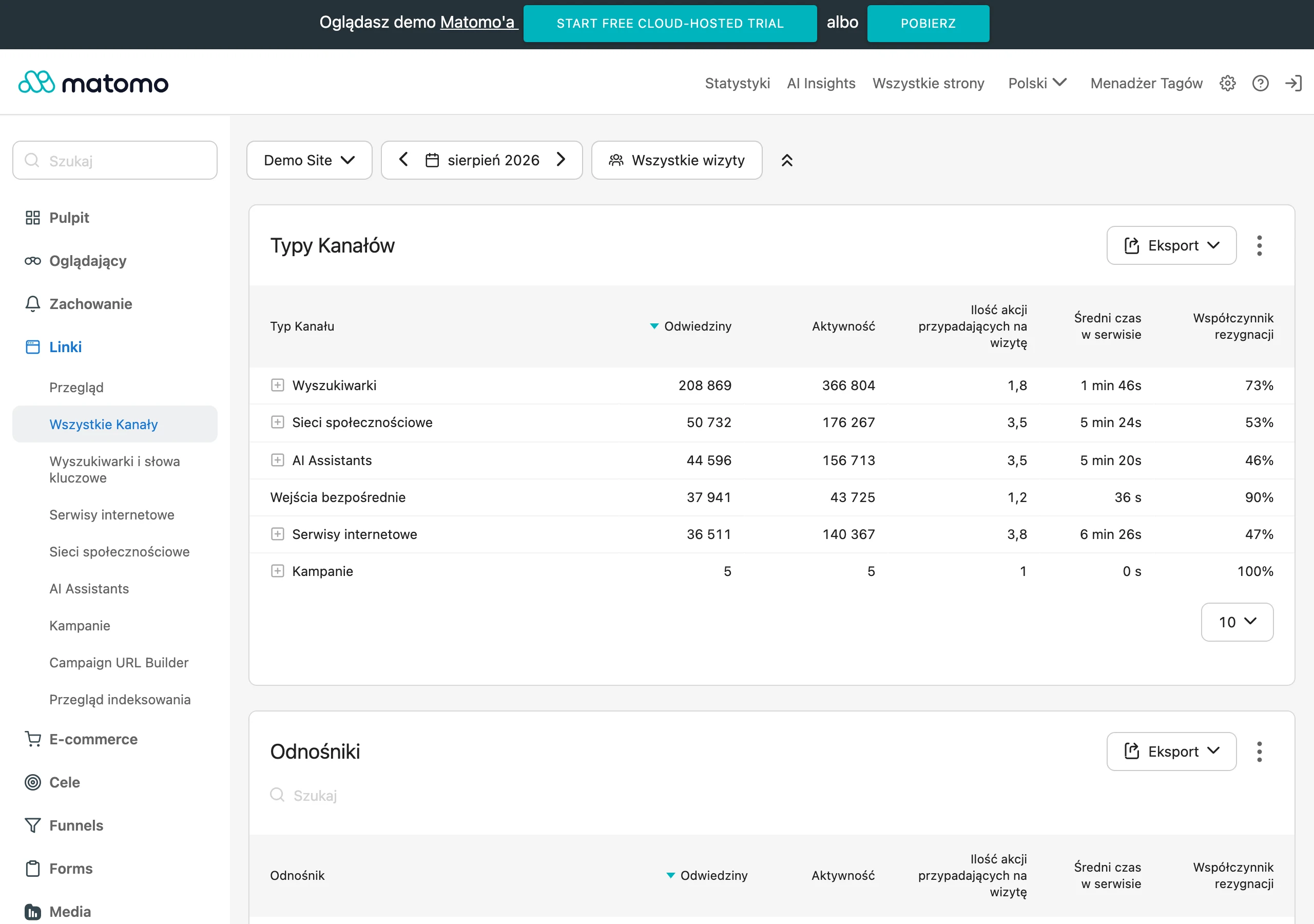
One of the most important tools is Google Analytics, which makes it possible to track traffic on the site, traffic sources and user behaviour. This makes it possible to identify which content attracts the most visitors and which needs improvement. Analysing metrics such as bounce rate or time spent on page helps optimise the user experience (UX), which has a direct impact on the site’s position.
Another key tool is Google Search Console. It provides valuable information about indexing errors, site performance in search results and the keywords for which the site is visible. Regularly reviewing reports makes it possible to react quickly to technical issues such as 404 errors or incorrect redirects.
Squarespace also offers its own Analytics section in the admin panel. Although it is not as advanced as Google Analytics or Search Console, it makes it possible to track basic metrics such as the number of visits or popular pages. It is a good starting point for monitoring the results of SEO efforts.
It is also extremely important to analyse conversions, that is, how many users complete desired actions such as buying a product or signing up for a newsletter. This makes it possible to assess the effectiveness of the SEO strategy and make changes where they are needed most.
Effective monitoring and analysis of results SEO on Squarespace requires using both the platform’s tools and external solutions such as Google Analytics or Search Console. Regularly updating the strategy based on the collected data helps maintain a high position for the site in search results and attract more organic traffic.
Using SEO audits and ranking reports
SEO audits and ranking reports on Squarespace play a key role in assessing the effectiveness of optimisation efforts. Audits allow you to thoroughly examine both the technical and content-related elements of the site, such as:
- loading speed,
- link structure,
- correctness of meta tags.
It is these that help detect errors which may negatively affect the site’s position in search results.
Ranking reports provide valuable information about the site’s positions for key phrases. They make it possible to track progress in SEO and identify the strategies delivering the best results. Regular analysis of this data allows you to adapt actions to the current requirements of search engine algorithms, which is essential for maintaining competitiveness.
When carrying out audits and generating reports, it is worth using professional tools such as:
- Google Search Console,
- Ahrefs.
These make it possible to monitor organic traffic, detect indexing issues and track ranking changes. This means you can respond quickly to emerging difficulties and make the necessary adjustments.
You should also not overlook the analytical features available directly in the Squarespace panel. Although they offer less advanced capabilities than dedicated external tools, they provide basic data on site traffic and the popularity of individual subpages.
Carrying out SEO audits systematically and analysing ranking reports is the foundation of effective SEO. They not only help maintain high visibility of the site in search results, but also attract more valuable organic traffic. These are simple actions that can significantly affect the success of your site.
Analysing organic traffic and conversions
Organic traffic analysis and conversions on Squarespace are a key element in assessing the effectiveness of an SEO strategy. Integration with analytics tools such as Google Analytics allows you to track which keywords attract the most visitors and what the click-through rates are. This makes it possible to fine-tune your actions precisely to both user expectations and search engine algorithm requirements.
Monitoring traffic sources is also crucial. Analytics tools help identify the pages that are the most popular and those that need improvement. For example, if the photography tips section attracts more visitors than the product page, it is worth considering expanding similar content.
Another important step is conversion analysis – checking how many users take the desired actions, such as making a purchase or signing up to the newsletter. This allows you to assess the effectiveness of individual subpages and make changes where they are most needed. For example, a low conversion rate on the offers page may indicate the need to modify its content or structure.
It is also worth using tools such as Google Search Console, which provide information about indexing errors or technical issues affecting the site’s visibility. Regularly reviewing reports makes it possible to respond quickly to emerging difficulties and implement the necessary fixes.
Organic traffic analysis and conversions are not only a way to assess the effectiveness of SEO activities, but also a tool for continuously improving your SEO strategy. This allows your site to maintain a high position in search results and attract more valuable organic traffic.
FAQ
Frequently asked questions
What SEO tools does Squarespace offer for site optimisation?
Squarespace enables customisation of title tags and meta descriptions, XML sitemap generation and support for rich snippet markup. The platform also lets you manage crawler access via the robots.txt file and integrates with Google Search Console.
Do meta descriptions on Squarespace affect a site’s position in Google?
Meta descriptions do not directly affect ranking, but they help increase click-through rates in search results. It is worth keeping them short, specific and using keywords.
How can you improve the visibility of a Squarespace site in search results?
The most important thing is to combine valuable content, relevant keywords and well-prepared metadata. You also need to take care of internal linking, external links and technical aspects such as site speed and responsiveness.
Why are information architecture and navigation important for SEO on Squarespace?
A clear structure makes it easier for users to move around the site and helps search engine crawlers index the content. Good navigation, heading hierarchy and internal linking support site visibility.
When is it worth using rich snippet on Squarespace?
It is worth enabling rich snippet when you want to make your site stand out in search results with additional information such as ratings, reviews, recipe preparation time or product prices. This is particularly useful for online stores, food blogs and service sites based on reviews.
Which ranking factors are most important on Squarespace?
The most important are content quality, natural use of keywords, site architecture, loading speed, responsiveness and linking. Clear URLs and the right heading hierarchy also matter.