
Core Web Vitals, a set of three key metrics assessing the quality of user experiences on the internet, have become an indispensable element of SEO strategy since 2021. They measure loading speed (LCP), interactivity (FID) and visual stability (CLS), having a significant impact on SEO in Google and visitor satisfaction. Find out why their optimisation is the key to better search engine results and more efficient performance of your website!
What are Core Web Vitals and why are they important?
Core Web Vitals are a set of key metrics assessing the quality of user experiences on websites. They consist of three main metrics: Largest Contentful Paint (LCP), First Input Delay (FID) and Cumulative Layout Shift (CLS). Each one is responsible for a different aspect of interaction – from loading speed, through response to user actions, to the visual stability of the page.
Their importance stems primarily from their impact on SEO and SEO in Google. Since 2021, they have been an official ranking factor, which means that websites with better results have a greater chance of higher positions in search results (SERP). Improving these metrics not only increases visibility in Google, but also translates into user satisfaction, which can lead to higher conversion rates.
The introduction of Core Web Vitals into Google’s algorithm has changed the way websites are optimised. Today, it is not only content and linking that matter, but also technical aspects of UX, such as loading speed and the smoothness of interactions. This encourages website owners to create more user-friendly and responsive solutions, which in turn raises the overall quality of the internet.
In short, Core Web Vitals are not just a tool for measuring website performance – they are a key element of SEO strategy and improving user experiences. Their optimisation has become essential for any website that wants to remain competitive in search results.
- 01Largest Contentful Paint (LCP)Loading speed of the largest element
- 02First Input Delay (FID)Responsiveness to user actions
- 03Cumulative Layout Shift (CLS)Visual stability of the page
- 04Google ranking factorImpact on SEO and SEO
Key Google metrics improving visibility in search results and overall user satisfaction.
Basic web metrics indicated by Google
Core Web Vitals are three key metrics introduced by Google that measure different aspects of user experience on a website. These are: LCP (Largest Contentful Paint), FID (First Input Delay) and CLS (Cumulative Layout Shift).
- LCP determines how quickly the largest content element on the page becomes visible. To achieve optimal results, this time should be less than 2.5 seconds,
- FID measures the delay in the page’s response to the user’s first action, such as clicking or scrolling. A value below 100 milliseconds is considered satisfactory,
- CLS assesses the visual stability of the page by detecting unexpected shifts of elements during loading. The recommended score is less than 0.1.
Since 2021, these metrics have become an official ranking factor in Google’s algorithm. Pages with better results have a greater chance of higher positions in search results (SERP). Improving these metrics not only increases the visibility of the website, but also affects user satisfaction, which can translate into higher conversion rates.
Impact on SEO and ranking in Google
Core Web Vitals play a key role in SEO and Google rankings. Since 2021, they have become an official ranking factor, which means that websites achieving better results in LCP, FID and CLS have a greater chance of higher positions in search results (SERP). Optimising these parameters not only affects site visibility, but also improves user experience, increasing engagement and reducing bounce rate.
Research indicates that pages loading in less than 2.5 seconds (LCP) have a 24% greater chance of retaining visitors. In addition, websites with fast interaction response times (FID below 100 ms) and stable content layout (CLS below 0.1) are more often favoured by Google algorithms. SEO experts confirm that improving these metrics can increase organic traffic by as much as 15-20%.
It is also worth paying attention to the impact of Core Web Vitals on the so-called “user experience signals”, which are gaining ever greater importance for Google algorithms. Pages that provide smooth and fast experiences are rewarded with higher positions, which directly translates into an increase in visits and conversions.
- 01Loading speed (LCP)Visible main content < 2.5s
- 02Interactivity (FID)Smooth, immediate response < 100ms
- 03Positive experience (UX)Greater satisfaction and engagement
Optimising these metrics builds trust and effectively keeps users on the site
What are the Core Web Vitals metrics?
Core Web Vitals are three key metrics that measure different aspects of user experience on a website: LCP (Largest Contentful Paint), FID (First Input Delay) and CLS (Cumulative Layout Shift). Each of them plays a different role in assessing website performance.
LCP (Largest Contentful Paint) determines how quickly the largest content element on a page becomes visible to the user. To ensure a good experience, it is worth aiming for a value below 2.5 seconds. This metric is mainly influenced by large images, headings or lengthy text.
FID (First Input Delay) measures the delay between the user’s first interaction (e.g. a click) and the page’s response. A value below 100 milliseconds is considered optimal because it guarantees smooth interactions and minimises frustration.
CLS (Cumulative Layout Shift) assesses the visual stability of a page during loading by detecting unexpected shifts in elements such as images or buttons. The recommended value is less than 0.1 – a high CLS can lead to confusion and make the site harder to use.
Since 2021, these metrics have a direct impact not only on user experience, but also on website rankings in Google. Paying attention to their optimisation can significantly improve both website performance and visitor satisfaction.
LCP – Largest Contentful Paint
LCP (Largest Contentful Paint) is a key website performance metric measuring the time needed to render the largest content element in the browser viewport. This may be a large image, heading, block of text or video. To give users a smooth experience from their first interaction with the site, the optimal LCP score should be below 2.5 seconds.
Many factors affect the value of this metric, such as:
- server response time,
- delays in delivering resources,
- lack of optimisation of large media files.
For example, inefficient image loading or failing to compress them can significantly increase LCP. It is also worth considering technologies such as lazy loading, which delay the loading of elements that are not visible at the start of the page.
Research indicates that websites with LCP below 2.5 seconds have a 24% greater chance of retaining users. Since 2021, Google has treated this metric as an official ranking factor, which means that pages with better results can expect higher positions in search results (SERP). Improving LCP not only increases visibility in Google, but also affects user satisfaction and conversion rates.
To optimise this parameter, it is worth focusing on a few key steps:
- use of Content Delivery Network (CDN) to shorten the server response time,
- image compression,
- minimising CSS and JavaScript code.
Thanks to these actions, you can not only improve user experience, but also increase the overall performance of the website.
- 01CRUX dataReal user experiences
- 02A reliable pictureDifferent devices and connections
- 03Lab dataStrictly controlled simulation
CRUX shows how the site performs in reality, and the lab shows artificial conditions.
FID – First Input Delay
FID (First Input Delay) is a metric that measures how quickly a page responds to the user’s first interaction, such as a click, scroll or button press. It is a key element affecting user satisfaction – long delays can be frustrating and lead to an increased bounce rate. To ensure smooth interactions, the optimal FID value should be below 100 milliseconds.
The page response time is mainly affected by JavaScript performance and browser CPU load. Scripts that block the main thread or excessive resource usage can significantly lengthen this time. To improve FID, it is worth focusing on:
- optimising JavaScript code,
- limiting operations performed while the page is loading,
- implementing techniques such as lazy loading or code splitting.
According to studies, pages with an FID below 100 ms have a 15-20% greater chance of retaining users and increasing conversions. Since 2021, Google has taken this metric into account as an official ranking factor, which means that websites with better results can expect higher positions in search results (SERP). Improving FID not only affects user experience, but also increases site visibility in Google.
CLS – Cumulative Layout Shift
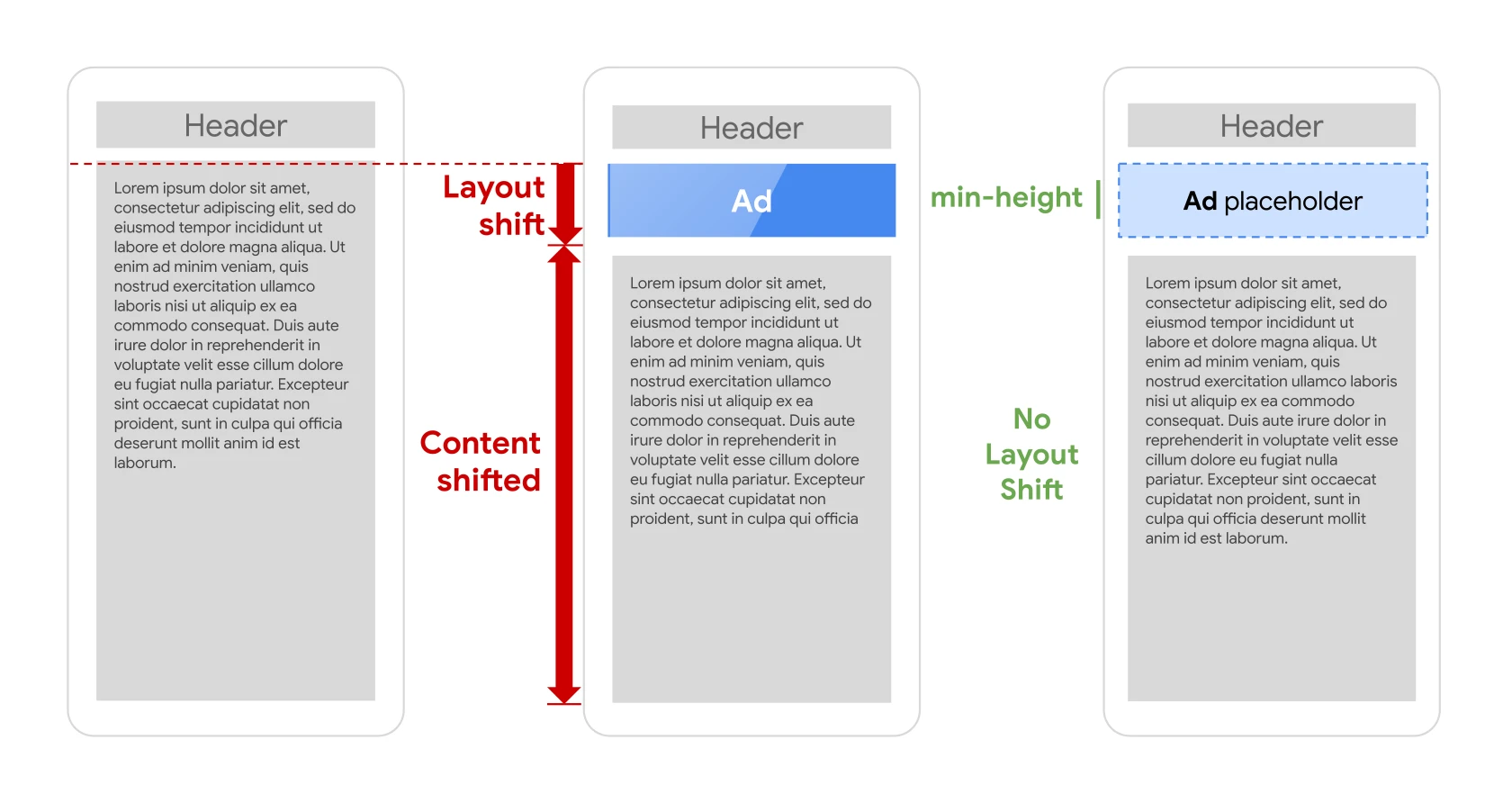
CLS (Cumulative Layout Shift) is a metric that measures the visual stability of a website while it is loading. Its purpose is to detect unexpected shifts in elements such as images, buttons or text, which can confuse users and worsen their experience. A high CLS score indicates frequent and unpredictable changes in the page layout, which often leads to frustration.
The optimal CLS value should be lower than 0,1. Results above 0,25 are considered poor and may negatively affect the page’s position in Google search results. CLS is one of the three key Core Web Vitals, alongside LCP (Largest Contentful Paint) and FID (First Input Delay). Since 2021, these metrics have become official ranking factors.
The causes of high CLS are varied. These may include, for example, missing specified dimensions for images or ads, dynamically added content or font changes during page loading. To improve this metric, it is worth applying several proven techniques:
- defining dimensions for images and multimedia elements,
- avoiding the dynamic addition of content above existing elements,
- using system fonts or preloading custom fonts.
Improving CLS brings many benefits – it increases user satisfaction and affects site visibility in Google. Pages with a low CLS score are more often rewarded with higher positions in search results (SERP), which translates into greater organic traffic and higher conversion rates.
How do Core Web Vitals affect user experience?
Core Web Vitals play a key role in shaping user experience (UX), focusing on the most important aspects of interacting with a website. One of them is page loading speed, measured by LCP (Largest Contentful Paint), which determines how quickly the user sees the main content. The optimal time is less than 2.5 seconds – a longer wait can lead to frustration and increase the number of people leaving the page.
Another important factor is interactivity, assessed using FID (First Input Delay). This metric shows how quickly the page responds to user actions such as clicks or scrolling. A value below 100 milliseconds ensures smoothness and an immediate response to commands, which translates into greater satisfaction and engagement from visitors. Delays, on the other hand, can discourage further use of the website.
No less important is visual stability, measured by CLS (Cumulative Layout Shift). Unexpected shifts in elements while the page is loading can be confusing and make navigation harder. A CLS value below 0,1 guarantees a consistent content layout, minimising the risk of accidental clicks and improving the overall user experience.
Care for these parameters not only affects a website’s SEO in Google, but also significantly increases visitor satisfaction. Research shows that websites with optimal Core Web Vitals scores have a 24% greater chance of retaining users and generate higher conversion rates. That is why investing in improving these metrics is a key step in building positive experiences and achieving better business results.
Unifying pages for UX
Optimising user experience (UX) through page unification is a key aspect of implementing Core Web Vitals. These metrics make websites more consistent and predictable, which translates into smoother performance and a better experience for visitors. High scores in LCP (loading speed), FID (interaction response time) and CLS (layout stability) guarantee that pages load quickly, respond instantly and minimise unexpected element shifts. As a result, users are more satisfied, and the risk of leaving the site out of frustration falls significantly.
Google introduced Core Web Vitals as a standard that promotes websites offering consistent and user-friendly experiences. Pages that meet these requirements are rewarded with higher positions in search results (SERP), which further encourages owners to invest in UX optimisation. As a result, users can expect a similar level of performance and stability regardless of which page they visit.
According to research, websites with optimal Core Web Vitals scores have as much as a 24% greater chance of retaining users. This clearly shows that caring about consistency and performance not only improves the visitor experience, but also increases a website’s competitiveness in Google search results.
Visual stability and interactivity
Visual stability and interactivity play a key role in shaping the user experience on a website. CLS (Cumulative Layout Shift) is a metric that measures page layout stability by detecting unexpected shifts in elements while a page is loading. To ensure consistency and avoid confusing visitors, the CLS value should be lower than 0,1. A high score can lead to frustration, especially when elements move during interaction, for example when a user tries to click a button.
On the other hand, FID (First Input Delay) assesses a website’s interactivity by measuring the response time to a user’s first action, such as clicking or scrolling. The optimal score is below 100 milliseconds, which guarantees smooth and immediate responses to commands. Longer delays may discourage further use of the site.
Analyses indicate that websites with low CLS and FID values have a 15-20% greater chance of retaining users and increasing the conversion rate. Improving these parameters not only affects visitor satisfaction, but also positively influences a website’s visibility in Google search results. Since 2021, both of these factors have officially been taken into account in Google’s ranking algorithm.
To increase visual stability and interactivity, it is worth applying several proven solutions:
- defining dimensions for images and multimedia,
- optimising JavaScript code,
- limiting operations that block the browser’s main thread.
Thanks to these actions, you can significantly improve the user experience and increase website effectiveness in terms of SEO. Remember – speed and stability are the foundations of success!
How to measure Core Web Vitals?
Monitoring Core Web Vitals is a key element of website optimisation that affects both user experience and SEO in Google search. To track these metrics effectively, it is worth using dedicated tools that provide detailed data on website performance.
One of the most commonly used solutions is Google PageSpeed Insights, which analyses a page in terms of three main metrics:
- LCP (Largest Contentful Paint),
- FID (First Input Delay),
- CLS (Cumulative Layout Shift).
The tool generates detailed reports for both mobile and desktop devices, highlighting areas that require optimisation.
Another noteworthy tool is Lighthouse, available in Chrome DevTools. In addition to analysing Core Web Vitals, Lighthouse carries out a website audit in terms of:
- performance,
- accessibility,
- SEO.
It provides a detailed report with practical recommendations for improvement.
It is also worth using Google Search Console, which offers a “Performance report” section based on data from Chrome UX Report (CrUX). This makes it possible to assess website performance based on real user experiences, rather than just lab results.
For those who prefer immediate access to data, the Web Vitals Extension for the Chrome browser may be useful. This simple tool enables you to track metrics in real time while browsing a page.
Systematically monitoring Core Web Vitals using these tools allows you to quickly identify issues and implement the necessary improvements. This makes it possible not only to improve the user experience, but also to increase a website’s visibility in Google search results.
How does CRUX research differ from lab data?
Reports from CRUX (Chrome User Experience Report) differ from lab data, such as that from PageSpeed Insights or Lighthouse, primarily in their source and method of collecting information. CRUX is based on real data from users browsing websites. This provides a reliable picture of visitors’ experiences in different conditions, taking into account a range of devices, browsers and internet connection speeds. This makes the results more representative of how the site actually performs.
On the other hand, lab data is generated under strictly controlled simulated conditions. Tools such as PageSpeed Insights or Lighthouse run tests in a laboratory environment that does not always reflect the full complexity of user behaviour. Although they provide detailed guidance on potential technical issues, they may miss some factors that affect page performance in practice.
Another important difference is the scope of the data. CRUX collects information from millions of Chrome users worldwide, which makes it possible to analyse global trends and compare results with other websites. Meanwhile, lab data is limited to specific tests carried out by the tool, which may not reflect the full spectrum of user experiences.
It is worth emphasising that both approaches complement each other perfectly. CRUX offers an overall picture of page performance in real-world conditions, while lab data helps identify specific technical issues requiring optimisation. Combining both methods allows for a comprehensive assessment and improvement of site performance in terms of Core Web Vitals.
Measurement tools – Google PageSpeed Insights, Lighthouse
Google PageSpeed Insights and Lighthouse are two indispensable tools for analysing website performance, especially in the context of Core Web Vitals. Google PageSpeed Insights focuses on three key metrics:
- LCP (Largest Contentful Paint),
- FID (First Input Delay),
- CLS (Cumulative Layout Shift).
This tool analyses a page on both mobile devices and desktop computers, highlighting areas that require optimisation. It also provides practical advice, such as image compression or improving CSS and JavaScript code.
Lighthouse, available in Chrome DevTools, offers even more capabilities. In addition to analysing Core Web Vitals, it also checks the page’s performance, accessibility and SEO. It generates a detailed report with specific recommendations that help improve site performance. This tool is especially valued by developers because it allows them to test pages under different simulated conditions.
It is worth emphasising that both tools differ from CRUX (Chrome User Experience Report) data, which is based on real user experiences. PageSpeed Insights and Lighthouse, however, provide lab results that help identify technical issues affecting page performance. Thanks to them, you can quickly detect errors related to long loading times or layout instability.
What is more, both tools integrate with other Google platforms, such as Search Console. This makes it possible to monitor site performance based on CRUX data and combine lab results with real user data. Such a combination enables a comprehensive assessment and optimisation of the website in terms of Core Web Vitals.
Regular use of Google PageSpeed Insights and Lighthouse not only improves user experience, but also increases visibility in Google search results. These are simple steps that can have a significant impact on your site’s success.
How to improve Core Web Vitals metrics?
To improve Core Web Vitals metrics, it is worth focusing on several key areas that directly affect website performance. Start with optimising load time. This can be achieved by compressing images, using modern formats (e.g. WebP) and implementing lazy loading, which delays the loading of elements not visible on the initial page view. In addition, using a Content Delivery Network (CDN) can significantly reduce server response time.
Another important element is reducing interaction delays. To improve the FID (First Input Delay) score, it is worth optimising JavaScript code, avoiding blocking the browser’s main thread and limiting the number of scripts running while the page loads. Techniques such as code splitting can help divide code into smaller chunks that are loaded only when needed.
Visual stability also plays a key role, especially in the context of CLS (Cumulative Layout Shift). To avoid unexpected element shifts, always define dimensions for images and media, and avoid dynamically adding content above already existing sections. Preloading custom fonts can prevent later layout changes caused by their loading.
Optimising CSS and JavaScript code is another important step. Minifying CSS and JS files and removing unnecessary code fragments can significantly speed up the site. It is also worth using browser cache mechanisms to reduce the number of requests to the server and shorten load times for returning users.
Regular monitoring of results using tools such as Google PageSpeed Insights or Lighthouse makes it possible to identify issues on an ongoing basis and implement the necessary fixes. Thanks to these actions, it is possible not only to improve Core Web Vitals scores, but also to increase user satisfaction and the site’s visibility in Google search results.
Optimising page loading and interactivity
Optimising page load speed and interactivity are key elements affecting Core Web Vitals metrics such as LCP (Largest Contentful Paint) and FID (First Input Delay). One of the most effective ways to speed up loading is to use lazy loading, which delays fetching elements that are not immediately visible. It is also worth ensuring image compression to the WebP format and minimising CSS and JavaScript code – these steps significantly reduce content render time.
When it comes to interactivity, optimal management of JavaScript code is crucial. It is important not to block the browser’s main thread. The code splitting technique makes it possible to break code into smaller chunks that load only when needed. In addition, it is worth limiting the number of scripts run during page load – this directly affects the speed of response to the user’s first actions.
It is also worth considering the use of a Content Delivery Network (CDN), which shortens server response time by distributing assets from locations closer to the user. As a result, the page loads much faster, which has a positive effect on LCP results.
You cannot forget about regular monitoring of site performance. Tools such as Google PageSpeed Insights or Lighthouse help identify areas requiring improvement. Thanks to systematic optimisation, it is possible not only to achieve better Core Web Vitals results, but also to increase user satisfaction and improve the site’s position in Google search results.
Image compression and lazy loading
Image compression and lazy loading are key website optimisation techniques that significantly affect Core Web Vitals metrics such as LCP (Largest Contentful Paint) and CLS (Cumulative Layout Shift). Compression involves reducing the size of image files while maintaining their visual quality. As a result, pages load faster, which directly translates into better LCP results. It is worth opting for modern formats such as WebP, which offer higher compression efficiency compared with traditional JPEG or PNG.
Lazy loading, on the other hand, is a method that delays loading elements not visible during the initial page view, e.g. images located below the fold. This means the browser does not have to fetch all assets at once, which speeds up the initial loading time. This is particularly important for improving LCP and reducing data usage for mobile users.
According to research, using lazy loading can reduce load time by as much as 30%, which has a huge impact both on user satisfaction and on SEO in Google. In addition, this technique minimises the risk of layout shifts (CLS) because elements are loaded gradually and their dimensions are precisely defined in advance.
To implement these solutions effectively, it is worth using analytical tools such as Google PageSpeed Insights or Lighthouse. They provide detailed guidance on areas requiring optimisation. Regular monitoring of results allows you to adjust your strategy on an ongoing basis and maintain high site performance.
Code optimisation and browser cache
Code optimisation and effective use of the browser cache are key factors affecting site performance and Core Web Vitals metrics. Thanks to well-optimised HTML, CSS and JavaScript, page load time is shortened, which directly translates into better LCP (Largest Contentful Paint) results. Removing unnecessary code fragments, minimising files and optimising scripts can significantly improve the site’s responsiveness, which has a positive impact on FID (First Input Delay).
The browser cache allows the site’s assets to be stored locally on the user’s device, reducing the number of requests sent to the server during subsequent visits. As a result, returning visitors experience faster page loading, which affects their satisfaction. It is worth ensuring the correct configuration of HTTP headers such as `Cache-Control` and `Expires` to control how long data is stored in the cache.
It is also worth applying advanced optimisation techniques such as tree shaking, which removes unused JavaScript code, and minification of CSS and JS files. These actions not only speed up the website, but also reduce browser workload.
Regular performance checks using tools such as Google PageSpeed Insights or Lighthouse make it possible to identify areas requiring improvement on an ongoing basis. This helps maintain high site effectiveness and strengthen its position in Google search results.
FAQ
Frequently asked questions
what are the three Core Web Vitals metrics and what do they measure?
Core Web Vitals include LCP, FID and CLS. They measure, respectively, the loading speed of the main content, the response time to the first interaction, and the stability of the page layout during loading.
do Core Web Vitals affect Google rankings?
Yes, since 2021 they have been an official ranking factor. Better results in LCP, FID and CLS can increase a page’s chances of ranking higher in the SERP.
what LCP, FID and CLS values are considered good?
For LCP, the optimal result is less than 2.5 seconds, for FID less than 100 milliseconds, and for CLS less than 0.1. These are the levels that, according to the article, are considered satisfactory or good.
why is LCP important for the user experience?
LCP shows how quickly the largest content element becomes visible. If this time is too long, the user may feel that the page is loading slowly and stop browsing it any further.
how can FID be improved on a website?
The article points to JavaScript optimisation, limiting operations during loading, and techniques such as lazy loading and code splitting. Reducing the load on the browser’s main thread also helps.
what causes a high CLS on a page?
High CLS is affected by, among other things, missing specified dimensions for images and ads, dynamically added content, and font changes during loading. This leads to unexpected shifts in elements on the page.