

CDN is a solution usually implemented to make a website load faster and handle sudden traffic spikes better. In practice, however, it is not only about speed, but also about the predictable delivery of images, CSS, JavaScript and other files needed to render the page correctly. This also matters for SEO, because the bot and the user should receive the same resources, in the correct version and without errors. A CDN on its own will not secure rankings in Google, but when configured properly it can genuinely improve performance, availability and indexing. It is equally important that a faulty configuration can be more harmful than having no CDN at all. That is why it is worth knowing not only the definition, but also how it works and the typical places where problems most often arise.
What a CDN is in practice
A CDN is a network of intermediary servers that delivers website files from a location closer to the user than the main server. Instead of fetching a resource directly from origin every time, the user is directed to the so-called edge node, where a ready copy of the file may already be waiting. This most often applies to images, CSS stylesheets, JavaScript files, fonts, video and documents. In more advanced implementations, a CDN can also handle selected HTML responses or API responses.
Technically, traffic is usually routed to a CDN via DNS or a reverse proxy. This remains invisible to the user, but in practice it means the browser does not communicate with the origin server straight away. This means the origin receives fewer requests, and the site can handle traffic growth and short-term overloads more easily. This is particularly important where one server serves a large number of assets or where users connect from many countries.
The basis of how a CDN works is caching, that is, storing copies of responses for a defined period. If the requested file is already in edge cache, we have a cache hit and the resource returns quickly without involving the origin. If it is not there, a cache miss occurs, and the CDN fetches the file from the origin server and stores it according to the cache rules. In practice, the effectiveness of a CDN depends mainly on what can actually be cached and how long such a copy can be treated as current.
Modern CDNs usually do more than just store files. They often terminate TLS connections, support HTTP/2 or HTTP/3, compress responses and help filter out some unwanted traffic. This improves resource delivery time and reduces server load, but only if the configuration does not interfere with headers, response codes or URL logic. From an SEO perspective, what matters is therefore not the mere use of a CDN, but whether the site delivers the correct content to the bot and the user faster and more reliably.
In practice, it is worth bearing in mind that not every piece of content is cached in the same way. Public resources that change rarely can be kept in cache for a long time, whereas the basket, user account or checkout should bypass cache or work under very strict rules. The most common mistake is not the lack of a CDN, but the fact that cache covers too much or too little. In such situations, outdated versions of content, incorrect responses or privacy-related data risks appear.
- 01Main Server (Origin)Central file repository
- 02Network of Nodes (Edge)Locations closer to the user
- 03Local CopyFast access to resources
- 04User RecipientPage loading in a flash
Key point: a CDN speeds up and unloads your site by delivering resources from close by.
How a CDN works step by step
A CDN works in such a way that the user or bot first reaches the edge node, and only then, when necessary, does it fetch data from the origin server. At the start, the domain or subdomain is pointed to the CDN by changing DNS or setting up a reverse proxy. From that moment on, the edge point becomes the first place where the request is handled. That is usually where the TLS connection ends and proper traffic processing begins.
When a request reaches the edge, the CDN checks whether it can return a ready response from cache. It relies on the so-called cache key, which may be built from the URL, query parameters, selected headers, the request method and sometimes also cookies. Poorly configured rules mean that a CDN can store too many variants of the same page or, conversely, serve everyone one version of the content. This is one of the key configuration stages, because this is where the speed, correctness and security of the response are decided.
If the resource is already stored at the edge, we have a cache hit and the file returns to the user without contacting the origin. This shortens latency and reduces the load on the main server. When the resource is missing, a cache miss occurs, so the edge fetches the response from the origin, analyses the headers and stores it according to the cache policy. In practice, it is the ratio of hits to misses that best shows whether the CDN is actually benefiting the site.
Along the way, a CDN can also improve content delivery. This most often applies to file compression, more efficient connection handling, support for newer protocols and, in some implementations, transforming images into lighter formats. This does not change the content of the page itself, but it affects how quickly the browser receives the resources needed for rendering. For SEO, this matters indirectly because it improves the technical conditions for loading and the site’s stability.
When the content on a page changes, a CDN does not always “notice” immediately. That is why purge or invalidation is used, meaning removing the old version from edge cache so that subsequent users and bots receive the up-to-date response. Without this, outdated HTML, images or CSS files may be served for some time, even though the origin already has a new version. With frequent publishing, the lack of a cache-clearing procedure is a straight path to delayed indexing and a mismatch between what the editors see and what Googlebot receives.
At the end, there are exceptions and quality control. Subpages dependent on sessions, logins, baskets or local settings should usually bypass cache or operate under very restrictive rules. After deployment, it is worth verifying response codes, redirects, JS and CSS loading, robots.txt behaviour and availability for bots. From an SEO perspective, this is exactly where the real effect of CDN configuration becomes visible, namely in response time, correct rendering and the stability of indexable URLs.
The impact of CDN on SEO and site performance
CDN affects SEO mainly indirectly, because it can shorten resource delivery time, increase site stability and limit the effects of problems with the availability of the origin server.

This is most noticeable with files affecting rendering, such as images, CSS and JavaScript. When these resources arrive faster and in a more predictable way, perceived speed improves, which can support performance metrics, such as TTFB or LCP. CDN is not a ranking factor in itself, but it can improve the technical conditions that determine how the page is perceived by the user and the crawler.
Availability also matters in the context of SEO. If the origin is overloaded, the CDN can take over a significant share of traffic for static resources and relieve the server, so the site returns errors less often and runs more stably. This is especially important during traffic spikes, campaigns, seasonality and on sites with international traffic.
The impact on indexing appears when the bot is able to fetch HTML and the resources needed for rendering faster and more stably. If the CDN correctly handles robots.txt, sitemap.xml, redirects and response codes, the risk of technical disruptions falls. The biggest SEO gain from a CDN comes when it improves page delivery without changing URL logic, content or HTTP responses.
However, caution is needed, because a poorly configured CDN can be more harmful than helpful. Typical problems include caching outdated HTML, turning 404s into 200s, incorrect redirects, blocking Googlebot with anti-bot protection or serving a different content version than on the origin. In such a scenario, not only technical performance drops, but also indexing consistency.
From a performance perspective, a CDN does not solve all problems. If the site has a heavy frontend, messy JS code, suboptimal images or issues on the application side, the CDN alone will not fix that. A CDN speeds up delivery, but it does not replace optimisation of the site itself.
For international traffic, the benefits usually grow because the physical distance between the user and the file delivery point is shortened. However, this does not solve issues of geotargeting, hreflang or content localisation. A CDN supports transport, but it does not replace a sound SEO architecture for multiple markets.
- 01Faster resource deliveryShortens load time (images, CSS, JS)
- 02Greater stability and availabilityRelieves the origin server by taking over static traffic
- 03Improved performance metricsSupports TTFB and LCP, improves perceived speed
- 04Indirect impact on SEOIt is not a ranking factor, but it improves technical conditions
CDN optimises the technical infrastructure, which translates into a better user experience and a more favourable assessment of the page by search engine bots.
What to do and what to watch out for when implementing a CDN
When implementing a CDN, it is worth clearly separating from the outset the elements that can go into cache from those that must be fetched from the origin every time.
The most sensible approach is to start with static assets, because that is where it is easiest to stay in control and the benefits are usually visible fastest. HTML, API responses and user-dependent content require separate rules, because it is not hard to end up with a situation where someone receives an old or private version of a page not intended for them. Do not cache the whole site with one rule just because “it will be faster”.
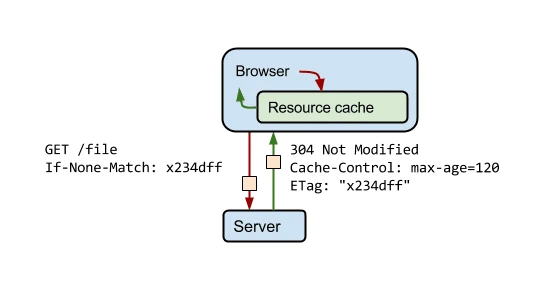
Everything is determined by HTTP headers. Cache-Control, ETag, Last-Modified, Vary and cookie-related rules decide whether the CDN will work in line with the site’s logic. When these settings are off, you can end up with responses that are fast but incorrect, and from an SEO point of view that is an unacceptable setup.
You also need to make sure addresses and response codes are handled correctly. The CDN should not independently alter 301, 302, 404, 410 or swap in a 200 response where the content does not actually exist. The same applies to robots.txt and sitemap.xml, because serving them incorrectly can derail crawling right from the start.
The security layer requires separate verification. Many CDN services combine cache with a WAF, request limiting and JavaScript challenges, which can be useful, but sometimes they block legitimate crawlers or complicate rendering. After deployment, always check whether the search engine bot receives the same page and the same resources that a regular user sees.
- Set separate rules for static assets, HTML, API and session-dependent pages.
- Verify the cache-control, vary, etag and cookie handling headers.
- Check redirects, 404, 410, robots.txt and sitemap.xml directly through the CDN.
- Test the site from several locations, on mobile and desktop, including for bots.
- Implement a purge or invalidation procedure after publishing and after major content changes.
A good practical step is to test not only the homepage after deployment, but also category pages, posts, pagination, filters and error pages. These are precisely the places where problems with the cache key, URL parameters and cookie passing most often appear. It is also worth monitoring TTFB, the completeness of CSS and JS loading, and the correctness of the mobile version in parallel.
If you use a separate subdomain or domain for assets, verify CORS, certificates, security policies and any preconnect. Mistakes in this area often do not immediately stand out from the business side, but they can block fonts, scripts or images. The CDN is meant to help deliver assets, not create a new layer of failure.
Finally, it is worth monitoring logs, 4xx and 5xx errors, hit ratio and how quickly updates reach the user and the bot. If new content is not visible for a long time after publishing, the cause is sometimes not indexing, but stale cache on the edge. In practice, a well-implemented CDN supports technical SEO, but only when it is treated as part of the infrastructure and regularly checked, not as an “automatic speed booster”.
Optimising CDN configuration for SEO
Optimising a CDN for SEO comes down to configuring cache, headers and response rules so that the site loads faster without breaking HTTP logic and without risking indexing issues. The key is a sensible separation of resources into groups. Static files can be cached aggressively, whereas HTML, API and user-dependent content require a much more cautious policy. What usually brings the biggest gain is good caching of images, CSS, JavaScript and fonts, rather than unconditional caching of entire pages. That reduces load on the origin and clearly improves the delivery time of files essential for rendering.
Response headers matter a great deal. For static assets, longer cache-control values and file versioning in the URL usually work best, because when the file changes, the URL changes too and the CDN does not serve the previous version. For HTML, it is better to keep shorter TTLs or rely on conditional validation using etag or last-modified, so as not to delay the appearance of new content in search.
Technical SEO also requires consistent HTTP responses. The CDN should pass through the correct 200, 301, 302, 404 and 410 codes instead of reducing different situations to a single response type. If the CDN layer turns a 404 into a 200 or caches a faulty redirect, the problem affects not only UX but also indexing. The same applies to robots.txt and sitemap.xml. These files must be available, up to date and served without delay after changes are deployed.
The cache key is also important, that is, the set of elements on the basis of which the CDN decides whether it can return a stored version of the response. If important components are missing from the key, such as selected cookies, query parameters or the Vary header, the site may start serving the wrong version of a page. In practice, the biggest problems are caused by overly broad HTML caching and by ignoring the fact that some content depends on language, device or session state.
From an operational point of view, fast cache refreshing after publication matters. With frequent updates, it is worth linking deployment with automatic purge or invalidation so that the bot and the user do not see an old version of the page for several hours. The CDN helps SEO when it speeds up content delivery, but it is just as important that after content changes it can stop caching it quickly.
Finally, the effects need to be assessed in real conditions. A higher hit ratio on its own means little if rendering accuracy has dropped, JS errors have appeared, or the bot receives a different response from the user. In practice, it is worth monitoring TTFB, the availability of key assets, responses to bots, server logs and the consistency between what the edge serves and what the origin returns.
- 01Intelligent resource groupingSeparate static and dynamic files
- 02Aggressive cache (static)Long cache-control, file versioning
- 03Cautious cache (dynamic)Limit cache for HTML, API, user-content
The key is to intelligently separate resources and use appropriate headers to speed up loading without risking indexing or site logic.
The most common mistakes and risks associated with CDN
The most common CDN mistakes include: incorrect HTML caching, breaking response codes, blocking bots and keeping outdated versions of content. The problem is that such issues usually do not become apparent straight away, because the site “works” — it just works differently for the user, differently for the bot and differently in different locations. The most dangerous are the errors that do not cause failures, but quietly change how the website behaves.
- caching private or session-based versions of pages and serving them to other users,
- serving error pages as 200 instead of 404 or 410,
- blocking Googlebot with anti-bot rules, challenges or an overly aggressive firewall,
- holding on to an older version of content after publication, migration or a change in redirects,
- incorrect handling of URL parameters, cookies and the Vary header.
A common problem is overly aggressive caching of dynamic pages. This affects especially e-commerce, services with a user account and multilingual websites. If the CDN does not distinguish variants depending on session, location or language, it can serve the wrong basket, the wrong language version or an incorrect page state, which affects both UX and the consistency of the content reaching the index.
The next risk is related to the security layer. CDN often also acts as a WAF, and badly configured rules can block crawlers, force JavaScript challenges or return responses different from origin. If a bot cannot fetch HTML, CSS, JS, robots.txt or sitemap.xml, the CDN’s speed no longer matters. For this reason, after deployment it is worth checking not only how the site works in a normal browser, but also how it looks to bots and the resources needed for rendering.
Problems can also be caused by inconsistencies in addresses and hosts. When the CDN adds separate subdomains, changes the way assets are served or introduces its own redirects, it is easy to make mistakes in canonicals, CORS, certificates or security policies. The result is often obvious: some resources do not load correctly, and fragments of content start functioning under several addresses.
Errors during purge and migrations are risky too. After a change to URLs, redirects or content, the CDN may still serve old cached responses for some time, even though origin is already returning new ones. In practice, this is one of the most common reasons for a mismatch between what the team sees on the server and what Google still sees. That is why after major changes you should immediately verify specific URLs, HTTP responses and versions returned from different locations.
The final risk is a false sense of improvement. Better edge metrics do not automatically translate into better SEO if, at the same time, rendering has worsened, the number of 5xx errors on origin has increased, or some resources load conditionally and unreliably. A CDN should be assessed not through the lens of declared speed, but by whether the site is genuinely faster, correct and accessible for both the user and the bot.
Monitoring and analysing CDN performance
Monitoring CDN performance comes down to verifying whether the cache layer actually speeds up resource delivery while not breaking site functionality or SEO logic. Simply enabling the service does not decide anything yet. You need to measure what happens on the edge, what still reaches origin and how users and bots see it. The most important thing is to compare the state before implementation and after implementation, not to draw conclusions based on a single test.
In practice, it is worth tracking several metrics in parallel: hit ratio, TTFB, the number of requests to origin, 4xx and 5xx errors, and response time of the source server. A high hit ratio on its own can be misleading if the cache mainly covers low-priority files while critical resources still load sluggishly. It is more reliable to check whether images, CSS, JavaScript and other files affecting rendering are delivered faster. If origin is still frequently under load, it usually means the cache rules are too conservative or simply poorly targeted.
It is worth carrying out the analysis from multiple locations and on different types of devices. CDN brings the most value where geographic latency was previously noticeable, so a test from one city will not show the full picture. It is a good idea to compare synthetic test results with real user data, because only then can you see whether the improvement in the lab translates into the day-to-day performance of the service.
From an SEO perspective, it is important to monitor not only speed, but also the correctness of HTTP responses. After implementation, verify whether the CDN does not swap 404 for 200, does not throw 301 and 302 redirects out of sync, serves robots.txt and sitemap.xml correctly and does not block bots with security rules. It is worth periodically checking the cache-control, vary, etag headers and the cache hit or miss status for key URLs. A configuration error that affects only some URLs can remain off the radar for a long time, yet still hit indexing.
A separate topic is monitoring content changes and purge effectiveness. When you publish new articles, update your offer or improve important subpages, check how quickly the new version appears on the edge and whether the old copy is still being served to users or bots. This has a direct impact on content freshness and the speed at which the search engine reprocesses the page.
The most useful are logs and reports that let you spot recurring patterns of problems, not just isolated incidents. Look out for spikes in errors by country, device type, URL path, response code and traffic source. If after implementation TTFB dropped, but the number of JS errors, incomplete responses or asset issues increased, then the CDN needs adjusting, not a declaration of success. A properly configured CDN should simultaneously offload the origin, stabilise resource delivery and maintain full compatibility with the site’s logic.
FAQ
Frequently asked questions
how does a CDN affect a website’s SEO?
It mainly has an indirect effect, because it can reduce the time needed to deliver resources and improve site stability. This helps rendering and can support indexing, but the CDN itself is not a ranking factor.
can a CDN improve the loading speed of images, CSS and JavaScript?
Yes, especially when those files are cached on edge nodes closer to the user. This means the browser gets the resources needed to render the page faster.
why can a poorly configured CDN harm SEO?
Because it can serve outdated HTML, incorrect redirects or a different version of the content than the origin. In extreme cases, this harms indexing more than having no CDN at all.
when is it worth doing a purge or invalidation in a CDN?
When the content on the website changes and the new version needs to reach users and bots as quickly as possible. Without refreshing the CDN cache, it may serve old files for some time.
what should be cached in a CDN, and what should not?
It is best to cache static assets such as images, CSS, JavaScript and fonts. HTML, API and content dependent on the user, session or basket should have separate, more cautious rules or bypass the cache.
how can you check whether a CDN is working properly from an SEO point of view?
You need to verify response codes, redirects, robots.txt, sitemap.xml and the loading of JS and CSS. It is also important to check whether the bot and the regular user receive the same content and the same resources.