

Cache is a mechanism that speeds up a website by storing ready-made data or files instead of generating and fetching them from scratch every time a page is visited. In practice, it operates in parallel across several layers: in the user’s browser, on the server, in a CDN, and sometimes also within the application itself or in the database. As a result, the site can display content more quickly, use fewer server resources and cope better with heavier traffic. The key is not simply “switching on cache”, but deciding what can be safely stored, where to do it, for how long and when to refresh the copy. These decisions are what determine the site’s real speed and the risk of showing outdated data. A properly configured cache helps, while a poorly configured one can hide errors, slow down deployments and mix content between users.
What is cache and what is its practical significance?
Cache is a temporary copy of data that allows a subsequent request to be handled more quickly without repeating the same operations. Instead of fetching an image, generating HTML or calculating a database query result every time, the system returns a ready response from a place that is closer to the user or works faster than the source.
In practice, three main layers are most commonly encountered. Browser cache stores static files such as CSS, JavaScript, images and fonts. Server-side cache can hold ready-made HTML, view fragments or query results. CDN or edge cache serves files from a node closer to the user, which reduces network latency and offloads the origin server.
The biggest benefit from cache appears where content is repeated between users. This applies to blog posts, category pages, product images, style sheets, scripts and API responses that do not depend on a specific user’s session. The more often the same resource is fetched unchanged, the greater the benefit from cache.
The business value is straightforward: shorter loading times, less work for the hosting environment and greater stability during traffic spikes. For the user, this means a faster page render, and for the site owner, a lower risk of overload during a campaign, in peak season or after a mention in the media. Cache does not replace solid optimisation, but it often delivers the fastest result for a reasonable amount of effort.
It is also worth remembering that not everything can be cached in the same way. The basket, user account, checkout, logged-in content and responses dependent on permissions require exceptions or separate rules. The most common mistake is treating the whole site as a single unit, even though in reality some content is public and some is private or highly changeable.
How does cache work from a technical perspective?
Cache works by preparing a response on the first request and saving a copy of it, then attempting to return that version on subsequent requests instead of creating everything from scratch. In practice, the aim is to shorten the path between request and response and to reduce costly operations such as database queries, view rendering or fetching assets from the origin.
The whole process starts with determining what is actually suitable for caching. You need to establish which elements are static, which change frequently and which depend on the user, language, location, cookies or URL parameters. This matters because the same resources may exist in several variants, and if the system does not distinguish them properly, it will start serving the wrong content.
On the first visit, a so-called miss usually occurs, meaning there is no ready copy available. The server or application then generates the response, stores it according to the rules and only then sends it to the user. On the next request, we have a hit, provided the copy is still valid, and the response comes back faster without full recalculation. It is precisely a high hit rate that makes cache genuinely speed up a site and reduce load on the origin.
In modern services, cache works in layers. The browser may not fetch images and scripts again, the CDN can return a file from the nearest node, a reverse proxy can serve ready-made HTML, and the application can use cache for data or view fragments. The problem is rarely the absence of one of the layers; more often it is the lack of consistency and coordination between them.
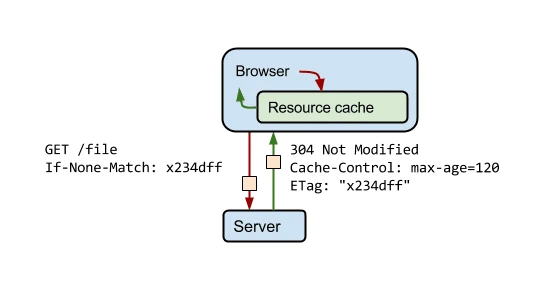
Each copy has its own lifetime or validation mechanism. Once the TTL expires, the response may be discarded, refreshed or validated using headers such as ETag or Last-Modified. If you do not plan cache invalidation after changes to content, prices, stock levels or the deployment of a new front-end, the user will see an old version even though the source is already up to date.
In technical practice, exceptions and cache key control are equally important. Unnecessary URL parameters, excess cookies, A/B tests or personalisation can split one page into dozens of variants, which clearly reduces cache effectiveness. That is why a good implementation does not come down to setting a long retention period, but to consciously limiting variability where it is not needed.
What rules govern cache behaviour?
Cache follows a simple rule: if there is a valid copy of a response or file, the system returns it instead of generating everything from scratch. In practice, four decisions are decisive: what may be cached, where to do it, how long to keep the copy and when to invalidate it. The biggest mistake is treating the whole site in the same way, even though different types of content require different rules.
The first request most often ends with the response being stored in the selected cache layer, and the next ones can then fetch the ready-made copy. The real benefit appears only when the content is repeatable and does not depend on a specific user, session or the system’s current state. For this reason, images, CSS, JS, fonts, posts, category pages and some API responses cache best.
The second principle is setting the copy’s lifetime correctly, i.e. TTL. Static resources updated only occasionally can have a long cache, whereas HTML with prices, stock levels or editorial content usually requires shorter values. A long TTL without file versioning makes deployments harder, because the user may still see an old version of CSS or JS.
The third principle concerns variants of the same content. When a response depends on language, location, URL parameters, cookies, an A/B test or being logged in, the cache must distinguish between these versions; otherwise it will return the wrong content. On the other hand, too many variants reduce cache effectiveness, because instead of one copy the system builds many almost identical ones.
The fourth principle covers validation and refresh. After content changes, the copy should be removed, rebuilt or verified using mechanisms such as ETag or Last-Modified. If you do not plan a purge after publication, deployment or a change in business data, the cache will start speeding up the delivery of outdated information.
A separate rule is the division between public and private content. Login pages, customer account, basket, checkout, admin panel and responses dependent on permissions should not go into a shared cache, except in very strictly defined exceptions. This is not a technical detail, but a matter of security and correct operation.
What should be analysed and optimised in the context of cache?
In the context of cache, it is worth analysing static resources, HTML and dynamic content, cache exceptions, sources of variability and the side effects of incorrect configuration. To begin with, it is a good idea to check whether static files have the correct Cache-Control headers, sensible TTL and versioned names. Without this, the browser and CDN will not use the full performance potential.
For HTML and the application layer, you need to determine whether full-page cache, fragment caching or microcaching can be implemented. This is particularly useful where many people view the same subpages and their content does not change from second to second. Not every page requires full page cache — sometimes a greater effect comes from caching a few expensive fragments or database query results.
You also need to precisely indicate the places that cannot be cached or should have separate rules. This applies especially to paths related to logging in, account, payment, basket and session-dependent data. In practice, many problems do not result from a lack of cache, but from exceptions being set too broadly or too narrowly.
- Check which URL parameters actually affect the content and which merely clutter the cache key.
- Assess how cookies, language, geolocation and personalisation translate into the number of variants of the same page.
- Verify whether 404 and 500 errors and redirects are not being kept in the cache for too long.
- Make sure that after deploying a new version of files, purge or resource versioning works.
It is also important to analyse the so-called cache key, i.e. what the system uses to recognise that it can return a ready-made copy. The more unnecessary parameters and cookies are included in this key, the fewer cache hits and the greater the load on the origin. Normalising the cache key often delivers a greater performance increase than simply extending the TTL.
Finally, it is worth monitoring on an ongoing basis whether the cache actually works. The most useful metrics are hit/miss, response time, source server load, the proportion of requests bypassing cache and the correctness of headers. If the results are poor, do not start with guesses — first check which cache layers are working properly and which only appear to be.
What implementation actions and decisions are key to effective cache?
The key are four decisions: how long each response or file should live, when the cache should be invalidated, which content can go into shared cache and how to build the cache key. Without these decisions, cache works randomly and is difficult to control. In practice, you do not implement “cache for the whole site”, but separate rules for different types of resources.
TTL should be set separately for images, fonts, CSS, JS, HTML and API, because each of these elements changes at a different frequency. Static files that are versioned in the name or address can have a long cache. HTML, prices, stock levels and responses dependent on current data usually require a shorter TTL or another refresh mechanism.
Automatic cache invalidation after publishing content, deploying front-end changes or changing business data is mandatory if the site is to show up-to-date information. Lifetime on its own is often not enough, because the user may view an outdated version of the page for many minutes or hours. A good implementation includes purge in the CDN, reverse proxy and possibly in the application layer, not just in one place.
Public and private content must be separated, because responses with user data cannot go into a shared cache. This applies especially to the basket, account, checkout, admin panels and any response dependent on session, permissions or cookies. If these exceptions are not marked properly, the issue stops being performance and turns into security and correctness.
The way the cache key is built is also very important, i.e. what the system uses to decide that a given response is “the same one”. When unnecessary URL parameters, campaign identifiers or irrelevant cookies enter the key, the cache splits into numerous variants and clearly loses effectiveness. For this reason, addresses are usually normalised, tracking parameters stripped out and only the elements that actually change the content, such as language or country, are kept.
In the end, this needs to be measured regularly. Key metrics are hit/miss, response time, origin server load, header correctness and paths that unnecessarily bypass the cache. If the hit rate is poor, the problem rarely lies in the cache mechanism itself, and more often in misguided rules, too many exceptions or an excess of variants of the same page.
What are the most common errors and limitations related to cache memory?
The most common mistakes include overly aggressive caching of dynamic content, no purge after changes, incorrect exception rules and no coordination between cache layers. In practice, this ends up causing one of two effects: the user gets outdated data, or the cache works only symbolically and brings no real benefit. Both scenarios often occur on sites with an extensive front-end, CDN and CMS.
A very common trap is setting one policy for the whole site. The homepage, product page, basket, blog and API response do not have the same dynamics or a comparable level of risk. Cache works well only when the policy is tailored to the type of content, rather than imposed on the whole domain with a single setting.
The second problem is outdated content after changes have been deployed. Long cache lifetimes without file versioning and without purge mean that some users load old CSS or JS and some load new, which can generate hard-to-reproduce errors. The same happens with prices, stock levels and editorial content when refreshing one layer does not clear the others.
In an environment with several cache layers, clearing one of them does not mean the user will see the new version of the page. Along the way, the browser, CDN, reverse proxy and application cache are often still in play. That is why the best way to start diagnostics is to analyse the response headers and establish which layer actually returned the given version of the content.
Another limitation of cache is the nature of the content itself. Personalisation, login, basket, A/B tests, geolocation, different language versions and real-time data limit the ability to cache fully, because one page stops being just one page and starts appearing in many variants. The more elements influence the final response, the harder it is to achieve a high cache hit without the risk of errors.
It is also worth remembering that cache is not a cure for every performance problem. If a page is heavy on the browser side, has too much JavaScript or renders key elements with a delay, the cache layer alone will not improve poor responsiveness. It will speed up resource delivery and relieve the server, but it will not replace front-end optimisation, database queries or a well thought-out application architecture.
How do you monitor the effectiveness and operation of cache memory?
Cache effectiveness is assessed by checking how often responses are served from cache, what impact this has on response times and in which situations the cache is bypassed without a clear reason. The mere presence of cache does not mean it works correctly. In practice, what matters is whether it reduces TTFB, lowers origin server load and does not return outdated data. The most important signal is not a single header, but a combination of hit rate, response time and the number of requests reaching the source.
At an operational level, it is a good idea to track a few indicators on an ongoing basis. This is not about dozens of metrics, but about those that show the real effect and let you quickly identify a problem.
- cache hit / miss ratio for CDN, reverse proxy and application,
- response time for hits and misses,
- origin load: CPU, RAM, number of database queries,
- percentage of requests bypassing cache due to cookies, URL parameters or headers,
- number of purges and the time after which the new content is visible,
- cache-related errors, e.g. old file versions, incorrectly saved 404, 500 or redirects.
In practice, monitoring starts with analysing HTTP responses. It is worth verifying headers such as Cache-Control, ETag, Last-Modified, Age, as well as those specific to CDN or reverse proxy, which indicate HIT, MISS, BYPASS or EXPIRED. If the headers suggest that the cache is working, but the server is still heavily loaded, the usual culprit is an incorrect cache key or too many exceptions.
For day-to-day checks, simple tools are usually enough: DevTools in the browser, curl, server logs, the CDN panel and application monitoring. DevTools will show whether static resources are being fetched from the network or from the browser cache. curl makes it possible to quickly check headers for a specific URL. Logs and APM will indicate which endpoints regularly reach the origin, despite theoretically being cacheable.
It is also worth observing edge cases, because this is where cache most often causes problems. This especially applies to publishing new content, front-end deployments, price changes, stock levels and basket behaviour. If after such changes the user still sees the old version of the page, the cause is usually a purge, TTL or overly aggressive cache in one of the layers.
Good monitoring should separate cache layers instead of lumping everything together. Browser cache is assessed differently, CDN differently, and HTML cache or query results on the application side differently again. The most common mistake in analysis is noticing an improvement in one layer while missing a problem in the next, which in practice wipes out the whole effect.
It is also worth comparing results before and after the changes introduced. If after deploying a new configuration the hit rate increases, but at the same time more reports appear about outdated data, that is a sign the configuration is not working. The aim is not the longest possible cache, but a controlled compromise between speed and content correctness.
FAQ
Frequently asked questions
How does cache memory work on a website?
On the first request, the system stores a copy of the response, and on subsequent ones it tries to return it instead of generating everything from scratch. This shortens response times and reduces the load on the source server.
Does cache speed up website loading?
Yes, because it makes content display faster and limits costly operations such as rendering views or database queries. It delivers the biggest impact for resources that repeat frequently.
Which content is best suited for cache?
Images, CSS, JavaScript, fonts, blog posts, category pages and some API responses cache well. These are resources that are usually repetitive and do not depend on a specific user.
Why can badly configured cache show outdated data?
Because after content changes, the copy may still be considered valid if refresh or invalidation has not been planned. In that case, the user sees an old version of the page despite the current source.
When should content not be cached?
Cache should not be shared for the basket, user account, checkout, admin panel and access-controlled content. Such data must have separate rules or exceptions.
What most reduces cache effectiveness?
Effectiveness drops when too many unnecessary URL parameters, cookies, A/B tests or personalisation elements are included in the cache key. Then one page breaks into many variants and the cache gets fewer hits.