

Browser caching is a mechanism whereby the browser saves some of the site’s files on the user’s device, so that on subsequent visits it does not need to download them from scratch. As a result, the site can load faster, uses less bandwidth and sends fewer requests to the server. The biggest difference is usually visible not on the first visit, but on the next one and when moving between subpages. A properly configured cache speeds up the site without changing its appearance or functionality, because it reduces unnecessary fetching of the same resources. The solution applies primarily to static files that are updated rarely. In practice, the final effect depends on which cache headers the server returns and whether the files have correct versioning.
What is browser caching and what is its practical use?
Browser caching means the browser stores copies of the site’s resources so they can be reused without a full download from the server. This applies to specific HTTP responses, and headers such as Cache-Control, ETag, Last-Modified or Expires determine whether a file can be kept and for how long. For the user, this translates into shorter loading times on subsequent visits. For the server, it means fewer unnecessary requests.
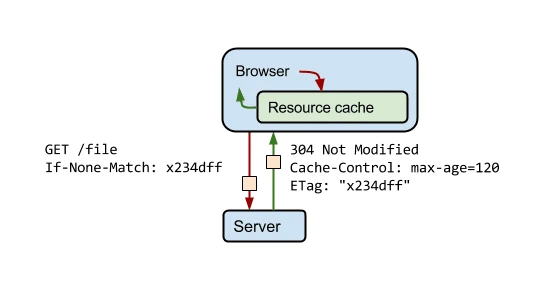
In practice, after the first visit the browser saves, for example, a CSS stylesheet, a JavaScript file, a font or an image. When the user returns to the site and a given resource is still considered valid according to the cache policy, the local copy is used. If, however, freshness needs to be confirmed, the browser sends a lightweight conditional request and the server can respond with 304 Not Modified instead of sending the entire file again.
The main use of browser caching is to speed up subsequent page views and transitions between subpages. The user does not have to wait again for the same interface files, so they see the content faster and can interact sooner. This is particularly important for sites where many subpages rely on the same front-end resources. The more files are repeated across subpages, the greater the real benefit.
However, it does not work identically for every type of resource. A long cache is suitable for static files, whereas for HTML and dynamic content shorter rules or validation are usually needed. Otherwise, the user may view an outdated page document after changes have been deployed. The most common mistake is setting one cache policy for the entire site.
In modern configurations, the Cache-Control header is the foundation. Expires can play a supplementary role, but it usually is not the main control mechanism. ETag and Last-Modified help determine whether a file has changed, but on their own they do not solve the performance problem if the browser still has to ask the server for confirmation every time. That is why a sensible cache policy should combine resource lifetime with the correct way of updating it.
The practical benefits of browser caching are also visible in maintenance costs and site stability. The fewer full downloads there are, the lower the bandwidth usage and the lighter the infrastructure load, especially when the site has many returning users. The effect can be weaker where traffic is dominated by first-time visits, but even then cache is useful when moving between further subpages within the same session.
- 01Local copy of resourcesThe browser saves files.
- 02HTTP headers decideCache-Control, ETag decide.
- 03Shorter loading timeOn subsequent visits.
- 04Fewer requests to the serverRelieving infrastructure.
A key mechanism for performance, reducing the user’s waiting time and decreasing traffic on the server.
Which resources benefit most from browser caching?
Static resources that change rarely and are used on many subpages benefit the most. These are the ones that can most often be safely kept in the browser cache for a long time. If versioning is additionally used in the file name or URL, it is possible to set a more aggressive cache without worrying that after deployment the user will see an outdated version. A long cache makes sense mainly when the new version of a file gets a new address.
- CSS — usually gives a clear effect, because it affects the rendering of the whole site and is shared by many subpages.
- JavaScript — is often heavy, so avoiding re-downloading shortens loading time and reduces bandwidth usage.
- Fonts — once stored locally, they do not need to be downloaded on subsequent visits, which improves stability and the speed of text display.
- Images, icons, logos — are well suited to cache, especially if they repeat in the header, footer, listings and product cards.
- Front-end libraries and multimedia files — benefit from cache when they are truly static and do not change with every publication.
CSS and JavaScript usually produce the most noticeable effect, because they are responsible for the layout, appearance and functioning of the interface. When these files are already stored locally, the browser assembles the page more efficiently on the next visit. This does not mean that processing on the device disappears, but it removes the cost of a full download over the network. In practice, this improves comfort especially on slower connections and on mobile devices.
Fonts are also a good candidate for cache, because they often weigh noticeably much and appear on almost every subpage. Interface graphics, such as logos, icons or section graphics, play a similar role. If these files are downloaded once and then used repeatedly, the browser saves time and bandwidth. The same applies to image files in online stores and content sites, provided they are not constantly replaced under the same address.
HTML, API responses and user-dependent content can be approached less cautiously. An HTML document often should refresh more quickly, because it contains references to newer versions of assets and the current page content. API responses can carry variable, private or session-related data, so not every one of them should be stored in the browser cache. What is static for everyone is treated differently from what changes depending on time, the user or the application state.
It is also worth remembering that the effectiveness of cache is affected by the correct configuration of response variants. When the Vary header is set too broadly, the browser and intermediary layers may treat similar responses as separate versions of the same resource. As a result, cache hit rates fall and the performance gain becomes less noticeable. That is why resources that are genuinely meant to benefit from cache should be not only static, but also consistent and predictable in how they are served.
How do you configure the cache mechanism at server level?
The server-side cache mechanism is configured by selecting the right HTTP headers for individual types of resources. The most important one today is Cache-Control, because it tells the browser whether a file can be stored, how long it remains fresh and whether it needs to be validated. It is better to avoid a single rule for the entire website, because HTML, images, CSS and APIs usually have different requirements.
For static files that are versioned in the name or hash, a long cache lifetime works best. In practice this mainly applies to CSS, JavaScript, fonts, icons and some images. If a file has a new URL after every change, you can safely set a long cache and the immutable directive, because the browser will not confuse the new version with the old one.
For HTML documents, more cautious rules need to be applied. A homepage or subpage should often show new content and new asset references quickly after deployment. For this reason, HTML usually gets a short cache or a policy based on validation, rather than being stored for days without contacting the server.
ETag and Last-Modified should be treated as an addition, not a substitute for a sensible cache policy. They make it possible to check whether a resource has changed, but the validation itself still requires a connection to the server. If every file has to be validated on every visit, the gain will be smaller than with a correctly configured long cache for static resources.
The Vary header also needs to be handled carefully. It is useful when a response has different variants, but an overly broad or inaccurate configuration reduces cache effectiveness, because the browser and intermediary layers start treating responses as separate versions. In practice, it is worth limiting Vary to situations that actually change the response content.
After deployment, it is worth verifying the configuration in real usage scenarios. The key cases are: the first visit, a repeat visit, publishing a new front-end version, a logged-in and a logged-out user, as well as API responses containing private data. The most common mistake is a long cache without file versioning, because then the user may see an old front-end for a long time.
- 01Cache-Control as the keyControls storage and freshness.
- 02Avoid one ruleDifferent types, different settings.
- 03Static files (versioned)Long cache, immutable.
- 04HTML documents (cautiously)Shorter time, frequent validation.
- 05Final effectFaster loading, fewer requests.
Effective configuration requires an individual approach to HTTP headers for different types of resources.
How does the resource validation process work in browser caching?
Validation works by the browser checking whether a locally stored resource is still up to date instead of immediately fetching it again. First, it assesses whether the file is still fresh according to the Cache-Control rules. If it is, it uses the local copy without making an additional request.
When a resource is no longer fresh or the policy requires confirmation that it is up to date, the browser sends a conditional request. Most often it does this via ETag or Last-Modified, meaning it tells the server: “I have this version, check whether it is still current”. The headers then include either If-None-Match or If-Modified-Since.
If the file has not changed, the server returns 304 Not Modified. Such a response does not contain the full resource content, so the transfer is smaller, and the browser still relies on its local copy. If the file has been updated, the server returns the standard 200 with the new version and new cache headers.
Validation is less costly than a full fetch, but it still comes at a price. Network latency, the connection setup with the server and response handling still apply. That is why validation works well for HTML and some more frequently updated content, but it should not replace long caching for versioned static files.
In practice, problems begin when version identifiers are not stable. Incorrectly generated ETags in a multi-server environment or an overly broad Last-Modified can trigger unnecessary fetches or inconsistent behaviour. If the deployment has several layers, it is worth making sure that the application server, reverse proxy and CDN are not getting in each other’s way and overwriting each other’s validation rules.
A well-functioning validation mechanism should reduce transfer without risking the serving of outdated content. The simplest test is to compare the first and second visit and observe which resources return as 304 and which are fetched again as 200. If after every site change the user receives up-to-date HTML, and static assets remain local until the file address changes, the mechanism is working correctly.
What are the best practices for managing cache for static and dynamic files?
The best practice is to separate caching policies for static files and dynamic content, because these two types of resources have completely different rates of change. CSS, JavaScript, fonts and images can usually be stored for a long time. HTML, API responses and user-dependent content require a much more cautious approach.
For static files, the best approach is a long cache lifetime combined with URL versioning. If a file gets a new name or hash after each modification, the browser can safely keep the previous version for a very long time, because the current one will appear under a different address anyway. It is versioning that makes it possible to really benefit from long cache lifetimes without the risk that a user will see an old front end after deployment.
In practice, with such assets, the Cache-Control header configured consciously for a specific group of files is crucial. When a resource is versioned, a long max-age is justified, and often immutable as well. This reduces not only full downloads, but also unnecessary validation, which still consumes time when there are many resources.
For HTML, short cache times or validation instead of long storage usually work better. The page document should fairly quickly “see” new content, fresh links to assets and layout changes. If HTML is cached too aggressively, the user may load an old version of the page even when the new static files are already on the server.
API responses should be separated according to their nature. Public and infrequently changing data can use a short cache or lightweight validation, while private, session-based and logged-in-user-dependent data should not end up in the browser cache without very deliberate control. It is also important to make sure whether the response differs between users, devices or login state.
The Vary header also needs to be monitored, because it determines when the browser and intermediary layers treat a response as a separate variant. It can be useful, for example, with compression, but incorrect use can reduce cache effectiveness and increase the number of variants of the same resource. Good cache configuration is not one rule for the whole site, but separate rules for HTML, static assets, API and user content.
After deployment, you should test not only the load time itself, but also change scenarios. It is worth checking the first visit, the next visit, publishing a new version, logged-in and logged-out mode, and behaviour on different devices. Only then can you see whether cache really speeds up the site and at the same time does not serve outdated data.
- 01Policy separationDifferent rate of change
- 02Long cache with versioningStatic files (CSS, JS)
- 03Cautious approachDynamic content (HTML, API)
The key is to differentiate the approach for maximum performance and update safety.
What are the most common mistakes and risks associated with incorrect caching?
The most common mistakes in caching include keeping HTML for too long, not versioning static files, and using one shared policy for the whole site. Such a configuration usually ends in one of two outcomes: either the site speeds up only minimally, or the user receives outdated resources. Both scenarios often appear after seemingly simple “quick” deployments.
Lack of asset versioning is the number one risk when using a long cache for CSS and JavaScript. When a file’s content changes but the URL stays the same, the browser can keep the old copy until the cache expires. The result is broken styles, JavaScript errors, and situations where some users see the new version of the site while others still see the old one. A long cache without changing the file address can seem safe only at first glance.
Another common mistake is relying solely on ETag or Last-Modified. These mechanisms help with validation, but they do not replace a sensible Cache-Control policy. If the browser has to ask the server on every visit whether the resource has changed, we save some transfer, but we do not use the full potential of acceleration.
A major risk is also caching dynamic content without distinguishing whether it is public or private. This applies especially to HTML after login, the basket, the customer panel, personalised results and API responses containing user data. In such a setup, the problem is not only performance, but also correct operation and data security.
Errors also appear in the context of the Vary header and additional layers, such as a CDN or Service Worker. When these elements operate according to inconsistent rules, it is easy to accidentally generate multiple variants of the same resource or keep an outdated file even though the configuration on the origin server is correct. The more cache layers are involved in serving a page, the more important it becomes to test the entire flow after deploying changes.
In practice, the best protection against such problems is a simple review process after every major front-end and server configuration change. It is worth checking response headers, the behaviour of subsequent visits, the moment the new version is published, and the differences between an anonymous and a logged-in user. Cache works effectively only when it speeds up the site at the same time as it does not undermine the freshness of the content.
How to measure browser caching efficiency in practice?
Browser caching efficiency is assessed by comparing the first visit with the next one and checking how many resources the browser fetches again and how many it reads locally. Three things are key here: the number of full downloads, the number of bytes transferred, and the time needed to render subsequent views. If after implementing cache the second visit looks almost the same as the first, the configuration is most likely not working as it should. In practice, it is not enough to track only the overall performance score. You need to go one level deeper, into the details of HTTP responses and the behaviour of specific files.
The easiest way to start is with the browser’s developer tools, especially the Network tab. There you can see which files were downloaded from the network, which received a 304 Not Modified response, and which were served from the browser or disk cache. The best sign of improvement is less data transferred and fewer requests that end with a full file download. The mere presence of 304 does not necessarily mean a clear speed-up, because validation still requires a connection to the server.
In measurements, it is worth going through a few specific scenarios, because only then does the real effect of the implementation become visible:
- first visit with an empty cache,
- second visit without clearing browser data,
- navigation between several subpages using the same CSS, JS and fonts,
- visiting the site after deploying a new front-end version,
- the variant for a logged-in and logged-out user, if the service displays different content.
When interpreting the results, it is worth separating three cases. The first is a full download from the server, which usually generates the greatest cost in time and transfer. The second is validation via ETag or Last-Modified, lighter, but still involving the network and the server. The third is using a local copy without downloading, which gives the greatest benefit on the user side. In the long term, the resources that do not require any contact with the server on subsequent views are the most worthwhile.
It is also worth being aware of what some tests will not show. Many laboratory tools check a site in a “clean” browser environment, so they mainly measure the first visit. This approach reflects the “weight” of the site well, but is less suitable for assessing browser caching. Browser cache is most clearly revealed in repeat visit tests and when moving between subpages, not only in a one-off synthetic test. That is why it makes sense to combine laboratory tests with a manual check of how the site behaves after the resources have been loaded once.
Waterfall analysis is also helpful. If, after the first visit, subsequent subpages load shared CSS, JS, font and image files without full transfer, the configuration is fine. If the same files return as new 200 OK downloads on every view, you should check Cache-Control headers, file versioning and any impact of Vary. Often the problem is not the lack of cache itself, but an overly cautious policy or the lack of a URL change after deploying a new file version.
It is also worth looking at the business and technical effect, not just a single loading time. With a well-set cache, the number of bytes downloaded by the user usually falls and the number of requests reaching the server for static assets decreases. This can improve the perceived speed of the service on subsequent views and reduce the load on the infrastructure. If you want to assess the effect fairly, compare the same pages, in the same browser, under the same conditions, and always contrast cold cache with repeat view.
FAQ
Frequently asked questions
How does browser caching speed up page loading on return visits?
The browser does not download the same files again, but uses a local copy if the asset is still valid. As a result, the page loads faster and the server receives fewer requests.
Does browser caching only work on the second visit to a site?
The biggest difference is usually seen not on the first visit, but on subsequent visits and when moving between subpages. That is when the browser can use resources saved earlier.
Which files benefit most from browser caching?
Static assets that change rarely benefit the most, for example CSS, JavaScript, fonts and images. It works especially well when the same files are used on many subpages.
Should HTML also be cached in the same way as static files?
No, HTML usually requires shorter caching rules or validation, because it changes more often and contains the page’s current content. An overly long cache for HTML may cause the user to see an out-of-date version.
Why is file versioning important for browser caching?
If a file gets a new URL after a change, you can safely set a long cache without risking serving an old version. Without versioning, the user may see an out-of-date front end for a long time.
How does resource validation work in browser caching?
The browser checks whether the local file is still up to date, and if not, it sends a conditional request with ETag or Last-Modified. If the server confirms there are no changes, it returns 304 Not Modified instead of the full file.