
LCP, or Largest Contentful Paint, is one of the key Core Web Vitals metrics that measures the loading time of the largest visible element on a page – from images to text blocks. It is essential both for building a positive user experience and for a better position in Google search results. Find out how deeply it affects SEO and which optimisation techniques will help you achieve an ideal loading time of under 2.5 seconds!
LCP: what is it and how do you measure it?
LCP (Largest Contentful Paint) is a key website performance metric that measures the time needed to display the main content visible to the user. This can be a large image, a heading, a block of text or another multimedia element visible without scrolling. Together with FID (First Input Delay) and CLS (Cumulative Layout Shift), LCP forms the basis of Core Web Vitals – a set of metrics used by Google to assess the quality of user experiences.
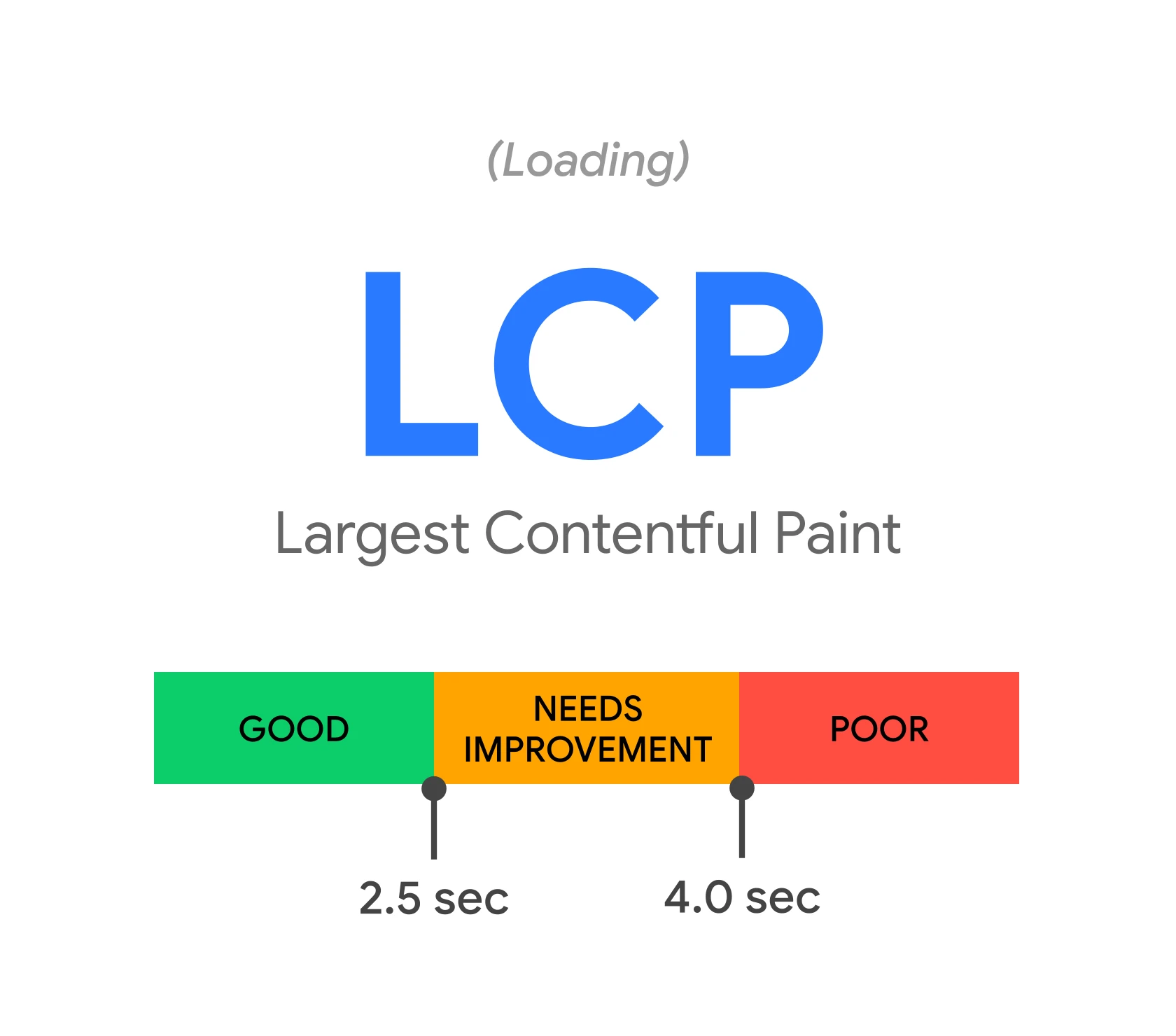
To check the LCP value, it is worth using tools such as:
- Google PageSpeed Insights,
- Lighthouse,
- WebPageTest.
These platforms analyse page loading time and identify the elements affecting this metric’s score. The optimal LCP value should fall within 2.5 seconds – a result above 4 seconds is considered unfavourable and may lower the page’s position in search results.
LCP is hugely important both for user experience and SEO. Pages that load their main content quickly are rated more highly by Google’s algorithms, which translates into higher rankings. In addition, faster loading increases visitor engagement and reduces the likelihood of users leaving the page after a short time.
Regular monitoring of LCP allows you to detect issues related to website performance. Tools such as Lighthouse provide detailed reports indicating the elements that are slowing down the loading of the main content. This makes it possible to take specific optimisation steps that will improve both page performance and user satisfaction.
- 01Main contentAn element visible without scrolling.
- 02Part of Core Web VitalsA key page quality metric.
- 03Analysis toolsUse analytical platforms.
- 04Optimal time < 2.5sA result that is good for the user.
LCP measures the time it takes for the main content to appear, and a result below 2.5 seconds provides a better user experience and a higher position in search results.
What does the LCP metric measure?
The LCP (Largest Contentful Paint) metric measures how quickly the largest content element on a website is fully loaded and displayed. This can be a large image, a heading, a substantial block of text or another visible multimedia component. LCP focuses on enabling the user to see the main content of the page as quickly as possible, which directly affects their browsing experience.
The main purpose of this metric is to assess page performance in terms of the time needed to display key information. The optimal LCP value should be below 2.5 seconds. If the score exceeds 4 seconds, it can negatively affect both the page’s position in search results and users’ decisions – many of them may leave the site without browsing further.
LCP is one of the key elements of Core Web Vitals – a set of metrics used by Google to assess the quality of user experiences. Improving this parameter not only affects better search engine rankings, but also increases visitor engagement and reduces the bounce rate. It is worth remembering that page loading speed is the foundation of user satisfaction and website success.
The importance of LCP for SEO
LCP (Largest Contentful Paint) is one of the key ranking factors in SEO that Google’s algorithm pays attention to. The speed at which the main content of a page is displayed has a direct impact on user experience and, consequently, on a site’s position in search results. The optimal LCP time, i.e. below 2.5 seconds, can significantly improve Google’s assessment of a page and help achieve better rankings.
A good LCP value not only increases a site’s visibility, but also affects visitor engagement and lowers the bounce rate. Research shows that sites loading within 2 seconds have a 15% higher conversion rate than those that take over 4 seconds to load. It is also worth remembering that LCP is part of Core Web Vitals – a set of metrics used by Google to assess the quality of websites.
Optimising this metric has a dual benefit: it affects both SEO and user satisfaction. In today’s world, visitors expect immediate access to content – every delay can put them off continuing to browse. That is why caring about page load speed is essential not only for better visibility in search engines, but also for providing users with a positive experience.
- 01Long server response timeDelayed data delivery.
- 02Inefficient resource optimisationLarge media files.
- 03Unnecessary scripts and blockingRender-blocking scripts.
The loading speed of key content is hampered by an overloaded server, large files and blocking resources.
LCP as part of Core Web Vitals
LCP (Largest Contentful Paint) is one of the key metrics that make up Core Web Vitals – a set of indicators developed by Google to assess the quality of user experiences on websites. Along with FID (First Input Delay) and CLS (Cumulative Layout Shift), LCP forms the basis for analysing a site’s performance. Its main purpose is to measure how quickly the largest content element appears in the browser viewport, which has a direct impact on visitors’ experience.
Google introduced Core Web Vitals to establish consistent standards for assessing page quality. LCP focuses on the loading speed of the main content, which is particularly important for users expecting immediate access to information. The optimal value of this metric should be less than 2.5 seconds. If this time exceeds 4 seconds, it can negatively affect both the site’s position in search results and the decisions of visitors.
It is worth noting that LCP is just one of the three pillars of Core Web Vitals:
- FID measures the time it takes for the page to respond to user actions,
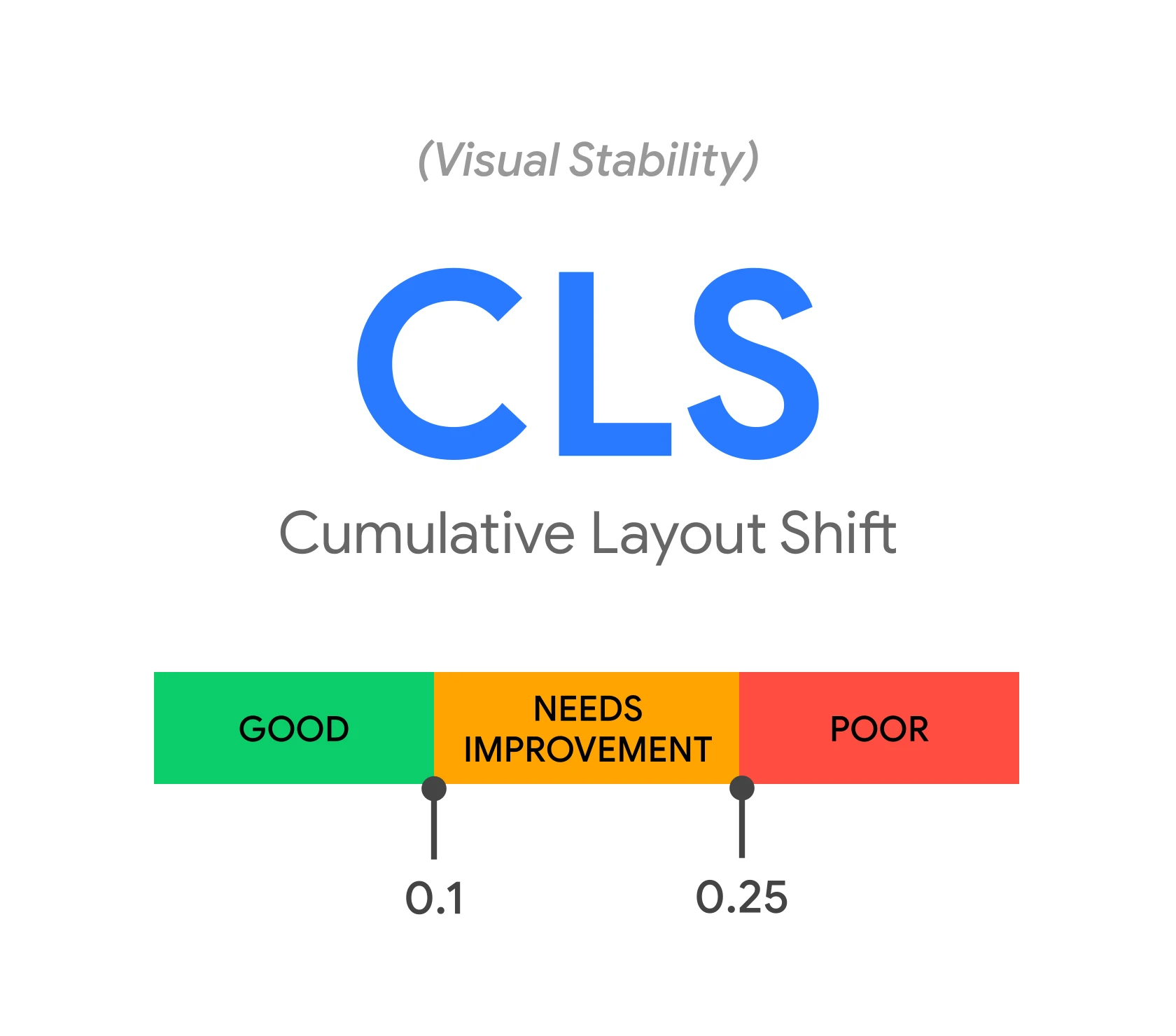
- CLS assesses the stability of the page layout during loading,
- together these three metrics create a comprehensive picture of site performance, which is crucial both for SEO and for visitor satisfaction.
Improving LCP not only increases the chances of better positions in Google rankings, but also affects user engagement. Research shows that faster-loading pages achieve higher conversion rates and lower bounce rates. That is why optimising this metric is essential both for SEO effectiveness and for delivering a positive experience to users.
How does LCP affect site performance?
LCP (Largest Contentful Paint) plays a key role in site performance by measuring the time at which the user sees the largest content element. Long loading times for the main content can lead to frustration and increase the number of people leaving the site. Research indicates that pages with an LCP exceeding 4 seconds have a 32% higher bounce rate compared with those that load within 2 seconds.
Displaying the main content quickly not only improves user engagement, but also reduces the likelihood that they will leave the page. Sites with optimal LCP (below 2.5 seconds) are rated more favourably by Google’s algorithms, which affects their positions in search results. In addition, faster loading translates into greater chances of conversions – pages with a short LCP achieve 15% higher conversion rates than those with longer loading times.
From a technical point of view, a long LCP time may result from:
- inefficient JavaScript code,
- large image sizes,
- slow server response time.
Improving these elements not only shortens LCP, but also boosts overall site performance. This, in turn, leads to a better user experience and more efficient use of server resources.
Optimising LCP matters for both SEO and visitor satisfaction. Sites that load the main content quickly are more user-friendly and are rated more highly by search engine algorithms. Regularly monitoring this metric and implementing optimisation measures makes it possible to ensure high site performance and a positive user experience.
The impact of LCP on user experience
LCP, or Largest Contentful Paint, plays a key role in shaping user experience. This metric measures the time needed to display the largest content element on the page. For a page to be perceived as fast and responsive, the optimal LCP time should be below 2.5 seconds. When this extends to 4 seconds, the experience becomes average, which may affect visitor satisfaction. However, if it exceeds 4 seconds, the risk of a user leaving the page before seeing the main content rises significantly.
Analyses show clear differences in user behaviour. Pages with an LCP below 2 seconds achieve a 15% higher conversion rate compared with those that take longer than 4 seconds to load. A long loading time not only frustrates visitors, but can also increase the bounce rate by as much as one third. Displaying key content quickly makes a page feel more intuitive and user-friendly, which directly translates into a positive experience.
Optimising LCP is hugely important not only for SEO, but also for user satisfaction. Pages that present the main content quickly are rated more favourably by Google’s algorithms and have a better chance of keeping visitors engaged. This in turn leads to better business results and greater effectiveness in achieving website goals.
Optimal LCP values
To ensure the best user experience and positively affect SEO, the optimal time for LCP should be less than 2.5 seconds. According to Google, a score in the 2.5–4 seconds range signals the need for optimisation, while exceeding 4 seconds may negatively affect the page’s position in search results.
Research confirms that websites with LCP below 2 seconds achieve a 15% higher conversion rate compared with those that take longer than 4 seconds to load. In addition, pages with an optimal LCP time are characterised by a lower bounce rate and better visibility in Google rankings.
It is therefore worth aiming to keep LCP below 2.5 seconds, because displaying the page’s main content quickly not only improves user satisfaction, but also increases the effectiveness of SEO efforts.
The most common causes of a poor LCP score
Poor LCP results often stem from several key factors, such as long server response times, inefficient resource optimisation and the presence of unnecessary scripts and render-blocking elements. All of these elements can significantly affect the loading speed of the most important parts of the page.
One of the main culprits is long server response time. When the server takes too long to process the request and deliver the data, it delays the display of key content. The cause may be server overload, incorrect configuration or a lack of database optimisation. Each of these issues requires an individual approach.
Another problem is incorrect resource optimisation, such as images, videos or fonts. Large media files take longer to download and display, which slows the page down. Using unsuitable formats (for example BMP instead of WebP) or not compressing images makes the situation worse.
It is also worth remembering unnecessary scripts and render-blocking resources. JavaScript scripts or CSS stylesheets that are poorly optimised or loaded in the wrong order can delay the display of content. In addition, third-party tools such as analytics or advertising scripts often place a burden on the page without providing much benefit to the user.
In the case of single-page applications (SPA), client-side rendering is also important. If the browser has to perform additional operations before showing the content, this time becomes longer, which negatively affects LCP.
To improve LCP results, it is worth focusing on three main areas:
- reducing server response time,
- reducing the size of resources,
- eliminating unnecessary render-blocking scripts.
These actions will not only improve the site’s performance, but also enhance user experience and rankings in search results.
Extended server response time
Long server response time is one of the main causes of a poor LCP score. When the server takes too long to process the request and deliver data, it delays the display of the page’s key content. The causes may vary: overload, incorrect configuration or a lack of database optimisation. Each of these problems requires an individual approach.
To improve LCP, optimising server response time is crucial. It is worth considering:
- upgrading the infrastructure,
- implementing caching solutions such as a CDN,
- improving database queries.
Shortening this time allows the main content of the page to be displayed faster, which directly translates into a better user experience and higher positions in search results.
Additionally, it is worth regularly monitoring server performance using tools such as Google PageSpeed Insights or Lighthouse. They highlight areas requiring improvement. Regular analysis and optimisation of server configuration can significantly affect response time reduction and improve the site’s overall performance.
Incorrect resource optimisation
Improper management of resources such as images, scripts or fonts is one of the key causes of poor LCP results. Large media files, unsuitable formats or a lack of compression can significantly extend page load time. For example, choosing the BMP format instead of WebP for images can increase their size by up to half, which negatively affects performance.
JavaScript scripts and CSS stylesheets that are not properly optimised or loaded in the wrong order can block content rendering. In addition, third-party tools such as analytics or advertising scripts often place a burden on the site without delivering real benefits to the user. Removing unnecessary elements and optimising the remaining ones can reduce LCP time by as much as 30%.
In the case of single-page applications (SPA), user-side rendering is also important. If the browser has to perform additional operations before displaying the content, this time becomes longer. Improving JavaScript and CSS code and using techniques such as image lazy-loading can significantly affect LCP results.
To optimise resources effectively, it is worth using tools such as Google PageSpeed Insights or Lighthouse. They indicate specific areas requiring improvement and suggest appropriate technical solutions. Regular analysis and optimisation help keep LCP below 2.5 seconds, which translates into a better user experience and higher positions in search results.
Unnecessary scripts and render-blocking resources
Unnecessary scripts and render-blocking resources are a common problem that negatively affects the LCP (Largest Contentful Paint) metric. Elements such as JavaScript scripts, CSS stylesheets or third-party tools that are not essential for displaying the main content can significantly slow down page loading. For example, analytics or advertising scripts often load before the key parts of the site, which extends the time it takes to display the most important elements.
To improve LCP, it is worth taking a few steps:
- analyse the site code using tools such as Google PageSpeed Insights or Lighthouse – they indicate the specific render-blocking resources,
- consider asynchronous loading of scripts by adding the async or defer attribute, which allows them to be fetched without disrupting the rendering process,
- minimise CSS and JavaScript code – removing unused fragments and compressing files can speed up the site,
- limit third-party tools by considering whether all plugins and scripts are really necessary.
Additionally, techniques such as lazy-loading for images or preloading key resources using the <link rel=”preload”> attribute can be used. These actions make it possible to display the main elements of the page faster, which directly translates into better LCP results and user satisfaction.
Eliminating unnecessary scripts and optimising resources can reduce LCP time by as much as 30%, which is hugely important both for SEO and for the user experience. It is worth spending time on these optimisations – the effects can be truly impressive!
Techniques for improving the LCP metric
To improve the LCP (Largest Contentful Paint) metric, it is worth applying a few proven techniques. One of the key steps is image optimisation. This can be achieved by compressing files, reducing their sizes and switching to modern formats such as WebP or AVIF. These formats offer better quality at a smaller size, which significantly speeds up page loading.
Another important aspect is reducing blocking JavaScript and CSS. Scripts and stylesheets that are not essential for displaying the main content are best loaded asynchronously or deferred. In addition, removing unused code and optimising critical resources allows the browser to render the page faster.
It is also worth considering lazy-loading images, that is, delaying their loading until the user scrolls the page and gets close to them. This technique not only speeds up the initial load time, but also makes more efficient use of available resources.
Another effective solution is preloading key resources, such as fonts or images visible above the fold. This can be implemented using the <link rel=”preload”> attribute, which informs the browser that these elements need to be fetched earlier.
No less important is optimising server response time. Implementing caching solutions (e.g. CDN) and modernising the server infrastructure can significantly shorten the time needed to deliver data to the user’s browser.
These actions not only improve LCP, but also increase the site’s overall performance and visitor satisfaction. Regular monitoring of metrics with tools such as Google PageSpeed Insights or Lighthouse makes it possible to identify areas requiring optimisation on an ongoing basis and introduce the appropriate improvements.
Optimisation of server response time
Optimising server response time plays a key role in improving the LCP (Largest Contentful Paint) metric. Long waits for a response can delay the display of the page’s main content, which negatively affects user experience and the site’s position in search results. How can this be changed? It is enough to implement a few proven solutions.
The first step is choosing the right hosting. High-performance servers with minimal latency significantly speed up data delivery to the browser. It is worth opting for hosting services that offer fast connections, database optimisation and support for modern protocols such as HTTP/2 and HTTP/3. These technologies effectively reduce communication delays.
Another important element is server configuration. Implementing caching mechanisms such as CDN (Content Delivery Network) allows resources to be delivered faster to users from different parts of the world. In addition, optimising database queries and using file compression tools (e.g. Gzip) can shorten response time by as much as 30%.
No less important is minimising delays in communication between the server and the browser. This can be achieved by reducing the number of HTTP requests, combining CSS and JavaScript files, and eliminating unnecessary redirects. Regular performance monitoring using tools such as Google PageSpeed Insights or Lighthouse helps identify areas that need improvement on an ongoing basis.
Reducing server response time not only improves LCP, but also increases the overall performance of the site and user satisfaction. Faster display of the main content is crucial both for SEO and for the experience of people visiting the site.
Optimisation of JavaScript and CSS code
Optimising JavaScript and CSS code is of huge importance for improving the LCP (Largest Contentful Paint) metric, which affects how quickly the main content of the page is displayed. Both scripts and style sheets can delay rendering, so it is worth applying several effective methods to address this.
One of the basic steps is minifying CSS and JavaScript files. This process involves removing unnecessary characters such as spaces, comments or line breaks, which significantly reduces file size and speeds up loading. Tools such as UglifyJS for JavaScript or CSSNano for CSS can automate this process.
Another important aspect is removing unused code. In many projects, code fragments accumulate that are never used. With tools such as PurgeCSS, you can easily get rid of redundant styles, and the Tree Shaking technique for JavaScript allows you to eliminate unused functions.
It is also worth paying attention to how scripts are loaded. By default, the browser blocks page rendering until all scripts have loaded. To avoid this problem, you can add the `async` or `defer` attribute to the `
FAQ
Frequently asked questions
How does LCP affect a site’s position in Google?
LCP is one of the factors taken into account by Google’s algorithm. Faster display of the main content can improve a page’s visibility in search results.
Is LCP part of Core Web Vitals?
Yes, LCP is one of the key Core Web Vitals metrics. Along with FID and CLS, it forms the basis for evaluating the quality of user experience.
What LCP values are considered good?
The optimal LCP time should be below 2.5 seconds. A result between 2.5 and 4 seconds suggests the need for optimisation, and above 4 seconds is unfavourable.
What most often causes a poor LCP result?
The most common causes are a long server response time, assets that are too large or poorly optimised, and unnecessary scripts blocking rendering. Client-side rendering in SPA applications can also have an impact.
How can a page’s LCP value be checked?
Google PageSpeed Insights, Lighthouse and WebPageTest can be used for measurement. These tools show loading time and the elements that affect the result.
Why is a low LCP important for the user?
Fast display of the main content reduces frustration and improves the perception of the page. The article also emphasised that faster-loading pages have a lower bounce rate and better conversion results.