
The choice of hosting affects loading speed, stability, security, and how easy it will be to develop the site in the future. Cloud hosting is not, by definition, the best option for everyone, but in many implementations it offers more control and flexibility than classic shared hosting. The difference becomes particularly noticeable when traffic is variable, the site relies on several integrations, or it needs more efficient deployments and more sensible monitoring. The key is not the word “cloud” itself, but whether the service truly matches the needs of your site, team and budget. In practice, the level of management also matters, because a different approach will work for the owner of a simple WordPress site and a different one for an online store or an application with more dependencies. In this article, we will look at when cloud hosting makes sense, how it works and what to pay attention to before migration.
What is cloud hosting and how does it work in practice?
Cloud hosting is a model in which a website uses resources allocated from cloud infrastructure, and their parameters can be changed without moving everything to another server. Instead of keeping the project on one rigidly limited environment, you use resources that can be adapted to the actual workload. This usually means CPU, RAM, disk, bandwidth, and sometimes also the ability to run more than one application instance.
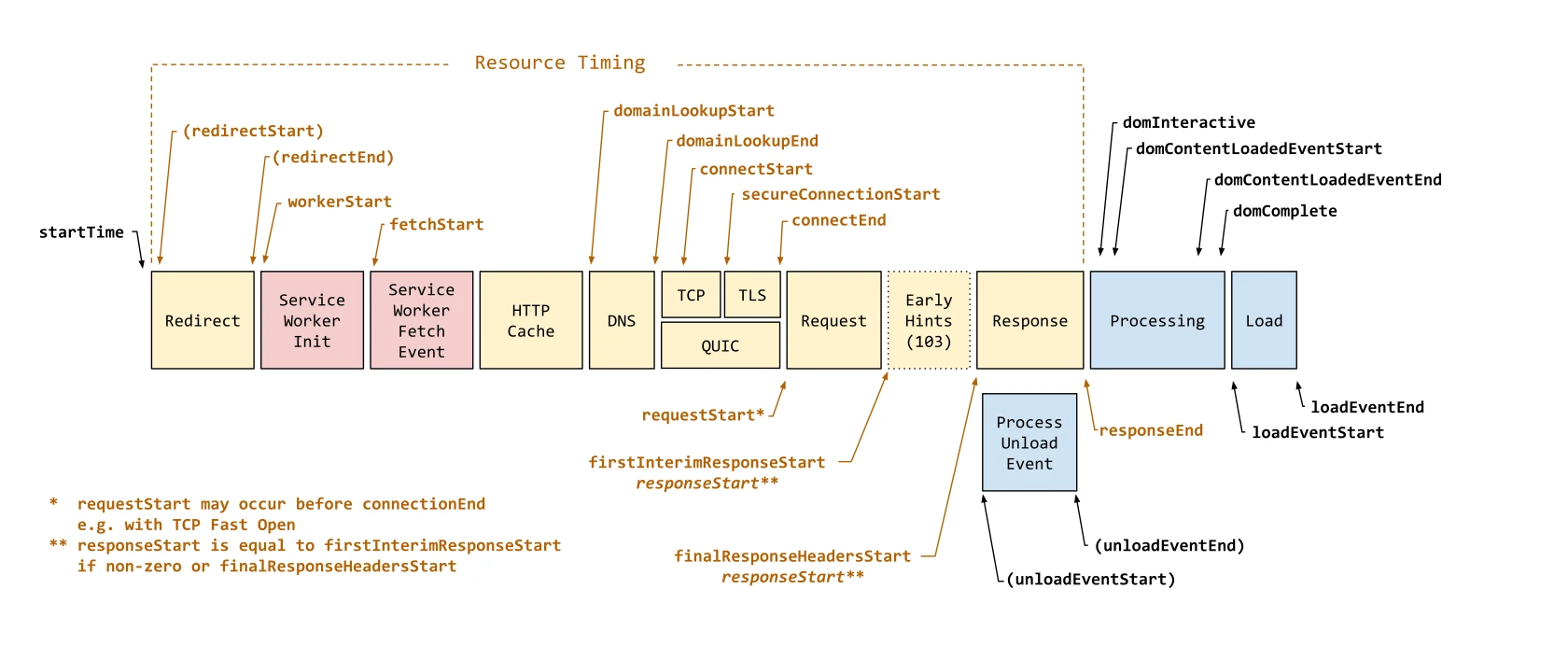
Such a service usually is not limited to just “space for files”. The package often also includes DNS, SSL certificate, backups, monitoring, network configuration and a basic layer of security. For a website’s performance, cache settings, database, PHP version or another runtime, as well as the way files and media are served, can be more important than the sheer number of resources.
From an operational perspective, cloud hosting is implemented in stages. First, the site’s technology, database size, number of files, integrations and traffic profile are assessed. Next, the architecture is selected, the environment is prepared, backups, access, the firewall and monitoring are configured, and only then are the files and database moved and DNS switched.
After migration, the matter is not closed. You need to review logs, catch application errors, check scheduled tasks, connections to payments, email and external APIs, and also make sure that cache and CDN are not serving outdated data. Cloud hosting offers flexibility, but it also requires better technical control than the simplest shared packages.
It is also important to distinguish between a managed service and a self-managed one. In the managed variant, the provider takes on a larger share of responsibility for updates, security, monitoring and response to incidents. In the self-managed model, you gain more freedom, but the scope of administrative duties and the risk of mistakes on your side also increase.
- 01Flexible resourcesTailored to load, CPU, RAM, disk.
- 02Scalability without downtimeChanging parameters without moving the application.
- 03Additional service packageDNS, SSL, backups, security.
- 04Configuration and optimisationCache, database, runtime, performance.
Cloud hosting is not just space, but a dynamic infrastructure and a set of services for effective application management.
Why should you consider cloud hosting for your site?
Cloud hosting is worth considering when your site has irregular traffic, growing performance needs or requires more control than shared hosting offers. This is especially important with advertising campaigns, seasonal spikes in visits, online stores and services based on numerous integrations. In such situations, a fixed hosting package more often becomes a bottleneck.
One of the key advantages is scaling without the need for a full move. When a site suddenly needs more memory, CPU power or a faster disk, this can usually be increased more smoothly and with less risk than in a classic migration. In practice, this matters when traffic is variable and you do not want to keep an expensive reserve of resources all the time.
Another argument is greater control over the operating environment. You can adjust the software version, cache behaviour, database settings, backup schedule, test environment and deployment procedure. This is important if you develop the site regularly and want to safely test changes before publishing.
Cloud hosting also often supports security and maintenance. It is easier to implement monitoring, environment isolation, automatic backups, access restrictions or log analysis. However, this does not mean that the cloud itself “takes care of security” for you, because you still need to keep on top of application updates, plugins, permissions and incident procedures.
It is also fair to say that this is not always the best option. If you run a simple business website with low traffic and no custom requirements, well-configured shared hosting may be more than enough and will be cheaper. Cloud hosting makes the most sense where performance, availability, the deployment process or the need for flexible scaling are the real challenge, rather than simply “wanting something better”.
You should also take the cost model into account. In the cloud, the price more often depends on actual resource usage and additional services, such as backup, CDN, transfer or IP addresses. That is why, before choosing, it is worth checking not only the starting rate, but also how the bill will change after traffic growth or after enabling additional features.
What are the key stages of cloud hosting implementation?
The key stages of cloud hosting implementation include analysing the current website, choosing the architecture, preparing the environment, migration, switching traffic, optimisation and later maintenance. This process determines whether the move will go smoothly and whether the new hosting will actually lead to better website performance. The most common mistake is moving a website without first establishing what is actually putting load on the server.
To start with, it is worth establishing how the current website works and what it actually needs. Check the CMS or framework in use, PHP versions or other runtime, database size, number of files, scheduled tasks and integrations with payments, email and external APIs. If traffic is seasonal or campaigns can trigger sudden spikes in visits, it is worth taking this into account already at the resource planning stage.
The second stage is choosing the architecture and the level of service management. In practice, you select not only CPU and RAM, but also the web server, database engine, storage type, backups, monitoring, CDN and security layer. For many websites, sensibly configured cache, an efficient database and an environment compatible with the application matter more than a “more powerful server”.
The next step is preparing the environment. This includes configuring access, the firewall, the SSL certificate, the backup schedule, logs and the test environment. It is also a good time to enable resource usage monitoring and alerts, because without them it is difficult later to quickly identify the source of a problem.
The migration itself comes down to moving files and the database and adapting the application configuration to the new environment. You need to verify forms, payments, email sending, cron tasks and connections to external services. Before changing DNS, you should have a rollback plan ready, that is, a quick return to the previous environment if errors appear after the switch.
After switching traffic, the work is not over. You should review the server and application logs, confirm that the certificate is working, check that the cache is correct and make sure that the CDN is not serving old file versions. Only then does optimisation make sense, meaning tuning cache, PHP parameters, the database, compression and the way media is served.
The final stage is maintenance and scaling. In practice, you monitor response time, errors, CPU and RAM usage, disk space and the effectiveness of backups. It is worth scaling the specific bottleneck, not the whole environment just in case, because it usually ends up costing more without any real improvement.
- 01Website and needs analysisUnderstanding requirements and load
- 02Choosing the architecturePlanning the right environment
- 03Preparation and migrationSecure transfer of data and files
- 04Switching and optimisationMonitoring, tuning, maintenance
Key to safe implementation and improved website performance
What benefits does managed cloud hosting offer?
Managed cloud hosting primarily means fewer technical responsibilities on your side and greater operational control on the provider’s side. This solution works particularly well when you do not have your own person for server administration, security and incident response. In practice, you pay not only for resources, but also for environment management.
The biggest benefit is that the provider takes over part of the responsibility for system updates, service configuration, monitoring, backups and basic security. This means you do not have to keep on top of every patch, log and incident response yourself. If you lack administrative skills, a managed model is usually a safer choice than a cheaper but fully self-managed cloud.
Convenience in day-to-day work is also very important. In more polished managed services, you get a ready-made staging environment, easier deployments, automatic backups and faster site recovery after a failure. As a result, you can implement changes more quickly and reduce the risk that a plugin, theme or application update will bring down the production site.
Managed cloud hosting also supports good performance maintenance. The provider usually has better control over cache configuration, runtime versions, server parameters and basic resource monitoring. This does not mean, however, that every website will be fast straight away, because a lot still depends on code quality, the database, images and the integrations in use.
At the same time, it is worth remembering the limitations. The more managed the service, the more often there is less freedom in custom configuration, root access or installing your own components. That is why, before choosing, it is worth checking whether the service supports your CMS or framework, scheduled tasks, the required database versions and the deployment method you need.
In practice, managed cloud hosting works best where stability, security and a quick response to problems matter, rather than full control over every server component. For simple websites it can be a convenient safety net, and for online stores and more complex services it often makes overall environment maintenance more organised. The right choice is not the model that offers the most options, but the one that fits the team’s skills and the level of risk you are prepared to take on yourself.
How can you avoid typical mistakes when migrating to the cloud?
Typical mistakes during a cloud migration are avoided when, before changing DNS, you thoroughly verify the site’s dependencies and prepare tests and a contingency plan. Most problems do not come from the hosting itself, but from overlooked elements such as payment integrations, email delivery, cron, cache, CDN or access restrictions by IP address. The worst decision is a “quick” migration, without a test environment and without the option to roll back.
Also do not assume that simply moving the site to the cloud will solve performance issues. If the application has slow database queries, too many plugins, poorly optimised images or incorrectly configured cache, the same problems will return in the new environment. The cloud gives greater control and flexibility, but it does not automatically remove application errors.
Before migrating, you need to establish exactly what is working in the current environment and what may stop working after the move. This applies to the PHP version or another runtime, cron jobs, API connections, web server modules, SMTP settings, DNS records and SSL certificates. If you do not have administrative skills, choose a managed service, because otherwise updates, security and troubleshooting will be your responsibility.
- make a full backup of files, the database and configuration,
- prepare a test environment as close to production as possible,
- verify forms, login, payments, email delivery and external integrations,
- define a rollback plan and a time window in which the change can be quickly reversed,
- reduce DNS TTL before the switch to shorten the time needed for changes to propagate,
- after changing DNS, monitor logs, application errors, cache and server responses.
A common mistake only comes to light after traffic is switched over. The site works in theory, but users see old content from the cache, some assets are still loading from the previous address, and some services reject connections from the new IP. After migration, you need to check not only the homepage, but the entire critical process: form, basket, payment, admin panel, cron and backups.
It is also worth setting up monitoring and alerts straight away. Without them, it is easy to miss a RAM usage spike, lack of disk space, 500 errors or non-working cron jobs. The first few days after migration are the best time to catch problems before users notice them.
- 01Verification and planCheck dependencies, prepare tests and a contingency plan.
- 02Test environmentMigrate without rushing, with a rollback option.
- 03Key elementsIntegrations, payments, emails, cache, CDN, IP.
- 04Not just the cloudThe cloud will not fix application errors (performance, queries).
The key to success is thorough preparation, testing and the awareness that the cloud offers control, but does not replace application optimisation.
What factors affect cloud hosting costs?
Cloud hosting costs are influenced primarily by actual resource usage and the scope of services maintained together with the site. In practice, you pay not only for CPU, RAM and disk, but also for transfer, backups, monitoring, CDN, certificates, test environments and the level of technical support. A low starting price can be misleading if the billing model adds charges for every extra element.
The nature of the site itself also matters a great deal. A simple WordPress site with moderate traffic is priced differently from a store with a large database, many integrations and traffic spikes from campaigns. With irregular traffic, the cloud often pays off, because it handles temporary load increases better without permanently keeping an oversized package.
The level of service management also affects the price. Managed hosting is usually more expensive than a self-managed instance, but in return it includes updates, security, monitoring, support during outages and often smoother deployments. This matters, because hosting cost should be calculated together with the cost of the work required to maintain it.
The scaling model is also important. Vertical scaling, meaning adding RAM or CPU, increases the cost directly, but is easier to implement. Horizontal scaling, meaning running multiple instances, provides greater resilience and flexibility, but usually requires additional architecture, such as a load balancer, an external database, media storage and better monitoring.
Costs can also rise because of elements that are easy to overlook at the quotation stage. These include fast storage, backups kept for longer than a few days, a staging environment, a paid application firewall, logs, additional IP addresses and traffic above the standard limit. The best approach is to compare offers based on the full usage scenario, not just the monthly price of the basic package.
To avoid overpaying, it is worth regularly checking what is actually consuming resources. Sometimes the problem is not an undersized server, but a faulty plugin, expensive database queries or the lack of cache. Scaling makes sense only when you know where the bottleneck lies, because otherwise you increase costs instead of removing the cause.
How do you optimise website performance in a cloud environment?
Website performance optimisation in the cloud comes down to identifying the real bottleneck and improving, step by step, the application, cache, database, media and server configuration. The most common mistake is adding CPU and RAM without checking what is actually slowing the site down. Measure first, then scale. In practice, you need to analyse not only the hosting itself, but the entire response chain: the web server, PHP or another runtime, the database, cache, CDN and the way assets load.

The starting point is monitoring response times and errors at the application and server level. Check which subpages are the slowest, which database queries take the longest, how much memory processes consume and whether the problem is constant or only appears during traffic spikes. Without logs and hard data, it is easy to improve the wrong element instead of the one that is actually limiting performance.
In many cases, the biggest difference comes from properly implemented cache. This is not just about browser cache, but also cache on the application and server side, and where needed, a reverse proxy or CDN. If the site rebuilds the same view from scratch every time, it wastes resources unnecessarily. For WordPress, stores and content portals, this is usually one of the fastest ways to shorten response times.
The database starts to become a bottleneck when the application performs too many queries or does so inefficiently. In practice, it is worth reviewing missing indexes, heavy queries, excess temporary data, unnecessary plugins and scheduled tasks that run too often. A more powerful machine will not fix a badly designed database. If the CPU load is mainly caused by the database, improve the queries first, not the pricing plan.
Static files also have a significant impact, namely images, scripts, CSS stylesheets and media. In a cloud environment, it is sensible to serve them via a CDN or separate storage so that each file download does not burden the application instance. Images should be compressed and sized appropriately for the user’s device. This is especially important during campaigns, when traffic grows quickly and unevenly.
The runtime environment configuration also matters. You need to choose the right version of PHP or another runtime, memory limits, the number of workers, opcache settings, web server parameters and the way background processes are handled. An unsuitable configuration can create request queues even when resources are theoretically available. In practice, a well-tuned environment often delivers a greater effect than simply increasing the machine’s parameters.
In the cloud, it is a good idea to separate work according to its nature. Generating thumbnails, imports, exports, email sending or API synchronisation should not slow down the site from the user’s perspective. Such operations are better moved to queues and asynchronous tasks rather than being handled during page load. This makes the front end faster and more stable under load.
- monitor response times, CPU and RAM usage, 5xx errors and slow database queries,
- implement cache at the application, server and CDN level,
- clean up and optimise the database and limit unnecessary plugins and modules,
- move media to storage or a CDN and compress assets,
- scale only the element that is actually the bottleneck.
Vertical and horizontal scaling only makes sense once basic optimisation has been done. If the problem is a lack of memory during short traffic spikes, adding RAM can bring immediate improvement. However, if the application is inefficient, increasing resources will only postpone the next problem and drive up costs. Good optimisation in the cloud is about precision, not adding power “just in case”.
After implementing changes, you should check the effect on real traffic, not just in a synthetic test. Compare response times, load, the number of errors and the site’s behaviour during campaigns, publications or when more users are online at the same time. If the results improve, keep the configuration and observe. If not, go back to the logs and look for the next limitation instead of relying on guesses.
FAQ
Frequently asked questions
How does cloud hosting work in practice on a website?
The site uses cloud resources that can be matched to the load without moving the whole project to another server. Packages often also include DNS, SSL, backups, monitoring and basic security.
Is cloud hosting better than shared hosting for every site?
No, because for a simple company site with low traffic, a well-configured shared hosting plan may be entirely sufficient. Cloud hosting makes the most sense with variable traffic, higher requirements and a need for flexible scaling.
Why is it worth considering cloud hosting for an online store or a site with integrations?
Because such projects more often need greater control, performance and stability than standard shared hosting. The cloud also handles traffic spikes caused by campaigns or seasonality better.
What are the most important stages of migrating a site to cloud hosting?
First, the site and its dependencies are analysed, then the architecture is chosen and the environment is prepared. Next, the files and database are moved, DNS is switched over, logs are checked, and only then is the configuration optimised.
What mistakes most often break a migration to the cloud?
The most common problem is moving the site without tests, a rollback plan, and checking integrations. Issues are also caused by missed elements such as cron, payments, email, cache, CDN or IP restrictions.
How much does cloud hosting cost and what does the price depend on?
The price depends mainly on resource usage and additional services such as backup, monitoring, CDN or technical support. The level of management also matters, as does the nature of the site, because a store with a large database usually costs more than a simple WordPress site.