UX is short for the English phrase “User Experience”, meaning user experience. The term appeared in business dictionaries a few years ago. You may assume that UX is just another buzzword invented by digital agencies wanting to sell more services, but that is a false assumption. UX, and especially UX design, should be an important issue for every small business with its own website or mobile app.
What is UX design and why is it important?
UX design has been described as “a bridge between technology and the end user”. In essence, UX design involves paying attention to customer experiences and to customers themselves in the process of designing any new website or app.
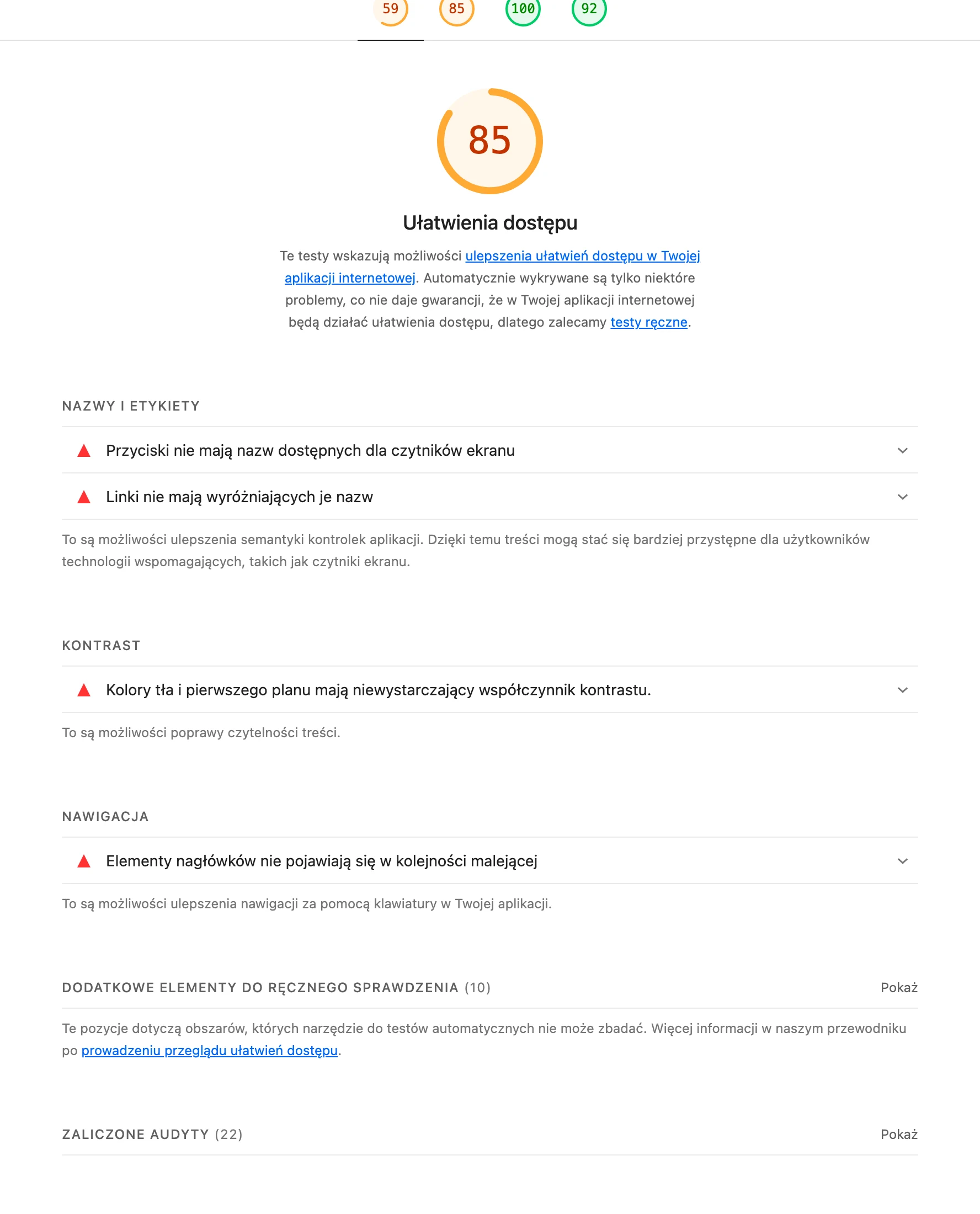
ExampleAccessibility issues are most often small details in the code: buttons without names, links without descriptions, overly weak contrast. Lighthouse for kubadzikowski.com, own screenshot
Effective design for user experience helps ensure that a website or app is easy to analyse, packed with the right information, looks great and, above all, generates conversions quickly.
Websites and apps follow the “15-second rule”. This is the average time a web user allows themselves to decide whether a given company meets their needs. If your website or app is badly designed or difficult to use, the user will leave within 15 seconds and never return.
This may mean losing a potential conversion – someone who did not become a long-term, loyal customer. In addition, a high bounce rate adversely affects your site’s position in Google. This makes it even harder to attract the attention of other customers in the future, and a carefully developed SEO strategy will prove unnecessary.
For small businesses, every customer matters. That is why UX design is crucial. You need to make sure that your website or app meets users’ needs. You therefore need to understand the importance of designing for user experience.
UX designWhat is UX design and why is it important?
01A bridge between technology and the userConnects technology with people’s needs
02Focus on the customer experienceEasy, informative, excellent to use
03Generate conversions and the 15-second ruleQuick decisions, greater efficiency
Effective UX builds intuitive, valuable and converting websites in less than 15 seconds.
What is considered good and bad UX design?
Everyone has their own taste, so you may feel that there is no such thing as good or bad UX design. There are undoubtedly mistakes and issues to avoid, and an excellent standard to aim for.
The table below explains the fundamental principles and defines good and bad user experience design.
Good UX design
Poor UX design
Simplicity – no user wants to spend many hours learning how to use a given website or app.
Hidden pages within the site that require a search to find. Patience is not a strong suit for many internet users.
A clear, well-defined set of icons that are well spaced and presented with a colour palette chosen with taste. Such a design stands out in terms of taste and modern trends.
A set of many icons and an unstructured colour scheme that give you a migraine, or a website or app designed so minimally that it seems unfinished.
Informative, well-written content that is available on the screen or behind a button. Such content should be clearly labelled and matched to what the user is looking for.
Collections of low-quality content that are clearly used only as “filler”. It is full of typos and is not useful to the end user. Such content annoys users and is penalised by Google.
Clear, well-placed, inspiring calls to action that do not sound pushy or desperate.
Unclear calls to action or ones that place too much pressure on sales. They do not inspire trust among users.
Pleasant, appropriate high-resolution illustrations, placed strategically so as not to obscure the page or its content.
Low-resolution illustrations that do not support the content in any way and fill the screen, obscuring text or calls to action.
Identical user experiences, regardless of whether they are using a computer, smartphone or tablet.
A website that does not cope with the limitations of a smaller screen. Mobile browsing is now more common than desktop browsing.
Table showing good and bad practices related to User Experience
What are wireframes, mock-ups and prototypes in UX design?
Now that you know how important UX design is, you may also be interested in exploring the topic further. You may come across jargon and terminology that is unclear to you.
ExampleOn a phone, only the heading, one sentence and a button fit above the fold — which is why content hierarchy is designed first for the small screen. kubadzikowski.com in 390 px view, own screenshot
Let’s discuss the three key terms that always come up when UX design is being discussed. This is a kind of “Holy Trinity” of the phases that every website or app goes through as part of the UX design process.
UX designWhat are wireframes, mock-ups and prototypes in UX design?
01WireframeWebsite skeleton, structural plan.
02Mock-upVisual design, look and behaviour.
03PrototypeInteractive model, function testing.
Three key phases of the UX design process, from structure to interaction.
Wireframes
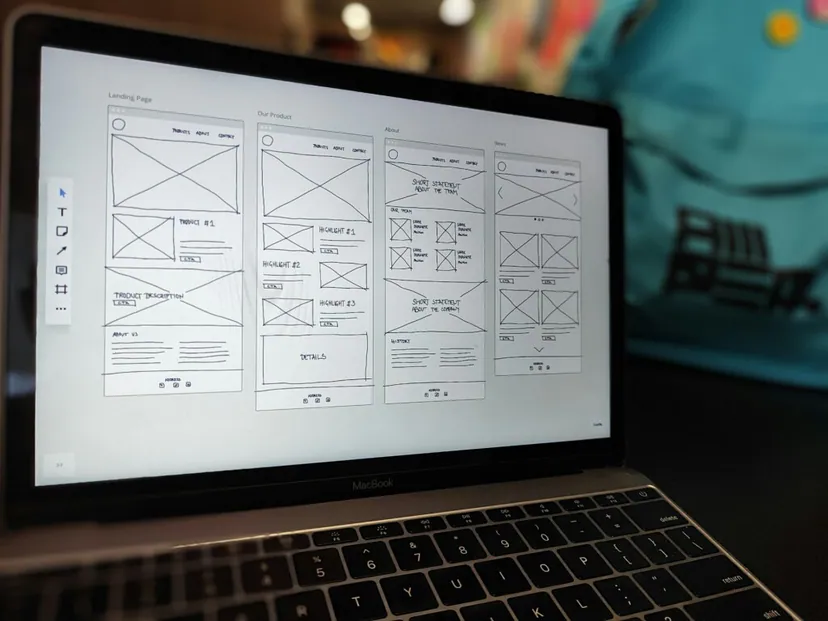
A wireframe is the first stage in the UX design process. Think of this model as the skeleton of your website planned long before the actual site is created. In this case, your website content is adapted to the skeleton.
Wireframes show how your website or app may look and function in the simplest possible way. They do not include any interactive functions or features and can be sketched by hand. It is simply the first step in identifying design-related problems before work begins.
Mock-ups
A mock-up is the next stage in the development of UX design. In many ways, it is a more refined version of the wireframe.
When it comes to a mock-up, it includes fitting all kinds of illustrations into the wireframe, including the company logo. It also includes the text that will appear on your website or in the app, using the appropriate font. The colour scheme of the website or app is also applied at this design stage.
The aim of creating a mock-up is to discuss the design before interactive features are used. A mock-up gives a clearer picture of what the final version of the website or app will look like. This is the time to make any significant structural changes if something does not seem to work as it should.
SummaryStrategic investment in UX design
01Invest with intentTurning pennies into pounds
02The philosophy of benefitsVisible effects and gains
03A broad issueContinuous learning and discovery
04User experienceThe key to loyalty
UX is not a cost, but a strategic investment in real gains and the long-term growth of the business.
Prototypes (prototypes)
A prototype is a fully coded, interactive version of your website or app. At this stage, user experiences can be fully tested and you can make sure the website or app does everything it should.
It is advisable to recruit outsiders as testers for your prototype. If they encounter problems, these must be eliminated before the website or app is launched. Remember that you only have one chance to make a good first impression.
Questions for small and medium-sized businesses related to UX design
If you are a small business owner who is wondering how much attention should be paid to UX design, ask yourself the following questions.
They will help you better understand the importance of this field and what needs to be kept in mind when evaluating earlier wireframes, mock-ups and prototypes of your website and app.
1. What UX design problems arise with your website or app?
Planning a website or app is always an exciting experience. Before moving on to the actual build, before dealing with logistical issues such as tight deadlines and budgets, everything seems possible. However, you need to remember that achieving goals often requires sacrifice.
Assess the above limitations objectively and ask yourself honestly – do they affect the UX design of your website or app? If so, you need to go back to the design stage.
Do not give in to the temptation to keep pushing ahead with the project in order to finish it as quickly as possible, adopting the “something is better than nothing” approach. Poorer-quality UX design will negatively affect the brand, not only delaying the launch of the website or app by several weeks (while problems are being resolved). Common examples of critical UX issues look as follows:
a long page loading time – if a page does not load within three seconds, most users will stop using it,
disorganised, unfinished content that has not been checked or has been copied,
groups of calls to action that are placed too close together. You do not need to whisper, but there is no need to shout either,
poor performance on certain browsers or, in particular, on mobile devices. Try to be platform-independent when it comes to user experiences.
You need to bear in mind that you are up against strong competition. Everyone is demanding the customer’s attention. Work on the mistakes and do not expose yourself to unfavourable comparisons.
2. What are the non-negotiable UX issues for your customers?
After improving the UX design of your website or app, you may feel pleased with it. However, that is only the first step. You need to remember that you are still thinking like a business owner.
This means that you know what your goals are and you automatically know how to solve various important problems. However, you need to consider what external users think and feel. Anyone who uses the Internet, regardless of whether they are simply looking for something or want to make a transaction in an online store, has a certain set of non-negotiable problems that lead to a deal being broken off.
Such problems cause users to abandon transactions and services, not sign up for newsletters or give up on free trials. So you need to think like a customer and find out what these problems are, and then take them into account in your UX design.
To achieve this, carry out market research. Ideally, it should involve using a prototype of your app and website, with comments and feedback on the results delivered. Above all, you need to find out what put users off using your website or app.
Every user has their own unique problems that, in their eyes, are non-negotiable. You cannot help everyone. Some people, for example, do not like the colour blue. If that is the colour representing your brand, you cannot completely change your identity just to please one person. However, there are some common problems, such as:
long “sales funnels”,
no obvious and transparent security protocols that protect customer data,
too many personal, inappropriate questions in the registration form,
complicated, difficult navigation between pages,
pop-up chat windows or adverts obscuring the content.
You do not need to do anything complicated or start from scratch to solve these problems. Most of them can be fixed quickly. However, that does not mean they are any less important.
3. Is your company able to handle UX needs?
One of the more important questions is whether you are able to handle UX design. This process is very important, so if you still do not understand something, you must improve your skills or use external services.
There are many on-line courses that promise to reveal many different UX design secrets. However, do not buy a pig in a poke and waste time and resources on training that promises a lot and delivers nothing.
If you use outsourcing for creating your website or mobile app, ask the agency or freelancer about their UX design capabilities. Sometimes the best solution is to leave such tasks to professionals. The costs involved will be offset by greater profit.
4. How can UX design be used to improve the bottom line?
Every business, whether it is a small or medium-sized enterprise or a global corporation, has a similar goal. That goal is to increase revenue. Your UX design decisions should therefore take this goal into account.
UX design should be focused on increasing customer engagement, encouraging conversions, generating new leads and improving business reputation. All of this will be reflected when you check your bank balance. The on-line world is a faster and more reliable way to gain an edge over the competition.
Summary
Every penny spent on UX design should be invested with the intention of turning it into a pound. Follow this philosophy, and you will notice the benefits of using the art of UX design. Of course, UX design is a broad subject that you need to learn about and explore in depth.
FAQ
Frequently asked questions
01How does UX affect conversions on a website or in an app?
Well-designed UX makes the service easy to understand, provides the right information and encourages action. As a result, it generates conversions more quickly and helps keep the user around for longer.
02Can poor UX harm a website’s position in Google?
Yes, because a high bounce rate has a negative impact on a website’s position in Google. As a result, it becomes harder to attract the attention of new customers afterwards.
03What are the most important features of good UX design?
The article points above all to simplicity, clarity, well-written content, clear calls to action and suitable illustrations. Consistency across desktop, smartphone and tablet is also important.
04How does a wireframe differ from a mockup and a prototype?
A wireframe is the first, simplest stage of planning the layout of a website or app. A mockup is more polished visually, while a prototype is a fully coded, interactive version for testing.
05Which UX problems are considered critical in a website or app?
The most important include long loading times, disorganised content, calls to action placed too close together, and poor performance on specific browsers or mobile devices. Hidden navigation and low-quality content are also problems.
06Should a small business outsource UX design to specialists?
If the company does not understand the topic or does not have the resources, it is worth using external services or improving its own skills. The article stresses that sometimes the best option is to leave it to the professionals.