

You do not need to run a site dedicated solely to news in order to appear in Google News channels. However, you do need to use specific search optimisation methods to give yourself a chance.
What is Google News and where does it appear?
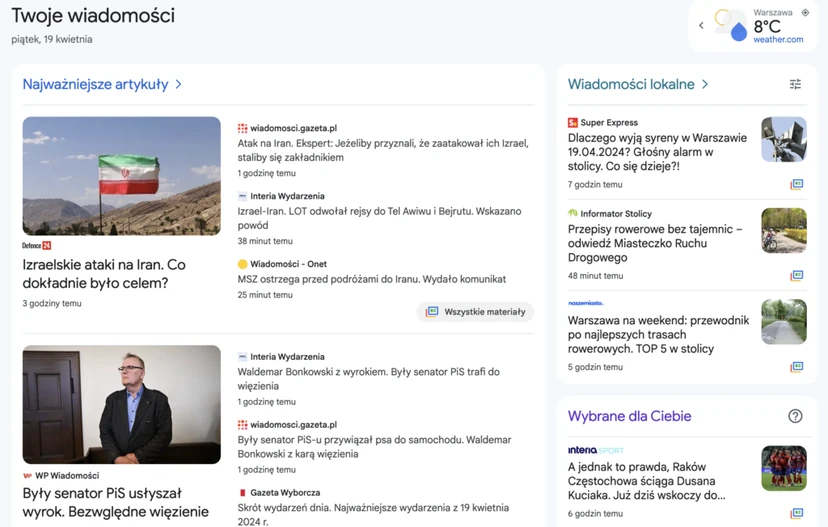
Google News is a news aggregator, in other words a service that gathers and displays articles in its channels. In other words, it uses technology to search for and organise relevant stories from different sources. It then shows those stories to people for whom they are likely to be interesting or useful.
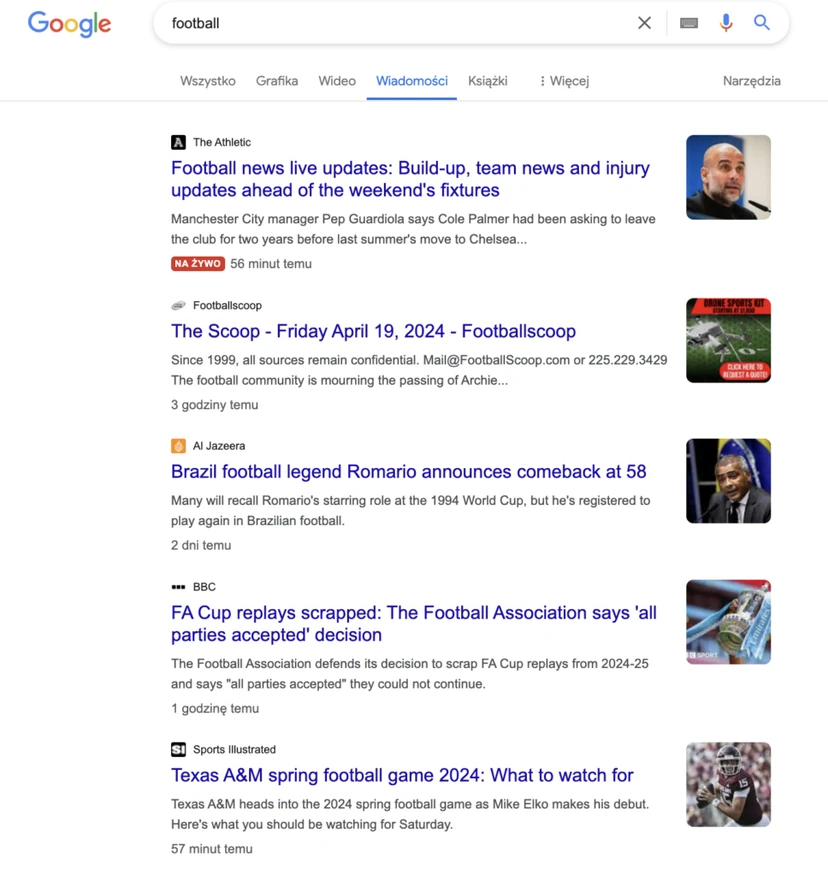
According to Semrush, Google sends users to publish-worthy pages 24 billion times every month. However, stories from Google News do not appear only on the website and in the app. They can also be found in Google Search in the “News” tab (aktualności) or “Top Stories” (najlepsze historie) on the search results page (SERP).
Google Discover, the personalised content discovery solution, also includes news. The Google Trends landing page also shows news under popular queries. They can also be found in “breaking news” and “top news” on YouTube.
- 01News aggregatorIt gathers and organises articles from different sources.
- 02Personalised storiesIt tailors content to the user’s interests.
- 03Wide visibilityWebsite, app, search engine, Google Discover.
Google News is a key aggregator that, thanks to advanced technology, delivers personalised content and generates billions of referrals every month, appearing at many user touchpoints.
How does Google News choose stories?
Google News suggests stories to readers through algorithms. Of course, the most important are stories from authoritative sources.
Most often, computers choose the content. It is not clearly defined when people and publishers in Google News carry out such actions. That is why people using the same language and living in the same region see the same “Top stories” in Google News.
Even so, you can adjust your user settings to influence the topics you see. Simply scroll down to “Your Topics” and click “Customize”. The system will also take your previous activity in Google Search and on YouTube into account when suggesting stories.
What are the ranking factors of Google News algorithms?
Google News uses seven ranking factors to deliver readers the most useful news. They are:
- relevance – matching stories to users’ queries in Google Search,
- location – helping users find content relevant to their local area,
- prominence – promoting publish-worthy events that are widely covered,
- authority – prioritising content from expert sources,
- freshness – presenting the latest news on a given topic,
- usability – assessing how easy it is to browse the page content,
- interest – personalising content that matches users’ interests or previous searches.
Google also pays attention to three factors that do not affect ranking. They are:
- point of view – the ranking system does not take into account the author’s ideological or political opinions,
- advertisers and commercial affiliations – advertisers and Google partners are not guaranteed special treatment,
- personal data – Google does not take into account sensitive characteristics such as gender, religious beliefs or age.
The last three factors may be public. However, they provide little insight into what Google is really looking for.
Let us look at some tactics that will help your news articles achieve better rankings.
- 01RelevanceMatching stories to queries.
- 02LocationContent relevant to the area.
- 03ProminenceEvents shown widely.
- 04AuthorityPriority for expert sources.
- 05FreshnessCurrent and new information.
The key is to provide useful, up-to-date and reliable news for users.
Ways to help you rank in Google News
We have already established that sites dedicated to news are not the only services gaining visibility in Google News channels. The system also takes into account any site that creates high-quality, timely, original content. It is also important to follow certain rules.
Here is information on how to use SEO so that your publish-worthy content gains a high position in Google News.
1. Adding a site to Google Publisher Center (Google publishing center)
Set up Google Publisher Center (it is a simple task that takes 30 minutes) to manage how the site appears in Google News. You do not have to add your site to Publisher Center to rank, but doing so comes with many benefits.
First of all, you can share your content directly with Google. So you do not have to wait until it is discovered through standard crawling.
The other advantages are as follows:
- control over content, publication design and brand presentation in Google News,
- the opportunity to appear in the news section in the Google News app,
- gaining Google’s approval, because the application is manually reviewed,
- creating a dedicated sitemap for Google News and a robots.txt file (the XML sitemap tells Google search engine robots which URLs should be indexed).
Important – Google does not guarantee publication just because you register and configure Publisher Center. This means you need to meet the relevant standards to be considered as a possible option.
To submit your site for approval, go to Publisher Center. Enter your site’s URL and click “Add” (Dodaj). Choose the name of your publication and your location. Then verify your site in Google Search Console.
Once your application is approved, you can share your content directly with Google News. This also applies to RSS feeds, page URLs and video materials.
2. Work on your site’s technical SEO
You can optimise your site for search engines using technical SEO tactics. This process helps Google News algorithms look more favourably on your site, because it will be easy to use.
Use the technical SEO tactics below to make your content worth publishing in Google News:
- follow Google’s technical guidelines (e.g. use only one language in a single article),
- implement structured data specific to news (e.g. inform Google that your content is a news article),
- optimise site speed (e.g. compress your visuals so they load faster),
- avoid duplicate content (e.g. do not copy content from other sites or paraphrase it without adding any additional value),
- provide an excellent user experience (e.g. create a mobile-friendly site and protect readers’ data with an HTTPS certificate).
Let us look at this in more detail. Structured data specific to news is also known as “schema markup”. In other words, additional code in the HTML version of your article helps Google search to understand the content of the page.
There are many different types of structured data. In Google News, the most popular are “Articles” and “News” (Article and NewsArticle).
In other words, Google does not have to guess what a given piece of content is about because you can tell the search engine yourself. This therefore increases the likelihood of content appearing in “Top stories” and stories selected for the user.
The same logic applies to headings. You simply need to create a 110-character version within the structured News data.
Example implementation of Schema.org for a news article
{
  "@context": "http://schema.org",
  "@type": "NewsArticle",
  "headline": "Naukowcy odkryli nową planetę w naszym Układzie Słonecznym",
  "alternativeHeadline": "Odkrycie nowej planety może zmienić nasze postrzeganie Układu Słonecznego",
  "image": [
    {
      "@type": "ImageObject",
      "url": "https://example.com/new_planet.jpg",
      "height": 800,
      "width": 1200
    },
    {
      "@type": "ImageObject",
      "url": "https://example.com/new_planet2.jpg",
      "height": 800,
      "width": 1200
    }
  ],
  "datePublished": "2024-04-18",
  "dateModified": "2024-04-18",
  "author": [
    {
      "@type": "Person",
      "name": "Jan Kowalski"
    },
    {
      "@type": "Person",
      "name": "Anna Nowak"
    }
  ],
  "publisher": {
    "@type": "Organization",
    "name": "Gazeta Naukowa",
    "logo": {
      "@type": "ImageObject",
      "url": "https://example.com/logo.jpg"
    }
  },
  "description": "Grupa międzynarodowych naukowców ogłosiła odkrycie nowej planety, która znajduje się na obrzeżach Układu Słonecznego. Szczegóły badania zostały opublikowane w najnowszym wydaniu 'Gazety Naukowej'.",
  "articleBody": "W artykule naukowcy opisują, jak za pomocą nowych technologii teleskopowych udało im się zidentyfikować obiekt, który może być dziesiątą planetą Układu Słonecznego. Badacze z różnych krajów współpracowali nad projektem, który przyniósł spektakularne wyniki...",
  "mainEntityOfPage": {
    "@type": "WebPage",
    "@id": "https://example.com/news/new-planet-discovered"
  },
  "keywords": ["nauka", "planeta", "astronomia", "Układ Słoneczny", "odkrycie"],
  "inLanguage": "pl-PL"
}
To gain positions in Google News channels, you need to ensure an optimal user experience.
So pay attention to the following features of your site and its content:
- fast loading,
- correct display on mobile devices,
- avoiding an excessive number of ads,
- ease of navigation,
- no unwanted page elements that block access to the content (e.g. pop-up ads),
- optimisation for Core Web Vitals (Core Web Vitals – metrics measuring speed and user experience).
3. Searching for popular topics and questions you can answer
By searching for keywords and using Google Trends, you can find popular topics and questions you can answer in your content. Go to Google Trends to check whether it makes sense to create content related to a given featured topic.
Noteworthy topics can also be found through keyword research. This process can be carried out with many different tools available online.
4. Create original, high-quality content with attention-grabbing headings
Content optimised for Google News must be original and exceptionally well written. You must also include eye-catching, relevant titles and headings to attract readers.
Create interesting titles and headings
Here are a few tips for creating headings and titles optimised for SEO and users:
- clearly and concisely inform the reader about the topic of the article,
- make sure the heading is descriptive and meaningful (forget wordplay and jokes),
- use the present tense and active voice,
- avoid overusing PR words such as “announces”, “launches” or “partners”,
- use the active voice (e.g. “you prepared a meal” instead of “the meal was prepared by you”).
Your heading can be the icing on the cake of valuable content. It can also have a negative impact on click-through rate (CTR). So it is worth taking care of it.
Keep your content aligned with E-E-A-T
When it comes to the main news content, always follow Google’s guidelines on E-E-A-T. This acronym stands for Experience, Expertise, Authoritativeness, and Trustworthiness (Experience, expertise, authority and trustworthiness). Google added “Experience” to this set at the end of 2022.
Here is a summary of the E-E-A-T elements:
- experience proves that insights are authentic,
- expertise demonstrates the author’s knowledge and qualifications,
- authority shows that the person is an expert or influencer with a good reputation (with many backlinks),
- trustworthiness is the most important element. It ensures the accuracy of the information contained on the site and its security.
E-E-A-T is not a ranking factor, but it is part of Google’s latest Quality Rater Guidelines.
Real people, (known as quality raters) use these guidelines to provide Google with feedback on changes in search. This is how the effectiveness of changes in the ranking system is measured.
Although they do not affect your ranking, the E-E-A-T principles are crucial for improving the SEO of your content. This also applies to news.
Create only publishable content and follow the rules
First and foremost, Google News SEO content must be publishable. Such content has the following characteristics:
- an original report or opinion from a trusted source,
- up-to-date information that users can use immediately,
- content that is attractive, inspiring, shocking or interesting in a way that grabs attention without “clickbait” tactics,
- suitable for a popular topic without an abrupt change of direction,
- suitable for a specific audience, answering specific questions, not too extensive,
- content full of verified factual data and high-quality illustrations that show the information is trustworthy.
If you want to achieve high positions in Google News, forget evergreen content, how-to guides and advice columns. These types of content are not current or publishable. They should be kept for other areas of your SEO strategy. Also follow Google News policy.
5. Keep your content “fresh”
Google News strongly favours fresh content. You should therefore focus on a series of new, current stories every week.
There are sites that appear in Google News if they are no older than 90 days. This means you can even use older content. If it stops performing, you should consider refreshing it.
Content can be refreshed in a few ways, for example:
- searching for new information on a given topic,
- adding updated facts and statistics,
- a more detailed approach to less rich content (content with little or no added value),
- looking at the content from a different perspective,
- asking experts for opinions and including quotes.
With these methods, you can refresh content significantly. Instead of trying to trick algorithms, it pays to put in a bit of effort.
Google also warns against “artificially refreshing” stories without adding value:
Do not artificially refresh stories without adding substantial information or some other compelling reason to refresh. Also, do not create only a slightly updated story compared with the one published previously. Do not delete the old one and redirect to the new one. This is against Google’s guidelines for article URLs.
Once the proper refresh is complete, update the article date. For Google (and readers), this is a signal that the content is new.
At best, you will improve your position in Google News. At worst, you will create more extensive content that is valuable to real readers.
6. Become a credible source of information and look after your social media presence
Google News prioritises new, expert, authoritative sources of current information. You can add posts on social media regularly to increase popularity and credibility.
Most sources in every Google News section have many followers on social media platforms. But this is not a requirement to appear there. Instead of building ever larger numbers, what matters is appearing on the channels where your audience is most active.
Accounts on multiple platforms indicate that you are a suitable company. They also provide an opportunity to generate engagement from followers and find out what content they like. You can therefore create more of it so that they keep coming back.
Another benefit of having followers is that Google may show your content in personalised feeds.
For example, regularly posting on X allows you to appear in the “From Twitter” section in “Full coverage” reports. Despite the change to “X”, this section is still titled “From Twitter”.
“Perspectives” are also available in Google Search and include posts from X. This is another news area through which you can reach your target audience.
Additionally, building a strong social media presence helps in many ways:
- it presents your content to a wider audience,
- it builds awareness of your brand,
- it increases trust, credibility and link acquisition opportunities.
Make sure you create accounts on platforms you can dedicate time to. There is no point being everywhere if you have to wait months for the next posts.
7. Fine-tune the small but important details
Improve the small, key details on your website and content pages to meet the requirements of Google News ranking factors.
For example, create an “About us” page and add your company contact details. Such additions signal transparency and build trust. This, in turn, leads to gaining authority.
Use your “About us” page to explain to your audience what your business does and your expertise in a given topic. By doing this, you will ensure that journalists and news publishers will in future look for suitable stories directly on your website.
Add author names to your content. Ideally, each of them should have their own author page. This signals expertise (important for the new “E” in E-E-A-T) and authority to Google.
When it comes to freshness, make sure articles have clear publication dates and times. Remember the 90-day rule.
To be included in Google News, articles must display a clear, visible date and time. It is best if this information appears between the title and the article content.
When it comes to news, hours are better than days. People assume that the newer the article, the more up to date its information is. You can also use structured data by filling in the “datePublished” or “dateModified” fields in line with the time zone.
In addition to meeting the ranking factor requirements, you will provide readers with a better user experience. This, in turn, has a positive effect on Google rankings.
8. User-friendly URLs
Unreadable URLs have a negative impact on the chance of an article appearing in Google News. Create a URL consistent with the article title. For example, WordPress has a “Permalink Settings” option that allows you to assign the post name to the page URL. User-friendly URLs make it easier for Google News crawlers and readers to understand the subject of the page before viewing it.
Every URL for your articles should be permanent. It must therefore not change after being included in Google News. If the URL changes, indexing problems will arise in Google News and the article may not be displayed.
Moreover, URLs must be unique. If multiple articles have identical URLs, they cannot be included in Google News.
9. Create a sitemap.xml for Google News
To effectively integrate with Google News and increase the visibility of your articles, it is worth ensuring that you prepare and submit a sitemap specifically intended for this service. Here are the rules and tips that will help you create an effective sitemap for Google News:
- specifics of a sitemap for Google News – this map should contain only articles published within the last two days. This is definitely different from standard sitemaps, which can include links to all pages of a website
- frequent updates – it is worth updating the sitemap every time a new article is published. This way Google will index the latest content faster, which can help improve the visibility of your articles in search results
Example sitemap for Google News:
To make it easier to understand, below you will find an example of what an XML sitemap for articles intended for Google News may look like:
<?xml version="1.0" encoding="UTF-8"?>
<urlset xmlns="http://www.sitemaps.org/schemas/sitemap/0.9"
        xmlns:news="http://www.google.com/schemas/sitemap-news/0.9">
  <url>
    <loc>https://example.com/article1.html</loc>
    <news:news>
      <news:publication>
        <news:name>Nazwa Twojej Gazety</news:name>
        <news:language>pl</news:language>
      </news:publication>
      <news:publication_date>2024-04-18</news:publication_date>
      <news:title>Tytuł Twojego Artykułu</news:title>
    </news:news>
  </url>
  <!-- Dodaj więcej artykułów zgodnie z potrzebami -->
</urlset>
FAQ
Frequently asked questions
How does Google News choose stories to show users?
Google News mainly uses algorithms that select content from authoritative sources. The system also takes into account language, region, previous activity in Google and YouTube, and user settings.
Do you need to run a site only about news to get into Google News?
No, you do not need to have a site dedicated exclusively to news. Google can take into account any site that publishes high-quality, timely and original content.
Which ranking factors are the most important in Google News?
The article points to seven factors: relevance, location, prominence, authority, freshness, usefulness and interests. Google does not, however, take into account viewpoint, advertisers and commercial relationships, or personal data.
Does adding a site to Google Publisher Center guarantee visibility in Google News?
No, registration alone does not guarantee publication. However, it can make it easier to manage the appearance and distribution of content and allow you to send it directly to Google News after approval.
What technical actions help you rank in Google News?
It is worth following Google’s technical guidelines, adding structured data for news, speeding up the site and avoiding content duplication. Good user experience is also important, including a mobile version and HTTPS.
Why does content freshness matter in Google News?
Google News strongly favours fresh material and often promotes current stories. The article also says that some sites appear in results if they are no older than 90 days, and older content can be refreshed with new facts and perspective.