

Google Discover can help you attract audiences for free and send thousands of visitors a month to your site. Below you’ll find information about Google Discover and optimisation for it. In this way, you’ll increase the chances of your content appearing in Discover feeds.
Google Discover – what is it?
Google Discover is a feed that allows users to discover content related to their interests. It displays content based on users’ activity across Google services.
Google Discover is available in the Google app and in the mobile version of the Google Chrome browser.


- 01Discovering contentIn line with interests
- 02Based on activityAcross Google services
- 03Access in the appGoogle app
- 04Access in ChromeChrome mobile browser
A personalised content feed based on your interests and activity in Google.
Should you optimise for Google Discover?
Here are a few reasons why you should optimise for Google Discover:
- increasing visibility – Google Discover allows you to appear in front of audiences for free. It is a great way to show your brand and content to new potential customers,
- generating traffic – users not only scroll through information from Google Discover, but also click and visit the recommended pages,
- more repeat visits – Google Discover gives users the option to follow publications, so it can be a great source of repeat visits to your website.
How does Google Discover work?
To appear in Google Discover, content must be indexed by Google and comply with the Google Discover content policy guidelines. However, just because content qualifies does not necessarily mean it will be shown.
The Google Discover feed looks similar to social media feeds. It is similar to information from Facebook and Instagram.
Users scroll through it, click on content that interests them, and then land on the page that offers it.
- 01Content qualificationIndexing and compliance
- 02Visual formatLike social media
- 03User interactionScroll, click, visit
Discover wants to offer content aligned with interests, regardless of the publication date, unlike News.
Google Discover and Google News
Google Discover and Google News are two completely different Google products. Google News is an aggregator that mainly focuses on current events and the latest published content.
On the other hand, Google Discover wants to offer users content that matches their interests, regardless of the publication date.
How is your Google Discover feed generated?
Google uses the following data to generate information in Discover:
- web and app activity,
- location history,
- location settings,
- followed topics.
Discover recommendations are updated as you use it, as Google learns more about you.
For example, if you show interest in motorcycles and keep visiting related pages and content, Google Discover will start showing you more content related to motorcycles.
This means traffic from Discover can change over time. It depends on changing interests, different types of content being created, and Google updates.
When you optimise your content, you may notice increases or drops in traffic generated from Discover.
- 01Generate trafficExtra traffic, for free.
- 02Optimise contentApply Discover SEO tips.
- 03Track resultsUse Google Search Console.
Key takeaway: Optimise content and analyse data to gain valuable reach at no cost.
Different types of Google Discover content
Google Discover usually displays these four types of content:
- article links – links to online articles from different publishers. Each article link is displayed as a card containing a headline and a thumbnail,
- Web Stories – this format includes video, images and audio, similar to Instagram Stories,
- YouTube videos and Shorts – a Google Discover user’s feed may also include YouTube videos and short clips known as Shorts. These are recommended based on the user’s YouTube history,
- Discovery ads – ads created as part of Google Discovery campaigns also appear periodically in this channel.
Following pages and topics
Google Discover includes a “Follow” feature that allows users to follow a page and see its latest updates displayed in the “Following” tab in Google Chrome.
This feature uses the site’s RSS feed or Atom feed to display the latest updates. If a site does not have either of these feeds, Google will generate one automatically.
Besides pages, you can also follow specific topics so content related to them appears more often in your feed.
Users can control how often they want to see content related to a specific topic by clicking the toggle icon on the card and choosing “More” or “Less”.
Methods of optimising for Google Discover
Let’s see how you can appear in Google Discover. Follow the tips below to optimise your content for this channel:
1. Creating high-quality content
The first step to achieving better results in Google Discover is making sure that you create high-quality content. This means creating content that:
- covers the topic in depth,
- provides original information supported by analysis or research,
- is not just a copy or rewrite of information from other sources.
Follow the tips below to create high-quality content:
Start with thorough research
Before you create excellent content, you need to understand what you are going to write about.
Here’s what you can do to expand your knowledge on a given topic:
- read existing online content related to the topic (e.g. blog posts, articles and guides),
- check what other people are saying about the topic on platforms such as Reddit or Quora,
- find videos or podcasts on the topic,
- interview a few experts in the field to gain insights you would not discover otherwise.
Cover the topic in depth
Discuss the topic broadly and try to include all the information people would want to know about the topic.
There are various tools for checking what questions people are asking about a topic (you can also do this using Google search). It’s worth finding out these questions so you can answer them later in your content.
Include data
Referring to studies or statistics in your content will make it more credible and support your claims.
It is best to have data collected yourself (e.g. during a survey) and use it in your content.
Alternatively, you can use data from research conducted by other people or companies. If you decide to use it, make sure you provide the sources and links to such research.
2. Optimising titles
Once you are confident about the quality of your content, make sure your titles are optimised for Google Discover.
Follow the best practices below to create titles optimised for Google Discover:
- demonstrate value – your title should tell users what value they will get from your content (e.g. “How to earn your first PLN100 online”),
- spark curiosity – try to spark curiosity with your title to increase the likelihood of a user clicking (e.g. “Scrambled eggs vs porridge – which breakfast is healthier for you”),
- try to include numbers – numbers tend to attract attention, so if possible, try to include them in the content (e.g. “22% of Americans have no savings for a rainy day”),
- avoid clickbait – Google Discover guidelines prohibit creating misleading content, so avoid using titles aimed at getting clicks at any cost.
Here are effective title formats you can try:
- lists (e.g. “10 ways to earn extra income this year”),
- “What” and “Why” titles (e.g. “Why does my dog smile?”),
- how-to guides (e.g. “How to fix a tap”),
- strongly argued titles (e.g. “Why are eggs bad for you?”),
- comparison and contrast titles (e.g. “Free weights vs machines – what helps you build muscle better?”).
3. Use interesting high-quality illustrations
Google recommends that websites use large, high-quality illustrations so they generate more visits from Google Discover.
According to Google’s guidelines, large illustrations must be 1200 pixels wide or larger and must be enabled by using the “max-image-preview:large” setting.
Of course, it is important that the illustrations you use are relevant to the content. Avoid using eye-catching illustrations that have nothing to do with your content. In addition, spend some time choosing an interesting thumbnail for your Google Discover content.
The thumbnail takes up a large part of the content card in Google Discover. Therefore, it affects the click-through rate your content generates in Discover.
Make sure you do not use the site logo as a thumbnail, as this is against Google’s guidelines. Also try not to use illustrations with a white background, as it can blend in with the Google Discover user interface (which is also mainly white).
4. Improve E-E-A-T
Google Discover documentation states that this feed uses many of the same signals and guidelines as the Google search engine to determine whether content is helpful. In the case of search, one of the most important factors is E-E-A-T, which stands for:
- experience (Experience) – does the author have experience in the subject?
- expertise (Expertise) – is the author an expert in the field?
- authoritativeness (Authoritativeness) – is the author (or site) an authority on the subject?
- trustworthiness (Trustworthiness) – is the author (or site) trustworthy?
When your content demonstrates E-E-A-T, you will show that it is worth showing to users. Here is how you can improve E-E-A-T:
Include personal experience
Wherever possible, talk about your personal experience related to the topic.
For example, if you are writing an article about dog training, mention your experience training your own dog and what you learned from it.
Show your expert knowledge
One of the best ways to demonstrate expert knowledge is to create a detailed author profile in which you explain why you are an expert in the topic you are covering.
Here are the elements worth considering including in the profile:
- job title,
- years of experience,
- a short note on why you are an expert in the topic,
- any media coverage related to you,
- awards, degrees or titles.
Become an authority in the field
There are two ways to signal authority:
- building topical authority,
- acquiring backlinks from other authoritative websites.
To develop topical authority, your site must cover the area of expertise you have chosen as thoroughly as possible.
For example, if you want your site to be recognised as an authority in fitness, you need to cover as many fitness-related topics as possible.
In addition to covering your area of expertise in depth, you can also demonstrate authority by acquiring backlinks from other authoritative websites in your industry. These can be acquired organically (naturally) or by using various link-building tactics.
Show that you are trustworthy
When assessing a site’s credibility, Google Quality Raters look at the following factors:
- author – who is the author? Do the authors have the authority to write on the topic?
- content – is the content factually accurate? Does it cite reliable sources?
- site – does the site look credible? Does it have a misleading layout or intrusive ads?
The above factors are listed in the Search Quality Rater Guidelines.
To help raters recognise your site as trustworthy, make sure of the following:
- clearly indicate the author of the content and explain why this person is suitable to write about the given topic,
- make sure your content is factually accurate and genuinely helpful. Support your claims by linking to reliable sources,
- avoid using pop-ups and other distracting elements on the page.
5. optimising content for mobile devices
As Google Discover is available only on mobile devices, it is crucial that your content and website are optimised for browsing on such a device.
Follow the best practices below to optimise your site for mobile devices:
Improve page loading speed
Nowadays, people expect websites to load quickly. They are not going to wait longer than 1-2 seconds for a page to load.
According to Semrush, there is a 32% greater chance that a user will leave a website if its loading time increases from one to three seconds.
Mobile users are particularly impatient. They usually browse the web on the go, during a break at work or at lunchtime. They therefore do not have the time or patience to browse slowly loading websites. Here are a few things you can do to speed up page loading:
- image compression – high-quality images can significantly slow down a website. Use dedicated image compression tools to reduce their file size on the site. Alternatively, use a format such as WebP to keep file sizes small while having a minimal impact on image quality,
- code minification – remove unnecessary HTML, CSS and JavaScript elements from your site as part of the optimisation process. There are many online solutions or WordPress plugins that can help (Minify, WP Rocket, etc.),
- use a content delivery network (CDN – content distribution network) – improve site speed by using CDN networks, such as Cloudflare or Akama, to deliver the site to users from servers that are physically closest to their location.
Increase your reach with Google Discover
Google Discover can be a great way to generate additional traffic to your website and appear in front of your target audience, completely free of charge.
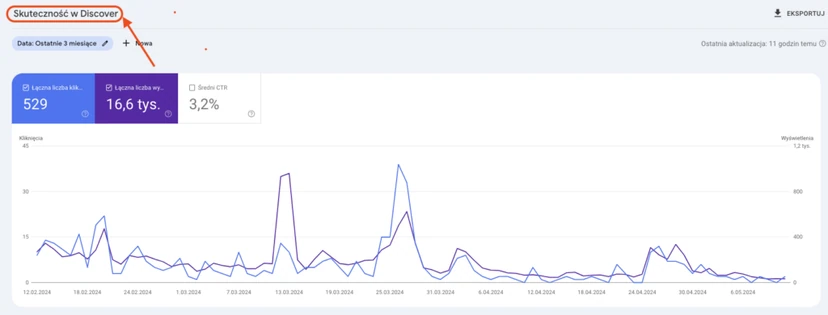
Start by applying the Google Discover SEO tips above to optimise your content for this channel. Also monitor how your pages appear in Google Discover by using the Discover section in Google Search Console.
FAQ
Frequently asked questions
How does Google Discover work and on what basis does it show content to users?
The feed selects content based on activity on the web and in apps, history, and location settings and followed topics. Over time, it learns the user’s interests and updates the recommendations shown.
Does content have to be indexed to appear in Google Discover?
Yes, content must be indexed by Google and comply with Google Discover content policy guidelines. However, simply meeting the requirements does not guarantee display.
How is Google Discover different from Google News?
Google News is an aggregator focused mainly on current events and the latest publications. Google Discover shows content matched to the user’s interests, regardless of publication date.
What kinds of content does Google Discover most often display?
The article mentions links to articles, Web Stories, videos and Shorts from YouTube, as well as Discovery ads. Content is shown as cards with a heading and thumbnail.
Why is it worth optimising content for Google Discover?
Because it can increase visibility, generate traffic to the site and provide more repeat visits thanks to the option to follow publications. It is also a way to reach new audiences for free.
What elements help increase the chance of traffic from Google Discover?
The article points to high-quality content, optimised titles, large and relevant images, and improving E-E-A-T. Mobile optimisation is also important, because Discover works only on mobile devices.