

Headings are a key element of every website, not only structuring content but also playing an important role in SEO. Understanding their significance and using them correctly can have a significant impact on your site’s visibility in search results.
What are headings?
Headings in HTML define and classify titles in documents. There are six different heading levels, from H1 to H6, which give the document structure. It is recommended that only one H1 heading appears on a page, while the others can be used multiple times, but their arrangement should be logical.
- 01Definition & structureClassify content, bring order.
- 02Six levels (H1-H6)Different levels of importance and size.
- 03Unique H1 headingOnly one, the main title on the page.
- 04Logical arrangement of the restRepeated use, consistent hierarchy.
Key takeaway: Headings organise content for users and search engines, with H1 as the unique, main title.
Benefits of using headings
- Structure and hierarchy – even if the document style sheet is not readable, using headings ensures that the content is structured and the headings are displayed hierarchically.
- Accessibility – headings are also recognised by screen readers used by visually impaired people, making them an important accessibility feature.
- SEO optimisation – headings play a key role not only for authors, but also for SEO specialists. They may not directly affect rankings, but they show the importance of the topic for specific search queries.
Heading hierarchy
Each heading has a different level of importance. The main heading, which indicates what the page is about, is written as H1. H2 to H6 are used to organise the article. In practice, H1 to H3 headings are usually sufficient.
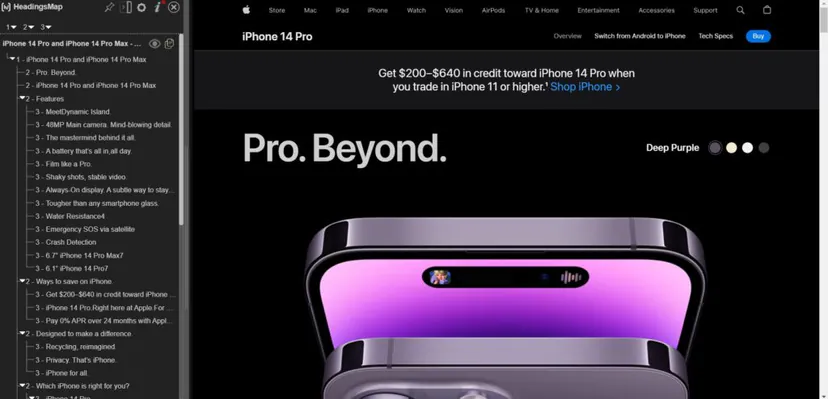
- 01H1 main headingWhat is on the page
- 02H2-H6 organisationDivide content into sections
- 03H1-H3 practiceThe most commonly used levels
Each heading level builds structure and makes navigation easier, with emphasis on the most important information.
Headings and Google rankings
Although headings play both an indirect and a direct role in ranking in search results, Google has in recent years relativised their importance for search engine optimisation. However, they are still often regarded as a ranking factor in the context of on-page optimisation.
Tips for using headings in SEO
- Use headings to structure – if your website were a book, the title would be in the H1 tag.
- Improve the usability of your content – headings are used today to structure content.
- Make your content scannable – According to Normal Nielsen Group, 79% of internet users do not read; they only skim the text. Only 16 percent actually read word for word
- Make your headings interesting – the H1 keyword is particularly important, because it decides whether the user engages with the rest of the content or not.
- Optimise for featured snippets – featured snippets are highlighted search results that are often shown at the top of search results.
- Use headings consistently – it is recommended to use the H1 tag only once, because it is simply good style and follows a certain logic.
- 01Structure and titleH1 is the title of a book
- 02Improving usabilityStructure content with headings
- 03Scanable contentMakes quick browsing easier
- 04Interesting H1Keywords attract attention
Correct use of headings increases readability, engages users and supports SEO
How does Google interpret headings?
Google, being the most advanced search engine, uses headings to understand the main topic of the page and its subsections. In some cases, Google may use the H1 heading instead of the meta title, because it considers it to define the purpose of the page better. That is why it is important for headings to be precise and reflect the content of the page.

What are the best practices for using headings?
- Avoid overusing keywords – while it is important to include keywords in headings, they should not be overused. Naturalness is key.
- Maintain consistency – use headings consistently across the site.
- Use short and concise headings – long headings can be difficult to understand for both users and search engines.
- Do not skip heading levels: If you use H2, make sure you also use H3 to further break down the content.
Common mistakes when using headings
- Using multiple H1 headings – although this is technically possible, it is recommended to use only one H1 heading per page.
- Styling instead of structuring – headings should be used to structure content, not just for styling.
- Skipping headings – some site creators skip headings, which can make it harder for search engines to understand the structure of the page.
In summary
Headings are not only a tool for structuring content, but also an important element in search engine optimisation. Using headings correctly can improve page visibility in search results and improve user experience. That is why it is important to spend time understanding and using headings correctly when designing and creating website content.
FAQ
Frequently asked questions
What are H1-H6 headings and what are they used for on a website?
H1-H6 headings are title levels in HTML that organise and classify a document’s content. H1 indicates the main topic of the page, while H2-H6 are used to build further sections and sub-sections.
Should there be only one H1 heading on a page?
Yes, it is recommended to use only one H1 per page. The remaining headings can appear multiple times, but they should create a logical hierarchy.
Why are headings important for SEO?
Headings help search engines understand the main topic of the page and its sub-sections. They do not have to directly determine rankings, but they support optimisation and show the relevance of the topic for users’ queries.
How does Google interpret headings on a page?
Google uses headings to better recognise the page topic and content structure. In some cases, it may even display the H1 instead of the meta title if it considers it to describe the page better.
When is it worth using H2 and H3 headings?
H2 and H3 are used to organise content into clear sections and sub-sections. In practice, H1 to H3 are often enough if the content does not require a more elaborate structure.
What mistakes are most often made when using headings?
The most common mistakes are using multiple H1s, skipping heading levels, and using them only for styling rather than structuring content. Overusing keywords and making headings too long are also problems.