

Semantic HTML, also known as semantic markup, is a term referring to the use of HTML tags that carry meaning or semantic value within the content they contain. By adding semantic HTML tags to pages, additional information is provided that helps determine the role and importance of different parts of a given page. This is the opposite of non-semantic HTML, which uses tags that do not carry meaning.
HTML is the language used to create the structure of a website. Beginners should first learn the basics of HTML.
What are semantic HTML tags?
Semantic HTML tags are tags that define the meaning of the content contained within them.
For example, tags such as <header> (header), <article> (article) and <footer> (footer) are semantic HTML tags. They clearly define the role of the content contained within them. On the other hand, tags such as <div> and <span> are typical non-semantic HTML elements. They serve only to contain content, but do not provide any indication of the type of content or the role it plays on the page.
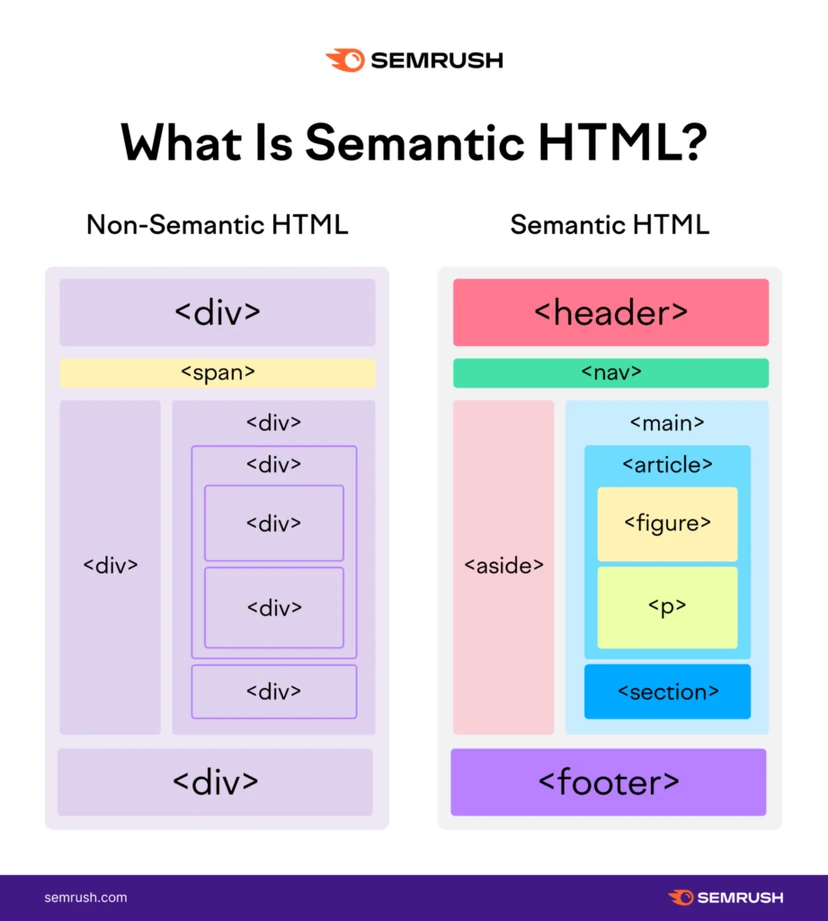
- 01Define meaningDefine the role of content
- 02Semantic examples<header>, <article>, <footer>
- 03Non-semantic tagsOnly containers, with no role (<div />, <span />)
Semantic tags add structure and meaning, making it easier for browsers and users to understand the content.
Why should you use semantic HTML tags?
Aside from the obvious reason that semantic HTML tags are easy to read and understand, for example by web developers reviewing code, there are two additional specific reasons why you should always use semantic tags.
Accessibility
For sighted users, identifying the different parts of a page is easy. Headings, footers and the main content are immediately and clearly visible.
However, this is not so easy for users who are blind or have poor eyesight and rely on screen readers.
Proper use of semantic HTML tags allows such readers to better understand the content, because their screen readers will communicate it more accurately.
- 01Define meaningDescribe the structure of the page.
- 02Structural tagsBuild the page layout (HTML5).
- 03Text tagsGive meaning to the content.
- 04Usage examplesDifferent elements (e.g. header, em).
Semantic tags are divided into structural (layout) and text (content meaning).
SEO
Semantic HTML tags are important for SEO (search engine optimisation) because they indicate the role of the content contained within the tags. Such information gives search engine robots, such as Googlebot and Bingbot, a better understanding of the content.
This in turn increases the chance of selecting a given piece of content as a candidate to appear on the search engine results page (SERP) for relevant keywords.
In simple terms, pages with correctly implemented semantic HTML have an SEO advantage over pages that do not have it.
Types of semantic HTML tags
Semantic tags can define different parts of a website.
It is worth looking at the most popular semantic HTML elements, divided into two categories according to their use:
- Semantic HTML structural tags
- Semantic HTML text tags
Semantic HTML structural tags
Many semantic HTML tags indicate the page layout.
Such “structural” tags were introduced when HTML4 was upgraded to HTML5. That is why they are also commonly known as semantic HTML5 tags or semantic HTML5 elements.
Below is their full list:
- <header> – the header tag (header) defines content that should be treated as introductory information for a given page or section,
- <nav> – the navigation tag is used for navigational links. It can be placed inside the <header> tag, but side <nav> navigation tags are also commonly used elsewhere on the page,
- <main> – this tag contains the main content of the page. There should be only one such tag on a single subpage,
- <article> – the article tag defines content that may be independent of the page it appears on. It does not necessarily have to mean a “blog post”. It should be seen as a self-contained element that can be used in different contexts,
- <section> – using the <section> tag is a way of grouping content that is thematically similar. The section tag differs from the article tag. It is not necessarily self-contained, but forms part of something else,
- <aside> – the side element defines content that is less important. It is often used for sidebar areas that provide additional but not very relevant information,
- <footer> – the <footer> tag (footer) is used at the bottom of the page. It usually contains contact details, copyright information and certain navigation elements of the page.
semantic HTML tags for text
Semantic HTML tags for text are HTML tags which, beyond formatting, have a semantic function related to the text contained within them.
Below are a few of the most popular examples:
- <h1> (heading) – the H1 tag means the highest-level heading. Usually there is one H1 heading on a single page,
- <h2> to <h6> (secondary headings) – these are secondary headings with different levels of importance. A single page may contain many headings of the same level of importance,
- <p> (paragraph) – a single paragraph of text,
- <a> (anchor) – used to mark a hyperlink between one page and another,
- <ol> (ordered list) – a list of items displayed in a specific order, starting with bullets. One <li> tag (list item) contains a single item in the list,
- <ul> (unordered list) – a list of items that do not have to be displayed in a specific order, starting with ordinary numbers. One <li> tag (list item) contains a single item in the list,
- <q> / <blockquote> – a quotation within text. The use of <blockquote> (blockquote) applies to long, multi-line quotations, whereas <q> covers shorter quotations within a given line,
- <em> (emphasis) – used for text that should be emphasised,
- <strong> (bold) – used for text that should be bolded,
- <code> – a computer code block.
Only the most popular examples of semantic HTML tags are presented above. You can also use many others, such as <summary>, <time>, <address>, <video>, etc. This makes it easier to understand the content on a website.
tips and best practices for semantic HTML
Finally, it is worth drawing attention to advice on implementing HTML based on common mistakes made by people using semantic HTML tags.
semantic HTML tags should not be used for styling purposes
Despite the fact that web browsers apply styling to many semantic tags (e.g. content in the <a> tag is usually blue and underlined), this does not mean that HTML tags are to be used for styling text.
In other words, just as the <a> tag is not used for non-link text simply so that it is blue and underlined, other semantic tags should not be used solely for styling purposes.
Below are some common examples of incorrect use of semantic tags:
- using tags from <h1> to <h6> for text that is not a heading in order to change the size of its font,
- using <blockquote> only to create a paragraph from text that is not a quotation,
- using <strong> or <em> in order to bold or italicise text that does not require such emphasis.
For styling purposes, CSS should always be used.
FAQ
Frequently asked questions
What are semantic HTML tags and how do they differ from non-semantic ones?
Semantic tags describe the meaning of the content they contain, for example header, article or footer. Tags such as div and span do not convey information about the role of the content on the page.
Why is it worth using semantic HTML tags in SEO?
Because they help search engine bots better understand the role of the content on the page. This increases the chance that the content will be better matched to search results.
How does semantic HTML affect site accessibility?
It makes it easier for screen readers to read the structure and content of the page more accurately. As a result, blind or visually impaired users can better understand the layout and meaning of elements.
Which HTML tag should appear only once on a subpage?
There should be only one main tag on a single subpage. It contains the main content of the page.
When should you use the article tag, and when should you use section?
Article is used for self-contained content that can exist independently of the page. Section is used to group topically related content and usually forms part of a larger whole.
Can semantic tags be used only for styling text?
No, semantic tags should not be used solely for appearance. To style text, you should use CSS, rather than for example headings, blockquote, strong or em without regard to their meaning.