
Internal linking (interlinking) and topical maps are important tools for organising and presenting information on a website. Internal linking involves creating links between subpages or sections of a website. This helps visitors navigate the site and find related information.
On the other hand, topical maps involve creating a visual representation of the relationships between different topics and concepts, which can be used to understand and communicate information about the structure and to focus on a website or topic area.
Before creating a topical map, it is worth understanding how to create a semantic model and how to create a semantic model and how to achieve the quality of a website’s semantic model.
What is mapping in the context of the Semantic Web?
In the Semantic Web (Semantic Web), mapping refers to the process of creating links between different data sources or word resources. This makes it possible to combine and understand data from different sources in the context of a broader whole.
- 01Connecting sourcesDifferent databases
- 02Understanding dataContext interpretation
- 03A broader wholeGlobal knowledge context
- 04Linking resourcesWord resources and data
- 05Smart connectionsDiscovering new relationships
Mapping is the process of creating links that makes it possible to understand data from different sources as part of a broader whole.
What is topical mapping?
Topical Mapping is a method of organising and visualising the relationships between different topics on a specific page, pages or a set of websites. It involves creating a diagram or concept map showing the relationships between different concepts, ideas or topics in order to understand their connections and fit them into a broader topical context.
How do you create a topical map?
Topical maps can be created using many tools, including paper and pencil, specialist software or online concept mapping tools. To create a topical map for SEO purposes, you need to follow the steps below:
- Define the main topic that the website focuses on. This could be a product, service or topic area covered by the given website. For example, let’s assume it is a website about financial consulting.
- Identify the secondary topics related to the main topic. These should be specific topics aligned with the main theme covered on the website.
There are several different ways to organise the secondary topics presented above. For example:
- Wealth management: This category may include secondary topics related to building and maintaining wealth, such as investment strategies, stocks and bonds, and risk management.
- Future planning: This category may include secondary topics related to retirement planning and debt management, such as estate planning, budgeting or retirement.
- Tax and legal issues: This category may include secondary topics related to tax and insurance planning and property investments.
- Identifying keywords and phrases that are relevant to each secondary topic and organising them into categories or groups. These should be terms that are likely to be used by people when searching for information on secondary topics. Below you can find possible keywords and phrases that can be used to search for information on each of the topics listed in the example:
- Asset management: asset creation, resource allocation, portfolio management, passive income, long-term investments, financial independence.
- Retirement planning: retirement savings, pension plans, 401(k), social care, retirement income, retirement age.
- Debt management: debt reduction, credit card debt, student loan, personal loans, debt consolidation, debt-to-income ratio.
- Tax planning: tax preparation, deductions, tax credits, tax reform, capital gains tax, income tax.
- Investment strategies: diversification, dollar-cost averaging, value investing, growth investing, active investing, index funds.
- Stocks and bonds: stock market, securities selection, securities exchange, securities prices, dividends, yield performance.
- Risk management: risk tolerance, risk-reward ratio, portfolio diversification, hedging, resource allocation.
- Estate planning: inheritance, will, trust, probate, power of attorney, later-life plans.
- Budgeting: budgeting tools, expense tracking, saving money, financial goals.
- Insurance planning: insurance cover, life insurance, health insurance, disability insurance.
- Real estate investments: property investment, real estate market, property financing, rental income.
- Incorporating keywords and subtopics into the content and structure of the website. This may involve using keywords in the website title, headings and body copy, as well as creating separate subpages and sections for each subtopic.
- Connecting subtopics to the main topic using semantic language and internal linking. These methods can show relationships between the subtopics and the main topic, such as causal relationships, hierarchy, connection or similarity, correlation, etc.
- Using linked data standards: Linked data standards, such as RDF and schema.org, provide the foundations for creating and passing data across the web. Using these standards helps ensure that the mapping is compatible with other data sources, which can be easily understood by other users.
- Using existing maps: In many cases, maps between the data sources being worked on already exist. Using and improving existing maps, where possible, is very helpful. It allows time and effort to be saved.
- Checking and correcting the map, if necessary. When creating and publishing new content, there may be a need to add or remove subtopics or adjust the relationships between them. In this way, you can ensure that the map reflects the structure of the website and what it focuses on.
- 01Defining the main topicMain area of the site
- 02Identifying subtopicsRelated categories
- 03Organisation and managementContent structure
- 04Optimisation for SEOVisibility online
The key structure for SEO visibility.
What is internal linking?
Internal linking refers to the process of creating links between different resources on a website. This process can be carried out using techniques such as hyperlinks, anchor text or by using semantic references that provide additional context and meaning to the link.
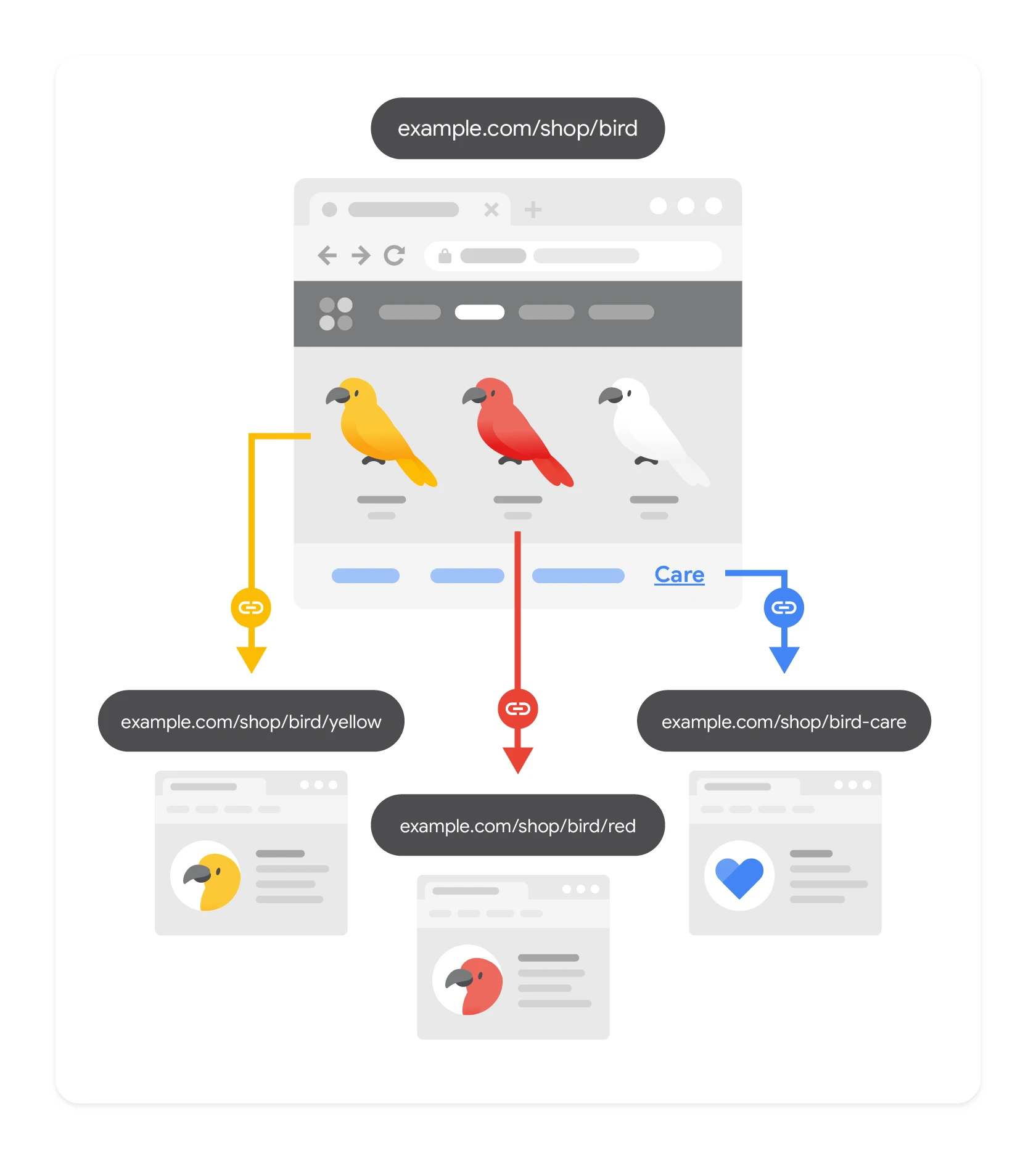
Internal linking allows web resources to be connected and linked together. This enables users to move from one resource to another and discover new information. It is an important part of the semantic web, as it makes it possible to create a network of internally linked data that can be easily discovered and understood.
How to create semantic internal linking?
There are many ways to create semantic internal linking between web resources:
- Using hyperlinks: The most basic form of internal linking is the use of hyperlinks. They allow users to navigate between websites by clicking links.
- Using semantic annotations: Semantic annotations, such as HTML tags and anchor text, provide additional context and meaning to the link. For example, in an HTML link you can use the “rel” attribute to indicate that the linked page is a “stylesheet” or “licence”.
- Using structured data: Schema.org is a standard vocabulary that can be used to mark up content on a website with structured data. One way of using schema.org in internal linking is to use the “BreadcrumbList” type. This makes it possible to define the hierarchical structure of subpages within the site.
- 01Using hyperlinksBasic navigation
- 02Semantic annotationsAdditional context and meaning
- 03Using structured dataschema.org content markup
Key methods for building logical connections and improving search engines’ understanding of content.
How to implement internal linking with hyperlinks?
The hyperlink code example looks as follows:
<a href=/blog/7/" rel=”prev” title=”guide to semantic modeling”>Semantic Modeling for Semantic SEO</a>.
In practice, this code will appear in the browser as follows: Semantic Modeling for Semantic SEO.
Below is a description of the code:
The “a” tag is the simplest form of internal linking and is the hyperlink mark-up, which looks as follows <a href=”url“>Enter your content</a>.
The href attribute specifies the URL of the page the link leads to.
The rel attribute stands for relation and, with the value ‘prev’, indicates that the linked page is the previous page in a series.
The title attribute is the anchor text of the hyperlink with the keyword. When you hover over it, you will be able to read the anchor text.
Below is a description of each attribute that can be used in hyperlinks:
- rel=alternate: Indicates that the linked page is an alternative version of the current page, for example it may be a translation into another language.
- rel=author: Indicates that the linked page contains information about the author of the current page.
- rel=bookmark: Indicates that the linked page is a permanent URL for the current page. It can therefore be used as a bookmark.
- rel=external: Indicates that the related page is on a different domain from the current page.
- rel=help: Indicates that the linked page provides help related to the current page.
- rel=license: Indicates that the linked page contains information about the licence of the current page.
- rel=next: Indicates that the linked page is the next page in a series and should be visited after reviewing the current page.
- rel=nofollow: Indicates that the link should not affect the ranking of the linked page in search results. This is often used to indicate paid or sponsored links.
- rel=noreferrer: Indicates that the linked page should not be able to access information about the referrer of the current page.
- rel=noopener: Indicates that the linked page should not be able to access certain properties of the current page, such as what appears in the window.
- rel=prev: Indicates that the linked page is the previous page in a series and should be opened before the current page.
- rel=search: Indicates that the linked page provides a search engine or interface for searching information on the current page.
- rel=tag: Indicates that the linked page covers the same topic as the current page and may be regarded as a tag or label for the current page.
How to implement internal linking with structured data?
Structured data can be used to describe the relationship between the main Entity and the secondary Entities (entities) within a given page or on other pages.
To optimise a website, it is worth considering implementing semantic SEO techniques by optimising structured data.
Internal linking using structured data can be easily implemented with Schemantra. It is the same tool as schema.org, with the difference that it is automated. It contains the complete vocabulary characteristic of schema.org. It can be used to describe your Entities and their relationships with other Entities on the site.
For example, you can use the “isPartOf” property (is part of) to indicate that a product is part of a product list. You can also use the “hasOfferCatalog” property (has offer catalogue) to indicate that a given company has an offer catalogue. You can also provide topical credibility by using the “about” or “mention” options.
Summary
Both internal linking and topical maps are useful tools for organising and presenting information on a website. By combining internal linking and topical maps, you can create a logical, intuitive content structure on a website. This in turn helps visitors and search engines understand the relationships between different pages or topics. This has a positive effect on user experience and the site’s visibility in search results.
FAQ
Frequently asked questions
How does a topical map help with internal linking on a website?
A topical map shows the connections between the main topic and supporting topics, making it easier to plan meaningful internal links. It also helps structure content into a logical hierarchy.
Can internal linking and topical mapping be combined in SEO?
Yes, the article points out that combining both methods creates an intuitive content structure. This makes it easier to understand the relationships between subpages and topics.
What steps do you need to take to create a topical map for SEO?
First, you need to define the website’s main topic, then select supporting topics and keywords for each one. Finally, you should reflect them in the content and site structure, and connect them with internal linking.
What internal linking methods are described in the article?
The article mentions hyperlinks, semantic footnotes and structured data. It also refers to using schema.org and BreadcrumbList to show the hierarchy of subpages.
Why are rel attributes in internal links important?
rel attributes help describe the relationship between pages, for example that a link leads to the previous page, the next page, a supporting page or a tag. This gives the link additional semantic context.
What structured data can be used for semantic internal linking?
The article points to schema.org and Schemantra as solutions for describing relationships between entities on a site. Example properties include isPartOf, hasOfferCatalog, about and mention.