

How does the World Wide Web work and how does it differ from the Internet?
World Wide Web functions as a service running on the Internet, not as a replacement for it. The Internet is the infrastructure and data transmission protocols (IP, TCP/UDP, routing), whereas WWW is based mainly on HTTP and URL addresses to deliver content. The answer to the question “is WWW the Internet?” is no — WWW is one of the services operating on the Internet, alongside, for example, e-mail (SMTP/IMAP) or FTP. That is why you can use the Internet without opening WWW pages, for example by using e-mail or VPN.
WWW works in a client–server model: the browser (client) sends a request, and the WWW server sends back a response (e.g. HTML, JSON or an image). A page “loads” because the server may be able to generate content dynamically (e.g. in environments such as PHP, Node.js or Python), rather than merely provide a static file. The browser interprets the response partly on the basis of the MIME type (Content-Type header), e.g. text/html or application/json. When the resource is not available at the given address, the standard signal is HTTP 404, i.e. information that the server could not find the requested resource.
Domain addresses in WWW provide a convenient naming layer, and DNS handles translating them into IP addresses. That is why sometimes “the Internet works”, but the page does not — a DNS outage, incorrect record configuration or propagation delays (TTL) may be to blame. WWW also uses ports: traditionally HTTP runs on port 80 and HTTPS on 443, so blocks on the firewall side can prevent pages from opening. HTTPS is HTTP encrypted with TLS, which protects data from eavesdropping and modification in transit, and browsers may warn when a trusted certificate is missing or there is a risk of impersonation (phishing).
- 01The Internet is infrastructureNetwork and transmission protocols
- 02WWW is a serviceDelivering content via HTTP
- 03Client–server modelDynamic content generation
- 04The Internet is not just WWWMail, FTP, VPN without pages
WWW is one of many services operating on the foundation of the Internet’s global infrastructure.
Key technologies: URL, HTTP and HTML in practice
The key WWW technologies include URL/URI for addressing resources, HTTP for communication and HTML for describing the structure of a document. A URL identifies a resource and can take the form of, for example, https://example.com/produkty?sort=ceną, where the protocol, domain and path show how to reach the content. The URL was a breakthrough because it combines the protocol, location and path to the resource in a single notation, which enables consistent linking regardless of platform. In practice, links often also include the “#” sign (fragment identifier), which is not sent to the server but is used by the browser to jump to a specific place in the document or to a specific application state.
- URL/URI — uniquely points to a resource (address), and its elements (protocol, domain, path, parameters, fragment) make it easier to understand where the link leads.
- HTTP/HTTPS — a request and response protocol with methods (GET, POST, PUT, DELETE) and status codes (e.g. 200, 301, 404, 500). POST allows data to be sent in the request body, which can be more convenient than appending everything to the URL.
- HTML — describes the structure of the document (headings, paragraphs, links, forms), and hyperlinks (e.g. in HTML via the <a href=”…”> tag) are the “heart” of WWW, because they build a network of connections between resources.
HTTP was designed as an exchange of a request and a response. The browser sends, for example, GET /, and the server returns a status code along with the content. Redirects (e.g. 301) and errors (e.g. 403, 404, 500) are standard signals that make it easier to determine what happened along the way between the client and the server. HTML provides structure, CSS is responsible for appearance, and JavaScript for interactivity and logic on the browser side, which is why the same page can look different on a phone (for example due to CSS responsiveness and different rendering engines). When you want to check what the server actually returns, you can use tools such as DevTools (the Network tab) or query the server from the terminal, for example with the curl -I command, to see the status and headers.
The history of WWW: from Tim Berners-Lee’s concept to global adoption
WWW was created as a response to the practical need to manage and connect distributed information in the scientific environment. In March 1989, Tim Berners-Lee, while working at CERN in Geneva, put forward a proposal for a hypertext-based system, and then refined it in 1990 together with Robert Cailliau, rapidly prototyping the solution in the context of laboratories. The decisive factor was combining hypertext with the Internet and simple standards, which created a scalable publishing and linking ecosystem. In 1991, CERN made WWW available to the scientific community beyond the laboratory, which accelerated the emergence of further servers in academic institutions.
WWW began to gain global reach as barriers to entry fell and the standards remained open. On 30 April 1993, CERN released WWW technology into the public domain (royalty-free), so anyone could create browsers and servers without licence fees. In 1993, an important step towards widespread use was the NCSA Mosaic browser, while in the mid-1990s the number of commercial services grew rapidly. In 1994, Netscape Navigator appeared, and alongside it, among other things, cookies (1994), which made it easier to maintain session state in services such as online stores.
- 01Concept and prototype (1989–1990)Hypertext for information management
- 02Scalable ecosystemCombining hypertext with the Internet
- 03Made available by CERN (1991)Expansion in the academic environment
- 04Technology released (1993)Global adoption, open standards
The key moment was CERN releasing the technology, which lowered barriers and enabled the global growth of the Web.
Early browsers and servers: how the WWW era began
The WWW era began with a specific set of tools developed at CERN: a browser, a server and basic standards. In 1990, the foundations of the implementation were created, including the HTTP protocol, the HTML language and the first httpd server software. The first browser was called WorldWideWeb (later Nexus) and ran on NeXT computers (NeXTcube) with NeXTSTEP, which made it easier to build GUI applications and edit documents in a single program. Meanwhile, the first WWW server ran at CERN on a NeXT machine and provided an information page historically associated with the address info.cern.ch.
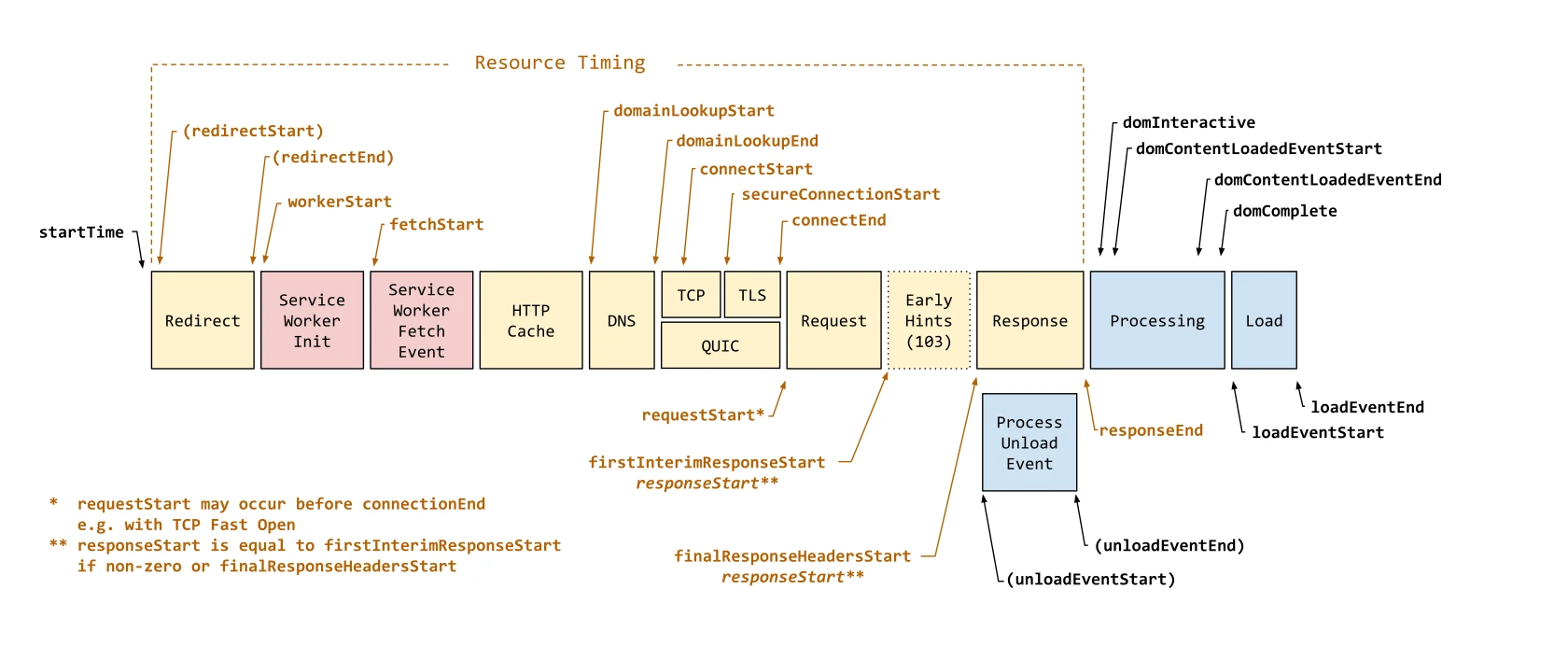
The early development of WWW was accelerated by cross-platform tools and the deliberately simple nature of the first protocol versions. An important milestone was the text-based Line Mode Browser, which ran on many systems and terminals without graphical requirements, making adoption easier in environments with varied hardware. Initially, WWW focused on publishing documents rather than applications — cookies only appeared in 1994, and the first versions of HTTP were aimed at simple retrieval of HTML documents. It is therefore no surprise that early WWW was not yet a “colourful Internet”, because text with links dominated, and graphics and layout matured gradually alongside graphical browsers.
Standardisation of WWW: the role of W3C and open standards
Standardisation of WWW comes down to agreeing shared specifications so that the same websites and applications work in many browsers and on different devices. In 1994, W3C (World Wide Web Consortium) was founded on Tim Berners-Lee’s initiative to coordinate the development of standards such as HTML, CSS and browser API specifications. At the same time, IETF publishes RFC documents for Internet protocols (including HTTP), ensuring interoperability. In practice, this means that vendors implement publicly described rules instead of relying on trial and error and “guessing” how something should work.
Open standards make it possible to build your own servers and browsers without paying royalties, which sustains competition and reduces dependence on a single vendor. It is precisely the standardisation process that helps reduce “vendor lock-in”, i.e. the situation in which one company imposes incompatible extensions and forces the use of a specific product. The history of the “browser wars” in the 1990s and 2000s showed how costly implementation divergences can be. In practice, WHATWG also plays an important role (including the HTML Living Standard), because the needs of web applications and browsers change faster than classic versioning cycles. Additional protection for consistency is provided by interoperability tests (e.g. Web Platform Tests) and public browser bug trackers.
Standardisation covers not only the “appearance” of websites, but also security and browser behaviour rules. Mechanisms such as TLS, CORS, SameSite cookies and Content Security Policy affect what the browser will consider allowed, as well as which connections to other domains will be blocked without the server’s consent. CSS develops modularly (e.g. Flexbox, Grid, Selectors, Media Queries), which makes it possible to roll out new features in stages rather than delivering rare, large “jumps”. This allows WWW to develop while maintaining compatibility and predictable behaviour.
- 01Common specificationsConsistent website behaviour
- 02Standards coordination (W3C, IETF)HTML, CSS, HTTP
- 03Clear rules, no guessingPublicly documented rules
- 04Openness and competitionInteroperability, no royalties
Standardisation ensures that websites and applications work across different devices and browsers, promoting innovation and independence.
Development of the WWW: from Mosaic to the dominance of social media
The development of the WWW since the early 1990s has been a journey from simple document browsing to mass, interactive services, including social platforms. The breakthrough in popularisation came with the NCSA Mosaic browser (1993), as it lowered the entry barrier thanks to its graphical interface and better multimedia support. In 1994, Netscape Navigator appeared, and as feature development accelerated, cookies (1994) began to be widely used to maintain session state, since HTTP is stateless. The commercialisation of the 1990s added online stores, portals and banner advertising, and one of the milestones was the first internet banner (1994) on HotWired.
The growing number of websites was organised by search engines and directories, and later Google (1998) popularised link-based ranking. At the same time, publishing became easier thanks to blogs and CMSs, such as WordPress (2003), which reduced the need for manual HTML work. The Web 2.0 trend (c. 2004–2006) shifted the WWW towards user-generated content and applications running “almost in real time”, supported by JavaScript, AJAX and APIs. As a result, the WWW became a platform not only for reading, but also for constant interaction and co-creating content.
The dominance of social media came from using the WWW as a content distribution channel and a way to build networks of contacts, with Facebook (2004) and YouTube (2005) being good examples. At the same time, smartphones shifted the focus to mobile devices, which forced responsiveness, refined performance and the emergence of new formats (e.g. WebP, AVIF). Faster content delivery was provided by CDNs (e.g. Cloudflare, Akamai, Fastly), which serve assets closer to the user and often add DDoS protection. Modern WWW also includes installable applications (PWA), real-time communication (WebSocket, WebRTC) and advanced frameworks, still based on the browser and web standards.
Security and privacy in the WWW: how to protect users
Security and privacy in the WWW are strengthened primarily through encrypted connections, verification of trust in a site, and reducing the risks arising from the operation of web applications. The WWW relies on mechanisms such as TLS certificates (HTTPS), browser policies (CSP) and authentication solutions (cookies, OAuth 2.0), while at the same time having to fend off typical application threats (e.g. XSS, CSRF). Browser warning messages most often result from an untrusted certificate, outdated ciphers or impersonation attempts (phishing). In practice, the simplest “first filter” is to check HTTPS and the correct domain before entering data into a form.
- Check whether the site runs over HTTPS and whether the domain matches what you expect (protection against phishing and impersonation).
- Use a password manager (e.g. Bitwarden, 1Password) and enable MFA wherever possible to limit the impact of stolen login data.
- Be aware of risks such as phishing, malvertising and attacks on applications (e.g. XSS), especially when a site asks you to log in or enter data into a form.
- Treat privacy as part of security. Tracking may use third-party cookies and fingerprinting, while adverts may result from tracking pixels and real-time bidding systems (RTB).
Privacy in the WWW is closely linked to how the browser identifies the user and how services connect events across websites. Typical tracking mechanisms include third-party cookies, fingerprinting and tracking pixels, which may be visible, for example, as adverts that “follow” you after visiting a shop. At the same time, web applications handle data from forms and user sessions, so secure authentication and browser-side rules (e.g. CSP) have a real impact on the risk of leaks and abuse. If a site seems suspicious or the browser warns you, the most sensible thing is not to enter any data and check whether it is definitely the correct domain.
The economy and financial model of the WWW: adverts, subscriptions and more
The economy of the WWW is based on several funding models that directly shape both how services are designed and the user experience. In practice, these include advertising, subscriptions, freemium, commissions and data sales, and the chosen model determines whether the priority will be reach, retention or monetisation of a single visit. Advertising is often closely tied to the tracking and targeting ecosystem, which uses browser identifiers, tracking pixels and real-time ad auction mechanisms (RTB). Whether you see a paywall, lots of adverts or access restrictions usually results not from WWW technology, but from the adopted funding model.
The growing number of paywalls is largely a response to the declining profitability of advertising and the rising costs of producing quality content and moderation. Freemium and subscription approaches shift the emphasis from “monetising traffic” to building and maintaining a relationship with the user, while advertising more often rewards scale and a high frequency of page views. From the audience’s perspective, it is worth remembering that the centralisation of analytics and advertising is part of the WWW economy, not an “accidental feature” of websites. As a result, product decisions (e.g. login, personalisation, content restrictions) usually stem from how the service is intended to sustain itself.
FAQ
Frequently asked questions
How is the World Wide Web different from the Internet?
The Internet is the infrastructure and data transmission protocols, while the WWW is one of the services operating on that infrastructure. You can use the Internet without opening WWW pages, for example via email or VPN.
How does the World Wide Web work in a client-server model?
The browser, i.e. the client, sends a request to the WWW server, and the server sends back a response with content such as HTML, JSON or an image. A page may “load” because the server generates it dynamically instead of returning only a static file.
What does the HTTP 404 code on a page mean?
It is a standard signal that the server did not find the requested resource at the specified address. Such a message helps identify that the problem concerns the location of the content, not the browser itself.
Why does the internet sometimes work, but a WWW page will not open?
The cause may be a DNS failure, incorrect record configuration or TTL propagation delays. The problem can also be port blocking, for example by a firewall.
What are the most important technologies used in the WWW?
The basic technologies include URL/URI for addressing resources, HTTP for communication and HTML for describing the structure of a document. Hyperlinks in HTML create a network of connections between resources.
How did the WWW come about and who created it?
The WWW emerged from the need to connect distributed information in the academic environment. In 1989, Tim Berners-Lee presented the concept at CERN, and later developed it with Robert Cailliau.