
Setting up and verifying a Google Moja Firma profile
Setting up and verifying a Google Moja Firma profile comes down to entering the real business details (NAP) and confirming that the location and business actually exist. The profile name should be the same as in real life (signage, website, invoices), because adding keywords can end with an edit by Google or suspension of the profile. If you serve customers at their location (a mobile business), you can hide the address and set a service area (cities, districts, radius), which reduces the risk of incorrect directions. For a fixed premises, set an exact address and check the pin on the map, because shifting it by 50–200 m can reduce the number of directions in the stats.
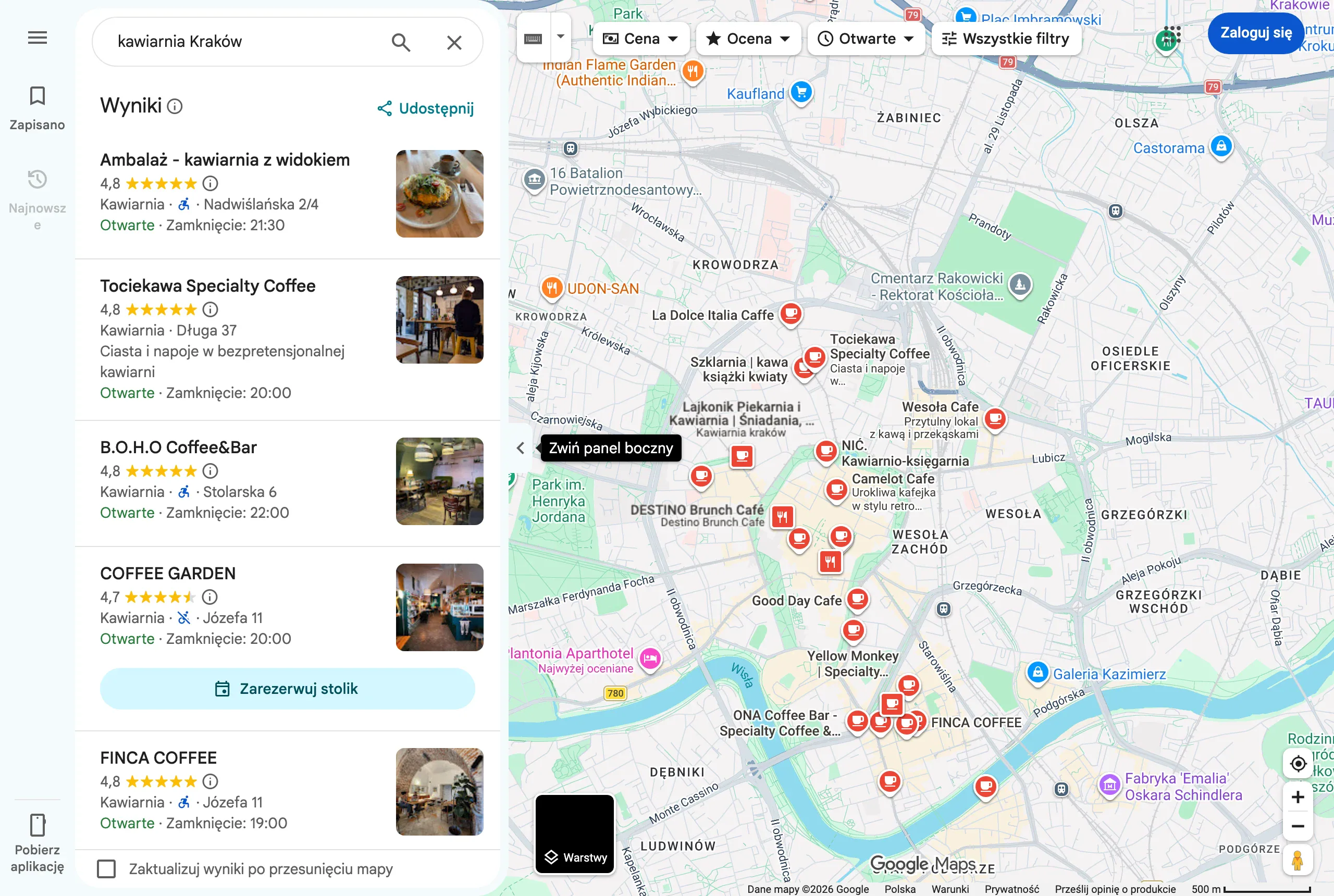
The safest approach is to use the main phone number identical on the website and in directories, and handle tracking with an additional number (secondary) or a solution such as CallRail while maintaining NAP consistency. When you change the phone number, update it at the same time on the website and in citations (e.g. Facebook, Panorama Firm, pkt.pl), because discrepancies reduce algorithmic trust. Set opening hours first as regular hours, then add special hours (public holidays, long weekends) in advance, so you do not lose traffic on “open now” searches. Google can also display warnings when there is no data about special hours, which increases the risk of negative reviews such as “I came and it was closed”.
- Choose a name that matches reality and do not add phrases such as “cheap”, “24h” — move keywords into the description and services.
- Set the correct location model: an address for a fixed premises or a hidden address + service area for a mobile business.
- Add the main phone number consistent with the website and directories, and implement call tracking tools as an additional number.
- Fill in regular hours and schedule special hours so you do not drop out of “open now” results.
- Carry out verification (phone, e-mail, video or postcard), and if there are problems use “Request access” and prepare documents (e.g. KRS/CEIDG, photo of signage, utility bill).
In practice, verification can take place by phone, e-mail, video or postcard. For video verification, it is best to record the full sequence: the entrance to the premises, signage, interior, work tools and access to the back office, because Google assesses the “reality” of the location. If the profile is already “someone else’s”, use the “Request access” option and be ready to escalate by attaching documents confirming the business. Duplicate profiles split reviews and ranking signals, so it is worth removing them or closing them (e.g. old address + new) with the note “Moved”. For safety, set a business account as the owner, and assign agency contractors, for example, as managers and enable two-factor verification (2FA), because takeover of a profile often ends with the phone number and link being replaced.
- 01Set real data (NAP)Consistent name and contact details
- 02Choose the business typeFixed address or service area
- 03Check the locationPrecise pin and address
- 04Verification and consistencyCurrent confirmation of data
Systematic updating and verification of the profile increases visibility.
Optimising categories and services for better visibility
Optimising categories and services comes down to configuring the profile so that Google clearly understands what you offer and which queries you should appear for in Maps. The main category has the strongest impact on visibility in the local “3-pack”, so choose the one that best describes the main source of revenue (e.g. “Dentist” rather than “Medical clinic”). In practice, changing the category can shift visibility for service keywords within 7–21 days, but only if the rest of the profile and the website confirm it. Add additional categories only when you genuinely provide those services and can show this on the website and in the offer, because too many irrelevant categories increase the risk of edits by Google or reports from competitors.
Complete the “Services” section in your customer’s language (e.g. “Timing belt replacement”, “Wheel alignment”) and add prices as a range or “from…”, if you have a price list. This helps the profile capture more long-tail queries and lets the user make a quicker decision without extra back-and-forth messages. In retail and package-based services, you can also add “Products”, treating them as offers (e.g. “Air conditioning service” as a product with a price and CTA), and a good practice is 6–12 key items with your own photos and a link to the relevant subpage. If you have a location landing page, point the profile link to the specific branch page rather than the general homepage.
Use the company description to give a short explanation: what you do, where, for whom and what sets you apart, without artificially stuffing in keywords (the limit is 750 characters). Attributes (e.g. “card payment”, “parking”, “takeaway”) improve matching to filters and queries, and in some industries they genuinely boost CTR in Maps, so fill in all information that is true. However, do not claim anything that is untrue (e.g. wheelchair access at stairs with no ramp), because users quickly verify this in reviews. Also keep the content consistent with the website: if the profile shows different opening hours or service scope than the site, the risk of data edits and a poorer user experience increases.
Strategies for acquiring and managing customer reviews
An effective review strategy in Google My Business is based on asking customers at the right moment, making it as easy as possible to leave a review, and responding consistently. It is worth asking for a review immediately after delivering value (after a visit, car collection, installation), ideally by SMS or email with a direct link to leave a review. A short message sent right after the service has been completed, asking whether everything is okay and including a link to the review, works well. This model ensures a steady flow of reviews and reduces the risk of the impression that reviews are being “coerced”.
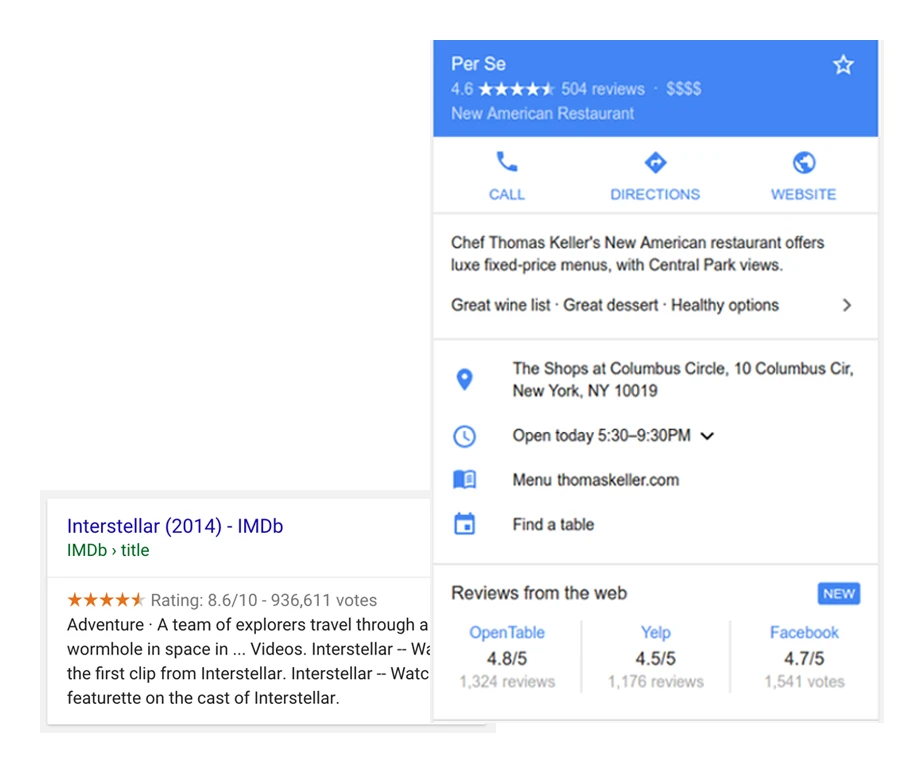
The easiest way to start collecting reviews is via the “Share profile” link, then shorten it (e.g. Bitly) or turn it into a QR code to place at reception, on a business card or on a receipt. Before you start distributing it, test the link on two phones (Android and iPhone) to check whether it opens the review submission screen rather than just the profile itself. If the goal is to “kick-start” visibility in Maps, trend and freshness are key: 5–10 reviews in the first month after optimisation often translates into a noticeable increase in enquiries, and later a steady 4–8 reviews per month works better than a one-off burst. It is also worth keeping an eye on the naturalness of review content (mentions of the service and location), because this makes it easier to match queries.
Responding to reviews should become standard, because it affects the decisions of future customers and structures your reputation. Ideally, respond to 100% of reviews, and especially to 1–3-star ones within 24–72 hours, using semi-templates: thanks + specific detail (service) + an invitation to return. For negative reviews, stick to the facts and suggest contact outside Google (phone/email), avoiding argument and disclosing the customer’s data. If a review breaches the rules (e.g. profanity, spam, off-topic content, impersonation), report it in the dashboard and prepare evidence, and if there is no response, use the appeals form or the support path in Business Profile.
Buying reviews or mass reviews from suspicious accounts risks a filter, review removal, or even profile suspension, so it is safer to build reviews solely on real transactions. To make better use of reviews for SEO and UX, once a month analyse recurring themes (e.g. “time”, “price”, “parking”, “service”) and translate them into changes in the process, service descriptions and photos. In your review responses, add context and proof of competence (scope of work, deadline), because this builds credibility more effectively than a generic “thank you, we look forward to seeing you again”. This way, even with a rating similar to the competition, you can gain an edge through the quality and content of your responses.
- 01Asking at the right momentImmediately after delivering value, e.g. after a visit, by SMS with a link.
- 02Making it as easy as possible to add a reviewA direct review link, shortened URL or a convenient QR code.
- 03Responding to reviews consistentlyOngoing, regular communication builds trust and engagement.
"A steady flow of reviews, a simple invitation and consistent customer engagement build credibility in Google."
Using multimedia content in the company profile
Multimedia materials in your business profile build trust and help the customer make a decision without needing to ask follow-up questions. Most often, it is the logo set as the profile picture that strengthens brand recognition, while the cover photo is worth choosing so that it shows what the customer will see on site, e.g. the entrance, the interior or the main product. Consistency with social media and the website also matters, because users trust a company faster when they see the “same” brand across different channels. In practice, well-chosen photos shorten the path from search to phone call, directions or booking.
The minimum photo set that actually works at the start is 20–40 photos added over 2 weeks, ideally in organised categories. In such a package, include exterior shots (at different times of day), the entrance and parking, the interior or workstations, products or completed jobs, and 2–3 team photos. Ongoing regularity (e.g. 5–10 photos a month) usually translates into a higher CTR on “Directions” and “Call” than a profile that stands still and is not updated. In addition, photos “at work” and team photos often increase credibility, especially in home services, while maintaining privacy (with no visible customer data).
Video in the profile (short 10–30 second clips) increases engagement and extends interaction time, which indirectly supports performance. Record specific shots showing the process (e.g. installation, servicing) or a short “tour” from the entrance to the interior, to reduce the concerns of new customers. Such materials work best when they have local context and answer what the customer will actually see after arriving. As a result, visit quality rises and the number of “misdirected” journeys falls.
Moderating customer photos (UGC) comes down to reporting only content that breaches the rules, rather than trying to remove everything that is simply “poor”. You can report abusive or off-topic material, but legal photos usually cannot be removed just because they do not fit the brand image. The most effective strategy is to “bury” UGC with your own up-to-date photos and encourage customers to add photos after a successful service. This keeps the profile up to date and better answers users’ questions before they even call.
Google posts (Updates, Offers, Events) help keep the profile “alive” and guide the user towards action with a clear CTA such as “Call”, “Book” or “Buy”. For most industries, a sensible rhythm is 1 post a week for 8–12 weeks, then at least 2 posts a month. For discounts and coupons in “Offer” posts, include dates, terms and restrictions, and (where relevant) the discount code and a link to a landing page with the terms and conditions, because this reduces the number of disputes. In seasonal or crisis situations, use short messages and special opening hours, and for a longer closure set the status to “Temporarily closed” instead of deleting the profile.
Advanced features of Google Moja Firma: Q&A and bookings
Advanced features of the Google Business Profile can close the customer’s decision without them needing to visit the website, especially thanks to Q&A and bookings. The questions and answers section works like a mini FAQ, because anyone can ask a question, including people outside your company, so it is worth pre-emptively addressing common concerns. The safest approach is to add 10–20 of the most common questions yourself and provide official answers from the business account to reduce the risk of “confusion”. Typical topics include parking, service time, Saturday availability or payment method.
Q&A requires ongoing oversight, because questions can sit there for weeks without a response, and then the customer drops out “at the decision threshold”. Set a routine of checking Q&A twice a week, or use notification monitoring tools (e.g. Localo, Semrush Listing Management) if you have them in your package; in a simpler version, check manually via Google email notifications. A quick and specific answer reduces the number of extra messages and improves conversion from the profile. At the same time, a regular review also helps catch automatically approved change suggestions.
Messages (chat) are worth enabling only if you can genuinely reply quickly during working hours. If you cannot respond within 1–4 hours, it is better to keep chat turned off, because lack of response damages the experience and may reduce the number of contacts. When you enable messages, prepare 5–8 quick replies (e.g. about pricing, lead times, travel) and assign one person responsible for handling them. It is a small change that organises communication and shortens response times to enquiries.
Bookings from the profile shorten the path to 1–2 clicks and usually increase the number of appointments in time-based industries (beauty, med, servicing), especially on mobile. You can integrate the profile with booking systems (e.g. Booksy, Calendly, Reservio), but the key is to send the link to a specific service or location, rather than to the homepage with additional steps. To measure profile effectiveness, add UTM parameters to the website link so that in Google Analytics 4 you can distinguish traffic from Maps from classic organic traffic. At the same time, look into the updates and “Highlights” sections, because Google can suggest modifications based on web data and reviews.
Protecting the profile against spam and user edits is based on regularly checking the key fields. Maps users can suggest changes (e.g. categories, opening hours, phone number), and Google sometimes accepts them automatically, so it is worth checking the profile every week. In industries more exposed to spam, it is also a good idea to document the business’s reality (e.g. photos of the sign, tenancy agreement), because this makes disputes and appeals easier. Such hygiene reduces the risk of drops in visibility resulting from incorrect data.
- 01Mini-FAQ 24/7Close the customer decision
- 02Self-serve questionsDisarm typical doubts
- 03Monitor regularlyCheck twice a week
“Q&A requires ongoing oversight, because questions can sit there for weeks without a response, and then the customer drops out at the decision threshold.”
Local SEO: how to strengthen profile visibility
Local SEO increases profile visibility when the profile, the website and business information across the web are consistent and mutually “confirm” your activity. A local page (a landing page for a location) stabilises results because it can include NAP, a map, service descriptions, pricing or price ranges, project photos, FAQ and clear CTAs (phone, form). In businesses with multiple branches, each location should have its own URL (e.g. /krakow, /poznan) and its own content, rather than one page “for everything”. This consistency reduces the risk of discrepancies between what Google sees in the profile and what it finds on the website.
Schema.org structured data makes it easier for Google to correctly interpret company information and helps reduce inconsistencies. In practice, the types most often used are LocalBusiness/Organization, PostalAddress and OpeningHoursSpecification, and implementation can be done, for example, with a plugin (Rank Math, Yoast) or manually in JSON-LD and checked in the Rich Results Test. This is not a “magic lever”, but it helps algorithms keep address and opening hours data aligned. As a result, the risk of Google or users “correcting” your information decreases.
Citations (business directories) make sense primarily when they reinforce NAP consistency and confirm the credible existence of the business across multiple sources. Quality matters, not quantity: a dozen solid places usually deliver a better result than hundreds of spammy listings. Examples in Poland include Panorama Firm, pkt.pl, Oferteo (with caution regarding lead quality), industry directories and social media profiles with identical NAP. If you change your name or address, plan to update the data in 10–20 places, because inconsistent information can linger for months.
- Prepare a location landing page with NAP, a map, service descriptions, price ranges, photos and FAQ, plus a clear CTA.
- Implement Schema.org (LocalBusiness/Organization, PostalAddress, OpeningHoursSpecification) and test it in the Rich Results Test.
- Make sure NAP citations are consistent across quality sources (e.g. Panorama Firm, pkt.pl, industry directories, social media).
- Build safe local links (chambers of commerce, partners, events, local media) instead of random low-quality links.
- Create local content about real issues (access, parking, neighbourhood specifics, common faults) instead of copying “service + city”.
Local link building strengthens domain authority, provided it is based on safe and topically relevant sources. Good directions include chambers of commerce, partners, sponsored events, local media and community websites, because such links usually look natural and have context. For example, a link from a partnership or sponsorship of a local event to a location page is often more valuable than random links from low-quality sites. At the same time, it is worth developing local content that describes real conditions (e.g. access, parking, neighbourhood specifics or the most common problems), rather than repeating identical paragraphs for multiple cities.
Optimising images for local SEO rarely comes down to “geotagging” these days, because EXIF has limited weight and Google often removes metadata. Usually, the quality of the photos, publication consistency, alignment with user needs (e.g. a photo of the entrance) and user reactions matter more, and on the website you should ensure sensible file names (e.g. “montaz-klimatyzacji-krakow.jpg”) and the ALT attribute. At the same time, build brand consistency (entity): identical name, address, phone number, e-mail on the domain, the same social media profiles and a consistent business description. If you want to understand why a competitor ranks higher, carry out an audit of the 3–5 best profiles (categories, reviews, services, photos, posts, FAQ, landing page link, attributes and keyword visibility), and tools such as PlePer (GMB Everywhere), Local Falcon or BrightLocal (grid ranking) can be helpful when diagnosing areas.
Analysis and maintaining profile performance
Analysing and maintaining profile performance is based on regularly measuring user actions and implementing controlled changes that can be compared over time. Instead of assessing the profile solely through impressions, check whether “Calls”, “Directions” and “Website clicks” are growing, because these are signals of genuine purchase intent. Compare results month on month, because in local SEO weekly fluctuations are normal. If you see an increase in directions without an increase in calls, the cause is often the offer, photos or a lack of information that removes barriers (e.g. parking and entrance access).
Profile statistics: what they really say about performance
Interpret profile statistics primarily through whether the user took action, not just saw the listing. The key metrics to monitor are “Calls”, “Directions” and “Website clicks”, because they most often translate into leads and visits. An increase in impressions without an increase in actions does not have to mean more customers, so always assess traffic quality, not just reach. When the data looks “good on paper” but sales are flat, go back to the information that may be blocking the decision (e.g. opening hours, access, clarity of services and prices).
2–4 week cycle tests and attribution in GA4
Test profile changes in 14–28 day cycles and change one thing at a time to make sure what actually worked. In practice, you can sequentially check the impact of the main category, refining services, a series of posts or adding new “entrance/parking” photos. To measure the effectiveness of a link from the profile, add UTM parameters so that in Google Analytics 4 you can distinguish sessions and conversions from Maps from classic organic results. If you use Google Tag Manager, configure events (e.g. click tel:, click e-mail, click “book an appointment”) so you can assess not only traffic, but also the quality of contact.
Tracking local rankings and KPIs that make sense
Tracking local rankings in a grid layout lets you see where you are actually losing visibility within a 1–10 km radius, even if you see solid rankings “at your own place”. Tools such as Local Falcon, Places Scout or BrightLocal Grid are used for this kind of diagnosis, revealing differences between neighbourhoods. Choose KPIs according to the industry and city, because a “good result” depends on demand and the level of competition. For local services, sensible targets might be 20–60 calls per month in a medium-sized city or 80–200 in a large city in high-demand industries, but ultimately it is worth comparing them with margin and the conversion from call to customer.
Maintenance schedule and a 90-day plan after optimisation
Maintaining results requires short, regular work rather than a one-off “optimise and forget” approach. Set aside 15–30 minutes a week to check changes, reply to reviews and Q&A, and add 1 post or 3–5 photos, and 60–120 minutes a month to analyse statistics, update services and plan content. If the profile loses positions, typical causes include an unsuitable category change, a duplicate, inconsistent opening hours/phone number, suspicious reviews or user edits, and sometimes also suspension after a name change. In the “90 days” approach, you first complete services and photos and collect initial reviews, then maintain the publishing rhythm and close off Q&A, and in the next step you implement citations, a steady flow of reviews and measurement-based tests.
Securing the profile against spam and unauthorised changes
Securing the profile against spam and unauthorised changes comes down to limiting permissions, enabling additional account protection, and regularly reviewing key fields that Google can change based on user suggestions. Maps users can suggest edits (for example categories, opening hours, phone number), and Google sometimes accepts them automatically, which can worsen visibility and conversions without your knowledge. The elements most exposed to trust impact are the name, address/service area, phone number, categories and opening hours. That is why the “profile hygiene” process is just as important as optimisation itself.
Roles, access and 2FA: the minimum security standard
The minimum security standard is to leave the business account owner in place and give contractors the manager role rather than full permissions. This division reduces the risk of the profile being taken over and of changes such as replacing the phone number or website link. Enable two-step verification (2FA) on the Google account, because a compromised profile often ends with contact details being changed and leads being lost. If you work with an agency, treat access as access to a key sales channel, not “just a listing”.
Monitoring changes and reacting to incorrect suggestions
Profile monitoring delivers the best results when you verify the name, phone number, categories, address and opening hours once a week. Google can suggest changes, including “Highlights”, based on data from the web and reviews, so it is worth checking the updates section regularly and rejecting unsuitable suggestions. If you notice an incorrect “highlight”, correct the information on the website and in the most important directories, because Google draws on data from multiple sources at the same time. A quick fix reduces the risk that customers will make decisions based on out-of-date information.
Documenting the company’s “reality” in case of disputes and appeals
Documenting the company’s reality is particularly important in industries exposed to spam, because it makes it easier to handle disputes and submit appeals when someone challenges the data. Gather materials confirming the business activity and location, for example photos of the signage and documents such as CEIDG/KRS registration or a utility bill. In the event of a profile suspension, start by checking compliance with the guidelines (name, address, service area, categories), and then submit an appeal, attaching documents and consistent data on the website. The more consistent the company information is across the profile and the web, the harder it is for automatic edits to permanently “switch” the listing.
FAQ
Frequently asked questions
How do you create and verify a Google Business Profile correctly?
You need to enter real business details that are consistent with the NAP data, then confirm the location and the business activity. Verification can take place by phone, e-mail, video or postcard.
Is it worth hiding the address in Google Business Profile if the business travels to the customer?
Yes, if you serve customers at their location, you can hide the address and set a service area. This reduces the risk of incorrect directions.
Why is the primary category in Google Business Profile so important?
Because it has the strongest impact on visibility in the local “3-pack”. It should describe the company’s main source of revenue as accurately as possible.
How do you collect reviews in Google Business Profile so they are natural and effective?
It is best to ask the customer right after the service has been delivered and send the review link by SMS or e-mail. A QR code at reception, on a business card or on a receipt also works well.
How should you respond to negative reviews in Google Business Profile?
It is worth sticking to the facts, thanking the reviewer for the feedback and suggesting contact outside Google. You should not get drawn into an argument or disclose the customer’s details.
What photos and videos are worth adding to Google Business Profile?
At the start, it is best to add 20–40 photos within 2 weeks, including the entrance, parking, interior, products and team. A 10–30 second video should show the process or a short tour of the place, as it builds trust and engagement.