
what is Hugging Face and why is it popular
Hugging Face is both a portal with repositories (Hugging Face Hub) and a set of open source libraries for working with ML models. It is not just a “website with models”, because the ecosystem also provides tools for downloading, running, training and deploying models in Python (including Transformers, Datasets, Diffusers). Its popularity comes from the fact that users can go from finding a model to testing and integrating it into an application without juggling tools at every stage. In practice, Hugging Face shortens the time to get started because it standardises interfaces and automates resource downloads.
Hugging Face primarily addresses the need to quickly use a ready-made model for NLP/vision/audio without writing everything from scratch. Thanks to shared conventions and interfaces (e.g. pipeline, AutoModel, AutoTokenizer), running text classification or generation often comes down to a few lines rather than dozens. This happens because the configurations and metadata in the repository allow the libraries to select the correct classes and parameters. If the same code works across many models, it is usually thanks to the “Auto*” standard and consistent configurations.
On the Hub, a model functions like a repository with versioning, weight files (often .safetensors), configuration and documentation in the form of a Model Card. This makes repeatability easier: you can point to a specific “revision” (commit/tag) and be sure that the weights and tokenizer will not change “under the hood”. Model Card and Dataset Card help answer the question of what the resource is suitable for and what its limitations are — they often include a description of the task, data, metrics, risks and licence. In addition, community mechanisms (issue reports, discussions, pull requests) make it possible to assess the reliability of solutions, just like on GitHub.
Hugging Face covers a broad range of areas: text, image, audio and multimodal solutions gathered in one ecosystem. On the Hub you will find models for image segmentation, object detection, speech transcription or image generation (e.g. Stable Diffusion in Diffusers), which makes it easier to deliver end-to-end projects. It is worth distinguishing the open source layer from the commercial offering: most libraries are free, and many free resources are available on the Hub. Paid options include Inference Endpoints, private resources at larger scale and selected infrastructure options, whereas the core of local work remains free.
- 01Hugging Face Hub & PortalA central database of models and open source repositories.
- 02Library & tool ecosystemStandardised workflows and automation in Python.
- 03A shorter end-to-end workflowQuick search, testing and integration without juggling tools.
- 04Fast start and time savingsReady-made interface conventions and automatic resource downloads.
It simplifies and speeds up ML model deployment thanks to shared interfaces and easily accessible resources.
Hugging Face Hub: models, datasets, Spaces and versioning
Hugging Face Hub is a space where models, datasets and demo applications are published as repositories with metadata and versioning. A model repository usually contains weights, a tokenizer, configuration files and documentation, with example names such as “bert-base-uncased” or “meta-llama/Llama-2-7b-hf” (where access has been granted). Dataset repositories store data together with metadata and loading scripts, for example “imdb”, “squad”, “common_voice”. The greatest value of the Hub is that it organises files, documentation and change history in one predictable format.
Models and datasets on the Hub can be searched and filtered by task, framework, language and licence. This helps with the practical question “can I use this commercially?” — you usually start with the licence filter and then check the conditions in the Model Card. The Hub renders Model/Dataset Cards as clear pages with descriptions and often additional file previews or examples, which makes it easier to assess usefulness. If you want to verify, for example, language support, you most often look at the language tags, the training description and the examples in the card.
Spaces on Hugging Face are hosted web applications, most often based on Gradio or Streamlit, which serve as an interactive demo of a model in the browser. This means you can quickly present how a solution works (e.g. a chatbot or image classifier) without having to ask the audience to install tools locally. In the context of testing and presentations, this shortens the path from prototype to a “clickable” demo version. Spaces are part of the same repository ecosystem, so it is easier to keep versions and resources consistent.
Versioning on the Hub works like Git: you can point to a specific commit, tag or branch as a “revision” and pin it in code. This solves the common problem of “it worked yesterday, today the results are different”, because you avoid uncontrolled replacement of weights or configuration. File downloads use, among other things, the huggingface_hub library (e.g. snapshot_download) or Git/Git LFS, which matters for large weights. Cache (e.g. in ~/.cache/huggingface) speeds up subsequent runs and makes it easier to resume downloads.
Access to resources can be public, private, or restricted by “gated models”, where you have to accept the terms and use a token. This explains situations such as “why can’t I download Llama?” — most often, you are not logged in or you have not accepted the provider’s terms. From the point of view of weight file security, the .safetensors format is increasingly used instead of .bin, because safetensors reduces the risk of running malicious code during loading. It is still worth checking the source and licence, but preferring .safetensors and pinning a revision are practical steps that reduce common risks.
transformers: how model execution works step by step
Running models in the Transformers library usually starts with using a pipeline, which automates model and tokenizer download, input preparation and output standardisation. In practice, you choose a task (e.g. sentiment-analysis or text-generation) and get a working prototype without having to write your own inference logic. The pipeline also “does for you” the basic pre- and postprocessing steps, which makes it easier to compare different models with the same output format. This approach works particularly well for quick tests and for assessing whether a given model is a fit for a specific use case.
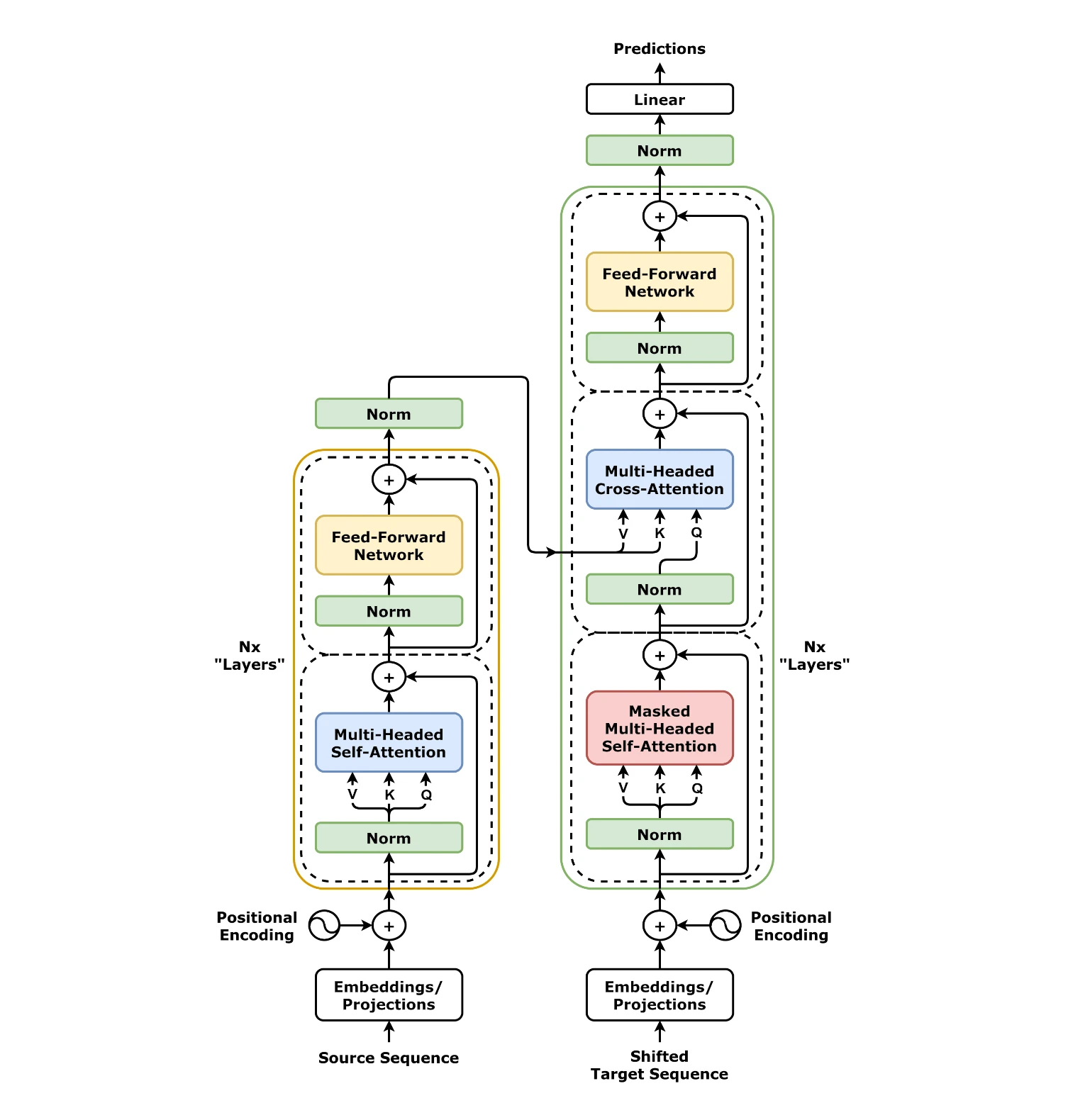
If you need more control, you use AutoTokenizer.from_pretrained and the appropriate AutoModelFor… class, which selects the architecture based on the model’s configuration files (e.g. config.json). The tokenizer turns text into tokens/IDs (usually subword units, e.g. BPE or WordPiece), and the model has a maximum input length, so once max_length is exceeded, the text may be truncated. In such cases, truncation, chunking the text into fragments, or choosing a model with a longer context are used. This is also the point at which it is easiest to ensure tokenizer–model version compatibility, because both are loaded “from the same source”.
Depending on the goal, different classes are used: for classification, AutoModelForSequenceClassification is most often chosen, while for text generation AutoModelForCausalLM and the generate method are used with parameters such as max_new_tokens, temperature or top_p. You control the “creativity” of the response, among other things, with temperature (e.g. 0.2 for stability, 0.8 for greater diversity) and top_p (e.g. 0.9), and in tasks such as summarisation beam search is often used (e.g. num_beams 4–8), although usually at the expense of speed. Performance is also affected by the device: you can work on CPU, CUDA or MPS (Apple Silicon), and with larger models device_map is useful (e.g. device_map=’auto’) together with a sensible choice of dtype (float16/bfloat16). If errors such as “size mismatch” occur, they usually stem from tokenizer–model incompatibility or from problems with padding and attention_mask during batching.
- 01Task selectionSentiment, text-generation, other
- 02Auto-tokenisationDownload and prepare input
- 03Pipeline inferenceWithout your own logic
- 04Output standardisationStandard format, makes comparisons easier
The pipeline automates the entire process of downloading models and pre/postprocessing, making quick tests and use case evaluation easier.
key hugging face libraries beyond transformers
Beyond Transformers, the Hugging Face ecosystem offers libraries covering data, metrics, training and inference acceleration, and image generation. Datasets handles loading and processing data (including caching and streaming), while Tokenizers speeds up tokenisation thanks to a Rust implementation. Diffusers simplifies working with diffusion models (e.g. Stable Diffusion) through ready-made pipelines (text-to-image, image-to-image, inpainting) and scheduler support. Evaluate lets you calculate metrics (e.g. accuracy, F1, BLEU, ROUGE, WER) without writing your own implementations, which makes it easier to compare models under identical conditions.
- datasets: load_dataset (also from local CSV/JSON/Parquet files), map, caching and streaming=True for iterating over data without fully downloading it to disk.
- tokenizers: fast tokenisation on large datasets when preprocessing becomes a CPU bottleneck.
- diffusers: ready-made pipeline classes for image generation and flow control (e.g. inpainting) without manually “stitching” components together.
- evaluate: repeatable metric calculation and model comparisons on the same test.
In model training and fine-tuning, Accelerate and PEFT are key: Accelerate simplifies running training on 1 GPU and multiple GPUs, as well as configuring mixed precision, while PEFT makes it possible to train adapters (e.g. LoRA/QLoRA) instead of full weights, which clearly reduces memory requirements. Optimum supports inference optimisations, including export to ONNX and integrations with backends (TensorRT, OpenVINO), which can be a practical step towards lower latency. TRL helps with LLM alignment (e.g. PPO/DPO) and logging results in preference-based training. All of this is tied together by huggingface_hub, which handles access tokens, snapshot downloads, uploads and publication automation in CI/CD (e.g. together with a Model Card and tags).
fine-tuning and training: how hugging face enables model fine-tuning
Hugging Face makes it possible to fine-tune models primarily thanks to ready-made training components in Transformers and libraries that make it easier to train on GPUs and work with large models. In practice, people often start with Transformers.Trainer, which provides a complete training loop with logging, evaluation, checkpoint saving and scheduler support. As a result, for tasks such as classification, NER, QA or simple seq2seq, there is no need to build everything from scratch in PyTorch. When you need scaling or mixed precision, Accelerate comes into play, simplifying training on 1 or multiple GPUs.
Preparing data for fine-tuning usually comes down to mapping the dataset to the fields required by the model, such as input_ids, attention_mask and labels. A common source of errors is a mismatch in column names, so a preprocess function is used and unused columns are removed after processing. When it comes to hyperparameters, for many BERT models a learning rate in the range of 2e-5 to 5e-5 is common, but the choice depends on the data and the model size. If the model starts to overfit very quickly, the usual fix is to adjust the LR, add weight decay, shorten the number of epochs, or increase the amount of data or augmentation.
- Mixed precision (fp16/bf16) reduces VRAM usage and can speed up training, but it requires caution (e.g. the risk of overflow).
- Gradient accumulation (e.g. via gradient_accumulation_steps) lets you achieve a larger effective batch with a smaller per-device batch.
- Checkpointing in Trainer makes it easier to resume training after an interruption, reducing the risk of losing progress.
For large language models, full weights are usually not trained; instead, PEFT and adapters (e.g. LoRA/QLoRA) are used to drastically reduce memory requirements. This approach is often a practical answer to the question of whether a 7B-class model can be fine-tuned on a single card — usually yes, if you combine LoRA with 4-bit and a sensible batch and gradient accumulation setup. For quick baselines and experiments, you can use AutoTrain, which reduces the amount of code and moves part of the work into configuration or the UI. After training, push_to_hub makes it easier to publish for sharing across a team, and integrations with TensorBoard or Weights & Biases help compare multiple runs based on metrics and loss curves.
- 01Ready-made components (transformers.Trainer)Complete training loop (logging, evaluation).
- 02Data preparationMapping the dataset to model fields.
- 03Scaling on GPUs (Accelerate)Simplified training on 1 or multiple GPUs, mixed precision.
- 04Quick task startFor classification, NER, QA and seq2seq without building from scratch.
Conclusion: Hugging Face simplifies the entire AI model fine-tuning process, from data preparation through training scaling, minimising the need to build from scratch.
deployment and inference: how to run models in applications
Models from the Hugging Face ecosystem are most often run in applications either through local inference in Python or using hosted inference services. In the local variant, the typical setup involves loading the model when the process starts (e.g. in a FastAPI/Flask backend) and handling requests via a pipeline or a custom forward/generate function in Transformers or Diffusers. If you do not want to maintain infrastructure, you can use the Inference API and a serverless approach for prototyping and lighter workloads. For steady traffic, Inference Endpoints are usually chosen, as they let you run the model on a selected instance (CPU/GPU) with autoscaling and more predictable performance.
For text generation in LLMs, Text Generation Inference (TGI) is often used, a server refined for batching, token streaming and better GPU utilisation. When the goal is high throughput for many users on a single GPU, servers with batching and memory optimisation matter in practice, and in many projects vLLM is also used where it is supported. If cost or memory becomes an issue, quantisation can help: bitsandbytes makes it possible to load models in 8-bit or 4-bit, genuinely reducing memory usage. In many use cases, the drop in quality after quantisation is acceptable, and the gain in the ability to run the model on cheaper hardware can be crucial.
When production runs without a GPU, a practical direction is exporting encoder models to ONNX and running them in ONNX Runtime, which can lower latency on CPU. In larger systems, the model is often only one element of the architecture, e.g. in RAG: embeddings + a vector database (FAISS, Pinecone, Weaviate) + generating answers based on the provided context. In production, it is also worth monitoring quality and drift by analysing the distribution of inputs, business metrics and answer samples. Additionally, logging the model version (revision from the Hub) makes it easier to tie regressions to a specific change in weights or configuration.
security, licences, ethics and practical decisions when choosing models
The safe and “company-usable” choice of a model on Hugging Face starts with verifying the licence and the terms of use of the model and the data it was trained on. On the Hub you’ll find licences ranging from permissive ones (e.g. Apache-2.0, MIT) to more restrictive ones, as well as categories such as “Responsible AI”, so in practice the decision depends on what the rules allow in your context (e.g. commercial). If you’re asking “can I use this in the company?”, the answer is usually in the Model Card — but you also need to take into account the limitations arising from the dataset and the base checkpoint. This matters because dependencies may have different terms than the “final” model itself.
Legal and ethical risks often stem from a lack of full clarity about the rights to the training data, which is why they cannot simply be “guaranteed” without an audit of the sources. In practice, teams are more likely to choose models from providers who thoroughly document the provenance of the data and content removal procedures, while also implementing answer filtering and continuous monitoring. Privacy is no less important: with hosted endpoints or an external API, input data may leave your infrastructure. For sensitive data, the standard choice is often self-hosting (e.g. in your own VPC), supplemented with anonymisation and logging in line with company policy.
Practical organisational constraints also include “gated models”, i.e. models that require acceptance of the access terms and the correct permissions. This explains why automations (e.g. in CI) can “blow up” during download: most often there is no token with the appropriate permissions, or the organisation has not accepted the provider’s terms. At the same time, you need to keep in mind security and quality limits: language models can hallucinate, and classifiers can carry bias from the training data. In practice, this is mitigated through evaluation on your own data, “guardrails” (e.g. rules or content classifiers) and RAG approaches, where the model answers based on the provided context rather than relying solely on “memory”.
Choosing a model in a project is usually a quality–cost–latency trade-off, because a larger model means higher hardware costs and greater delays. A common strategy to start with is to go for a smaller model (e.g. 7B/8B) with sensible fine-tuning/adapters, and only later increase the size if the metrics require it. Evaluation cannot rely solely on automatic metrics: in text generation, ROUGE/BLEU often prove insufficient, so scenario tests, regression question sets and manual verification of policy compliance and factual correctness are also needed. To maintain control within the team, reproducibility and governance are key: pinning versions (revision), a standardised Model Card description, and consistent naming and tagging of releases.
FAQ
Frequently asked questions
How does Hugging Face work in practice when launching ML models?
It enables you to quickly download a model and get it running without manually building the whole stack. Thanks to standardised interfaces such as pipeline and AutoModel, many tasks can be started in just a few lines of code.
Is Hugging Face only for text models?
No, the ecosystem also covers images, audio and multimodal use cases. This means you can work in one consistent environment across different types of tasks.
Why is Hugging Face so popular among people working with AI?
Because it shortens the path from finding a model to testing it and integrating it into an application. Instead of juggling tools at every stage, the user works within one ecosystem and consistent standards.
What can be found on Hugging Face Hub?
The Hub stores models, datasets and demo apps as repositories with metadata and versioning. The repositories include, among other things, weights, tokenizer, configuration and documentation in the form of a Model Card or Dataset Card.
How can you check whether a model from Hugging Face is suitable for a specific use?
Model Cards, Dataset Cards and filters by task, framework, language and licence help with this. In the cards you can check the training description, metrics, limitations and terms of use, including commercial use.
Does Hugging Face allow model versioning and avoiding changes in results?
Yes, on the Hub you can point to a specific commit, tag or branch as the revision. This reduces the problem where the same code gives different results after weights or configuration changes.