
Definition and significance of FAQ in a marketing strategy
FAQ in a marketing strategy is a practical tool that directly addresses purchase objections and makes it easier for the user to make a decision. Most often, it takes the form of a list of questions and answers that can be quickly skimmed when someone is looking out for phrases such as “return”, “delivery” or “invoice”. The key marketing value of FAQ lies in the fact that it reduces hesitation before purchase, because it explains the rules and conditions in simple language. In practice, FAQ often complements the offer page by providing answers to doubts that would otherwise stop the user at the decision stage.

FAQ is usually shorter and focuses on the most common questions, whereas a knowledge base covers full instructions and step-by-step guides. When the offer is complex, FAQ should act as a gateway, meaning it should quickly answer “is it possible” and direct users to further materials or to contact. In formal terms, FAQ can explain matters in “plain English”, but it does not replace the terms and conditions, privacy policy or contract. A good practice is to link to legal documents and clarify that, in case of discrepancies, the terms and conditions apply.
- 01Answers objectionsMakes it easier to make a decision
- 02Quick overviewList of questions and answers
- 03Reduces hesitationExplains the rules simply
- 04Complements the offerResolves the customer’s doubts
Key value: FAQ reduces hesitation and speeds up purchasing decisions by answering the most common questions.
How FAQ supports customer service and reduces costs
FAQ supports customer service by acting as a “first line of support” 24/7, before the user writes on chat or by e-mail. It works particularly well where processes generate repetitive questions, e.g. about payments, deliveries, complaints, logins or warranties. For a business, this means fewer simple support tickets and lower service costs, and for the customer — a faster resolution without waiting for an answer. In practice, FAQ can reduce questions about shipment status if it guides the user to the right instructions and the places where action can be taken.
The best answers in FAQ start with the key point in the first sentence, and only then clarify the details and exceptions, because the user usually asks “is it possible” and “how long does it take”. Instead of generalities, it is worth providing verifiable steps and directing users to the right process, e.g. the returns form, customer panel or shipment tracking page. Such linking shortens the time needed to deal with the matter, because the user can immediately see where to click and what to do next. When a given answer does not fit the situation, FAQ should clearly indicate the next contact step, instead of leaving the user with an imprecise “contact us”.
FAQ and knowledge base: differences and use
FAQ is a shorter format that collects the most common questions and provides concise answers, whereas a knowledge base contains full instructions, guides and step-by-step articles. In practice, FAQ clears up quick doubts in the style of “can I…”, while a knowledge base shows the entire process in the dashboard and is often supplemented with supporting materials, such as screenshots. For example: FAQ can answer “Can I change the delivery address?”, and the knowledge base will guide the user through changing the address in a specific part of the interface. This separation makes it easier to choose the right support path without wandering around the site.
The best use case is the “FAQ as a gateway” model: a quick answer + a link to a detailed article or the place where the action can be carried out. This means the FAQ does not balloon into “everything about everything”, but stays scannable and easier to maintain. If a topic requires an individual diagnosis or additional data, the FAQ should end with a clear indication of the next step (e.g. a form or contact), rather than suggesting that every case can be covered in a single paragraph. This approach also helps maintain content consistency when the same answers appear in several places.
- 01FAQ: quick questionsShort answers. Concise information.
- 02Knowledge base: full instructionsDetailed guides. Step by step.
- 03Practical exampleFAQ: “Can I…?”. Base: “How to do it…”
- 04FAQ as a gatewayQuick answer + link to details.
- 05Effect: better navigationAvoids overload. Makes the path easier to choose.
"Separation makes it easier to choose the right support path, and the gateway model prevents the FAQ from becoming overloaded."
When is it worth implementing FAQ in a company?
FAQ is worth implementing when the same questions keep coming back in a company about processes such as payments, delivery, returns, complaints, logging in or warranties. In that case, one well-designed section can shorten the time spent searching for information, because the user gets the answer without involving support. It works particularly well for “operational” questions, for example about parcel status, where the answer can provide clear steps and direct the user to tracking. If the offer is extensive, FAQ still makes sense, provided it leads on to detailed materials or the relevant support channel.
Implementing FAQ makes the most sense when you need consistent answers across multiple channels (website, app, pinned forum thread, automatic chat reply) and want to synchronise them from a single source. This matters because users expect identical information regardless of where they ask the question. FAQ will also work well when the number of enquiries grows and you need to organise them so they can be quickly scanned and the topic found without scrolling through many screens. At the same time, it is worth remembering that FAQ should not be used to hide key information (e.g. return costs) — such data is better presented directly in the process itself, while FAQ should be treated as support for clarification.
Most common mistakes in creating and understanding FAQ
The most common mistake is treating FAQ as “everything about everything”, which makes it harder for the user to quickly find the right answer. Can something be found quickly when the list of questions grows without priorities. Then scanability drops and the risk increases that the person looking for something specific will still choose to contact support. The second typical misstep is hiding key information (e.g. return costs) in FAQ instead of showing it clearly in the relevant parts of the process, which undermines trust. As a result, FAQ stops supporting the decision and starts to look like a “hook” in communication.
The problem can also be answers that do not lead to action, for example ending with a general “contact us” instead of pointing to the relevant form or panel. Equally problematic are long-winded answers or those starting with a digression when the user expects an immediate “yes/no” or a concrete time and cost. Frustration is also increased by messages like “it depends” without specifying the variants and how to check the correct scenario. If FAQ has been implemented as an accordion, poor accessibility can additionally make it harder to reach the content for people using a keyboard or screen readers.
- 01No prioritiesToo long a list of questions, poor scanability
- 02Hiding key dataNo information in the process, undermines trust
- 03Answers without actionGeneral advice instead of concrete solutions
The key is for FAQ to be fast, transparent and lead to a concrete action.
Structure and format of an effective FAQ
An effective FAQ takes the form of a list of questions and concise answers that can be scanned with the eye in a few seconds. The format that works best is usually one where the questions are short, written in the user’s language, and the answers start with the core point in a single sentence. The biggest difference is made by a consistent answer structure and linking to places where an action can be carried out immediately (e.g. form, customer panel, shipment tracking). This means the user not only understands the rules, but also immediately knows what to click next.
Accordion or full content on the page?
An accordion saves space, but full content on the page can be better for SEO and is usually more user-friendly for people using screen readers. If you choose an accordion, the implementation should be accessible, including full keyboard support and correct ARIA attributes, otherwise some users will not expand the answers. In practice, an accordion can also make browser search harder if it is poorly built. The format should be chosen based on whether users more often “hunt” for a single item or prefer to read a series of answers one after another.
Categories, navigation and search
When the number of questions grows beyond around 15–20, it makes sense to split a well-designed FAQ into categories such as “Payments”, “Delivery”, “Returns” or “Account”. This structure works well with a side menu or filters, so the user does not have to click through many screens. In more extensive sites, an integrated search makes a big difference, shortening the route to an answer, and tools such as Algolia DocSearch or the search in Zendesk Help Center can surface results after just 2–3 characters. Isn’t it also worth ensuring that the search handles typos and inflections, since users enter the same queries in different ways.
How to structure answers so they are “user-friendly”
The most practical answer format is a consistent pattern that the user quickly recognises and in which they immediately spot the key parameters. Start with the core point, then move on to conditions and exceptions, because usually the answer to questions like “can it be done” and “how long does it take” is what matters most. Consistency with the interface is crucial: the names of buttons and sections should sound exactly as they do in the app or dashboard. For selected questions, screenshots, a short GIF or a 30–60 s video are useful, but they should not replace the text, because many people want an answer straight away.
- Conditions (when the rule applies and who it concerns)
- Steps (what to click and where)
- Time (when the matter will be completed)
- Cost (what charges may appear)
- What next (the best next step: a link to the process or support)
How to choose questions for an FAQ based on data analysis
FAQ questions are chosen most accurately when they are based on data from real customer interactions and on-site behaviour. The most reliable sources are support emails, chats, call recordings, comments on social media and Google reviews, because they show recurring doubts captured in natural language. In addition, it is worth looking at queries from the internal search in the store or help center, because this is a direct signal of what users cannot find. If the same question comes up regularly (e.g. many times a week), it is the number one candidate for inclusion in the FAQ.
Data analysis should also take into account the places where users “drop off” in the process, because these are often friction points related to costs and rules. Google Analytics 4 and tools such as Hotjar can identify pages with a high exit rate (e.g. the basket), which suggests question topics about payment methods, delivery cost, lead times and returns policy. In ticketing tools, tagging requests is useful (e.g. in Zendesk, Freshdesk or Intercom), even with a simple set of 5–10 tags, so that you can quickly check the most common categories of cases. As a result, the FAQ answers what truly blocks the user, rather than what merely “seems important”.
You will set priorities fastest by starting with 10–15 questions with the highest volume and the greatest impact on conversions or the number of tickets. Why not simplify the decision straight away. It is enough to assign topics points for frequency (1–5) and business impact (1–5), then sort by the total so you do not begin with a “list of 50 questions”. At the same time, it is worth filtering out threads that simply do not fit the FAQ, that is, very rare ones, those requiring individual diagnosis, or those burdened with a disputed legal interpretation. If a question cannot be resolved without user data, it is better to close it with a clear contact path and indicate what information will be needed (e.g. the order number).
- Collect recurring questions from emails, chats, reviews and comments, then group them thematically.
- Tag tickets in the support tool (e.g. “return”, “payment”, “address change”) and regularly review the weekly report.
- Review GA4/Hotjar data to spot process stages with a high exit rate and match FAQ content to them.
- Check queries from the internal search and fill in missing phrases, linking to the relevant processes.
- Set the order using the “frequency + impact” method and remove rare topics or those that require individual diagnosis.
The role of FAQ in improving SEO and search visibility
FAQ supports SEO because it answers queries entered into the search engine in question form and captures traffic with informational and commercial intent. Users often want a specific answer without unnecessary detours, so FAQ content based on natural phrases can send them straight to the right page. Isn’t that exactly the point. Questions work particularly well as long-tail keywords, usually more precise and less competitive than broad terms, provided the answer is to the point. Concise answers (1–2 sentences) are more often suitable for citation as a featured snippet, which can increase CTR.
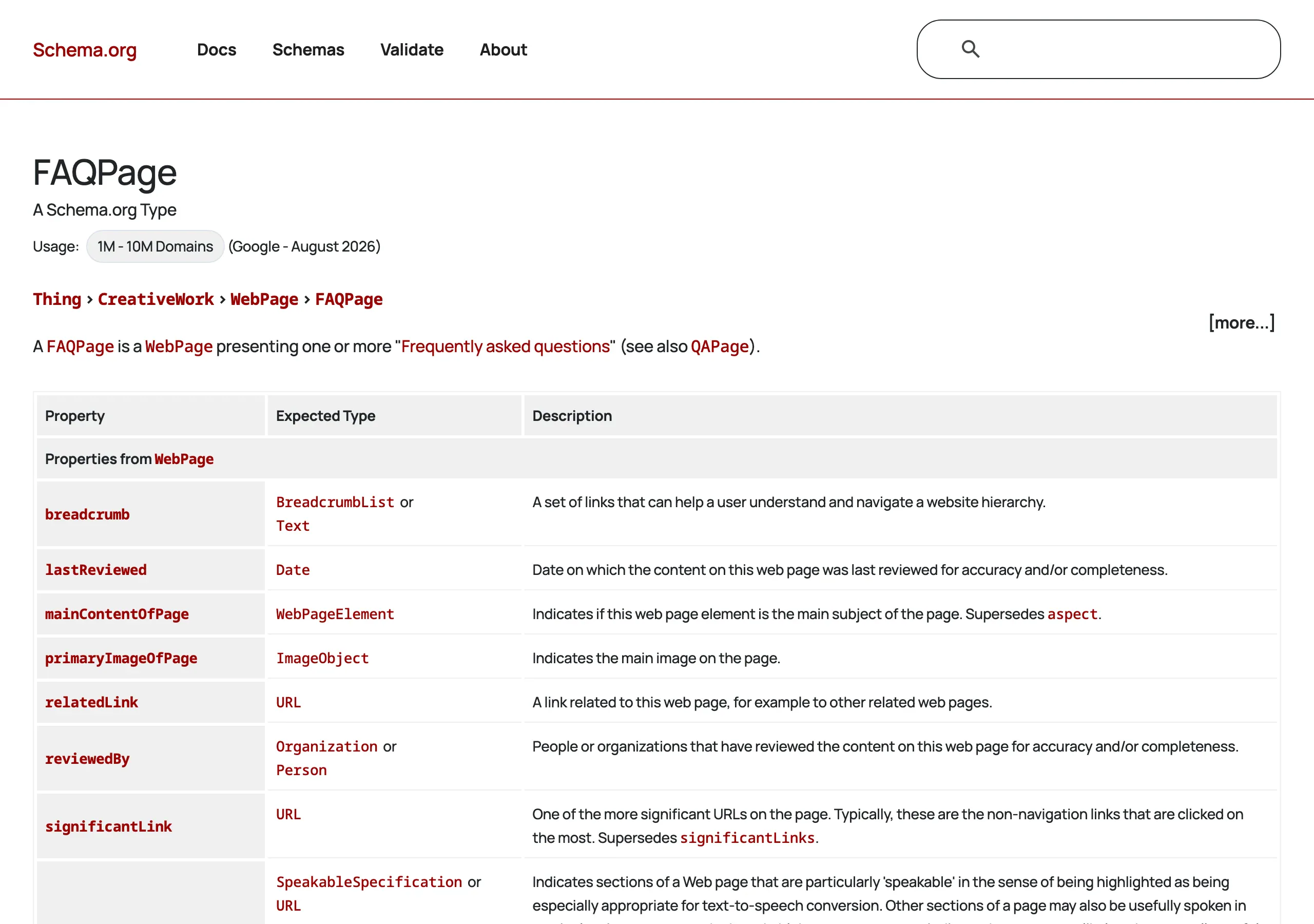
FAQ visibility in search engines can be strengthened with FAQPage structured data (schema.org) in JSON-LD, remembering that the search engine may, but does not have to, display rich results. The key is for the markup to match the content visible to the user, because discrepancies or syntax errors may invalidate the implementation (it is worth checking this in Google Rich Results Test). In practice, avoiding duplication also matters. copying identical answers to multiple subpages dilutes SEO signals and makes updates harder, so it is better to maintain one “source of truth” and link to it. Where it makes sense (e.g. on product pages), a short FAQ section of 3–6 context-specific questions can be effective instead of a long list obscuring the content.
FAQ supports SEO also from the UX and technical side, because extensive scripts and heavy images can noticeably slow down a website, especially on mobile. So isn’t it worth taking care of image optimisation (e.g. WebP/AVIF), loading video only on demand and reducing the number of JS libraries if they are meant to handle only a simple accordion. The FAQ section also works brilliantly as a space for internal linking to key subpages (pricing, terms and conditions, contact, shipment tracking), which organises the site architecture and guides the user to the next step. SEO results are easiest to monitor in Google Search Console, tracking queries, positions, impressions and clicks, and then refining the first sentences of answers where you can see lots of impressions but few clicks.
FAQ
Frequently asked questions
How does FAQ help a user find an answer faster?
It organises repeated doubts in one place and lets the user quickly scan the questions with their eyes. As a result, the user does not have to search for information in several places.
Can FAQ reduce the number of customer support queries?
Yes, because it acts as a first line of support 24/7 and answers repetitive questions without a consultant’s involvement. That means fewer simple queries and lower support costs.
How is FAQ different from a knowledge base?
FAQ is shorter and answers the most common questions in a concise format. A knowledge base contains full instructions, guides and step-by-step descriptions.
When is it worth implementing FAQ in a company?
When the same questions regularly come back about payments, deliveries, returns, complaints, logins or warranties. It also makes sense when you need consistent answers across multiple channels.
What should good answers in FAQ look like?
They should start with the core point in the very first sentence, and only then clarify conditions and exceptions. It is also best to direct users straight to a specific action, for example a form, a customer panel or parcel tracking.
Why can FAQ support SEO?
Because it answers questions entered by users in natural language and often uses long-tail keywords. Concise answers can also be suitable for citation as a featured snippet.