
How the AVIF format revolutionises image compression on websites
AVIF changes the approach to image compression on the web because it uses AV1 codec tools that can go significantly lower in photographs than JPEG or WebP at similar quality. In real-world implementations, you can often see savings of around ~20–50% compared with WebP and ~40–70% compared with JPEG, although the final result depends on the image content and encoding settings. Photography, large images (e.g. hero images) and places where you serve many graphics in product listings or blog thumbnails benefit the most. The business effect is simple: less transfer per user and lower CDN load where images account for most of the page weight.
AVIF works best where maximum size reduction without visible quality loss matters — especially in photographs and materials with smooth gradients. In addition, the format acts as an ISO-BMFF container (similar to HEIF/HEIC), but with AV1 compression, so a single file can contain, among other things, an alpha channel, metadata and (optionally) animation. Thanks to this, in some use cases AVIF can be a real candidate to replace JPEG (photos) and sometimes PNG (transparency), provided you take into account encoding/decoding costs and compatibility. In the context of modern websites and SPA applications, it is most often implemented to reduce transfer and improve key metrics such as LCP.
- 01Better compression~20–50% less than WebP, ~40–70% than JPEG
- 02Photo qualityHigh quality at a smaller size
- 03Business effectsLess transfer and CDN load
- 04Ideal forPhotos, hero images, listings
AVIF offers significant transfer savings while maintaining high image quality, especially in photographs and large graphics.
Key advantages and limitations of the AVIF format compared with JPEG and WebP
Compared with JPEG and WebP, AVIF usually wins on file size at similar quality, but it is not always the “best for everything”. Its advantage is most often seen in photographs and gradients, whereas for sharp UI elements (icons, text in graphics) the result may depend on the mode (lossless) and chroma subsampling (e.g. 4:4:4 instead of 4:2:0). In addition, AVIF can be slow to encode, and decoding time can be higher than with WebP/JPEG, especially at large resolutions and high quality. For this reason, websites often use a multi-format strategy: AVIF as the first choice, WebP as the second, and JPEG/PNG as fallback.
- Advantage: smaller files for many photographs than WebP and JPEG, which reduces transfer and works well where there are many images (e.g. e-commerce).
- Advantage: alpha channel support (transparency), which means that in some cases PNG can be replaced while preserving edge aesthetics.
- Advantage: support for higher colour depths (10/12-bit) and HDR content, which can be useful in modern galleries and applications, provided the whole pipeline supports it.
- Limitation: higher encoding cost and potentially slower decoding, so transfer savings do not always translate directly 1:1 into faster rendering on weaker devices.
- Limitation: in sharp UI interfaces, the default 4:2:0 can worsen coloured edges, so sometimes PNG/WebP or lossless AVIF with 4:4:4 performs better, at the cost of a larger file.
- Limitation: relying solely on AVIF without an alternative can cause compatibility issues, which is why in practice a fallback is implemented (WebP and JPEG/PNG).
The safest approach on the web is to treat AVIF as a “web-first” format for modern browsers, but always plan WebP and JPEG/PNG as a compatibility layer. This strategy reduces the risk of “empty images” for some users and in the tool ecosystem that does not render content in the same way as a full browser. At the same time, it allows you to take advantage of the real savings in image weight where AVIF performs best: large photos, hero images, product listings and thumbnails. The key is choosing the format for the type of graphic and testing quality in critical details (edges, fine patterns and gradients) before rolling out settings globally.
AVIF implementation strategies on websites: optimisation for better LCP
AVIF helps improve LCP primarily when the largest “above the fold” image is large and dominates the transfer, because a smaller file is usually downloaded faster. This most often applies to hero images and large images in e-commerce, where a single asset can determine the render time of the key view. In practice, it is worth measuring the effect on real devices, because the gain from lower transfer can be partly offset by the cost of decoding on a weaker CPU. The best results come from a “test on LCP” approach rather than assuming that the format alone will automatically speed up every page.
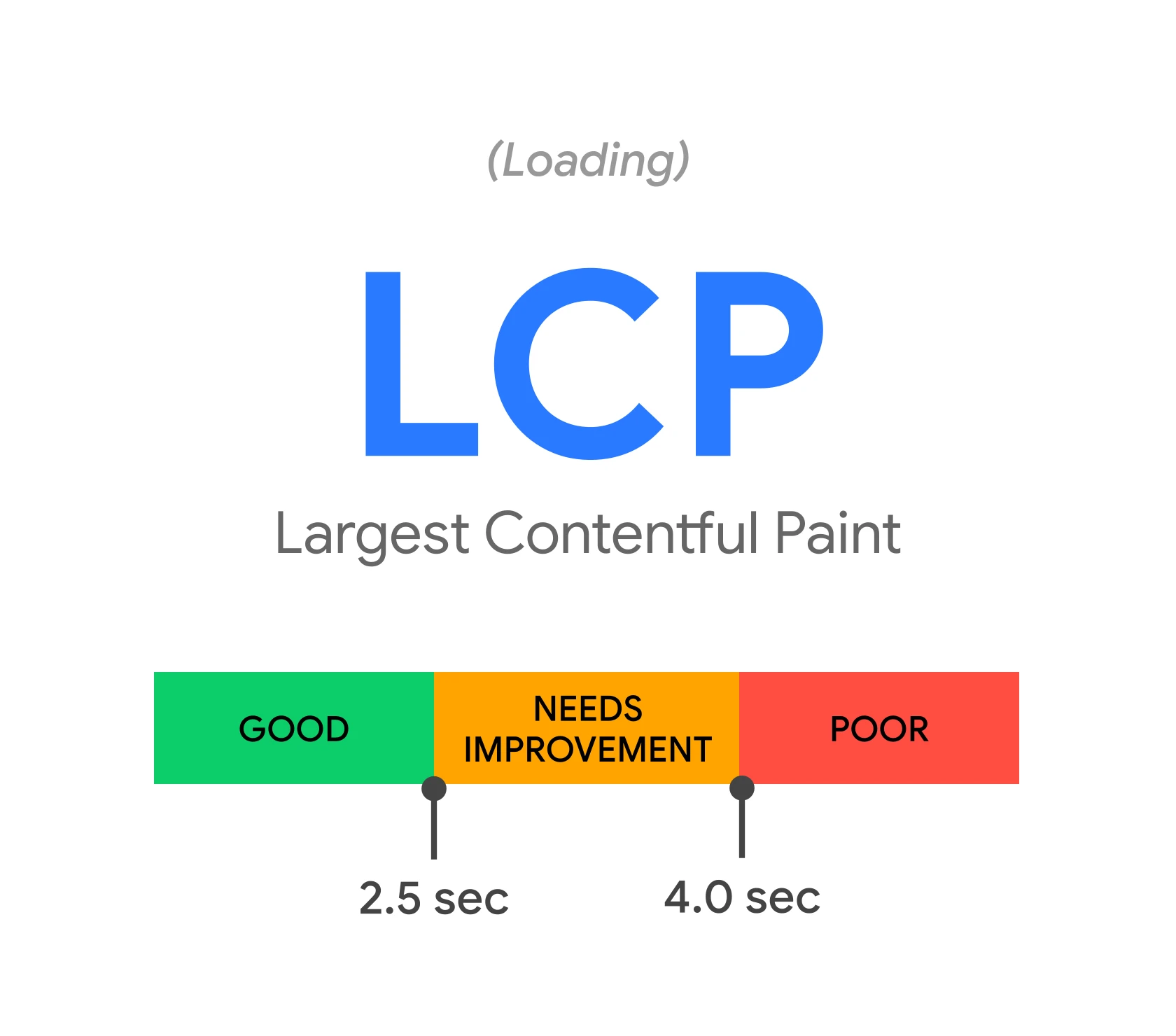
LCP-oriented implementation usually works best when you match the format and resolution to the actual display size, instead of serving one “massive” variant for all screens. Variants for different widths and correctly set “sizes” are crucial, because without them the browser may fetch a file that is too heavy and worsen LCP despite using a modern format. It is also worth always providing image dimensions (width and height), so the browser can reserve space and reduce CLS, which usually translates into better Lighthouse results. If the image is critical for LCP, avoid overly aggressive lazy loading and consider fetch priority settings so it does not lose out at the start to heavy scripts.
AVIF can decode more slowly than WebP/JPEG, which is why in production a threshold-based approach often works better than converting “everything that moves”. A practical strategy is to serve AVIF for large widths (e.g. from 800 px), WebP for medium sizes, and JPEG as the final fallback, which lets you consciously manage the trade-off: transfer vs. decoding. Performance is also strengthened by aggressive cache settings for images (long TTL and file name versioning), because this reduces the number of requests on repeat visits and eases server load. If you use a CDN and format negotiation via the Accept header, make sure you set Vary: Accept so the cache does not mix formats between clients.
- 01Dominant images (LCP)The largest asset “above the fold”.
- 02Smaller AVIF fileReducing size speeds up downloading.
- 03Faster rendering and testingMeasure the impact on real hardware.
Key takeaway: The best results come from a “test on LCP” approach and matching the format to the display size.
Browser support for AVIF and the importance of fallbacks
AVIF support is broad in modern browsers (Chrome/Edge, Firefox and Safari in newer releases), but fallbacks are still essential for older devices and some embedded clients. In practice, this means that without an alternative some users may see a blank space instead of the image, and issues may also affect bots, RSS readers or integrations that do not render HTML like a full browser. The simplest and safest pattern is multi-format sources, where AVIF is the first choice and the following layers ensure compatibility. A fallback is not an “optional extra”, but a condition for stable image delivery across the full range of clients.
Effective compatibility implementation relies on allowing the browser to choose the best supported format without detection scripts, while the server correctly describes the asset. Correct Content-Type: image/avif is crucial, because the file extension alone does not guarantee proper behaviour if the server returns the wrong MIME type. To verify support and format choice, it is worth using manual tests: checking rendering and the Network tab in DevTools (response type and size), and for product decisions referring to current data on caniuse.com. In hybrid applications and Android WebView, support depends on the version of the system Chromium component, so the compatibility plan should assume that WebP/JPEG still need to work without forcing device updates.
Beyond “plain web”, AVIF often runs into hard limitations, which is why it is not always worth treating it as the only image version. In emails, AVIF support is heavily limited, and in link previews and social bots many parsers still expect JPEG/PNG (e.g. for og:image and twitter:image), so it is more sensible to publish classic formats there. If you use on-the-fly CDN image optimisation, also make sure the cache key and the Vary: Accept header are correct, so you do not serve AVIF to a client that does not support it. This approach lets you capture AVIF savings in page content while maintaining predictable behaviour in channels such as social and newsletters.
AVIF implementation in practice: how to use <picture> and <source> effectively
The easiest way to implement AVIF in HTML is to provide it as the first source in <picture> with <source> and set type=”image/avif”, so the browser can choose the best supported format. In practice, this is layered: AVIF, then WebP, and finally a classic fallback in <img> (JPEG/PNG). This keeps compatibility without any scripts to detect support. At the same time, make sure the server returns the correct Content-Type: image/avif, because the .avif extension alone does not guarantee correct recognition if the MIME type is set incorrectly.
You achieve responsiveness through srcset and sizes, i.e. a set of width variants matched to the real display size on different screens. If you get sizes wrong, or do not provide it at all, the browser may download an image that is too large and worsen LCP despite the modern format. To reduce CLS, provide width and height in <img>, even if the image is later scaled in CSS. For smoother rendering, you can also consider decoding=”async”, especially on weaker devices.
Choose loading priorities according to the image’s role: loading=”lazy” works well below the “fold”, while for an LCP image it is often better to use loading=”eager” and fetchpriority=”high” so as not to delay the key render. For CSS backgrounds, you do not have a native fallback like in <picture>, so image-set() with types (AVIF/WebP/JPEG) is used, and behaviour should be checked in Safari and Firefox because implementations differ in detail. Preloading a critical image only makes sense if you are sure the client will support the indicated format or you use a conditional approach, because an incorrect preload wastes a request. For icons and simple illustrations, SVG is often the better choice (scalability and styling), and AVIF is best kept for bitmaps and photographs.
- 01AVIF layeringFirst AVIF, then WebP, and fallback at the end.
- 02Correct MIMEThe server must return Content-Type: image/avif.
- 03ResponsivenessUse srcset and sizes for different screens.
In summary: The key is the order of sources in <picture>, the correct MIME type and the right srcset/sizes variants for optimal performance and compatibility.
Tools and techniques for converting to AVIF: what is worth knowing
For converting images to AVIF, people most often use libavif (avifenc/avifdec), because it provides predictable parameters and works well in automation. For quick quality tests on a single photo, Squoosh (web) is convenient, and in a Node.js environment within automated processes you can use @squoosh/cli or @squoosh/lib. In applications and server-side pipelines, sharp also often appears, as it lets you generate size and format variants in one place. FFmpeg can be an alternative depending on the build and available libraries, but more often it serves as an “add-on” in an existing video pipeline rather than the primary tool for mass image production.
Quality and size in AVIF are mainly controlled by the CQ parameter (often on a 0–63 scale), where a lower value means higher quality and a larger file, and by the speed setting, which controls the trade-off between encoding time and asset weight. For web photos, typical starting points are around CQ 18–32, while for thumbnails higher values often work well (e.g. 30–40), provided the degradation is not noticeable at the target size. Choose settings on a representative set of 5–10 images and assess the critical details at 100% and 200% zoom, instead of guessing with a “global” preset. As a practical starting point for A/B comparisons, you can use e.g. avifenc -a cq-level=28 -a speed=6 input.jpg output.avif, and for UI consider lossless mode and 4:4:4 (e.g. avifenc –lossless –yuv 444 input.png output.avif), if you want to preserve sharp edges.
In larger sites, conversion is usually moved to builds (Webpack/Vite) or to the CDN, so that AVIF is not encoded at runtime and CPU cost plus TTFB are not added. In a “build-time” approach, AVIF/WebP/JPEG and several resolutions are often generated in parallel, and then served through components or a shortcode in the CMS, which makes consistent use of srcset and sizes easier. If you use ImageMagick for processing (resize, strip metadata), pay attention to colour profiles, because AVIF may preserve ICC differently than you expect, and if problems arise, it is worth intentionally retaining the profile or converting to sRGB. For process stability, keep the originals (e.g. TIFF/PNG/JPEG) in storage, and treat the variants as reproducible artefacts, because AVIF settings and tools can change as libraries evolve.
The impact of AVIF on SEO and accessibility: what you need to know
AVIF does not improve SEO “directly”, but it can help indirectly thanks to better speed and UX, and therefore potentially better Core Web Vitals. In practice, lighter images reduce transfer, which is especially noticeable on mobile, where delays and network limitations more often worsen the user experience. To make the effect noticeable, assess not only file size, but also the impact on metrics and behaviour on users’ devices. In an SEO context, AVIF is a tool for improving performance, not a ranking factor in itself.
Accessibility does not come from the file format, but from how you describe the image and how you embed it in the content. Simply replacing JPEG with AVIF will not change much if there is no sensible alt, and when the graphic is purely decorative, the correct practice is alt=”” (instead of stuffing keywords). Also be careful with overly aggressive compression: it can blur small text in an image and reduce readability, so for text in images, check the preview at least at 100% and 200%. If you have to leave text in the image, consider a higher quality setting or moving the content into HTML/CSS.
In the ecosystem of image indexing and distribution, predictability for bots and tools is crucial, and they do not always have AVIF support. With a large number of images, an image sitemap helps search engines find them faster regardless of format, but as the only URL, a JPEG fallback is more often the “safer” option than AVIF. For og:image and twitter:image, it is usually better to provide JPEG/PNG, because social parsers do not always handle AVIF correctly. From a security and privacy perspective, also remember to keep image processing libraries updated (e.g. libavif, libaom, sharp) and to remove EXIF data (e.g. GPS) when publishing user photos.
Good practices and pitfalls when implementing AVIF on websites
Safe AVIF implementation requires nailing down server, cache and quality configuration, because most problems do not stem from the format itself, but from the integration along the way. The server must send the correct Content-Type: image/avif for .avif files, otherwise some browsers may misinterpret the response or cache it incorrectly. If you serve the format conditionally based on Accept, add Vary: Accept so the CDN/proxy does not mix versions between clients. The most common “random” error after rolling out optimisation is missing Vary: Accept and serving AVIF to devices without support.
Control quality and appearance after conversion with tests on a representative set of images, because too low a quality quickly reveals artefacts on faces, hair and fine patterns (moire). Also pay attention to colour management: if the sources are in Display P3, the pipeline should correctly preserve the ICC profile or consciously convert to sRGB, otherwise saturation may differ between devices and browsers. HDR in AVIF makes sense mainly when you are actually presenting HDR content on HDR-capable devices; in “standard” services rendered in sRGB, it may only complicate the pipeline without any clear benefit. In e-commerce, also consider LQIP or blur-up in listings so the user sees the product shape faster before the final image loads.
It is worth adapting the format strategy to the channel, because AVIF does not have equally broad support outside the classic WWW. For the WWW, the usual stack is AVIF + WebP + JPEG/PNG as a fallback, whereas for social preview and in emails it is safer to stick with JPEG/PNG. In WordPress, a common issue is when a plugin generates AVIF but does not replace URLs in <picture> or the server/CDN does not provide the correct MIME type, so diagnostics are best started in DevTools by checking what is actually being fetched. To spot problems with MIME, Vary: Accept or cache more quickly, it is a good idea to monitor image loading errors (e.g. onerror handling in <img> and logging to Sentry).
- Generate variants in several formats: AVIF + WebP + JPEG/PNG.
- Embed images via <picture> with srcset/sizes set correctly.
- Declare width/height and set sensible loading/fetchpriority.
- Configure the server and cache: the correct MIME, Vary: Accept and long TTL.
- Check the og:image meta tags and channels outside the WWW (e.g. social, email) for classic formats.
FAQ
Frequently asked questions
How does AVIF affect page loading speed and Core Web Vitals?
Smaller image files usually download faster, which can improve LCP and reduce transfer. However, the gain also depends on the decoding cost on weaker devices.
Will AVIF replace JPEG and WebP on all websites?
Not always, because AVIF is not the best for every type of graphic. On websites, the safest approach is to use AVIF as the first choice, with WebP and JPEG/PNG as fallback.
Why does AVIF work better for photos than for icons and text in graphics?
It delivers the biggest benefits in photographs, hero images and images with smooth gradients. For sharp UI elements, the effect depends on settings such as 4:4:4, 4:2:0 or lossless mode.
When is it worth using a fallback instead of AVIF alone?
A fallback is always needed when you need to support older devices, some embedded clients, bots or integrations that do not support AVIF. Without an alternative, some users may see a blank space instead of an image.
How do you implement AVIF correctly in HTML?
The simplest way is through the picture element, where AVIF is the first source, then WebP, and finally img with JPEG or PNG. It is also important to set the correct Content-Type: image/avif on the server.
Does AVIF help with SEO?
It is not a direct ranking factor, but it can help indirectly through better speed and UX. Lighter images reduce transfer and can improve performance metrics, especially on mobile.