
Diagnosis of visibility drops after an algorithm update
Start diagnosing visibility drops after an update by establishing when and where exactly clicks and impressions fell in Google Search Console. In the Performance report, check the precise date of the decline and assess whether the drop covers many URLs or concerns one area of the site. If the drop starts within 1–3 days and covers many URLs, it often overlaps with a core update rollout; if it concerns a single directory, a technical or content issue is more likely. Next, segment the data by page type (e.g. category, article, product) so you can clearly see where the decline is greatest.
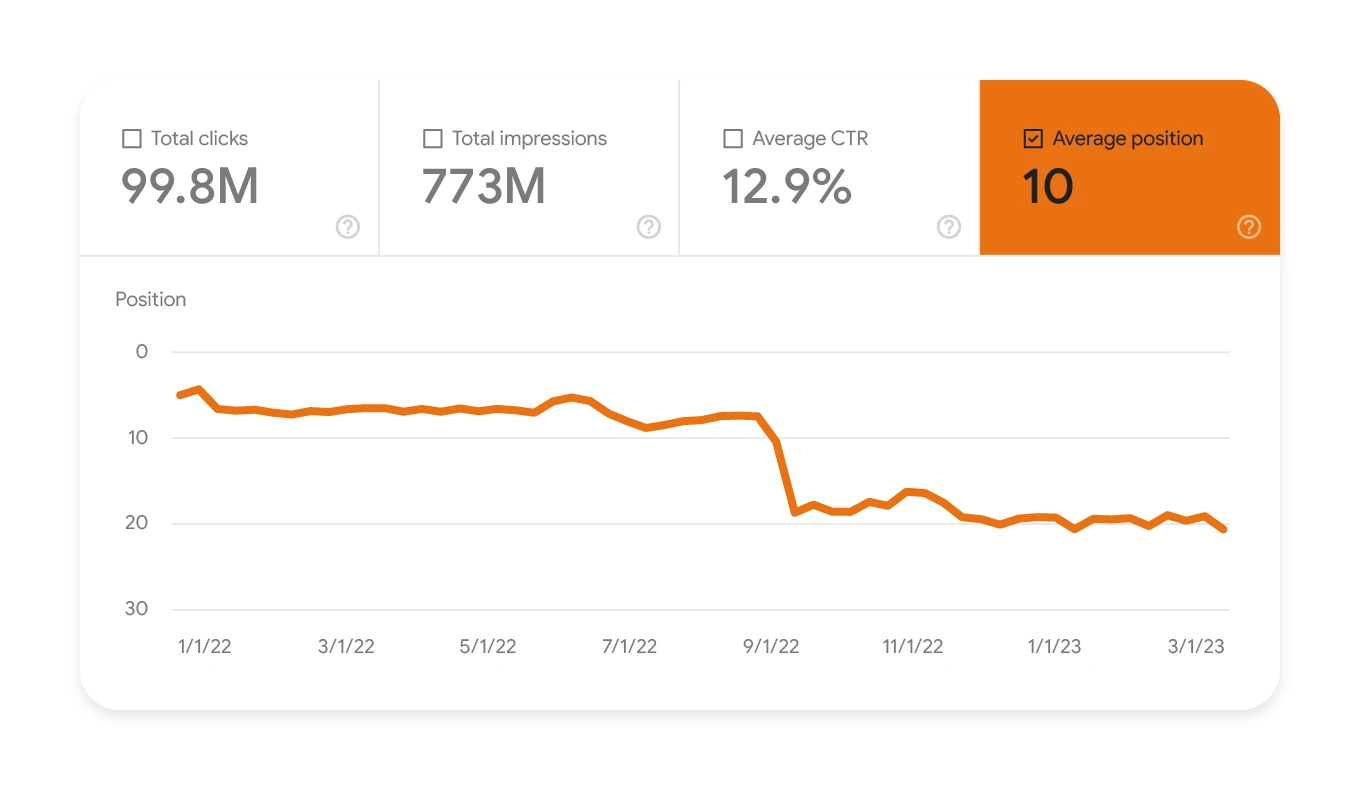
It is also worth checking whether the drop mainly affects branded or non-branded queries, as this makes it easier to assess whether the problem is recognition/CTR or rather content alignment with intent. In GSC, filter out queries containing the brand name and compare them with the rest, then pair the results with the page segments that serve those queries. In GA4, compare the Organic Search channel with Direct and Referral to confirm that organic traffic is falling, rather than all visibility resulting, for example, from attribution changes. If consent mode implementations or tagging changes appeared in the background (e.g. loss of session_start in GTM), bear in mind that part of the “drop” may result from measurement differences.
- In GSC, verify indexing and exclusions (e.g. “Excluded: page with redirect”, “Duplicate, Google chose different canonical”), because canonicalisation errors and duplicates can intensify keyword cannibalisation.
- In GSC, use the country/device filters to catch drops only on mobile (often a sign of UX/Core Web Vitals issues) or only in one country (differences in the SERP or local competition).
- Carry out a manual review of 10–20 key keywords and check whether new modules (e.g. AI Overview, Top Stories, more videos) are pushing organic results down and reducing CTR despite stable rankings.
- Compare the date of the drop with announcements (Search Status Dashboard, Google Search Central) and tracker data (Semrush Sensor, MozCast, Sistrix) to set the priorities of your hypotheses more accurately.
- In GSC, verify the “Manual actions” and “Security issues” sections, because their presence changes the order of work. First, you remove the violations and clean up the site.
Finally, make sure that Googlebot is still crawling the site intensively, because a drop in crawl budget can exacerbate visibility problems. Server log analysis (e.g. in Screaming Frog Log File Analyser) will show the frequency of Googlebot visits and 4xx/5xx errors that limit page refreshes. If the share of 500 responses is rising or the crawl rate is falling, improve server stability and fix the errors, because Google may update the index less often. The signals gathered in this way provide a solid basis for assessing whether the source of the problem is an algorithm update, a SERP/CTR change or a technical error.
- 01Analysis of the date and scopeCheck the exact date and scope of the drop
- 02Signals vs causesGlobal update or technical issue
- 03Data segmentationFilter by page type and queries
A systematic approach makes it easier to quickly identify the cause of the drop.
Identifying the type of update and Google’s intent
You can identify the type of update by which kinds of pages were hit hardest and what the new “winner pattern” looks like in the top 10 results for key keywords. A core update usually acts broadly, covering many queries and types of subpages, and recovery requires a holistic increase in value for the user rather than a single SEO fix. If you are looking for the quickest starting point, begin with the URLs with the biggest drop in traffic and revenue, and with the topics where competitors are winning with better breadth and freshness of content. In practice, this means prioritising specific areas of the site rather than “optimising everything at once”.
If you suspect updates related to helpful content, check whether the content is being created mainly for keywords rather than for the user’s real task. In the case of a spam update, pay attention to unnatural patterns such as aggressive anchors, doorway pages or mass-generated content, and in tools such as Ahrefs/Semrush verify a sudden increase in low-quality links and repetitive anchors. When rankings for tests and reviews drop first, this may fit a reviews update; in that case the algorithm more often expects proof of experience, such as methodology, data, original photos, pros/cons and regular updates. In e-commerce, drops can also result from poorer product data (schema, availability, prices) or low-quality product pages, which is often visible in the lack of rich results such as price or stars.
If rankings remain stable but clicks fall, the source of the problem is often CTR and changes in the SERP layout, rather than the ranking assessment itself. In such a situation, AI Overviews and enhanced results may “take over” some of the traffic, so the priority becomes aligning titles and snippets with the need to “click for detail”, as well as fighting for exposure in additional SERP modules (e.g. FAQ, HowTo, video). Separately, check whether the SERP intent has shifted (e.g. from a guide to a product list or from an article to video), because even solid content in the wrong format will then lose out. Before attributing the drop to the update, also verify seasonality and trends (Google Trends and 12–24 months of data), because not every dip around rollouts results from algorithmic action.
Technical audit: critical errors after an update
A technical audit after an algorithm update should first and foremost catch issues that block indexing or blur ranking signals. Run a crawl in Screaming Frog or Sitebulb and check meta robots (noindex), robots.txt and canonicals pointing to incorrect URLs. Especially after a migration, a common problem is canonicals pointing to the staging version or to URLs with parameters, which ends up causing exclusions in Google Search Console. If in GSC the number of “Excluded: page with redirect” or “Duplicate, Google chose different canonical than user” grows, treat this as a signal to urgently review canonicalisation and duplicates.
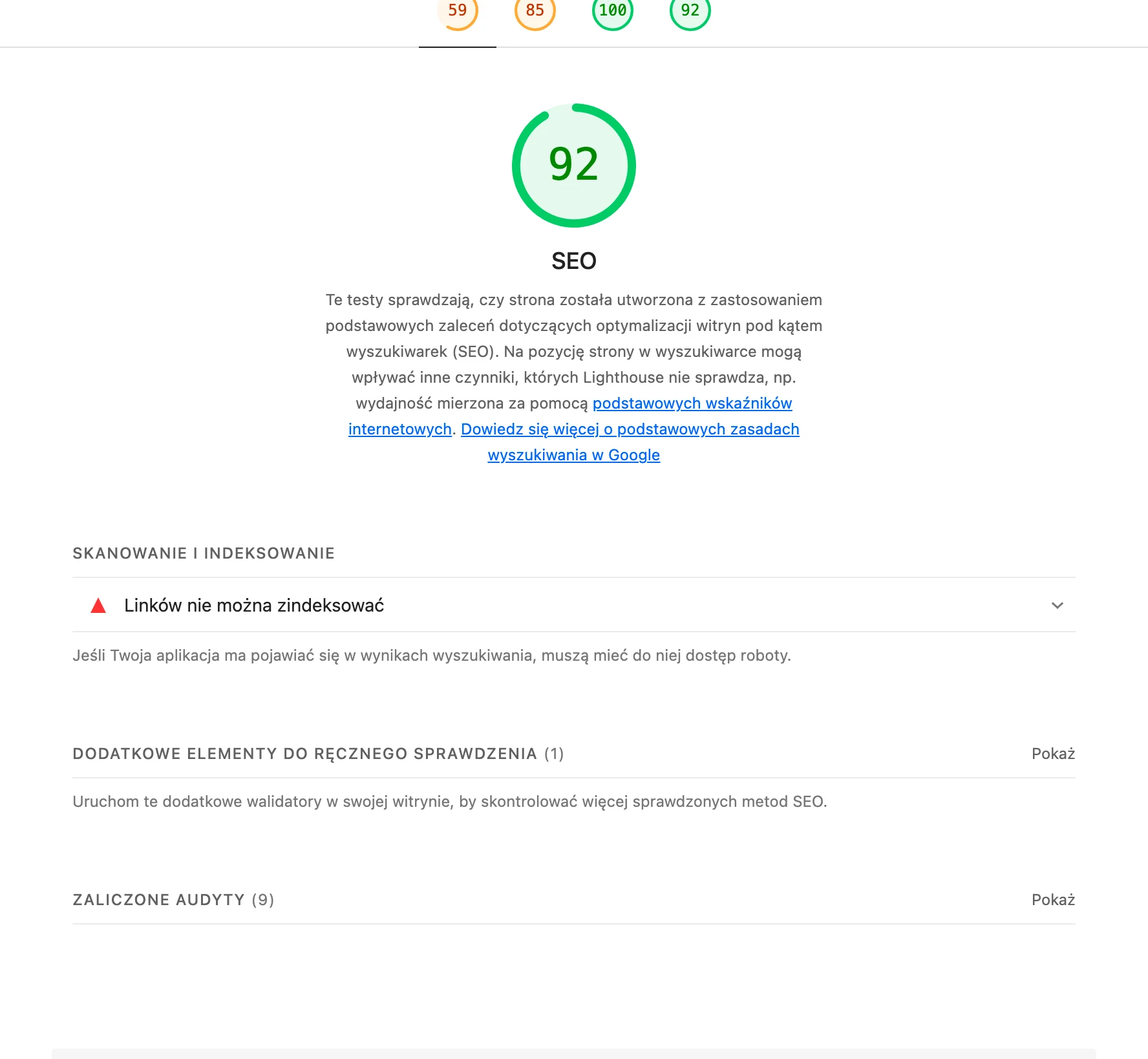
HTTP errors and redirects are just as important, because after updates Google can recrawl problematic URLs more often and reveal 404/410s, 301 loops and soft 404s more quickly. Check in the “Pages” report in GSC whether the number of URLs marked as soft 404 (a page showing a “not found” message while returning 200) is increasing, as this lowers the quality of the index. At the same time, look at the information architecture: in the crawler, count click depth and aim for 3–4 for key subpages, strengthening the hierarchy through breadcrumbs and contextual internal linking. These elements make it easier for Google to understand the site structure faster and pass PageRank internally more effectively.
- Verify rendering in SPA/SSR services in GSC (“Inspect URL” → rendered page view) and compare it with the browser. If headings, descriptions or links are missing, move the content into HTML or fix SSR.
- Check the XML sitemap: lastmod matching the real content change, no 3xx/4xx URLs, and for large sites the sitemap index and the 50k URL limit per file.
- Assess the impact of URL parameters in e-commerce: canonicals to the base version, noindex for combinations without value, and valuable filters in the form of user-friendly URLs.
- Review structured data: Rich Results Test and schema reports in GSC, because errors can remove rich results and reduce CTR.
- If you operate in multiple languages, check hreflang (reciprocity, self-referencing, x-default) and whether the canonical does not point globally to the wrong version (e.g. EN instead of PL).
Server performance is often a “silent” source of drops, because high TTFB (e.g. >800 ms) and 5xx errors during peak hours can reduce indexing speed and undermine ranking stability. Measure TTFB in WebPageTest and confirm errors in the logs to check whether the problem worsens at specific times of day. Then implement cache (e.g. Nginx FastCGI cache), CDN (Cloudflare) and monitor CPU/RAM limits on the hosting to reduce the number of 5xx responses. When Google more often encounters 5xx errors or slow responses, the site may be refreshed in the index less frequently, and visibility then falls indirectly.
- 01Full site crawlCheck indexing blocks (Screaming Frog)
- 02`robots.txt` and meta tagsVerify `noindex` directives
- 03Canonical tagsEliminate bad signals (staging/parameters)
- 04GSC exclusionsAnalyse duplicates and poor canonicalisation
- 05HTTP statuses and redirectsUrgent fix for 404, 410 and loops
The goal is to quickly eliminate problems that block indexing or blur ranking signals after the update.
Adjusting content to user intent
Adapting content to user intent means making sure that each keyword leads to a URL in a format that matches what dominates the SERP. Match the page type to the intent: informational (guide), transactional (category/product) or navigational (brand), because the wrong format loses even with correct optimisation. For example, if you are trying to rank for “mortgage calculator” with an article without a tool, you will usually lose out to calculators and landing pages with a form. First check the top 10 results and only then decide whether you need a guide, a hybrid page (guide + table + filters), or a separate landing page.
Declines after a core update often also result from content fragmentation and keyword cannibalisation, so organise your topics by consolidating related materials. If you have several articles on the same subject, combine them into one as strong a piece of content as possible, move unique sections across and set up 301s from the weaker URLs, leaving one page as the “source of truth”. Where credibility is key, add evidence of experience: your own photos, test results, screenshots, methodology and conditions (e.g. a laptop battery test at 200 nits, Wi‑Fi, 50% volume). These elements improve usefulness and are difficult to copy in mass-produced content.
To recover visibility, expand your answers so that they fully address real user questions, rather than merely “ticking off” keywords. Add sections on costs, risks, alternatives and next steps, plus FAQ content based on “People also ask” and data from GSC (queries with impressions), answering directly and precisely. At the same time, limit the impact of thin content: pages with no traffic, no rankings and no value are often better removed or merged than kept as hundreds of thin URLs that dilute crawl. Finally, strengthen the topic through internal linking in a hub model (pillar page + clusters), with descriptive anchors and links from navigation, “related” blocks and contextual content.
In YMYL sectors (health, finance), aligning content with intent also means reducing the user’s risk of error through compliance with law and policies. It is worth adding update dates, sources (e.g. acts, KNF, WHO), warnings and a “when to consult a specialist” section, so it is immediately clear what your recommendations are based on. Also set a refresh cycle: review fast-changing topics every 3–6 months, and evergreen content every 6–12 months, using a checklist to verify facts, update figures and refine UX. After significant changes, request indexing in GSC for key URLs so that Google picks up the new version faster.
Strengthening E-E-A-T: trust, authors and reputation
Strengthening E-E-A-T comes down to showing users and Google who is behind the content, on what basis it is prepared and where its credibility comes from. The best starting point is transparency: add author pages with bio, experience details and links to profiles and publications, and for YMYL topics clearly identify the subject-matter editor or reviewer and their role. In sensitive sectors (health, finance), “good content” alone is not enough if the author’s or reviewer’s responsibility and competence are not visible. This structure also helps the user assess whether a given piece of information is safe for them.
Trust is also built by clear company details and the real identity of the website. Make the NIP, address, telephone number, email address and key documents (terms and conditions and privacy policy) available in easy-to-find places, because this answers the question “is this a safe place to buy from or contact?”. In the content itself, rather than stating “we are experts”, it is better to show methods, data, assumptions and limitations, and also add sections “who this is not for” and “the most common mistakes”. This helps the user understand the context and the risks more quickly, rather than just the potential benefits.
Off-site reputation usually works indirectly, but it can increase a site’s resilience to fluctuations after updates. Monitor brand mentions across the web (e.g. Brand24, Google Alerts) and maintain complete profiles in industry directories, while resolving recurring issues through processes (customer service, returns) rather than limiting yourself to communication. If you run an online store or offer services, ensure credible reviews (e.g. Trustpilot, Opineo) and moderate UGC for spam, and respond substantively to critical reviews instead of removing them. A natural review profile can be more persuasive than only perfect scores.
Freshness and technical security are elements that, in practice, complete E-E-A-T. In guide content, add a “last updated” field, a concise changelog and links to sources so the user can immediately assess whether the information is still current. At the same time, make sure the technical fundamentals are in place: up-to-date libraries, no vulnerabilities and the correct headers (CSP, HSTS), because HTTPS is only the starting point, not a full answer to audience concerns. In rankings and reviews, disclose affiliate relationships, selection criteria and the funding model to directly resolve the question “is this objective?”.
Stability after updates is also strengthened by topical authority, rather than just “domain strength”. If a site covers many topics, materials that clearly stray from the main specialism may be perceived as less credible by the algorithm. For that reason, it pays to build strong topic clusters and cut off-topic content, rather than publishing “about everything”. In the long term, this makes it easier to maintain a consistent level of quality and reputation within the key areas of the business.
- 01Author transparencyPages, bio, experience, links
- 02Editorial reviewSubject-matter reviewer, role, responsibility
- 03Website identityNIP, address, full contact details, documents
- 04Safety assessmentHelp the user assess credibility
The key to E-E-A-T is combining expert knowledge with a clear indication of who is behind the content and why.
External linking and authority signals
After traffic drops, external link building is best started with an audit of the link profile to check whether unnaturalness signals have kicked in or whether important sources have been lost. Verify in Ahrefs/Majestic the rate of link growth, domain quality, anchors and sitewide links, because the risk increases when patterns such as link farms, private blog networks and comments with identical anchors appear. If the share of exact match anchors is too high (e.g. >20–30% for highly competitive keywords), the profile may look unnatural and need correcting towards a mix of brand/URL/partial matches. Such a review also helps clearly establish whether the problem is link-related, or whether the cause needs to be sought elsewhere.
Treat disavow as an emergency tool, not a routine profile “vacuum cleaner”. It is justified when you have clear signals of unnatural links, they cannot be removed, and the profile looks unequivocally manipulative, especially after spam updates. If you are preparing a file, do it at domain level (domain:example.com), add only problematic sources and note the reasoning behind the decision. Avoid the “I delete everything with low metrics” approach, because that is not, in itself, a criterion arising from the knowledge graph.
The safest way to build authority is based on real value that others want to reference and cite. Earn links through PR and data: reports, calculators, interactive maps and methodology-backed resources, because such content has natural linking potential. In many industries, links from business relationships also work well (manufacturers, distributors, chambers of commerce, conferences), because they have context and often generate real traffic. This approach is consistent with the goal of “linki bez spamu” rather than short-term link volume growth.
Declines can also result from losing strong links, so recovering them is often faster than “building from scratch”. In Ahrefs, review the “Lost backlinks” report and try to bring them back by fixing 404s, restoring the content or contacting the publisher, because sometimes one recovered source weighs more than dozens of weak new links. Also check whether external links lead only to the homepage, because often a better result comes from pointing them to pillar pages and key categories, and only then distributing equity through internal linking. As a result, the boost goes directly to the URLs that actually need to rank.
To understand where competitors gain an advantage, compare the link profile using a “link gap” method. In Semrush/Ahrefs, use the comparison of domains linking to you and your competitors (Link Intersect) to identify specific industry sites that you have not yet reached. At the same time, nurture brand signals and unclickable mentions, because recognition and citations may correlate with resilience to updates, and users more often choose a known brand at a similar position. This completes the authority strategy: links, mentions and a consistent presence across the industry ecosystem.
Improving UX and Core Web Vitals
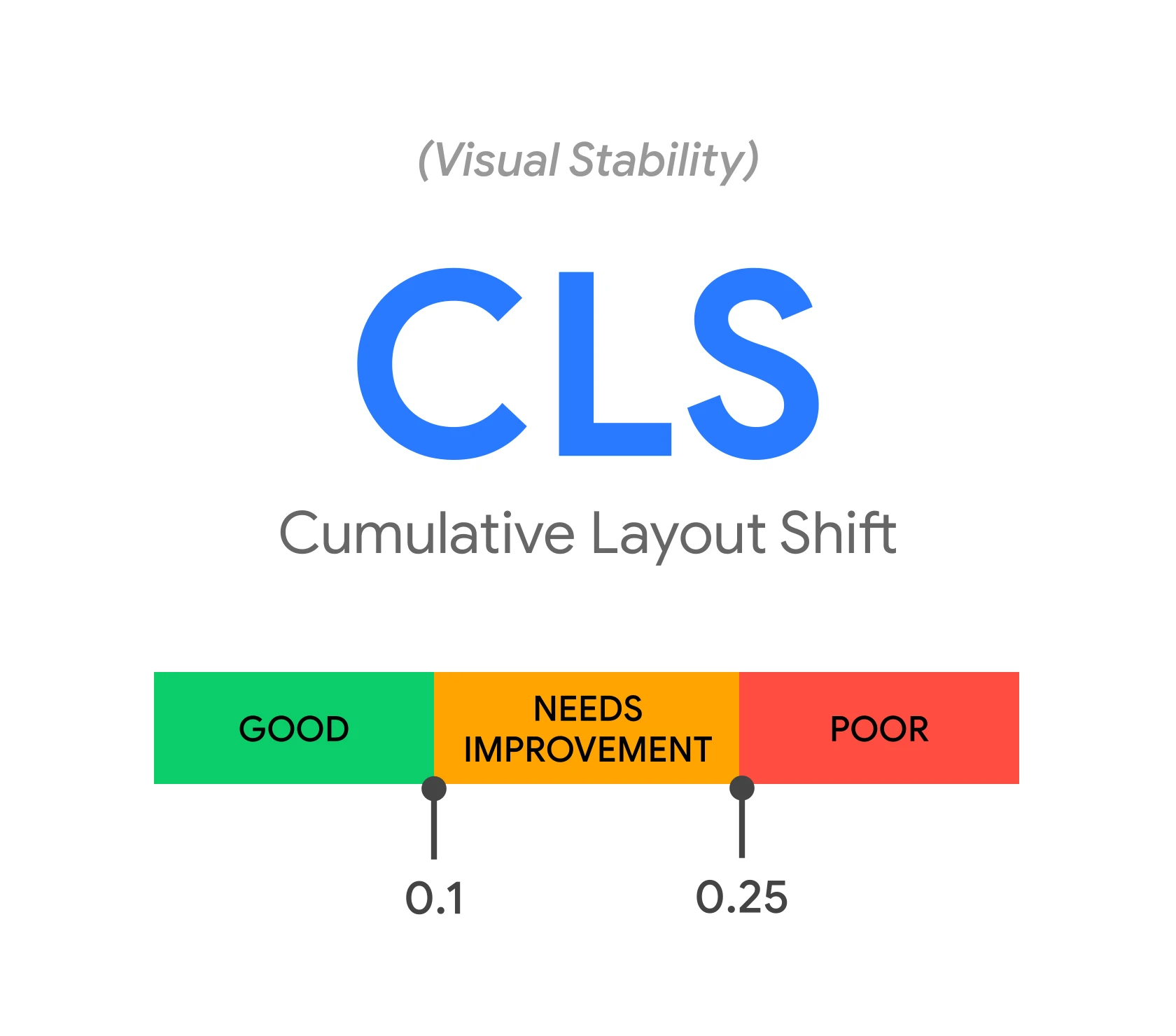
Improving UX and Core Web Vitals helps recover visibility after an update, especially when the drops mainly affect mobile or when you are competing in very tight SERPs. Start with diagnosis using field data in CrUX (Chrome UX Report) and PageSpeed Insights, because they best reflect the actual user experience. The three key thresholds to assess are LCP < 2.5 s, INP < 200 ms and CLS < 0.1. If you see that the issues occur primarily on mobile devices, treat them as a priority, because that is where they more often translate into drops.
You will most often improve LCP through optimising the hero image and the critical resources that block rendering. Use WebP/AVIF formats, add preload for the key image and implement responsive images (srcset) so the browser downloads the right size. At the same time, reduce render-blocking CSS/JS, because heavy files delay the first full render of the content. The result is that the user sees the page faster, which strengthens the perception of quality.
You will lower INP when you reduce delays after interaction, for example after clicking a filter or menu, which is often visible in shops built on heavy JS. Break up long tasks, defer scripts and reduce the number of external tags. It is also worth checking the impact of tools such as chat widgets, heatmaps or extensive trackers, because they can clearly worsen responsiveness. If the page “lags” after a click, the problem is usually interaction, not the content itself.
You will improve CLS when you limit the “jumping” of elements most often caused by ads, embeds and images without reserved space. Reserve height for banners, specify image dimensions and set font-display for fonts so the layout does not change during loading. Additionally, reduce the intensity of pop-ups and interstitials, testing a variant with a delay, a smaller format or an in-content banner, especially on mobile. It is also worth refining accessibility (A11y), including contrast, labels in forms and keyboard navigation that works, because these are often quick fixes with a big impact on perception.
Monitoring progress and methods for testing changes
Monitoring progress after an update involves continuously comparing data from GSC, GA4 and rank tracking to assess whether implementations are genuinely improving visibility and traffic. Build a dashboard in Looker Studio combining GSC + GA4 + a position tracking tool (e.g. AccuRanker, Senuto), so that you have positions, CTR, conversions and page segments in one place. Such a view shortens decision-making time, because you can immediately see whether the problem concerns clicks, impressions or traffic quality. This also makes it easier to separate the effect of on-site changes from fluctuations in the SERP itself.
Set up rank tracking in intent groups (informational, transactional, local, brand), because this shows the area requiring work more quickly. If only the informational basket drops, you more often focus on content and trust signals, and when the transactional one does, on category pages, filters or product data. Do not track only a dozen keywords, because individual keywords can distort the picture of changes after an update. Grouping also makes it easier to maintain consistent KPIs for different types of landing pages.
Roll out changes in stages on a sample of 10–30 URLs of a similar type and compare them with a control group over 2–6 weeks, because the algorithm’s response can be delayed. This approach reduces the risk of “breaking the rest” and helps determine which elements are actually driving results. After larger updates, request indexing in GSC for key URLs and verify whether Google can see the new version. When you update hundreds of pages, monitor the pace in the “Pages” report and in logs, and strengthen internal linking if crawl cannot keep up with the changes.
The effect of the work is clearest when you analyse the relationship between impressions and clicks and respond to CTR issues or SERP elements. If impressions are rising but clicks are not, in GSC choose queries with high impressions and low CTR, then test new titles, snippet structures and schema data. If you are fighting for featured snippets, answer directly under the question heading in 40–60 words and monitor lost “position 0” rankings in tools (Semrush, Ahrefs), because it is often possible to regain them faster than to win new ones. Also take the rollout context into account, because the first signals are usually visible 2–4 weeks after implementation, and full stabilisation can take 6–12 weeks depending on the scale of the site.
FAQ
Frequently asked questions
How do you check what exactly dropped after a Google algorithm update?
First, compare the date of the drop in clicks and impressions in Google Search Console in the Performance report. Then check whether the decline affects many URLs, specific types of pages, queries, countries or devices.
Does a drop in rankings after a Google update always mean a penalty?
No, some drops result from changes in the SERP layout and CTR, even when rankings are similar. That is why you need to distinguish a real ranking drop from a loss of clicks caused by new results modules.
Why is it worth checking manual actions and site security after a Google update?
Because manual actions or security issues change the order of work and first require the violations to be removed. Without that, the visibility recovery plan will be wrong.
How do you tell whether a drop is due to a core update, a technical issue or content?
If the drop appears within 1–3 days and affects many URLs, it often fits a core update. If it concerns one directory or indexation exclusions, a technical or content issue is more likely.
How do you adapt content to user intent after drops in Google?
You need to compare the top 10 results and check which format dominates in the SERP: a guide, category, product, landing page or video. If the page format does not match the intent, even good content can lose.
When is it worth consolidating or removing content after a Google algorithm update?
It is worth doing when you have several similar pieces on the same topic or thin pages with no traffic and no value. In that case, it is better to combine the content into one stronger URL than to keep many weak subpages.