

A drop in traffic after a Google update does not automatically mean a penalty or a lasting problem with the whole site. First, you need to establish exactly what has gone down: clicks, positions, CTR, the number of indexed pages, or only traffic from selected queries. Only then is it possible to separate the impact of the algorithm from seasonality, changes on the site, or simple technical errors. The biggest mistake is quickly rewriting the entire website without checking the data from Google Search Console, GA4 and indexing. In practice, what matters is diagnosis at the level of specific page types, directories and search intent. The aim is simple: not to “do more SEO”, but to identify the causes of the drop and arrange a sensible order of fixes.
What a drop in traffic after a Google update means
A drop in traffic after a Google update is a situation where, after changes to the algorithm, clicks from search results decrease, and sometimes also impressions, positions or CTR. And that is where the essence begins. In practice, you do not analyse “traffic” on its own, but rather which metric has fallen and in which segment. The problem looks different when a page loses positions, and different again when positions are similar but CTR drops because of changes in the layout of the results. So the question is not “is there a drop”, but “what exactly has changed”. That distinction shapes the next steps.
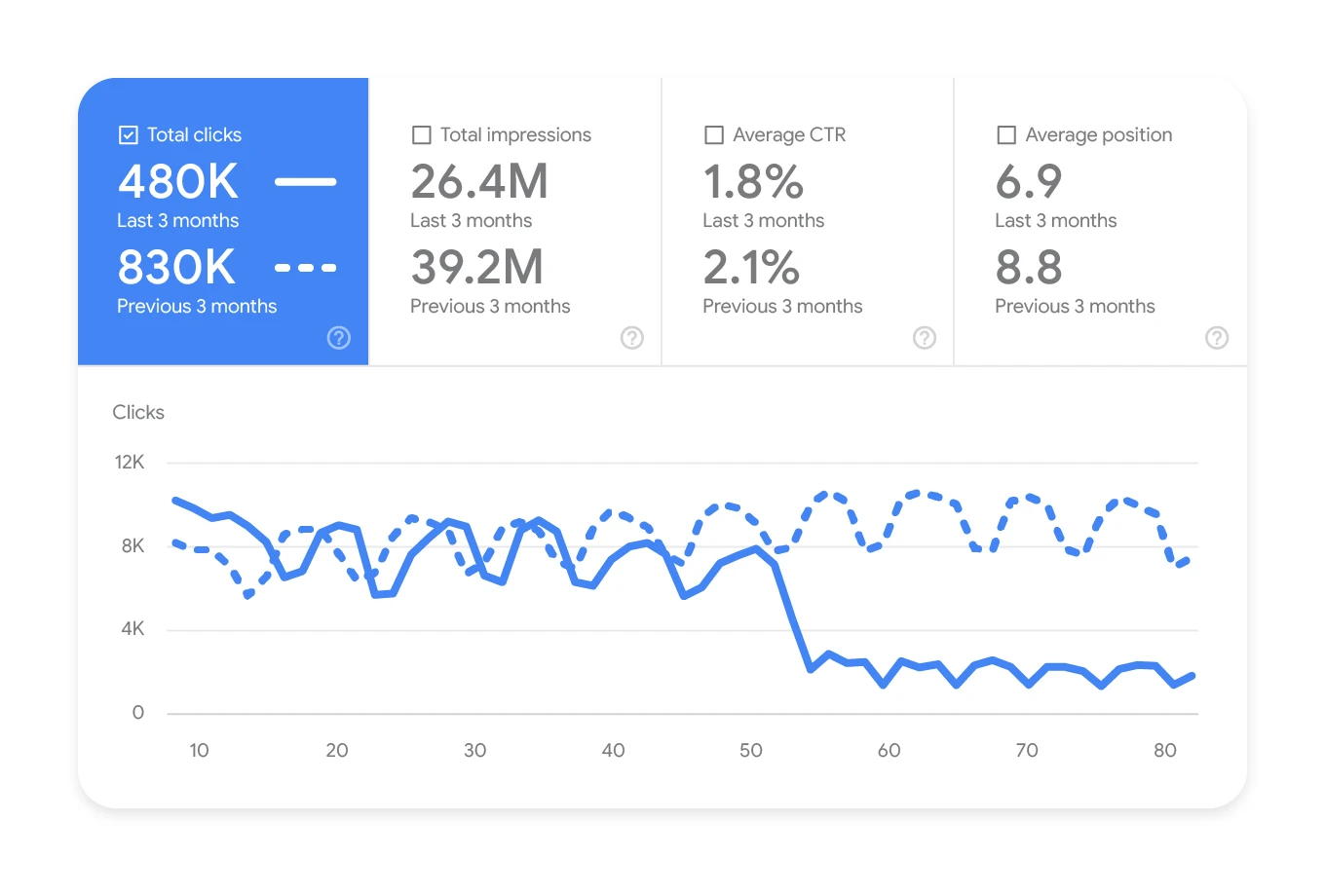
Such a drop is not, by definition, a penalty from Google. The problem is that more often it simply means: the algorithm has calculated the usefulness of the content, the match to intent or the quality of the page against current competitors in the SERP differently. It also happens that the update merely coincided in time with another issue, for example an incorrect canonical, a noindex, a template change or poorer rendering. That is why the starting point is not hunting for the culprit “update”, but calmly confirming the cause in the data.
In a real analysis, you look at specific groups of URLs, not the whole website as one chart. Separately, it is worth checking categories, guide articles, service pages, locations, product pages, as well as the split by mobile and desktop and by country. After an update, there is very rarely one universal fix for all page types. Most often, the problem affects selected URL templates or a specific type of query. And that is not a cliché, but everyday practice in analyses.
The practical point of such diagnosis is simple. You need to get to a list of pages and queries that were actually affected, and determine what they have in common. The end result should not be a general slogan like “improve the content”, but a specific map of technical and content causes, a backlog of changes and rules for further updates. Good diagnosis ends with a decision on what to fix first, and what not to touch. That saves time and, more importantly, limits the risk of making the situation worse through chaotic implementations.
Current context and conditions for assessing the drop
The context is simple. You need to check whether the drop is really linked to the Google update and which parts of the site were caught in the fallout. First, you compare the date of the drop in Google Search Console and GA4 with the timing of the officially communicated changes and with the earlier visibility trend. Then you separate a drop in clicks from a drop in positions, because these are often two different stories. If positions are stable and CTR is falling, the cause may lie more in the SERP than in the site itself.
Without segments, there is no diagnosis. An assessment only makes sense when you break the data down into pieces: the whole site or just one section, content type, device or a specific market. Only such a breakdown can reveal the real picture, for example a strong drop in guide articles with stable service pages, or a problem only on mobile. The question is what exactly is falling and where. Without segmentation, it is easy to aim in the wrong direction and implement a recovery plan that treats the wrong illness.
The update is not the only suspect. The assessment is also affected by factors independent of the changes in Google themselves: migrations, changes in the CMS, issues with robots.txt, noindex, sitemaps, canonicals, redirects, performance, JavaScript and internal linking. In practice, it is also worth checking whether important content is available without user interaction, whether soft 404s have appeared and whether Google still renders the key sections of the site correctly. A technical error deployed at the wrong moment is very easy to mistake for the effect of an update.
Content and UX can drag performance down even when technically “everything is correct”. You cannot reliably assess a drop without looking at content quality and user experience, because Google increasingly rewards sites that genuinely solve the problem, are up to date, readable and aligned with search intent, rather than just stuffed with phrases. If a site has thin descriptions, duplicated sections, aggressive ads, poor navigation or content written solely for visibility, an update usually only brings to the surface what was already not working. Instead of one screw to tighten, it turns out the whole mechanism is running crooked. In such situations, a technical fix on its own is usually not enough.
For a reliable assessment, the main tools used are Google Search Console, GA4, indexing reports, URL Inspection, crawling tools, server logs and a manual analysis of the current search results. Charts alone are not enough. What also matters is what the SERP looks like today for the most important queries: do how-to guides dominate, category pages, local results, video or Google’s expanded modules? The data clearly shows that this context makes a difference to interpretation. It is what allows you to decide whether the problem is indexing, content format, intent match or a change in competitors in the results.
How the diagnosis and repair process works for a site
Diagnosis and repair of a site is a march from data to specific changes on selected pages, not a major rebuild of the whole website. First you measure the scale of the drop, then assign it to page types and queries, and only at the end do you implement fixes. The key is to break the problem into segments, because after an update things rarely fall across the board for one reason alone.
The first stage is simple. You check exactly what got worse: clicks, impressions, average position or CTR. You break the data down by directories, URL templates, devices, countries and query groups, because only then does the real picture emerge. As a result, you quickly catch whether the problem concerns only advice articles on mobile or whether it is dragging the whole domain down.
The second stage is a technical audit, but carried out selectively, where the numbers show a real issue. On the table are: indexing, response statuses, redirects, canonicals, noindex tags, robots.txt, sitemaps, JavaScript rendering and mobile errors. If important content does not render properly or Google receives conflicting indexing signals, no cosmetic content changes will deliver the full effect.
The third stage concerns content and matching search intent. And this is where it gets interesting. You need to honestly assess whether the page actually answers the user’s question, whether it is up to date, complete and logically structured, rather than merely “on topic”. In practice, you compare it with what is winning in the results today: guides, category pages, local landing pages, rankings or another format that Google considers to better meet the need.
The fourth stage is trust signals and editorial quality. Not extras, but a layer that often tips the balance. This includes authorship, company information, contact details, sources, policies, brand consistency and the overall credibility of the site. This does not replace good content, but it helps when Google compares several similar results and looks for signs that this one is reliable.
The final stage is implementing changes by priority and calmly validating the effects. First you improve the pages and templates with the greatest business impact or the biggest loss of traffic, and then you monitor re-indexation, recovering queries and the behaviour of topic clusters. A good diagnosis ends with a backlog of changes with priorities, not a list of general recommendations in the style of “improve SEO”.
Practical steps to take after a drop in traffic
After a drop in traffic, start with a list of pages and queries that lost the most, because that sets the order of work. Without this, it is easy to chase symptoms. It is best to compare the period before and after the drop in Google Search Console and check where clicks, impressions or positions disappeared. Without such a list, you can “fix” visible problems that are not the source of the traffic loss at all.
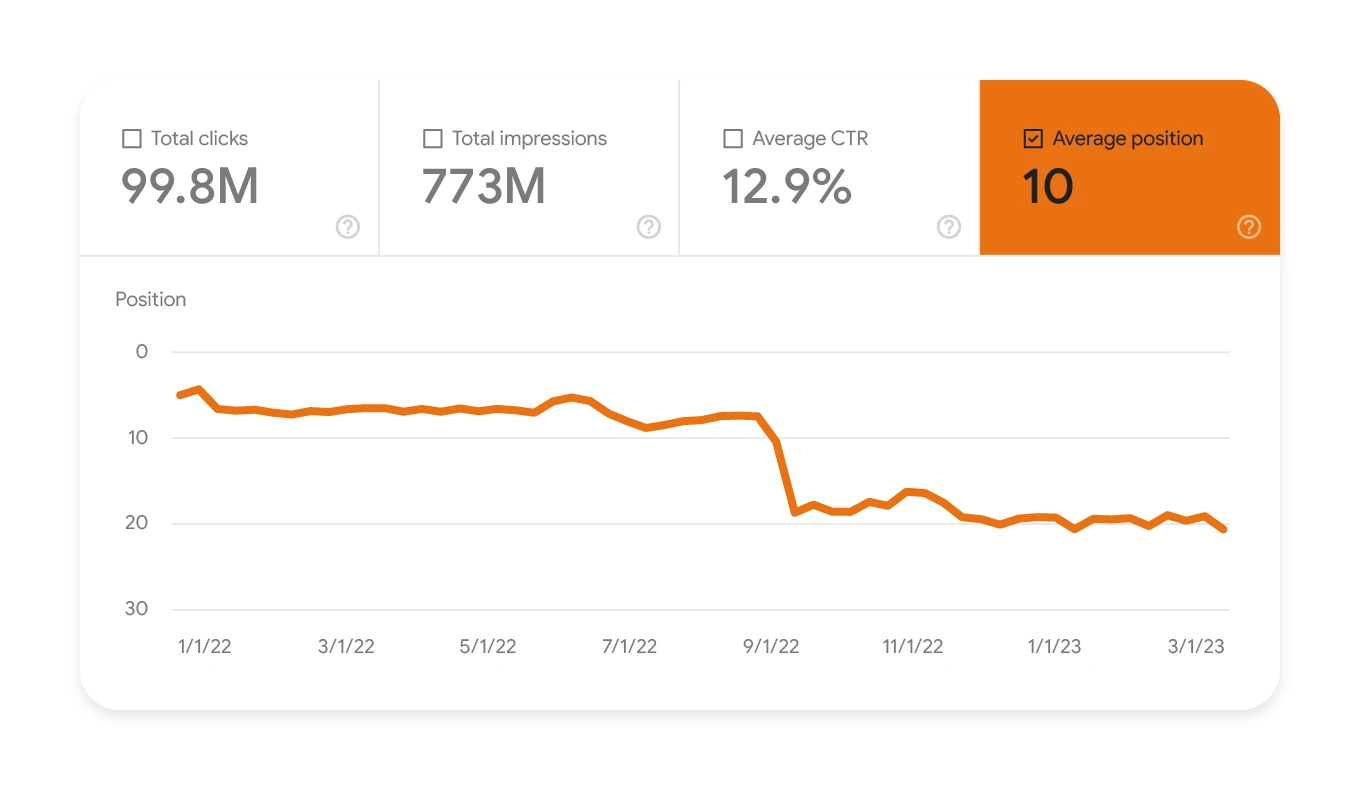
If the drop affects one section, act selectively. Do not touch the whole site just because one section has fallen. When the problem affects the whole domain, start with global things: the template, menu, internal linking, performance, ads, structured data and indexing settings. The question is what changed “everywhere”, because that usually leads to the cause faster than tinkering with individual texts.
In informational content, the usefulness of the answer usually wins, not the number of words. It sounds banal, but in practice it means specifics: updating facts, adding procedures, examples, limitations and usage conditions, while at the same time cutting fragments written solely for keywords. If several articles answer the same intent, it is often better to merge them than to breed keyword cannibalisation that ends up eating its own tail.
Service pages, local pages and categories must play to transactional intent. The user should quickly see the scope of the offer, area of operation, terms, any pricing, FAQ, contact details and a clear path to the next step. Are they really supposed to guess what you do and where you operate. A page that looks good from an SEO point of view but does not clearly answer the user’s need often loses out after quality updates.
Technical issues can hurt the most. Especially the ones you cannot see at first glance, but which then show up in the data. This includes orphan pages, overly deep click structure, soft 404s, incorrect redirects, ambiguous canonicals, poor rendering of JS sections and content hidden until the user interacts. Such small details can drag down the assessment of entire URL groups, even if a single page “on the face of it” looks fine.
- Do not rewrite the entire site using one template without diagnosis.
- Do not mass-delete content without checking its traffic, internal links and role in the structure.
- Do not assess the effects of changes after a few days if Google has not yet recalculated signals and refreshed indexing.
- Do not assume that link building alone will solve the problem if the main cause is content, intent or technical issues.
After implementation, look at the metrics that tell the truth about progress. The number of indexed pages, recovering queries, CTR after snippet changes, recrawling and visibility of the most important topic clusters will show whether you are moving in the right direction. Do not react to every daily spike or dip, because after updates the data often settles in stages. In the end, there should be a plan for further fixes, a review schedule and a clear map of which pages to update, merge or rebuild.
The most common mistakes and what to avoid in remedial actions
The most common mistake is making major changes without determining exactly what has dropped and where. If you do not distinguish whether the problem concerns rankings, CTR, indexing or only one section of the site, it is very easy to fix the wrong area. After a Google update, the most expensive mistakes usually come not from a lack of action, but from actions taken blindly. And that is not a cliché, but a cost that later shows up in traffic.
A common problem is assuming that every update means a penalty or the need to rebuild the entire site. That is a convenient simplification. In practice, a drop may be the result of a change in intent in the SERP, the growth of special modules or a specific type of content losing its edge. The key is to first establish what actually “shifted” the results. That is why there is no point immediately rewriting every text, turning the site structure upside down or removing large sections without a traffic and internal links map.
It is also a mistake to judge everything at domain level. That is a dead end. A drop often affects one directory, one URL template or one type of query, for example how-to content on mobile. The question is whether you can see that difference in the data. If you do not segment the data, you mix different problems together and lose the ability to set sensible priorities.
In content work, you need to avoid mechanical “SEO additions”. This is not cosmetic. Adding paragraphs around keywords, artificial FAQs, overlong introductions and duplicated sections usually does not improve usability; it just blurs the answer. Instead, a better result comes from cutting unnecessary fragments, making the answer more precise, updating facts, showing conditions of use and removing content that explains nothing. The data makes it clear: clarity wins over volume.
On the technical side, global changes made without checking the effects are dangerous. That is asking for trouble. Mass adjustments to canonicals, noindex, redirects, heading templates or JavaScript rendering can deepen the loss instead of limiting it. And that is not a cliché. Before rolling out a sitewide change, check on a small sample whether it improves indexing and visibility, not just tidies up the code.
You also need to be careful about drawing conclusions too quickly after implementation. Haste is costly. Google does not assess all changes immediately, and short-term fluctuations after an update are normal. Judging the results after two or three days leads to chaos, because the team starts rolling back good fixes or adding more changes without hard data. The problem is that at that point you no longer know what worked and what only created noise.
A separate mistake is focusing solely on external links as a universal cure. That is tempting, but it is a shortcut. The link profile matters, but it will not fix weak intent alignment, thin content, poor information architecture or indexing errors. Look at it this way: first improve what is fully under the site’s control, and only then assess whether the problem also concerns trust and authority. Otherwise you are pouring in fuel while the engine is still coughing.
What to measure and monitor after implementing changes
After implementing changes, you need to measure primarily whether Google is recrawling, reindexing and rating specific pages and topic clusters better. The result matters, not the impression. The most important thing is not individual rankings, but recovering clicks, visibility of query groups and the behaviour of the affected sections. The question is whether the trend is lasting or just temporary. Monitoring should confirm that the change solved the right problem, and not merely coincided with a natural fluctuation.
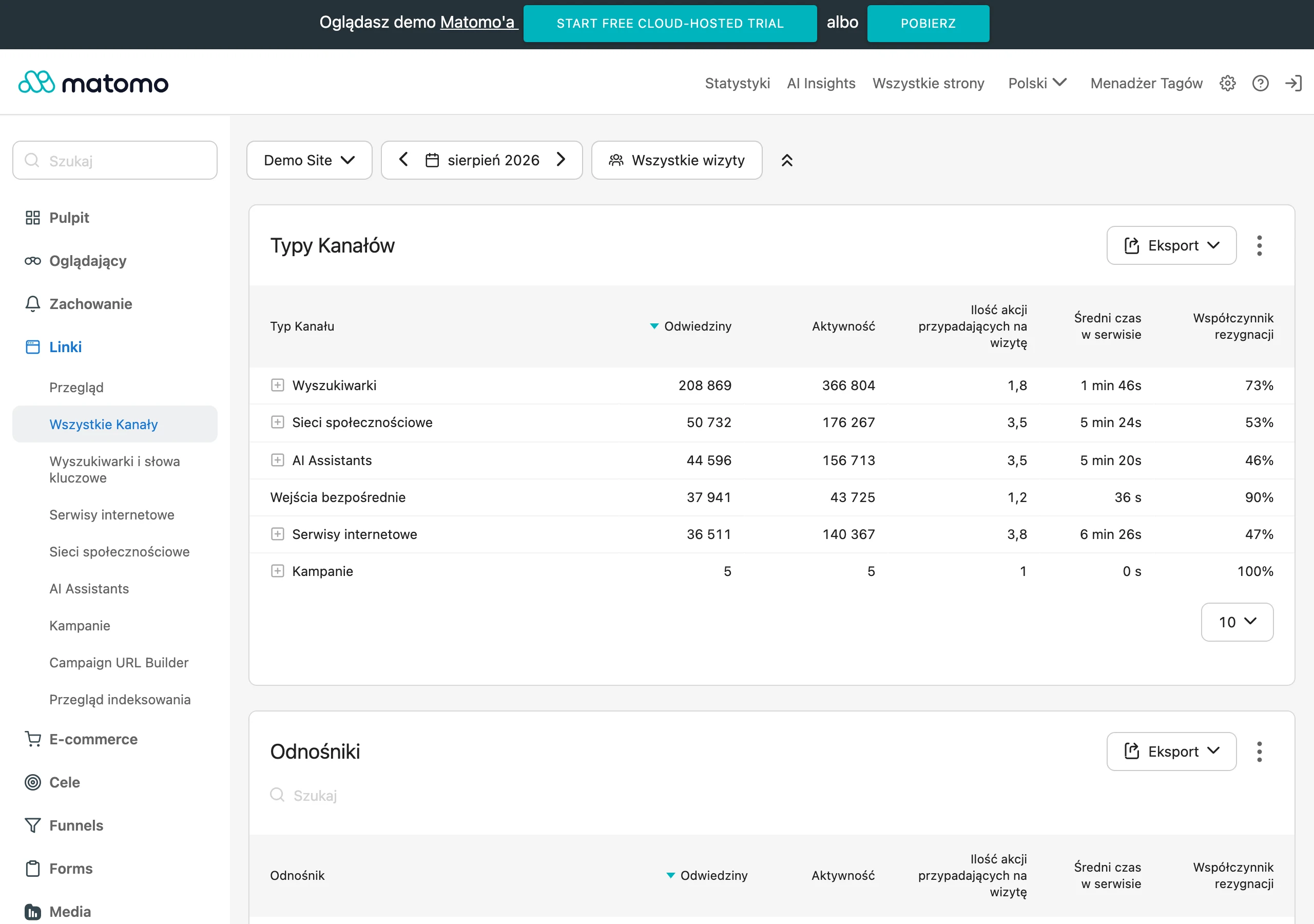
In Google Search Console, the numbers matter. Clicks, impressions, average position and CTR only make sense when you view them in segments, not in one nice-looking chart. Compare data for directories, page types, devices, countries and query sets that were hit hardest. That is how you distinguish a recovery in rankings from a situation where rankings are flat but CTR is rising after snippet changes.
Indexing is just as important. And here there is no room for guesswork, only checking: the number of indexed pages, statuses in indexing reports, URL Inspection results and whether issues with canonicals, noindex, redirects, soft 404s and content rendering have disappeared after the fixes. If important URLs are not indexed correctly, traffic analysis will start to lie, because the problem lies earlier than ranking.
The technical side also has to tell the truth. Monitor server response time, 5xx and 4xx errors, crawl logs and the behaviour of JavaScript-based sections. Thanks to logs, you can see whether Googlebot is returning to fixed URLs, how often it fetches them and whether it is not burning through crawl budget on low-priority pages. On larger sites, this can be a quicker signal of improvement than traffic changes alone.
In GA4, keep it specific. Focus mainly on organic traffic and its quality where you have actually made changes on the site. For service pages or category pages, also observe transitions to key steps, such as submitting a form, making contact or going to the offer. The question is: is the recovered traffic coming back to the right types of pages, rather than bouncing around random subpages. The point is not to attribute every conversion change to the algorithm, but to check whether the direction is healthy.
A good habit is to label deployments. And to do it consistently. Create a simple change log: note publication dates, the scope of fixes, the list of URLs and the purpose of the deployment, because without this, after a month it is hard to connect the effect with a specific decision. The most useful monitoring is the kind that combines data from GSC, GA4, the crawler and logs with a calendar of real changes on the site.
When assessing the effects, trend matters, not nerves. Look at weekly trends and before-and-after comparisons, rather than reacting to daily spikes and drops. The problem is that some fixes only start working after Google recrawls and re-evaluates the pages, so patient validation is more sensible than constant tweaking. If there is no improvement after a reasonable amount of time, go back to the diagnosis and check whether the cause was assigned correctly, rather than just “sounding logical”.
FAQ
Frequently asked questions
How do you check exactly what fell after a Google update?
First compare data from Google Search Console and GA4 to determine whether clicks, impressions, rankings, CTR or indexation dropped. Then break the result down by sections, page types, devices and queries.
Does a drop in traffic after a Google update mean a penalty from Google?
No, a drop on its own is not, by definition, a penalty. It often only means that the algorithm has judged the content, search intent match or site quality against competitors differently.
Why is it not worth rewriting the whole site straight away after a drop in traffic?
Because without diagnosis you may end up fixing the wrong area that actually lost visibility. The article emphasises that you first need to determine the cause in the data, and only then plan changes.
What data is most important when analysing a drop after a Google update?
The most important are Google Search Console, GA4, indexation reports, URL Inspection, crawling tools, server logs and manual analysis of search results. Charts alone are not enough, because you also need to see the SERP context.
When can a drop in CTR after an update result not from the site, but from search results?
When rankings remain similar, yet CTR still falls, the cause may lie in changes to the SERP. In that case, the problem may not be the site, but the layout and competitiveness of the results.
What technical errors can look like the effect of a Google update?
Such issues include, among others, an incorrect canonical, noindex, robots.txt, sitemap, redirects, JavaScript rendering problems, soft 404s and mobile errors. If they appeared at the same time as the update, they are easy to confuse with it.