

The drop in traffic after an update is a diagnosis, not a penalty from Google. The mere coincidence of dates can be misleading, because at the same time there may have been changes in the site, analytics or even the layout of search results. The biggest sin. Looking at one chart for the whole domain and drawing “revealed truth” from it. First you need to establish whether SEO really dropped, or whether it was only measurement, indexing, CTR or demand for queries. A good diagnosis, with no mercy, shows which segments were affected, since when, on which URLs and for what reason. Only then can you sensibly decide what to fix, what to monitor and what not to touch without hard evidence.
How do you diagnose a drop in traffic after an update?
A drop in traffic after an update is diagnosed when you separate the correlation with the update date from the actual cause of the decline. To start with, compare the moment of the drop with the Google update calendar, deployment history, content changes, hosting outages and shifts in analytics. If several things happened in the same time window, do not automatically assume the algorithm is to blame. The update date is a starting point, not proof.
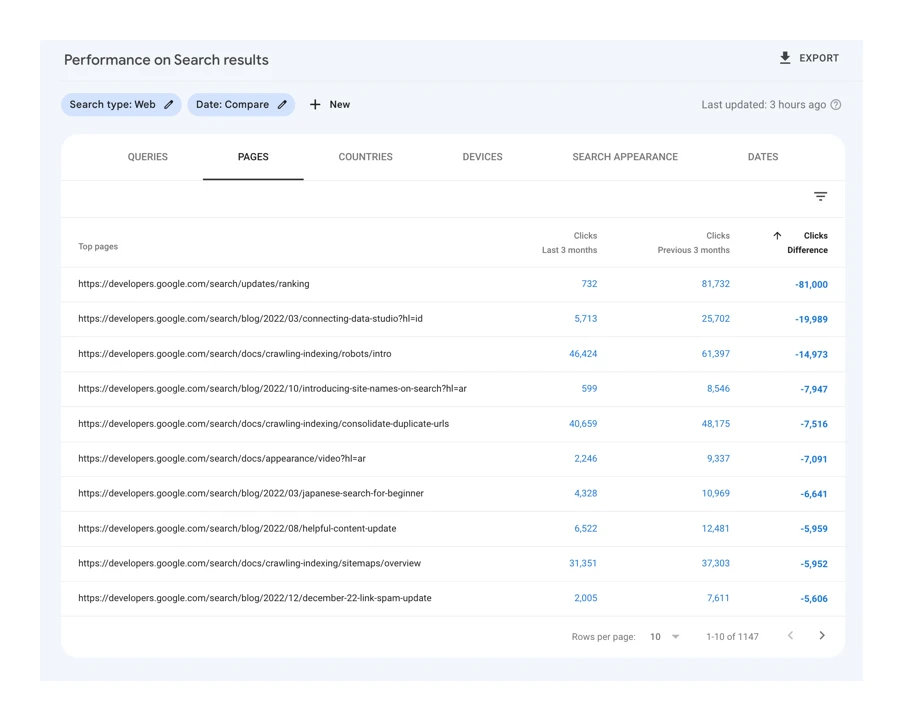
The second step is prosaic, but crucial. You need to confirm that the data is actually reliable. In practice, compare Google Search Console with GA4 and check whether tags have broken, whether consent mode has changed, whether traffic filters have been added or whether there are errors in the attribution of landing pages. When clicks in GSC are dropping and sessions in GA4 start behaving illogically, the problem often lies in measurement, not visibility.
The third step. Segments, not an average for the whole domain. Check countries, devices, directories, page types, templates, brand and non-brand and query groups separately. If the drop affects only one folder or one type of URL, rewriting the whole site en masse is usually a mistake. This kind of breakdown will quickly show whether the problem has a shared technical, content-related or business pattern.
Then you need to call things by their name. What exactly dropped: positions, impressions, CTR or the number of indexed pages. A drop in rankings more often suggests a problem with intent match, content quality, internal linking or competitive pressure. A drop in CTR at similar positions usually results from changes in the SERP, title, description or from modules such as AI Overviews, video or local results coming in. In turn, a drop in impressions and indexing points attention to crawl, rendering, URL statuses, canonicals, noindex and Page indexing.
At the end you build causal evidence, not a pretty description of the symptoms. Compare the pages that lost traffic with those that kept it, and check template changes, internal linking, server logs, recrawling and the indexing status. Only when the data shows a common decline mechanism can you prioritise fixes. Without that, it is easy to roll out costly changes that skirt around the source of the problem.
Key causes of organic traffic decline
A decline in organic traffic rarely has one cause. And that is not a cliché. It may be not only an algorithm update, but also measurement errors, deployment changes, technical issues, falling demand or reshuffles within the SERP itself. The key thing is that on a chart it looks similar, while in practice it requires completely different actions. That is why the question should not be “did Google penalise the site?”, but “what exactly stopped working?”.
The first group of causes sits in measurement and deployments. After changes to tags, consent mode, redirects, x-robots-tag headers, canonicals or JS templates, traffic can look lower even though the real problem is data collection or page availability for Google. This happens surprisingly often after “innocent” front-end tweaks. A typical scenario is an accidental noindex, faulty redirects or rendering that, after front-end changes, hides key content from the crawler.
The second group is technical issues and indexing. If the number of 4xx and 5xx errors grows, redirect loops appear, robots.txt blocks, inconsistent hreflangs or weak internal linking, Google may crawl the site less often and index it worse. When impressions drop together with index coverage, the first thing to check is the technical setup, not the content itself. The same applies when, after restructuring the URL architecture, some pages drop out of the index or lose canonical signals.
The third group is content quality and search intent fit. Pages can lose visibility not because they are “too weak overall”, but because they no longer match what Google shows today for a given query. The problem may be thin content, duplication, keyword cannibalisation, outdated information, a poor template or simply a weak main section of the page. If competitors cover the topic better or hit the intent more precisely, the drop in rankings is a natural consequence, not some mysterious punishment.
The fourth group consists of factors external to the site itself. Rankings may stay similar, but there are fewer clicks because the results layout has changed, new modules have appeared, marketplaces have taken the user’s attention, or demand for the topic has simply fallen. A stable position does not guarantee stable traffic if CTR and search volume are declining. The problem is that it is easy to look at only one metric and miss the rest. That is why you need to keep position, impressions, CTR and seasonality in one frame, instead of focusing solely on rankings.
Technical analysis and site optimisation
Technical analysis is checking whether Google can still correctly find, fetch, render and index the pages that previously delivered traffic. A simple question, a blunt answer. If that process has broken somewhere, the drop does not have to come from an algorithm update, but from an implementation or infrastructure issue. First, you need to determine whether the problem concerns URL accessibility, indexing, rendering or internal linking, because the entire fix plan depends on that.
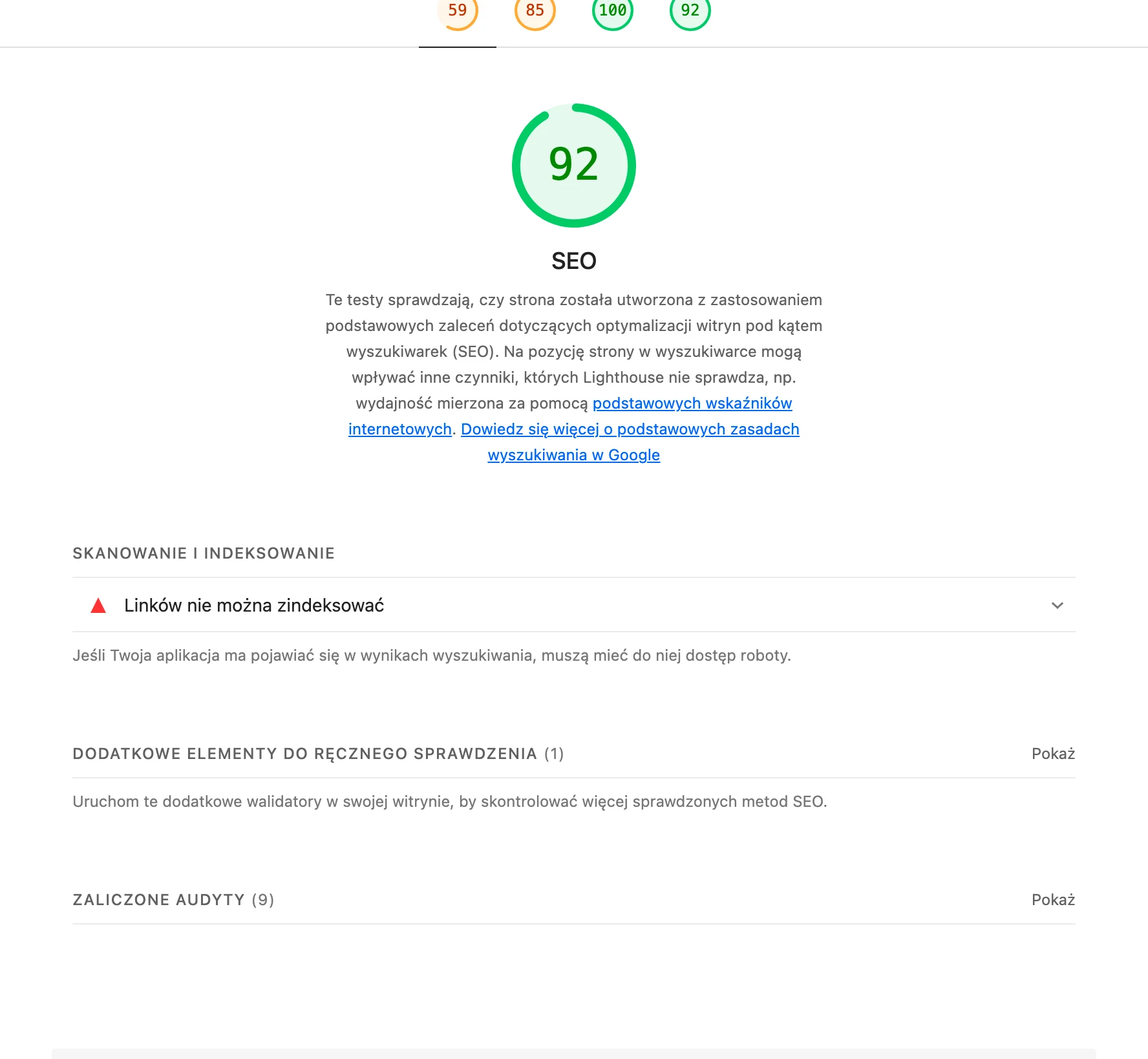
In practice, the starting point is simple. You compare the state “before” and “after” the drop, and then, without sentiment, you check 3xx, 4xx and 5xx statuses, changes in robots.txt, x-robots-tag headers, noindex tags and canonicals. The problem is that even a minor template tweak can cut a large part of the site out of the index or push Google towards incorrect canonical URLs.
If impressions and the number of indexed pages have dropped, there is no time for guesswork. The priority is the indexing report, inspection of specific URLs and a crawl of the entire site, because these show what Google actually has on its radar. You need to establish which directories or page types disappeared from the index, which are crawled less often, and whether the sitemap still reports the correct URLs. A drop in clicks alone explains nothing if you do not know whether the pages are still present in the index and whether Google can see their current version.
Most problems show up after frontend and JavaScript changes. A page may look “normal” to the user, yet Google may not see the main content, internal links or elements that determine indexing. That is why you should compare the source code, rendered HTML and URL inspection result, especially for the templates that have taken the biggest hit recently.
A separate topic is internal linking and site architecture. When important pages lose links from the menu, listings, breadcrumbs or related content sections, their significance within the domain simply drops. And here is the catch: you do not always see it at site-wide level, but at the level of a specific directory or a single template type the picture becomes brutally clear.
On top of that come performance and stability. An increase in server errors, timeouts, unstable hosting or a deterioration in Core Web Vitals does not always push rankings down immediately, but it can throttle crawling and damage the user experience. If the drop started at the same time as a deployment, migration or template rebuild, look for the cause in the technical changes first, and only then in the update itself.
Optimisation after diagnosis should not be mass or chaotic. Instead of applying fixes “across the board” — correct the specific errors on the affected templates, roll out changes in stages and monitor recrawl and reindexing. That is exactly how you distinguish real improvement from a random traffic rebound.
The role of SERP changes and their impact on traffic
SERP changes hit traffic when rankings look similar, but people click less because the search results have started to look different from they did not long ago. This is one of the more frequently ignored reasons for a drop after a supposed “update”. Google may not reduce a page’s visibility, yet still take away part of its clicks by adding new modules and changing the layout of the results. The question is: did the ranking fall, or did the click-through rate fall.
The simplest signal looks like this. Impressions are stable or growing, average position is not changing significantly, and CTR is dropping; the data speaks clearly. In that case, the problem may not be the quality of the site, but competition within the results view itself, which suddenly becomes denser. Above the classic results you may see local modules, video, images, marketplaces, rich results or AI-generated answers.
In such a situation, analyse queries, not just landing pages. For some keywords, the intent can shift, and with it the set of results that Google considers most useful changes. If a query that previously drove clicks to an article now shows mainly comparison sites, videos or local results, simply “adding more content” will usually not bring back the previous traffic.
The SERP layout can change overnight. Informational and broad keywords usually take the hit, because the user gets the answer faster and simply clicks less, even if your page is still high up. The problem is that visibility alone does not pay the bills. That is why you should look at clicks, impressions, position and CTR for groups of queries at the same time, not just total organic traffic.
Seasonality and ordinary shifts in demand also affect declines. If interest in the topic has weakened, traffic will go down even with unchanged visibility, and without any “failure” along the way. The same happens when queries shift from broad keywords to more specific, branded or transactional ones that a given section of the site simply does not cover. And then you can optimise endlessly, and the result will still be poor.
The conclusion is simple. When rankings fall, you look for the problem in quality, technical issues or intent match, and when rankings are similar but CTR falls, you break down the SERP and the way the result is presented. This distinction saves a lot of unnecessary changes, because not every drop in traffic can be fixed by rebuilding the site.
If the layout of the results is the culprit, actions have to be selective. It is worth refining the title and description, implementing correct structured data where it makes sense, matching the content format to the current intent, and calmly assessing whether a given keyword group is still a realistic source of clicks. The question is: should you fight for the old CTR at any cost, or shift the focus to other query clusters. Sometimes the best decision is not to battle for a fraction of a per cent, but to change direction towards areas that still have traffic potential.
Importance of content analysis and matching user intent
Content analysis and intent show whether the page still answers what the user and Google expect from a given query. This is most often where the problem lies when everything looks technically correct, yet rankings or traffic still fall. The key point is that this is not some magic “penalty”, but rather a poorer match to the current results layout and the user’s real needs. If the query intent has changed, simply improving a few paragraphs is usually not enough.
In practice, you do not analyse the “content of the whole domain”, only specific groups of pages. You need to check which directories, template types or topic clusters lost visibility and whether they share a common pattern. Often it turns out that the problem affects only one type of landing pages, while the rest of the site remains stable. And that changes the conversation: instead of moving everything at once, you target the place that is actually leaking.
The most important question is simple: does this page answer the same type of need that Google now shows in the SERP. If guides, rankings, category pages or local results have started to dominate the query, and the site is delivering a completely different format, the drop is often simply a consequence. You do not assess content in isolation from the real search results, but by comparing it with what actually occupies the top positions.
The second thing is the quality of the page itself. Is the topic really developed, current and useful, or does it merely skim the surface, duplicate other people’s paragraphs or rely on a template that adds little. Thin content, duplicated sections and outdated topics often lose not because they are “bad”, but because other pages satisfy the intent more precisely and faster. This is especially visible on large sites, where similar URLs multiply.
Another issue is keyword cannibalisation. It happens often. When several subpages target very similar queries, Google can rotate URLs, destabilise rankings or choose a less relevant page than the one the team wanted to promote. If, after a drop, you can see URLs being swapped in Search Console, it is often a sign that you need to tidy up the content architecture, not rewrite everything from scratch.
Comparison tells you the most: pages that lost out, set against pages that held on or improved. This setup quickly exposes whether the problem is weak core sections, out-of-date information, lack of specifics, a poor heading structure or insufficient trustworthiness of the page content. In practice, the best approach is to analyse the differences between “winners” and “losers” within the same domain, because it cuts out a large part of vague assumptions. And leaves you with what is measurable.
Matching intent also includes elements that are not the text itself. Internal linking matters, as does the way the answer is presented, the visibility of key information above the fold and the template’s alignment with the user’s goal. A page can have correct content, but if the most important answer is hidden, stretched out or covered by template elements, effectiveness drops. The question is: does the user get the answer straight away.
The most common mistake after an update is mass rewriting of content without confirming which pages and which topics were actually hit. It is better to start with a few representative clusters, review the changes in the SERP, compare templates and only then plan fixes. That cuts the chaos. And reduces the risk of worsening pages that were working well before.
What data should you collect and how should you interpret it?
For a reliable diagnosis, data needs to be gathered from several sources and read together, not in isolation. A drop in clicks in one report alone will not tell you whether the problem is rankings, CTR, indexing, demand or a simple measurement error. The minimum set is Google Search Console, GA4, implementation history, a technical crawl, HTTP status monitoring and, if possible, server logs. Without connecting the data, it is easy to confuse correlation with the real cause.
In Search Console, look at clicks, impressions, average position and CTR. But always in segments, because that is where the mechanics of the drop become visible, not just a nice averaged chart. The most useful breakdown is by country, device, directory, page type, URL group, brand and non-brand, and query clusters. A “whole domain” view can be like fog that hides what has actually fallen.
Interpretation starts with recognising the symptom. And there is no magic here, only discrepancies in the data. If impressions and the number of indexed pages are falling, the problem more often lies in indexing, accessibility or URL quality. If impressions are holding steady but clicks are dropping, you need to look into CTR, check snippet changes and the SERP layout. If, however, the average position drops for a specific segment, only then does it make sense to break down content, intent and competitiveness.
Data from GA4 lets you confirm whether the drop in organic traffic is real. And more importantly: whether it translates into user behaviour, not just a chart in a report. First, though, you need to be sure the measurement works: tags, consent mode, traffic filters, attribution and landing page tagging. The problem is that a “SEO drop” quite often turns out to be an implementation error or a change in reporting method.
A site crawl shows you what you will not see in traffic alone. Hard facts, without interpretative fluff. Gather 3xx, 4xx and 5xx statuses, check noindex, canonicals, robots.txt blocks, JS rendering errors, the internal linking structure and template changes. If many pages suddenly changed status or stopped being sensibly linked, that is stronger evidence than the mere coincidence with the date of the update.
Server logs and HTTP response monitoring make a difference, especially on large sites. Without them, it is easy to shoot in the dark. They show whether Googlebot is still visiting key sections, whether crawl has weakened, or whether server errors or longer response times have appeared. This makes it possible to distinguish a ranking problem from a problem with Google fetching and processing pages.
For interpretation, a “before and after” comparison for the same URLs and a comparison of winning and losing pages works brilliantly. It is a simple method, but ruthlessly effective. Look not only at the fact that something fell, but exactly where, since when and with what symptom. If the drop concerns only one folder after a new template rollout, then the update hypothesis moves into the background.
A good practice is one diagnosis spreadsheet. One, not five scattered notes. For each segment, record: the date of the drop, scale, symptom in GSC, indexing status, technical changes, content changes, SERP type and working conclusion. Such a record organises the work and lets you prioritise, instead of reacting nervously to individual charts.
The most important thing is that every interpretation ends with a decision. Without that, you are left with only comments on the data. When indexing drops, the priority is URLs, crawl and rendering. When rankings drop, the priority is content alignment, keyword cannibalisation and internal linking. And when CTR drops with similar positions, analyse titles, descriptions, rich results and changes in the SERP itself, rather than rebuilding the whole site.
Practical steps to monitor and improve performance
Monitoring and performance improvement is about implementing changes in the order resulting from the diagnosis and checking whether the “affected” segments are actually recovering. After analysis, you need to move from the level of hypotheses to the level of control: what we change, on which URLs, from when, and what effect should appear. The biggest sin at this stage is fixing everything at once, because then it is impossible to fairly say what actually worked. First you fix the issues that block indexing, crawl or site accessibility, and only then do you optimise content and CTR.
It is better to shape the action plan according to the symptom, not according to the department in the company. It is a simple rule. If impressions and the number of indexed pages have fallen, the priority is indexing, URL statuses, robots, canonicals, rendering and server errors. If rankings have dropped while the index remains stable, intent, content quality, keyword cannibalisation and internal linking come to the fore. And if positions are similar but clicks have fallen, you need to work on CTR and check whether the results layout itself has changed.
Deployments are best done in stages, on a limited group of addresses. That is safer. It can be one directory, one template type or a group of pages with the same problem, so that the signal does not get lost in the background. A test on a small sample gives a much better signal than a mass change across the whole domain, whose effects cannot then be separated. In practice, this applies especially to changes in templates, headings, main content sections, internal linking and structured data.
Every deployment should have simple documentation. And that is more important than it sounds. All you need is the date, a description of the change, the URL scope, the task owner and the expected effect, for example a rise in the number of indexed pages or CTR improvement on a specific type of landing page. Without such a log, it is easy to confuse the impact of your own fixes with another Google rollout or seasonal fluctuations in demand. And then the discussion in the team turns into guesswork.
Monitoring should be carried out on the segments that previously showed a problem. Not on the “domain average”. The most practical approach is to observe directories, page types, devices, countries, brand and non-brand, and specific query groups separately. The average for the whole domain often hides the real effect, because growth in one area can mask a further drop in another. That is why a “whole site” report makes sense as background, but not as the main progress metric.
To assess the effects, it is worth combining data from several sources rather than looking at a single chart. In Google Search Console, you should check clicks, impressions, position and CTR for the same pages before and after deployment, preferably in comparable time windows. In logs and technical monitoring, you can see whether Googlebot has returned to the problematic URLs, whether the number of errors has fallen and whether the new versions of the pages are actually being crawled. If the problem concerned rendering or accessibility, improvement in the clicks chart usually comes later than improvement in technical signals. That is how this system of connected vessels works.
SEO results need to be viewed with the right delay. Some technical changes can flash a signal after the next crawl and reindexation, but improving content or internal architecture usually takes more time, because Google has to digest the new state of the pages and compare it with the competition here and now. The lack of an immediate rebound does not automatically mean the change was bad; first you need to check whether it has been noticed, rendered and indexed.
You also need to distinguish stopping the decline from a full recovery in traffic. It is not the same thing. Sometimes the “win” in the first stage is stabilising indexation, reducing 5xx errors or recovering some impressions in one directory, even if the overall picture still looks weak. Only then is there room for further growth and refining advantages. There may be no fireworks, but the fact is that this approach leads to better decisions than believing that one round of fixes will reverse the entire trend.
If you cannot see improvement after the deployments, you should not instinctively increase the scale of changes. The question is whether the diagnosis was accurate: whether the chosen cause really explains the decline, whether the symptom was read correctly and whether the problem does not lie higher up, for example in a change in query intent or in a reshuffle of the SERP layout, which recently can turn results upside down. The safest method is iteration: one confirmed hypothesis, one deployment, one validation of the effect.
The final goal is not “fixing the site after an update”, but regaining control over the process. And that is not a cliché. When you have a list of affected segments, priorities for changes, a deployment history and constant monitoring, you stop guessing and start managing. Then, even if the cause really was a Google update, you respond to the specific effects on the site rather than to the narrative around the update itself.
FAQ
Frequently asked questions
How do you diagnose a traffic drop after a Google update?
First, compare the date of the drop with updates, deployments, content changes, hosting outages and analytics issues. Then check what dropped: rankings, impressions, CTR or indexing.
Does a traffic drop after an update always mean a penalty from Google?
No, the dates lining up is not proof. The cause may also be measurement errors, site changes, technical issues or lower demand for queries.
Why is it worth checking GSC and GA4 when traffic drops?
Because a drop in clicks in Search Console and illogical session behaviour in GA4 often points to a measurement issue, not visibility. It is also worth checking tags, consent mode and traffic filters.
What segments of the site should you analyse instead of looking at the whole domain?
Check countries, devices, directories, page types, templates, and brand and non-brand separately. This breakdown will show faster whether the problem concerns technical issues, content or the business.
What does a drop in CTR with similar positions mean?
Most often the issue lies in changes in the SERP, not on the site itself. New modules may have appeared, the results layout may have changed, or the title and description may be less effective.
How do you tell whether the problem is technical and related to indexing?
If the number of impressions and indexed pages drops, you need to check crawl, rendering, URL statuses, canonicals, noindex and robots.txt. An increase in 4xx and 5xx errors can also limit indexing and crawl.