
Enquiry leads rarely have a single source. That is why their origin is checked at the intersection of analytics, forms, phone calls and CRM, rather than in one report. In practice, it is not about a simple “the lead came from Google, ads or social media”. You need to determine which campaign, which subpage and at what point in the user journey actually led to the contact. The most common mistake is looking only at the “last click” report, which cuts off earlier visits and then distorts budget decisions. On top of that, some enquiries come in by phone, email or chat, so GA4 on its own usually does not show the full picture. This article shows how to check it so the result can be translated into concrete decisions.
What checking the sources of enquiry leads involves
Checking the sources of enquiry leads means establishing exactly where the contact came from. And which data confirm that path, step by step. The unit of analysis here is not a “website visit”, but a specific enquiry from a form, phone call, email, chat or booking system. So first you need to clearly separate what counts as a lead in the company and what is just a general enquiry. Otherwise you end up comparing things that are not comparable.
In practice, the source of an enquiry is pulled from several layers of data. The key ones are: the user acquisition channel, the campaign, the landing page, the referrer, UTM parameters, the conversion event and the data recorded at the point of contact itself. It sounds technical, but the stakes are purely business-related. If the form does not save the source, medium and campaign, it becomes very difficult later to assess reliably what really works. And then the budget starts going where it should not.
For this kind of analysis, GA4, Google Search Console, the ad platform, CRM, the form panel, call tracking and tag manager are used most often. Analytics reports alone are not enough. They show only a slice of the history and often do not cover what happens on the sales side. Only by combining data from several places can you distinguish between channels that generate enquiries and those that deliver only traffic.
The final goal is not attribution theory. It is about a concrete map of marketing activities that can be used in the budget week, not in a presentation. Such a view should show which campaigns and subpages deliver contacts, where measurement breaks down and which forms or phone numbers do not pass the source. The most useful outcome is not “how many leads there were”, but “what the quality leads came from and where we are losing attribution”. The question is whether we are measuring impact or just clicks.
The current context of enquiry measurement
Today’s measurement context is simple. A standalone analytics report very often is not enough to determine the true source of a lead. Some contacts are created outside the form, for example by phone, by replying to an email, clicking the number, or returning to the site after a few days. And that is when the classic discrepancy starts: the result in one tool may be technically correct, but business-wise incomplete. And that is a difference that can cost more than one poorly targeted campaign.
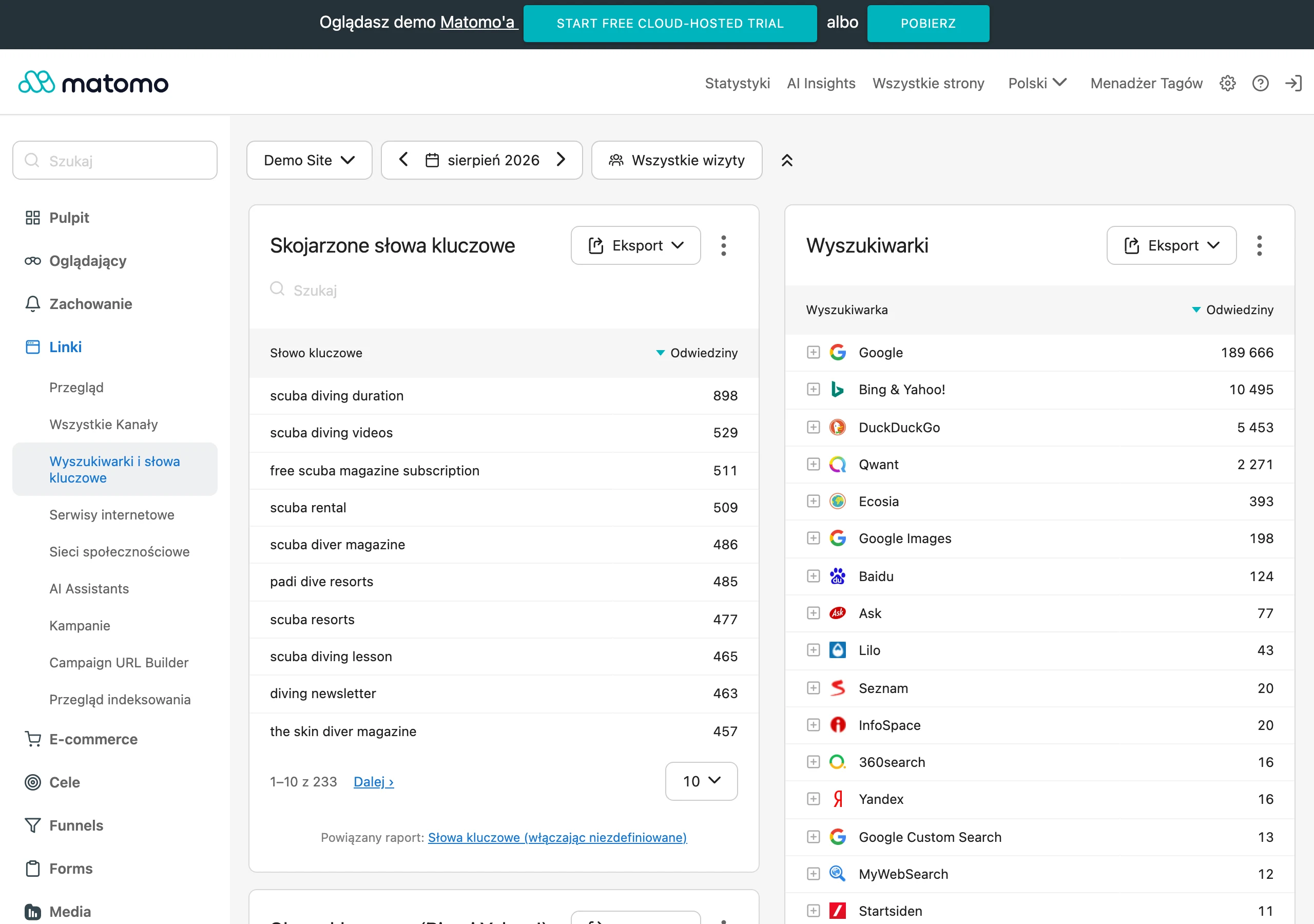
Data gaps are now part of everyday life. Cookie limitations, refusals of marketing consent and smarter browsers all play a part, so some traffic and conversions end up as direct or unassigned, even though the user previously came from a specific campaign. So where does this “direct” come from? That is exactly why you need to combine CRM, form logic, landing page reports and ad data in parallel, instead of trusting one convenient view.
The second pain point is the GA4 implementation. Since the system is event-based, a wrongly configured form submit, missing cross-domain tracking or inconsistent campaign naming can throw reports and the whole interpretation of results off within days. The most common cause of bad conclusions does not lie in the marketing channel itself, but in incorrect or incomplete measurement.
In practice, the winner is not the person looking at the “last source”. A user may first reach the company through SEO, then return from a brand ad and only then send an enquiry, so simple attribution becomes misleading. And when a company sells by phone or operates locally, without call tracking and a distinction between sales and technical calls, the picture will be incomplete and some enquiries will receive an arbitrary label.
What the analysis process looks like in practice
The analysis starts simply and ends with decisions. First you move from the lead definition to data integration and extracting decisions that can actually be implemented, not just described in a report. You need to establish exactly what counts as an enquiry. For one company it will be a submitted form and a phone call, for another also chat, email or a booking. If the lead definition is imprecise, the whole subsequent report mixes valuable contacts with random messages.
Then it is time for a measurement audit. You check whether forms record the source of the visit, whether clicks on the phone number and email are measured, whether events in GA4 fire correctly and whether UTM parameters disappear after redirects. The key thing is that this is where technical faults most often come to light, completely invisible before, even though the form “looked” as if it was working properly.
The next step is consistency in naming. The point is to ensure that campaigns, channels and sources all use one naming scheme across ads, mailings, partner links and CRM entries, rather than several parallel dialects. Without consistent UTMs and source/medium mapping, some leads fall into direct or unassigned, and then comparing channels loses its point.
At the end, you need to attach the source data to the contact itself. In the form, it is worth storing at least source, medium, campaign, landing page, referrer and the record identifier, and if possible also first touch and last touch, because otherwise analytics ends in guesswork. For phone enquiries, you need call tracking or at least separate numbers by traffic source. Without this, a significant share of enquiries will not be attributed at all.
Once the data has been collected, it is linked with CRM, GA4 and advertising platforms. Simply, but without mercy for shortcuts. In practice, this is done through the client ID, date, campaign, landing page, phone number or another stable key that does not change with every refresh. The effect is concrete: you can see not only the last visit, but also earlier interactions. And you can check whether the user first came from SEO, then returned from an advert and only then sent an enquiry.
At the end, there is quality analysis and loss diagnosis. This is the moment of truth. You need to filter out spam, tests, service requests, recruitment and existing customers, because otherwise campaigns acquiring new contacts look better than they really are. Only after such cleansing can you see which channels and which subpages really generate valuable enquiries, and which only produce noise.
What to do to make the analysis result useful
A useful result does not come about by chance. You need to ensure that every lead has as full and comparable a source description as possible, otherwise you are comparing apples with pears. One thing is key: one campaign and channel dictionary, used consistently across all activities. If newsletter, Meta ads and Google Ads campaigns are labelled according to different rules, the report will show fragmented and therefore misleading data.
In practice, you need to make sure that every form records the same source fields, and that the CRM stores them without overwriting. It is a detail that makes all the difference. This is especially important where the user returns several times before contacting you or moves between domains and subdomains. The most common operational mistake is not a lack of traffic, but the fact that the traffic source does not reach the form or gets lost before being saved to the CRM.
A useful result must show not only the number of leads, but also their quality. Raw volumes are not enough. That is why it is worth combining marketing data with CRM status: new lead, qualified, quote sent, won, lost. A contact on its own tells you little, because some sources generate a lot of enquiries, but few real sales opportunities.
You also need to look beyond the last click. The question is: where does the journey really begin. In many industries, the first visit comes from organic content or a local service subpage, while the conversion is only completed after returning from a brand campaign or remarketing. If you analyse only the last click, it is easy to underestimate SEO, content and pages that start the journey to an enquiry.
A good analysis result should also be resilient to technical changes. Without this, the report only lives until the next implementation. After any major site update, you need to check forms, events, redirects, consent and cross-domain, because that is when measurement most often breaks down. The most useful report is not the most extensive one, but the one you can trust when making decisions about budget, content and on-site fixes.
The most common errors and limitations in measurement
The most common measurement mistakes are straightforward. The contact source disappears, campaign tags take on a life of their own, and data from forms, phones and CRM are not linked together. In practice, the report looks “good” only at first glance, because some enquiries end up in direct, unassigned or are attached to the wrong channel. And that is exactly what comes to light after site changes, after implementing a new form or after moving to an external lead management tool.
A classic example is a form that works perfectly for the user. The problem is that, along the way, it does not save UTM parameters, the landing page or the referrer, so all that remains in the system is a “bare” contact. The salesperson sees a new enquiry, but cannot determine whether it came from SEO, adverts, e-mail marketing or a direct visit. If the source is not recorded at the moment the form is submitted, reconstructing it later is often only an approximation. And approximations can be costly when you are accounting for budget.
From here it gets technical. Errors in analytics and attribution, such as misconfigured submit events, lack of cross-domain, misdirected redirects and different UTM standards, mean that the same campaign appears in reports under several names or loses its source when moving between domains. The result is paradoxical, because it looks like “more data”, but in reality it is a mismatch in definitions. On top of that come the limitations of consent, browsers and cookies, so even a correct implementation will not show the full picture for every user. The question is whether you know where measurement ends and guessing begins.
Another major limitation is looking only at forms. If a company collects a lot of contacts by phone, e-mail or chat, GA4 alone will show only a slice of the real result. Without call tracking, or at least distinguishing numbers by channel, it is hard to assess honestly which activities really deliver demand and which only pump up traffic. The tables will look nice, but not necessarily sales.
A separate topic is lead quality. Spam, tests, service enquiries, recruitment enquiries and messages from existing customers can artificially inflate a channel’s “effectiveness”. If you do not separate new sales enquiries from other contacts, budget optimisation will be based on a false result. And a false result has the characteristic that it looks credible until you start calculating the cost of acquiring real opportunities.
Another limitation is reading reports too simply. The last-click model often rewards the channel that closes the contact, and ignores earlier visits from SEO, content or a remarketing campaign. So instead of trusting a single “source” column, it is better to compare the result with landing pages, user paths and the lead status in the CRM. Only this puzzle shows what works and what only looks good in the report.
What optimisation decisions can be made
Analysing the sources of enquiries gives very concrete decisions. You can see where to add budget, what to improve on the website and which measurement errors to remove first so you stop making decisions blindly. The key is to look not at the number of contacts alone, but at their quality and the subsequent sales status. A channel with a lower number of leads may be more valuable than one that delivers a mass of random messages. And that is not a cliché, just everyday life in reports.
The first group of decisions is simple. It is about budget and campaigns, that is, where valuable enquiries are actually being generated and where there is only “traffic spinning”. If specific campaigns, keywords, ad groups or creatives deliver quality leads, you increase their share at the expense of weak sources. If, on the other hand, leads come in but stop at the CRM stage, it is better to cut delivery, narrow targeting or replace the message rather than mechanically add budget.
The second group of decisions concerns entry pages. They do the heavy lifting. When the analysis shows that enquiries are being collected by a few specific service, local or advice pages, it makes sense to boost precisely those places: the content, CTA, form, information layout and response speed. Often, more effect comes from refining one strong page than from increasing the budget across the whole channel.
The third group is fixing measurement and lead capture itself. Without that, you are stumbling in the dark. If some contacts come in as direct, you need to tidy up UTM parameters, passing parameters to forms, cross-domain tracking, events and the source saved in the CRM. This usually will not immediately increase the number of enquiries, but it will let you stop making decisions based on skewed data.
The findings can also hit the offer and contact handling. And that is often the most painful part. If one channel delivers a lot of enquiries but they are poorly matched, the problem may lie in overly broad messaging, an unclear form or poor qualification on the sales side. Analysing sources only makes sense once you know which leads are truly sales-worthy and which merely burden the team.
In practice, it usually ends with a list of specifics. Not necessarily a long one, but a sharp one. This is usually a budget shift, improving a few landing pages, implementing call tracking, standardising UTM and filtering leads in the CRM. And it is exactly these decisions that create a useful effect, because they tie marketing, measurement and sales into one process instead of keeping the data in separate tools.
Why it is worth integrating CRM with analytics
Integrating CRM with analytics is about checking not only where a contact came from, but also what happened to it later in sales. The question is: was it a customer, or just a “click”? A form submission in GA4 or in the ad platform itself only tells you that someone took an action. Only the CRM shows whether it was a real customer, an irrelevant enquiry, a duplicate, spam or a contact from an existing customer. Without this, it is easy to treat a channel as effective simply because it generates a lot of forms, not because it delivers valuable sales opportunities.
The biggest benefit of connecting the data is straightforward: you evaluate sources by the quality of leads, not just by their number. In practice, it often turns out that a campaign with fewer contacts delivers more sales conversations, proposals and won deals than a high-volume channel. This changes budget decisions, because you start optimising for sales rather than for conversion alone.
CRM can also tidy up what ruins marketing reports. And that is not a detail. If salespeople mark a record as service, recruitment, partner, existing customer or test, such contacts can simply be excluded from the assessment of activities aimed at new enquiries. This means SEO, Google Ads, Meta Ads or email marketing are not judged on leads that look fine on paper but are sales-wise empty.
The integration only makes sense when both systems speak the same data language. Ideally they are linked by a shared identifier or at least a consistent set of fields: date, source, campaign, landing page, contact type and lead status. In simpler implementations, it is enough for the form to send source, medium and campaign parameters to the CRM. In a better model, you add first touch, last touch, customer ID, campaign number and device information, and then you link it to the sales stages. If the CRM does not store the source at the moment the record is created, later analysis is usually just guesswork.
With a long decision-making process and many touchpoints, this connection makes a difference. The question is: where did the sale really begin? A user may first come in via SEO, then return from a brand ad, and finally call after a few days and only then reach sales. In the CRM you can see whether such a contact moved further along, and in analytics you can check which channels supported it earlier. Only by combining these two perspectives do you see the real contribution of marketing to winning the enquiry.
In practice, this integration also tidies up the marketing–sales relationship. No more reporting solely on cost and the number of leads. Marketing instead shows the number of sensible sales opportunities, broken down by channels and campaigns, which is exactly what you can stand behind at the table. Sales, in turn, gets fuller context for the contact: which page someone came from, which service they were interested in and which campaign brought them in. This makes analysis easier, but also the handling of the enquiry itself, without stumbling around in the dark.
FAQ
Frequently asked questions
How do you check where lead enquiries come from in a company?
You need to combine data from GA4, CRM, forms, phone calls, emails, chat and ad systems. Only this set shows which campaign, subpage and point in the journey led to the contact.
Is a GA4 report enough to identify a lead source?
No, because GA4 shows only part of the history and often does not include contacts by phone, email or chat. For the full picture, you also need data from CRM, forms and call tracking.
Why is it not worth analysing enquiries using last click only?
Because this model cuts off earlier user interactions and can distort the assessment of channels. As a result, budget ends up going where the journey to the enquiry actually did not begin.
What most often breaks measurement of lead enquiry sources?
The most common causes are incorrectly set up events, lack of cross-domain tracking, inconsistent campaign naming and lost UTM parameters. The problem also appears when the form does not save the contact source to the CRM.
When does an enquiry end up in direct or unassigned despite an earlier campaign?
This happens when cookie, marketing consent or browser limitations break the user trail. A similar effect is also caused by a lack of correct parameter transfer between pages and systems.
What data is worth saving for every contact so it can be analysed?
It is worth storing source, medium, campaign, landing page, referrer and record ID. If possible, it is also good to have first touch and last touch as well as the lead status in the CRM.