
Optimising Core Web Vitals is the key to improving site performance and better user experiences, while simultaneously increasing the chances of higher rankings in search results. Learn how to optimise the LCP, FID and CLS metrics using effective techniques such as image compression, asynchronous script loading and predefined element dimensions. Apply proven analytical tools and hosting solutions to gain an advantage in the competitive online market.
How to optimise all Core Web Vitals metrics
Optimising the Core Web Vitals metrics is a process that requires a holistic approach, focusing on three key indicators: LCP (Largest Contentful Paint), FID (First Input Delay) and CLS (Cumulative Layout Shift). Each plays a crucial role both in user experience and in the site’s ranking within search results.
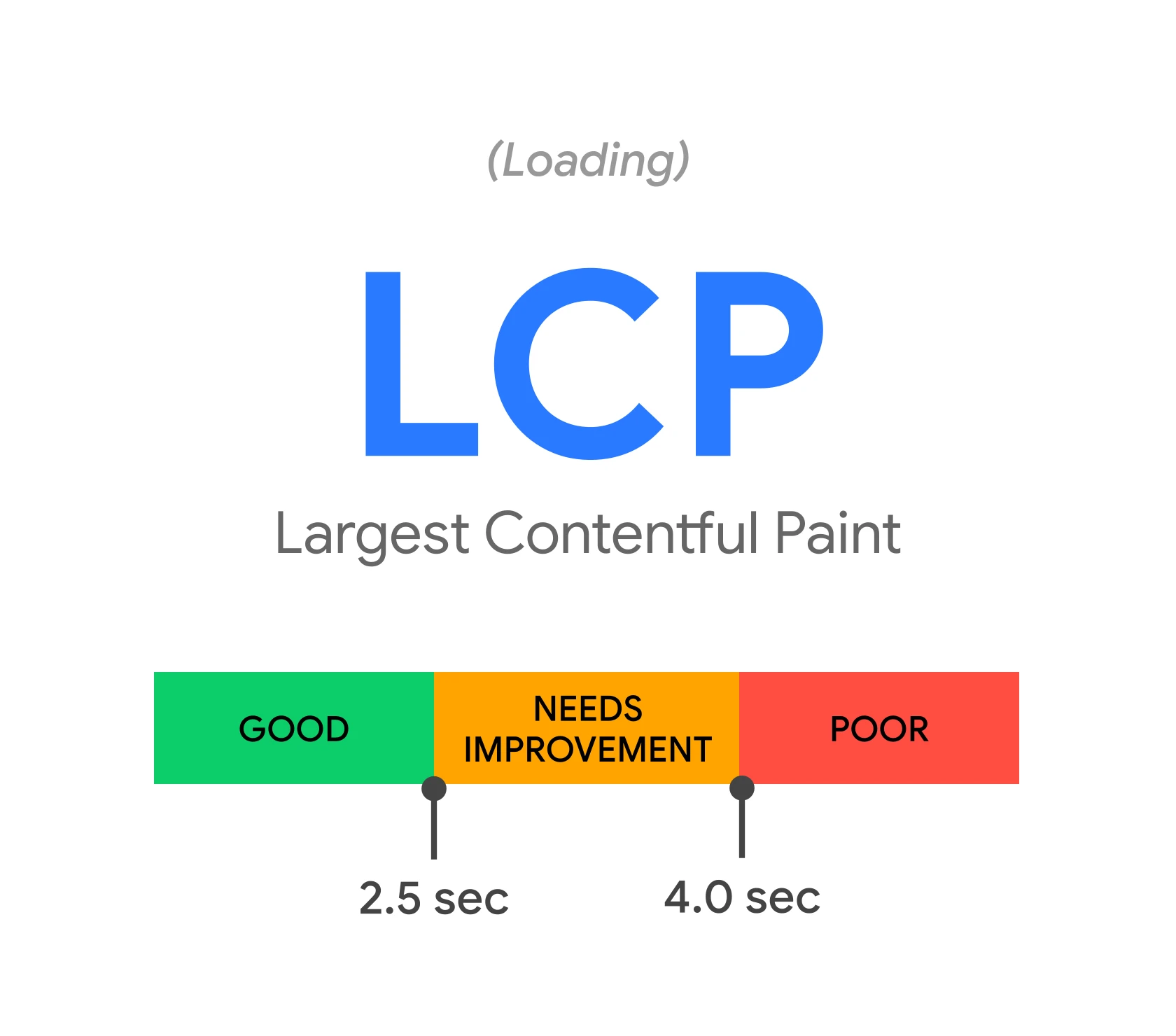
To improve LCP, it is worth reducing the loading time of the largest element visible on the screen. This can be achieved by:
- optimising images – compressing them,
- using modern formats such as WebP,
- preloading key resources.
Additionally, the use of a CDN network can significantly speed up content delivery to users.
In the case of FID, increasing the site’s interactivity is crucial. Effective methods include:
- minimising JavaScript execution time,
- asynchronous loading of unnecessary resources,
- code optimisation.
It is also worth considering the use of cache plugins that reduce delays related to server request processing.
To improve CLS, the most important aspect is to ensure visual stability during page loading. It is advisable to:
- predefine dimensions for elements such as images, videos or ads,
- apply lazyload techniques for dynamic elements.
These actions help avoid unexpected layout shifts and contribute to smooth content rendering.
Using analytical tools such as PageSpeed Insights or Google Search Console allows ongoing monitoring of progress and identification of areas needing improvement. Regular analysis of data from Chrome UX Report or WebPageTest helps maintain high site performance in line with Core Web Vitals guidelines.
- 01Improve LCPFaster content loading • Image optimisation • Use CDN
- 02Increase FIDBetter interactivity • Split JavaScript • Delay scripts / cache
- 03Stabilise CLSAvoid shifts • Reserve space
A holistic approach to optimising LCP, FID and CLS.
How to optimise the LCP metric?
To improve the LCP (Largest Contentful Paint) metric, focus on reducing the loading time of the most important visible elements on the page. Key steps include:
- image optimisation,
- using a Content Delivery Network (CDN),
- minifying CSS and JavaScript files.
Image optimisation is not only about compressing images but also using modern formats such as WebP and preloading key resources. Thanks to CDN, content is delivered faster, minimising delays caused by geographic distance. Meanwhile, minifying CSS and JavaScript files reduces their size, which results in faster page rendering.
It is also important to avoid blocking resources such as large JavaScript scripts or inefficient CSS styles. Implementing asynchronous script loading and prioritising critical elements can significantly improve LCP.
Regular monitoring of the LCP metric using tools such as PageSpeed Insights or Google Search Console allows you to continuously identify areas needing improvement. This makes it possible to consistently work on enhancing the site’s performance and providing better user experiences.
Content analysis and image optimisation
To improve the LCP (Largest Contentful Paint) metric, it is crucial to analyse and optimise graphical assets on the site. Start by carefully checking the current images – whether they are properly compressed and if their sizes match the actual requirements of the site. Files that are too large can significantly slow down loading times, which negatively affects LCP.
The foundation of optimisation is image compression. It is worth choosing modern formats such as WebP, which provide better quality at a smaller file size compared to traditional JPEG or PNG. Additionally, ensure that images have defined dimensions (the width and height attributes) to avoid undesirable layout shifts during loading.
Another important step is preloading key graphics. This allows the browser to start downloading the most important elements earlier, speeding up their display. For less critical images, it is advisable to use the lazyload technique, which delays their loading until they become visible on the screen.
Regular monitoring of results using tools such as PageSpeed Insights or Google Search Console enables you to identify optimisation issues promptly and implement necessary fixes. These actions can significantly improve not only the LCP metric but also the overall site performance.
Using a CDN
A CDN (Content Delivery Network) is a powerful tool that significantly improves the LCP (Largest Contentful Paint) metric. This works thanks to a distributed server infrastructure delivering content from locations closer to the user. As a result, loading times are shortened, which is especially crucial for large files such as images or videos.
One of the main advantages of a CDN is minimising latency caused by the geographical distance between the server and the end user. Consequently, assets such as images are delivered much faster, directly translating into better LCP scores. Furthermore, many CDN networks offer additional optimisation features, e.g. automatic image compression or conversion to the WebP format.
Another benefit is the content caching mechanism. Frequently requested resources are stored on servers closer to users, which further accelerates their availability. This solution works especially well for websites with a global reach.
Implementing a CDN not only improves LCP but also enhances overall site performance. Faster content delivery leads to better user experiences and can influence higher rankings in search results. This simple yet effective solution can be the key to the success of your website.
Minification of CSS and JS files
Minification of CSS and JavaScript files is the process of removing unnecessary elements from the source code, such as spaces, comments, or redundant line breaks. This significantly reduces file size, which translates into faster page loading. In the case of CSS, minification can also include merging several style sheets into one, further reducing the number of HTTP requests.
In the context of JavaScript, minification often goes hand in hand with so-called “uglification”. This process shortens variable names and removes unused code fragments. Common tools used for this purpose include UglifyJS and Terser. For CSS, a popular solution is CSSNano.
Minification has a direct impact on the LCP (Largest Contentful Paint) metric. Smaller files are downloaded more quickly by the browser, shortening the time to render the largest visible element on the page. Additionally, reducing the amount of data transferred lessens the load on the server and network, which is especially important for users with slower internet connections.
It is worth remembering, however, that minification is only one aspect of performance optimisation. Other techniques, such as asynchronous script loading or GZIP/Brotli compression, can further reduce file sizes and improve site performance. Regular testing with tools like PageSpeed Insights allows you to monitor the effects of the implemented changes and make adjustments where needed.
How to optimise the FID metric?
To improve FID (First Input Delay), which measures the time the page takes to respond to the user’s first interaction, focus on several key areas. This metric measures the delay between a click, key press, or other action and the moment the browser starts processing it. The shorter this time, the better the user experience.
One of the most effective ways to optimise FID is to reduce the execution time of JavaScript scripts. Long tasks blocking the browser’s main thread can cause noticeable delays. To address this, it is advisable to split large scripts into smaller parts or use asynchronous loading. This enables the browser to respond more quickly to user actions.
Another important step is optimising the site code. Remove unnecessary functions, minify JavaScript files and avoid lengthy computational loops – all this can significantly reduce processing time. It is also worth considering the use of caching mechanisms that store frequently used resources in cache memory. This not only relieves the server but also speeds up the page’s response.
It is also important to pay attention to the loading order of resources. Critical scripts should be loaded first, and less important ones only after the main page elements have loaded. Techniques such as defer or async for <script> tags allow better management of loading priorities and help avoid blocking page rendering.
Regularly monitoring the FID metric using tools like PageSpeed Insights or Google Search Console helps identify issues and implement necessary fixes. These actions ensure smooth site interactivity, which translates not only into better user experiences but also higher rankings in search results.
Cache plugins and code optimisation
Cache plugins and code optimisation play a key role in improving site performance, particularly regarding FID (First Input Delay). Tools such as WP Rocket, W3 Total Cache or LiteSpeed Cache store static versions of the website, greatly reducing the time needed for the server to process requests. This results in faster loading and smoother interaction with content for users.
Code optimisation is not only about minifying CSS and JavaScript files but also about eliminating unnecessary parts and implementing asynchronous script loading. These steps reduce the main browser thread’s load, which directly improves FID results. Additionally, it is worth ensuring database caching and SQL query optimisation to further speed up the site’s performance.
Implementing these solutions not only increases site interactivity but also positively impacts other Core Web Vitals metrics such as LCP and CLS. Regular monitoring of results with tools like PageSpeed Insights allows optimising strategies to be adapted to current user needs, ensuring continuous improvement of on-site experiences.
Asynchronous JS script loading
Asynchronous JS script loading is a technique that allows JavaScript code to be fetched and executed without blocking page rendering. This makes the browser more responsive, directly improving the FID (First Input Delay) metric.
To implement this method, simply add the `async` or `defer` attribute to the `<script>` tag.
FAQ
Frequently asked questions
How to optimise the LCP metric on a website?
It’s worth reducing the loading time of the largest visible element on the screen by optimising images, preloading key resources and using a CDN. CSS and JavaScript minification as well as avoiding blocking scripts also helps.
Does image compression improve Core Web Vitals?
Yes, it particularly affects LCP because smaller files load faster. The article also mentions using modern formats such as WebP.
Why does asynchronous loading of JS scripts help with FID?
Because it limits blocking of the browser’s main thread by long JavaScript tasks. This allows the page to respond faster to the user’s first interaction.
How to reduce layout shifts and improve CLS?
You should predefine the dimensions of elements such as images, videos and ads. Using lazy loading for dynamic elements also helps to avoid sudden content shifts.
When is it worth using a CDN for site optimisation?
When faster content delivery is important, especially to users geographically distant from the server. A CDN can also support image compression and conversion to WebP.
Which tools can help monitor Core Web Vitals?
The article lists PageSpeed Insights, Google Search Console, Chrome UX Report and WebPageTest. They allow you to track progress and identify areas needing improvement.