

SEOquake is one of those SEO plugins you reach for when you need to check something quickly and manually. It doesn’t replace a full site audit but is great for evaluating a single URL, checking on-page elements, and comparing Google results. It allows you to spot missteps in minutes that are easy to miss when just browsing through the site. The biggest value of SEOquake lies in providing a quick preview of key SEO signals without launching a complex audit tool. It’s a real time saver when analysing content, implementations, templates, and competitor pages. However, it’s important to be aware of the plugin’s limits and when to turn to more precise data sources.
What is SEOquake and how does it work in practice?
SEOquake is a browser plugin that displays basic SEO data for the open page or a list of search results. It acts like a quick control panel rather than a full-fledged audit system. Its role is to facilitate manual URL evaluation without running an extensive crawl of the entire site.
In practice, you start by installing the extension and navigating to the analysed page or the Google results page. The plugin reads visible elements of the document and shows, among others, the title, meta description, H1-H6 headings, canonical, meta robots, and basic link information. It’s a good tool to start with when you want to check if the most important on-page elements are set up correctly.
When analysing a single subpage, SEOquake allows you to see in a short moment how the heading structure looks, whether links are internal or external, and their attributes. You can also easily spot obvious issues such as missing H1, duplicated title, unreadable description, or incorrectly set canonical. This overview is especially useful after implementing changes, before publishing content, and during SEO QA.
In SERP mode, the plugin overlays additional data directly on search results. This makes it possible to compare several URLs without opening each separately and check how competitors set titles, descriptions, and basic page signals. This speeds up manual analysis of competing results but still does not provide hard strategic conclusions.
The output from working with SEOquake is not a detailed report but a quick list of observations for further verification. The plugin answers well the question “Is there anything suspicious or inconsistent on this page?”. If the answer is yes, only then does it make sense to move on to a deeper analysis using other tools.
What are the current advantages and limitations of SEOquake?
The greatest strength of SEOquake today remains the speed of manual verification, and its main weakness is the lack of full technical insight and data needed for decision-making. The plugin works well for checking single URLs, spotting simple on-page errors, and comparing a few SERP results. However, it does not replace analysing the entire site, JavaScript rendering, or data from Google Search Console.
Its practicality is best seen in operational work. An editor can review meta tags before publication, an SEO specialist can check the site after implementation, and the quality manager can compare several subpages within a section of the site. If you need a quick answer to the question “Does this subpage look correct from a basic SEO perspective?”, SEOquake is usually enough to start.
However, caution is advised when interpreting visible metrics. Some information depends on available sources and integrations, so it is more indicative than decisive. In practice, this means that the number or metric shown in the plugin should not set priorities without confirmation from other tools.
A second significant limitation concerns search results themselves. The SERP is dynamic, personalised, and depends on location, device, and user history, so the plugin’s overlay mainly serves for quick comparison of what is visible on the screen at that moment. It is not worth drawing too far-reaching conclusions about real positions or competitive advantage from it.
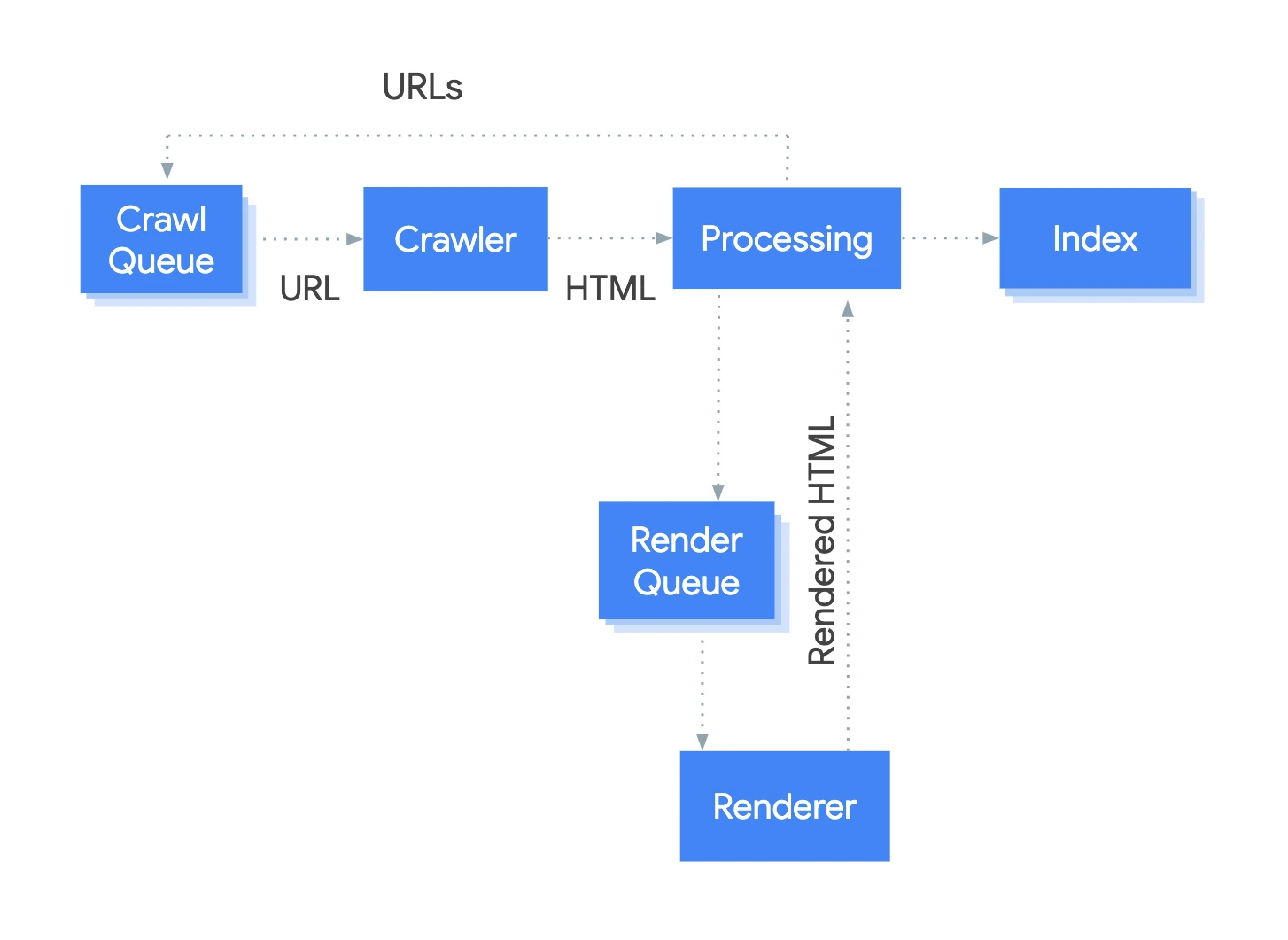
Another matter relates to sites heavily reliant on JavaScript. A quick preview of code and HTML elements does not always reflect what actually renders for search engines and what really affects indexing. In such cases, SEOquake may act as an initial filter, but usually is not enough to diagnose technical problems.
It’s best to treat this plugin as support rather than the centre of the process. It is useful for checking title, description, headings, canonical, robots, and links, but it will not show the full site structure, internal linking logic across the domain, or traffic quality. SEOquake is worth using for quick verification and comparison, not as a standalone audit system.
How to efficiently use SEOquake for on-page analysis?
SEOquake is best used for a rapid check of key on-page elements on a single URL. Start with what most often determines the quality of implementation and page visibility: title, meta description, H1, canonical, and meta robots. If these elements are inconsistent or wrong, the problem is usually obvious at first glance and there’s no need to launch a full audit immediately.
In practice, the plugin is most useful in three situations: before page publication, after implementing changes, and when reviewing templates. This way, you can quickly verify if the CMS is creating empty tags, duplicated headings, or incorrect canonicals. This is especially helpful for category pages, blog posts, and landing pages built according to a uniform scheme.
The recommended order for analysis is simple. First, assess whether the title and description match the page’s topic and user intent, then check the heading structure, and finally the technical elements related to indexing. Don’t limit yourself to just whether the tags exist at all, but check their consistency with the content and role of the subpage. A page may technically have a correct title yet still poorly answer the query, so merely correcting the tag will add little value.
SEOquake is also useful for comparing several similar subpages. When you open several addresses from the same section, you can easily spot if one has a different H1-H2 arrangement, lacks a description, or uses a different linking logic. Such manual verification works well in SEO QA, as it allows you to quickly detect errors resulting from template implementation rather than the content itself.
However, it’s worth remembering the limitations. The plugin provides a quick document preview but does not replace checking rendering, Google indexing, or data from Search Console. For heavily JavaScript-dependent sites, some issues may not be visible in a simple HTML preview, so when something raises doubts, it is good to confirm it with additional tools.
The most common mistake is judging the page quality solely by its tags. A well-set title, single H1, and correct canonical do not necessarily mean the subpage is well optimised. Content quality, query relevance, the page’s place in the site structure, and whether the user can easily continue navigating also matter.
What to pay attention to when using SEOquake to check links?
When checking links in SEOquake, it’s worth focusing on their type, attributes, and placement within the site structure. First, count internal and external links, then check whether they have the correct rel attributes and lead to sensible addresses. The link count alone says little if you don’t know where they lead and what function they serve.
In internal link analysis, the key is whether they support navigation and context transfer between subpages. The plugin allows you to quickly spot pages with very few internal links, overly complex menus, or random anchors. This is a good way to assess whether an important subpage is isolated or whether a section of the site links to itself inconsistently.
For external links, it’s worth checking whether there are too many and whether they lead to low-quality or outdated sources. It’s also good to verify the nofollow, sponsored, and ugc attributes, especially when the site includes advertising, affiliate, or user-generated links. Incorrectly marking external links is a common editorial issue, particularly in sponsored content and large blogs.
SEOquake is useful for quick anchor checks but does not provide comprehensive insight into the entire site’s linking. The tool alone won’t detect all orphan pages, show full click depth, or replace a full site crawl. For this reason, results from the plugin should be treated as a starting point for further action, not a final verdict.
In practice, it’s worth reviewing links after significant changes to content, menus, “related articles” modules, and footer blocks. These are exactly the places where you often find accidental, duplicated, or redirecting links. When you see many links to non-canonical, redirected, or commercially insignificant addresses, it’s usually better to tidy up this section before further optimisation.
You should also be cautious when interpreting data on dynamic pages. Some links may be loaded client-side, so a quick preview may not show the complete content visible to users and bots. In such cases, it’s best to combine manual checks in SEOquake with rendering tests and verification of which addresses are actually indexed.
How does SEOquake support analysis of indexing and technical site signals?
SEOquake facilitates analysis of indexing and technical site signals by providing a quick overview of elements affecting crawl and search engine indexing decisions. Usually, this involves checking whether the given URL contains any conflicting or incorrect directives, such as meta robots, canonical, or unusual header structure. This helps identify issues before they impact the visibility of multiple subpages. This approach is especially useful for checking new implementations, pagination, filters, and template-generated pages.
Manual verification of a single address brings the most value. You open the page and immediately see whether the URL has a canonical to itself, to another subpage, or none at all, whether robots block indexing, and whether basic HTML elements are consistent. If canonical, robots, and page content send conflicting signals, this is the first place to check, as such conflicts often lead to indexing problems or cannibalisation.
The plugin also facilitates the assessment of technical signals that do not require a full crawl, yet still matter in the daily SEO QA workflow. In just a few moments, you can verify the presence of basic tags, internal links leading to the page, and elements indicating how the document was prepared for the search engine. It’s a convenient way to catch recurring CMS-side mistakes, such as empty tags, incorrectly set canonicals on multiple templates, or accidentally implemented noindex tags.
However, it’s important to remember that SEOquake does not provide a complete picture of indexing. It does not replace data from Google Search Console, render testing, or server response checks, so on its own it won’t explain why a page isn’t being indexed or why Google chooses a different canonical. In JavaScript-heavy sites, the plugin’s preview can only be partially reliable, because problems may only reveal themselves after rendering. Therefore, it’s best to treat SEOquake results as a quick filter to catch obvious issues, rather than as a final verdict.
How to avoid common mistakes when using SEOquake?
Common mistakes when using SEOquake can be avoided if you treat the plugin as a tool for quick checks rather than as a full-fledged SEO audit. The most frequent issue is drawing overly far-reaching conclusions based on a single page view or a few metrics from the panel. In practice, SEOquake is meant to help you spot warning signals, not to decisively resolve an entire issue on its own.
The second common error is evaluating a page solely based on tags and technical parameters. Even correct title, description, and H1 tags do not guarantee that the subpage matches user intent, contains meaningful content, or supports the goals of the entire section. If the analysis ends at tags, it’s easy to overlook the real cause of poor results, such as content mismatch, unclear information architecture, or weak internal linking.
The third mistake involves checking only a single subpage and assuming the rest of the site works identically. For template-based sites, it’s always worth comparing several URLs from the same section, since only then can you see whether the problem is isolated or systemic. One correct subpage does not confirm that the entire implementation pattern is right, especially in online stores, blogs, and filter-based sites.
Caution is also advisable when interpreting data from search results. The SERP overlay facilitates quick page comparisons but doesn’t provide a definite answer about position, competitor advantage, or domain quality, since results depend on location, device, and personalisation. Compare manually, but confirm important decisions using other sources, especially Search Console, a crawler, and user behaviour analysis.
The last mistake is ignoring the technical context of the site. In dynamic or JavaScript-based sites, some issues won’t appear in the plugin’s simple preview, so if any ambiguities arise, it’s worth checking rendering, server responses, and indexing status. The safest approach is straightforward: use SEOquake for quick checks, note your observations, and only then decide what requires deeper analysis.
When is SEOquake most useful in the SEO process?
SEOquake is most useful when you need to quickly and manually assess a single URL or compare several SERP results without running a full audit. The tool works well at the early diagnosis stage, implementation checks, and daily SEO QA. It brings the most value when time matters and the decision concerns specific page elements rather than the entire site structure. If you want to spot an obvious problem on a subpage within 2-3 minutes, SEOquake is usually sufficient.
In practice, it’s best to use it at several repeatable points in the process. This mainly means situations when you’re checking a page “live” and need quick confirmation that basic SEO signals are set up correctly.
- before publishing a new subpage or article,
- immediately after implementing changes in the template, menu, pagination, or category section,
- when manually verifying title, description, H1, canonical, and robots,
- when comparing competitive results for a single query,
- when checking whether internal and external linking looks sensible at the level of a specific page.
It works great in editorial and content workflows too. An editor, SEO specialist, or content publisher can immediately verify whether the page has a correct title, non-duplicated headings, and no faulty canonical after implementation. This is especially important on template-based sites, where one mistake can be copied onto dozens of subpages.
SEOquake can also help in analysing search results, but rather as a tool for quick comparison rather than for drawing firm ranking conclusions. You see several URLs side by side and can assess differences in meta tags, heading structure, and basic technical signals. This helps form an initial hypothesis about why certain pages look similar or what distinguishes them.
It makes the least sense to treat this plugin as the sole source of truth during a full site audit. It won’t show the full picture of rendering, problems across thousands of URLs, data from Google Search Console, or user engagement quality after entering the site. The best working model is simple: SEOquake for quick problem detection, followed by deeper verification in analytics tools, crawlers, and the search engine itself.
In practice, it comes down to one thing: it’s good to have this plugin handy if you regularly check individual pages and make fast operational decisions. Not everyone will need it, but those involved in content publishing, on-page optimisation, and implementation control can noticeably reduce their work time. You’ll gain the most if you treat SEOquake as a quick filter for potential issues rather than a comprehensive audit system.
FAQ
Frequently asked questions
How does SEOquake help check a single URL for SEO?
The plugin shows basic on-page elements like title, meta description, H1-H6, canonical, and meta robots. This quickly reveals obvious errors or inconsistencies on the page.
Does SEOquake replace a full SEO audit of the entire site?
No, it acts as a quick control panel rather than a full auditing system. It’s suitable for initial verification but doesn’t show the complete picture or all technical issues.
Why use SEOquake before publishing or after implementing changes?
Because it quickly catches errors such as empty tags, duplicate headings, or incorrect canonicals. It’s a convenient tool for SEO QA and template checks.
How does SEOquake facilitate comparing Google results?
In SERP mode, it overlays additional data directly on search results, allowing comparison of several URLs without opening them separately. This speeds up manual competitor analysis, though it doesn’t provide strategic conclusions on its own.
What to watch for when checking links with SEOquake?
Check the number of internal and external links, their attributes, and where they lead. Especially important are nofollow, sponsored, and ugc tags, as well as links pointing to outdated or low-quality URLs.
When is SEOquake insufficient for diagnosing SEO issues?
When the site relies heavily on JavaScript, as quick HTML previews may not show everything rendered for the search engine. It’s also insufficient for assessing indexing, rendering, and full analysis of the entire site.