Given the current consumption of video content, gaining major popularity on the world’s largest video platform seems difficult. The good news is that ranking on YouTube does not require technical know-how or spam tactics.
There are certain key elements used by the YouTube algorithm to rank videos. YouTube SEO involves optimising videos with these elements in mind and closely following the algorithms.
How do videos rank on YouTube?
There is no clear answer to this question. For videos to rank well on YouTube, you first need to understand the YouTube algorithm and ranking factors.
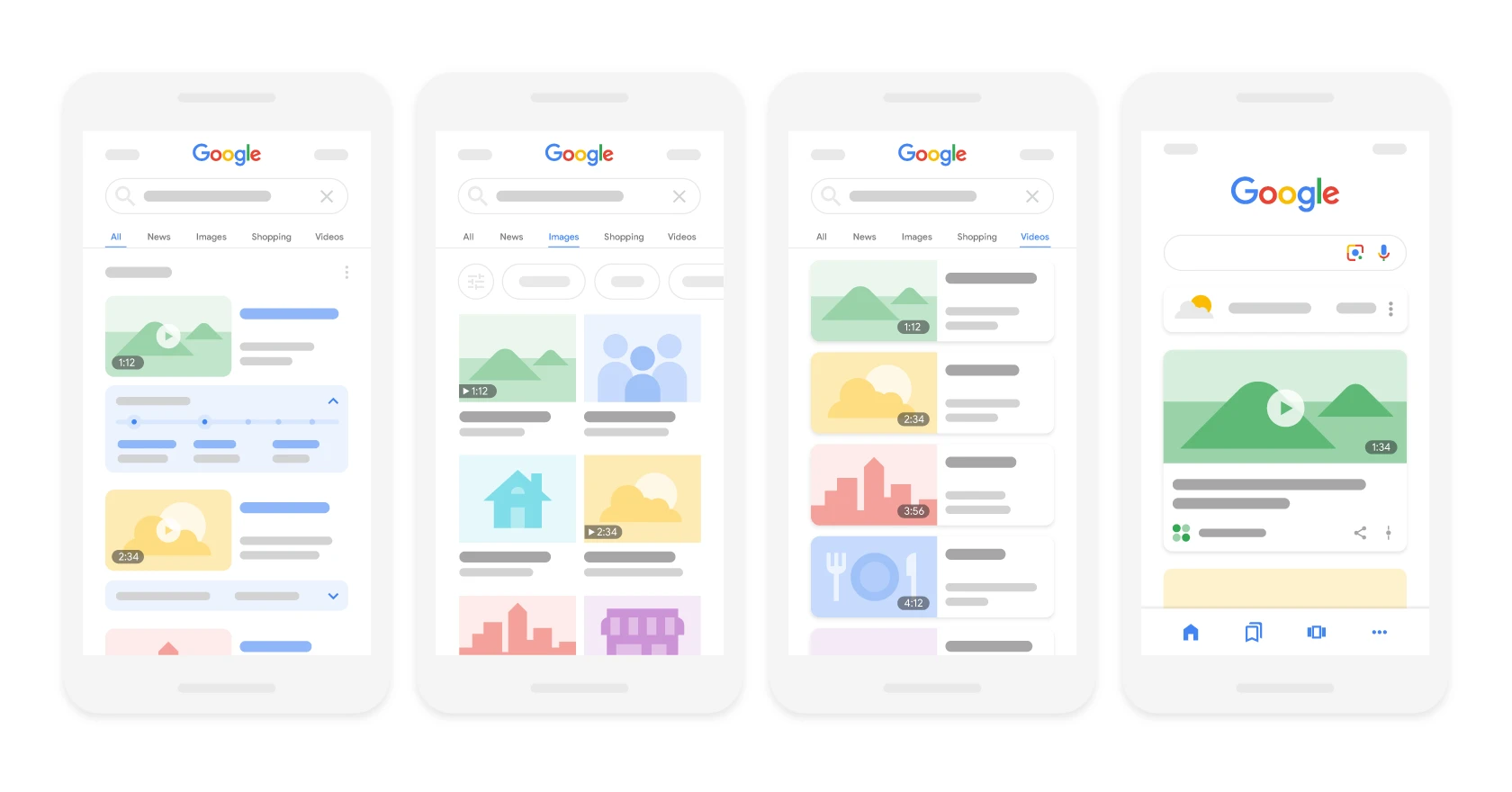
DiagramVideos appear in the main results, on the Video tab and in Discover; the thumbnail and duration come from VideoObject data.Source: Google Search Central, CC BY 4.0
Like any search engine, YouTube wants to deliver content that answers the searcher’s query. For example, if someone searches for “how to tie a tie”, YouTube will not show a video titled “how to tie shoelaces”. Instead, results answering that specific query will appear.
Once you are working on YouTube SEO, think about how you can use the terms and phrases used by your target audience. You also need to think about YouTube analytics and engagement. When ranking videos, YouTube pays attention to a metric called “watch time”, in other words how long viewers stay with your videos.
A longer watch time means you are delivering valuable content. A short watch time means your content should not be ranked. So if you want to rank videos, create content optimised for longer watch time. For example, you can encourage users to stay until the end of the video by promising a surprise or a prize draw.
SEO guideHow do videos rank on YouTube?
01Understand the algorithmLearn the ranking factors
02Answer the queryDeliver relevant content
03Apply keywordsUse audience phrases
04Analyse engagementOptimise watch time
Success on YouTube is a combination of understanding the algorithm, content relevance and high viewer engagement.
Is it worth optimising videos on YouTube?
Optimising videos on YouTube delivers the same results as optimising pages in Google – better rankings, more clicks and conversions!
This kind of optimisation helps you achieve the desired results on YouTube and will even improve your position in search rankings. Google suggests optimising videos to improve visibility and engagement.
If you actively solve the problems of potential customers using videos on YouTube, then you have done about 90% of the work in YT optimisation. In addition, YouTube video ranking is a key element of an inbound marketing strategy even if it does not seem like it. Around 10 years ago, inbound video marketing was a novelty.
Marketers learned that it is not enough just to publish large volumes of content. It also has to be high quality and optimised so that search engines can find it as easily as possible.
In the past, content was largely limited to written words. Today, that is no longer the case. Instead, a comprehensive content strategy includes written materials such as blogs and e-books, but also media such as podcasts, visual assets and videos.
As other content formats have developed, the need to optimise them for search has emerged. One area of growing importance is YouTube.
YouTube SEO is the process that helps users find your video content on YouTube. It includes, among other things, keyword research to optimise playlists, descriptions and videos. This process combines standard SEO practices with optimisation techniques specific to YouTube only.
YouTube ranking strategy
To succeed on YouTube, you need a clear strategy. It consists of two parts. First and foremost, you need to understand how YouTube SEO works.
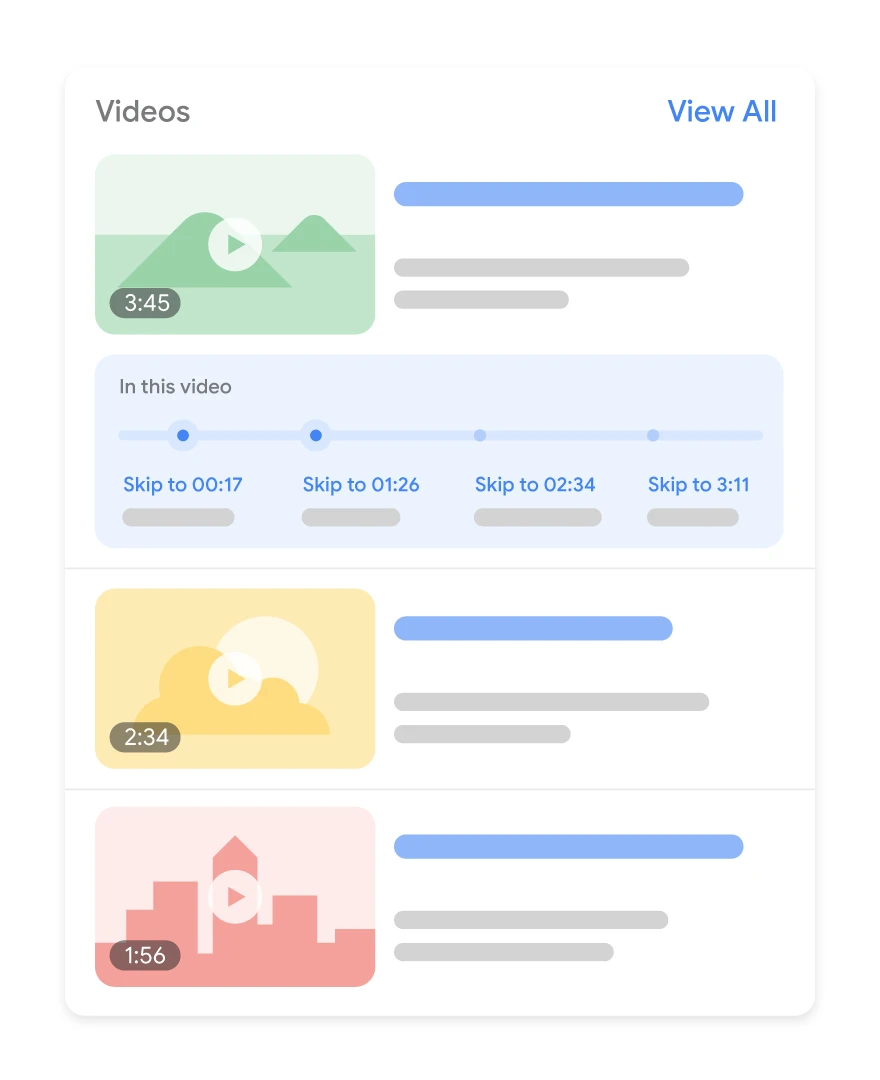
DiagramKey moments split the video into chapters visible in the results — the user can jump straight to the relevant section.Source: Google Search Central, CC BY 4.0
Next, you need to use this knowledge when choosing your target audience, developing your channel plan and setting growth goals.
YouTube strategyYouTube SEO strategy
01Two-stage strategyA clear action plan
02SEO algorithmsKey search function
03Audience and goalsPrecise targeting and growth
04Integration with GoogleShared search algorithms
05Signal analysisEvaluating elements and history
Effectiveness on YouTube is based on understanding and using search algorithms and precise planning.
How does YouTube SEO work?
YouTube is part of Google and uses similar search algorithms to show users videos that best match their queries. When a user enters a query in YouTube, the search bots browse the video platform to deliver the best results based on algorithms.
Search algorithms assess various signals and elements to rank video content, not only on YouTube, but also in Google search results. Search history and viewer personalisation play a key role in tailoring the results.
In addition, the algorithm also uses video performance and optimisation to rank video content on YouTube. Videos with longer watch time and more likes and shares are placed above those with low engagement (or a high bounce rate).
In addition, search bots cannot watch the content of a video, they only crawl it using text elements such as the title, description, tags and video metadata. Optimising videos by using an appropriate title, a clear and concise description, and broad and specific tags will allow for better ranking than videos that have not been optimised.
Together, these signals tell the algorithm how relevant, popular or engaging your video is for a given user query.
Choosing your target audience
For many content creators, growing an audience involves choosing a topic and optimising videos on YouTube. However, as growth increases, so does competition.
In the past, it was very easy to create a YouTube channel covering a broad topic such as “product reviews” or “technical issues”, but today new YouTube channels need a more specific approach.
Once you have narrowed down your target audience, think about who you want to engage with your channel and why. Ask yourself the following questions:
How much do you know about your target audience?
Why do they spend time on YouTube?
Which other social media platforms do your audience prefer?
What sparks their interest and loyalty?
Are there other YouTube channels or creators you should collaborate with to reach such an audience?
Developing a plan
Creating a content plan may seem simple if your YouTube channel focuses on a topic you enjoy. Usually, though, the challenge is not coming up with ideas, but making them happen.
Comprehensive content planning includes an excellent ability to create high-quality films, video material and voice recordings that are concise and easy to understand, creating short but meaningful titles, a long description, etc.
If you want to optimise a YouTube channel for SEO, content planning does not only mean which videos will be created and when they will be published. It is a process aimed at determining what resources you need to increase traffic, conversions and engagement through your video content.
For example, you may have a great idea for a surfing video, but where are you going to shoot it? If you are not filming on your own or with the help of a local community, it will be difficult to secure high-quality source material for your videos.
Gaining professional skills or hiring a team with experience in editing, sound and animation can also improve the quality of your videos. However, if such resources are not immediately available to you, you need a plan for creating good video content without them.
Competitor analysis can also help with planning when you are trying to decide the length of the video or which other social media platforms should promote the video.
Setting growth goals
YouTube offers many helpful metrics that help assess whether your team is meeting your strategic goals. Broader metrics can help track consistency and major changes in performance, such as algorithm changes.
It is also a good idea to choose more specific metrics linked to your goals. For example, if you want to grow your audience, track subscriber numbers, views and audience retention.
If your goal is engagement, pay attention to likes, comments, shares and watch time. Want to increase traffic to your website? Add links to your video descriptions and annotations, then track those sources on your website.
Tracking metrics related to your goals will let you learn how you are growing your audience. You can use that knowledge to create more effective videos for both users and SEO. All of this will translate into the growth of your YT channel.
Keyword research
A solid SEO strategy starts with effective keyword research. The phrases entered by searchers in their queries are important for SEO strategists and YouTube. Simply enter the main query in the search bar, and YouTube’s search engine will automatically suggest a long list of keywords, just like Google.
Including these keywords, their variations and many matching phrases in different elements of your YouTube videos can help you reach the right audience.
1. Rename the video file using the target keyword
Your YouTube SEO efforts start before you even upload the video. Your goal is not to rank only on YouTube, but also in Google.
Search engine bots do not watch videos, only their source code. By including the target keyword in the video file name, the YouTube algorithm can read the file name and the entire code.
So replace a random name such as “reklama_firmy_004.mov” with the desired keyword. For example, if your keyword is “poradnik dotyczący malowania domu” (a guide to painting a house), your file name should look like this: “poradnik-dotyczacy-malowania-domu”, followed by the file type (MOV, MP4 and WMV formats are the most popular formats compatible with YT).
A good practice is to use a keyword modifier such as “best”, “how to”, “guide”.
2. Include the keyword in the title
Video titles are the first point of contact with viewers. They are also important elements that support indexing and ranking of your videos.
If you have done extensive keyword research, you will have plenty of relevant high-traffic keywords. Your title should therefore be as close as possible to user queries. Include the exact or very closely matching keyword at the very beginning to increase your visibility.
Your video title should clearly inform viewers about its content. It should also be short. It is best to keep it to 60 characters to avoid it being cut off on results pages. The most effective titles fall within the 50-60 character range. Longer titles are usually less effective compared with videos that have short, specific titles. This is not a hard and fast rule, but it is worth remembering.
3. Optimising the video description
A detailed description of the video’s content is just as important as its title. The good news is that you have up to 5000 characters to describe your video content. The video description is important for two reasons. First, it encourages the viewer to click the video and secondly, it helps the algorithm identify your content through keywords.
When a user searches for a term, the search results page displays a maximum of 120 characters. To see the full description, the viewer must click “show more” (więcej). That is why it is worth putting the most compelling information at the beginning.
Further down in the description, you should include exact keywords along with matching phrases that describe your content. To give the description more context, you can include a call to action (CTA), i.e. text that asks users to subscribe, download a free e-book or buy a product.
It is a good idea to include timestamps in the description with relevant keywords, as well as add 5 to 8 hashtags that are closely related to the main keyword.
An optimised description can help you appear in the sidebar of suggested videos. This has a significant impact on the number of views.
4. Tag your video with popular keywords related to your topic
YouTube suggests using tags to let users know what your video is about. However, in this way you are informing not only users, but also YouTube itself. The platform uses tags to understand the content and context of your videos.
This is how YouTube discovers how to connect your videos with similar content, and that can expand your reach. Among other things, tags can help you appear in the sidebar among suggested videos.
Note that YouTube tags are different from hashtags. Tags help to understand your video’s content, whereas hashtags give it meaning and attract viewers through similar hashtags.
The best practice is to use competitors’ popular tags to help YouTube understand them better. To find a tag, go to the View Source option and look for keywords in the relevant tags.
Do not use irrelevant tags to get more views. In fact, Google may penalise you for such actions.
As with the description, use the most important keywords, including the more popular ones, as well as long-tail keywords.
5. Categorisation of video materials
Categorising videos will not improve rankings or engagement. However, by selecting the right category, the YouTube algorithm learns what your video is about. YouTube categories divide a huge pool of videos in search into different categories, such as games, education, music videos, animals, fashion, etc.
After uploading the video, you can place it in the appropriate category in “Advanced settings”. It is important to go through a thorough process to determine which category the video belongs to. You need to answer the following questions:
Who are the biggest creators in a given category? What are they known for and what do they do well?
Are there any patterns among the audiences of similar channels in a given category?
Do videos in a similar category share characteristics such as production value, length or format?
6. Add a custom thumbnail to the result link
Your video thumbnail is the main image that users will see while scrolling through the list of video search results. Thumbnails do not directly affect SEO, but they certainly significantly increase click-through rate (CTR).
You can always choose one of the thumbnail options generated automatically by YouTube, but when using your own materials, you can notice a significant difference in clicks. Moreover, a custom thumbnail with your brand logo is easy to remember and will make it easier for the user not to get lost among the multitude of videos.
It is important for the thumbnail to attract attention. For this purpose, it is a good idea to take inspiration from similar videos created by the competition.
YouTube recommends using images sized 1280×720 pixels, with a 16:9 aspect ratio, saved as .jpg, .gif, .bmp, .png files of 2MB or less. By following these parameters, you can be sure that your thumbnail will maintain high quality across various viewing platforms.
Adding a custom thumbnail requires having a verified YouTube account. To do this, visit youtube.com/verify and follow the instructions. With custom thumbnails, you can manage how your materials are presented to viewers.
7. Use an SRT file to add subtitles and closed captions
As with the other texts discussed, subtitles and closed captions can improve YouTube search optimisation by presenting relevant keywords. The YouTube algorithm can read text contained in the source code and in the video.
Your subtitles and closed captions not only support YouTube SEO, but also increase engagement. According to Hubspot, videos with subtitles record a 12% increase in interest compared with videos without subtitles.
Closed captions or transcripts are a textual reflection of the audio track in the same language as the audio file. They also include noises and sounds such as “door opening”, “inhale-exhale”, etc. Closed captions help deaf or hard-of-hearing people understand the content of the material.
Video subtitles are a reflection of the audio file in other languages. Assuming that viewers can hear the audio, subtitles provide useful translations into different languages.
Only around 20% of the world’s population are native English speakers. Therefore, creating multilingual versions of video transcripts makes sense.
To add subtitles or closed captions to a video, you need to upload a supported text file with the transcript or subtitles. In the latter case, you can directly enter the content of the video transcript, which will automatically synchronise with the video.
Adding subtitles is a similar process, but you can limit the amount of text you want to display. So go to the video manager, and then click “Video” under “Video manager”.
Find the video to which you want to add subtitles and click the drop-down arrow next to the edit button. Then select “subtitles/CC”. You can choose how you want to add subtitles or closed captions.
8. Add cards and end screens to increase the watch time of your YouTube channel
Cards
When you watch a video, you may see a small, white, round icon with the letter “i” appearing in the corner or a clear banner asking you to subscribe. These are information cards, which YouTube describes as “pre-formatted notifications appearing on standard and mobile devices, which can be created to promote your brand and other videos on your channel”.
You can add up to five cards to one video, and there are six types:
channel cards, which direct viewers to another channel,
donation cards, which encourage fundraising for non-profit organisations in the US,
fan funding cards, which encourage viewers to support your video creation,
link cards, which direct viewers to an external website, an approved crowdfunding platform or an approved merchandising platform.
poll cards, which contain questions for viewers with selectable answers,
video or playlist cards, which link to other content of this type on YouTube.
End screens
End screens display similar information to cards, but appear only at the end of the video and are more visually detailed.
There are many detailed instructions for adding end screens, depending on the platform they are to display on and the types of content.
It is worth remembering that YouTube always tests end screens and tries to optimise them for viewer experience. So it may turn out that the end screen does not look exactly as it was designed.
Of course, adding cards and end screens takes a lot of time. However, it is worth dedicating that time, because the number of YouTube users is growing significantly year on year. Proper optimisation of materials increases the chance of reaching a wider audience. In addition, cards and end screens are a great option for adding calls to action in a subtle but effective way.
9. Adding hashtags to increase reach
Hashtags are part of the YouTube user interface, which allows related topics to be added to your content, similar to LinkedIn or Instagram.
These elements appear right above the video title, so they are easy to find and click. You can enter your company name in them or include related keywords. It is also recommended to use hashtags in the YouTube description, but you should not overdo it. The YouTube algorithm regularly checks content for spam. As a result, it is a good idea to choose 2-3 hashtags that best describe the video.
To look for hashtags related to your video, you can use the autosuggest option. After entering the main keyword, the search engine suggests a set of keywords that are searched for and related to the given topic.
Hashtags are ideal for increasing the visibility of your videos within searches related to a given topic.
10. Creating a playlist related to the overall theme of your video
Playlists are an excellent way to organise your video materials around a common theme. Creating a playlist on your channel can make browsing videos much easier.
The best practice is to group videos into playlists optimised for a given topic or keyword. This will not only send YouTube a signal about what the videos are about, but also encourage users to click through to more materials, increasing views and improving your rankings.
This option is best for brands that have a lot of videos on similar topics.
11. Experimenting with video length
Just as longer blog posts perform better than shorter ones (under 1000 words), longer videos outperform shorter productions.
The longer a viewer stays on the page, the more positive a signal the YouTube algorithm receives about greater engagement. This means, among other things, that the video is better ranked. So do not be shy and create videos that are as long as possible.
After all, the user is looking for a detailed answer to their query. The length of a video may vary depending on the niche, but the optimal video length is around 11 minutes.
Of course, this is by no means a magic number or a requirement. Not every YouTube user will watch a video for 10 minutes or more.
For example, as Hubspot reports, over 70% of watch time comes from mobile devices. Some people can watch hour-long videos on a small screen. However, this figure shows how important it is to know your audience.
To discover what the right watch time is for your viewers, try creating videos of different lengths. Then carry out a quick analysis of watch time, average watch time and audience retention for each video and adjust your strategy.
Tip – longer videos provide more opportunities to add ads, and that translates into greater earning potential.
12. Use YouTube autocomplete
This feature makes it easier to find the most popular search terms related to your video’s topic.
Just start typing a keyword phrase (or keyword) and see what other phrases and keywords appear. Then add the most relevant ones to your title, descriptions and tags.
You can also use this tool to discover YouTube trends or detect which keywords your competitors are targeting. Such information will allow you to change your YouTube SEO strategy so that it delivers better results.
13. Try timestamps
Timestamps mark different sections of your videos. They make it easier for your audience to find the content they are looking for in each video.
Adding a timestamp can improve user retention and their experience because it meets expectations. Timestamps give viewers the ability to easily skip to the part they want to see in the video. Timestamps also support SEO, because they make it easier for the YouTube algorithm to understand the content of your videos. This helps videos appear for search terms included in the video, rather than just for the general topic.
For example, if your video shows how to bake a cake, it may include sections on baking equipment or cake trends and fashion.
If you add timestamps to mark such sections, a user may not find your video by searching for “how to bake a cake”, due to the high competition for that phrase, but may find it by searching for “how to bake a chocolate cake”.
You can add timestamps manually or add and edit automatic video chapters in YouTube Studio. You can also use other automatic YouTube strategies and tools to speed up this process.
This option is best because it breaks long videos into segments and enables YouTube to understand the content of your videos.
14. Adding a call to action in your video and its description
Calls to action (CTA) are an effective method of building engagement. A value-driven call to action not only encourages likes, subscriptions and shares, but also improves audience engagement metrics.
This will increase the video’s visibility in search results and in suggested videos. To achieve maximum effectiveness, vary your calls to action. There are around eight different types of CTA directing viewers to your website or product pages.
In one video, you can use a verbal call to action asking viewers to like, subscribe or share. In another video, ask users to save the video to their playlist or click the links shared in the comments.
You can also ask viewers for comments and feedback. Such actions are important not only because of the user experience. They also send signals to YouTube that your video is engaging and offers value to your viewers.
15. Review YouTube search analysis
Analytics are useful for tracking progress towards your goal, but you can also actively use this data to improve YouTube SEO.
Let’s assume you want to determine why traffic suddenly increased for one of your videos. This may be due to the video ranking for a popular keyword. Or some popular website recently shared your video.
You can review video-specific data and check why such a spike in views occurred. Then you can think about how to optimise other videos using the same tactic.
YouTube analytics can also help predict keywords that are growing in popularity. Optimising your videos for such keywords earlier gives you a better chance of achieving higher rankings for the same search results.
Video analysis also helps you understand your audience better. Analysing viewers’ age, location and interests helps you make smart changes.
Most SEO specialists recommend paying attention to the following metrics to assess the success of their efforts:
total and watch time,
views and click-through rate,
card clicks,
unique viewers,
traffic sources,
subscriber growth.
Thanks to YouTube search analysis, you can gain insights into the areas that are effective and those that still need improvement.
16. Optional solution – leave a pinned comment under your video
Leaving a comment under the video is a sensible strategy. Additional comments improve video SEO and increase audience engagement.
A pinned comment can encourage viewers to write hundreds of replies. So leave an engaging comment that prompts further discussion or offers additional value to users.
Start optimising YouTube videos!
Video marketing is important for businesses and creators. Regardless of which SEO tip or tool you start with, the foundation of a successful YouTube channel is good content.
Make sure viewers can watch something relevant and high quality when they find you.
Optimising video content can help attract more viewers and build a community. This, in turn, leads to more conversions and sales. So start today and watch your YouTube channel grow.
FAQ
Frequently asked questions
01How does YouTube SEO work and what does video ranking depend on?
YouTube SEO is based on matching the video to the user’s query and signals such as watch time, likes, shares and the quality of optimisation. The algorithm also analyses the title, description, tags and metadata, because it does not watch the video itself.
02Is it worth optimising YouTube videos for SEO?
Yes, because optimisation can improve visibility, click-throughs, conversions and rankings in search results. The article also says that if your video genuinely solves the audience’s problem, you have already done a large part of the SEO work.
03Why is watch time important for a YouTube video’s ranking?
Watch time shows how long viewers stay with the video, so it is a signal of content quality. A longer watch time suggests value, while a short one may mean the video should not be ranked highly.
04How do you choose keywords for a YouTube video?
It is worth starting with the main query and checking the suggestions in the YouTube search bar, which show similar phrases. You then need to include those words and their variants in the title, description, tags and file name.
05How do you optimise a YouTube video title to make it effective?
The title should contain the exact or very close keyword, preferably at the beginning. It is best when it is short and fits within 50–60 characters so it does not get cut off in search results.
06Do tags and video category matter in YouTube SEO?
Tags help YouTube understand the content and context of the video and connect it with similar materials. The category itself does not improve rankings, but it helps the algorithm recognise the topic of the video.