
Google Knowledge Panel is an element of search results that many people see as the “official business card” of a brand or person in Google. In practice, it does not work like an advert or a standard SEO result, so you cannot switch it on with a single toggle. The panel appears when Google decides it understands well who or what the entity is and can verify the key information. The most important thing is that the knowledge panel results from a consistent and credible online presence of the entity, not from a single technical action. That is why it is not only the website that matters, but also data consistency, official profiles and the quality of sources that describe the brand. When you keep this logic in mind, it becomes easier to make sound decisions and not waste time on actions that have no real impact on the result.
What is Google Knowledge Panel and why is it important?
Google Knowledge Panel is a knowledge panel in search results that presents the most important information about a specific person, company, brand, place or organisation. It may include the name, a short description, images, a link to the website, social media profiles, contact details or local information. This is not a regular organic result or an advert. It is a module displayed by Google when the system recognises a given entity and can connect it with its own Knowledge Graph and credible external sources.
Its importance is very practical: it organises what the user sees straight after typing in the brand or person’s name. Instead of several inconsistent results from different places, Google can show one block with the key data. This is often the first touchpoint with the brand for branded queries, so incorrect or incomplete information immediately affects how the company is perceived.
For local businesses, the panel is often linked to Google Business Profile, but these elements should not be treated as identical. Google Business Profile helps Google understand a local business, but on its own it does not guarantee a classic knowledge panel for a brand. For people, organisations and brands, a broader set of signals matters, including the official website, biography, profiles, publications and data consistency across multiple places.
The Knowledge Panel is also important because it reduces information chaos. If Google can unambiguously assign the website, profiles and basic facts to one entity, the chance increases that the user will see the correct data instead of random mentions. The more unambiguous the entity’s identity is online, the easier it is for Google to build the panel and keep it in a sensible form.
- 01Knowledge modulePresents key information about the entity.
- 02Google Knowledge GraphConnects data from credible sources.
- 03Orders the resultsOne coherent block instead of chaos.
- 04First touchpoint with the brandBuilds immediate trust and authority.
A key element of building image and trust in search results.
How does Google automatically create knowledge panels?
Google automatically creates a knowledge panel when it can recognise one specific entity and confirm its data from multiple sources. There is no standard route in which you order such a panel from scratch for any brand or person. The system first has to “understand” that it is a real, separate entity, and only then can it build its representation in search results.
The first stage is entity identification. Google looks at the name, category, topic, location, associated people, official domain and other characteristics that make it possible to distinguish a given entity from brands or people with a similar name. When the name is extremely generic or many similar entities operate in circulation, misidentification becomes more likely.
The second stage involves gathering and comparing signals. Google takes into account the official website, structured data, social media profiles, industry sources, publications, local data and other places where the entity has been described. What matters is not the mere existence of these sources, but whether they all point to the same identity: the same name, the same website, the same profiles and the same basic facts.
The third stage is verifying and merging the information into one entity. Google checks whether the name, URL, logo, images, contact details, location or the role of a given person do not conflict with one another. If the signals are strong enough, the system can connect them to an entity in the Knowledge Graph and display a panel for matching queries, usually branded or highly specific ones.
The final stage concerns the presentation and updating of the panel. Google shows only the elements it considers sufficiently certain and useful, which is why the panel can be extensive or limited to the minimum. Changes on the website, in Google Business Profile, in the brand name, in contact details or in official profiles may over time affect its content. Lack of manual control over the panel does not mean a lack of influence — influence is built through consistent data and credible sources, not through a single request to Google.
Steps to increase the chances of appearing in the Knowledge Panel
To increase the chances of appearing in the Knowledge Panel, it is worth making it easier for Google to recognise the entity unambiguously and confirm it across multiple, mutually consistent sources. This is not about a single trick or a one-off submission. What matters is whether Google sees a stable identity for the brand, person or organisation and can tie the website, profiles and other mentions into one entity. First you organise the entity’s identity, and only then do you strengthen the confirming signals.
The main starting point remains the official website. On the homepage or on the “about us” page, there should be clearly stated information: the name, what the entity does, who represents it, the official URL, contact details and links to official profiles. If users and Google do not immediately get an answer as to who they are dealing with, it is harder to get a knowledge panel to appear.
The next step is structured data. It is worth implementing schema.org tailored to the type of entity, for example Organization, Person or LocalBusiness, and filling in fields such as name, url, logo, sameAs, contactPoint or address, if they are true and needed. Structured data does not create a panel by itself, but it helps Google very much to connect the facts with the right entity.
- Set one official name and stick to it consistently on the website, in social media profiles and in directories.
- Make sure you have one primary domain and clear links leading to the official brand or personal profiles.
- Complete the website with a description of the entity, a logo or photo, contact details and information confirming real existence.
- Implement correct schema structured data, consistent with the facts.
- Develop your presence in trustworthy external sources that describe the entity and link to the official website.
- For a local business, refine the Google Business Profile and keep it aligned with the website.
- Check brand queries and observe whether Google correctly connects the brand, website and profiles.
External sources matter because Google rarely relies solely on declarations from its own website. Industry directories, organisational profiles, publications, institution databases, partner websites and social media all help, provided they contain consistent data and lead to the official website. The more trustworthy places confirm the same identity, the easier it is for Google to recognise it as real and identifiable.
For local businesses, the Google Business Profile is particularly important. The correct category, up-to-date opening hours, phone number, address, photos and consistency with the website help Google understand that it is the same entity. The profile itself does not guarantee a classic Knowledge Panel for a brand, but it clearly strengthens entity signals for local and brand queries.
If the panel is already showing, it is worth checking whether you can confirm that you are the official representative of the entity, and also reporting incorrect elements. This does not give you full control over the panel, but it increases the chance of correcting the data displayed. It is also a good habit to monitor results for the brand or person name after changes on the website, after a rebrand or after profile updates.
The most common mistake is focusing on SEO visibility or ads rather than on the identity of the entity. Traffic on the website may grow, and yet the panel still will not appear if the name is ambiguous, the data are scattered, or individual sources contradict one another. A Knowledge Panel is created on the basis of a recognisable and consistent entity, not solely from the popularity of the website.
- 01Organise your identityEstablish a stable entity
- 02Homepage as the baseProvide clear details
- 03Connect profiles and mentionsTie everything into one entity
- 04Strengthen confirming signalsConfirm in multiple sources
The key is a consistent, unambiguous identity confirmed in many places, which Google can easily recognise.
The importance of data consistency in creating a knowledge panel
Data consistency is crucial, because it is what allows Google to recognise that different pieces of information refer to exactly the same entity. When one name appears on the website, a second in social media and a third in directories, the system receives mixed signals. As a result, the panel may not appear, may appear with gaps, or may be associated with the wrong entity.
In practice, consistency means alignment of key identifying elements. This is mainly about the name, URL, logo, links to official profiles, contact details and, for local businesses, also NAP, i.e. name, address and phone. Google compares this information across the website, business profile, directories, publications and structured data.
The biggest problems are usually caused by small discrepancies that a brand owner may be tempted to overlook. A different phone number in one directory, an out-of-date address after moving premises, several variants of the company name, forgotten social media profiles or multiple domains without a clear indication of the right one all weaken credibility. For a person, this is often a detail; for Google, however, it is a signal that the data do not have sufficient confirmation.
Consistency becomes especially important for brands with generic names or names similar to other companies. In such a situation, even minor inconsistencies in the data make it harder to distinguish one entity from another. It helps to clearly indicate the official website, consistently used social media profiles, the same branding graphics and a clear description of the business.
Consistency is not limited solely to contact details, but also includes the entity description and its relationships. If a company presents itself once as a software house and another time as a marketing agency, and the representatives’ profiles do not lead to the official website, Google has less certainty about the type of entity. That is why it is worth ensuring that the description of the business, the role of the people representing it and the relationships between pages are logical and repeated consistently.
The most sensible approach is to start with a simple audit of your own data. You should check the website, Google Business Profiles, social profiles, industry directories and the most important external mentions, and then standardise everything according to one pattern. First establish the canonical version of the data, and only then correct the places where old or conflicting information appears.
You also need to remember that consistency must be maintained over time. Changing the brand name, domain, phone number or address without simultaneously updating all channels often breaks the signals that were previously built. After such changes, it is worth reviewing the key sources and making sure that Google still connects everything to the correct entity.
The effect of consistency is simple: Google recognises more quickly what is official and what is secondary or out of date. This increases the chance that the panel will be correct, stable and associated with the right brand or person. The fewer conflicts in the data, the easier it is for Google to trust what it displays in the knowledge panel.
The role of structured data in entity identification
Structured data makes it easier for Google to determine exactly who the entity described on the page is and how to connect it with other sources on the web. This is not a way to “order” a knowledge panel, but it is an important signal supporting entity identification. Properly implemented schema.org reduces the risk of misreading the name, profiles and relationships between the website and the brand. In practice, the point is that Google should not have to guess whether the page concerns a company, a person, an organisation or a local business.
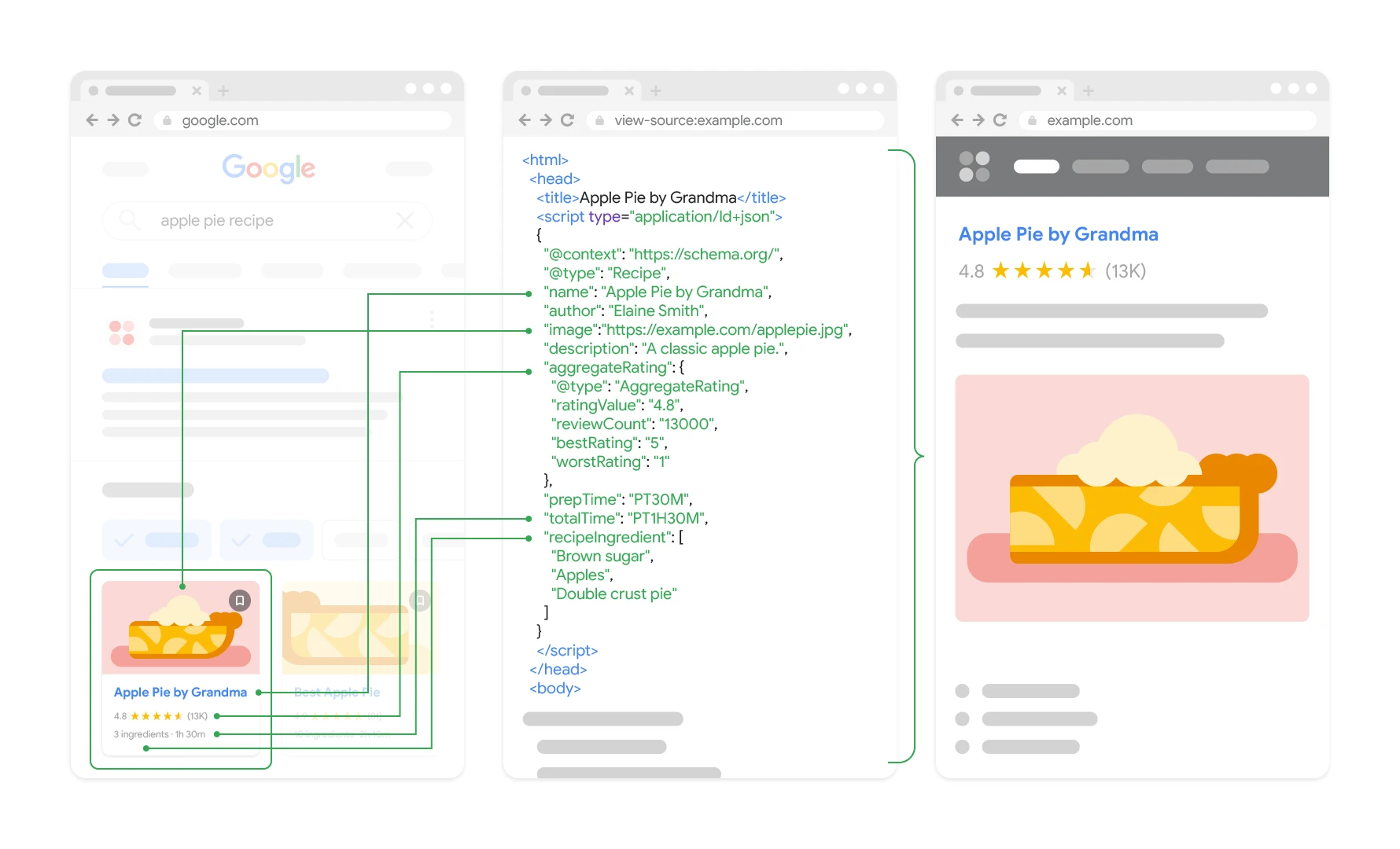
The most commonly used types are Organization, Person or LocalBusiness. The choice of type should result from the actual nature of the entity, not from what “sounds better”. If the business operates locally and has a physical premises, it is worth describing it as LocalBusiness. If the website represents a specific person, Person is usually a more accurate choice than a generic Organization.
- name — the official name of the entity, consistent with what appears on the website and in other sources,
- url — the main address of the official website,
- logo or photo — an element identifying the brand or person,
- sameAs — links to official profiles and pages that confirm identity,
- contactPoint or contact details — provided they are public and actually used,
- address — for local entities, in line with the data visible on the website and in Google Business Profile,
- founder, role, affiliation or other attributes — only where they matter and can be verified.
The key point is that structured data must match the content of the website. If you provide a different name, a different address or profiles that cannot be considered official in the code, the signal starts working against you instead of strengthening credibility. Schema works best when it organises information already present on the page, rather than building a new, artificial version of the entity.
In practice, it is worth implementing structured data at least on the homepage and on the “about us” or contact page. For many brands, that is enough, provided the other elements of the ecosystem are consistent. Adding the code alone will not solve the problem when the company operates under different names in directories, uses several phone numbers and has inconsistent profiles. Structured data supports entity recognition, but it does not replace credible external sources.
It is also worth remembering that not every correctly implemented tag will later be reflected in the knowledge panel. Google only selects the information it considers confirmed and useful. That is why the goal is not to “fill in all fields”, but to provide the most important, true and unambiguous data about the entity.
- 01Precise entity identificationEstablishing exactly who the described entity is.
- 02Schema.org implementationA clear connection with other sources on the web.
- 03Elimination of Google’s guessworkReducing the risk of misreading the name and relationships.
This is not the knowledge panel, but a key signal that makes precise identification on the web easier and reduces ambiguity.
The most common problems and mistakes in the context of the knowledge panel
The most common problems with the knowledge panel stem from Google being unable to confirm unambiguously exactly what a given entity is and which sources should be treated as official. Usually, this is not about a single technical glitch, but about an accumulation of inconsistencies. The more discrepancies there are in the name, URLs, profiles or contact details, the harder it is to build a stable panel. The biggest enemy of the Knowledge Panel is not the lack of one action, but the lack of one coherent identity.
- A name that is too generic or very similar to other brands, people or companies.
- No clearly indicated official website.
- Different versions of the name, description or address in different places online.
- Several phone numbers, several domains or several mutually inconsistent social profiles.
- Weak links between the website, company profile, directories and publications.
- Missing structured data or implementing it in a way that is inconsistent with the visible content.
- Changing the brand name, domain or location without updating all sources.
- The belief that the Google Business Profile itself, ads or high SEO traffic will automatically create a knowledge panel.
A very common mistake is presenting the entity in too generic a way. If a brand has a name similar to dozens of other companies, and the website lacks a clear description, industry, location and official profiles, Google is given too few reference points. In such a situation, it is worth strengthening the distinguishing elements: the full name, business category, domain, representative details, location and related profiles.
Sources that contradict one another also cause problems. A company has one name on the website, another in a directory, an abbreviation on social media and a third variant in the Google Business Profile. For a user, this is a minor detail, but for an entity-identifying system it is a real conflict. If you want to increase your chances of getting a panel, you first need to standardise the core data, and only then build visibility.
Another issue is forced implementations. Some website owners add extensive schema markup without having confirmation for the information entered. Others place links in the sameAs field to unofficial profiles, old accounts or services that do not represent the brand. This does not help, because Google looks for confirmations, not declarations without substance.
In practice, it is also worth being cautious during a rebrand. A new domain, new logo, new company name or relocating the registered office should be reflected as quickly as possible on the website, in social media profiles, in the Google Business Profile and in key external sources. If old and new data exist in parallel, the panel may fail to update or may start mixing information.
If a panel already exists, a common mistake is believing that once a correction is reported, Google will immediately apply all changes. In practice, that is not how it works. Edit suggestions and owner verification can be helpful, but the final decision still belongs to Google. For this reason, the most reliable approach is to remove sources of discrepancies and strengthen official, consistent signals across the brand ecosystem.
How to monitor the presence and accuracy of the Google Knowledge Panel?
The presence and correctness of the Google Knowledge Panel are best monitored by regularly checking brand queries and comparing the information in the panel with the brand’s or person’s official sources. The simplest way to start is by searching the full company name, first and last name, the most commonly used name variant and combinations such as brand + city or person + role. This allows you to assess whether the panel appears at all, for which queries it is shown and whether Google assigns the correct entity to the correct page. If the panel appears only for some queries, this usually points to a problem with name ambiguity or too weak a connection between entity signals.
The mere existence of a panel is not enough. It is worth checking whether the name, category, description, website address, social profiles, photos, contact details and local elements, if they apply to the business, match. The most important rule is simple: everything visible in the panel should be verifiable on the official website and in the official profiles. When old phone numbers, an outdated address or incorrect links appear, the source of the problem is rarely the panel itself, and more often inconsistent data circulating in different places.
Results should be checked in several configurations, because the panel does not always look identical. A good practice is to test on a desktop and on a phone, in a normal window and in no-personalisation mode, and for local businesses also from different locations or by adding the city name to the query. Google can present different panel variants depending on the user’s intent, the type of entity and the strength of confirmation for specific information. Therefore, the absence of one element does not necessarily mean an error, but it often signals that Google does not yet have sufficiently strong confirmation.
- check the full brand name, abbreviations and popular query variants,
- compare the panel with the official website, Google Business Profile and social profiles,
- archive screenshots after major changes to the website, contact details or branding,
- verify whether Google indicates the correct website and the correct profiles as official,
- monitor whether the panel is not mixing your entity with another company or person with a similar name.
For ongoing monitoring, a simple rhythm works best: once a month and after every significant change to the name, address, phone number, domain, logo or profile structure. Most mistakes appear precisely after changes that have not been updated consistently everywhere at the same time. If the company operates locally, it is also worth making sure the panel matches the Google Business Profile, because discrepancies between these sources often undermine the credibility of the information.
If there are errors in the panel, first correct the primary sources, and only then report changes in Google. In practice, this means updating the website, structured data, the Google Business Profile, official profiles and key external entries that Google may read. Only once the official data is in order does it make sense to use the option to suggest changes or report the panel as an entity representative. Without fixing the sources, a correction in the panel itself is often only temporary, because with the next update Google may revert to earlier signals.
It is also worth looking at monitoring more broadly than solely through the prism of the module in the results. Search Console can show whether the number of impressions and clicks for brand queries is growing, and manual SERP checks will indicate whether the panel helps with the correct identification of the brand. It is a practical duo: one tool measures interest in the brand, the other assesses the quality of its exposure in Google. If brand queries are increasing, and the panel is still unstable or contains errors, you usually need to return to work on entity consistency, rather than focus solely on SEO visibility.
FAQ
Frequently asked questions
How does Google create a Knowledge Panel for a brand or person?
Google first recognises a specific entity and then combines signals from multiple sources, such as the website, profiles and publications. If the data is consistent and credible, it may display a knowledge panel for matching queries.
Can Google Knowledge Panel be switched on with one action?
No, the panel does not work like an ad or a standard SEO result and cannot be turned on with a single switch. It is created automatically when Google decides that it understands the entity well and can verify its details.
What helps most with a knowledge panel appearing in Google?
The most important thing is a consistent entity identity across the web: one official name, one domain, matching profiles and credible external sources. An official website with a clear description of the entity and correct structured data also matters a lot.
What details should match for Google to recognise an entity better?
Above all, this concerns the name, URL, logo, contact details, official profiles and — for local businesses — NAP, meaning name, address and phone number. If these elements do not align, Google has a harder time associating them with one entity.
Can schema.org structured data help with the Knowledge Panel?
Yes, because it makes it easier for Google to understand whether the page is about a person, company, organisation or local business. It does not create the panel on its own, but it supports entity identification and connecting facts with the right entity.
Does a Google Business Profile guarantee a knowledge panel for a brand?
No, a Google Business Profile alone does not guarantee a classic Knowledge Panel. However, it helps Google better understand a local business and strengthens signals for local and brand queries.