
WooCommerce plugins increase conversion only when they genuinely remove an obstacle on the path to purchase. In practice, it is not about adding more features, but about shortening the user journey, making product selection easier and reducing the reasons why the basket gets abandoned. One store will benefit from a simpler checkout, while another from better product filtering or recovering abandoned baskets. The biggest mistake is choosing plugins “just in case”, without checking where customers are actually dropping off. That is why a sensible selection of extensions should start with analysing the funnel, devices, traffic sources and the store’s technical limitations. Only then does it make sense to decide which features really have a chance to translate into sales growth.
What are WooCommerce plugins that increase conversion
WooCommerce plugins that increase conversion are extensions that improve a specific stage of the buying journey and help more users move from landing on the site to completing the purchase. They are not “magical” sales add-ons, but tools that solve a specific, practical problem. If a customer cannot find a product quickly, better search and filtering will help. If they abandon the payment stage, simplifying the checkout will usually do more than adding another layer of promotions.
Most often we talk about several classes of solutions: checkout optimisation, recovering abandoned baskets, upsell and cross-sell, reviews and social proof, wishlists, quick product view, sticky add-to-cart, stock availability notifications and dynamic promotions. Each of these groups works at a different stage of the funnel. A good conversion plugin is not meant to create a “wow” effect, but to remove the friction that blocks a purchase.
The example is simple: if a store has many variants, the user often gets lost already on the product page. In such a situation, clearer variant selectors, stock availability messages, reviews and a persistent add-to-cart button on mobile matter more. By contrast, with a broad catalogue, solutions that shorten the route to the right product work more strongly, namely search, filters and category merchandising.
In practice, there is no single best plugin for every store. Effectiveness depends on the assortment, the share of mobile traffic, traffic sources, the number of products, the type of customers and the current integrations. The same feature that will increase conversion in one store may in another only slow down the site and worsen performance. That is why it is better to look not at the popularity of the add-on, but at whether it solves a measurable operational problem.
It is also worth remembering the technical costs. Too many heavy extensions can reduce the store’s speed, cause JavaScript conflicts and break the checkout or payment process. This is particularly important on mobile, where most sales are often decided today. That is why conversion plugins should be assessed not only by the list of features, but also by their impact on performance and the stability of the entire buying journey.
How to choose the right plugins for your store
Plugins should be chosen based on which stage of the funnel users are dropping off at, rather than by the list of most popular add-ons alone. First it is worth establishing whether the problem concerns the product listing, product page, basket or checkout, and only then selecting the appropriate category of solution. If you do not know where you are losing users, choosing a plugin will be guesswork.
To start with, it is worth reviewing the basic metrics: add-to-cart rate, checkout start rate, purchase completion rate, basket abandonment rate and average order value. The results should be split by mobile and desktop, because problems can look completely different on a phone. Traffic source also matters. A user from a product ad usually makes a decision quickly, whereas a returning user is more likely to respond to a wishlist, basket reminders or recommendations.
The choice of plugin should result from the type of problem:
- low add-to-cart rate — refining the product page, variants, reviews, sticky add-to-cart, delivery messages, quick view;
- high checkout abandonment — simplifying the form, one-page checkout, faster payments, fewer steps and clearer delivery costs;
- low order value — bundling, upsell, cross-sell, free delivery thresholds, dynamic promotions;
- poor product discovery — better search, filters, sorting and catalogue presentation logic;
- lost demand when out of stock — stock availability notifications and product interest sign-up;
- lots of returning users without purchase — wishlists, basket saving and automated reminders.
From a technical perspective, you need to verify compatibility with the current WooCommerce, theme, page builder, payment gateways, cache, as well as inventory and sales integrations. This matters because even a good feature can trigger errors related to coupons, taxes, delivery or variable products. In a store operating at the limits of performance, every additional plugin must be assessed particularly carefully. Sometimes it is better to implement one simple feature well than three elaborate add-ons that overlap.
Before full implementation, it is worth going through real purchase scenarios. You need to test a simple and variable product, purchase as a guest and while logged in, coupon use, free delivery, different payment methods and the entire process on a phone. A plugin may look good visually, yet still break the logic of the basket or order completion. For that reason, a functional test is more important than the feature description on the supplier’s website itself.
At the finish, what remains is measuring the effect after implementation. It is worth comparing the data before and after the change: add-to-cart rate, checkout entries, completion, average basket value and use of a given function. If the results do not improve or the store starts running more slowly, the extension should be improved or rolled back. A plugin only makes sense when it raises a specific metric without worsening the performance of the whole store.
The importance of mobile solutions in conversion
Mobile solutions have the strongest impact on conversion today when they shorten the purchase to a few simple steps on a small screen. In a WooCommerce store, the winner is not the one who adds the most features, but the one where the customer can quickly find the product, choose a variant and pay without frustration. If a plugin makes mobile use more complicated, even a sensible sales feature can lower results. For this reason, priority should go to extensions that tidy up the interface, speed up performance and reduce the number of steps.

Plugins that improve three areas work best most often: the product page, basket and checkout. On mobile, sticky add-to-cart, a clear variant selector, a quick product preview and a simplified order form are especially important. When the user has to scroll for too long, manually correct fields or only look for delivery costs at the end, the abandonment rate usually rises.
Fast payment methods and reducing the number of decisions in the checkout are also important. In practice, plugins supporting express checkout, data autofill, basket saving and clear delivery messages perform well. On mobile, every additional step, popup or heavy script is a real conversion cost that quickly shows up in the numbers.
In stores with a broad catalogue, search and filters also have a strong impact on mobile results. If the user cannot narrow down the offer quickly, they will most likely never reach the moment of adding the product to the basket. That is why plugins for search, filtering and quick preview often deliver a greater effect than adding more promotional elements on the homepage.
Mobile is not only about design, but also technical compatibility. A plugin should work properly with the theme, builder, cache, payment gateways and shipping logic, because conflicts most often show up on phones. Before leaving a new extension in place permanently, go through the full purchase process on a real device, not just in the browser preview.
Stages of implementing and optimising WooCommerce plugins
Implementing and optimising WooCommerce plugins should start with identifying the point at which the user drops out of the funnel. At the outset, you need to establish whether the problem concerns entering the product page, adding to basket, the checkout itself, or returning after basket abandonment. Without this diagnosis, it is easy to implement a striking feature that in practice solves no real issue.
After the analysis has been carried out, the plugin category is matched to the specific business goal. A low add-to-cart rate usually suggests a need for better product presentation, stronger reviews, using a sticky CTA or simplifying variant selection. A high drop-off in checkout more often means it is worth shortening the form, refining payments or switching to a simpler order completion model.
Installing the plugin is only the first step, because configuration is of key importance. You need to set promotion conditions, mobile visibility, message copy, upsell rules, behaviour for different shipping methods and tax compatibility. A well-designed plugin configured incorrectly can do more harm than an average solution set up sensibly.
After implementation, you need to run full purchase scenario tests. It is worth checking a simple and variable product, purchase with a coupon, free delivery, different payments, guest checkout and a logged-in user, as well as performance on a phone. This is important because errors often do not appear on the product page, but only in the basket or at the final ordering step.
The next stage is measuring the impact on results. The most convenient metrics to monitor are changes in add-to-cart rate, checkout starts, purchase completion, average order value and basket abandonment. If no improvement is visible in the data after implementation, the plugin is not increasing conversion simply because it looks modern.
Optimisation does not end with one test, because user behaviour changes with traffic, seasonality and the growth of the catalogue. Sometimes the configuration needs to be simplified, some functions disabled, or the plugin removed entirely if it worsens loading speed and Core Web Vitals. The best approach is a short work cycle: analysis, solution selection, implementation, testing, measurement and correction.
How to avoid common mistakes when implementing plugins
Common mistakes can be avoided when each plugin is chosen for a specific problem in the funnel, not for the promise of “more sales” alone. The most common mistake is installing extensions just because they look appealing or offer many features. As a result, store complexity increases, performance drops and diagnostics become more difficult. First, the problem needs to be named: low add-to-cart, checkout abandonment, weak search or a low average basket.
The second mistake is duplicating functionality with several plugins at once. It is not uncommon for a store to have two upsell modules running in parallel, a separate sticky add-to-cart from the theme and another from a plugin, plus extra popup scripts. This increases the risk of JavaScript conflicts, cart errors and slower loading times. One well-configured plugin usually works better than three solutions that partially overlap.
One of the most common problems is technical compatibility. A plugin can work flawlessly on the product page and at the same time break the checkout, conflict with cache, a builder, a payment gateway or shipping and tax logic. For this reason, before implementation it is worth checking not only the feature description, but also the update history, compatibility with the WooCommerce version and behaviour on mobile.
It is equally risky to judge a plugin solely by appearance. A solution focused on conversion should pass a test of the entire purchase journey: simple product, variable product, coupon, free delivery, BLIK or card payment, guest checkout and logged-in checkout. If a plugin looks good but in one of these scenarios makes it harder to complete the order, then in practice it reduces conversion.
It is also worth keeping an eye on overly aggressive sales elements. A popup covering the screen, several trust badges at once, a countdown timer without clear promotion rules or too many product recommendations often get in the way more than they support the purchasing decision. Especially on mobile, every additional message distracts from the goal, which is moving to the cart and payment.
The safest implementation path is simple: test on a staging environment, check performance, verify analytics and only then publish. After launch, it is worth monitoring errors, abandoned checkouts and customer reports for a few more days. The plugin should be kept only if it genuinely improves results and does not worsen the store’s performance in other areas.
How to measure the effectiveness of WooCommerce plugins
The effectiveness of WooCommerce plugins is assessed by changes in specific metrics at the stage of the funnel that the given plugin was meant to improve. Looking only at total sales is not enough, because the result is also influenced by seasonality, traffic sources, prices and ad campaigns. So it is crucial to clearly define what problem the plugin was meant to solve and which KPI should change after it is implemented.
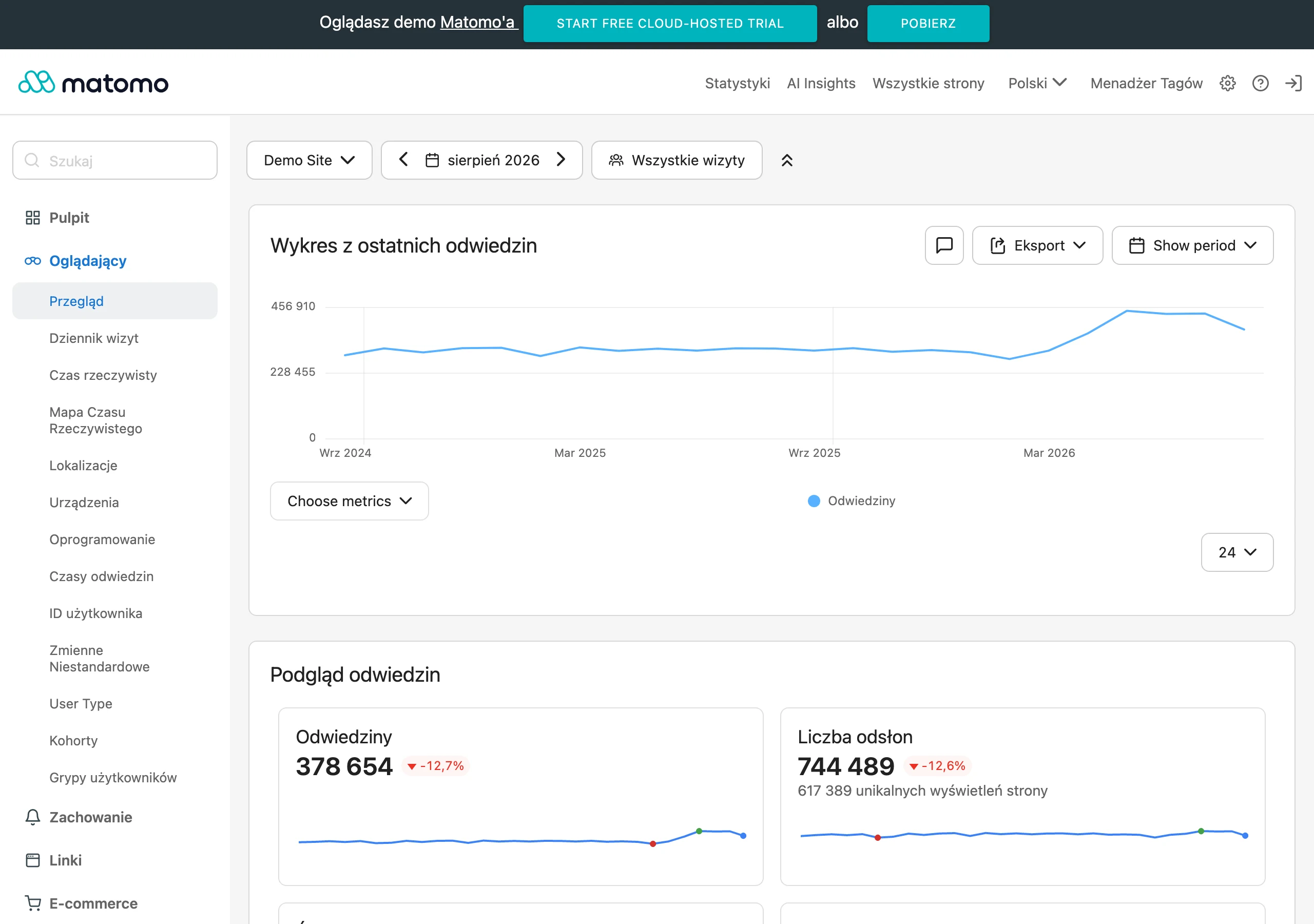
First, establish the baseline before implementation. In practice, it is a good idea to record the current add-to-cart rate, the percentage of started checkouts, the checkout completion rate, average order value and cart abandonment level. Without “before” data, it is impossible to reliably assess whether the plugin actually helped or simply coincided with another change.
Next, you need to track e-commerce events correctly in analytics. The minimum includes product views, add-to-cart actions, checkout starts, coupon usage, payment method selection and purchases. If you are implementing a plugin for search, wishlist or stock availability notifications, these interactions should also be measured as separate events.
- For checkout plugins, the most important metrics are: checkout starts, form abandonment, purchase completion and errors at the payment stage.
- For search and filters, what matters is: use of search, clicks through to product cards, add-to-cart after search and the exit rate from listings.
- For upsell, bundles and free-delivery thresholds, the most important metrics are: average order value, number of products in the cart and the share of orders with additional items.
- When recovering abandoned carts, it is worth monitoring: the number of recovered carts, recovered revenue and the effectiveness of reminder messages.
A change in a single overall metric can be misleading, which is why results should be segmented. Analyse mobile and desktop separately, new and returning users, paid and organic traffic, as well as different product types. In a store with a large number of variants, one plugin may improve results for simple products while at the same time worsening them for variable products.
The most reliable approach is to compare results before and after over a stable period, and where traffic volume allows, also to run an A/B test or stage the rollout. This makes it easier to separate the plugin’s impact from price changes, campaigns or seasonal demand growth. If usage of a feature increases after implementation but the target stage of the funnel does not improve, it is a sign that the feature is visually appealing but does not deliver a real business effect.
Finally, you need to make an operational decision: keep, improve or remove. A good plugin is not one that merely adds a feature, but one that increases a measurable result without the cost of a slower store, errors or poorer UX. Effectiveness measurement should cover conversion, basket value and the impact on page performance at the same time.
FAQ
Frequently asked questions
How do you choose WooCommerce plugins that will really increase conversions?
First, you need to check which stage of the funnel users are dropping off at: the product page, the cart or the checkout. Only then do you choose a plugin for a specific problem, instead of installing popular add-ons without a diagnosis.
Can a better checkout improve sales in WooCommerce?
Yes, if the problem lies precisely at the purchase completion stage. The article points out that where checkout abandonment is high, simplifying the form, faster payments and fewer steps will do more than adding more promotions.
Which WooCommerce plugins help when customers do not add products to the cart?
In this situation, the best solutions are those that improve the product page, variations, reviews, sticky add-to-cart, delivery messages and quick product view. The aim is to reduce friction before clicking “add to cart”.
Why can too many plugins reduce conversion in a WooCommerce store?
Because heavy extensions can slow the store down, cause JavaScript conflicts and break the cart or payments. As a result, the features that were meant to support sales start getting in the way of them.
When is it worth implementing abandoned cart recovery plugins?
When analysis shows that users leave the store after adding a product to the cart or during returns to purchase. The article also notes that for returning customers, wishlists, cart saving and reminder automation work well.
How do you measure whether a WooCommerce plugin has actually improved results?
You need to compare data before and after implementation, especially add-to-cart rate, checkout starts, completed purchases, average order value and cart abandonment. If the metrics do not rise or the store runs slower, the plugin needs to be improved or removed.