

A migration of a site without losses in traffic and leads is a project of the “deliver or pay” kind. You are changing the website, but you are not allowed to lose what is already working: visibility in Google, visits to important subpages and functioning contact paths. In practice, this involves changing the domain, CMS, template, information architecture, language versions or frontend technology. The biggest mistake. Treating a migration as an ordinary new site launch, without rigorous SEO, analytics and form control. A safe migration is not a one-off publication, but a process with an audit, URL mapping, testing and post-launch monitoring. Even if traffic stays at a similar level, leads can drop sharply because of forms that do not work properly, incorrect tagging or less intuitive navigation. That is why decisions are made on the basis of baseline data and a list of pages that genuinely make money for the business.
What a migration of a site without losses in traffic and leads is
A migration of a site without losses in traffic and leads is a controlled move of a website so as to maintain organic visibility, pass SEO signals correctly and not interrupt conversion paths. One thing is key. It is not about simply “launching” a new version, but about transferring its value: content, search intent, internal linking, metadata, structured data and contact points. The question is: what are you really transferring, and what are you merely repainting. In practice, it is a project at the intersection of SEO, development, analytics, UX and often content.
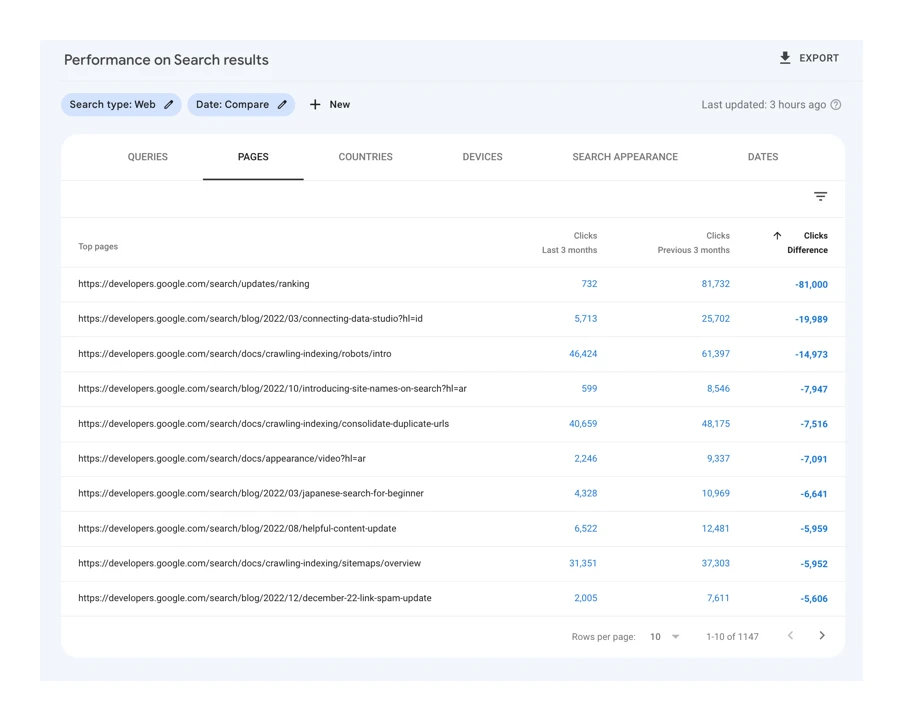
Such a migration may include a domain change, a switch from HTTP to HTTPS, replacing the CMS, a redesign, combining several websites or rebuilding categories and filters. It sounds technical, but the stakes are very down to earth. Each of these scenarios carries different risk. With a domain change, redirects and canonical signals are most important; with a CMS change, metadata and content often “evaporate”; and with a redesign, navigation and forms are easiest to break.
The most important thing is that the success of a migration is measured not by the appearance of the new site, but by the continuity of results. Continuity matters. If, after launch, visits to key URLs disappear, the number of submitted forms drops or analytics stops attributing sources correctly, the migration has not been carried out safely. Organic traffic and leads must be treated as two separate goals, because you can keep one and lose the other.
In a well-run project, concrete operational elements are created, rather than a set of general recommendations. And that is not a cliché. We are talking about a URL inventory, a 301 redirect map, a list of priority pages, a baseline data benchmark, a staging environment, a QA checklist and a post-publication monitoring plan. But beware. It is precisely these materials that organise cooperation between SEO, developers, analytics and the people responsible for content.
Key elements of the migration process
There are no minor details in a migration. The key points are baseline data, a complete list of addresses, well-planned redirects, recreating SEO and analytics, pre-launch testing and post-launch monitoring. If even one of these pieces is missing, the risk of losing visibility, or worse, interrupting lead capture, increases. The process must tie together the technical and business layers, instead of pretending they are two separate worlds.
- Baseline benchmark — you need to know which subpages drive traffic, leads, revenue, backlinks and visibility before anything is touched.
- Full URL inventory — addresses should be collected from the crawl, sitemap, Search Console, Analytics, the CMS, server logs and lists of pages with external links.
- 301 redirect map — each old URL should have a consciously assigned new equivalent that matches the topic, rather than an automatic redirect to the homepage.
- Recreating SEO signals — title, headings, content, canonicals, breadcrumbs, internal linking, hreflang and structured data need to be transferred.
- Continuity of analytics and leads — forms, events, goals, CRM integrations, click-to-call and campaign sources must work identically or better than before.
- Staging and QA — the test environment should be available for checking, but blocked from indexing, and before launch you need to test URLs, forms, tags and mobile.
- Post-launch monitoring — after publication, 404s, indexing errors, drops in visits to priority pages, conversion issues and gaps in redirects should be tracked.
In practice, the most painful issue is the lack of alignment between the old and new site structure. If category names, product URLs, blog layout or filtering logic change, you need to ensure not only the user redirect, but also the preservation of search intent. The question is: does the new site really match what the old URL was about. Google does not assess the mere fact of a redirect, only whether the new site actually matches what the old URL used to be about.
The second critical area is conversion analytics. After a migration, the problem often is not a real drop in the number of leads, but the fact that forms do not send events, the thank-you page does not load properly, or the data does not reach the CRM. And then the reports look as if there has been a failure, even though sales are still happening “somewhere”. That is why you test not just the form itself, but the whole journey: entry, completion, submission, event recording and the appearance of the lead in the sales system.
The third element is the quality of the technical implementation. An overly heavy frontend, JavaScript rendering issues, incorrect noindex or a conflict between robots.txt and the sitemap can derail results even with a well-prepared 301 map. The problem is that these faults do not shout at you immediately; they slowly eat away at visibility. A safe migration only ends once, after launch, you have confirmed indexing, form functionality and data stability, not at the moment you click “publish”.
Current challenges and risks in site migration
The biggest contemporary challenges and risks in site migration come from the fact that everything changes at once. Not only technical SEO, but also content, frontend and conversion tracking can all drift out of alignment in a single moment, like poorly set points on a railway line. Today, the problem is rarely just the absence of one redirect. More often, the loss comes from a sum of small issues that each look harmless on their own, but together weaken visibility and damage contact journeys. In practice, you therefore need to keep an eye not only on indexing, but also on content alignment with search intent, internal linking logic and whether the forms actually work.
The most common risk is a mismatch between the old and new meaning of pages. If the old page answered a specific query and the new version is thinner, combines several topics, or leads to a too-generic equivalent, Google can lower its rankings. The question is: is the new URL really “the same thing”, just in a new guise. A 301 redirect protects SEO value only when the new URL is as close an equivalent as possible to the old page.
The second major risk lies on the frontend side. New sites are often heavier, more dependent on JavaScript and full of components loaded only after user interaction. The effect is often straightforward: content rendering becomes more complex, key elements appear later, and some links or forms disappear “under the bonnet”, even though they were previously available straight away.
The third group of issues concerns analytics and leads. There is no room for assumptions here. After a migration it is very easy to lose GA4 events, conversion definitions, UTM parameters, CRM integration or the logic for confirming form submissions. And then the theatre of numbers begins: traffic looks stable, while sales suddenly drop. Traffic may look stable, and leads fall, simply because the form is working badly, the event is not being recorded correctly, or the lead does not reach the sales system.
The risk also grows with the scale of the site. Multilingual setups, subdomains, extensive filters, pagination, landing pages for campaigns, structured data and many template types increase the number of places where inconsistencies can appear. On a small site that is usually a few missteps; on a large one, it is already a systemic problem that can bite in several places at once. The more complex the site, the more important one shared URL map, one set of rules and a clear business owner for decisions.
In practice, migration has to be kept under control simultaneously at three levels: technical SEO, conversion tracking and the UX of key contact journeys. This is not an “either-or” choice, but work across three dashboards at once. The tools usually used for this are a technical crawler, Search Console, GA4, server logs, uptime monitoring and performance tests. If you look only at rankings or only at forms, you may miss the real source of the problem.
How the practical site migration process works
The practical site migration process is a sequence of actions: from benchmarking and URL mapping to testing, launch and post-launch stabilisation. First order, then pace. The sequence matters because each stage prepares data for the next, and shortcuts usually come back as a bill. When a team starts with the implementation and only later tries to sort out URLs, metadata and analytics, it ends up with losses that could have been predicted.
- Discovery and benchmark. The start is simple. You collect baseline data on traffic, leads, landing pages, rankings, indexation, template types and current technical errors, because without that, comparing after migration would be guesswork. It is the benchmark that will show, in black and white, whether the migration really succeeded.
- Full site inventory. One source is not enough. URL lists should not come only from a crawl or only from the CMS, because something will always slip through the net. You combine the crawl, sitemap, Search Console, Analytics, the CMS database, server logs and data on pages with backlinks so as not to miss important URLs and not discover them only after a 404.
- Design decisions and migration map. This is where wishes end and decisions begin. For every old URL, you decide whether it stays, gets a new equivalent, is merged with another page or disappears in a controlled way rather than “by accident”. The result is a 301 map together with exceptions for parameters, language versions, media, pagination and pages without a straightforward equivalent, because the problem is that it is precisely the exceptions that do the most damage.
- Recreating the SEO layer and content. It is not only what is visible on screen that gets moved. That also includes title, headings, canonicals, breadcrumbs, internal linking, FAQ, hreflang and structured data, in other words the whole “mechanics” of visibility. If the new version changes the information architecture, it is crucial that the pages still answer the same search intents. Not a new layout for the sake of it, but consistency for the user and the bot.
- Recreating analytics and leads. Conversion has to work, not just look as if it does. At this stage you recreate forms, events, campaign sources, click-to-call, chats, CTA buttons and CRM integration, because without that the reports will be nice, but empty. The goal is not limited to a record in a tool. It is about making sure the lead actually gets passed on for handling.
- Staging deployment and QA. Tests need somewhere to happen. The test environment should be available for checking, but blocked from indexing, otherwise you end up with duplicate content and a mess. Before launch, you run a comparative crawl, redirect tests, tag validation, mobile tests, performance tests, form tests, canonical tests and structured data tests. The data makes it clear that there is no shortcut here.
The publication moment itself is a separate stage. And that is not a cliché. It should follow a checklist: remove indexing blocks, activate redirects, check DNS and certificates, generate up-to-date sitemaps, confirm that GA4 is working and manually go through the most important lead paths. Publishing without a checklist usually does not break everything at once, but adds up to a series of small errors that, taken together, cost traffic and contacts.
After launch, monitoring and stabilisation begin. Without sentimentality. Every day, or very regularly, you check URL statuses, 404 errors, redirect chains, indexation, visits to priority pages, forms, session and conversion discrepancies, and new errors in Search Console. The question is whether we treat this as part of the deployment or as an “observation period” with no action. The first days after migration are part of the deployment, not a time for passive waiting for everything to sort itself out.
At the end, a backlog of fixes is created. This is not cosmetic work, but a list of things that keep the site in good order. It includes missing redirects, orphan pages, lost metadata, incorrect canonicals, slow components, rendering issues and interface elements that reduce the number of submitted forms. This stage determines whether the migration will end with a safe move only, or instead, and in fact beyond that, with the site being organised for the next few months.
Strategies for minimising losses during migration
Losses after migration come from small details. That is why minimising losses is about securing pages, SEO signals and lead paths before the new version goes live in production. First, you decide which URLs actually drive traffic and contact, and only then do you start planning changes to structure, content and design. In practice, priority goes to pages with organic visits, campaign landing pages, key categories, articles with backlinks and all forms. If you do not know which URLs and contact points are business-critical, migration becomes guesswork.
The second strategy is less spectacular, but it saves the day. It is a full inventory of the old site and a conscious decision for every URL, without any “it will somehow work out”. The URL list cannot come from a single source, because then something is almost always missing. You need to bring it together from data from the crawl, the CMS, Search Console, analytics, server logs and the list of pages with external links. Every old URL should have a new equivalent that matches it thematically, rather than a generic redirect to the homepage.
The next layer is semantics. The new site may look better, but if it cuts important sections, flattens the topic or puts several search intents into one “universal” URL, visibility often drops despite correct redirects. And here the question is: are you moving the content, or just the letters. That is why you move not only the text itself, but also headings, title, canonicals, breadcrumbs, internal linking, FAQ and the elements that helped the page respond to specific queries. The most common loss of traffic does not come from the URL change itself, but from losing the page’s meaning.
The lead layer requires separate protection. Forms, clicks on the phone number, chats, CTA buttons, thank-you pages, GA4 events and CRM integrations must work identically or better than before, because there is no room for compromise here. Traffic stability alone is not enough, because a user may land on the site and not submit a form due to a validation error, a missing event or an overly heavy component loaded by script. Rather than celebrating sessions, it is better to look at behaviour in the funnel straight away. After migration, you need to compare not only sessions, but also started forms, submissions and whether the lead reaches the sales system.
Many losses can be cut thanks to a solid test environment and rigorous QA before launch. Staging should be available for review, but cut off from indexing, without exceptions. At this stage, you do a comparative crawl, redirect tests, tag validation, JavaScript rendering checks, internal linking, structured data and mobile version checks. The problem is that migrations like to descend into chaos at the last minute, so critical content changes are best frozen for the duration of the rollout, so the URL map does not drift between SEO, development and content.
The final strategy is simple, but unforgiving. Fast monitoring after launch and readiness to make fixes, because in the first few days reaction time matters, and some problems only emerge after bots and users hit production. The team should have one source of truth for KPIs, logs, errors and the change backlog, so that priorities are not lost and symptoms are treated instead of causes.
- daily checks of the status of the most important URLs and new 404 errors,
- checking whether redirects are not forming chains or loops,
- comparing traffic and leads on priority pages, not just across the entire site,
- verifying indexing, sitemap and Search Console messages,
- manual tests of forms, phone, CTA and CRM integrations after every fix.
The most common mistakes and how to avoid them in a site migration
The most common mistakes in a site migration are the lack of a complete redirect map, loss of SEO signals and forms left to run wild. These are not “isolated” faults. They usually come as a package: some old addresses return 404, new subpages have thinner content, and analytics starts counting leads incorrectly. The effect can be perverse. A supposedly “small” migration, and then rankings drop and the number of enquiries falls.
- No 301 map for all important addresses – the solution is a full inventory and 1:1 mapping or a deliberate merge to the closest equivalent.
- Redirects to the homepage or overly broad categories – redirect according to the topic, intent and historical function of the page, instead of sweeping everything to the homepage.
- Loss of metadata, headings and internal linking after changing the CMS – before launch, compare the old and new templates and check whether the export and import of SEO fields really works.
- Incorrect noindex, blocks in robots.txt or a blocked staging environment pushed to production – you need a publishing checklist and manual checks of the key rules immediately after go-live.
- Content loaded by JavaScript that is invisible to Google – test rendering, the HTML source and the availability of key links without user interaction.
- Missing lead events and form tests – check both the event recording and whether the lead actually reaches the CRM, rather than just “looking fine” in the report.
A very common mistake is lumping too many changes into one bundle. The company changes the domain, CMS, information architecture, templates, content and analytics tools all at once, and then starts guessing what really caused the drop. And here the data are clear. The more variables in one rollout, the greater the risk and the longer, more expensive the diagnosis. It is safer to separate changes where possible, or at least clearly mark which elements are critical and should not be touched at the last minute.
Another mistake is evaluating a migration solely through the prism of total traffic. The total number of sessions can look stable while entries to the pages that previously generated enquiries disappear. The problem is that the aggregate neatly masks the gaps. That is why analysis should be carried out at the level of URL groups, template types, devices, branded and non-branded queries, and form stages. If you only monitor total traffic, you may miss a decline exactly where the business actually makes money.
Project organisation also often goes wrong. When SEO, the developer, the analyst and content are fiddling in different files, conflicting decisions about URLs, content and tagging quickly arise. One source of decisions is key: one owner of the URL map, one publishing checklist and one dashboard for assessing the effects of the migration. Most problems do not come from a lack of knowledge, but from a lack of a shared version of the truth.
The last serious sin is publishing without a contingency plan. Not every fault can be predicted, so beforehand you need a mapped rollback path, a list of decision-makers and fix priorities for the first 24-72 hours. After launch, that saves nerves and time, because nobody is groping around in the dark, deciding who fixes redirects, who validates forms and who confirms the data in analytics. The question is not “will something go wrong”, but “will it be clear what to do first”. A good migration is not about having no problems, but about quickly detecting and containing the ones that really hit traffic and leads.
Monitoring migration success and analysing results
Monitoring migration success starts simply. Every day you check whether the new version of the site has preserved visibility, is collecting data correctly and is still delivering leads from the same or better paths. The benchmark must come from pre-launch baseline data, because without it you will not distinguish natural fluctuations from a real problem. The most important thing is to compare not only total traffic, but also the specific pages, queries and forms that previously delivered business results.
First you check the technical layer: URL statuses, 301 redirects, 404 errors, canonicals, the XML sitemap and indexing reports. This is a quick test of whether Google and users are landing where they should, and whether the migration has undermined basic SEO signals. Search Console, a comparative crawl and server logs are very useful here, because only together do they bring to light problems that are not visible in GA4 alone.
The second layer is analytics and lead measurement continuity. You check whether sessions are being recorded properly, traffic sources are not being overwritten, and forms, click-to-call, chats and other conversion events work just as they did before launch. Stable traffic with a drop in the number of submitted forms usually means a problem with UX, CRM integration or tagging, rather than with SEO itself.
Analysis of results should go one level deeper than the overall report. In practice, you compare landing pages, branded and non-branded queries, devices, countries, template types and the form stages where users drop off. The data makes it clear: only this sort of cross-section shows whether the problem is isolated or systemic. If after a migration only selected sections drop, it is easier to identify the cause: incorrect URL mapping, content loss, weaker internal linking or a slower frontend.
Not every drop after publication means a failure. However, each one needs to be read and placed in the right context. Short-term fluctuations often result from the reprocessing of redirects and changes in indexing, whereas drops that persist on priority pages usually call for a quick intervention. And that is where the essence begins, because results are assessed through the lens of seasonality, active campaigns, content changes and differences between days of the week, rather than in a simple day-to-day view. The question is whether we are looking at a trend or a single dip.
An separate migration dashboard helps with this. Ideally with several groups of metrics: indexing and technical errors, organic traffic on priority pages, the number of started and submitted forms, and lead quality in the CRM. This view more quickly shows the gap between traffic and sales performance, which is what hurts most. If a lead makes it into the form but does not appear in the CRM, the migration has not been successfully completed, even if SEO looks stable. This is not cosmetic; it is a real gap in the process.
After launch, response time matters. And that is not a cliché. Problems with 404s, redirect chains, missing events, incorrect noindex or orphaned pages should go straight into the backlog, with a priority assigned and the owner of the task clearly indicated. Not “sometime”, but immediately, because every day of delay can cost visibility and conversion. The success of a migration is judged by the stabilisation of the whole setup: visibility, usability and conversion, not by the publication day itself.
FAQ
Frequently asked questions
How do you prepare a site migration so you don’t lose organic traffic and leads?
First, you need to gather baseline data, identify priority pages and prepare a complete list of URLs. Then you create a 301 redirect map, restore SEO and analytics, and test everything on staging.
Is a 301 redirect map enough to make a migration safe?
No, because redirects protect SEO value only when the new address is as close a match as possible to the old one. You also need to migrate content, metadata, internal linking, forms and conversion tracking.
Why can leads drop after a site migration even if traffic stays similar?
Because the problem often lies in forms, events, tagging or CRM integration, not in the traffic itself. If the contact path stops working properly, reports and lead numbers can fall even with stable visits.
What should you check on staging before publishing the new site?
On staging, you should check redirects, forms, tags, the mobile version, canonicals and structured data. The test environment should be accessible for review, but blocked from indexing.
When should you start monitoring the site after migration?
Immediately after launch, because the first few days are part of the implementation, not a period of passive waiting. You need to regularly check 404 errors, indexing, redirects, visits to priority pages and form performance.
Which pages are most important when planning a site migration?
Priority should go to pages that genuinely drive traffic, leads, revenue, backlinks and organic visibility. Particularly important are campaign landing pages, key categories, articles with external links and contact forms.