

SEO site architecture is the foundation that determines whether a website can be effectively optimised today and expanded without chaos in a year’s time. This does not concern the visual layer, but the information layout, the links between subpages, the logic of URL addresses, and how users and search engine robots move around the site. In practice, many SEO problems do not stem from poor content, but from valuable materials being placed in the wrong way. Well-designed structure reduces keyword cannibalisation, makes indexing easier and allows new sections to be added without rebuilding the whole site. This matters for both a small service website and an online store, a portal or a local site. The earlier you organise the architecture, the less often you will have to come back later for costly fixes.
What is SEO site architecture and why is it important?
SEO site architecture is the way subpages, URLs, navigation and internal linking are organised so that the website is clear to users and easy for search engines to read. It includes the hierarchy of categories, subcategories, service pages, local pages, filters, the blog and other sections. It is the design of information logic, not the graphic design.
Its role is to combine three areas at once: real search demand, user needs and the technical limitations of the CMS or store. When these layers do not hold together, the website starts to drift apart. That is when duplicate topics appear, landing pages are chosen badly, and sections emerge that cannot be clearly assigned to a specific search intent.
Good architecture organises the site’s subject matter into clusters. The homepage or parent category leads to more detailed subpages, and these are supported by sensible internal linking. In practice, this means a simple rule: one main search intent should lead to one main landing page.
This is also important because search engines assess websites better when relationships between subpages are organised and predictable. When the main topic has clear subtopics and each section serves a clearly defined function, proper crawling and indexing become easier. It also removes the common problem where several subpages try to rank for very similar keywords and none of them fully uses its potential.
The importance of architecture grows as the site expands. A small website may function for some time despite an imperfect structure, but a larger site quickly feels the consequences of poor decisions. If there are no naming rules, URL patterns and rules for creating new sections, every expansion increases SEO debt and makes further growth harder.
- 01Order and clarityA structure that is friendly for users and search engines.
- 02Consistent integrationBrings together demand, user needs and technology.
- 03Information logicA design of site logic, not graphics.
Key takeaways: Good architecture organises the site’s subject matter and prevents chaos, avoiding duplicates and poorly chosen landing pages.
How do you design a site structure so that it is scalable and SEO-friendly?
A scalable and SEO-friendly structure should be built around business goals, search intent and types of subpages, rather than the menu alone. At the outset, you need to clearly define what the company sells, which markets it operates in, what its priorities are and which areas it plans to develop in the next stages. Only then does it make sense to map out categories, subcategories and URL patterns.
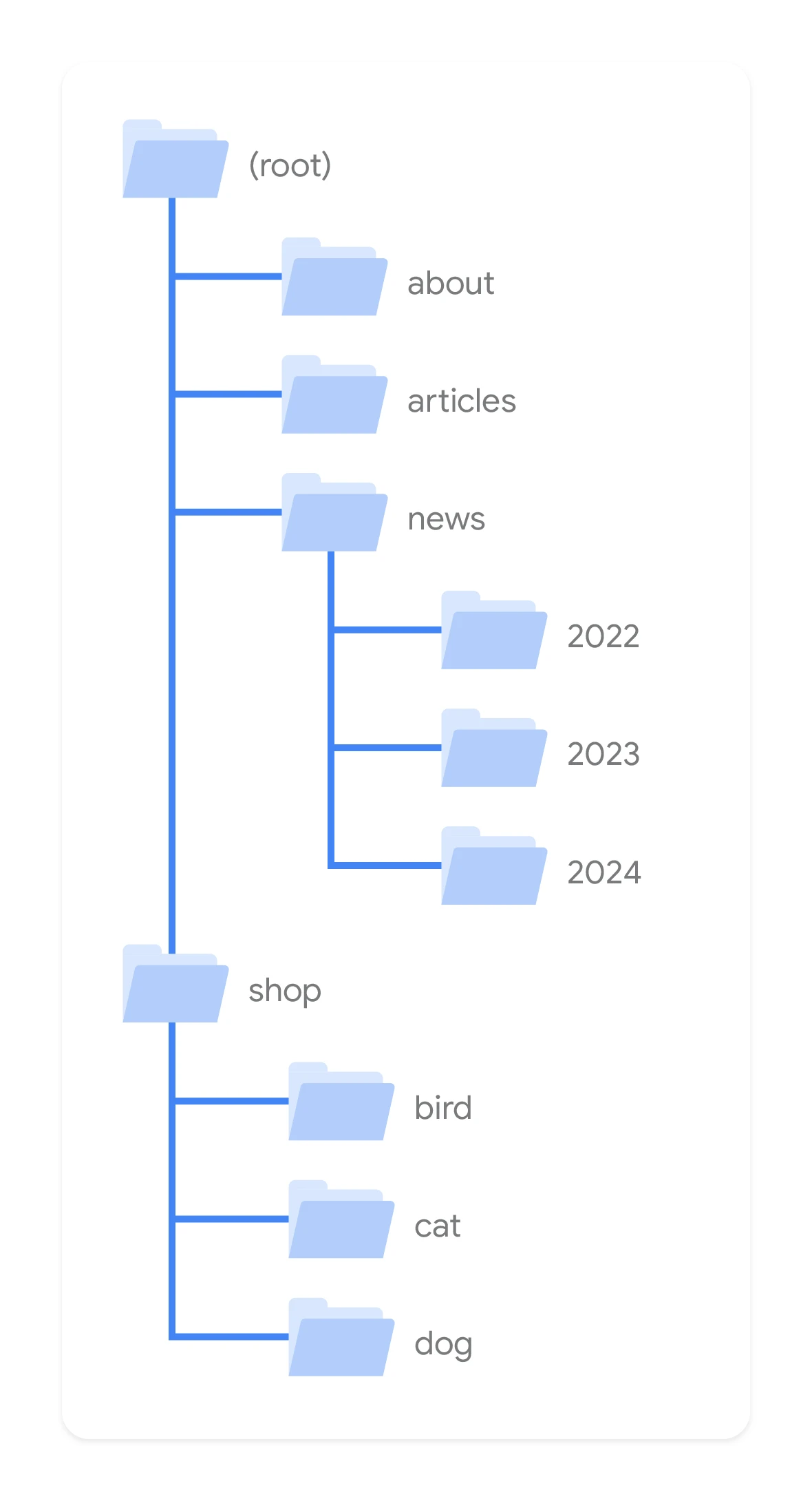
The next stage is mapping topics and user intents. Not every keyword needs a separate subpage, but neither can you “cover” all queries with one general service page. It is worth separating informational, commercial, transactional and local queries, and then deciding whether a given topic needs a pillar page, a supporting subpage, a category or a separate local page.
Scalability starts with a predictable hierarchy. The structure should lead users from general to specific, without unnecessary jumps and without hiding key subpages too deeply. The best structures can be expanded by adding further elements to the existing logic, rather than creating exceptions for every new topic.
In practice, it is a good idea to adopt a few fixed rules from the project stage onward:
- what types of subpages exist in the site and what role they play,
- which sections are primary and which are supporting,
- what the URL patterns and naming look like,
- which pages should be indexed and which should only help with navigation,
- how breadcrumbs, section menus and contextual linking work,
- what to do with filters, tags, pagination and automatically generated addresses.
It is also crucial to separate content functions. Sales pages should respond to a purchase or contact intent, while guide content should develop the topic and direct users to the right offers. Combining these roles on one subpage often ends with content that fails to meet the expectations of either the user or the search engine.
When designing, technical constraints also need to be taken into account. Some CMS platforms and e-commerce engines can create excessive URLs through filters, sorting, variants or tags. Indexing everything the system can generate is one of the most common architectural mistakes. That is why, alongside the content map, an indexing plan is needed: what should be visible in Google, what should have a canonical, and what should remain out of the index.
If the site is already live, the project should not start from building everything from scratch. First, it is worth checking which URLs should be kept, which combined, which rewritten and which redirected. Often, a better result comes from strengthening a promising pillar page and tidying up internal linking than from adding more very similar URLs.
A well thought-out site structure is ready for implementation straight away. In practice, it should be closed with a concrete sitemap, URL rules, indexing decisions and a clear description of how the menu, breadcrumbs and linking blocks work. If, after the project, the content, UX and development teams still understand the structure in their own way, it means the architecture has not been described clearly enough.
What are the key elements of the site architecture creation process?
The key elements of this process include gathering business goals, analysing search demand, assessing the current site, designing the target structure and verifying whether it can be implemented correctly.
At the outset, it is worth clarifying what the site actually sells, which markets it operates in and which sections are to be developed in the coming months. This is not a formality. If the architecture does not flow directly from the offer, priorities and CMS constraints, it quickly loses practical value.
The next step is demand analysis, that is assigning topics and search intents to specific page types. In essence, it is about deciding whether a given topic should have one service page, a separate category, a local page or rather an entire cluster of supporting content. This is the stage at which keyword cannibalisation is easiest to limit later on.
Next, the current state is checked: existing URLs, click depth, orphan pages, duplicates, thin pages and mismatches between the menu and the actual offer. Such a review shows what is worth keeping, what to merge and what to remove or redirect. Not every new need means a new URL — sometimes a better result comes from strengthening one pillar page and completing solid internal linking.
- setting business goals, offer types and locations,
- mapping keyword clusters and intents,
- auditing existing subpages and the relationships between them,
- designing the target sitemap, URLs, menu and breadcrumbs,
- indexing decisions for filters, pagination, tags and parameters,
- an implementation plan together with redirects and post-publication checks.
The design phase creates the target logic of the site: the main sections, parent-child relationships, URL patterns, the role of the blog, rules for local pages and the internal linking model. Consistency matters, not creativity. One main intent should lead to one main landing page.
Indexing decisions are a separate stage. It is necessary to indicate which pages should be visible in Google and which serve only as a supporting function for the user, such as filters, variants or selected pagination pages. Mistakes in this area can flood the index with hundreds of weak URLs and weaken the key sections.
Finally, an implementation plan and post-publication validation are needed. A document with the architecture alone does not improve SEO if the menu, breadcrumbs, internal links, redirects and sitemaps do not work according to the design. Good architecture is only complete once it has been properly implemented and checked from a technical perspective.
- 01Gathering business goalsOffer, priorities, markets.
- 02Analysing search demandTopics, intents, page types.
- 03Designing the target structureCategories, pages, clusters.
- 04Verifying implementationCMS capabilities, limitations.
The site architecture must result directly from business goals, demand analysis and technical capabilities.
What should you pay attention to when analysing the current site structure?
When analysing the current site structure, you need to check whether there are logical landing pages, whether the user and the crawler can reach them easily, and whether the subpages are not competing with each other for the same topic.
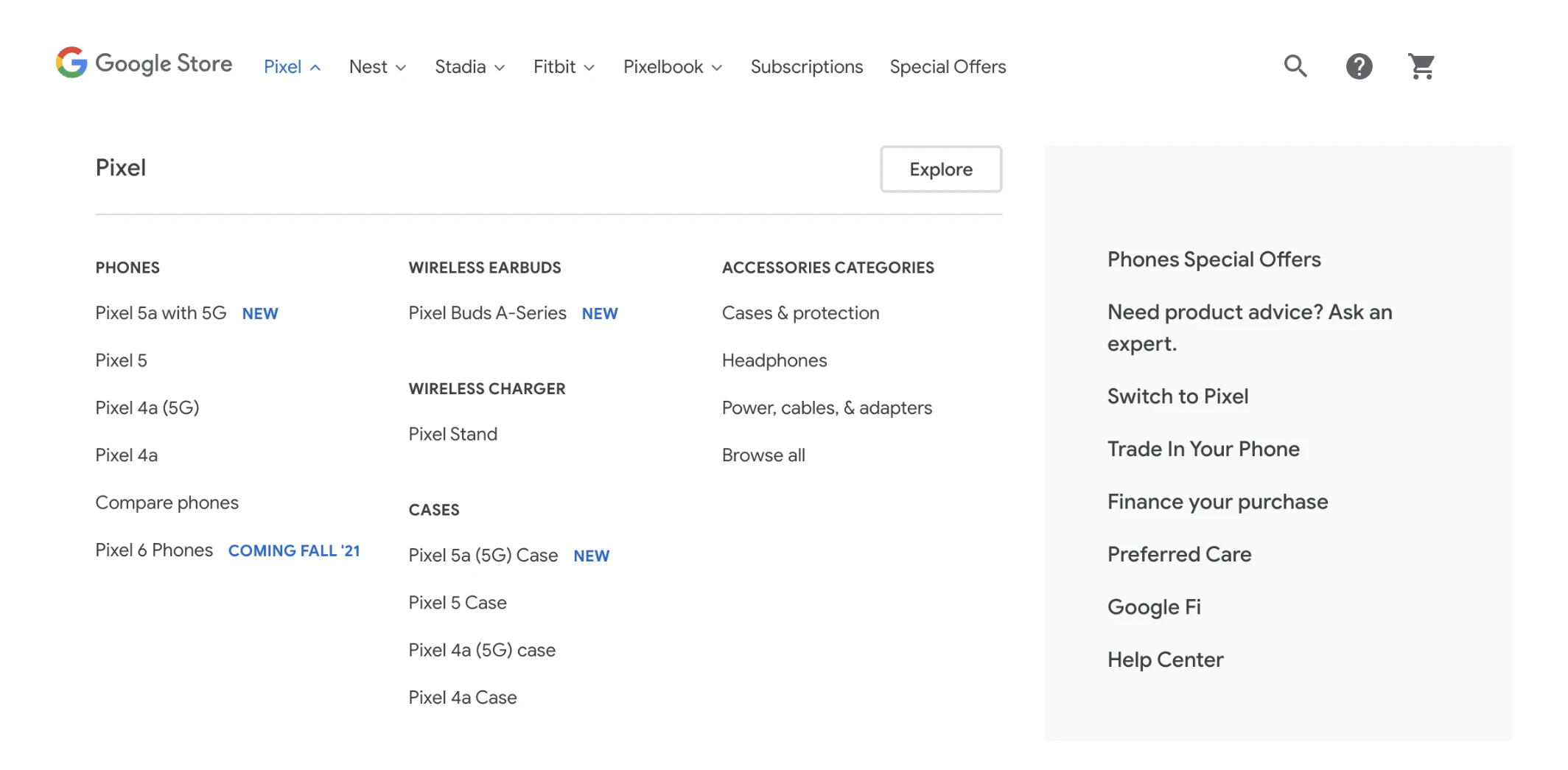
The first step is a full URL inventory. It is worth establishing which types of pages already exist, which are indexed, which are generated automatically, and which have no real business or SEO role. Without such a review, it is easy to design a new structure alongside the old chaos instead of tidying it up.
The second area is hierarchy and click depth. Key pages should not be hidden several levels down if they are meant to address significant demand. Conversely, a structure that is too flat can also be problematic, because many topics end up on one level and start to blend into one another.
You also need to check whether the menu, breadcrumbs and internal linking reflect the same logic as the offer. A common problem looks like this: a company provides five services, but only two are visible in the menu, while the rest are hidden in the blog or in the footer. If an important section is not clearly embedded in navigation, both the user and SEO usually suffer.
- topic duplication and multiple pages targeting the same search intent,
- orphan pages with no internal links,
- thin pages with little value and no clear function,
- filters or parameters generating new URLs on a large scale,
- incorrect redirects after earlier structural changes,
- inconsistency between the URL, page title, menu and actual content.
Analysis of filters, tags, sorting and other mechanisms that generate URL variants is very important. In online stores and large websites, this is precisely where an excess of low-value pages most often arises. Not everything that can be generated in a CMS should be indexed.
It is also worth checking whether the site has pillar pages for the main topics and whether supporting content is logically linked to them. If blog articles live their own lives and the service pages are not strengthened by them, the content potential gets dispersed. This is often visible on sites that publish a lot, but do not build clear topic clusters.
In the end, you need to decide what to do with the existing assets. Some pages are worth keeping, some combining, some rewriting and some permanently redirecting. The worst decision is to leave old and new versions of the same topic side by side, because then the problem does not disappear, it just moves elsewhere.
The most common mistakes in designing site architecture and how to avoid them
The most common missteps are creating multiple subpages that address the same search intent, inconsistent URL rules, too many filters allowed into the index, and an architecture designed around the menu rather than the real needs of the user and the search engine. As a result, keyword cannibalisation appears, weak internal linking and blurred SEO signals. A site may contain a great deal of content, and yet still not have a proper landing page for key queries. The most important rule is simple: one main search intent should have one main landing page.
Often the problem starts when an almost identical topic is split across several subpages solely because it differs by one keyword variant. If the user expects the same answer, creating several URLs that compete with one another misses the point. It is better to prepare one strong pillar page and reinforce it with supporting content that develops subtopics instead of duplicating the main thread.
Another mistake is designing architecture only around the menu layout or the company’s organisational structure. The fact that the sales department has three service lines does not automatically mean that users search for them in the same way. Good architecture starts with intent and demand, and only then is translated into the menu, breadcrumbs and division into site sections.
It is filters, tags and variants generated automatically by the CMS or store that most often create chaos. When everything ends up in the index, the number of URLs grows faster than the site’s actual value. Only those combinations that have real demand, bring unique value and make sense as a separate landing page are worth indexing. The rest should remain supporting elements, with proper noindex, canonical rules or blocking of unnecessary URL generation.
Incorrect structural depth can also be problematic. An architecture that is too flat mixes topics and makes it harder to read the relationships between subpages, while one that is too deep hides important pages several clicks away from the homepage. The best solution is a predictable path from general page to detailed page, supported by breadcrumbs and contextual linking. An orphan page or one buried deep in the site rarely uses its full SEO potential.
A separate group of mistakes consists of rebuilds implemented without a migration plan. Changing URLs, merging sections or removing categories without a redirect map can wipe out visibility that has previously been built up. If the site is already live, you need to assess which URLs to keep, which to merge and which to redirect, instead of starting with a blank slate.
- 01Duplicate pagesThe same intent, many URLs
- 02Inconsistent rules & filtersToo many filters, weak architecture
- 03Cannibalisation & weak linksSEO dilution, weak signals
- 04One page, one goalKey principle: one intent = one page
The main principle: one primary search intent should have one main landing page, to avoid cannibalisation and strengthen SEO.
What architectural decisions affect SEO effectiveness?
SEO effectiveness is determined above all by decisions about what types of pages are created, which of them are indexed, and how they are connected with internal linking. These are what decide whether the site addresses different search intents in a clear way and in a way that can be scaled further. A poorly chosen page type means that even valuable content works on an suboptimal URL. A well-chosen page type makes SEO, content development and the next stages of site expansion easier.
The first key decision concerns mapping intents to specific subpages. It is worth separating what should be a service or offer page, what should be a category, what should be a local page, and what should be guidance content. If a topic has commercial intent, it is not worth trying to optimise it solely with a blog post; the right landing page is needed.
The second decision covers the parent-child relationship between sections. Search engines interpret the site topic more accurately when they see a main cluster and the subtopics related to it, and the user can move smoothly from a general page to a more detailed one. For this reason, you need to consciously determine which pages are pillar pages, which are supporting pages, and how the blog is to support the offer rather than mix with it or replace it.
Rules for URLs and naming are also highly important. URLs should reflect the logic of the sections, maintain consistency between page types and not change without a clear reason. A scalable architecture is one in which new subpages can be added according to the same rules, without inventing the structure from scratch with every expansion.
Another critical decision concerns indexation. You need to determine which pages are target landing pages, and which serve only a supporting function for navigation, filtering or pagination. In practice, this means specific rules for filters, parameters, tags, product variants and automatically generated pages. Without such decisions, the site easily loses crawl budget and disperses the value of important subpages.
The internal linking model also affects results. The mere presence of a page in the sitemap is not enough if no sensible links from stronger sections lead to it. The most effective links are those embedded in the logic of the site: from strong and general pages to supporting pages, rather than random links added only “for SEO”. The menu, breadcrumbs, footer and contextual links should work together, not in isolation from one another.
The final important decision concerns how the architecture is to handle the site’s growth in six months and in two years. If templates for sections, rules for local pages and rules for new categories are not established now, every expansion will add chaos. Good architecture not only organises the current site, but also sets the framework through which future changes do not damage SEO.
What are the practical recommendations for implementing changes in website architecture?
It is best to implement changes in website architecture in stages, with SEO risk control and by making sure the new structure results from the offer and search intent, rather than only from a menu concept. The most sensible approach is to start with areas of the greatest business importance and highest traffic potential. This way, results appear faster, and any missteps do not spread across the whole site. The worst-case scenario is changing the URLs, content, menu and linking all at once without a dependency plan.
When the site is already live, it is first worth deciding which pages stay, which should be merged and which should be redirected. Not every new need means creating another subpage. Often, a better move is to strengthen an existing pillar page and tidy up internal linking than to multiply similar URLs. This is particularly important for services, locations and categories, where it is easy to end up with several pages addressing the same search intent.
Before implementation, it is worth writing down clear, firm rules for the whole site: URL patterns, breadcrumb logic, the place of local pages, rules for creating subcategories, the role of the blog and indexation decisions for filters and supporting pages. Such a document organises the work of content, UX and development. Without it, every subsequent section is created according to slightly different rules, and the site quickly loses consistency. Scalability is not about being able to add a new page, but about being able to do so without breaking the whole logic of the site.
When changing URLs, you need to prepare a redirect map and verify it before publishing. Every old URL that had traffic, links or was indexed should have a clearly indicated new equivalent. You should avoid redirect chains, redirects to the homepage “just in case”, and situations where several old pages are sent to one new one without thematic justification. A good migration preserves the continuity of the page’s topic, rather than only technically moving the user to a different address.
The implementation should go through a test environment or at least a thorough check of the key elements list. It is worth checking response statuses, internal links, canonical tags, noindex, sitemaps, pagination, filter behaviour and click depth to the most important sections. In practice, many problems result not from the architecture itself, but from minor implementation errors, such as an incorrect heading template, a missing link to the parent page or the automatic generation of unnecessary URLs by the CMS.
After publishing, it is not worth assuming that everything works flawlessly. You simply need to check it in practice. It is a good idea to verify whether the crawler is able to go through the new sections, whether the pages are actually linked from the menu, breadcrumbs and contextual blocks, and also whether URLs that were meant to remain purely auxiliary are not starting to appear in the index. Architecture is only effective when it remains consistent not only on the diagram, but also in actual crawling, indexing and user navigation.
Finally, it is crucial to maintain discipline as the site continues to expand. New subpages should be created according to the same naming conventions, the same hierarchy and the same linking logic. When the team adds sections ad hoc because “they’ll be useful later”, even a well-designed architecture starts to lose consistency after a few months. That is why, in practice, the best-performing model is one in which every new section goes through a brief assessment: what is its main intent, where does it sit in the structure, and does it duplicate anything that already exists.
FAQ
Frequently asked questions
How does site architecture affect SEO and a website’s rankings?
It organises subpages, URLs, navigation and internal linking, making the site clear for users and bots. It makes indexing easier, reduces keyword cannibalisation and helps match one main page to one search intent.
Why is a good site structure important when expanding a website?
The larger the site, the more clearly the effects of poorly planned architecture show. Without naming rules, URL patterns and rules for creating new sections, expansion increases chaos and SEO debt.
How do you design a scalable site structure for SEO?
You need to start with business goals, search intent and page types, rather than the menu itself. Then it is worth building a predictable hierarchy that can be expanded by adding further elements to the same logic.
Can one page answer all queries in SEO?
Not always, because not every keyword should lead to the same subpage. The article emphasises that different types of intent — informational, commercial, transactional and local — often require different pages or content clusters.
What should you check in an existing site structure before a redesign?
First it is worth auditing URLs, checking click depth, orphan pages, duplicates and thin pages. You also need to compare the menu, breadcrumbs and internal linking with the site’s actual offer.
What site architecture mistakes most often hurt SEO?
The most common problems are multiple subpages targeting the same search intent, inconsistent URL rules and allowing too many filters and parameters to be indexed. Too deep or too flat structures, as well as redesigns without a redirect plan, are also problematic.