

Did you know that choosing the right CMS can decide the success of your site in search results? Platforms such as WordPress or Shopify offer SEO optimisation tools, from editing meta tags to generating user-friendly URLs and integrating with plugins such as Yoast SEO. Find out how a CMS affects visibility in Google and which functionalities are crucial for an effective SEO strategy!
How do CMS systems affect SEO?
CMS systems play a key role in SEO, enabling effective management of both content and the technical aspects of a site. They make it easy to modify meta tags such as titles and descriptions, which directly affect a website’s visibility in search results. What is more, these platforms allow you to create user-friendly URLs, which not only makes indexing by search engine robots easier, but also improves the user experience.
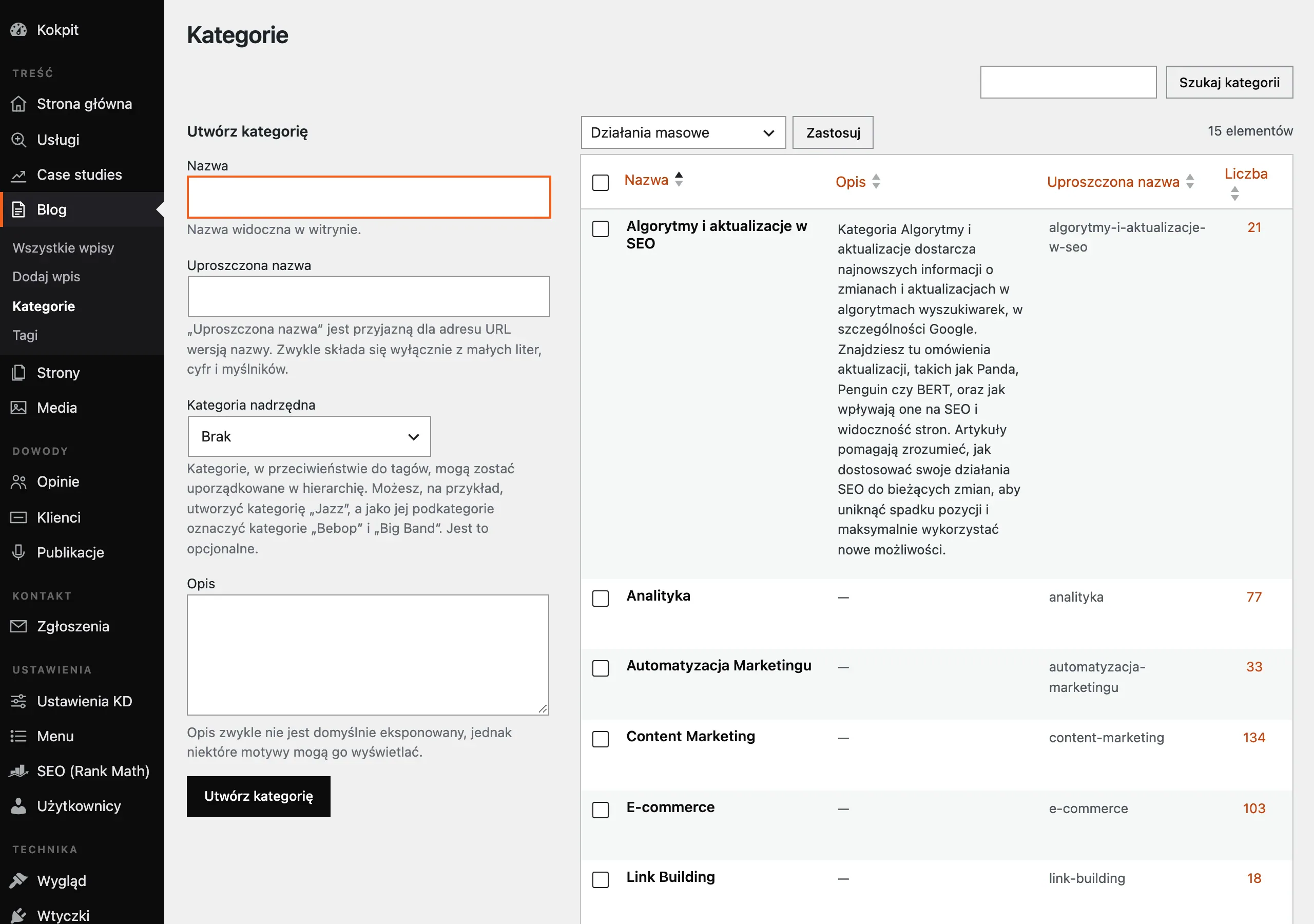
Many CMS systems offer built-in SEO tools or integration with popular solutions such as Yoast SEO or Rank Math. These functionalities help to:
- optimise content for keywords,
- monitor technical errors,
- generate XML sitemaps, speeding up and improving the indexing process.
In addition, some platforms support the implementation of advanced schema.org markup, which can significantly increase site visibility in search results.
Unfortunately, not all CMS systems are equally SEO-friendly. Some of them may generate duplicate content or limit the options for optimising page loading speed, which negatively affects ranking positions. That is why choosing the right platform is hugely important for success in SEO. WordPress or Shopify offer broad scope for customisation to SEO requirements, while others may require additional modifications or integration with external tools.
CMS systems are essential in the process of optimising websites for SEO. They allow you to control key technical and content elements, and choosing the right platform can significantly affect your site’s visibility and its overall performance.
- 01Content and technical managementEasy modification of meta tags.
- 02User-friendly URLsSimplified site indexing.
- 03SEO tools integrationKeyword analysis.
- 04Schema markup supportIncreased visibility in results.
A CMS makes technical site management easier, which directly improves visibility and search engine results.
Key criteria for choosing a CMS platform
Choosing the right CMS is a key decision that has a direct impact on SEO and the functionality of a website. To make the right choice, it is worth analysing several key aspects.
The first of these is SEO optimisation features. An ideal platform should offer simple tools for editing meta tags such as titles and descriptions, as well as generating search-engine-friendly URLs. It is also worth checking whether the system supports integration with popular SEO plugins such as Yoast SEO or Rank Math. Such solutions make it easier to optimise content for keywords and help identify technical errors.
Another important factor is ease of use. A good CMS should allow quick changes to content and site structure without the need to involve programming specialists. This is particularly important for websites that require regular updates.
Just as important is technical support. The platform should provide access to professional help in case of problems — whether through detailed documentation, user forums, or direct contact with the technical team. This guarantees peace of mind in emergency situations.
System flexibility is also of huge importance. A CMS should allow adaptation to individual business needs. Integration with analytics tools (e.g. Google Analytics) or social media platforms can significantly make it easier to monitor marketing performance and adapt strategy to changing market trends.
The last, but equally important, element is costs. You need to analyse carefully both licence or subscription fees and any expenses for additional modules or integrations with other systems. The chosen platform should be not only functional, but also cost-effective in the long term.
When choosing a particular CMS, it is worth paying attention to its capabilities in terms of SEO, ease of use, availability of technical support and flexibility for business needs. Such a comprehensive choice will allow effective website optimisation and its long-term success in search results.
How to choose the right CMS for SEO optimisation?
Choosing the right CMS for SEO optimisation requires taking several key elements into account. First and foremost, the platform should make it easy to manage meta tags, such as page titles, descriptions or headings, which play an important role in the indexing process by search engine robots.
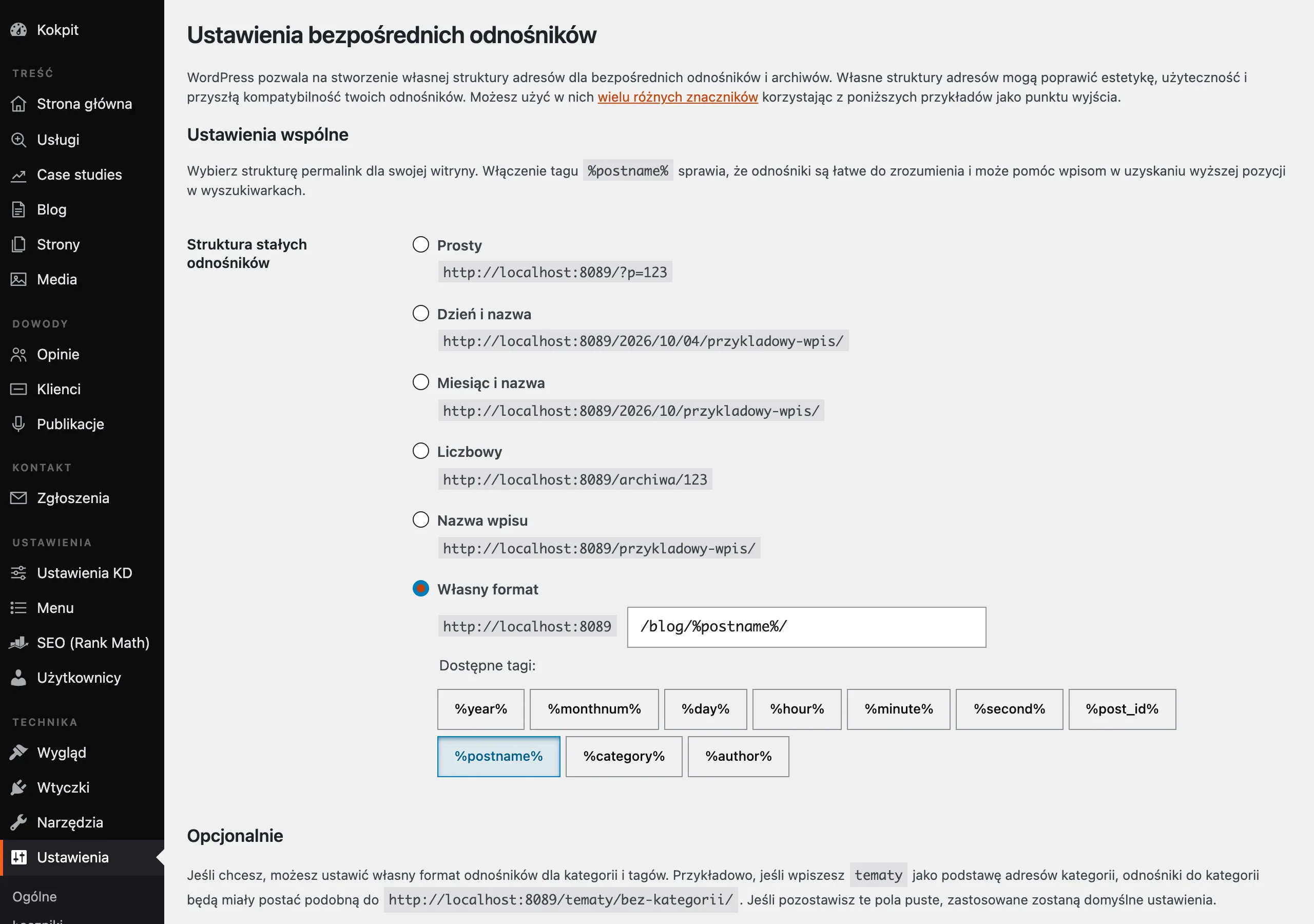
Another important aspect is the ability to create clear and user-friendly URL structures. They should be concise, contain keywords and be easy to understand for both users and algorithms. It is also worth checking whether the system offers automatic XML sitemap generation – this significantly speeds up the indexing process for new subpages.
Integration with popular SEO tools such as Yoast SEO or Rank Math is another important factor. These plugins not only help optimise content for keywords, but also monitor technical issues. In addition, it is worth paying attention to support for advanced schema.org markup, which can increase website visibility by displaying rich snippets in search results.
Mobile optimisation is another key element. Modern CMS platforms should offer responsive templates and tools for tailoring content to mobile devices. Page loading speed is also of huge importance – the platform must make it easy to manage images and scripts and integrate with file compression tools.
System flexibility is equally important. The platform should allow new functionality to be added and integration with marketing and analytics tools such as Google Analytics or Google Search Console. This makes it possible to monitor performance on an ongoing basis and adapt SEO strategy to changing needs.
Ease of use and the availability of technical support are the last, but no less important, factor. A CMS should be easy to use even for people without advanced technical knowledge, while still offering professional help — whether through technical documentation, user forums or direct contact with the support team.
Choosing the right CMS for SEO optimisation is a strategic decision. The platform must combine functionalities related to managing meta tags, creating user-friendly URLs and integrating with SEO tools. In addition, it should be flexible, intuitive to use and provide high-quality technical support.
- 01Managing meta tagsTitles, descriptions, headings.
- 02User-friendly URLsReadable, concise, keyword-rich.
- 03Automatic XML sitemapSpeeds up subpage indexing.
- 04Integration with SEO toolsPlugin support (e.g. Yoast).
Choosing the right CMS will ensure better visibility in search engines and more efficient indexing.
The best CMS platforms supporting SEO
The best CMS systems supporting SEO are platforms equipped with advanced tools for optimising websites for search engines. Among them, PrestaShop, WooCommerce, Magento, IdoSell and Shopify deserve particular attention. Each of these platforms offers unique features that can significantly increase a site’s visibility in search results.
PrestaShop is a popular solution for online stores that allows you to define meta descriptions and create SEO-friendly URLs. This makes it easy to tailor content to keywords, which translates into better rankings. In addition, the platform supports integration with analytics tools, making it easier to track the results of SEO activities.
WooCommerce, integrated with WordPress, is another SEO-friendly option. With access to plugins such as Yoast SEO or Rank Math, you can effectively optimise content for keywords and monitor technical errors. The platform also offers great flexibility in adapting templates and site structures, which is crucial for mobile optimisation.
Magento is a more advanced CMS system that offers extensive customisation and technical optimisation capabilities. Although it requires greater technical knowledge, it allows the implementation of advanced schema.org markup and the management of large volumes of product data. It is an ideal solution for large online stores.
IdoSell is an e-commerce platform aimed mainly at small and medium-sized businesses. It offers solid SEO support through meta tag editing and XML sitemap generation. The platform stands out for its ease of use and access to professional technical support.
Shopify is a popular CMS system for online stores that combines ease of use with effective SEO tools. The platform allows you to create SEO-friendly URLs and integrate with Google Analytics and Google Search Console. In addition, Shopify offers responsive templates, which affects a site’s mobile optimisation.
Choosing the right CMS system supporting SEO depends on individual business needs and the user’s technical proficiency. Each of the platforms mentioned has its strengths and can help improve a site’s visibility in search results.
What risks can a CMS generate for SEO?
CMS systems play a key role in content management and SEO optimisation, but they can also introduce certain challenges that negatively affect a site’s visibility in search results. One common problem is limited ability to edit SEO-friendly URLs. Some platforms generate long and complicated links, which makes them harder for search engine bots to index and less readable for users.
Another important challenge is difficulty optimising page load speed. Many CMS systems do not provide full control over the key elements affecting performance, such as image compression or code minification. As a result, the website may run more slowly, which directly affects its position in Google rankings.
Limited control over metadata is another problem we often encounter. Some platforms prevent manual editing of meta tags, such as page titles or descriptions. Automatic generation of these elements often leads to content duplication or the creation of unappealing descriptions for users.
Automatic generation of duplicate content is another challenge. For example, some CMS systems create multiple versions of the same page (e.g. with different URL parameters), which can lead to indexing conflicts and lower rankings. The solution is to configure canonical URLs, but this requires additional action from the administrator.
It is also worth paying attention to problems with implementing advanced schema.org markup. Some platforms do not offer easy integration of these tags, which limits the ability to display rich snippets in search results. This, in turn, reduces the site’s appeal to potential visitors.
To avoid these problems, it is worth choosing CMS systems that offer greater flexibility in managing the technical aspects of SEO. Regular monitoring and site optimisation for technical errors are key to maintaining high visibility in search results.
- 01Complex URLsNegative impact on indexing and readability.
- 02Loading speed issuesLack of control over site performance.
- 03Limited metadata optimisationDifficulties editing SEO tags.
All of these challenges require conscious CMS management to optimise visibility.
Inability to edit SEO-friendly URLs
Failure to adapt SEO-friendly URLs in CMS systems can significantly affect SEO effectiveness. These links play a key role for both search engine algorithms and users – they should be concise, contain relevant keywords and be intuitive to read.
However, many CMS platforms generate long, complex URLs with redundant parameters. Such a solution not only makes it harder for crawlers to interpret, but can also lower CTR (click-through rate), as users often perceive them as less attractive or less trustworthy.
Another problem is the risk of duplicate content resulting from the inability to modify links. When the system creates different versions of the same page (e.g. with sorting parameters), this can lead to conflicts during indexing. In such cases, it becomes necessary to set canonical URLs manually, which creates extra work for the administrator.
That is why it is so important to choose CMS systems that offer full control over link structure. Platforms such as WordPress or Shopify make it easy to adapt URLs to SEO standards, which directly translates into better visibility in search results and increases the site’s online effectiveness.
Limited options for optimising page load speed
Limited options for optimising page load speed are a common problem in many CMS systems, which can negatively affect user experience and the site’s position in search results. Load speed is one of Google’s key ranking factors, and a slow site often results in a higher bounce rate and lower conversions.
Many CMS platforms do not provide full control over elements affecting performance. They lack tools for:
- image compression,
- minification of CSS and JavaScript code,
- server optimisation.
This leads to longer loading times and directly affects SEO. In addition, some systems generate inefficient scripts or do not offer solutions for managing the size of media files.
Technical limitations can also make it harder to integrate with advanced tools such as Google PageSpeed Insights or Cloudflare. As a result, administrators are forced to rely on external solutions or modify code manually, which increases both costs and the time needed to improve performance.
To avoid these problems, it is worth opting for CMS systems equipped with performance optimisation tools. They should support technologies such as:
- lazy loading,
- CDN (Content Delivery Network),
- automatic image compression.
Platforms such as WordPress or Shopify often offer these features through additional plugins or native solutions.
Choosing the right CMS platform with optimisation features is crucial for maintaining a site’s competitiveness in search results. Without this, it is difficult to achieve satisfactory SEO results and provide users with a smooth experience.
Lack of full control over metadata
A lack of full control over metadata in CMS systems can significantly reduce the effectiveness of SEO efforts. Elements such as page titles, descriptions and headings play a key role in the indexing process carried out by search engine robots, and also influence users’ decisions to click on a search result.
Many CMS platforms automatically generate metadata, which often leads to repetitive content or dull, unappealing descriptions. For example, when the system prevents manual editing of meta tags for individual subpages, this may result in identical titles and descriptions across different sections of the site. Such duplicates can negatively affect the site’s position in search results.
In addition, the inability to adapt meta tags to specific keywords makes it harder to optimise content for SEO. As a result, the site may not be sufficiently visible for target user queries. For example, if the system generates page titles without taking keywords into account, Google’s algorithms may have difficulty assigning the appropriate value of a page to a given query.
The solution to this problem is to choose a CMS platform that offers full control over metadata. Systems such as WordPress or Shopify allow manual editing of meta tags and integration with SEO tools (e.g. Yoast SEO). This makes it possible to precisely adapt content to the requirements of search engine algorithms, avoiding duplication and increasing a site’s appeal for both crawlers and users.
Automatic generation of duplicate content
Automatic creation of duplicate content by CMS systems can lead to serious complications related to site indexing. Duplicates negatively affect a site’s ranking, because Google algorithms treat them as of little value to users. CMS platforms often generate different versions of the same page, for example by adding sorting or filtering parameters, which results in content being duplicated.
Take, for example, an online store that creates many URLs for one product depending on the filters selected, such as colour or size. When the system is not configured properly, search engine robots may treat each version as a separate page and index it separately. This leads to conflicts and a drop in search result rankings.
To avoid such problems, it is worth using canonical URLs (rel=”canonical”). This tells crawlers which version of the page is the main one and helps avoid indexing duplicates. In addition, it is worth regularly monitoring the site for duplicate content using tools such as Google Search Console or Screaming Frog.
Choosing the right CMS is also crucial. Platforms such as WordPress or Shopify offer advanced tools for managing canonical URLs and integration with SEO plugins. This makes it easy to detect and remove duplicates, helping maintain strong visibility and avoid penalties from Google.
Problems with implementing advanced schema.org markup
Implementing advanced schema.org markup in CMS platforms is often a challenge that can affect the effectiveness of SEO efforts. Markup such as Article, Product or FAQ plays a key role in improving a site’s visibility in search results by enabling rich snippets. Unfortunately, many CMS platforms do not offer simple tools for implementing it.
One of the biggest problems is the lack of native support for schema.org in most systems. As a result, it becomes necessary to add markup manually by modifying the HTML code or using additional plugins. This approach can be problematic for people without technical experience and increases the risk of making mistakes in the data structure.
Another obstacle is the limited flexibility of markup customisation. Many platforms offer only basic schema.org templates that do not always meet a site’s individual needs. For example, an online store may require detailed markup such as availability, price or reviews, but the system often does not allow precise adjustments.
On top of that, there is the problem of automatically generating incorrect markup. Some CMS systems create schemas automatically, which often results in an incorrect data structure. For example, they may generate redundant or unnecessary tags that confuse crawlers and lower the site’s quality in Google’s eyes.
The solution to these problems is to choose a CMS platform with advanced tools for managing schema.org. Systems such as WordPress (with plugins such as Yoast SEO) or Shopify offer intuitive interfaces for adding and editing markup without needing to touch the code. It is also worth regularly testing the data structure using tools such as Google Structured Data Testing Tool to make sure the markup is implemented correctly and complies with Google’s guidelines.
With the right approach, you can avoid errors and maximise the benefits of using schema.org. This, in turn, translates into better visibility and increased traffic from organic search.
What CMS features support SEO?
CMS systems provide a range of features that support SEO efforts and can significantly improve a site’s visibility in search results. One of the most important tools is the ability to edit meta tags, such as page titles, descriptions or headings. These elements play a key role in matching content to user queries, which affects a site’s SEO. Google’s algorithms analyse them for relevance, so precisely tailoring this data to keywords can bring measurable benefits.
Another important feature is creating friendly URLs. Good CMS platforms allow you to generate readable links containing relevant keywords. Such URLs not only make it easier for search engine crawlers to index the site, but also improve the user experience, increasing the likelihood of a click from the search results.
It is also worth paying attention to XML sitemap generation, which helps crawlers browse a site’s content more quickly and efficiently. This is especially important for large websites with many subpages. Many CMS platforms offer automatic creation of such sitemaps, which significantly speeds up the indexing of new content.
Integration with analytics tools is another advantage of modern CMS systems. Thanks to connection with Google Analytics or Google Search Console, it is possible to monitor the results of SEO efforts and identify potential technical issues. This makes it possible to adjust the optimisation strategy on an ongoing basis to changing algorithm requirements.
Another important aspect is managing duplicate content. Some platforms automatically generate different versions of the same page (for example, with sorting parameters), which can lead to indexing problems. That is why it is worth choosing systems that offer tools for configuring canonical URLs (rel=”canonical”), which point crawlers to the main version of the page.
The last, but equally important aspect is page speed optimisation. CMS systems should make it easy to manage elements that affect performance, such as image compression or minification of CSS and JavaScript code. Loading speed is one of Google’s key ranking factors, so it is worth choosing platforms that offer performance optimisation tools.
A well-chosen CMS can be a powerful ally in SEO activities, providing access to the necessary tools and functions that support both the technical aspects of optimisation and the user experience.
The importance of page loading speed in SEO
Page loading speed is one of the key factors influencing its position in search results. Search engines such as Google treat it as an important indicator of a website’s quality. The faster a page loads, the better it is indexed and the greater its chances of achieving higher rankings.

Why does loading speed matter so much for SEO? First and foremost, it affects the user experience. Slow-loading pages often lead to a high bounce rate – visitors leave the website before they have a chance to familiarise themselves with its content. By contrast, fast loading increases engagement, which translates into longer time spent on the page and a greater chance of conversions.
How can you speed up a website? Here are a few effective methods:
- image compression – reducing the size of image files without losing quality,
- minification of CSS and JavaScript code – removing unnecessary characters and spaces from the source code,
- lazy loading – delaying the loading of elements not visible on the screen until the page is scrolled,
- using a CDN (Content Delivery Network) – content distribution from servers located closer to the user.
Modern CMS platforms such as WordPress or Shopify offer tools that make it easier to optimise these elements. Thanks to plugins for image compression or code minification, administrators can improve page performance without having to make any changes to the source code.
You should also not forget about the mobile version of the website. More and more people use the internet via smartphones, which is why Google introduced mobile indexing (Mobile-First Indexing). This means that it is the mobile version of the page that is prioritised when assessing its quality. That is why optimising loading speed for mobile devices is crucial for SEO success.
Loading speed is not just a technical issue – it has a huge impact both on the website’s visibility in search results and on user satisfaction. Choosing the right CMS with optimisation features can significantly affect the effectiveness of SEO activities and the long-term success of the website.
Mobile optimisation in CMS platforms
Mobile optimisation in CMS platforms plays a key role in a website’s visibility in search results. In an era of a growing number of mobile users, responsive design has become an essential element of every modern website. Good CMS platforms automatically adapt content to different screen sizes, which translates into a better user experience and higher positions in Google rankings.
Responsive design means that the layout smoothly adapts to the device on which it is displayed. As a result, the content remains readable and easy to navigate, whether we are using a smartphone, tablet or computer. Many popular CMS platforms, such as WordPress or Shopify, offer ready-made responsive templates that can be easily adapted to individual needs.
Page loading speed is another important element of mobile optimisation. Google treats this factor as key when assessing a website’s quality. That is why it is worth choosing CMS platforms that allow easy management of elements affecting performance – from image compression to minification of CSS and JavaScript code. In addition, tools such as lazy loading or integration with CDN (Content Delivery Network) are essential to ensure smooth performance on mobile devices.
It is also important not to forget about compliance with Mobile-First Indexing – mobile-first indexing. Since 2019, Google has treated it as the primary factor when assessing a website’s quality. That is why mobile optimisation is now crucial for SEO success.
CMS platforms that offer advanced mobile optimisation tools not only improve a page’s position in search results, but also increase user engagement and conversions. Investing in a system with responsive design features is a step towards the long-term success of any website.
Flexibility and scalability of CMS platforms
Flexibility and scalability are key features of CMS platforms that determine their usefulness in a long-term website growth strategy. Good content management systems should make it easy to adapt to changing business needs, both in terms of functionality and technology.
Flexibility is reflected in the ability to make changes without needing to interfere with the source code. This allows companies to react quickly to new market trends or user expectations. For example, adding new elements such as contact forms or integration with analytics tools (e.g. Google Analytics) should be intuitive and seamless.
Scalability, in turn, refers to the system’s ability to handle a growing number of users, content or transactions without losing performance. For dynamically growing online stores or information portals, this is essential. Platforms such as WordPress or Shopify offer cloud solutions and the ability to expand server infrastructure, which makes it possible to smoothly increase resources as traffic grows.
Another important aspect is integration with other systems and tools. Flexible CMS platforms make it possible to connect with various business applications, such as CRM (Customer Relationship Management) or ERP (Enterprise Resource Planning), which streamlines data and process management.
The impact of flexibility and scalability on SEO optimisation should not be forgotten either. CMS systems should allow easy adjustment of meta tags, URL structures or the implementation of advanced schema.org markup. All of this translates into better site visibility in search results and higher positions in Google rankings.
Choosing the right CMS platform with these features in mind is key to the long-term success of a website. Thanks to flexibility and scalability, companies can effectively develop their online presence, adapting to changing market and user requirements.
Data security in CMS systems
Data security in CMS systems plays a key role, affecting both user trust and compliance with applicable regulations. Breaches can lead to serious consequences – loss of reputation, high financial penalties, and even temporary downtime of the site. That is why, when choosing a CMS platform, it is worth paying particular attention to advanced protection mechanisms.
Modern CMS systems offer a range of features that protect data. One of the most important is encryption, which protects information from unauthorised access. Many platforms use SSL/TLS protocols to secure communication between the server and the user’s browser – this is particularly important for online stores processing sensitive payment data.
Another key element is regular updates. Since CMS systems are often the target of hacker attacks, vendors constantly publish security patches. These updates remove vulnerabilities in the software that could be exploited by cybercriminals. It is worth choosing platforms that offer automatic updates or intuitive tools for managing them.
Access control should not be forgotten either. Good systems make it possible to manage user permissions precisely by assigning roles (e.g. administrator, editor). This reduces the risk of accidental or deliberate data breaches by unauthorised people.
Equally important are backups. Regularly creating backups makes it possible to restore the site quickly in the event of a failure or a ransomware attack. Some platforms offer automatic backup creation and cloud storage, which further increases the level of security.
The final important aspect is activity monitoring. Systems should make it possible to track user actions such as logins or content edits. This means suspicious behaviour can be detected quickly and action taken before the problem escalates.
It is also worth remembering that data security has a direct impact on SEO. Sites exposed to attacks may be marked as unsafe by browsers, which leads to a drop in organic traffic and lower positions in search results. That is why investing in a secure platform is a key element of a long-term SEO strategy and building user trust.
Integration of CMS with SEO tools
Integrating CMS systems with SEO tools is a key element of effective website optimisation. To monitor results and analyse traffic, it is worth connecting the content management platform with analytics tools such as Google Analytics or Google Search Console. This solution allows you to adjust your SEO strategy on an ongoing basis to current needs.
Most popular CMS platforms offer built-in integration features or support the installation of suitable plugins. For example, WordPress makes it easy to connect Google Analytics using plugins such as MonsterInsights or Site Kit. Shopify, on the other hand, provides native integration with Google Search Console, which makes it easier to track indexing errors and improve site visibility.
Thanks to integration, processes such as report generation or detection of technical issues can also be automated. This allows administrators to react quickly to changes in search engine algorithms and make the necessary adjustments. It is worth paying attention to CMS platforms that offer advanced options, for example automatic submission of XML sitemaps to Google Search Console or notifications about indexing errors.
Integration with analytics tools also provides valuable insights into user behaviour. Data analysis of time spent on the site, navigation paths or conversion rates helps you better tailor content and site structure to audience expectations. This directly affects higher positions in search results and the effectiveness of marketing activities.
Choosing a CMS with broad integration capabilities is an investment in the long-term success of a website. Platforms such as WordPress, Shopify and Magento not only make it easier to connect to Google Analytics and Google Search Console, but also support other analytical and optimisation solutions. This makes it possible to manage both the technical aspects of SEO and user experience effectively, which translates into better performance across the whole site.
Using Google Search Console and Google Analytics in a CMS
Integrating CMS platforms with tools such as Google Search Console and Google Analytics is the foundation of an effective SEO strategy. These platforms provide essential information about site performance, user traffic and technical errors that can affect a website’s visibility in search results.
With Google Search Console, you can monitor the indexing process, identify technical issues (e.g. 404 errors or duplicate content) and analyse search results. The tool also lets you check which keywords generate the most organic traffic and how the site is assessed by Google’s algorithms. Many popular CMSs, such as WordPress and Shopify, offer easy integration with this tool through dedicated plugins or built-in features.
Google Analytics, on the other hand, provides detailed data on visitor behaviour – from time spent on the site to navigation paths and conversion rates. This information is crucial for optimising content for users’ needs and adapting the SEO strategy to current trends. Most CMS platforms allow data to be sent automatically to Google Analytics, which makes it much easier to monitor the effects of ongoing activities.
It is also worth mentioning the possibility of integrating both tools with each other. This makes it possible to obtain a comprehensive picture of site performance – from technical errors to user behaviour. For example, data from Google Search Console can help identify indexing issues that affect the organic traffic drop visible in Google Analytics.
Modern CMSs also offer advanced reporting features and automation of analytical processes. Some platforms allow automatic generation of SEO reports or notifications about indexing errors detected by Google Search Console. This significantly speeds up responses to changes in search engine algorithms and improves the effectiveness of optimisation efforts.
Integrating a CMS with Google Search Console and Google Analytics is not only a way to manage a website better, but also a key element of building a long-term SEO strategy. Thanks to these tools, you can precisely adapt the content and structure of the site to the requirements of algorithms and user expectations, which translates into higher positions in search results and greater marketing effectiveness.
Keyword research and keywords in the context of a CMS
Keyword research and keyword analysis are the foundation of an effective SEO strategy, especially in the context of content management systems (CMS). Well-designed platforms should offer intuitive tools for entering and modifying keywords, which makes it easier to tailor content to the needs of users searching for information.
It is essential that when researching keywords, you focus not only on their popularity, but also on their conversion potential. Modern CMSs should provide functionality for analysing such phrases and support their implementation in meta tags, headings and content. For example, platforms such as WordPress and Shopify offer integration with SEO tools (e.g. Yoast SEO), which make it easier to optimise for selected keywords.
It is equally important to monitor the effectiveness of the selected keywords. CMSs should allow integration with analytical tools such as Google Analytics or Google Search Console. This makes it possible to track SEO results on an ongoing basis and adapt the strategy to current search trends.
It is also worth ensuring the creation of user-friendly URLs containing relevant keywords. Modern CMS platforms allow the structure of links to be easily adapted to SEO requirements, which affects both indexing by search engine robots and user experience.
Effective optimisation for keywords requires not only the right tools to identify them, but also a CMS platform that enables their efficient implementation and performance monitoring. Choosing the right system has a direct impact on a site’s visibility in search results and its overall online effectiveness.
Technical optimisation and internal linking in a CMS
Technical optimisation and effective internal linking play a key role in increasing a site’s visibility in search results. Good CMS platforms should not only make it easier to create and manage internal links, but also support building a coherent site structure, which has a direct impact on its indexing by search engine robots. Tools for creating links between subpages not only improve the distribution of link equity (link equity), but also make navigating the site more intuitive for users.
One of the important aspects of technical optimisation is managing 404 errors. Modern CMS systems automatically detect non-existent pages and redirect visitors to the relevant subpages, thereby minimising the loss of organic traffic. Many platforms also offer automatic generation of 301 redirects, which is particularly useful when reorganising the URL structure.
Strategic internal linking allows SEO power to be distributed evenly across the site. Placing links to key subpages skilfully increases their chances of a higher position in search results. Modern CMS systems are often equipped with analytics tools that help assess the internal linking structure, identify weak points and improve the flow of value between pages.
Another important element is managing HTML attributes, such as the “nofollow” or “canonical” tags. Good CMS platforms make it easy to add these tags without having to interfere with the source code. This is particularly important for avoiding duplicate content and controlling how the page is indexed by search engine crawlers.
It is also worth remembering about integration with analytics tools, such as Google Search Console or Screaming Frog. Thanks to these, you can monitor the effectiveness of internal linking and quickly identify technical issues affecting your website’s SEO.
Choosing the right CMS system with advanced technical optimisation features and effective internal linking is the foundation of an effective SEO strategy. The platform should provide easy management of 404 errors, the creation of a coherent link structure and integration with analytics tools – all of this translates into better visibility and higher positions in search results.
How can an SEO audit help in choosing a CMS?
An SEO audit is a powerful tool that not only helps assess the current website, but also makes it easier to choose the right CMS (Content Management System). Thanks to a thorough analysis, the audit allows you to identify both the site’s strengths and areas requiring improvement. It is invaluable support when making the decision to change platforms.
One of the main goals of an audit is to provide information about the features necessary to increase a site’s visibility in search results. For example, if the current platform makes it difficult to edit meta tags or generates complicated URL addresses, the audit will clearly highlight this. Such knowledge will help determine what features the new CMS should offer.
The audit also takes technical aspects into account, such as:
- page loading speed,
- responsiveness on mobile devices,
- integration with analytics tools, such as Google Analytics or Google Search Console.
If the current CMS cannot handle these issues, it is worth considering moving to a platform with better performance optimisation tools.
Another key element is content management and the internal linking structure. The audit shows whether the current system supports effective creation of connections between subpages and whether it allows easy management of 404 errors and 301 redirects. These factors have a huge impact on the coherence of the site structure and its indexing by search engine crawlers.
It is also worth paying attention to the flexibility and scalability of the CMS platform. If you are planning to grow the site or introduce new features, choosing a system that allows easy adaptation to changing business needs without harming SEO is crucial. An SEO audit will help assess these aspects and avoid future technical problems.
In short, an SEO audit is not only a way to improve a site’s visibility – it is also an indispensable source of knowledge when choosing a new CMS system. Thanks to it, you can avoid mistakes related to technical limitations and choose a solution that supports long-term SEO success and the development of the website.
How do you choose an e-commerce platform that will have a CMS friendly to SEO?
When choosing an e-commerce platform with a CMS system friendly to SEO, it is worth paying attention to several key aspects:
- management of meta tags, such as page titles, descriptions or headings, which have a huge impact on page indexing and SEO,
- the ability to create clear and user-friendly URLs containing important keywords, which makes indexing easier and improves the user experience,
- automatic generation of XML sitemaps, which speed up the addition of new subpages to the index,
- integration with popular SEO tools, such as Yoast SEO or Rank Math, which support content optimisation, identify technical errors and enable the implementation of schema.org markup,
- mobile optimisation, including responsive templates and tools for adapting content to mobile devices,
- managing page loading speed through easy handling of images and scripts, as well as integration with file compression tools,
- system flexibility, allowing for expanded functionality and integration with analytics and marketing tools, such as Google Analytics or Google Search Console,
- ease of use and access to technical support, including detailed documentation, user forums and direct contact with the support team.
Choosing the right e-commerce platform with an SEO-friendly CMS has a long-term impact on the growth of the online store. It should combine functionality related to optimising meta tags, creating clear URLs and integrating with SEO tools, as well as being flexible, intuitive to use and providing high-quality technical support.
FAQ
Frequently asked questions
How does a CMS affect a website’s SEO?
It enables you to manage content and technical elements such as meta tags, URLs and the XML sitemap. This makes indexing easier and improves visibility in the search engine.
Is every CMS good for SEO optimisation?
No, because some systems generate duplicate content or limit page speed optimisation. That is why choosing the platform matters so much for SEO results.
Which CMS features are most important for SEO?
The most important are meta tag editing, friendly URLs, XML sitemap generation and integration with SEO plugins. It is also worth paying attention to support for schema.org and analytics tools.
When is it worth choosing a CMS with integration with Yoast SEO or Rank Math?
When you want easier optimisation of content for keywords and monitoring of technical errors. Such plugins also help streamline work without advanced technical knowledge.
Why are friendly URLs important for SEO?
They are easier for users and search engine bots to understand, which supports indexing. In addition, they can improve link readability and the site’s effectiveness in search results.
Which CMSs are mentioned as good support for SEO?
The article mentions WordPress, Shopify, PrestaShop, WooCommerce, Magento and IdoSell, among others. Each of these platforms has features that support optimisation, but they differ in flexibility and level of sophistication.